ECO mode RENAULT MEGANE 2018 User Guide
[x] Cancel search | Manufacturer: RENAULT, Model Year: 2018, Model line: MEGANE, Model: RENAULT MEGANE 2018Pages: 348, PDF Size: 9.25 MB
Page 134 of 348
2.22
DRIVING ADVICE, ECO-DRIVING (3/5)
ECO mode
ECO mode is a function which opti-
mises fuel consumption. It acts upon
certain power consuming systems in
the vehicle (heating, air conditioning,
power-assisted steering, etc.) and on
certain driving actions (acceleration,
gear changing, cruise control, decele-
ration, etc.).
Limiting acceleration enables low fuel
consumption in urban and surrounding
areas. Reduced usage of the air condi-
tioning reduces fuel consumption with-
out affecting heating comfort.
Free wheel in ECO mode
Depending on the vehicle, for vehicles
fitted with an automatic gearbox, in the
deceleration phases (with the foot fully
off the accelerator pedal), switching to
freewheeling (automatic neutral) de-
creases engine braking and allows you
to farther without accelerating in order
to save fuel.Activating the function
The function can be activated:
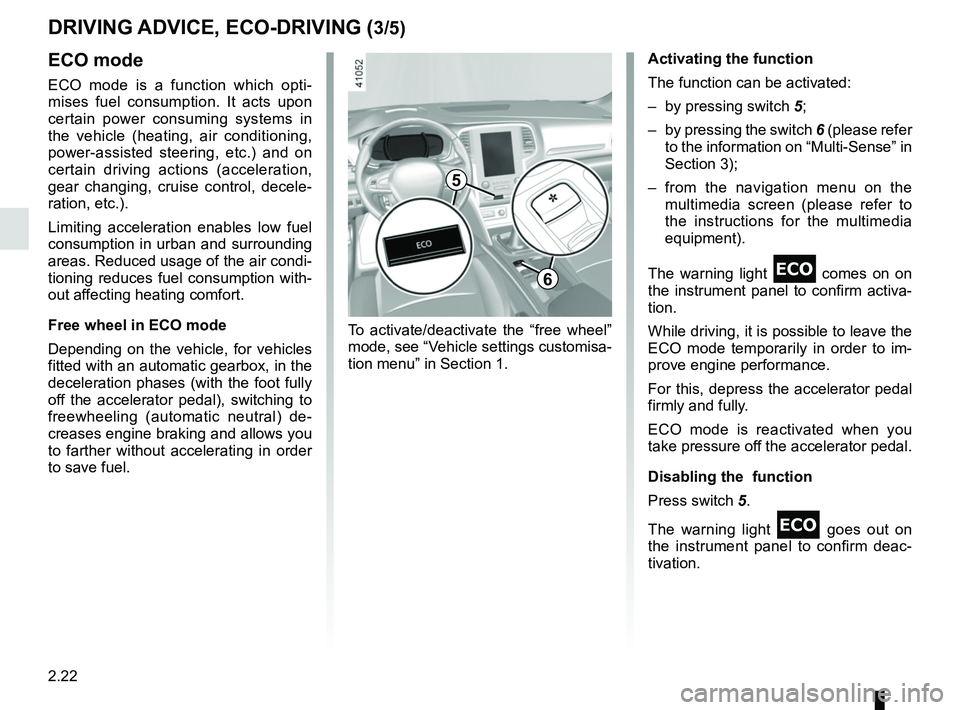
– by pressing switch
5;
– by pressing the switch 6 (please refer
to the information on “Multi-Sense” in
Section 3);
– from the navigation menu on the multimedia screen (please refer to
the instructions for the multimedia
equipment).
The warning light
comes on on
the instrument panel to confirm activa-
tion.
While driving, it is possible to leave the
ECO mode temporarily in order to im-
prove engine performance.
For this, depress the accelerator pedal
firmly and fully.
ECO mode is reactivated when you
take pressure off the accelerator pedal.
Disabling the function
Press switch 5.
The warning light
goes out on
the instrument panel to confirm deac-
tivation.
To activate/deactivate the “free wheel”
mode, see “Vehicle settings customisa-
tion menu” in Section 1.
5
6
Page 135 of 348
2.23
Driving advice and ECO
driving
Behaviour
– Drive carefully for the first few miles until the engine reaches its normal
operating temperature, rather than
let it warm up while the vehicle is sta-
tionary.
– Speed is expensive.
– Dynamic driving with a lot of frequent acceleration and braking is expen-
sive on fuel in comparison to the time
saved.
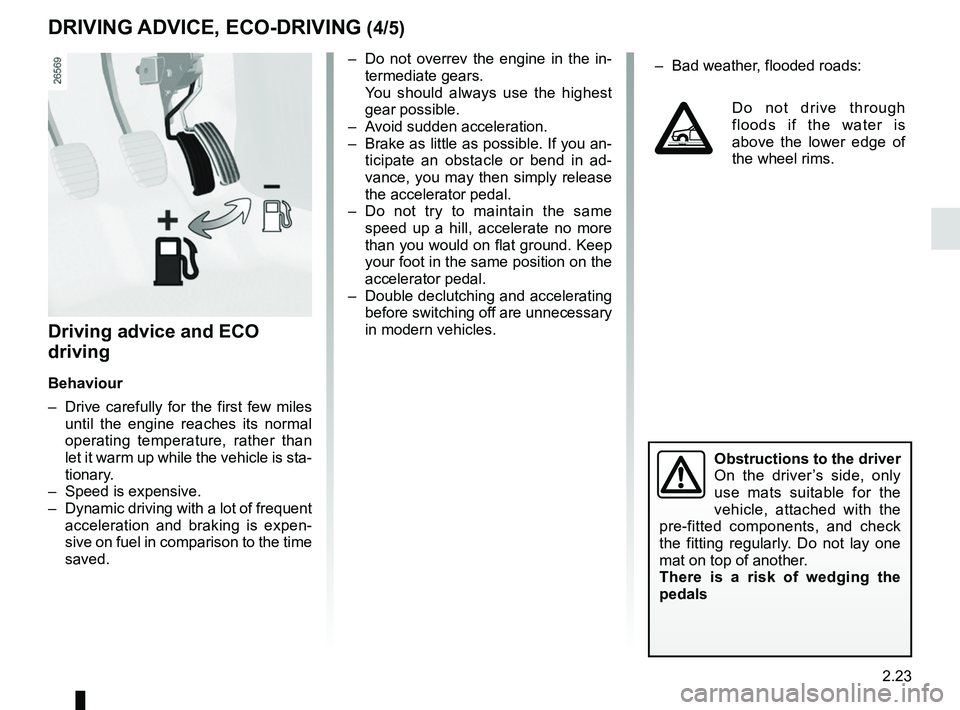
– Do not overrev the engine in the in-termediate gears.
You should always use the highest gear possible.
– Avoid sudden acceleration.
– Brake as little as possible. If you an- ticipate an obstacle or bend in ad-
vance, you may then simply release
the accelerator pedal.
– Do not try to maintain the same speed up a hill, accelerate no more
than you would on flat ground. Keep
your foot in the same position on the
accelerator pedal.
– Double declutching and accelerating before switching off are unnecessary
in modern vehicles.
Obstructions to the driver
On the driver’s side, only
use mats suitable for the
vehicle, attached with the
pre-fitted components, and check
the fitting regularly. Do not lay one
mat on top of another.
There is a risk of wedging the
pedals
DRIVING ADVICE, ECO-DRIVING (4/5)
– Bad weather, flooded roads:
Do not drive through
floods if the water is
above the lower edge of
the wheel rims.
Page 136 of 348
2.24
DRIVING ADVICE, ECO-DRIVING (5/5)
Advice on use
– Opt for ECO mode.
– Electricity is fuel; switch off all the electrical components which are
not really needed. However (safety
first), keep your lights on when the
visibility is bad (“see and be seen”).
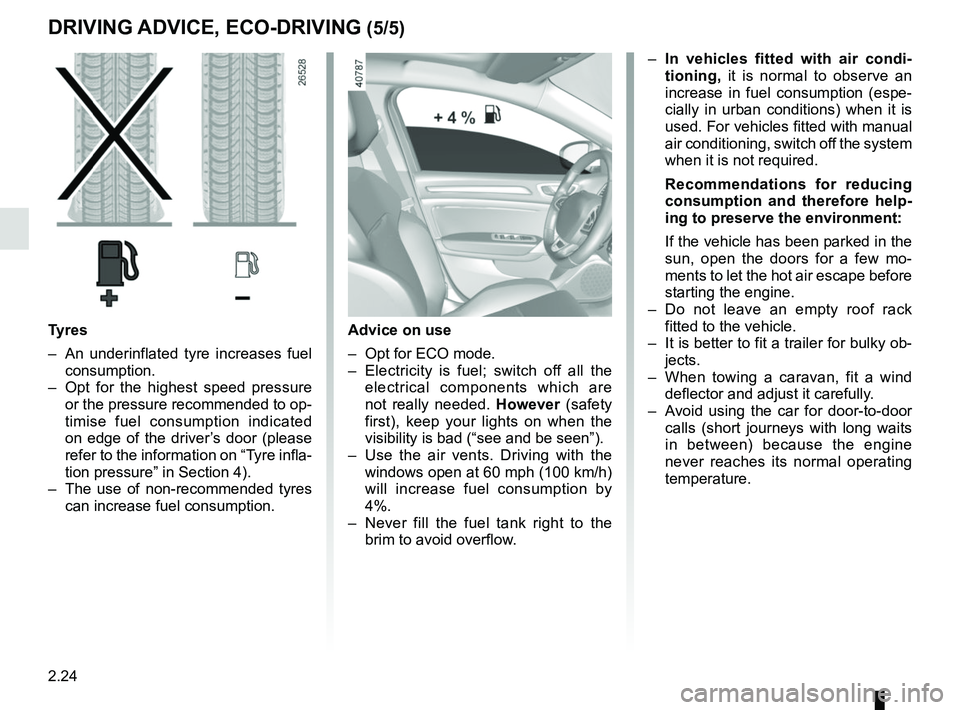
– Use the air vents. Driving with the windows open at 60 mph (100 km/h)
will increase fuel consumption by
4%.
– Never fill the fuel tank right to the brim to avoid overflow.
– In vehicles fitted with air condi-
tioning, it is normal to observe an
increase in fuel consumption (espe-
cially in urban conditions) when it is
used. For vehicles fitted with manual
air conditioning, switch off the system
when it is not required.
Recommendations for reducing
consumption and therefore help-
ing to preserve the environment:
If the vehicle has been parked in the
sun, open the doors for a few mo-
ments to let the hot air escape before
starting the engine.
– Do not leave an empty roof rack fitted to the vehicle.
– It is better to fit a trailer for bulky ob- jects.
– When towing a caravan, fit a wind deflector and adjust it carefully.
– Avoid using the car for door-to-door calls (short journeys with long waits
in between) because the engine
never reaches its normal operating
temperature.
Tyres
– An underinflated tyre increases fuel consumption.
– Opt for the highest speed pressure or the pressure recommended to op-
timise fuel consumption indicated
on edge of the driver’s door (please
refer to the information on “Tyre infla-
tion pressure” in Section 4).
– The use of non-recommended tyres can increase fuel consumption.
Page 137 of 348
2.25
MAINTENANCE AND ANTIPOLLUTION ADVICE
Your vehicle complies with criteria for
recycling and recovering vehicles at the
end of their service life, which entered
into force in 2015.
Some parts of your vehicle have there-
fore been designed to facilitate future
recycling.
These parts are easy to remove so
that they can be recovered and reproc-
essed by recycling companies.
By virtue of its design, moderate fuel
consumption and initial settings, your
vehicle also conforms to current anti-
pollution regulations. The manufac-
turer is actively striving to reduce pol-
lutant exhaust gas emissions and to
save energy. But the fuel consumption
of your vehicle and the level of pollutant
exhaust gas emissions are also your
responsibility. Ensure that it is main-
tained and used correctly.
Maintenance
It is important to remember that fail-
ure to respect antipollution regulations
could lead to legal action being taken
against the vehicle owner.In addition, replacing engine, fuel
supply system and exhaust compo-
nents with parts other than those origi-
nally recommended by the manufac-
turer may alter your vehicle so that it
no longer complies with anti-pollution
regulations.
Have your vehicle adjusted and
checked by an authorised dealer, in ac-
cordance with the instructions given in
your maintenance schedule: they will
have all the equipment necessary for
ensuring that your vehicle is maintained
to its original standard.
Engine adjustments
– Spark plugs:
for optimum condi-
tions of use, output and performance
the specifications laid down by our
Design Department must be strictly
applied.
If the spark plugs have to be changed, use the make, type and gap specified
for your vehicle’s engine. Contact an
authorised dealer for this.
– Air filter, fuel filter: a choked ele-
ment will reduce efficiency. It must
be replaced.
– Ignition and idle speed: no adjust-
ment is needed.
Exhaust gas monitoring
system
The exhaust gas monitoring system will
detect any operating faults in the vehi-
cle’s antipollution system.
If this system malfunctions, toxic sub-
stances may be released into the at-
mosphere or damage may occur.
ÄThis warning light on the in-
strument panel will indicate if
there are any faults in the system:
This lights up when the ignition is
switched on and goes out when the
engine is started.
– If it lights up continuously, consult an approved Dealer as soon as possi-
ble;
– if it flashes, reduce the engine speed until the light stops flashing. Contact
an authorised dealer as soon as pos-
sible.
Page 184 of 348
2.72
Automatic deactivation of the
parking distance control
The system deactivates:
– when the vehicle speed is above ap-proximately 6 mph (10 km/h);
– depending on the model, when the vehicle is stationary for more than
approximately 5 seconds and an ob-
stacle is detected (such as when in a
traffic jam, etc.);
– when the vehicle is in neutral for manual gearboxes, or in position N
or P for automatic gearboxes.
PARKING DISTANCE CONTROL (5/5)
Operating faults
When the system detects an operating
fault, a beep sounds for approximately
3 seconds each time reverse gear is se-
lected and is accompanied by the mes-
sage “Check parking sensor” shown on
the instrument panel. Please consult an
authorised dealer.
Page 189 of 348
2.77
ASSISTED PARKING (3/4)
Your speed should not exceed around
4 mph (7 km/h).
Once in position to exit the space, the
system will notify you of the end of the
manoeuvre.
Once the warning light
on the
instrument panel goes off and a beep
sounds, the manoeuvre has been com-
pleted.
Suspending the manoeuvreThe manoeuvre is suspended in the fol-
lowing circumstances:
– you take control of the wheel;
– a door or the boot is opened;
– the vehicle is at a standstill for too long;
– an obstacle in the direction of move- ment prevents the manoeuvre from
being completed;
– the engine will stop.
Once the warning light
on the
instrument panel goes off and a beep
sounds, the manoeuvre has been sus-
pended. Then to resume the manoeu-
vre, press and hold the system activa-
tion switch. In this case, the reason for suspending
the manoeuvre will be displayed on the
multimedia screen.
Make sure:
– you have released the steering wheel
and;
– that all doors and the boot are closed, and;
– that no obstacles are in the way of the direction of movement, and;
– that the engine is started.
Cancelling the manoeuvre
The manoeuvre can be stopped in the
following cases:
– by pressing the system activation switch;
– the vehicle speed has exceeded 4 mph (7 km/h);
– You have performed more than ten forwards/backwards movements in
one manoeuvre;
– the parking distance control sensors are dirty or blocked;
– the vehicle wheels have skidded.
Once the warning light
on the
instrument panel goes off and a beep
sounds, the manoeuvre has been com-
pleted.
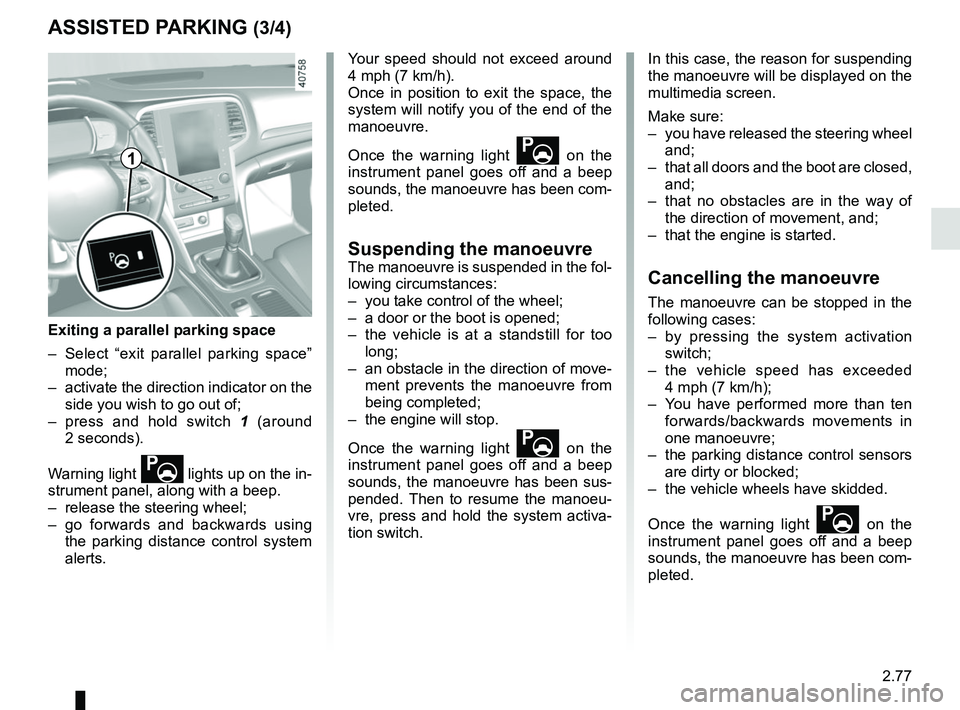
Exiting a parallel parking space
– Select “exit parallel parking space” mode;
– activate the direction indicator on the side you wish to go out of;
– press and hold switch 1 (around
2 seconds).
Warning light
lights up on the in-
strument panel, along with a beep.
– release the steering wheel;
– go forwards and backwards using the parking distance control system
alerts.
1
Page 192 of 348
2.80
AUTOMATIC TRANSMISSION (2/3)
Driving in manual modeWith the selector lever in position D,
move the lever to the left into the M po-
sition. Shifting the lever or the paddles
repeatedly allows you to change gears
manually:
– to move down through the gears, push the lever forwards or press the
left-hand paddle;
– to move up through the gears, push the lever backwards or press the
right-hand paddle.
The gear selected is displayed on the
instrument panel.
Special casesIn certain driving conditions (for exam-
ple, engine protection, operation of the
Electronic Stability Programme: the au-
tomatic system may change gear auto-
matically. Likewise, to prevent incorrect
manoeuvres, a gear change may be re-
fused by the automatic system: in this
case the gear display flashes for a few
seconds as a warning.
Special circumstances
– If the bends and road surface do
not allow you to stay in automatic
mode (e.g. in the mountains), we
recommend that you change to
manual mode. This will prevent the
automatic gearbox from changing
gear repeatedly when climbing, and
permit engine braking on long de-
scents.
Driving in automatic mode
Put lever 1 into position D.
In most road conditions you will en-
counter, you will not need to touch your
lever again: the gears will change au-
tomatically at the right time and at the
most suitable engine speed because
the automatic system takes into ac-
count the vehicle load and road contour
and adjusts itself to the particular driv-
ing style you have chosen.
Economical driving
When driving, always leave the lever
in position D, keeping the accelerator
pedal lightly depressed to ensure auto-
matic gear changes at a lower engine
speed.
Accelerating and overtaking
Depress the accelerator pedal firmly
and fully (so that it goes beyond the
kickdown point).
This will enable you to change down
to the optimum gear within the
engine range.
When facing uphill, to remain
stopped, do not keep your foot on
the accelerator.
Risk of overheating the automatic
gearbox.
Page 196 of 348
3.2
MULTI-SENSE (1/2)
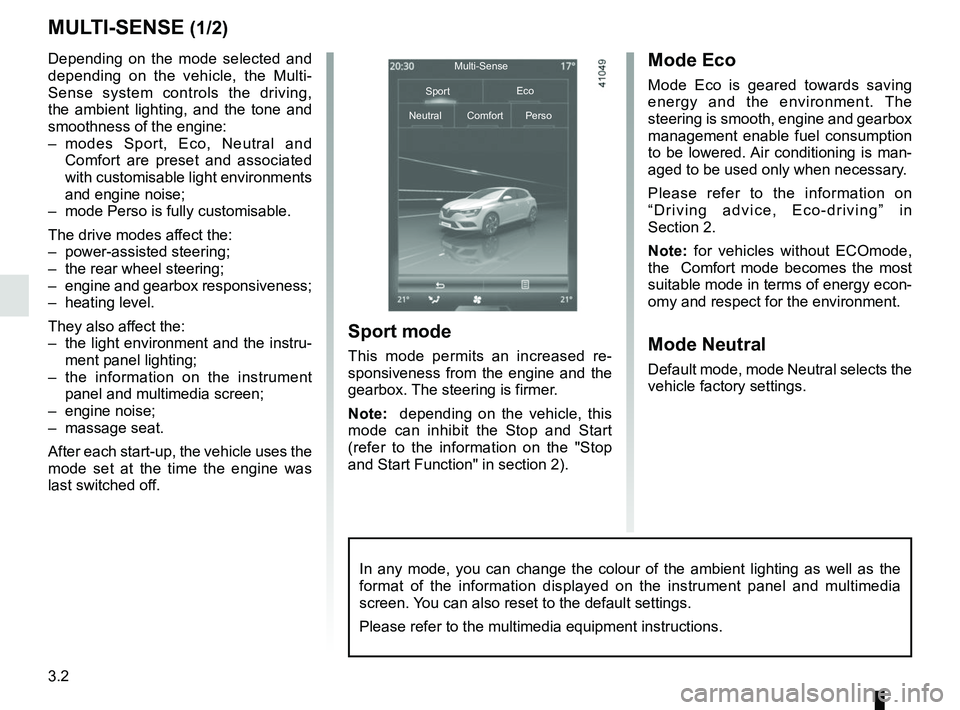
Depending on the mode selected and
depending on the vehicle, the Multi-
Sense system controls the driving,
the ambient lighting, and the tone and
smoothness of the engine:
– modes Sport, Eco, Neutral and Comfort are preset and associated
with customisable light environments
and engine noise;
– mode Perso is fully customisable.
The drive modes affect the:
– power-assisted steering;
– the rear wheel steering;
– engine and gearbox responsiveness;
– heating level.
They also affect the:
– the light environment and the instru- ment panel lighting;
– the information on the instrument panel and multimedia screen;
– engine noise;
– massage seat.
After each start-up, the vehicle uses the
mode set at the time the engine was
last switched off.Mode Eco
Mode Eco is geared towards saving
energy and the environment. The
steering is smooth, engine and gearbox
management enable fuel consumption
to be lowered. Air conditioning is man-
aged to be used only when necessary.
Please refer to the information on
“Driving advice, Eco-driving” in
Section 2.
Note: for vehicles without ECOmode,
the Comfort mode becomes the most
suitable mode in terms of energy econ-
omy and respect for the environment.
Mode Neutral
Default mode, mode Neutral selects the
vehicle factory settings.
Multi-Sense
Sport Eco
Neutral Comfort Perso
Sport mode
This mode permits an increased re-
sponsiveness from the engine and the
gearbox. The steering is firmer.
Note: depending on the vehicle, this
mode can inhibit the Stop and Start
(refer to the information on the "Stop
and Start Function" in section 2).
In any mode, you can change the colour of the ambient lighting as well a\
s the
format of the information displayed on the instrument panel and multimed\
ia
screen. You can also reset to the default settings.
Please refer to the multimedia equipment instructions.
Page 197 of 348
3.3
MULTI-SENSE (2/2)Accessing the menu
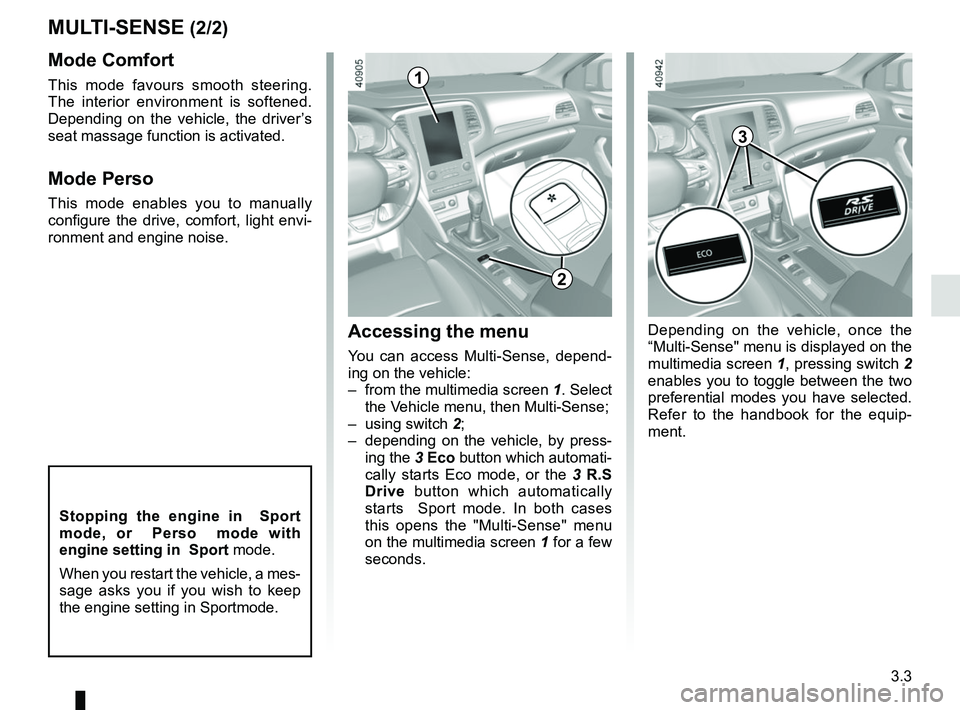
You can access Multi-Sense, depend-
ing on the vehicle:
– from the multimedia screen 1. Select
the Vehicle menu, then Multi-Sense;
– using switch 2;
– depending on the vehicle, by press- ing the 3 Eco button which automati-
cally starts Eco mode, or the 3 R.S
Drive button which automatically
starts Sport mode. In both cases
this opens the "Multi-Sense" menu
on the multimedia screen 1 for a few
seconds.
Mode Comfort
This mode favours smooth steering.
The interior environment is softened.
Depending on the vehicle, the driver’s
seat massage function is activated.
Mode Perso
This mode enables you to manually
configure the drive, comfort, light envi-
ronment and engine noise.
1
2
3
Depending on the vehicle, once the
“Multi-Sense" menu is displayed on the
multimedia screen 1, pressing switch 2
enables you to toggle between the two
preferential modes you have selected.
Refer to the handbook for the equip-
ment.
Stopping the engine in Sport
mode, or Perso mode with
engine setting in Sport mode.
When you restart the vehicle, a mes-
sage asks you if you wish to keep
the engine setting in Sportmode.
Page 203 of 348
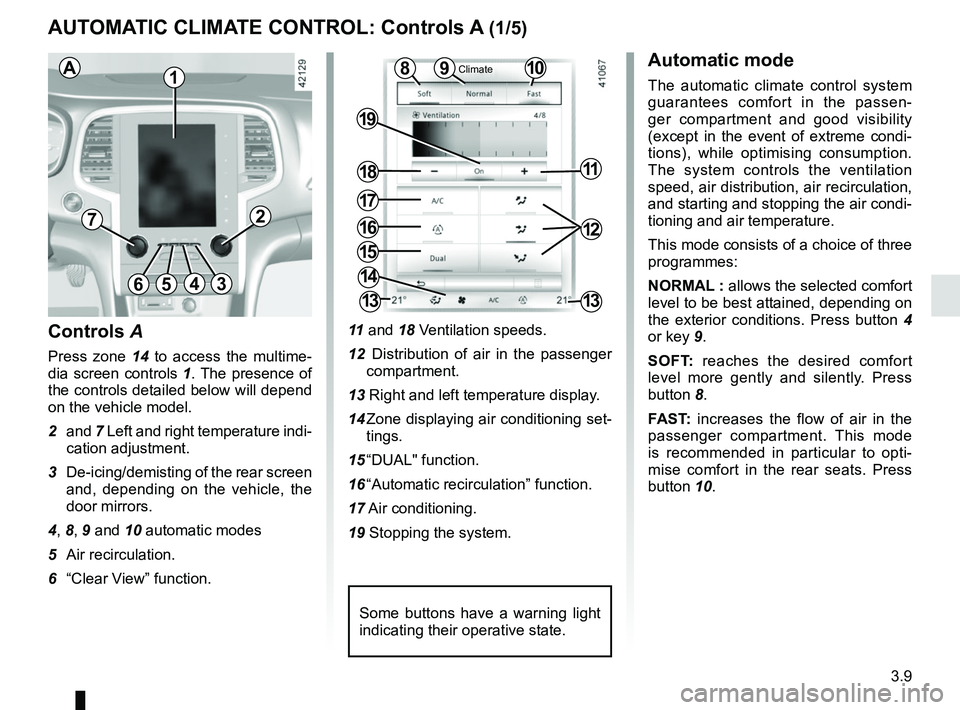
3.9
11 and 18 Ventilation speeds.
12 Distribution of air in the passenger compartment.
13 Right and left temperature display.
14 Zone displaying air conditioning set- tings.
15 “DUAL" function.
16 “Automatic recirculation” function.
17 Air conditioning.
19 Stopping the system.
10
AUTOMATIC CLIMATE CONTROL: Controls A (1/5)
15
6543
9
1216
17
18
19
11
Controls A
Press zone 14 to access the multime-
dia screen controls 1. The presence of
the controls detailed below will depend
on the vehicle model.
2 and 7 Left and right temperature indi-
cation adjustment.
3 De-icing/demisting of the rear screen and, depending on the vehicle, the
door mirrors.
4, 8, 9 and 10 automatic modes
5 Air recirculation.
6 “Clear View” function.
Automatic mode
The automatic climate control system
guarantees comfort in the passen-
ger compartment and good visibility
(except in the event of extreme condi-
tions), while optimising consumption.
The system controls the ventilation
speed, air distribution, air recirculation,
and starting and stopping the air condi-
tioning and air temperature.
This mode consists of a choice of three
programmes:
NORMAL : allows the selected comfort
level to be best attained, depending on
the exterior conditions. Press button 4
or key 9.
SOFT: reaches the desired comfort
level more gently and silently. Press
button 8.
FAST: increases the flow of air in the
passenger compartment. This mode
is recommended in particular to opti-
mise comfort in the rear seats. Press
button 10.8
14
13
72
13
1
Some buttons have a warning light
indicating their operative state.
AClimate