park assist RENAULT MEGANE 2018 User Guide
[x] Cancel search | Manufacturer: RENAULT, Model Year: 2018, Model line: MEGANE, Model: RENAULT MEGANE 2018Pages: 348, PDF Size: 9.25 MB
Page 129 of 348
2.17
ELECTRONIC PARKING BRAKE (1/3)
Note:
To indicate that the electronic parking
brake is released, a beep sounds and
the message “Apply parking brake” ap-
pears on the instrument panel:
– with the engine running: when the driver’s door is opened;
– with the engine switched off (eg. when the engine stalls): when a front
door is opened.
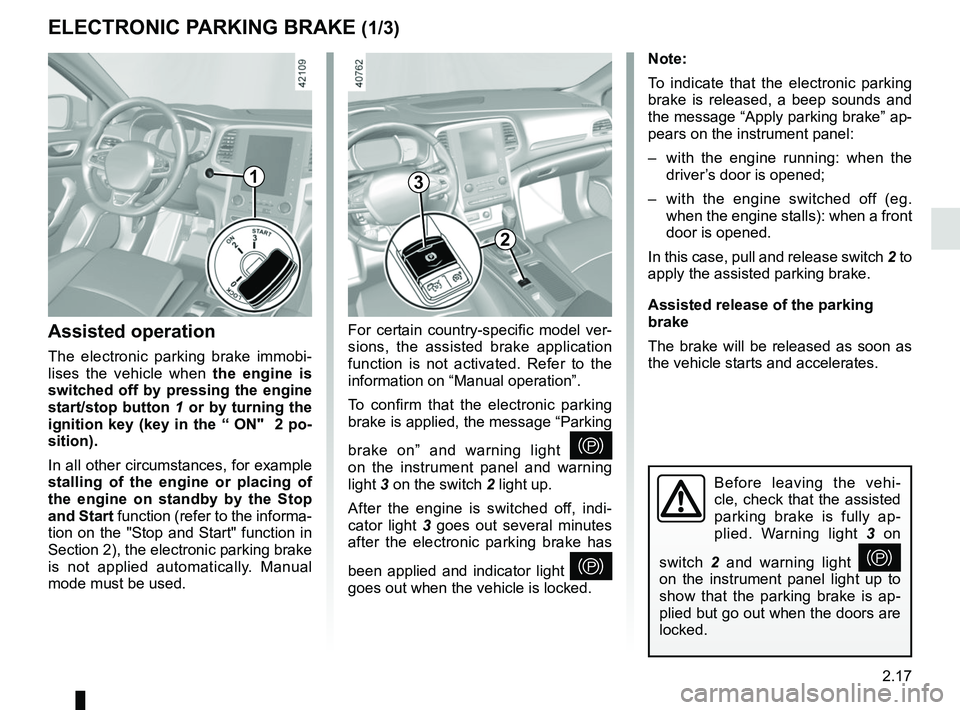
In this case, pull and release switch 2 to
apply the assisted parking brake.
Assisted release of the parking
brake
The brake will be released as soon as
the vehicle starts and accelerates.
Assisted operation
The electronic parking brake immobi-
lises the vehicle when the engine is
switched off by pressing the engine
start/stop button 1 or by turning the
ignition key (key in the “ ON" 2 po-
sition).
In all other circumstances, for example
stalling of the engine or placing of
the engine on standby by the Stop
and Start function (refer to the informa-
tion on the "Stop and Start" function in
Section 2), the electronic parking brake
is not applied automatically. Manual
mode must be used. For certain country-specific model ver-
sions, the assisted brake application
function is not activated. Refer to the
information on “Manual operation”.
To confirm that the electronic parking
brake is applied, the message “Parking
brake on” and warning light
}
on the instrument panel and warning
light 3 on the switch 2 light up.
After the engine is switched off, indi-
cator light 3 goes out several minutes
after the electronic parking brake has
been applied and indicator light
}
goes out when the vehicle is locked.
Before leaving the vehi-
cle, check that the assisted
parking brake is fully ap-
plied. Warning light 3 on
switch 2 and warning light
}
on the instrument panel light up to
show that the parking brake is ap-
plied but go out when the doors are
locked.
3
2
1
Page 131 of 348
2.19
Operating faults
– If there is a fault, the © warning
light illuminates on the instrument
panel accompanied by the “Check
parking brake” message and, in
some cases, the
} warning
light.
Please contact an authorised dealer
as soon as possible.
– If there is an assisted parking brake fault, the warning light
® comes
on, along with the message “Braking
system fault”, a beep and, in some
cases, the warning light
}.
This means that you must stop as
soon as traffic conditions allow.
Versions with an automatic
gearbox
For safety reasons, automatic release
is deactivated when the driver’s door
is open or not shut properly and the
engine is running (in order to prevent
the vehicle from moving without the
driver). The “Release parking brake
manually” message appears on the
instrument panel when the driver de-
presses the accelerator.
ELECTRONIC PARKING BRAKE (3/3)
It is therefore essential to
immobilise the vehicle by
engaging first gear (manual
gearbox) or position P (au-
tomatic gearbox). If the slope re-
quires it, chock the vehicle.
Never leave your vehicle
without moving the selec-
tor lever to position P and
switching off the engine.
This is because when the vehicle is
stationary with the engine running
and a gear engaged, the vehicle
may begin to move.
There is a risk of accidents.If no lights or sounds are ap-
parent, this indicates a fault
in the instrument panel. This
indicates that it is essential
to stop immediately (as soon as traf-
fic conditions allow). Ensure that the
vehicle is correctly immobilised and
contact an approved Dealer.
If the message “Electric fail-
ure DANGER” or “Check
battery” appears, manually
activate the electronic park-
ing brake by pulling switch 2 (or po-
sition the gear lever in P for auto-
matic gearboxes) before stopping
the engine.
Risk of loss of immobilisation of the
vehicle.
Contact an authorised dealer.
Page 147 of 348
2.35
DRIVER CORRECTION DEVICES AND AIDS (6/10)
Activating or deactivating the
system
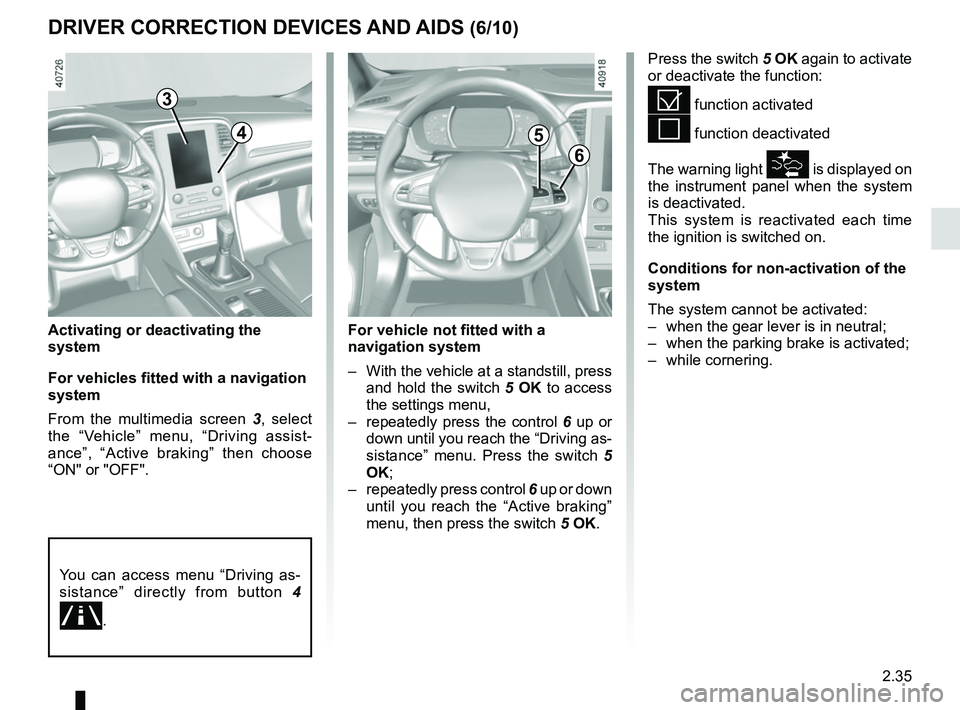
For vehicles fitted with a navigation
system
From the multimedia screen 3, select
the “Vehicle” menu, “Driving assist-
ance”, “Active braking” then choose
“ON" or "OFF".
Press the switch 5 OK again to activate
or deactivate the function:
= function activated
< function deactivated
The warning light
\b is displayed on
the instrument panel when the system
is deactivated.
This system is reactivated each time
the ignition is switched on.
Conditions for non-activation of the
system
The system cannot be activated:
– when the gear lever is in neutral;
– when the parking brake is activated;
– while cornering.
3
6
5
For vehicle not fitted with a
navigation system
– With the vehicle at a standstill, press and hold the switch 5 OK to access
the settings menu,
– repeatedly press the control 6 up or
down until you reach the “Driving as-
sistance” menu. Press the switch 5
OK;
– repeatedly press control 6 up or down
until you reach the “Active braking”
menu, then press the switch 5 OK.
You can access menu “Driving as-
sistance” directly from button 4
.
4
Page 183 of 348
2.71
System sound
Enables the system sound to be
chosen.
Deactivating the system sound
Activate or deactivate the parking dis-
tance control sound.
Note: if you deactivate the sound, you
will no longer be notified with beeps
when approaching an obstacle.
Deactivating the system
Activate or deactivate parking distance
control.
Vehicles not fitted with a multimedia
system
Vehicle stationary:
– press and hold the switch 5 OK to
access the settings menu;
– repeatedly press the control 6 up or
down until you reach the “Driving as-
sistance” menu;
– press the switch 5 OK;
– repeatedly press the control 6 up or
down until you reach the “Parking
distance control settings” menu;
PARKING DISTANCE CONTROL (4/5)
When the vehicle is being driven at
a speed below approximately 6 mph
(10 km/h), certain noises (motorcy-
cle, lorry, pneumatic drill, etc.) may
trigger the beeping sound of the
parking distance control.
4
Adjustment
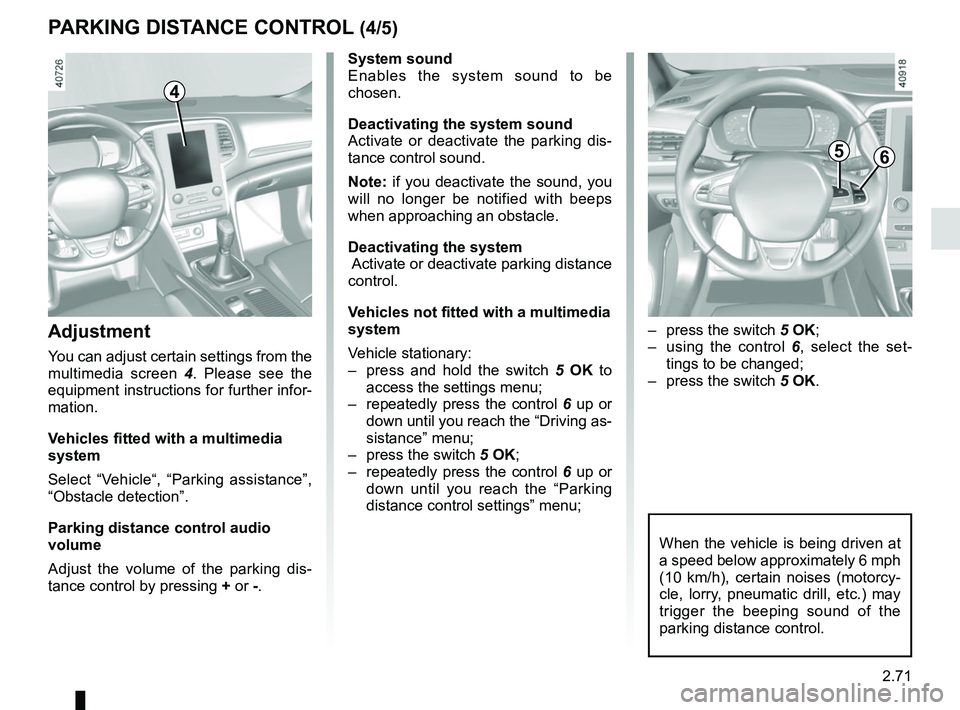
You can adjust certain settings from the
multimedia screen 4. Please see the
equipment instructions for further infor-
mation.
Vehicles fitted with a multimedia
system
Select “Vehicle“, “Parking assistance”,
“Obstacle detection”.
Parking distance control audio
volume
Adjust the volume of the parking dis-
tance control by pressing + or -.
– press the switch 5 OK;
– using the control 6, select the set-
tings to be changed;
– press the switch 5 OK.
56
Page 186 of 348
2.74
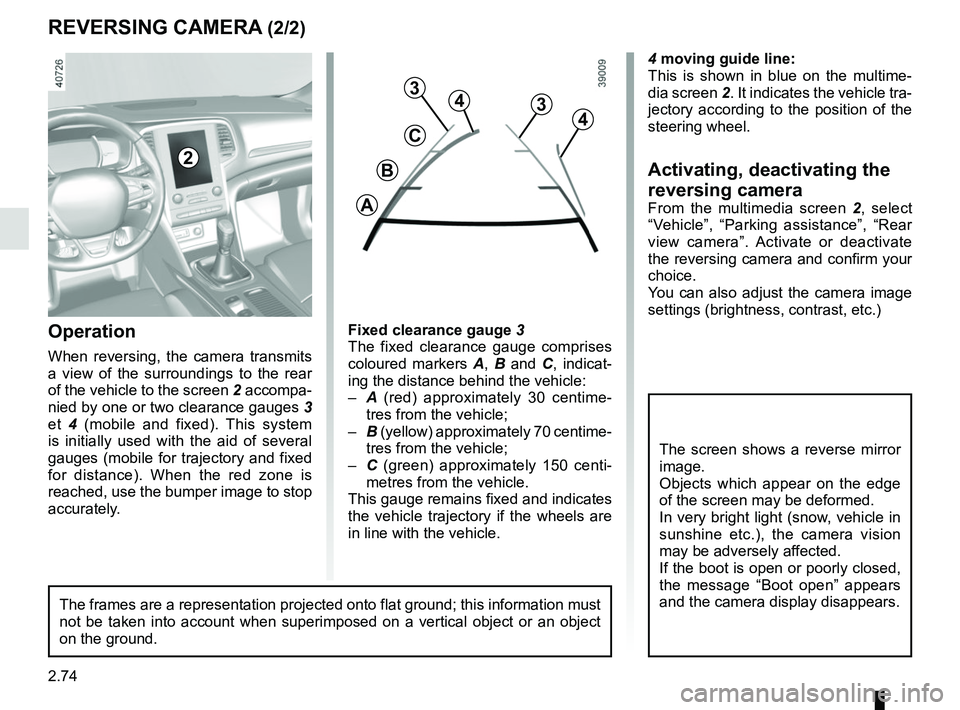
4 moving guide line:
This is shown in blue on the multime-
dia screen 2. It indicates the vehicle tra-
jectory according to the position of the
steering wheel.
Activating, deactivating the
reversing camera
From the multimedia screen 2, select
“Vehicle”, “Parking assistance”, “Rear
view camera”. Activate or deactivate
the reversing camera and confirm your
choice.
You can also adjust the camera image
settings (brightness, contrast, etc.)
REVERSING CAMERA (2/2)
C
B
A
43
2
The screen shows a reverse mirror
image.
Objects which appear on the edge
of the screen may be deformed.
In very bright light (snow, vehicle in
sunshine etc.), the camera vision
may be adversely affected.
If the boot is open or poorly closed,
the message “Boot open” appears
and the camera display disappears.
3
4
Fixed clearance gauge 3
The fixed clearance gauge comprises
coloured markers A, B and C , indicat-
ing the distance behind the vehicle:
– A (red) approximately 30 centime-
tres from the vehicle;
– B (yellow) approximately 70 centime-
tres from the vehicle;
– C (green) approximately 150 centi-
metres from the vehicle.
This gauge remains fixed and indicates
the vehicle trajectory if the wheels are
in line with the vehicle.Operation
When reversing, the camera transmits
a view of the surroundings to the rear
of the vehicle to the screen 2 accompa-
nied by one or two clearance gauges 3
et 4 (mobile and fixed). This system
is initially used with the aid of several
gauges (mobile for trajectory and fixed
for distance). When the red zone is
reached, use the bumper image to stop
accurately.
The frames are a representation projected onto flat ground; this informa\
tion must
not be taken into account when superimposed on a vertical object or an o\
bject
on the ground.
Page 187 of 348
2.75
ASSISTED PARKING (1/4)
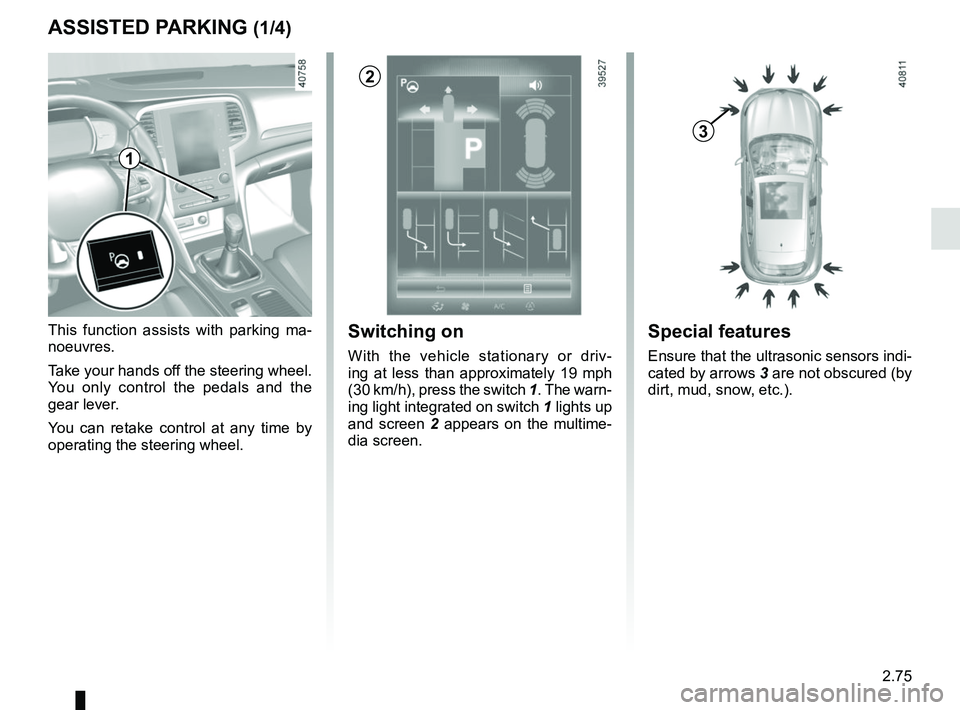
This function assists with parking ma-
noeuvres.
Take your hands off the steering wheel.
You only control the pedals and the
gear lever.
You can retake control at any time by
operating the steering wheel.Switching on
With the vehicle stationary or driv-
ing at less than approximately 19 mph
(30 km/h), press the switch 1. The warn-
ing light integrated on switch 1 lights up
and screen 2 appears on the multime-
dia screen.
1
2
Special features
Ensure that the ultrasonic sensors indi-
cated by arrows 3 are not obscured (by
dirt, mud, snow, etc.).
3
Page 188 of 348
2.76
Choice of manoeuvre
The system can perform four types of
manoeuvres:
– parallel parking;
– perpendicular parking;
– angle parking;
– moving out of a parallel parking space.
From the multimedia screen, select the
manoeuvre you wish to perform.
Note: when starting the vehicle, or after
having successfully completed parallel
parking using the system, the default
manoeuvre proposed by the system is
assistance in exiting a parallel parking
space. In other cases, the default ma-
noeuvre can be set from the multimedia
screen.
ASSISTED PARKING (2/4)
Operation
Parking
As long as the vehicle speed is less
than 20 mph (30 km/h), the system
looks for available parking spaces on
both sides of the vehicle.
Once a space has been found, it is dis-
played on the multimedia screen, indi-
cated by a small letter “P". Drive slowly,
with the indicators activated on the side
of the space, until the message “Stop”
is displayed, alongside a beep.
The space is then indicated on the mul-
timedia screen by a capital “P".
– Stop the vehicle;
– select reverse gear.
Warning light
lights up on the in-
strument panel, along with a beep.
– release the steering wheel;
– follow the system instructions on the multimedia screen. Your speed should not exceed around 4
mph (7 km/h).
Once the warning light
on the
instrument panel goes off and a beep
sounds, the manoeuvre has been com-
pleted.
Page 189 of 348
2.77
ASSISTED PARKING (3/4)
Your speed should not exceed around
4 mph (7 km/h).
Once in position to exit the space, the
system will notify you of the end of the
manoeuvre.
Once the warning light
on the
instrument panel goes off and a beep
sounds, the manoeuvre has been com-
pleted.
Suspending the manoeuvreThe manoeuvre is suspended in the fol-
lowing circumstances:
– you take control of the wheel;
– a door or the boot is opened;
– the vehicle is at a standstill for too long;
– an obstacle in the direction of move- ment prevents the manoeuvre from
being completed;
– the engine will stop.
Once the warning light
on the
instrument panel goes off and a beep
sounds, the manoeuvre has been sus-
pended. Then to resume the manoeu-
vre, press and hold the system activa-
tion switch. In this case, the reason for suspending
the manoeuvre will be displayed on the
multimedia screen.
Make sure:
– you have released the steering wheel
and;
– that all doors and the boot are closed, and;
– that no obstacles are in the way of the direction of movement, and;
– that the engine is started.
Cancelling the manoeuvre
The manoeuvre can be stopped in the
following cases:
– by pressing the system activation switch;
– the vehicle speed has exceeded 4 mph (7 km/h);
– You have performed more than ten forwards/backwards movements in
one manoeuvre;
– the parking distance control sensors are dirty or blocked;
– the vehicle wheels have skidded.
Once the warning light
on the
instrument panel goes off and a beep
sounds, the manoeuvre has been com-
pleted.
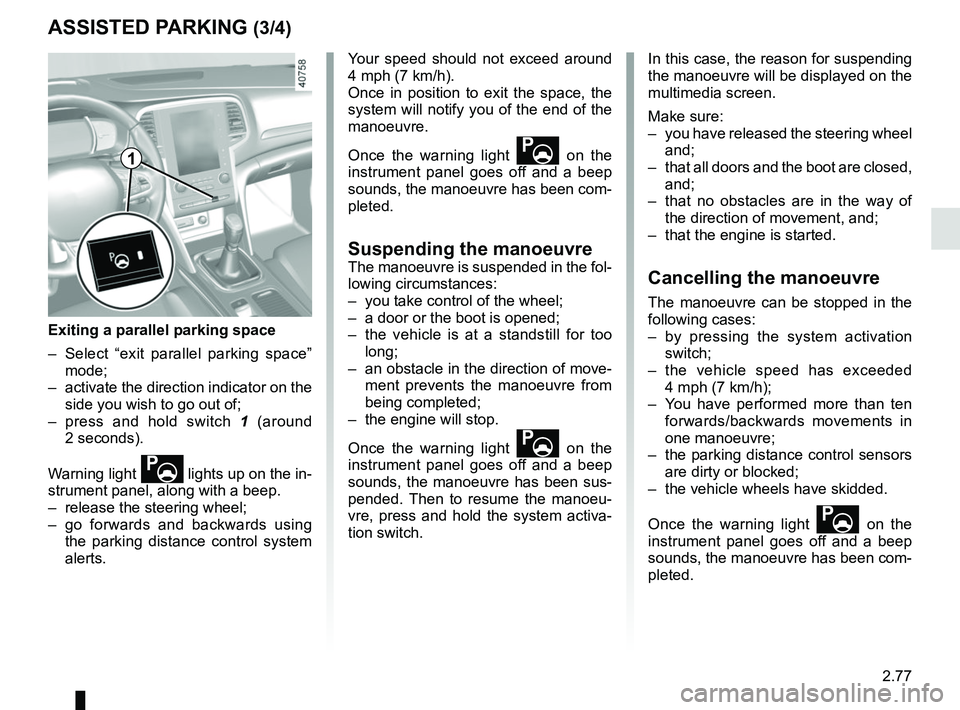
Exiting a parallel parking space
– Select “exit parallel parking space” mode;
– activate the direction indicator on the side you wish to go out of;
– press and hold switch 1 (around
2 seconds).
Warning light
lights up on the in-
strument panel, along with a beep.
– release the steering wheel;
– go forwards and backwards using the parking distance control system
alerts.
1
Page 190 of 348

This function is an additional driving aid. This function is not under any circumstances intended to replace the due\
care
and attention of the driver, who should at all")
2.78
ASSISTED PARKING (4/4)
This function is an additional driving aid. This function is not under any circumstances intended to replace the due\
care
and attention of the driver, who should at all times be in control of the vehicle.
Make sure that the manoeuvre complies with the applicable traffic regulations at your location.
– The driver should always look out for sudden hazards during driving: alw\
ays ensure that there are no moving obstacles (such as a child, animal, pram, bicycle, etc.) or small, narrow object\
s such as stones or posts in your path when manoeu-
vring.
– The system cannot detect objects located in the sensor blind spots.
– During manoeuvring, the steering wheel may turn quickly: do not place yo\
ur hands inside the wheel, and ensure nothing is located in this space.
– Always visually check that the parking space proposed by the system is s\
till available and contains no obstacles.
– The system should be deactivated when towing a trailer.
Page 341 of 348

A
ABS ....................................................................\
...2.30 → 2.39
accessories...................................................................")
7.1
ALPHABETICAL INDEX (1/6)
A
ABS ....................................................................\
...2.30 → 2.39
accessories........................................................................\
5.34
accessories socket ........................................ 3.34 – 3.35, 3.58
adaptive cruise control...........................................2.61 → 2.67
additional methods of restraint .....................1.30 → 1.33, 1.36
side protection ............................................................. 1.35
to the rear seat belts ........................................1.30 → 1.34
adjusting your driving position ...............................1.26 → 1.29
advice on antipollution ....................................................... 2.25
air bag....................................................................1.30 → 1.36
activating the front passenger air bags ........................ 1.54
deactivating the front passenger air bags .................... 1.52
air conditioning ........................................................3.6 → 3.20
air vents ...................................................................... 3.4 – 3.5
anti-corrosion check ..............................................6.17 → 6.21
anti-corrosion protection .................................................... 4.15
anti-lock braking system: ABS ...............................2.30 → 2.39
antipollution advice .................................................................\
......... 2.25
armrest: front ..................................................................\
............ 3.32
ashtray .................................................................... 3.34 – 3.35
assisted parking............................... 2.68 → 2.72, 2.75 → 2.78
automatic gearbox (use) ........................................2.79 → 2.81
automatic gearbox selector lever...........................2.79 → 2.81
B
battery..................................................................... 4.11 – 4.12 troubleshooting ................................................. 5.30 – 5.31
battery (remote control) ..................................................... 5.33
blind spot warning signal .......................................2.43 → 2.46
blind spot: warning signal ......................................2.43 → 2.46
bonnet........................................................................\
. 4.2 – 4.3
brake fluid ........................................................................\
.... 4.9 bulbs
changing ......................................5.14 → 5.27, 5.26 – 5.27
C
catalytic converter................................................... 2.14 – 2.15
central door locking ...............1.2 – 1.3, 1.5, 1.13 → 1.16, 1.20
changing a bulb .................................5.14 → 5.27, 5.26 – 5.27
changing a wheel...................................................... 5.9 – 5.10
changing gear ...............................................2.16, 2.79 → 2.81
child restraint/seat .............................1.37 – 1.38, 1.40 → 1.51
child safety........1.6, 1.9, 1.19, 1.37 – 1.38, 1.40 → 1.51, 3.22,
3.24, 3.26
child seats..........................................1.37 – 1.38, 1.40 → 1.51
children .......................................................... 1.37 – 1.38, 1.38
children (safety) ........................ 1.6, 1.9, 1.19, 3.22, 3.24, 3.26
cigar lighter ............................................................. 3.34 – 3.35
cleaning: inside the vehicle .............................................. 4.18 – 4.19
clock ..................................................................\
................ 1.85
closing the doors ...................................................1.14 → 1.19
control instruments ................................................1.66 → 1.73
controls ...............................................................\
...1.56 → 1.59
coolant ................................................................\
................. 4.8
courtesy light ...................................... 3.27 – 3.28, 5.25 – 5.26
courtesy mirrors ................................................................. 3.29
cruise control .........................................................2.57 → 2.60
customised vehicle settings ................................... 1.82 – 1.83
customising the vehicle settings ............................ 1.82 – 1.83
D
dashboard..............................................................1.56 → 1.59
deadlocking the doors ................................................ 1.5, 1.13
de-icing rear screen .........................................................3.9 → 3.13
demisting rear screen .........................................................3.6 →
3.13