radio RENAULT MEGANE 2018 User Guide
[x] Cancel search | Manufacturer: RENAULT, Model Year: 2018, Model line: MEGANE, Model: RENAULT MEGANE 2018Pages: 348, PDF Size: 9.25 MB
Page 119 of 348
2.7
STARTING, STOPPING THE ENGINE: vehicle with RENAULT card (3/3)
If the RENAULT card is no longer in the
passenger compartment when you try
to switch the engine off, the message
“No keycard Press and hold” appears
on the instrument panel: press the
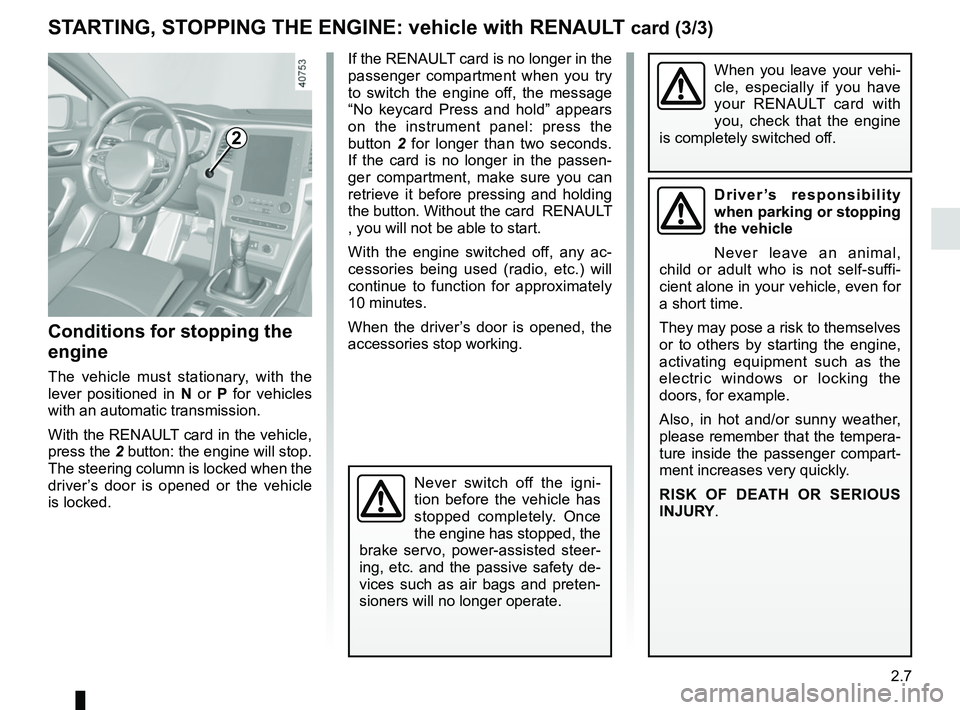
button 2 for longer than two seconds.
If the card is no longer in the passen-
ger compartment, make sure you can
retrieve it before pressing and holding
the button. Without the card RENAULT
, you will not be able to start.
With the engine switched off, any ac-
cessories being used (radio, etc.) will
continue to function for approximately
10 minutes.
When the driver’s door is opened, the
accessories stop working.
Conditions for stopping the
engine
The vehicle must stationary, with the
lever positioned in N or P for vehicles
with an automatic transmission.
With the RENAULT card in the vehicle,
press the 2 button: the engine will stop. The steering column is locked when the
driver’s door is opened or the vehicle
is locked.
When you leave your vehi-
cle, especially if you have
your RENAULT card with
you, check that the engine
is completely switched off.
2
Driver’s responsibility
when parking or stopping
the vehicle
Never leave an animal,
child or adult who is not self-suffi-
cient alone in your vehicle, even for
a short time.
They may pose a risk to themselves
or to others by starting the engine,
activating equipment such as the
electric windows or locking the
doors, for example.
Also, in hot and/or sunny weather,
please remember that the tempera-
ture inside the passenger compart-
ment increases very quickly.
RISK OF DEATH OR SERIOUS
INJURY.
Never switch off the igni-
tion before the vehicle has
stopped completely. Once
the engine has stopped, the
brake servo, power-assisted steer-
ing, etc. and the passive safety de-
vices such as air bags and preten-
sioners will no longer operate.
Page 219 of 348
3.25
ELECTRIC SUNROOF (2/3)
Special features
Your vehicle is fitted with an anti-pinch
facility: when the sunroof encounters
resistance whilst closing (branch of
a tree, etc.), it stops and then moves
back a few centimetres.
After closing the sunroof by remote
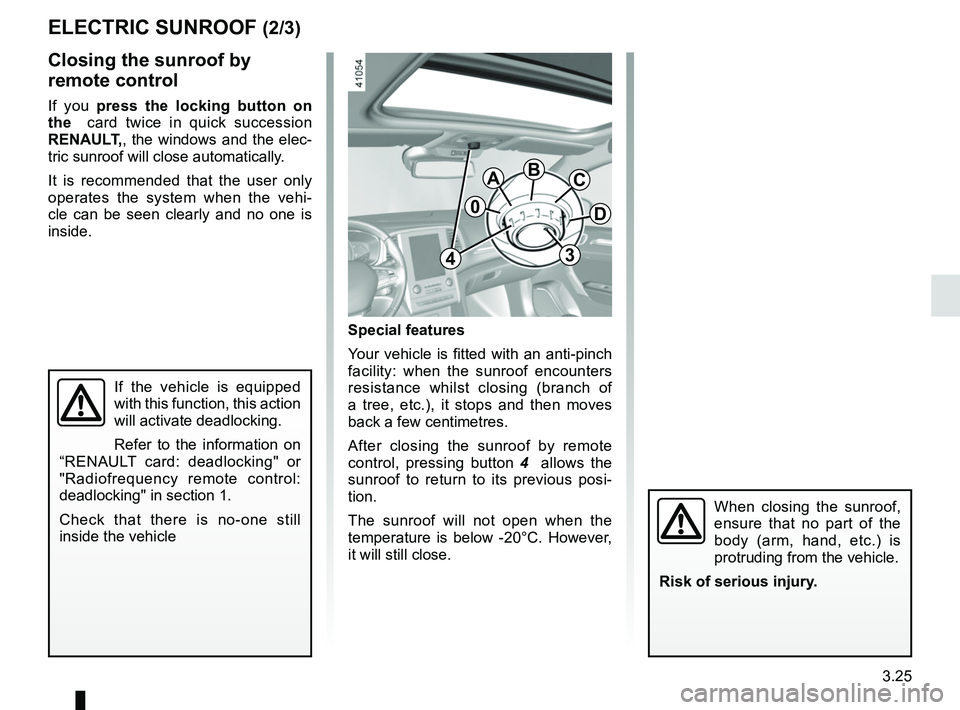
control, pressing button 4 allows the
sunroof to return to its previous posi-
tion.
The sunroof will not open when the
temperature is below -20°C. However,
it will still close.
Closing the sunroof by
remote control
If you press the locking button on
the card twice in quick succession
RENAULT,, the windows and the elec-
tric sunroof will close automatically.
It is recommended that the user only
operates the system when the vehi-
cle can be seen clearly and no one is
inside.
If the vehicle is equipped
with this function, this action
will activate deadlocking.
Refer to the information on
“RENAULT card: deadlocking" or
"Radiofrequency remote control:
deadlocking" in section 1.
Check that there is no-one still
inside the vehicle
0
ABC
D
34
When closing the sunroof,
ensure that no part of the
body (arm, hand, etc.) is
protruding from the vehicle.
Risk of serious injury.
Page 234 of 348
3.40
Depending on the vehicle, there are
various ways to unlock and operate the
luggage compartment lid:
– by the locking/unlocking button on the remote control key (refer to the
information on “Radiofrequency
Remote Control: use” in section 1);
– by the locking/unlocking button on card RENAULT (refer to the informa-
tion on "Card RENAULT: use in sec-
tion 1);
– via the external boot lid control;
– using the hands-free function;
– using the dashboard control.
LUGGAGE COMPARTMENT: 4 DOOR VERSION (1/3)
2
Manual controls
To open
Depending on the vehicle, press the
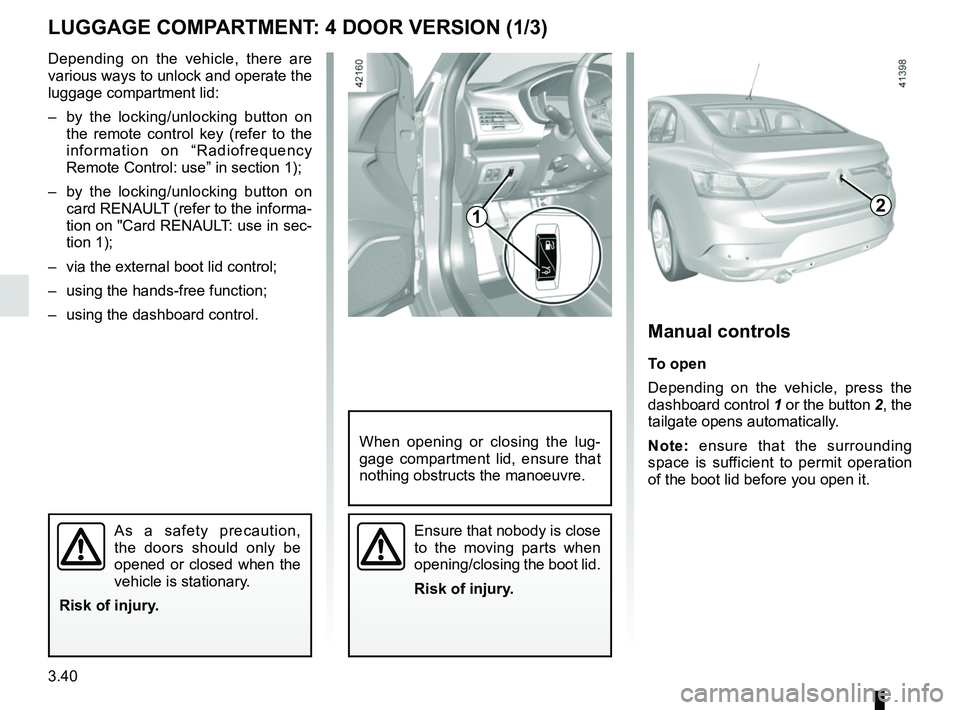
dashboard control 1 or the button 2, the
tailgate opens automatically.
Note: ensure that the surrounding
space is sufficient to permit operation
of the boot lid before you open it.
Ensure that nobody is close
to the moving parts when
opening/closing the boot lid.
Risk of injury.
When opening or closing the lug-
gage compartment lid, ensure that
nothing obstructs the manoeuvre.
As a safety precaution,
the doors should only be
opened or closed when the
vehicle is stationary.
Risk of injury.
1
Page 252 of 348
3.58
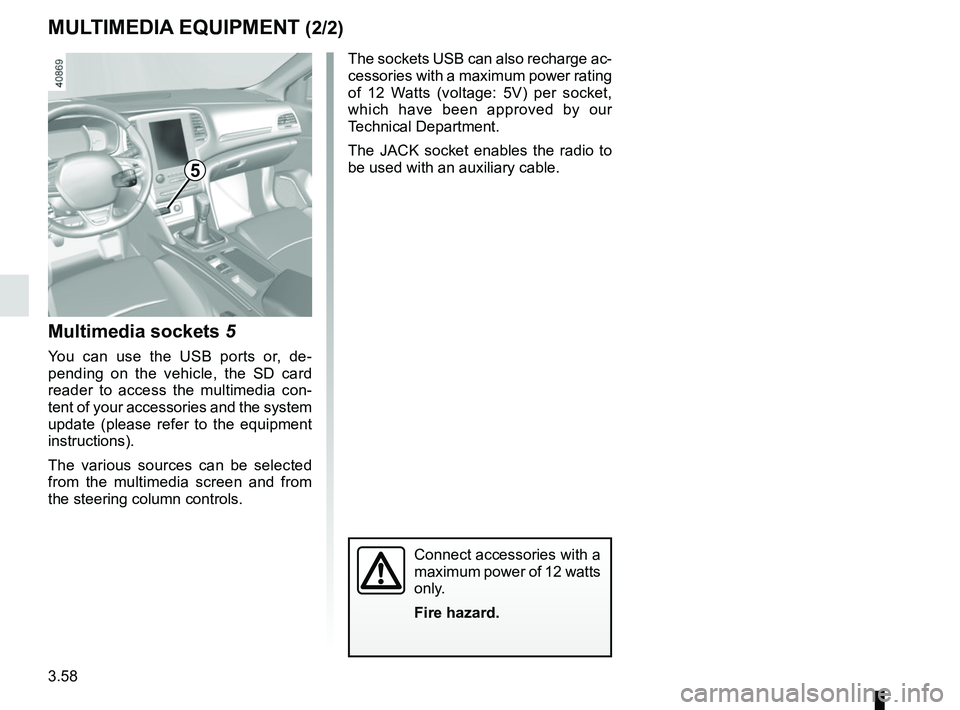
Multimedia sockets 5
You can use the USB ports or, de-
pending on the vehicle, the SD card
reader to access the multimedia con-
tent of your accessories and the system
update (please refer to the equipment
instructions).
The various sources can be selected
from the multimedia screen and from
the steering column controls.
MULTIMEDIA EQUIPMENT (2/2)
The sockets USB can also recharge ac-
cessories with a maximum power rating
of 12 Watts (voltage: 5V) per socket,
which have been approved by our
Technical Department.
The JACK socket enables the radio to
be used with an auxiliary cable.
Connect accessories with a
maximum power of 12 watts
only.
Fire hazard.
5
Page 263 of 348
4.11
BATTERY (1/2)
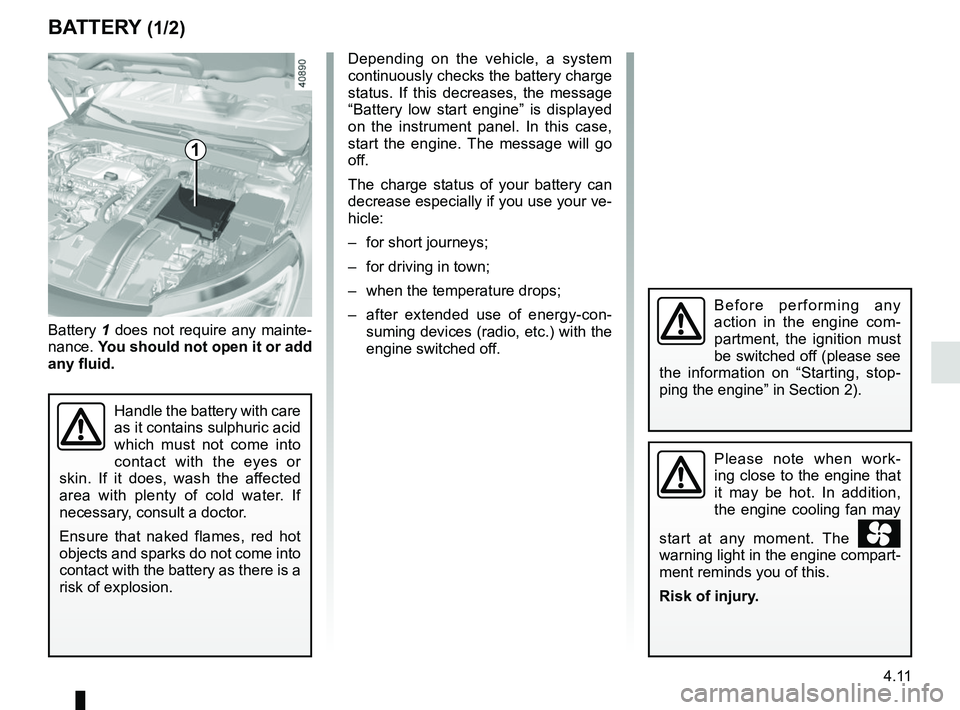
1
Battery 1 does not require any mainte-
nance. You should not open it or add
any fluid.
Handle the battery with care
as it contains sulphuric acid
which must not come into
contact with the eyes or
skin. If it does, wash the affected
area with plenty of cold water. If
necessary, consult a doctor.
Ensure that naked flames, red hot
objects and sparks do not come into
contact with the battery as there is a
risk of explosion.
Please note when work-
ing close to the engine that
it may be hot. In addition,
the engine cooling fan may
start at any moment. The
warning light in the engine compart-
ment reminds you of this.
Risk of injury.
Before performing any
action in the engine com-
partment, the ignition must
be switched off (please see
the information on “Starting, stop-
ping the engine” in Section 2).
Depending on the vehicle, a system
continuously checks the battery charge
status. If this decreases, the message
“Battery low start engine” is displayed
on the instrument panel. In this case,
start the engine. The message will go
off.
The charge status of your battery can
decrease especially if you use your ve-
hicle:
– for short journeys;
– for driving in town;
– when the temperature drops;
– after extended use of energy-con- suming devices (radio, etc.) with the
engine switched off.
Page 269 of 348
4.17
Using a roller type car wash
Return the windscreen wiper stalk to
the Park position (refer to the informa-
tion on the “Windscreen washer, wiper”
in Section 1). Check the mounting of
external accessories, additional lights
and mirrors, and ensure that the wiper
blades are secured with adhesive tape.
Remove the radio aerial mast if your
vehicle is fitted with this equipment.
Remember to remove the tape and refit
the antenna after washing.
Vehicles with a matte paint
finish
This type of paint requires certain pre-
cautions.
You should do the following
Wash the vehicle by hand using plenty
of water, using a soft cloth or a gentle
sponge.
Do not do the following
Use wax-based products (polishing).
Rub too hard.
Wash the vehicle in a roller-type car
wash.
Attach stickers to the paintwork (risk of
leaving marks).
Wash the vehicle
using a high-pressure
cleaning device.
BODYWORK MAINTENANCE (3/3)Cleaning the headlights
As the headlights are made of plastic
“glass”, use a soft cloth or cotton wool
to clean them. If this does not clean
them properly, moisten the cloth with
soapy water, then wipe clean with a soft
damp cloth or cotton wool.
Finally, carefully dry off with a soft dry
cloth.
Do not use cleaning products con-
taining alcohol or utensils (e.g.: a
scraper).
Page 270 of 348
4.18
Glass instrument panel(e.g. instrument panel, clock, exterior
temperature display, radio display, etc.)
Use a soft cloth (or cotton wool).
If this does not clean them properly,
use a soft cloth (or cotton wool) slightly
moistened with soapy water and then
wipe clean with another soft damp cloth
or cotton wool.
Finally, carefully dry off with a soft dry
cloth.
Do not use products containing alco-
hol and/or spray fluids on the area.
Seat belts
These must be kept clean.
Use products selected by our Technical
Department (Approved outlets) or
warm, soapy water and a sponge and
wipe with a dry cloth.
Detergents or dyes must not be used
under any circumstances.
INTERIOR TRIM MAINTENANCE (1/2)
Textiles (seats, door trim, etc)
Vacuum-clean the textiles regularly.
Liquid stain
Use soapy water.
Dab lightly (never rub) with a soft cloth,
rinse and remove the excess.
Solid or pasty stain
Carefully remove the excess solid or
pasty material immediately with a
spatula (working from the edges to the
centre to avoid spreading the stain).
Clean as for a liquid stain.
Special instructions for sweets or
chewing gum
Put an ice cube on the stain to solidify
it, then proceed as for a solid stain.
A well-maintained vehicle will last
longer. It is therefore recommended to
maintain the interior of the vehicle regu-
larly.
A stain should always be dealt with
swiftly.
Whatever type of stain is on the trim,
use
cold (or warm) soapy water with
natural soap.
Detergents (washing-up liquid, pow-
dered products, alcohol-based prod-
ucts) should not be used.
Use a soft cloth.
Rinse and soak up the excess.
For further recommendations for
maintaining the interior, and/or for
any unsatisfactory results, please
see an authorised dealer.
Page 273 of 348

5.1
Section 5: Practical advice
Puncture/emergency spare wheel . . . . . . . . . . . . . . . . . . . . . . . . . . . . . . . . . . . . \
. . . . . . . . . . . . . . . 5.2
Tyre inflation kit . . . . . . . . . . . . . . . . . . . . . . . . . . . . . . . . . . . .\
. . . . . . . . . . . . . . . . . . . . . . . . . . . . . 5.4
Tools . . . . . . . . . . . . . . . . . . . . . . . . . . . . . . . . . . . .\
. . . . . . . . . . . . . . . . . . . . . . . . . . . . . . . . . . . . . 5.7
Wheel trim . . . . . . . . . . . . . . . . . . . . . . . . . . . . . . . . . . . . \
. . . . . . . . . . . . . . . . . . . . . . . . . . . . . . . . . 5.8
Changing a wheel . . . . . . . . . . . . . . . . . . . . . . . . . . . . . . . . . . . .\
. . . . . . . . . . . . . . . . . . . . . . . . . . . 5.9
Tyres (tyre and wheel safety, use in winter) . . . . . . . . . . . . . . . . . . . . . . . . . . . . . . . . . . . .\
. . . . . . . 5.11
Headlights (changing bulbs) . . . . . . . . . . . . . . . . . . . . . . . . . . . . . . . . . . . .\
. . . . . . . . . . . . . . . . . . . 5.14
Rear lights and side lights (replacing bulbs) . . . . . . . . . . . . . . . . . . . . . . . . . . . . . . . . . . . .\
. . . . . . . 5.16
Interior lighting: changing bulbs . . . . . . . . . . . . . . . . . . . . . . . . . . . . . . . . . . . . \
. . . . . . . . . . . . . . . . . 5.25
Fuses . . . . . . . . . . . . . . . . . . . . . . . . . . . . . . . . . . . . \
. . . . . . . . . . . . . . . . . . . . . . . . . . . . . . . . . . . . . 5.28
Battery . . . . . . . . . . . . . . . . . . . . . . . . . . . . . . . . . . . . \
. . . . . . . . . . . . . . . . . . . . . . . . . . . . . . . . . . . . 5.30
RENAULT card: battery . . . . . . . . . . . . . . . . . . . . . . . . . . . . . . . . . . . . \
. . . . . . . . . . . . . . . . . . . . . . . 5.32
Radio frequency remote control: batteries. . . . . . . . . . . . . . . . . . . . . . . . . . . . . . . . . . . . \
. . . . . . . . . 5.33
Accessories . . . . . . . . . . . . . . . . . . . . . . . . . . . . . . . . . . . . \
. . . . . . . . . . . . . . . . . . . . . . . . . . . . . . . . 5.34
Wipers (replacing blades) . . . . . . . . . . . . . . . . . . . . . . . . . . . . . . . . . . . .\
. . . . . . . . . . . . . . . . . . . . . 5.35
Towing: breakdown . . . . . . . . . . . . . . . . . . . . . . . . . . . . . . . . . . . .\
. . . . . . . . . . . . . . . . . . . . . . . . . . 5.37
Operating faults . . . . . . . . . . . . . . . . . . . . . . . . . . . . . . . . . . . . \
. . . . . . . . . . . . . . . . . . . . . . . . . . . . . 5.39
Page 301 of 348

Allocation of fuses
(the presence of certain fuses depends on the vehicle equipment level)\
Symbol Allocation SymbolAllocation
HWindscreen washerÝTowbar socket
ëNot usedNot use")
5.29
FUSES (2/2)
Allocation of fuses
(the presence of certain fuses depends on the vehicle equipment level)\
Symbol Allocation SymbolAllocation
HWindscreen washerÝTowbar socket
ëNot usedNot used
ÆFront cigarette lighter, front and rear second row
accessories socketDiagnostic socket, audio alarm
Not usedÌHorn
Heated door mirrorsInstrument panel, dashboard control lighting
×Brake lights, passenger compartment central unitOLocking opening elements, boot opening and
closing control
Parking brakeDDirection indicator lights, hazard warning lights
\bAdditional servoRear USB sockets on console
îRadio, multimedia screen, multimedia accesso-
ries sockets, parking brake control
Passenger compartment centre unit, rear wiper,
rear fog light
Page 305 of 348
5.33
Operating faults
If the battery is too weak to ensure cor-
rect operation, you can still start and
lock/unlock the vehicle (please refer to
the information on “Locking/unlocking
the opening elements” in Section 1).
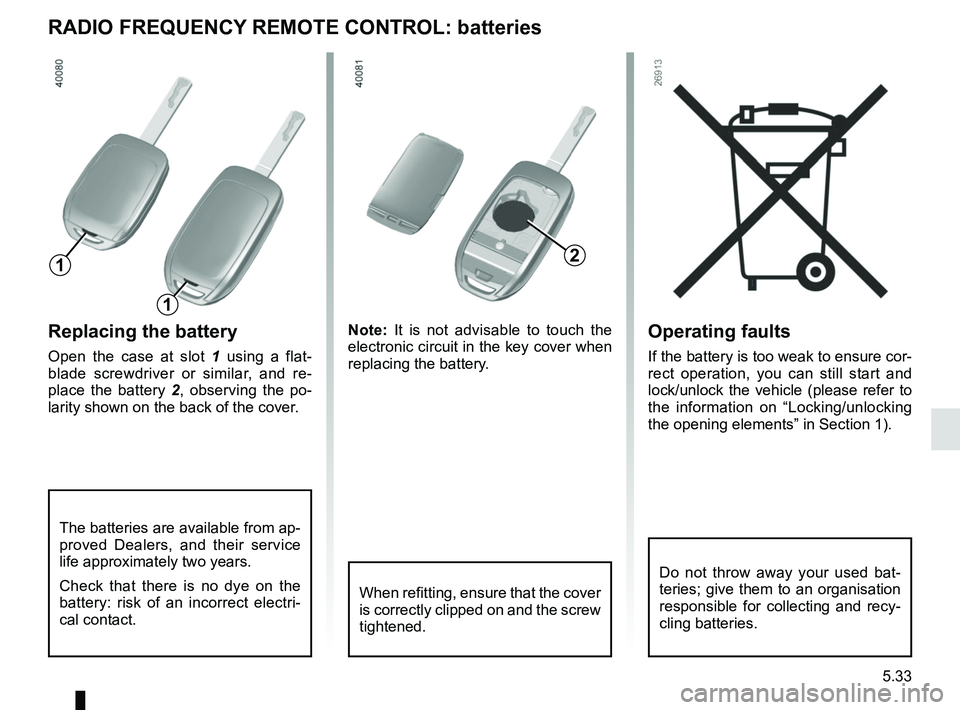
Replacing the battery
Open the case at slot 1 using a flat-
blade screwdriver or similar, and re-
place the battery 2 , observing the po-
larity shown on the back of the cover. Note:
It is not advisable to touch the
electronic circuit in the key cover when
replacing the battery.
RADIO FREQUENCY REMOTE CONTROL: batteries
When refitting, ensure that the cover
is correctly clipped on and the screw
tightened.
The batteries are available from ap-
proved Dealers, and their service
life approximately two years.
Check that there is no dye on the
battery: risk of an incorrect electri-
cal contact.
2
1
1
Do not throw away your used bat-
teries; give them to an organisation
responsible for collecting and recy-
cling batteries.