wheel RENAULT MEGANE 2018 User Guide
[x] Cancel search | Manufacturer: RENAULT, Model Year: 2018, Model line: MEGANE, Model: RENAULT MEGANE 2018Pages: 348, PDF Size: 9.25 MB
Page 85 of 348
1.79
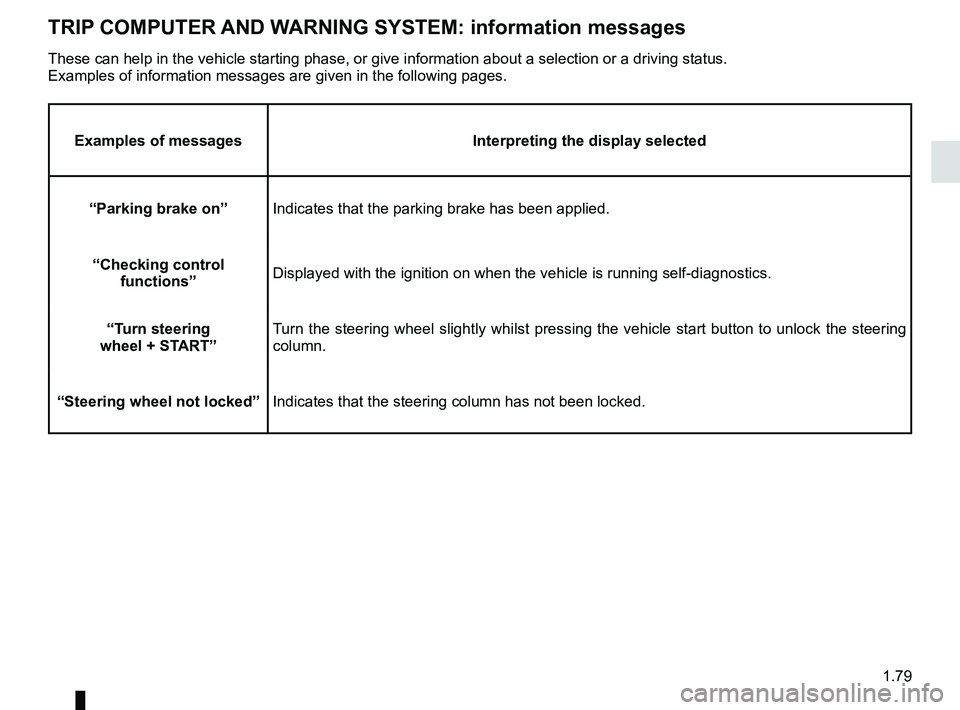
TRIP COMPUTER AND WARNING SYSTEM: information messages
Examples of messagesInterpreting the display selected
“Parking brake on” Indicates that the parking brake has been applied.
“Checking control functions” Displayed with the ignition on when the vehicle is running self-diagnost\
ics.
“Turn steering
wheel + START” Turn the steering wheel slightly whilst pressing the vehicle start button\
to unlock the steering
column.
“Steering wheel not locked” Indicates that the steering column has not been locked.
These can help in the vehicle starting phase, or give information about \
a selection or a driving status.
Examples of information messages are given in the following pages.
Page 87 of 348
1.81
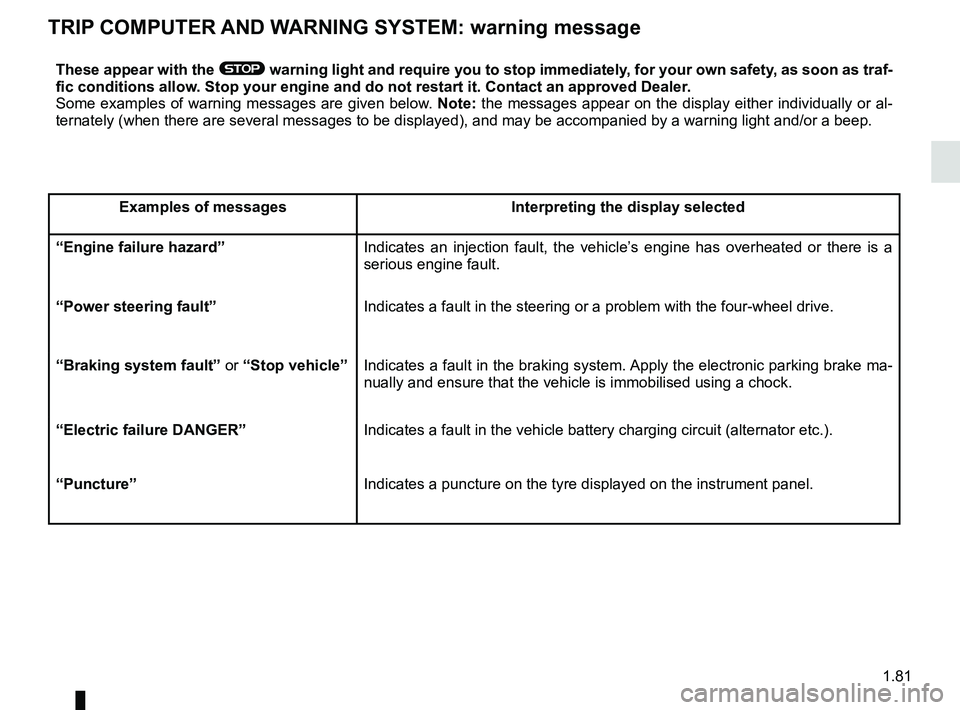
TRIP COMPUTER AND WARNING SYSTEM: warning message
These appear with the ® warning light and require you to stop immediately, for your own safety, as soon as traf-
fic conditions allow. Stop your engine and do not restart it. Contact an approved Dealer.
Some examples of warning messages are given below. Note: the messages appear on the display either individually or al-
ternately (when there are several messages to be displayed), and may b\
e accompanied by a warning light and/or a beep.
Examples of messages Interpreting the display selected
“Engine failure hazard” Indicates an injection fault, the vehicle’s engine has overheated or there is a
serious engine fault.
“Power steering fault” Indicates a fault in the steering or a problem with the four-wheel drive\
.
“Braking system fault” or “Stop vehicle” Indicates a fault in the braking system. Apply the electronic parking brake ma-
nually and ensure that the vehicle is immobilised using a chock.
“Electric failure DANGER” Indicates a fault in the vehicle battery charging circuit (alternator e\
tc.).
“Puncture” Indicates a puncture on the tyre displayed on the instrument panel.
Page 88 of 348
1.82
VEHICLE SETTINGS CUSTOMISATION MENU (1/2)
Adjusting the settings
Select the function to modify:
a) Free wheel in ECO mode;
(please refer to the information on “Driving advice, ECO-driving” in
Section 2)
b) Auto door lock while driving;
c) Use handsfree card: open/close;
d) Indicator sound volume;
e) Internal welcome sound;
f) External welcome;
g) Automatic Cabin Light;
h) Rear wiper when rear gear engaged;
i) Driving style indicator.
Depending on the function, select “ON"
or "OFF" to activate or disable it, and
"+" or "-" to adjust the volume of the in-
dicators.
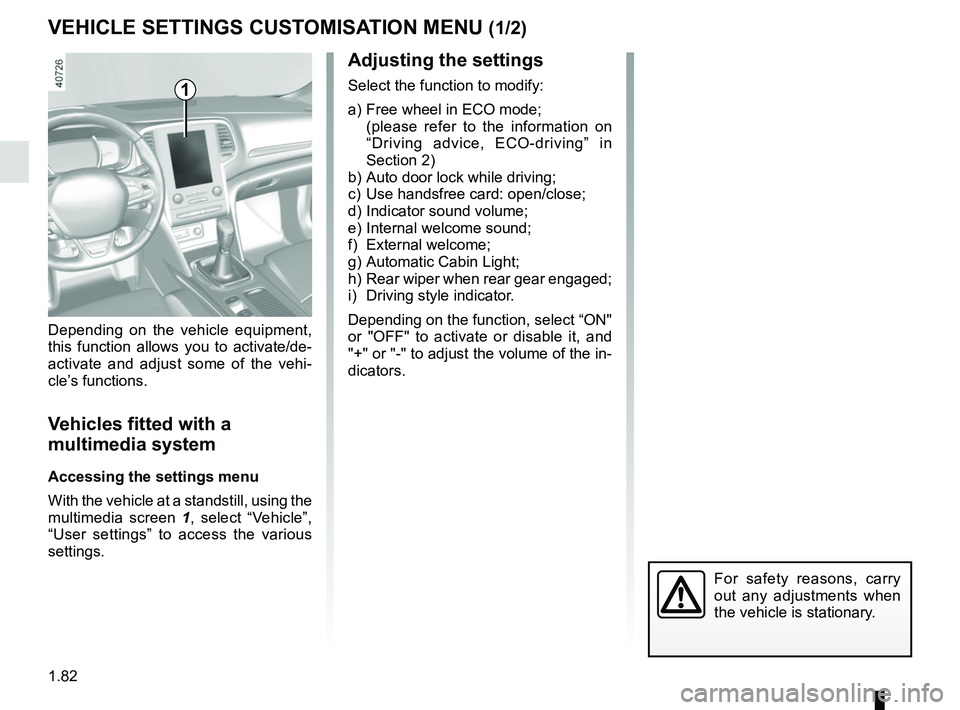
Depending on the vehicle equipment,
this function allows you to activate/de-
activate and adjust some of the vehi-
cle’s functions.
Vehicles fitted with a
multimedia system
Accessing the settings menu
With the vehicle at a standstill, using the
multimedia screen
1, select “Vehicle”,
“User settings” to access the various
settings.
1
For safety reasons, carry
out any adjustments when
the vehicle is stationary.
Page 89 of 348
1.83
VEHICLE SETTINGS CUSTOMISATION MENU (2/2)
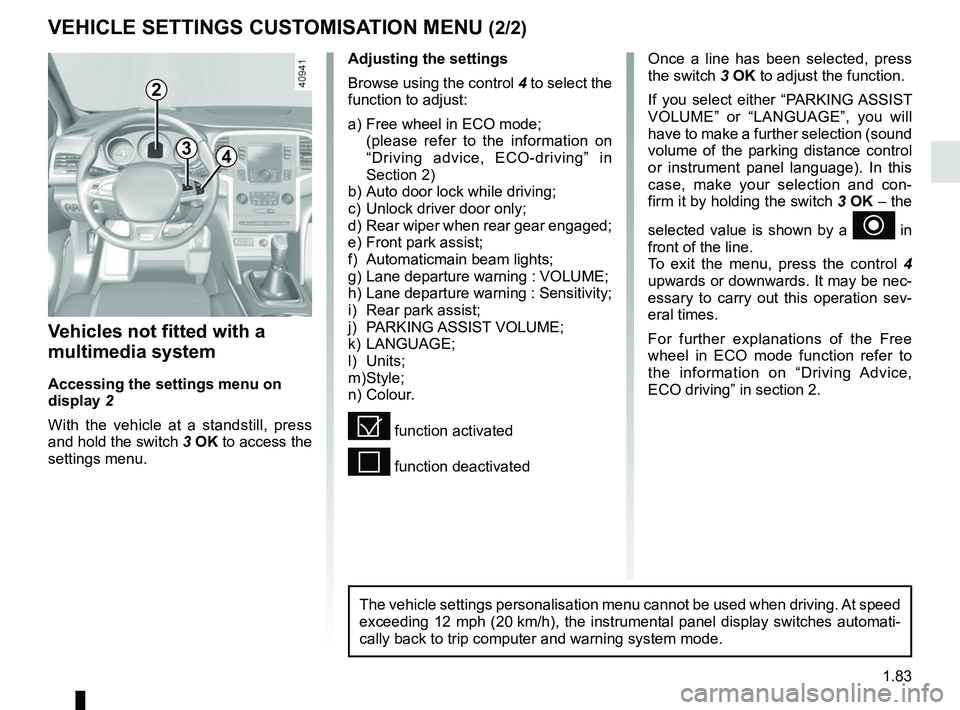
34
Once a line has been selected, press
the switch 3 OK to adjust the function.
If you select either “PARKING ASSIST
VOLUME” or “LANGUAGE”, you will
have to make a further selection (sound
volume of the parking distance control
or instrument panel language). In this
case, make your selection and con-
firm it by holding the switch 3 OK – the
selected value is shown by a
~ in
front of the line.
To exit the menu, press the control 4
upwards or downwards. It may be nec-
essary to carry out this operation sev-
eral times.
For further explanations of the Free
wheel in ECO mode function refer to
the information on “Driving Advice,
ECO driving” in section 2.
Vehicles not fitted with a
multimedia system
Accessing the settings menu on
display 2
With the vehicle at a standstill, press
and hold the switch 3 OK to access the
settings menu.
Adjusting the settings
Browse using the control 4 to select the
function to adjust:
a) Free wheel in ECO mode;
(please refer to the information on “Driving advice, ECO-driving” in
Section 2)
b) Auto door lock while driving;
c) Unlock driver door only;
d) Rear wiper when rear gear engaged;
e) Front park assist;
f) Automaticmain beam lights;
g) Lane departure warning : VOLUME;
h) Lane departure warning : Sensitivity;
i) Rear park assist;
j) PARKING ASSIST VOLUME;
k) LANGUAGE;
l) Units;
m) Style;
n) Colour.
= function activated
< function deactivated
2
The vehicle settings personalisation menu cannot be used when driving. At speed
exceeding 12 mph (20 km/h), the instrumental panel display switches automati-
cally back to trip computer and warning system mode.
Page 90 of 348
1.84
POWER-ASSISTED STEERING
Power-assisted steering
Variable power-assisted steering
The variable power assisted steering
system is equipped with an electronic
control system which alters the level of
assistance to suit the vehicle speed.
Steering is made easier during parking
manoeuvres (for added comfort) while
the force needed to steer increases
progressively as the speed rises (for
enhanced safety at high speeds).
Special feature of Stop and Start
Depending on the vehicle, when the
engine switches to standby, the steer-
ing assistance may no longer be opera-
tional. In this case it returns to its origi-
nal state when the engine is restarted
or when the speed moves above
0.62 mph (1 km/h) (hill, slope, etc.).
Never leave the steering wheel at
full lock while stationary.
Do not switch off the engine
when driving downhill and,
as a general rule, when
driving (the power-assisted
steering and brake cannot operate
normally).
With the engine switched off, or if
there is a system fault, it is still pos-
sible to turn the steering wheel. The
force required will be greater.
Page 115 of 348
2.3
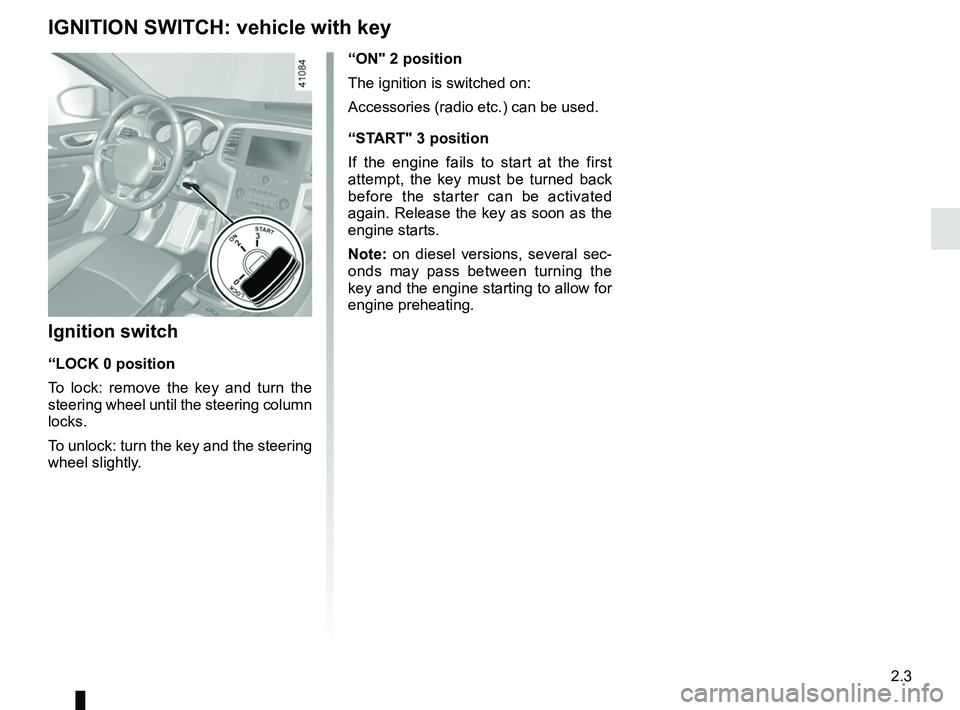
“ON" 2 position
The ignition is switched on:
Accessories (radio etc.) can be used.
“START" 3 position
If the engine fails to start at the first
attempt, the key must be turned back
before the starter can be activated
again. Release the key as soon as the
engine starts.
Note: on diesel versions, several sec-
onds may pass between turning the
key and the engine starting to allow for
engine preheating.
Ignition switch
“LOCK 0 position
To lock: remove the key and turn the
steering wheel until the steering column
locks.
To unlock: turn the key and the steering
wheel slightly.
IGNITION SWITCH: vehicle with key
Page 116 of 348
2.4
STARTING, STOPPING THE ENGINE: vehicle with key
Starting the engine
Petrol versions
– Activate the starter without acceler-
ating;
– release the key as soon as the
engine starts.
ÉDiesel versions
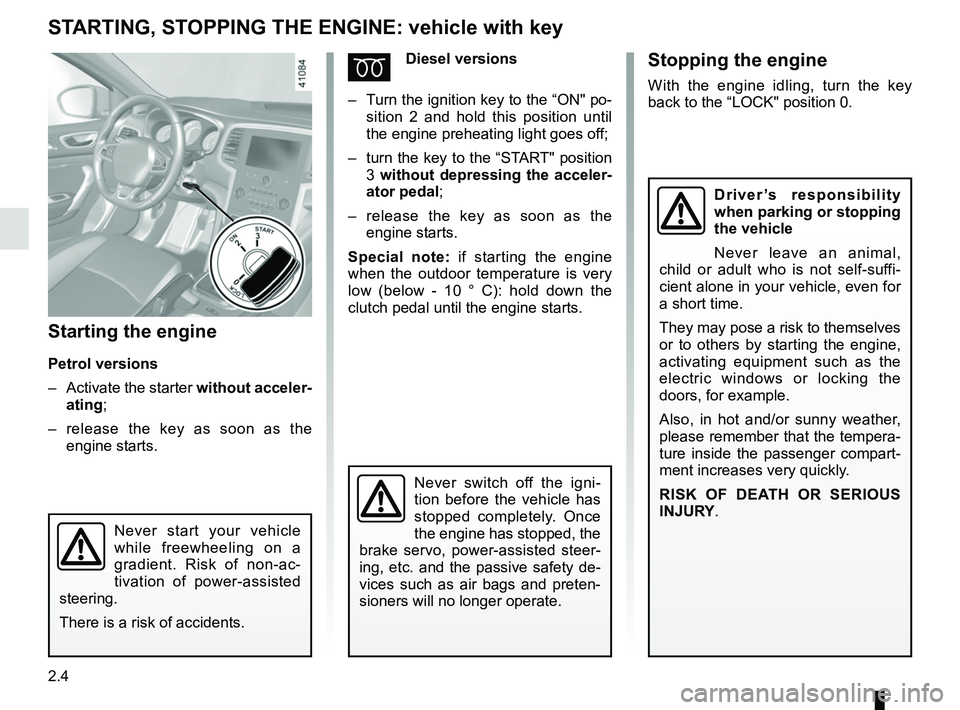
– Turn the ignition key to the “ON" po-
sition 2 and hold this position until
the engine preheating light goes off;
– turn the key to the “START" position
3 without depressing the acceler-
ator pedal;
– release the key as soon as the
engine starts.
Special note: if starting the engine
when the outdoor temperature is very
low (below - 10 ° C): hold down the
clutch pedal until the engine starts.
Never start your vehicle
while freewheeling on a
gradient. Risk of non-ac-
tivation of power-assisted
steering.
There is a risk of accidents.
Never switch off the igni-
tion before the vehicle has
stopped completely. Once
the engine has stopped, the
brake servo, power-assisted steer-
ing, etc. and the passive safety de-
vices such as air bags and preten-
sioners will no longer operate.
Stopping the engine
With the engine idling, turn the key
back to the “LOCK" position 0.
Driver’s responsibility
when parking or stopping
the vehicle
Never leave an animal,
child or adult who is not self-suffi-
cient alone in your vehicle, even for
a short time.
They may pose a risk to themselves
or to others by starting the engine,
activating equipment such as the
electric windows or locking the
doors, for example.
Also, in hot and/or sunny weather,
please remember that the tempera-
ture inside the passenger compart-
ment increases very quickly.
RISK OF DEATH OR SERIOUS
INJURY.
Page 117 of 348
2.5
STARTING, STOPPING THE ENGINE: vehicle with RENAULT card (1/3)
Conditions for starting the
engine
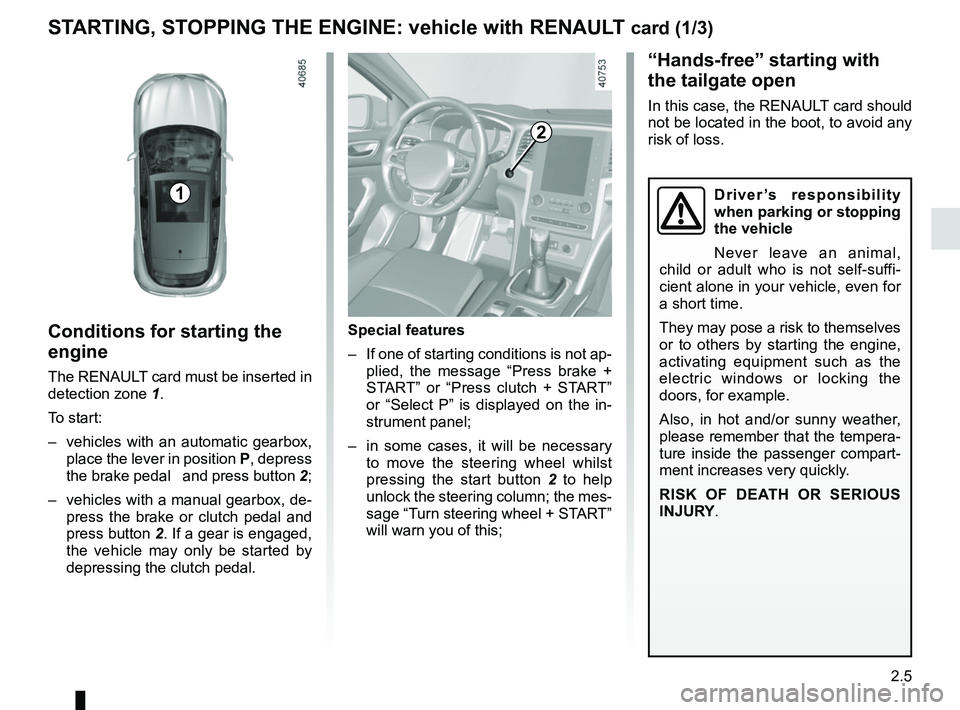
The RENAULT card must be inserted in
detection zone 1.
To start:
– vehicles with an automatic gearbox, place the lever in position P, depress
the brake pedal and press button 2;
– vehicles with a manual gearbox, de- press the brake or clutch pedal and
press button 2. If a gear is engaged, the vehicle may only be started by
depressing the clutch pedal.
“Hands-free” starting with
the tailgate open
In this case, the RENAULT card should
not be located in the boot, to avoid any
risk of loss.
2
1
Special features
– If one of starting conditions is not ap- plied, the message “Press brake +
START” or “Press clutch + START”
or “Select P” is displayed on the in-
strument panel;
– in some cases, it will be necessary to move the steering wheel whilst
pressing the start button 2 to help
unlock the steering column; the mes-
sage “Turn steering wheel + START”
will warn you of this;
Driver’s responsibility
when parking or stopping
the vehicle
Never leave an animal,
child or adult who is not self-suffi-
cient alone in your vehicle, even for
a short time.
They may pose a risk to themselves
or to others by starting the engine,
activating equipment such as the
electric windows or locking the
doors, for example.
Also, in hot and/or sunny weather,
please remember that the tempera-
ture inside the passenger compart-
ment increases very quickly.
RISK OF DEATH OR SERIOUS
INJURY.
Page 120 of 348
2.8
STANDING START PROCEDURE (1/2)
Activating the system
The system is activated by:
– with the engine running, and the ve-hicle stationary;
– Sport mode activated (please see the “Multi-Sense” section);
– depress the brake pedal with the left foot;
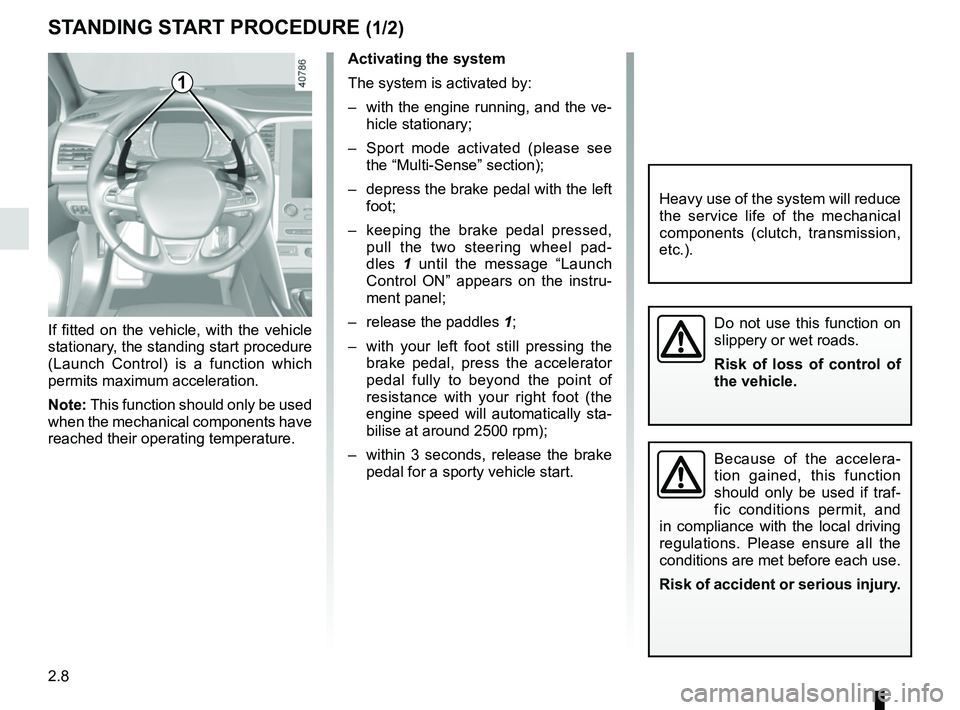
– keeping the brake pedal pressed, pull the two steering wheel pad-
dles 1 until the message “Launch
Control ON” appears on the instru-
ment panel;
– release the paddles 1;
– with your left foot still pressing the brake pedal, press the accelerator
pedal fully to beyond the point of
resistance with your right foot (the
engine speed will automatically sta-
bilise at around 2500 rpm);
– within 3 seconds, release the brake pedal for a sporty vehicle start.
If fitted on the vehicle, with the vehicle
stationary, the standing start procedure
(Launch Control) is a function which
permits maximum acceleration.
Note: This function should only be used
when the mechanical components have
reached their operating temperature.
1
Do not use this function on
slippery or wet roads.
Risk of loss of control of
the vehicle.
Because of the accelera-
tion gained, this function
should only be used if traf-
fic conditions permit, and
in compliance with the local driving
regulations. Please ensure all the
conditions are met before each use.
Risk of accident or serious injury.
Heavy use of the system will reduce
the service life of the mechanical
components (clutch, transmission,
etc.).
Page 132 of 348
2.20
DRIVING ADVICE, ECO-DRIVING (1/5)
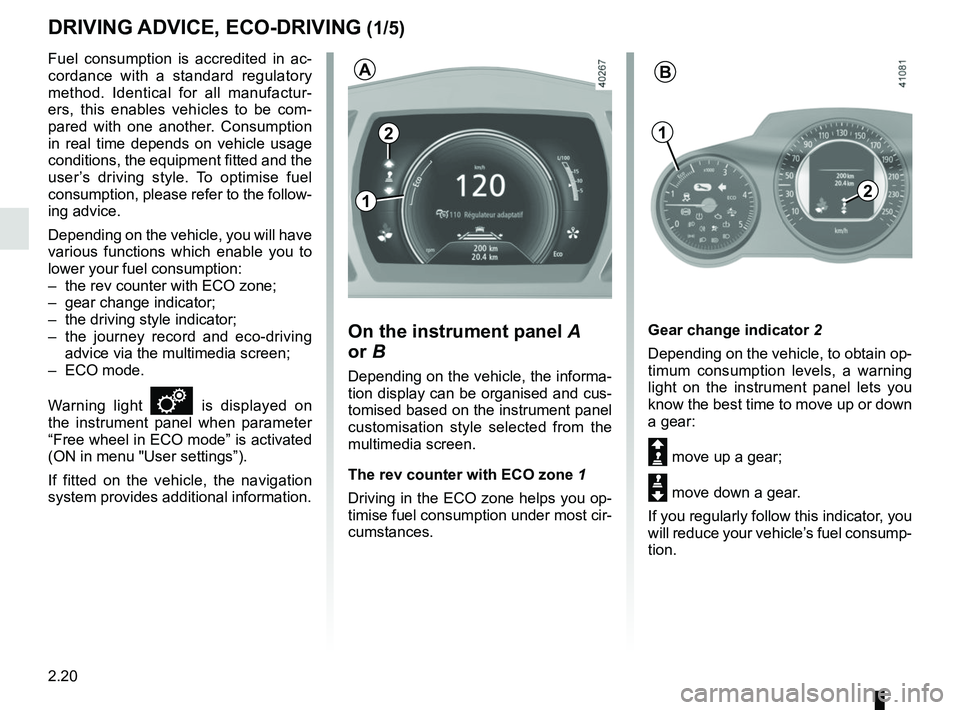
Gear change indicator 2
Depending on the vehicle, to obtain op-
timum consumption levels, a warning
light on the instrument panel lets you
know the best time to move up or down
a gear:
Š move up a gear;
‰ move down a gear.
If you regularly follow this indicator, you
will reduce your vehicle’s fuel consump-
tion.
Fuel consumption is accredited in ac-
cordance with a standard regulatory
method. Identical for all manufactur-
ers, this enables vehicles to be com-
pared with one another. Consumption
in real time depends on vehicle usage
conditions, the equipment fitted and the
user’s driving style. To optimise fuel
consumption, please refer to the follow-
ing advice.
Depending on the vehicle, you will have
various functions which enable you to
lower your fuel consumption:
– the rev counter with ECO zone;
– gear change indicator;
– the driving style indicator;
– the journey record and eco-driving
advice via the multimedia screen;
– ECO mode.
Warning light
is displayed on
the instrument panel when parameter
“Free wheel in ECO mode” is activated
(ON in menu "User settings”).
If fitted on the vehicle, the navigation
system provides additional information.
On the instrument panel A
or B
Depending on the vehicle, the informa-
tion display can be organised and cus-
tomised based on the instrument panel
customisation style selected from the
multimedia screen.
The rev counter with ECO zone 1
Driving in the ECO zone helps you op-
timise fuel consumption under most cir-
cumstances.
2
1
AB
2
1