ignition RENAULT MEGANE 2018 Owner's Manual
[x] Cancel search | Manufacturer: RENAULT, Model Year: 2018, Model line: MEGANE, Model: RENAULT MEGANE 2018Pages: 348, PDF Size: 9.25 MB
Page 102 of 348
1.96
Special note
When driving the vehicle, the wiping
speed slows down whenever the ve-
hicle stops. For example, fast wiping
speed will slow to normal wiping speed.
As soon as the vehicle moves off,
wiping will return to the speed originally
selected.
If stalk 1 is operated, it overrides and
cancels the automatic function.Vehicle fitted with intermittent
windscreen wipers
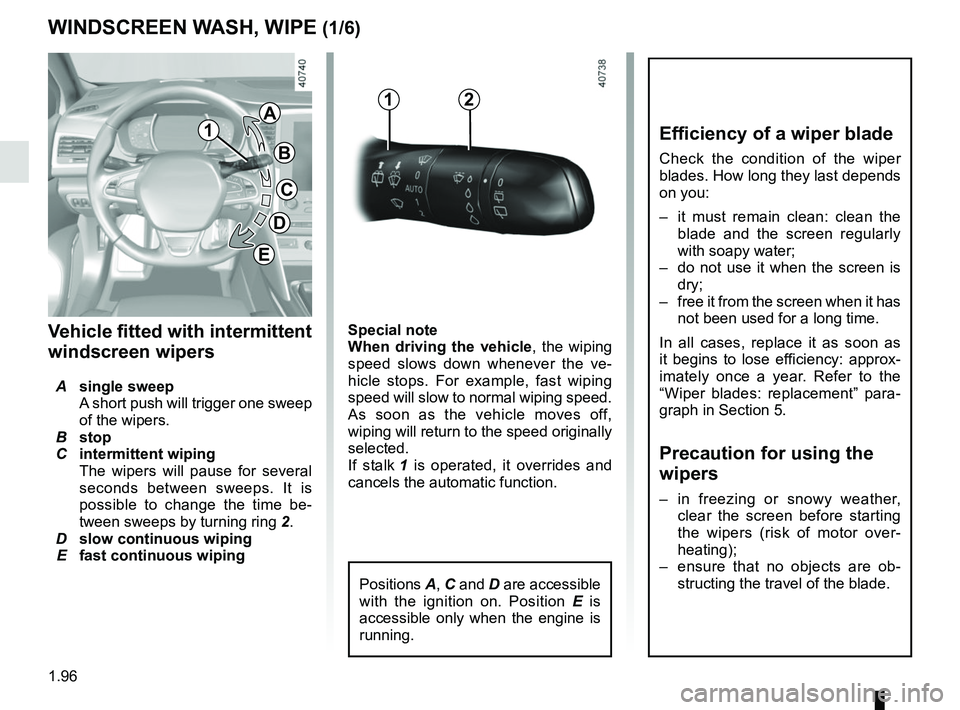
A single sweep
A short push will trigger one sweep
of the wipers.
B stop
C intermittent wiping
The wipers will pause for several
seconds between sweeps. It is
possible to change the time be-
tween sweeps by turning ring 2.
D slow continuous wiping
E fast continuous wiping
WINDSCREEN WASH, WIPE (1/6)
1
1A
B
C
D
2
Positions A, C and D are accessible
with the ignition on. Position E is
accessible only when the engine is
running.
E
Efficiency of a wiper blade
Check the condition of the wiper
blades. How long they last depends
on you:
– it must remain clean: clean the blade and the screen regularly
with soapy water;
– do not use it when the screen is dry;
– free it from the screen when it has not been used for a long time.
In all cases, replace it as soon as
it begins to lose efficiency: approx-
imately once a year. Refer to the
“Wiper blades: replacement” para-
graph in Section 5.
Precaution for using the
wipers
– in freezing or snowy weather, clear the screen before starting
the wipers (risk of motor over-
heating);
– ensure that no objects are ob- structing the travel of the blade.
Page 104 of 348
1.98
WINDSCREEN WASH, WIPE (3/6)
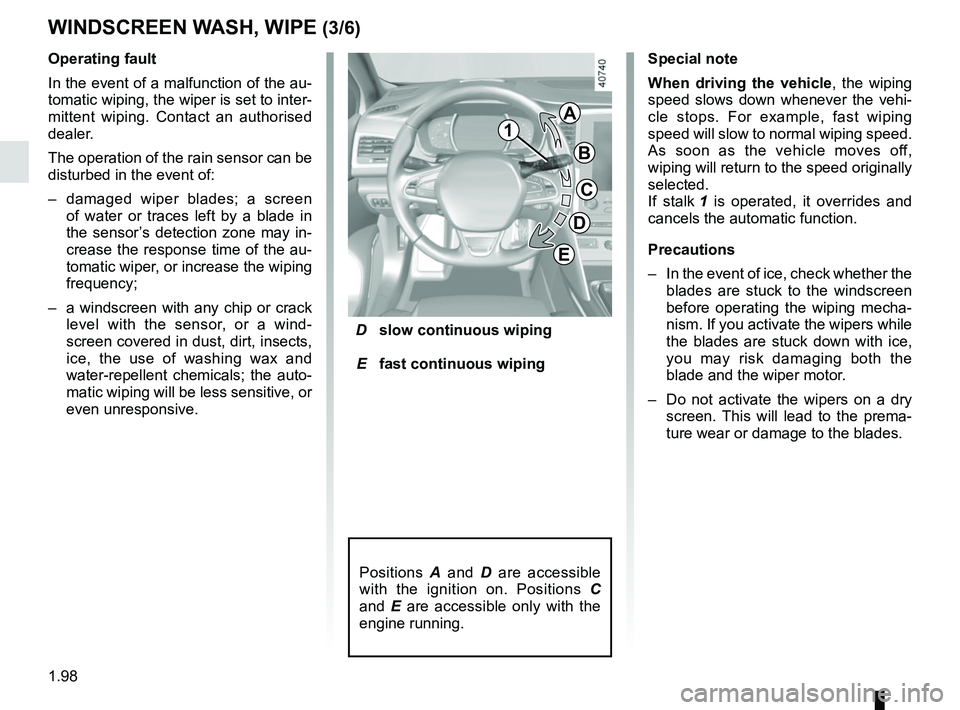
D slow continuous wiping
E fast continuous wiping
Operating fault
In the event of a malfunction of the au-
tomatic wiping, the wiper is set to inter-
mittent wiping. Contact an authorised
dealer.
The operation of the rain sensor can be
disturbed in the event of:
–
damaged wiper blades; a screen
of water or traces left by a blade in
the sensor’s detection zone may in-
crease the response time of the au-
tomatic wiper, or increase the wiping
frequency;
– a windscreen with any chip or crack
level with the sensor, or a wind-
screen covered in dust, dirt, insects,
ice, the use of washing wax and
water-repellent chemicals; the auto-
matic wiping will be less sensitive, or
even unresponsive. Special note
When driving the vehicle, the wiping
speed slows down whenever the vehi-
cle stops. For example, fast wiping
speed will slow to normal wiping speed.
As soon as the vehicle moves off,
wiping will return to the speed originally
selected.
If stalk
1 is operated, it overrides and
cancels the automatic function.
Precautions
– In the event of ice, check whether the
blades are stuck to the windscreen
before operating the wiping mecha-
nism. If you activate the wipers while
the blades are stuck down with ice,
you may risk damaging both the
blade and the wiper motor.
– Do not activate the wipers on a dry
screen. This will lead to the prema-
ture wear or damage to the blades.
Positions A and D are accessible
with the ignition on. Positions C
and E are accessible only with the
engine running.
1
A
B
C
D
E
Page 105 of 348
1.99
WINDSCREEN WASH, WIPE (4/6)
Specific front wiper position
(service position)
This position enables the blades to be
lifted to remove them from the winds-
creen.
It may be useful to:
– to clean the blades;
– to release the blades from the winds-creen in winter;
– replace the blades (refer to the “Wiper blades: replacement” para-
graph in Section 5).
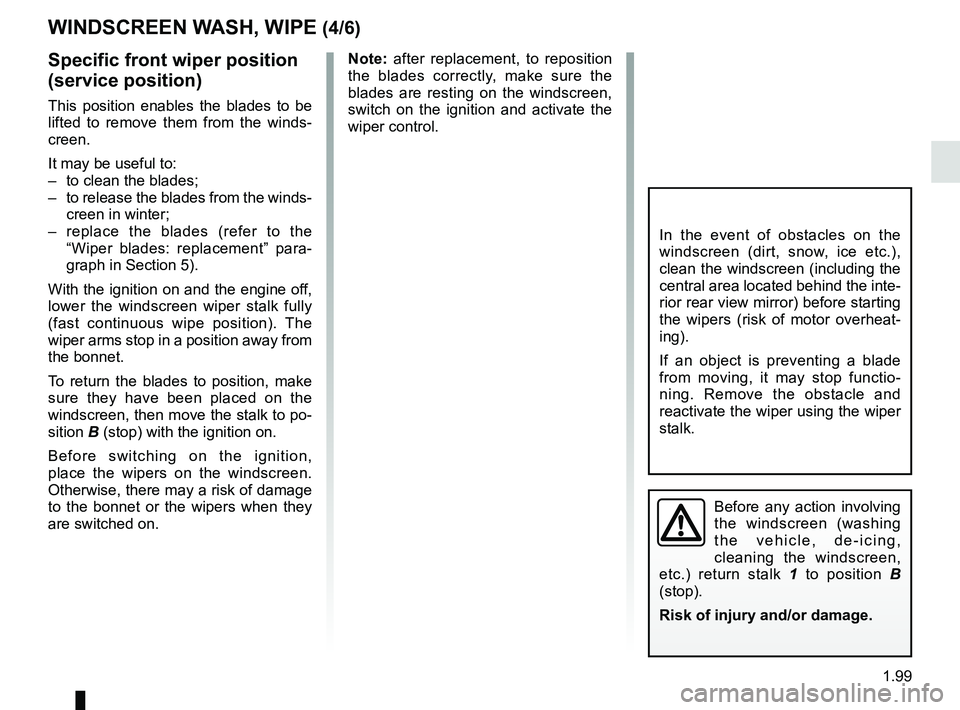
With the ignition on and the engine off,
lower the windscreen wiper stalk fully
(fast continuous wipe position). The
wiper arms stop in a position away from
the bonnet.
To return the blades to position, make
sure they have been placed on the
windscreen, then move the stalk to po-
sition B (stop) with the ignition on.
Before switching on the ignition,
place the wipers on the windscreen.
Otherwise, there may a risk of damage
to the bonnet or the wipers when they
are switched on.
In the event of obstacles on the
windscreen (dirt, snow, ice etc.),
clean the windscreen (including the
central area located behind the inte-
rior rear view mirror) before starting
the wipers (risk of motor overheat-
ing).
If an object is preventing a blade
from moving, it may stop functio-
ning. Remove the obstacle and
reactivate the wiper using the wiper
stalk.
Before any action involving
the windscreen (washing
the vehicle, de-icing,
cleaning the windscreen,
etc.) return stalk 1 to position B
(stop).
Risk of injury and/or damage.
Note: after replacement, to reposition
the blades correctly, make sure the
blades are resting on the windscreen,
switch on the ignition and activate the
wiper control.
Page 106 of 348
1.100
WINDSCREEN WASH, WIPE (5/6)
Windscreen washer
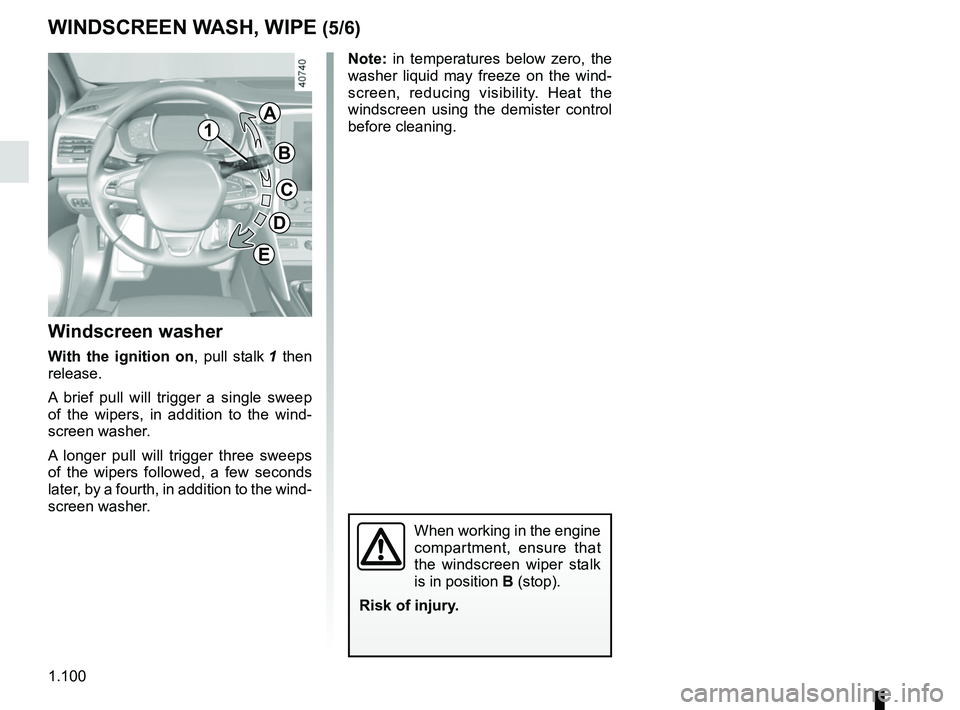
With the ignition on , pull stalk 1 then
release.
A brief pull will trigger a single sweep
of the wipers, in addition to the wind-
screen washer.
A longer pull will trigger three sweeps
of the wipers followed, a few seconds
later, by a fourth, in addition to the wind-
screen washer.
When working in the engine
compartment, ensure that
the windscreen wiper stalk
is in position B (stop).
Risk of injury.
1
A
B
C
D
E
Note: in temperatures below zero, the
washer liquid may freeze on the wind-
screen, reducing visibility. Heat the
windscreen using the demister control
before cleaning.
Page 108 of 348
1.102
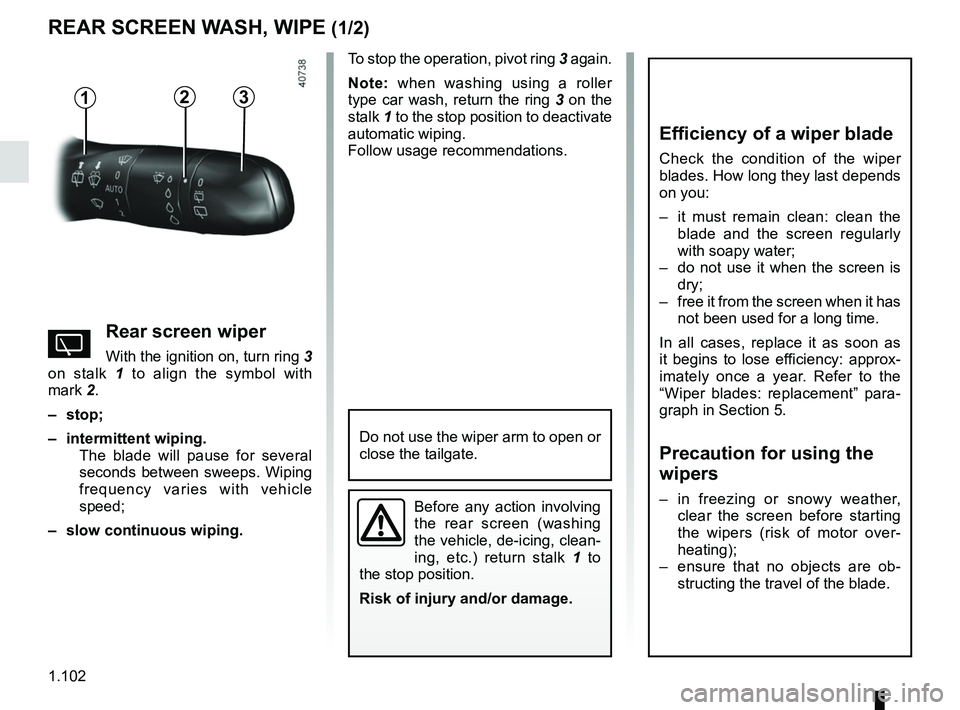
To stop the operation, pivot ring 3 again.
Note: when washing using a roller
type car wash, return the ring 3 on the
stalk 1 to the stop position to deactivate
automatic wiping.
Follow usage recommendations.
REAR SCREEN WASH, WIPE (1/2)
13
Do not use the wiper arm to open or
close the tailgate.
YRear screen wiper
With the ignition on, turn ring 3
on stalk 1 to align the symbol with
mark 2.
– stop;
– intermittent wiping. The blade will pause for several
seconds between sweeps. Wiping
frequency varies with vehicle
speed;
– slow continuous wiping.
2
Before any action involving
the rear screen (washing
the vehicle, de-icing, clean-
ing, etc.) return stalk 1 to
the stop position.
Risk of injury and/or damage.
Efficiency of a wiper blade
Check the condition of the wiper
blades. How long they last depends
on you:
– it must remain clean: clean the blade and the screen regularly
with soapy water;
– do not use it when the screen is dry;
– free it from the screen when it has not been used for a long time.
In all cases, replace it as soon as
it begins to lose efficiency: approx-
imately once a year. Refer to the
“Wiper blades: replacement” para-
graph in Section 5.
Precaution for using the
wipers
– in freezing or snowy weather, clear the screen before starting
the wipers (risk of motor over-
heating);
– ensure that no objects are ob- structing the travel of the blade.
Page 109 of 348
1.103
REAR SCREEN WASH, WIPE (2/2)
In the event of obstacles present on the
rear window (dirt, snow, etc.), the wiper
will try to sweep away all the obstacles.
If an obstacle prevents the blade from
moving, it can be stopped. Remove the
obstacle, wait for around 30 seconds
and reactivate the wiper using the wiper
stalk.
Precautions
– If the weather is icy, check that the
blade is not stuck to the windscreen
before operating the wipers. If you
activate the wiper while the blade is
blocked by ice, you risk damaging
both the blade and the wiping motor.
– Do not operate the wipers on a dry
screen. This will lead to the prema-
ture wear or damage to the blades.
Activation/deactivation of the rear
screen wiper
Engaging reverse gear triggers inter-
mittent wiping (if the front wipers are in
operation). If your vehicle is fitted with
a vehicle settings customisation menu,
you can opt to activate or deactivate
this function. To do this, refer to the in-
formation on the “Vehicle settings cus-
tomisation menu” in Section 1; “Rear
wiping in reverse gear”.
For vehicles not fitted with a settings
customisation menu, you can have this
function deactivated by an authorised
dealer.
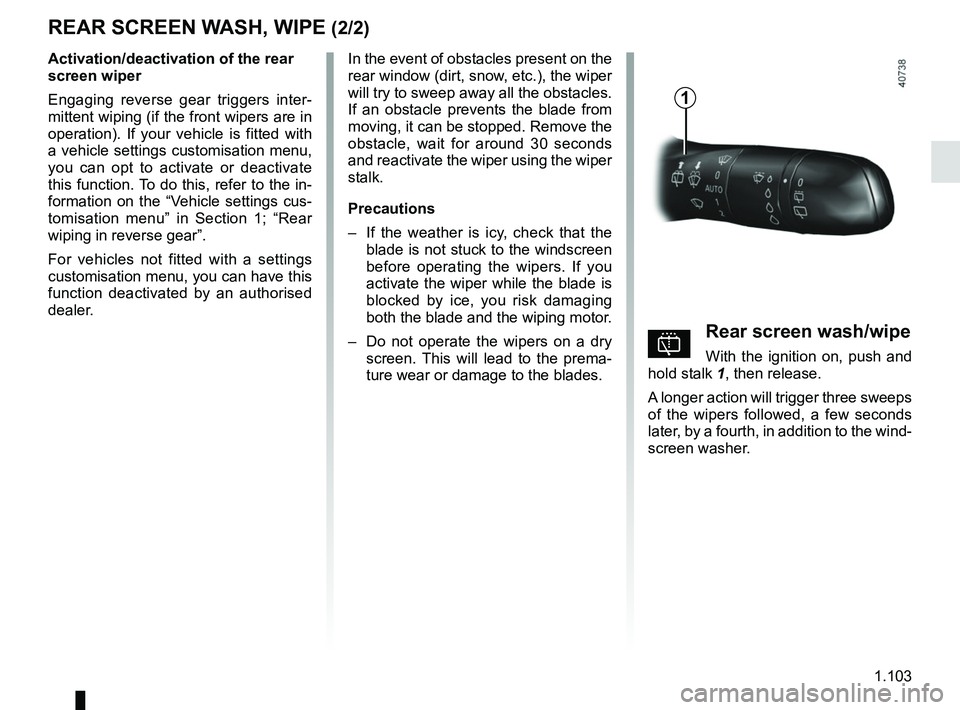
pRear screen wash/wipe
With the ignition on, push and
hold stalk 1, then release.
A longer action will trigger three sweeps
of the wipers followed, a few seconds
later, by a fourth, in addition to the wind-
screen washer.
1
Page 111 of 348
1.105
FUEL TANK (2/3)Filling with fuel
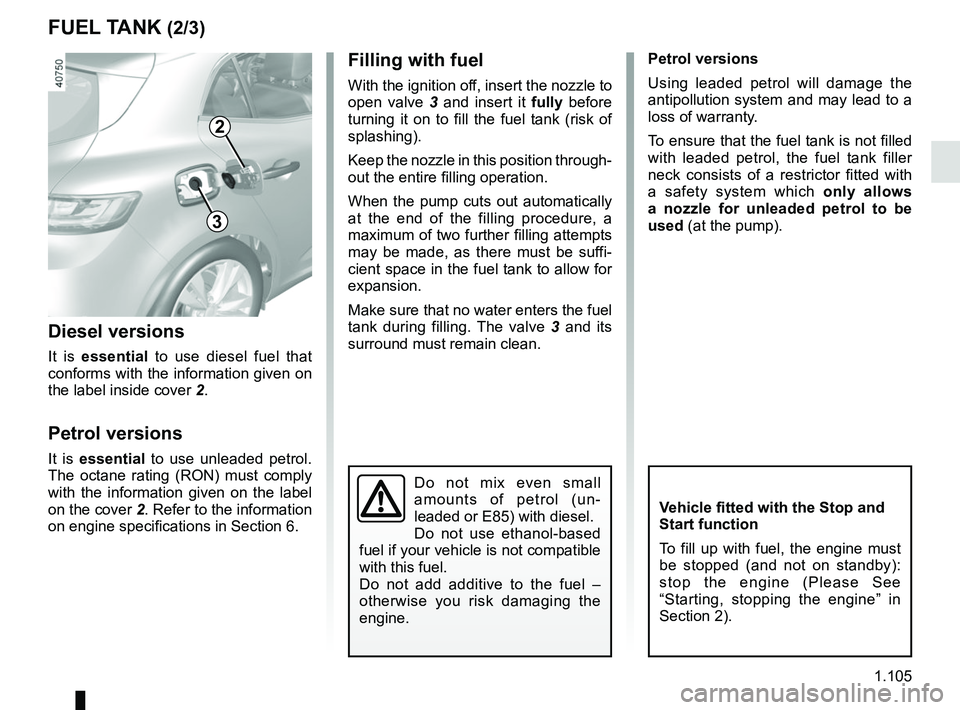
With the ignition off, insert the nozzle to
open valve 3 and insert it fully before
turning it on to fill the fuel tank (risk of
splashing).
Keep the nozzle in this position through-
out the entire filling operation.
When the pump cuts out automatically
at the end of the filling procedure, a
maximum of two further filling attempts
may be made, as there must be suffi-
cient space in the fuel tank to allow for
expansion.
Make sure that no water enters the fuel
tank during filling. The valve 3 and its
surround must remain clean.
Vehicle fitted with the Stop and
Start function
To fill up with fuel, the engine must
be stopped (and not on standby):
stop the engine (Please See
“Starting, stopping the engine” in
Section 2).
Petrol versions
Using leaded petrol will damage the
antipollution system and may lead to a
loss of warranty.
To ensure that the fuel tank is not filled
with leaded petrol, the fuel tank filler
neck consists of a restrictor fitted with
a safety system which only allows
a nozzle for unleaded petrol to be
used (at the pump).
Diesel versions
It is essential to use diesel fuel that
conforms with the information given on
the label inside cover 2.
Petrol versions
It is essential to use unleaded petrol.
The octane rating (RON) must comply
with the information given on the label
on the cover 2. Refer to the information
on engine specifications in Section 6.
Do not mix even small
amounts of petrol (un-
leaded or E85) with diesel.
Do not use ethanol-based
fuel if your vehicle is not compatible
with this fuel.
Do not add additive to the fuel –
otherwise you risk damaging the
engine.
2
3
Page 112 of 348
1.106
Persistent smell of
fuel
If you notice a persistent
smell of fuel you should:
– stop the vehicle as soon as traf- fic conditions allow and switch off
the ignition;
– switch on the hazard warning lights and ask your passengers
to leave the vehicle and to keep
away from traffic;
– contact an approved Dealer.
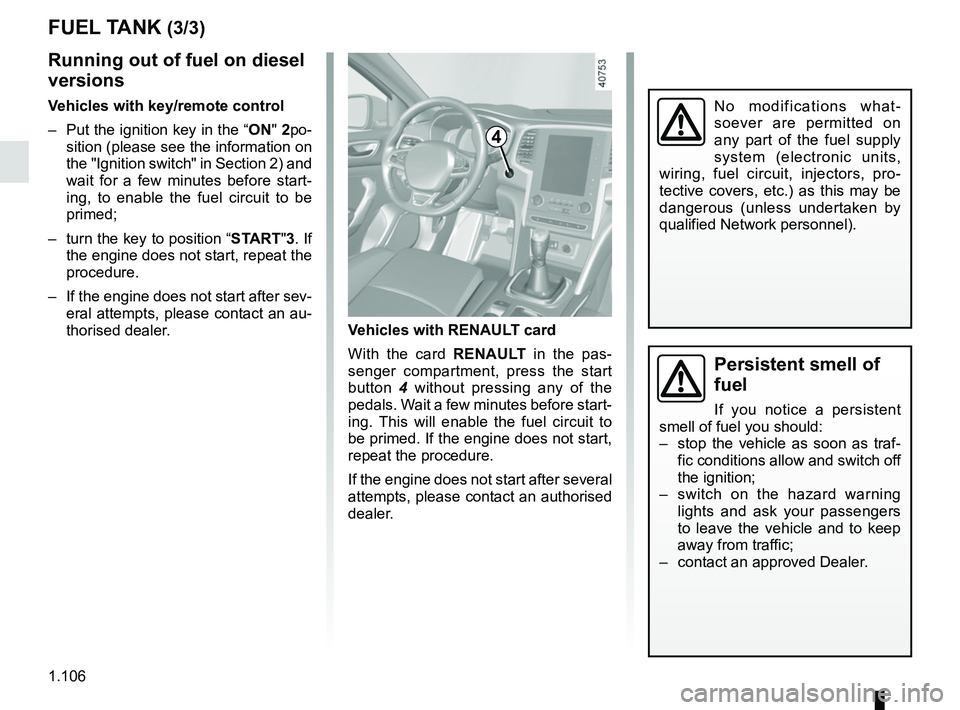
Vehicles with RENAULT card
With the card RENAULT in the pas-
senger compartment, press the start
button 4 without pressing any of the
pedals. Wait a few minutes before start-
ing. This will enable the fuel circuit to
be primed. If the engine does not start,
repeat the procedure.
If the engine does not start after several
attempts, please contact an authorised
dealer.
No modifications what-
soever are permitted on
any part of the fuel supply
system (electronic units,
wiring, fuel circuit, injectors, pro-
tective covers, etc.) as this may be
dangerous (unless undertaken by
qualified Network personnel).
4
FUEL TANK (3/3)
Running out of fuel on diesel
versions
Vehicles with key/remote control
– Put the ignition key in the “ON" 2po-
sition (please see the information on
the "Ignition switch" in Section 2) and
wait for a few minutes before start-
ing, to enable the fuel circuit to be
primed;
– turn the key to position “START"3. If the engine does not start, repeat the
procedure.
– If the engine does not start after sev- eral attempts, please contact an au-
thorised dealer.
Page 113 of 348

Running in . . . . . . . . . . . . . . . . . . . . . . . . . . . . . . . . . . . . \
. . . . . . . . . . . . . . . .")
2.1
Section 2: Driving
(Advice on use relating to fuel economy and the environment)
Running in . . . . . . . . . . . . . . . . . . . . . . . . . . . . . . . . . . . . \
. . . . . . . . . . . . . . . . . . . . . . . . . . . . . . . . . 2.2
Ignition switch . . . . . . . . . . . . . . . . . . . . . . . . . . . . . . . . . . . .\
. . . . . . . . . . . . . . . . . . . . . . . . . . . . . . 2.3
Starting, stopping the engine: vehicle with key/remote control unit . . . . . . . . . . . . . . . . . . . . . . . . . . 2.4
Starting - Stopping the engine: vehicle with RENAULT card . . . . . . . . . . . . . . . . . . . . . . . . . . . . . . . 2.5
Standing start procedure . . . . . . . . . . . . . . . . . . . . . . . . . . . . . . . . . . . . \
. . . . . . . . . . . . . . . . . . . . . . 2.8
Stop and Start function . . . . . . . . . . . . . . . . . . . . . . . . . . . . . . . . . . . .\
. . . . . . . . . . . . . . . . . . . . . . . 2.10
Special features of petrol versions . . . . . . . . . . . . . . . . . . . . . . . . . . . . . . . . . . . .\
. . . . . . . . . . . . . . 2.14
Special features of diesel versions . . . . . . . . . . . . . . . . . . . . . . . . . . . . . . . . . . . .\
. . . . . . . . . . . . . . 2.15
Gear lever/Handbrake . . . . . . . . . . . . . . . . . . . . . . . . . . . . . . . . . . . . \
. . . . . . . . . . . . . . . . . . . . . . . . 2.16
Electronic parking brake . . . . . . . . . . . . . . . . . . . . . . . . . . . . . . . . . . . .\
. . . . . . . . . . . . . . . . . . . . . . 2.17
Driving advice, Eco-driving . . . . . . . . . . . . . . . . . . . . . . . . . . . . . . . . . . . .\
. . . . . . . . . . . . . . . . . . . . 2.20
Maintenance and antipollution advice . . . . . . . . . . . . . . . . . . . . . . . . . . . . . . . . . . . . \
. . . . . . . . . . . . 2.25
Environment . . . . . . . . . . . . . . . . . . . . . . . . . . . . . . . . . . . .\
. . . . . . . . . . . . . . . . . . . . . . . . . . . . . . . 2.26
Tyre pressure monitoring system . . . . . . . . . . . . . . . . . . . . . . . . . . . . . . . . . . . .\
. . . . . . . . . . . . . . . 2.27
Driver correction devices/aids . . . . . . . . . . . . . . . . . . . . . . . . . . . . . . . . . . . . \
. . . . . . . . . . . . . . . . . . 2.30
Lane departure warning. . . . . . . . . . . . . . . . . . . . . . . . . . . . . . . . . . . . \
. . . . . . . . . . . . . . . . . . . . . . . 2.40
Blind spot warning . . . . . . . . . . . . . . . . . . . . . . . . . . . . . . . . . . . . \
. . . . . . . . . . . . . . . . . . . . . . . . . . . 2.43
Safe distance alert . . . . . . . . . . . . . . . . . . . . . . . . . . . . . . . . . . . . \
. . . . . . . . . . . . . . . . . . . . . . . . . . . 2.47
Fatigue detection warning . . . . . . . . . . . . . . . . . . . . . . . . . . . . . . . . . . . . \
. . . . . . . . . . . . . . . . . . . . . 2.49
Speed limiter . . . . . . . . . . . . . . . . . . . . . . . . . . . . . . . . . . . .\
. . . . . . . . . . . . . . . . . . . . . . . . . . . . . . . 2.51
Speeding alert . . . . . . . . . . . . . . . . . . . . . . . . . . . . . . . . . . . . \
. . . . . . . . . . . . . . . . . . . . . . . . . . . . . . 2.54
Cruise control . . . . . . . . . . . . . . . . . . . . . . . . . . . . . . . . . . . .\
. . . . . . . . . . . . . . . . . . . . . . . . . . . . . . 2.57
Adaptive cruise control . . . . . . . . . . . . . . . . . . . . . . . . . . . . . . . . . . . .\
. . . . . . . . . . . . . . . . . . . . . . . 2.61
Parking distance control . . . . . . . . . . . . . . . . . . . . . . . . . . . . . . . . . . . .\
. . . . . . . . . . . . . . . . . . . . . . 2.68
Reversing camera . . . . . . . . . . . . . . . . . . . . . . . . . . . . . . . . . . . . \
. . . . . . . . . . . . . . . . . . . . . . . . . . . 2.73
Assisted parking . . . . . . . . . . . . . . . . . . . . . . . . . . . . . . . . . . . .\
. . . . . . . . . . . . . . . . . . . . . . . . . . . . 2.75
Automatic gearbox. . . . . . . . . . . . . . . . . . . . . . . . . . . . . . . . . . . . \
. . . . . . . . . . . . . . . . . . . . . . . . . . . 2.79
Page 115 of 348
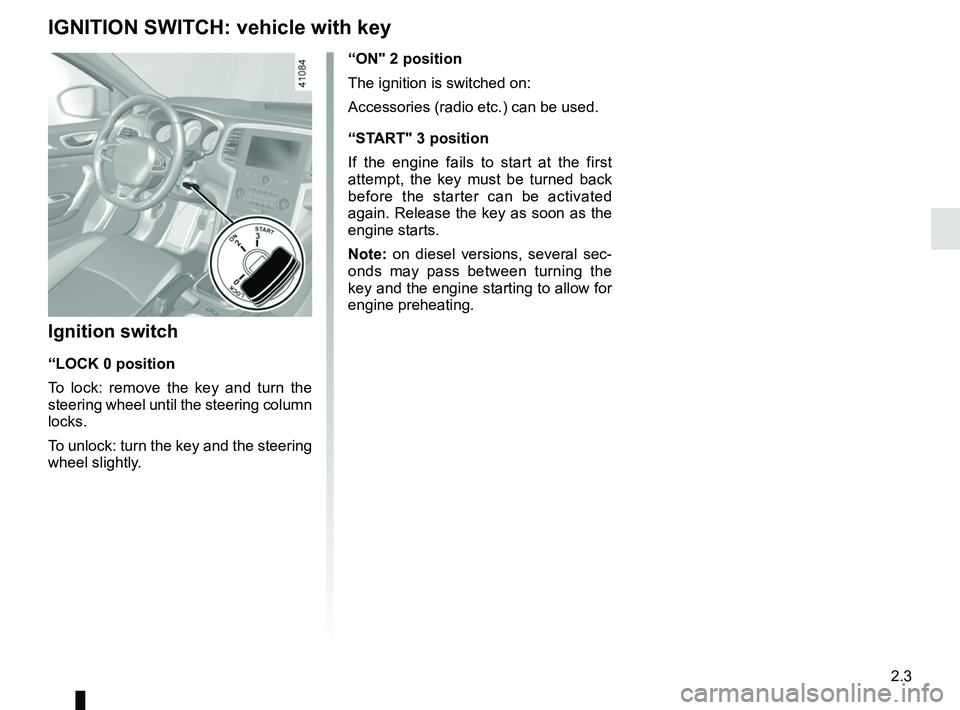
2.3
“ON" 2 position
The ignition is switched on:
Accessories (radio etc.) can be used.
“START" 3 position
If the engine fails to start at the first
attempt, the key must be turned back
before the starter can be activated
again. Release the key as soon as the
engine starts.
Note: on diesel versions, several sec-
onds may pass between turning the
key and the engine starting to allow for
engine preheating.
Ignition switch
“LOCK 0 position
To lock: remove the key and turn the
steering wheel until the steering column
locks.
To unlock: turn the key and the steering
wheel slightly.
IGNITION SWITCH: vehicle with key