lights RENAULT MEGANE 2018 Owner's Manual
[x] Cancel search | Manufacturer: RENAULT, Model Year: 2018, Model line: MEGANE, Model: RENAULT MEGANE 2018Pages: 348, PDF Size: 9.25 MB
Page 69 of 348
1.63
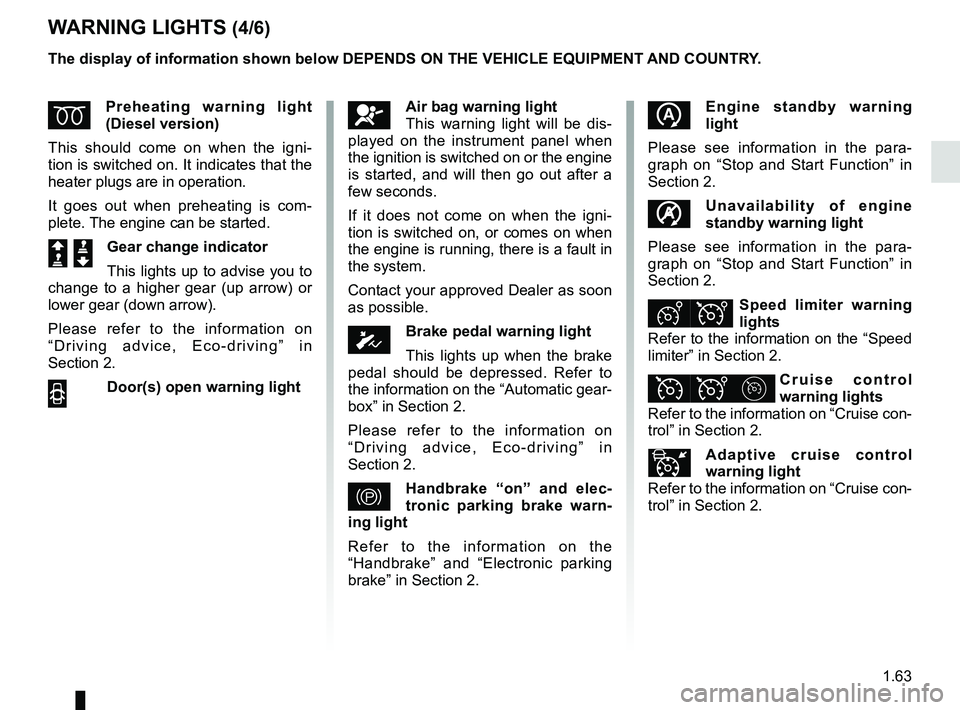
WARNING LIGHTS (4/6)
ÉPreheating warning light
(Diesel version)
This should come on when the igni-
tion is switched on. It indicates that the
heater plugs are in operation.
It goes out when preheating is com-
plete. The engine can be started.
Š ‰Gear change indicator
This lights up to advise you to
change to a higher gear (up arrow) or
lower gear (down arrow).
Please refer to the information on
“Driving advice, Eco-driving” in
Section 2.
2 Door(s) open warning light
The display of information shown below DEPENDS ON THE VEHICLE EQUIPMENT \
AND COUNTRY.
Engine standby warning
light
Please see information in the para-
graph on “Stop and Start Function” in
Section 2.
Unavailability of engine
standby warning light
Please see information in the para-
graph on “Stop and Start Function” in
Section 2.
ÐÎSpeed limiter warning
lights
Refer to the information on the “Speed
limiter” in Section 2.
ÏΦ Cruise control
warning lights
Refer to the information on “Cruise con-
trol” in Section 2.
Adaptive cruise control
warning light
Refer to the information on “Cruise con-
trol” in Section 2.
åAir bag warning light
This warning light will be dis-
played on the instrument panel when
the ignition is switched on or the engine
is started, and will then go out after a
few seconds.
If it does not come on when the igni-
tion is switched on, or comes on when
the engine is running, there is a fault in
the system.
Contact your approved Dealer as soon
as possible.
ÓBrake pedal warning light
This lights up when the brake
pedal should be depressed. Refer to
the information on the “Automatic gear-
box” in Section 2.
Please refer to the information on
“Driving advice, Eco-driving” in
Section 2.
}Handbrake “on” and elec-
tronic parking brake warn-
ing light
Refer to the information on the
“Handbrake” and “Electronic parking
brake” in Section 2.
Page 70 of 348

The display of information shown below DEPENDS ON THE VEHICLE EQUIPMENT \
AND COUNTRY.
\fFree wheel warning light in
mode ECO
It lights up in mode ECO when the
“Free whee")
1.64
WARNING LIGHTS (5/6)
The display of information shown below DEPENDS ON THE VEHICLE EQUIPMENT \
AND COUNTRY.
\fFree wheel warning light in
mode ECO
It lights up in mode ECO when the
“Free wheel in mode ECO” is activated
(ON) in the user settings.
The warning light colour is dim when
the vehicle is not while freewheeling.
This warning light is bright when the ve-
hicle is while freewheeling (automatic
neutral).
Please refer to the information on
“Driving advice, ECO-driving” in
Section 2.Assisted parking brake fault
light
Please refer to the information on the
“Assisted parking brake” in Section 2.
Emergency active brake
assist
Refer to the information on “Driving cor-
rection devices and aids” in Section 2.
Mode warning light ECO
This comes on when ECO
mode is activated.
Please refer to the information on “Eco-
driving” in Section 2.
Tyre pressure monitoring
system
Refer to the information on the “Tyre
pressure monitoring system” in
Section 2.
Rear seat belt reminder (depending
on vehicle)
Warning light
ß comes on, accom-
panied (depending on the vehicle) by
a message indicating the number of
fastened seat belts on the instrument
panel for approximately 30 seconds,
each time the vehicle is started, a door
is opened or a rear seat belt is fas-
tened/unfastened. Check that the rear
passengers are wearing seat belts and
that the number of seat belts shown as
fastened corresponds to the number of
rear seat places occupied.
Page 71 of 348

The display of information shown below DEPENDS ON THE VEHICLE EQUIPMENT \
AND COUNTRY.
On display C
Passenger airbag ON
Please refer to the information
on “Child safe")
1.65
WARNING LIGHTS (6/6)
The display of information shown below DEPENDS ON THE VEHICLE EQUIPMENT \
AND COUNTRY.
On display C
Passenger airbag ON
Please refer to the information
on “Child safety: deactivating/activating
the front passenger airbag” in Section 1.
¹Passenger airbag OFF
Please refer to the information
on “Child safety: deactivating/activating
the front passenger airbag” in Section 1.
ßDriver’s seat belt reminder
and, depending on the vehi-
cle, front passenger seat belt re-
minder.
This lights up when the ignition is
switched on. If the driver's or front pas-
senger's seat belt (if this seat is occu-
pied) is not fastened as soon as the
vehicle has reached approximately
12.4 mph (20 km/h), it flashes and a
bleep sounds for around 120 seconds.
Note: an object placed on the passen-
ger seat base can activate the warning
light.
C
Page 72 of 348
1.66
DISPLAYS AND INDICATORS (1/6)
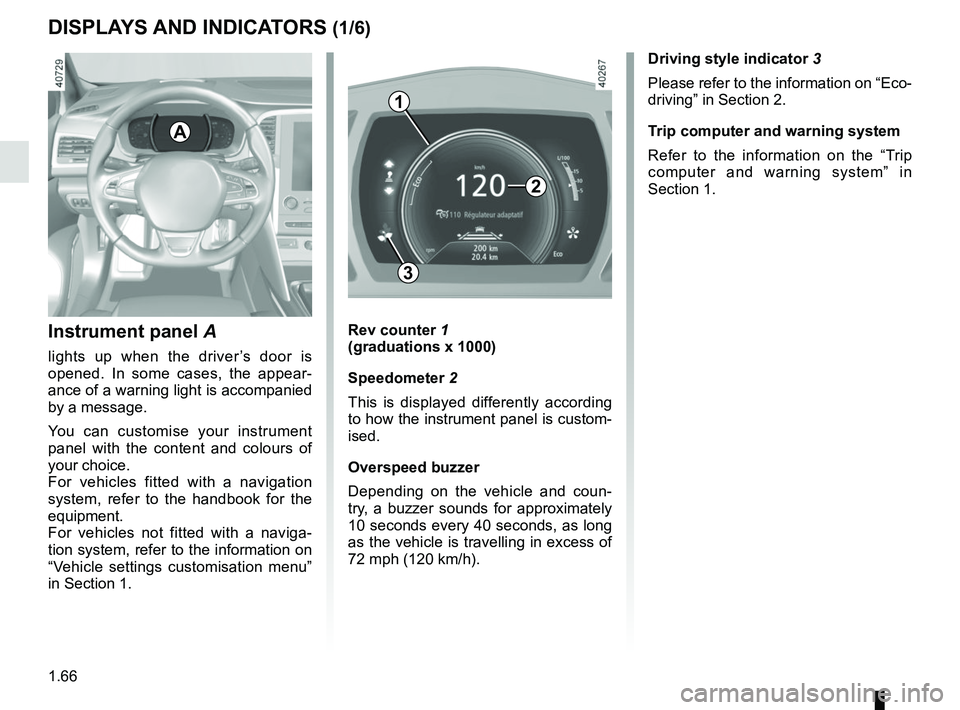
Instrument panel A
lights up when the driver’s door is
opened. In some cases, the appear-
ance of a warning light is accompanied
by a message.
You can customise your instrument
panel with the content and colours of
your choice.
For vehicles fitted with a navigation
system, refer to the handbook for the
equipment.
For vehicles not fitted with a naviga-
tion system, refer to the information on
“Vehicle settings customisation menu”
in Section 1.
Rev counter 1
(graduations x 1000)
Speedometer 2
This is displayed differently according
to how the instrument panel is custom-
ised.
Overspeed buzzer
Depending on the vehicle and coun-
try, a buzzer sounds for approximately
10 seconds every 40 seconds, as long
as the vehicle is travelling in excess of
72 mph (120 km/h).
3
A
Driving style indicator 3
Please refer to the information on “Eco-
driving” in Section 2.
Trip computer and warning system
Refer to the information on the “Trip
computer and warning system” in
Section 1.
1
2
Page 74 of 348
1.68
DISPLAYS AND INDICATORS (3/6)
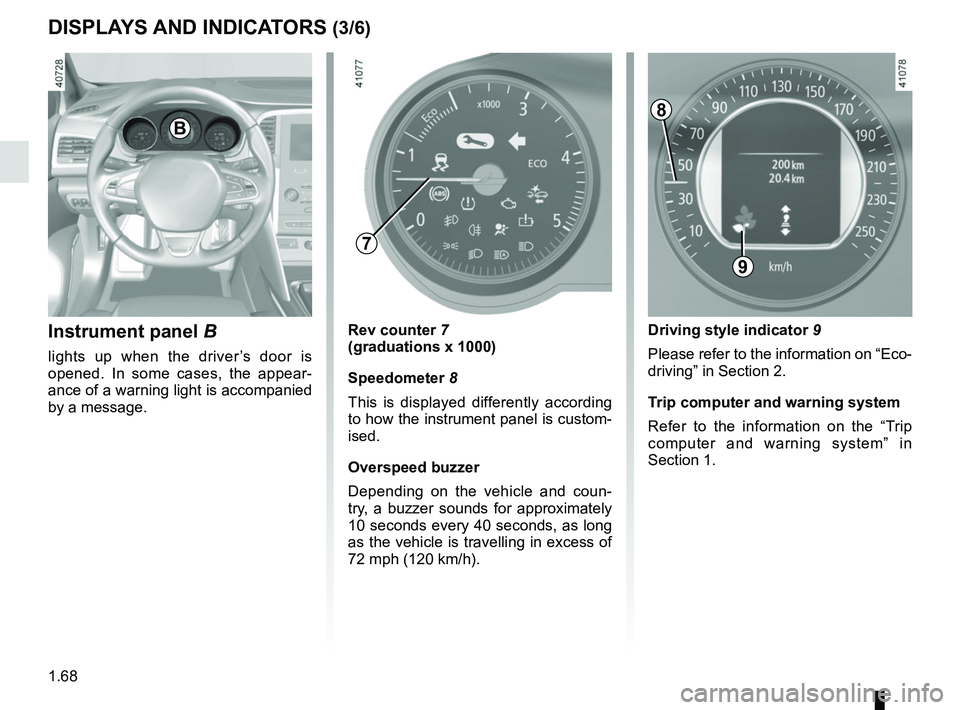
Instrument panel B
lights up when the driver’s door is
opened. In some cases, the appear-
ance of a warning light is accompanied
by a message.
Rev counter 7
(graduations x 1000)
Speedometer 8
This is displayed differently according
to how the instrument panel is custom-
ised.
Overspeed buzzer
Depending on the vehicle and coun-
try, a buzzer sounds for approximately
10 seconds every 40 seconds, as long
as the vehicle is travelling in excess of
72 mph (120 km/h).
9
B
Driving style indicator 9
Please refer to the information on “Eco-
driving” in Section 2.
Trip computer and warning system
Refer to the information on the “Trip
computer and warning system” in
Section 1.
8
7
Page 76 of 348
1.70
DISPLAYS AND INDICATORS (5/6)
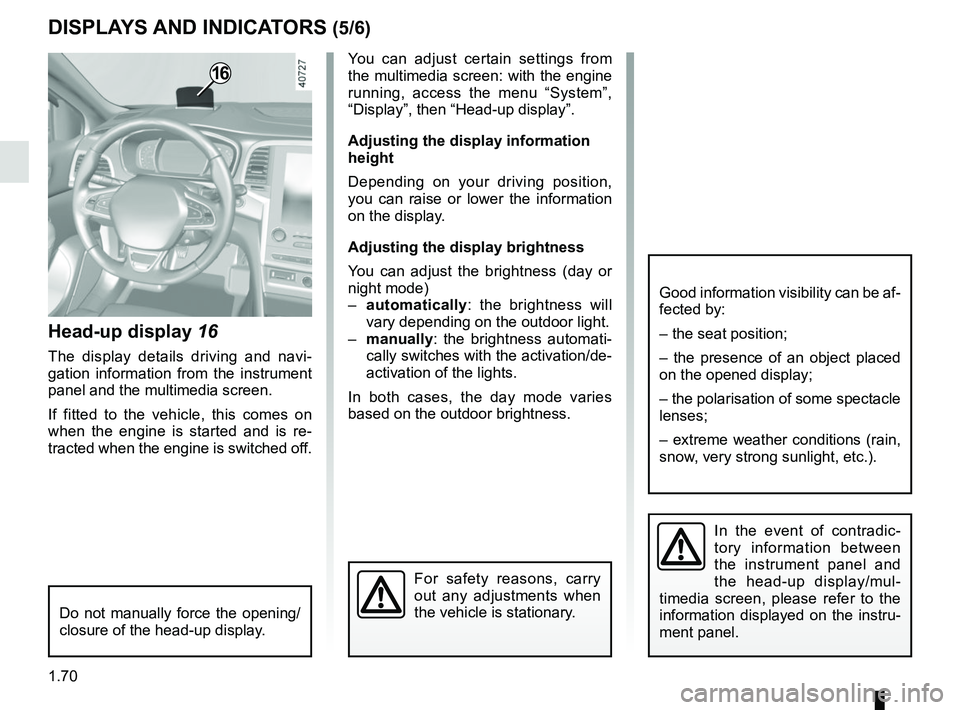
Head-up display 16
The display details driving and navi-
gation information from the instrument
panel and the multimedia screen.
If fitted to the vehicle, this comes on
when the engine is started and is re-
tracted when the engine is switched off.
16You can adjust certain settings from
the multimedia screen: with the engine
running, access the menu “System”,
“Display”, then “Head-up display”.
Adjusting the display information
height
Depending on your driving position,
you can raise or lower the information
on the display.
Adjusting the display brightness
You can adjust the brightness (day or
night mode)
– automatically : the brightness will
vary depending on the outdoor light.
– manually: the brightness automati-
cally switches with the activation/de-
activation of the lights.
In both cases, the day mode varies
based on the outdoor brightness.
Good information visibility can be af-
fected by:
– the seat position;
– the presence of an object placed
on the opened display;
– the polarisation of some spectacle
lenses;
– extreme weather conditions (rain,
snow, very strong sunlight, etc.).
In the event of contradic-
tory information between
the instrument panel and
the head-up display/mul-
timedia screen, please refer to the
information displayed on the instru-
ment panel.
Do not manually force the opening/
closure of the head-up display.
For safety reasons, carry
out any adjustments when
the vehicle is stationary.
Page 86 of 348

1.80
TRIP COMPUTER AND WARNING SYSTEM: operating fault messages
These appear with the © warning light and mean that you should drive very carefully to an author\
ised dealer as
soon as possible. If you fail to follow this recommendation, you risk da\
maging your vehicle.
They disappear when the display selection key is pressed or after severa\
l seconds and are stored in the computer log. The
© warning light stays on. Examples of operating fault messages are given \
in the following pages.
Examples of messages Interpreting the display selected
“Clean diesel filter” Indicates the presence of water in the diesel filter; contact an approve\
d Dealer
as soon as possible.
“Check lighting” Indicates a fault in the headlights.
“Check vehicle” Indicates a fault in one of the pedal sensors, battery management system\
or oil
level sensor.
“Check airbag” Indicates a fault in the restraint system in addition to the seat belts.\
In the event
of an accident, it is possible that they may not be triggered.
“Check antipollution system” Indicates a fault in the vehicle’s particle filter system.
Page 89 of 348
1.83
VEHICLE SETTINGS CUSTOMISATION MENU (2/2)
34
Once a line has been selected, press
the switch 3 OK to adjust the function.
If you select either “PARKING ASSIST
VOLUME” or “LANGUAGE”, you will
have to make a further selection (sound
volume of the parking distance control
or instrument panel language). In this
case, make your selection and con-
firm it by holding the switch 3 OK – the
selected value is shown by a
~ in
front of the line.
To exit the menu, press the control 4
upwards or downwards. It may be nec-
essary to carry out this operation sev-
eral times.
For further explanations of the Free
wheel in ECO mode function refer to
the information on “Driving Advice,
ECO driving” in section 2.
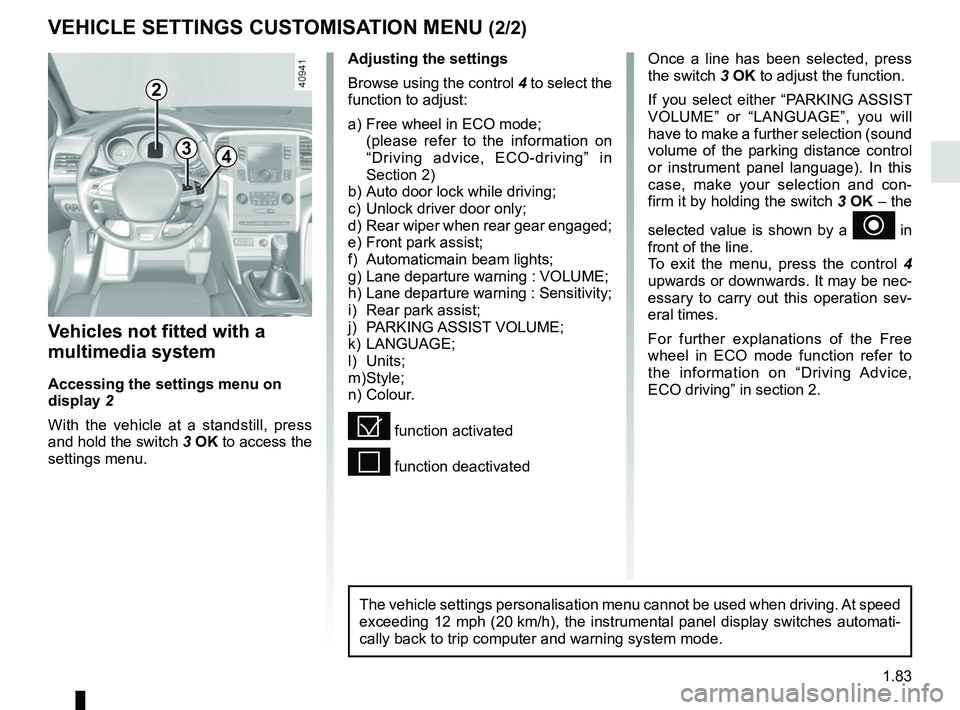
Vehicles not fitted with a
multimedia system
Accessing the settings menu on
display 2
With the vehicle at a standstill, press
and hold the switch 3 OK to access the
settings menu.
Adjusting the settings
Browse using the control 4 to select the
function to adjust:
a) Free wheel in ECO mode;
(please refer to the information on “Driving advice, ECO-driving” in
Section 2)
b) Auto door lock while driving;
c) Unlock driver door only;
d) Rear wiper when rear gear engaged;
e) Front park assist;
f) Automaticmain beam lights;
g) Lane departure warning : VOLUME;
h) Lane departure warning : Sensitivity;
i) Rear park assist;
j) PARKING ASSIST VOLUME;
k) LANGUAGE;
l) Units;
m) Style;
n) Colour.
= function activated
< function deactivated
2
The vehicle settings personalisation menu cannot be used when driving. At speed
exceeding 12 mph (20 km/h), the instrumental panel display switches automati-
cally back to trip computer and warning system mode.
Page 93 of 348
1.87
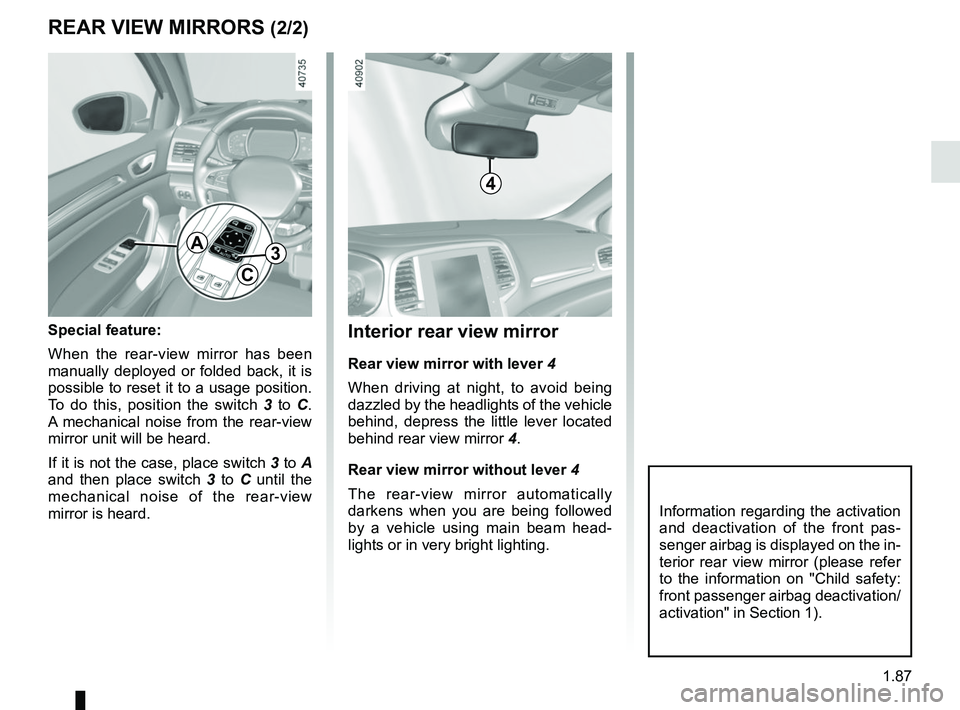
Interior rear view mirror
Rear view mirror with lever 4
When driving at night, to avoid being
dazzled by the headlights of the vehicle
behind, depress the little lever located
behind rear view mirror 4.
Rear view mirror without lever 4
The rear-view mirror automatically
darkens when you are being followed
by a vehicle using main beam head-
lights or in very bright lighting.
REAR VIEW MIRRORS (2/2)
Special feature:
When the rear-view mirror has been
manually deployed or folded back, it is
possible to reset it to a usage position.
To do this, position the switch 3 to C.
A mechanical noise from the rear-view
mirror unit will be heard.
If it is not the case, place switch 3 to A
and then place switch 3 to C until the
mechanical noise of the rear-view
mirror is heard.
A
C
3
Information regarding the activation
and deactivation of the front pas-
senger airbag is displayed on the in-
terior rear view mirror (please refer
to the information on "Child safety:
front passenger airbag deactivation/
activation" in Section 1).
4
Page 94 of 348
1.88
Halogen bulb versions
HEADLIGHT BEAM ADJUSTMENT (1/2)
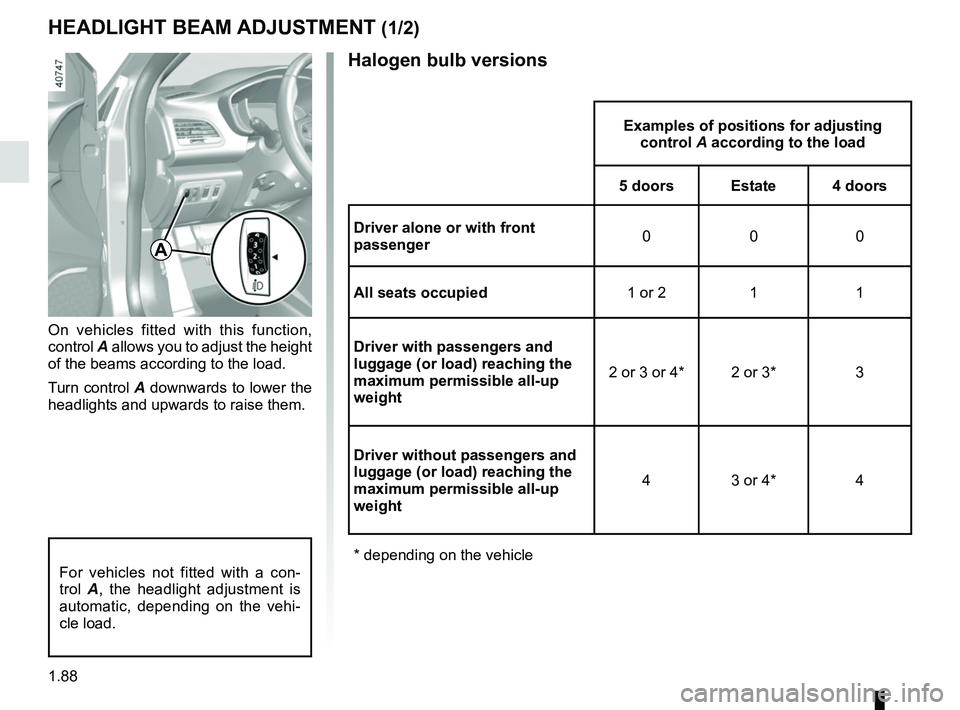
On vehicles fitted with this function,
control A allows you to adjust the height
of the beams according to the load.
Turn control A downwards to lower the
headlights and upwards to raise them.
Examples of positions for adjusting control A according to the load
5 doors Estate 4 doors
Driver alone or with front
passenger 000
All seats occupied 1 or 2 1 1
Driver with passengers and
luggage (or load) reaching the
maximum permissible all-up
weight 2 or 3 or 4* 2 or 3* 3
Driver without passengers and
luggage (or load) reaching the
maximum permissible all-up
weight 4 3 or 4* 4
* depending on the vehicle
A
For vehicles not fitted with a con-
trol A, the headlight adjustment is
automatic, depending on the vehi-
cle load.