seats RENAULT MEGANE 2018 Owner's Manual
[x] Cancel search | Manufacturer: RENAULT, Model Year: 2018, Model line: MEGANE, Model: RENAULT MEGANE 2018Pages: 348, PDF Size: 9.25 MB
Page 57 of 348

X = Seat not suitable for fitting child seats ISOFIX.
IUF/IL = On equipped vehicles, seat which allows an approved “Universal/semi-u\
n")
1.51
CHILD SEATS: attachment using the isofix system (3/3)
X = Seat not suitable for fitting child seats ISOFIX.
IUF/IL = On equipped vehicles, seat which allows an approved “Universal/semi-u\
niversal” or “vehicle specific” child seat to be at-
tached using the ISOFIX system; check that it can be fitted.
i-U = Suitable for the i-Size restraint devices in the “universal” forwa\
rd-facing and backward-facing category.
(1) If necessary, position the vehicle seat as far back as possible. Move the front seat\
as far forward as possible to install a re ar-
facing child seat, then move back the seat in front as far as it will go\
, although without allowing it to come into contact with the
child seat.
(2) In all situations, remove the rear headrest of the seat on which the chi\
ld seat is positioned. This must be done before fitting the
child seat. Please refer to the information on the “Rear headrests”\
in Section 3. Move the seat in front of the child forwards,
move the seatback forward to avoid contact between the seat and the chil\
d’s legs.
The size of the ISOFIX child seat is indicated by a letter:
– A, B and B1: for forward-facing seats in group 1 (9 to 18 kg);
– C and D: shell seat or rear-facing seats in group 0+ (less than 13 kg)\
or group 1 (9 to 18 kg);
– E: rear-facing shell seats in group 0 (less than 10 kg) or 0+ (less t\
han 13 kg);
– F and G: cots in group 0 (less than 10 kg).
Page 94 of 348
1.88
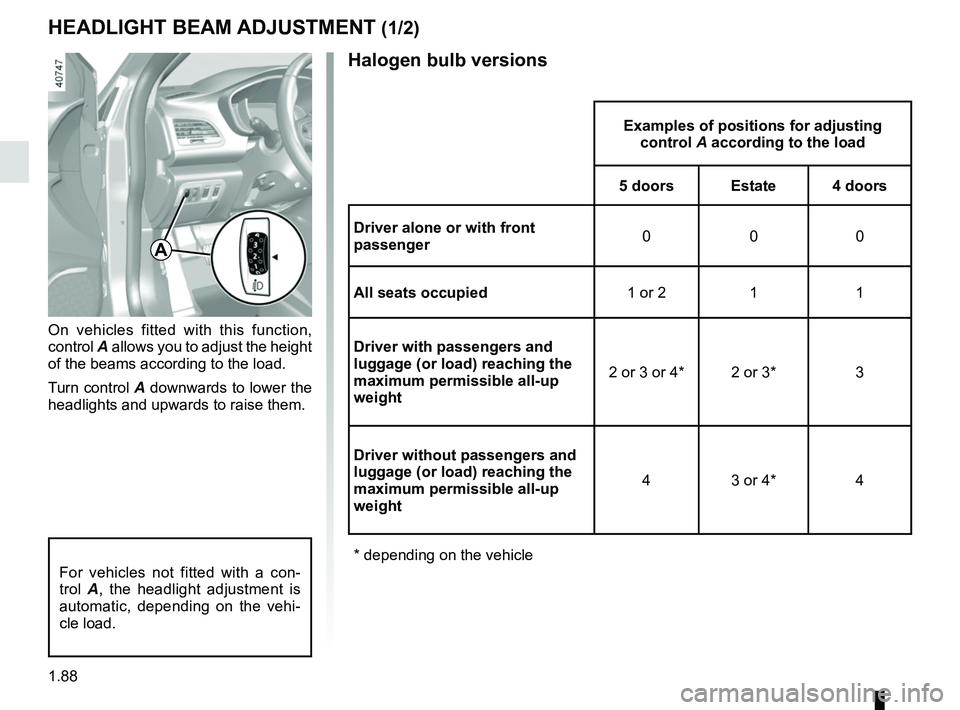
Halogen bulb versions
HEADLIGHT BEAM ADJUSTMENT (1/2)
On vehicles fitted with this function,
control A allows you to adjust the height
of the beams according to the load.
Turn control A downwards to lower the
headlights and upwards to raise them.
Examples of positions for adjusting control A according to the load
5 doors Estate 4 doors
Driver alone or with front
passenger 000
All seats occupied 1 or 2 1 1
Driver with passengers and
luggage (or load) reaching the
maximum permissible all-up
weight 2 or 3 or 4* 2 or 3* 3
Driver without passengers and
luggage (or load) reaching the
maximum permissible all-up
weight 4 3 or 4* 4
* depending on the vehicle
A
For vehicles not fitted with a con-
trol A, the headlight adjustment is
automatic, depending on the vehi-
cle load.
Page 95 of 348
1.89
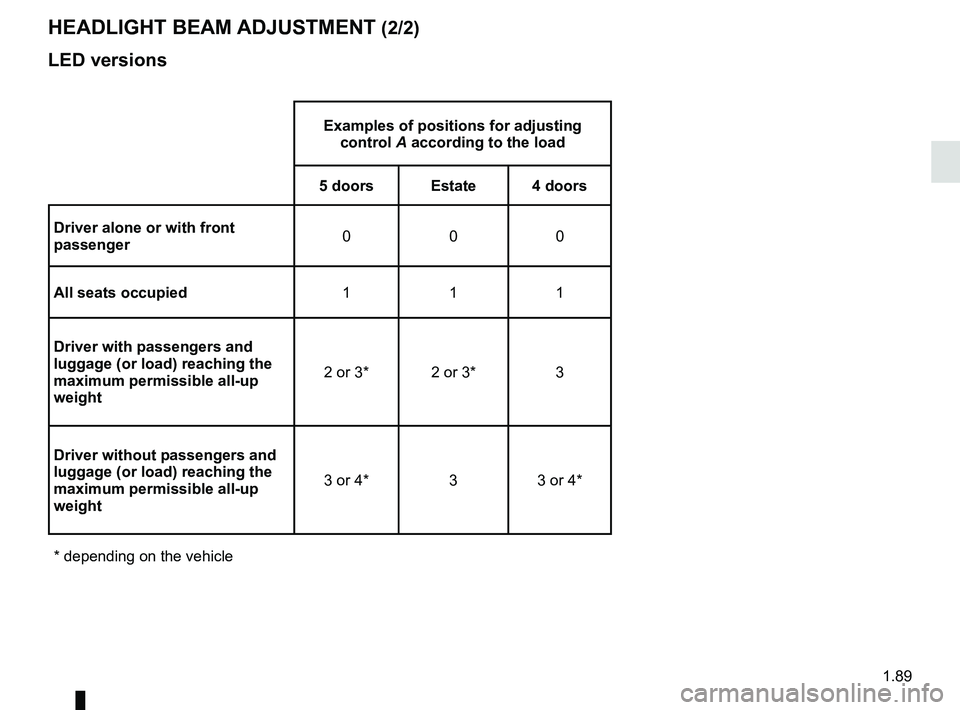
LED versions
HEADLIGHT BEAM ADJUSTMENT (2/2)
Examples of positions for adjusting control A according to the load
5 doors Estate 4 doors
Driver alone or with front
passenger 000
All seats occupied 111
Driver with passengers and
luggage (or load) reaching the
maximum permissible all-up
weight 2 or 3* 2 or 3* 3
Driver without passengers and
luggage (or load) reaching the
maximum permissible all-up
weight 3 or 4* 3 3 or 4*
* depending on the vehicle
Page 199 of 348
3.5
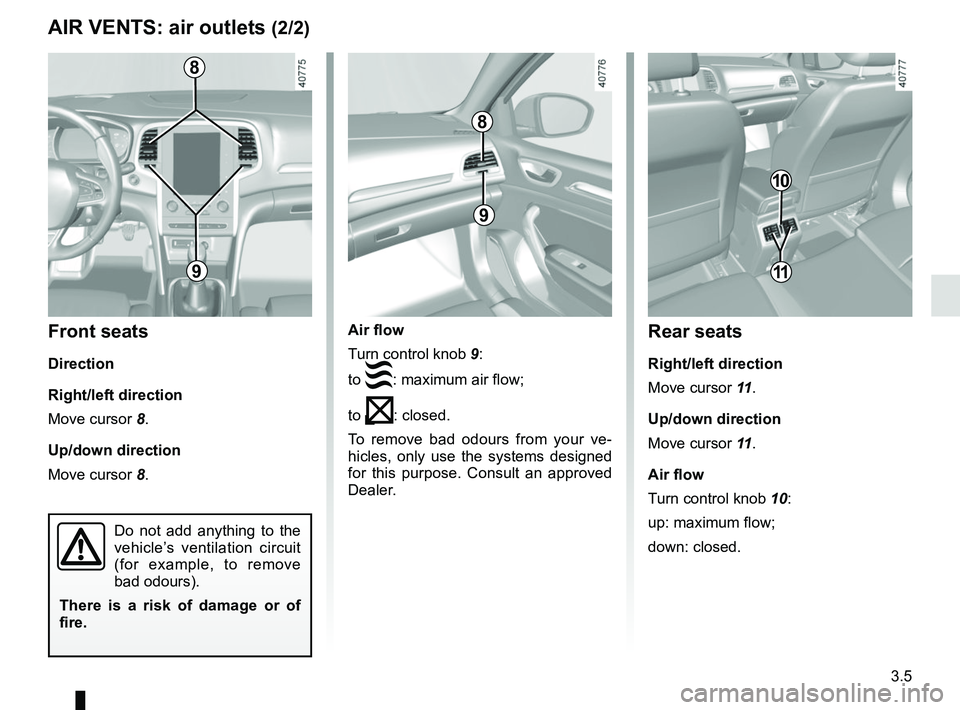
Air flow
Turn control knob 9:
to
: maximum air flow;
to
: closed.
To remove bad odours from your ve-
hicles, only use the systems designed
for this purpose. Consult an approved
Dealer.
AIR VENTS: air outlets (2/2)
8
9
8
9
Front seats
Direction
Right/left direction
Move cursor 8.
Up/down direction
Move cursor 8.
Do not add anything to the
vehicle’s ventilation circuit
(for example, to remove
bad odours).
There is a risk of damage or of
fire.
10
Rear seats
Right/left direction
Move cursor 11 .
Up/down direction
Move cursor 11 .
Air flow
Turn control knob 10:
up: maximum flow;
down: closed.
11
Page 203 of 348
3.9
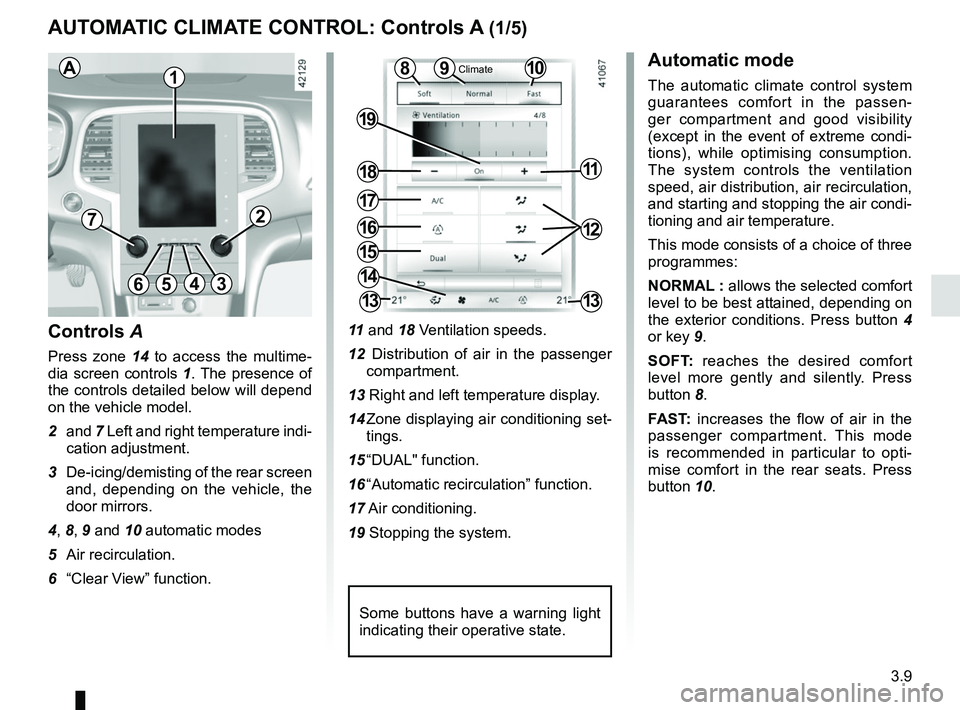
11 and 18 Ventilation speeds.
12 Distribution of air in the passenger compartment.
13 Right and left temperature display.
14 Zone displaying air conditioning set- tings.
15 “DUAL" function.
16 “Automatic recirculation” function.
17 Air conditioning.
19 Stopping the system.
10
AUTOMATIC CLIMATE CONTROL: Controls A (1/5)
15
6543
9
1216
17
18
19
11
Controls A
Press zone 14 to access the multime-
dia screen controls 1. The presence of
the controls detailed below will depend
on the vehicle model.
2 and 7 Left and right temperature indi-
cation adjustment.
3 De-icing/demisting of the rear screen and, depending on the vehicle, the
door mirrors.
4, 8, 9 and 10 automatic modes
5 Air recirculation.
6 “Clear View” function.
Automatic mode
The automatic climate control system
guarantees comfort in the passen-
ger compartment and good visibility
(except in the event of extreme condi-
tions), while optimising consumption.
The system controls the ventilation
speed, air distribution, air recirculation,
and starting and stopping the air condi-
tioning and air temperature.
This mode consists of a choice of three
programmes:
NORMAL : allows the selected comfort
level to be best attained, depending on
the exterior conditions. Press button 4
or key 9.
SOFT: reaches the desired comfort
level more gently and silently. Press
button 8.
FAST: increases the flow of air in the
passenger compartment. This mode
is recommended in particular to opti-
mise comfort in the rear seats. Press
button 10.8
14
13
72
13
1
Some buttons have a warning light
indicating their operative state.
AClimate
Page 208 of 348
3.14
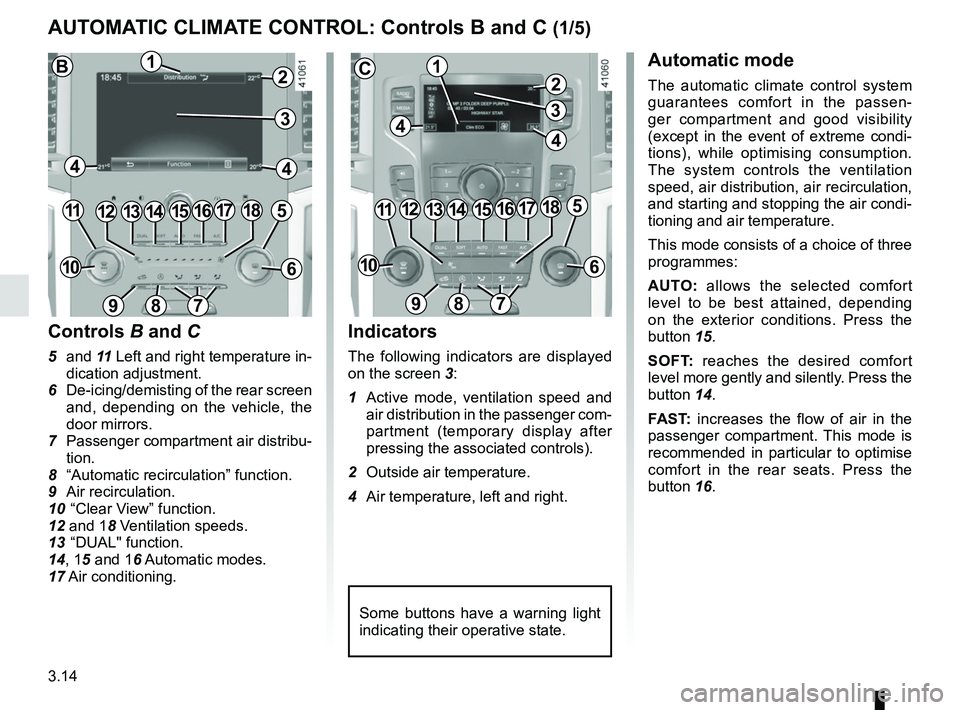
AUTOMATIC CLIMATE CONTROL: Controls B and C (1/5)
Indicators
The following indicators are displayed
on the screen 3:
1 Active mode, ventilation speed and air distribution in the passenger com-
partment (temporary display after
pressing the associated controls).
2 Outside air temperature.
4 Air temperature, left and right.
Automatic mode
The automatic climate control system
guarantees comfort in the passen-
ger compartment and good visibility
(except in the event of extreme condi-
tions), while optimising consumption.
The system controls the ventilation
speed, air distribution, air recirculation,
and starting and stopping the air condi-
tioning and air temperature.
This mode consists of a choice of three
programmes:
AUTO: allows the selected comfort
level to be best attained, depending
on the exterior conditions. Press the
button 15.
SOFT: reaches the desired comfort
level more gently and silently. Press the
button 14.
FAST: increases the flow of air in the
passenger compartment. This mode is
recommended in particular to optimise
comfort in the rear seats. Press the
button 16.
10
Some buttons have a warning light
indicating their operative state.
1113141512
89
6
Controls B and C
5 and 11 Left and right temperature in-
dication adjustment.
6 De-icing/demisting of the rear screen and, depending on the vehicle, the
door mirrors.
7 Passenger compartment air distribu- tion.
8 “Automatic recirculation” function.
9 Air recirculation.
10 “Clear View” function.
12 and 18 Ventilation speeds.
13 “DUAL" function.
14, 15 and 16 Automatic modes.
17 Air conditioning.
7
1851716
1
44
2
10
1113141512
89
6
7
1851716
1
44
2
BC
33
Page 216 of 348
3.22
ELECTRIC WINDOWS (1/2)
1
2
34
5
6
Electric windows
These systems operate:
– with the engine running;
– with the ignition off until one of the front doors is opened (limited to ap-
proximately 12 minutes).
– with the engine off, front doors closed, after pressing the start
button.
Press the window switch down or pull it
up to lower or raise the window to the
desired height: the rear windows do not
open fully.
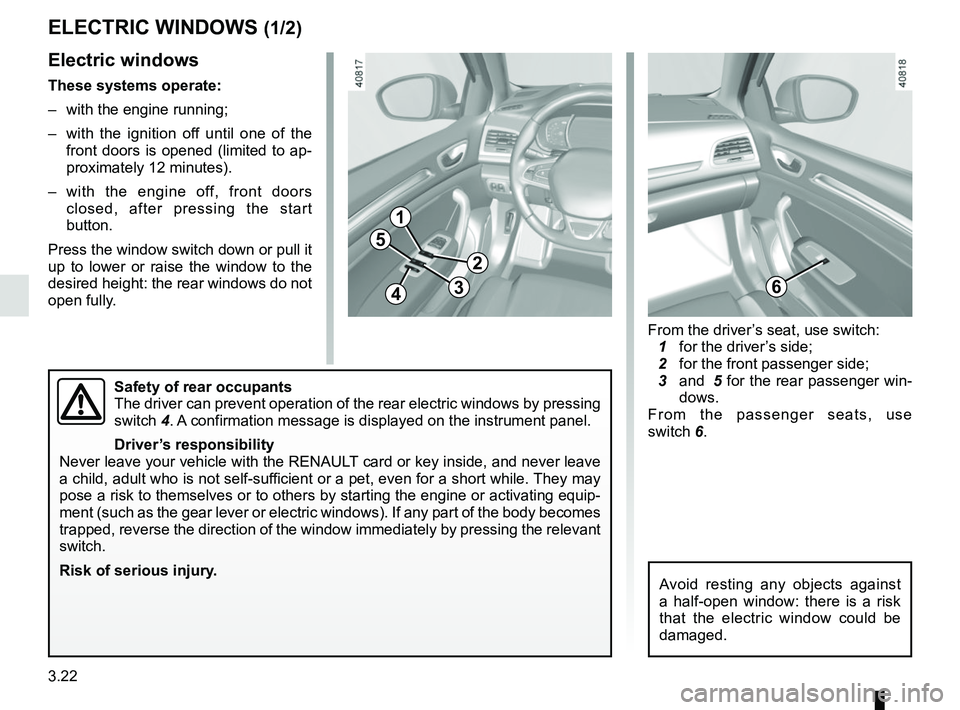
Safety of rear occupants
The driver can prevent operation of the rear electric windows by pressin\
g
switch 4. A confirmation message is displayed on the instrument panel.
Driver’s responsibility
Never leave your vehicle with the RENAULT card or key inside, and never leave
a child, adult who is not self-sufficient or a pet, even for a short while. They may
pose a risk to themselves or to others by starting the engine or activat\
ing equip-
ment (such as the gear lever or electric windows). If any part of the \
body becomes
trapped, reverse the direction of the window immediately by pressing the\
relevant
switch.
Risk of serious injury.
Avoid resting any objects against
a half-open window: there is a risk
that the electric window could be
damaged.
From the driver’s seat, use switch:
1 for the driver’s side;
2 for the front passenger side;
3 and 5 for the rear passenger win-
dows.
From the passenger seats, use
switch 6.
Page 232 of 348
3.38
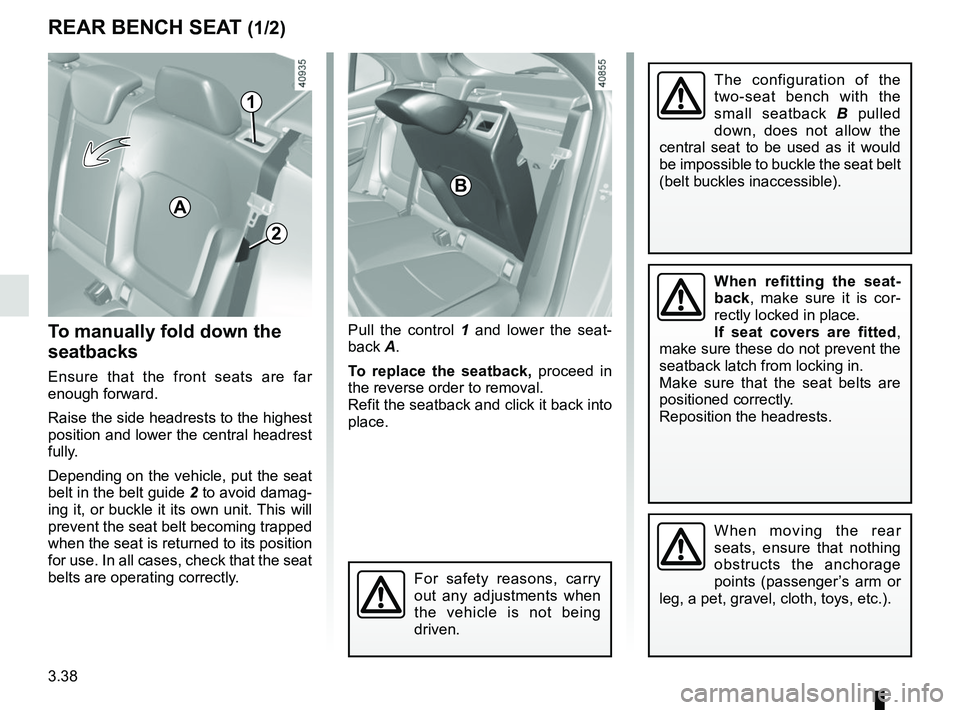
To manually fold down the
seatbacks
Ensure that the front seats are far
enough forward.
Raise the side headrests to the highest
position and lower the central headrest
fully.
Depending on the vehicle, put the seat
belt in the belt guide 2 to avoid damag-
ing it, or buckle it its own unit. This will
prevent the seat belt becoming trapped
when the seat is returned to its position
for use. In all cases, check that the seat
belts are operating correctly.
Pull the control 1 and lower the seat-
back A.
To replace the seatback, proceed in
the reverse order to removal.
Refit the seatback and click it back into
place.
REAR BENCH SEAT (1/2)
For safety reasons, carry
out any adjustments when
the vehicle is not being
driven.
When moving the rear
seats, ensure that nothing
obstructs the anchorage
points (passenger’s arm or
leg, a pet, gravel, cloth, toys, etc.).
A
1
The configuration of the
two-seat bench with the
small seatback B pulled
down, does not allow the
central seat to be used as it would
be impossible to buckle the seat belt
(belt buckles inaccessible).
When refitting the seat-
back, make sure it is cor-
rectly locked in place.
If seat covers are fitted ,
make sure these do not prevent the
seatback latch from locking in.
Make sure that the seat belts are
positioned correctly.
Reposition the headrests.
B
2
Page 233 of 348
3.39
REAR BENCH SEAT (2/2)
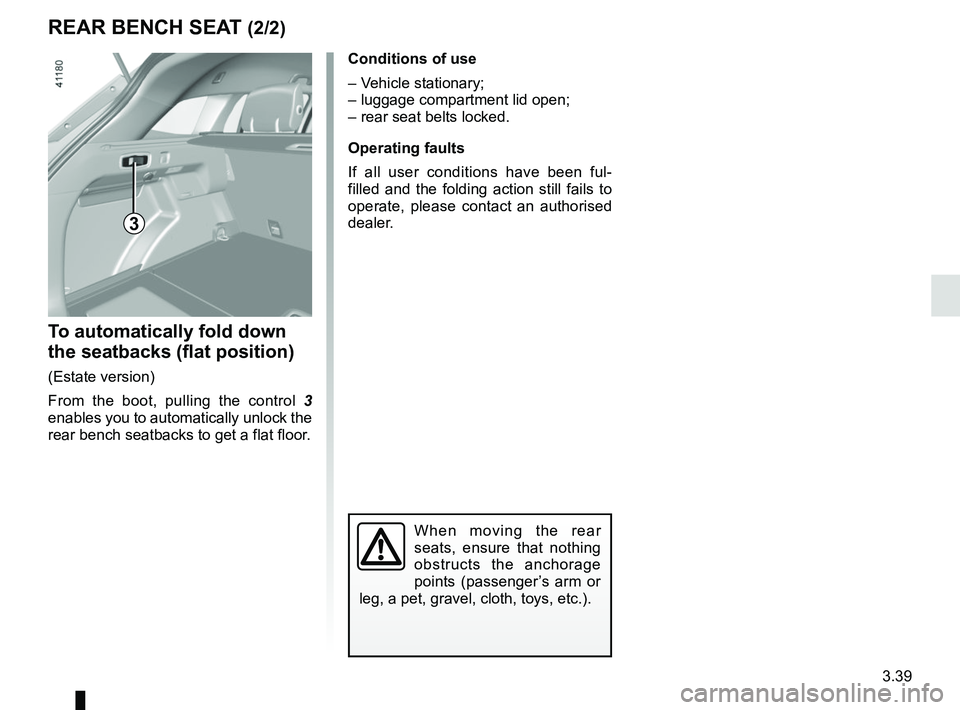
To automatically fold down
the seatbacks (flat position)
(Estate version)
From the boot, pulling the control 3
enables you to automatically unlock the
rear bench seatbacks to get a flat floor.
3
When moving the rear
seats, ensure that nothing
obstructs the anchorage
points (passenger’s arm or
leg, a pet, gravel, cloth, toys, etc.).
Conditions of use
– Vehicle stationary;
– luggage compartment lid open;
– rear seat belts locked.
Operating faults
If all user conditions have been ful-
filled and the folding action still fails to
operate, please contact an authorised
dealer.
Page 240 of 348
3.46
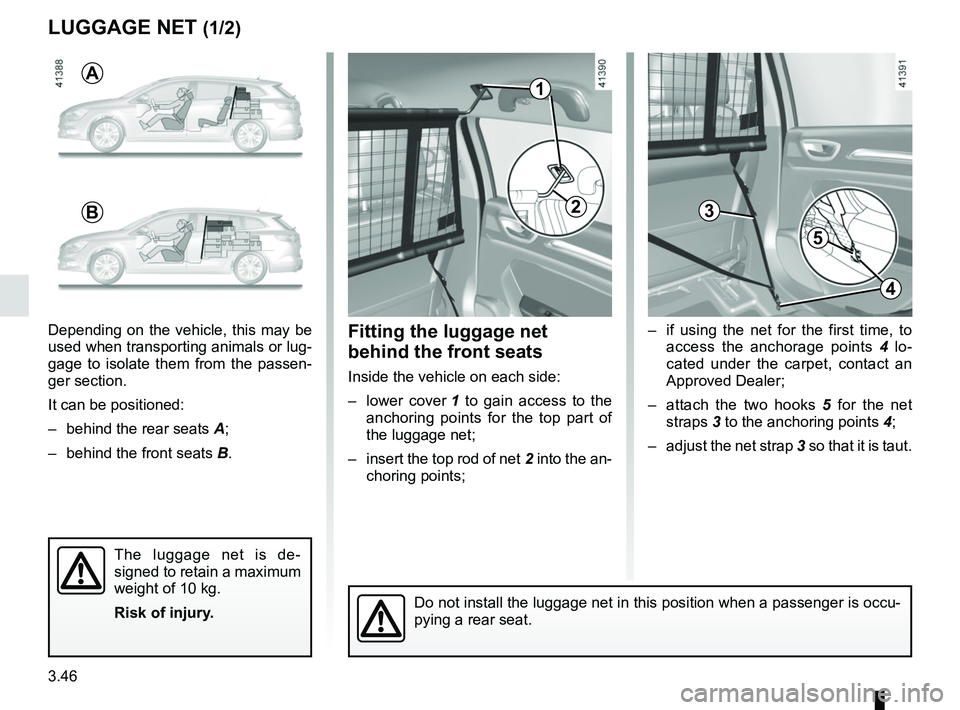
– if using the net for the first time, to access the anchorage points 4 lo-
cated under the carpet, contact an
Approved Dealer;
– attach the two hooks 5 for the net
straps 3 to the anchoring points 4;
– adjust the net strap 3 so that it is taut.
3
LUGGAGE NET (1/2)
Fitting the luggage net
behind the front seats
Inside the vehicle on each side:
– lower cover 1 to gain access to the
anchoring points for the top part of
the luggage net;
– insert the top rod of net 2 into the an-
choring points;
Depending on the vehicle, this may be
used when transporting animals or lug-
gage to isolate them from the passen-
ger section.
It can be positioned:
– behind the rear seats
A;
– behind the front seats B.
The luggage net is de-
signed to retain a maximum
weight of 10 kg.
Risk of injury.
Do not install the luggage net in this position when a passenger is occu\
-
pying a rear seat.
A
B
1
2
5
4