ignition RENAULT MEGANE ESTATE 2016 X95 / 3.G User Guide
[x] Cancel search | Manufacturer: RENAULT, Model Year: 2016, Model line: MEGANE ESTATE, Model: RENAULT MEGANE ESTATE 2016 X95 / 3.GPages: 274, PDF Size: 2.62 MB
Page 66 of 274
1.60
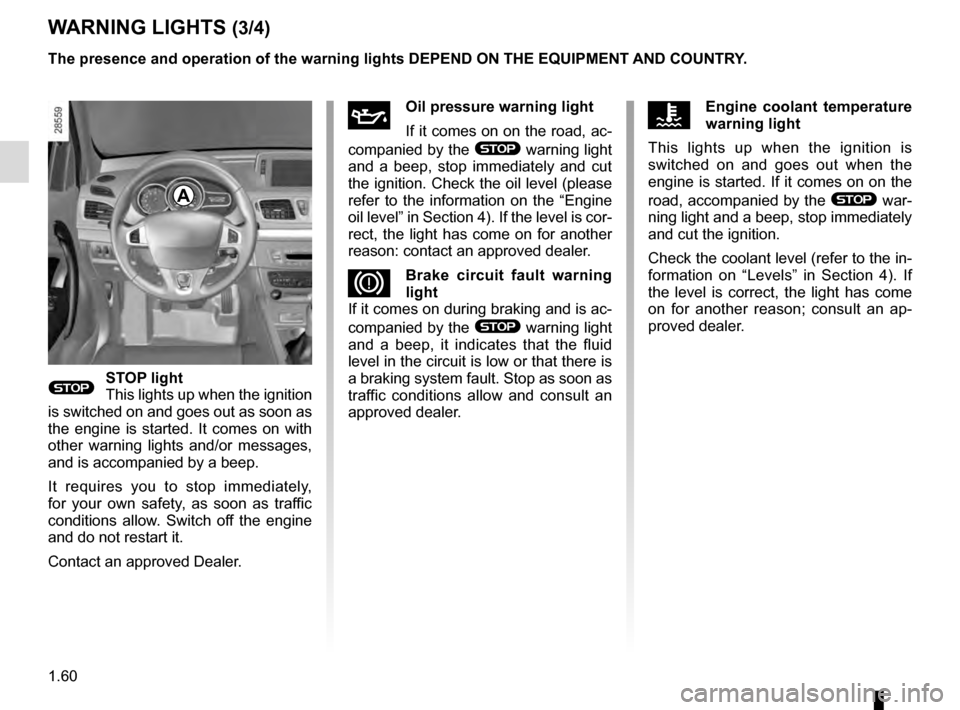
WARNING LIGHTS (3/4)
A
ÀOil pressure warning light
If it comes on on the road, ac-
companied by the
® warning light
and a beep, stop immediately and cut
the ignition. Check the oil level (please
refer to the information on the “Engine
oil level” in Section 4). If the level is cor-
rect, the light has come on for another
reason: contact an approved dealer.
DBrake circuit fault warning
light
If it comes on during braking and is ac-
companied by the
® warning light
and a beep, it indicates that the fluid
level in the circuit is low or that there is
a braking system fault. Stop as soon as
traffic conditions allow and consult an
approved dealer.
®STOP light
This lights up when the ignition
is switched on and goes out as soon as
the engine is started. It comes on with
other warning lights and/or messages,
and is accompanied by a beep.
It requires you to stop immediately,
for your own safety, as soon as traffic
conditions allow. Switch off the engine
and do not restart it.
Contact an approved Dealer.
ÔEngine coolant temperature
warning light
This lights up when the ignition is
switched on and goes out when the
engine is started. If it comes on on the
road, accompanied by the
® war-
ning light and a beep, stop immediately
and cut the ignition.
Check the coolant level (refer to the in-
formation on “Levels” in Section 4). If
the level is correct, the light has come
on for another reason; consult an ap-
proved dealer.
The presence and operation of the warning lights DEPEND ON THE EQUIPMENT\
AND COUNTRY.
Page 69 of 274
1.63
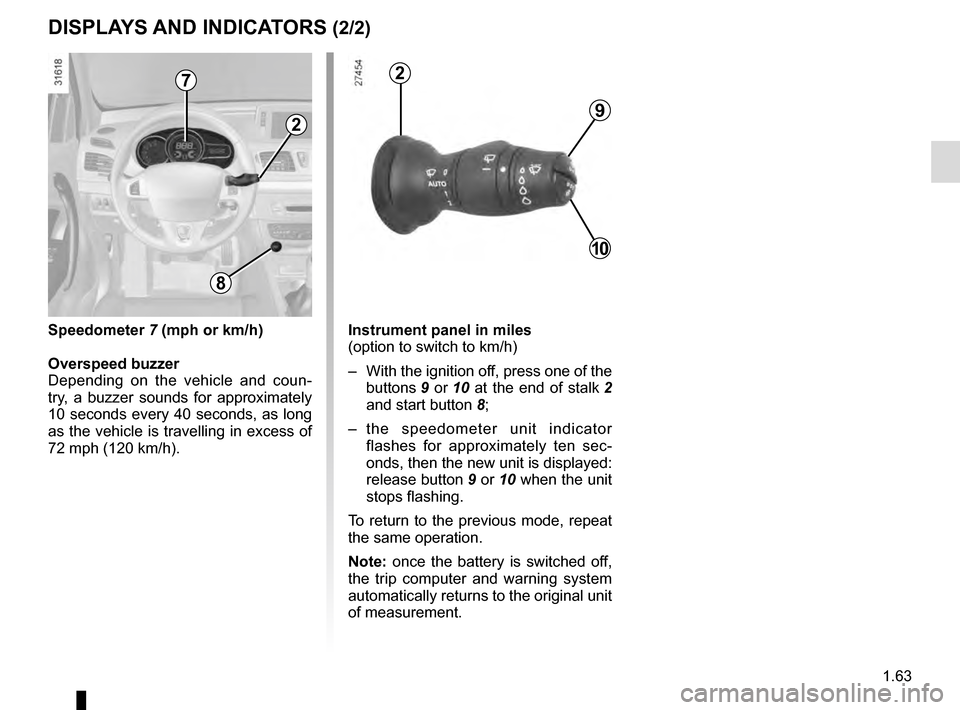
Instrument panel in miles
(option to switch to km/h)
– With the ignition off, press one of the buttons 9 or 10 at the end of stalk 2
and start button 8;
– the speedometer unit indicator flashes for approximately ten sec-
onds, then the new unit is displayed:
release button 9 or 10 when the unit
stops flashing.
To return to the previous mode, repeat
the same operation.
Note: once the battery is switched off,
the trip computer and warning system
automatically returns to the original unit
of measurement.
DISPLAYS AND INDICATORS (2/2)
9
10
2
2
8
Speedometer 7 (mph or km/h)
Overspeed buzzer
Depending on the vehicle and coun-
try, a buzzer sounds for approximately
10 seconds every 40 seconds, as long
as the vehicle is travelling in excess of
72 mph (120 km/h).
7
Page 74 of 274

The display of information shown below DEPENDS ON THE VEHICLE EQUIPMENT \
AND COUNTRY.
Examples of selectionsInterpreting the display selected
On-board comp")
1.68
ON-BOARD COMPUTER: trip settings (3/6)
The display of information shown below DEPENDS ON THE VEHICLE EQUIPMENT \
AND COUNTRY.
Examples of selectionsInterpreting the display selected
On-board computer with mileage-
before-service message
c) Mileage before service or oil change.Mileage before service
With the ignition switched on, and the engine not running
and the selected display is “Mileage before service”, press
button 2 or 3 for about 5 seconds to display the mileage before
service (distance or time to the next service). When the range
approaches its limit, there are several possible scenarios:
– distance/time remaining less than 900 miles (1,500 km) or
one month : the message “Service due in” is displayed ac-
companied by the nearest term (distance or time);
– distance equal to 0 miles or service date reached: the
message “service vehicle” is displayed accompanied by the
© warning light.
The vehicle requires a service as soon as possible.
SERVICE
INTERVALS
Service in
30 000 Kms / 12 mo.
Service due in
300 Kms / 24 days
Service required
Resetting: to reset the distance before service, press and hold button 2 or 3 for approximately 10 seconds until the display
shows the service mileage without flashing.
NB: if a service is performed without changing the engine oil, only the mi\
leage before the next service should be reset. In the
event of an oil change, both the distance before the next service and th\
e next oil change should be reset.
Page 75 of 274

The display of information shown below DEPENDS ON THE VEHICLE EQUIPMENT \
AND COUNTRY.
Examples of selectionsInterpreting the display selected
On-board comp")
1.69
ON-BOARD COMPUTER: trip settings (4/6)
The display of information shown below DEPENDS ON THE VEHICLE EQUIPMENT \
AND COUNTRY.
Examples of selectionsInterpreting the display selected
On-board computer with distance before
next service message (cntd.)
c) Mileage before service or oil change.Mileage before service
With the ignition switched on and the engine not running ,
and the selected display is “Mileage before service”, press
button 2 or 3 for about 5 seconds to display the mileage before
the next service, then briefly press button 2 or 3 to view the
mileage before the next oil change (distance or time remaining
before the next service). When the range approaches its limit,
there are several possible scenarios:
– distance/time remaining less than 900 miles (1,500 km) or
one month : the message “Service due in” is displayed ac-
companied by the nearest term (distance or time);
– range equal to 0 km/miles or service date reached: the
message “service vehicle” is displayed accompanied by the
© warning light.
The vehicle requires an oil change as soon as possible.
SERVICE
INTERVALS
Oil change in
30 000 Kms / 24 mo.
Service due in
300 Kms / 24 days
Service required
Depending on the vehicle, the mileage before an oil change varies accord\
ing to the driving style (frequent driving at low speed ,
door-to-door journeys, extensive use at idling speed, towing a trailer, etc.). The distance remaining until the next oil change can
therefore decrease more quickly in some cases than the actual distance t\
ravelled.
Resetting: to reset the mileage before the next service, press and hold button 2 or 3 for approximately 10 seconds until the
display shows the mileage before service without flashing.
NB: if a service is performed without changing the engine oil, only the mi\
leage before the next service should be reset. In the
event of an oil change, both the distance before the next service and th\
e next oil change should be reset.
Page 78 of 274
1.72
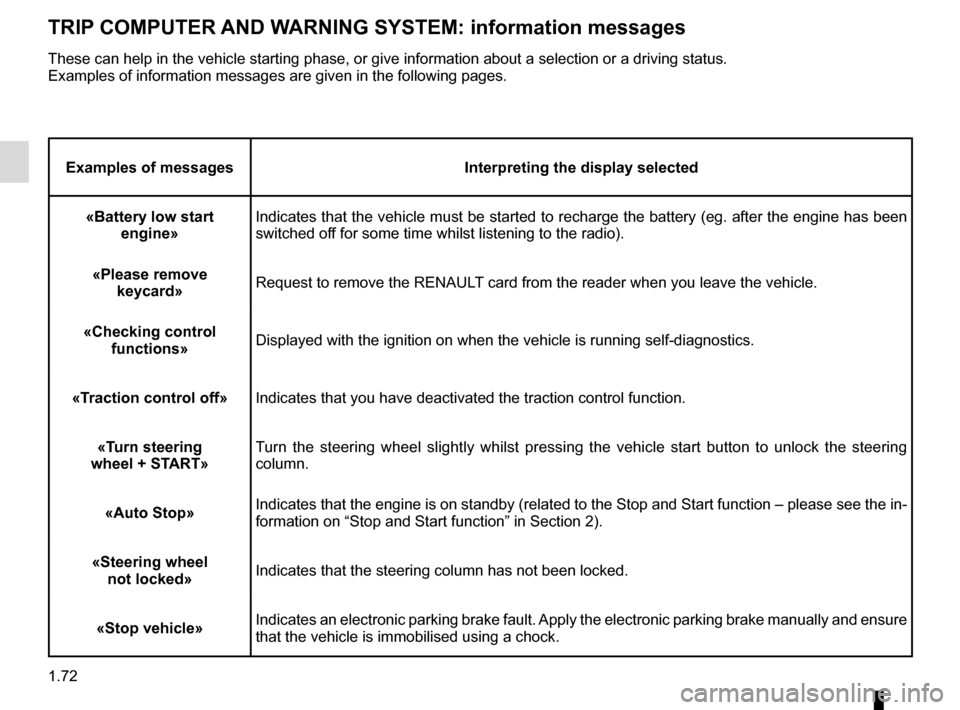
TRIP COMPUTER AND WARNING SYSTEM: information messages
Examples of messagesInterpreting the display selected
«Battery low start engine» Indicates that the vehicle must be started to recharge the battery (eg.\
after the engine has been
switched off for some time whilst listening to the radio).
«Please remove keycard» Request to remove the RENAULT card from the reader when you leave the vehicle.
«Checking control functions» Displayed with the ignition on when the vehicle is running self-diagnost\
ics.
«Traction control off» Indicates that you have deactivated the traction control function.
«Turn steering
wheel + START» Turn the steering wheel slightly whilst pressing the vehicle start button\
to unlock the steering
column.
«Auto Stop» Indicates that the engine is on standby (related to the Stop and Start \
function – please see the in-
formation on “Stop and Start function” in Section 2).
«Steering wheel not locked» Indicates that the steering column has not been locked.
«Stop vehicle» Indicates an electronic parking brake fault. Apply the electronic parking brake manually and ensure
that the vehicle is immobilised using a chock.
These can help in the vehicle starting phase, or give information about \
a selection or a driving status.
Examples of information messages are given in the following pages.
Page 89 of 274
1.83
Special note
When driving the vehicle, the wiping
speed slows down whenever the vehi-
cle stops. For example, fast wiping
speed will slow to normal wiping speed.
As soon as the vehicle moves off,
wiping will return to the speed originally
selected.
If stalk 1 is operated, it overrides and
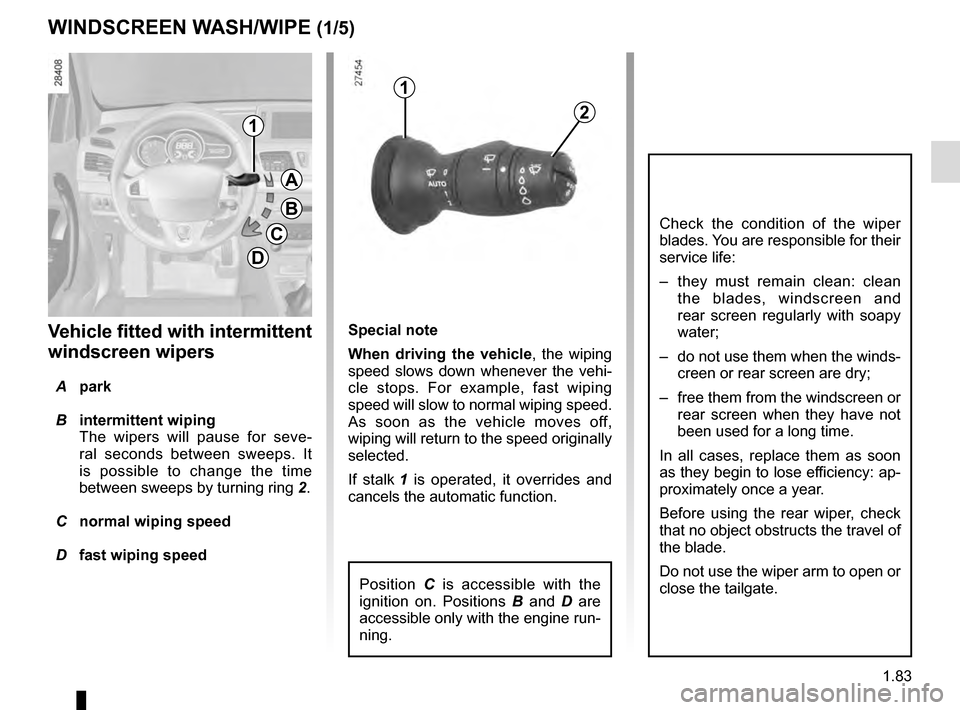
cancels the automatic function.Vehicle fitted with intermittent
windscreen wipers
A park
B intermittent wiping
The wipers will pause for seve-
ral seconds between sweeps. It
is possible to change the time
between sweeps by turning ring 2.
C normal wiping speed
D fast wiping speed
WINDSCREEN WASH/WIPE (1/5)
1
1
A
B
C
D
2
Position C is accessible with the
ignition on. Positions B and D are
accessible only with the engine run-
ning.
Check the condition of the wiper
blades. You are responsible for their
service life:
– they must remain clean: clean the blades, windscreen and
rear screen regularly with soapy
water;
– do not use them when the winds- creen or rear screen are dry;
– free them from the windscreen or rear screen when they have not
been used for a long time.
In all cases, replace them as soon
as they begin to lose efficiency: ap-
proximately once a year.
Before using the rear wiper, check
that no object obstructs the travel of
the blade.
Do not use the wiper arm to open or
close the tailgate.
Page 91 of 274
1.85
WINDSCREEN WASH/WIPE (3/5)
Operating fault
In the event of a malfunction of the
automatic wiping, the wiper is set to
intermittent wiping. Contact an au-
thorised dealer.
The operation of the rain sensor can
be disturbed in the event of:
– damaged wiper blades; a screen
of water or traces left by a blade in
the sensor’s detection zone may
increase the response time of the
automatic wiper, or increase the
wiping frequency;
– a windscreen with any chip or
crack level with the sensor, or a
windscreen covered in dust, dirt,
insects, ice, the use of washing
wax and water-repellent chemi-
cals; the automatic wiping will
be less sensitive, or even unres-
ponsive.
1
A
B
C
D
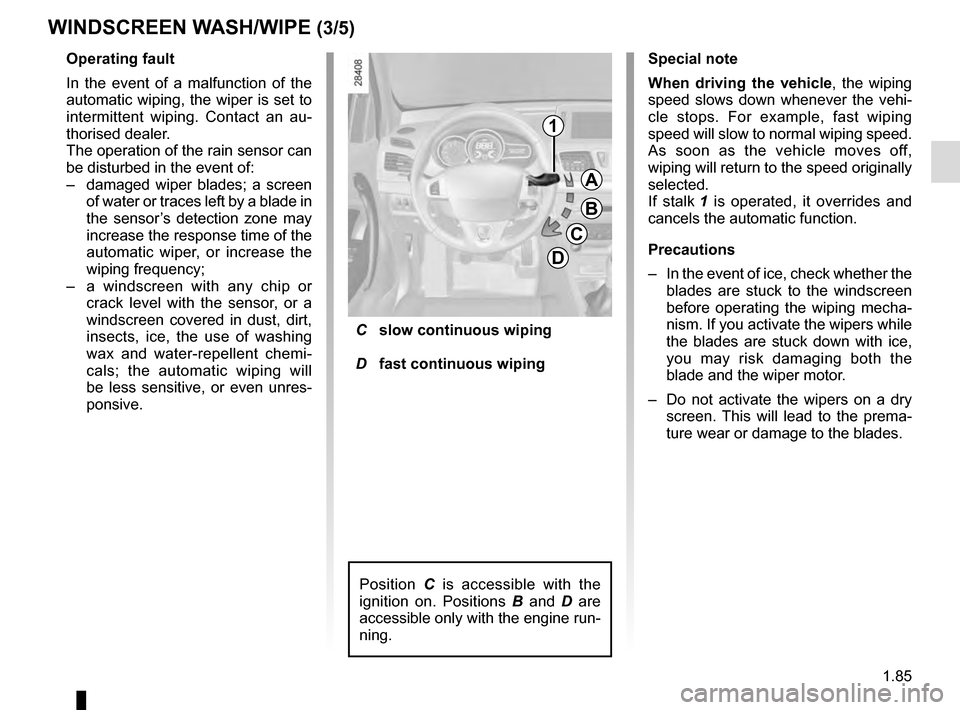
C slow continuous wiping
D fast continuous wiping
Position C is accessible with the
ignition on. Positions B and D are
accessible only with the engine run-
ning.
Special note
When driving the vehicle, the wiping
speed slows down whenever the vehi-
cle stops. For example, fast wiping
speed will slow to normal wiping speed.
As soon as the vehicle moves off,
wiping will return to the speed originally
selected.
If stalk 1 is operated, it overrides and
cancels the automatic function.
Precautions
– In the event of ice, check whether the
blades are stuck to the windscreen
before operating the wiping mecha-
nism. If you activate the wipers while
the blades are stuck down with ice,
you may risk damaging both the
blade and the wiper motor.
– Do not activate the wipers on a dry
screen. This will lead to the prema-
ture wear or damage to the blades.
Page 92 of 274
1.86
WINDSCREEN WASH/WIPE (4/5)
Specific front wiper position
(service position)
This position enables the blades to be
lifted to remove them from the winds-
creen.
This can be useful:
– to clean the blades;
– to release the blades from the winds- creen in winter;
– to replace the blades (please refer to the information on the “Wiper
blades” in Section 5).
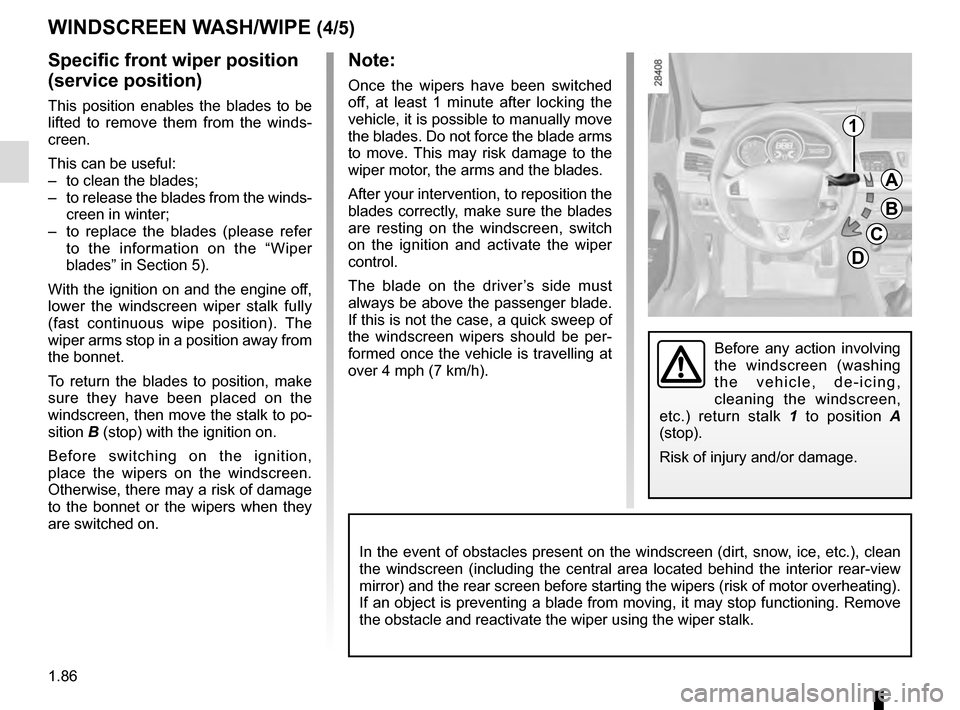
With the ignition on and the engine off,
lower the windscreen wiper stalk fully
(fast continuous wipe position). The
wiper arms stop in a position away from
the bonnet.
To return the blades to position, make
sure they have been placed on the
windscreen, then move the stalk to po-
sition B (stop) with the ignition on.
Before switching on the ignition,
place the wipers on the windscreen.
Otherwise, there may a risk of damage
to the bonnet or the wipers when they
are switched on.
Note:
Once the wipers have been switched
off, at least 1 minute after locking the
vehicle, it is possible to manually move
the blades. Do not force the blade arms
to move. This may risk damage to the
wiper motor, the arms and the blades.
After your intervention, to reposition the
blades correctly, make sure the blades
are resting on the windscreen, switch
on the ignition and activate the wiper
control.
The blade on the driver’s side must
always be above the passenger blade.
If this is not the case, a quick sweep of
the windscreen wipers should be per-
formed once the vehicle is travelling at
over 4 mph (7 km/h).
1
A
B
C
D
In the event of obstacles present on the windscreen (dirt, snow, ice, etc.), clean
the windscreen (including the central area located behind the interior \
rear-view
mirror) and the rear screen before starting the wipers (risk of motor \
overheating).
If an object is preventing a blade from moving, it may stop functioning.\
Remove
the obstacle and reactivate the wiper using the wiper stalk.
Before any action involving
the windscreen (washing
the vehicle, de-icing,
cleaning the windscreen,
etc.) return stalk 1 to position A
(stop).
Risk of injury and/or damage.
Page 93 of 274
1.87
Headlight washers
Headlights on
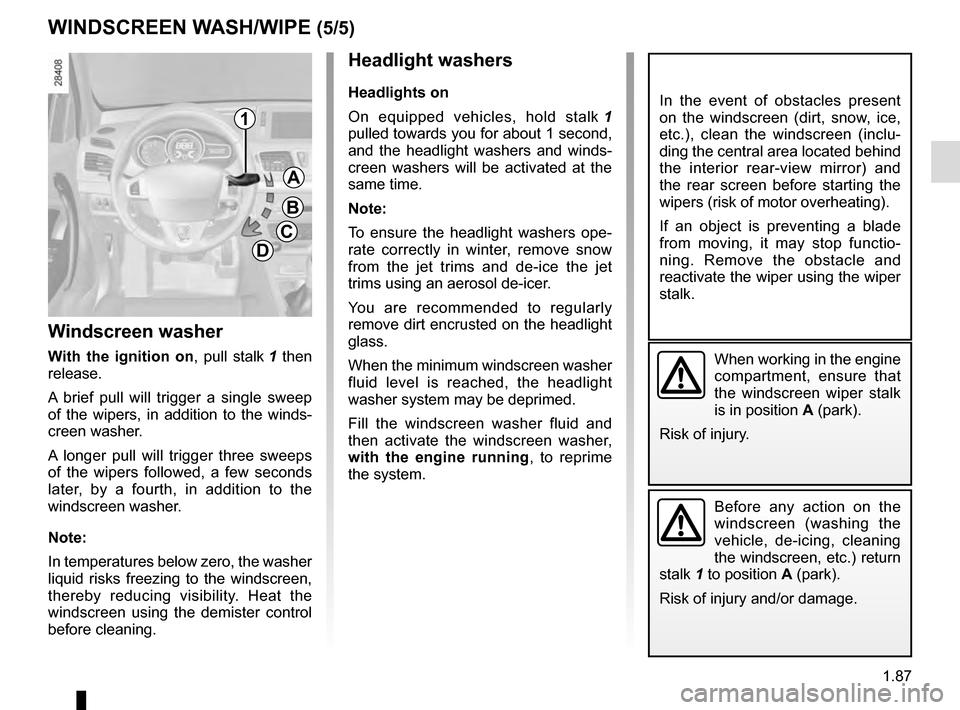
On equipped vehicles, hold stalk 1
pulled towards you for about 1 second,
and the headlight washers and winds-
creen washers will be activated at the
same time.
Note:
To ensure the headlight washers ope-
rate correctly in winter, remove snow
from the jet trims and de-ice the jet
trims using an aerosol de-icer.
You are recommended to regularly
remove dirt encrusted on the headlight
glass.
When the minimum windscreen washer
fluid level is reached, the headlight
washer system may be deprimed.
Fill the windscreen washer fluid and
then activate the windscreen washer,
with the engine running , to reprime
the system.
Before any action on the
windscreen (washing the
vehicle, de-icing, cleaning
the windscreen, etc.) return
stalk 1 to position A (park).
Risk of injury and/or damage.
Windscreen washer
With the ignition on , pull stalk 1 then
release.
A brief pull will trigger a single sweep
of the wipers, in addition to the winds-
creen washer.
A longer pull will trigger three sweeps
of the wipers followed, a few seconds
later, by a fourth, in addition to the
windscreen washer.
Note:
In temperatures below zero, the washer
liquid risks freezing to the windscreen,
thereby reducing visibility. Heat the
windscreen using the demister control
before cleaning.
WINDSCREEN WASH/WIPE (5/5)
A
B
C
D
1
When working in the engine
compartment, ensure that
the windscreen wiper stalk
is in position A (park).
Risk of injury.
In the event of obstacles present
on the windscreen (dirt, snow, ice,
etc.), clean the windscreen (inclu-
ding the central area located behind
the interior rear-view mirror) and
the rear screen before starting the
wipers (risk of motor overheating).
If an object is preventing a blade
from moving, it may stop functio-
ning. Remove the obstacle and
reactivate the wiper using the wiper
stalk.
Page 94 of 274
1.88
REAR SCREEN WASH/WIPE
1
2
Check the condition of the wiper
blades. You are responsible for their
service life:
– they must remain clean: clean the blades, windscreen and
rear screen regularly with soapy
water;
– do not use them when the wind- screen or rear screen are dry;
– free them from the windscreen or rear screen when they have not
been used for a long time.
In all cases, replace them as soon
as they begin to lose efficiency: ap-
proximately once a year.
Before using the rear wiper, check
that no object obstructs the travel of
the blade.
Do not use the wiper arm to open or
close the tailgate.
pRear screen washer/
wiper
With the ignition on, push the stalk.
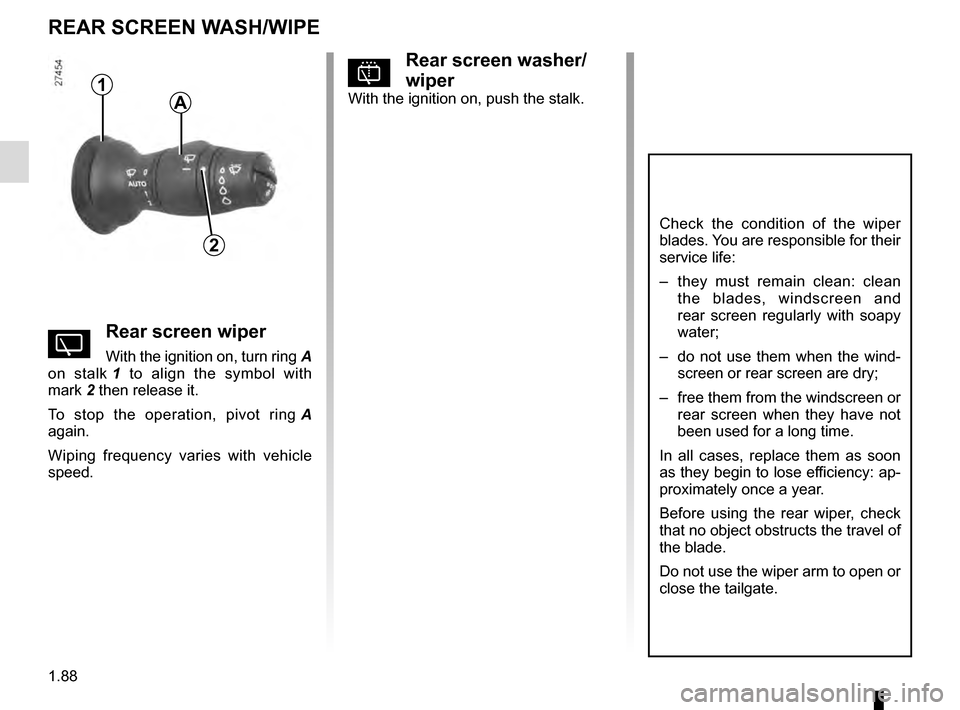
YRear screen wiper
With the ignition on, turn ring A
on stalk 1 to align the symbol with
mark 2 then release it.
To stop the operation, pivot ring A
again.
Wiping frequency varies with vehicle
speed.
A