warning lights RENAULT SANDERO 2012 User Guide
[x] Cancel search | Manufacturer: RENAULT, Model Year: 2012, Model line: SANDERO, Model: RENAULT SANDERO 2012Pages: 183, PDF Size: 6.95 MB
Page 51 of 183
control instruments ............................... (up to the end of the DU)
trip computer and warning system ........(up to the end of the DU)
warning lights ........................................ (up to the end of the DU)
1.45
ENG_UD20446_9
Ordinateur de bord (B90 - L90 Ph2 - F90 Ph2 - R90 Ph2 - Dacia)
ENG_NU_817-9_B90_Dacia_1
Trip computer and warning system
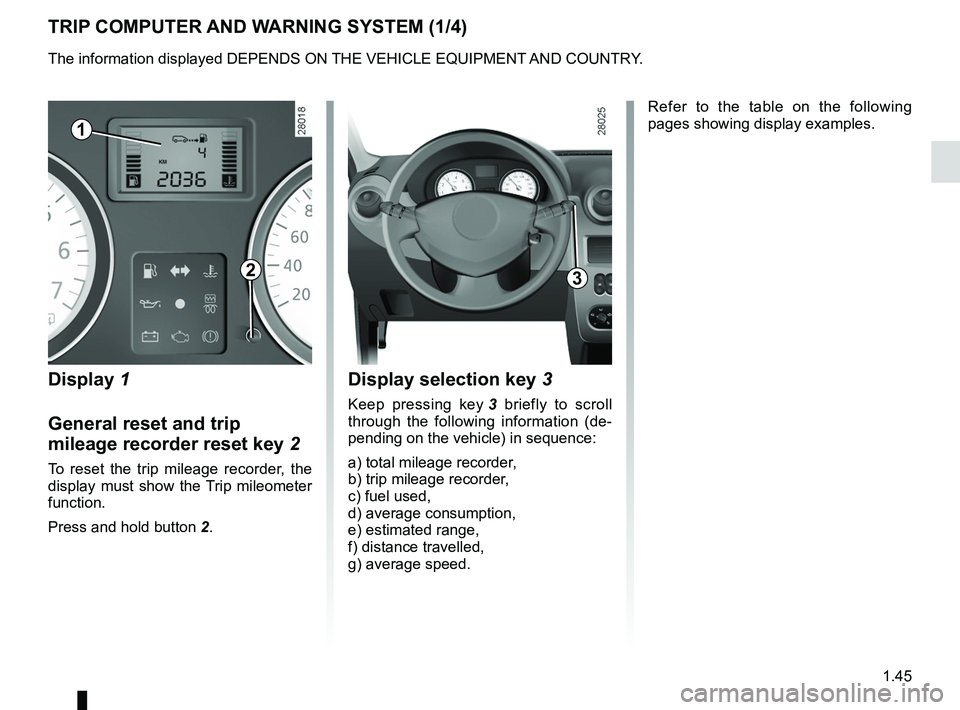
TRIP COMPUTER AND WARNING SYSTEM (1/4)
Display 1
General reset and trip
mileage recorder reset key 2
To reset the trip mileage recorder, the
display must show the Trip mileometer
function.
Press and hold button 2.
Display selection key 3
Keep pressing key 3 briefly to scroll
through the following information (de -
pending on the vehicle) in sequence:
a) total mileage recorder,
b) trip mileage recorder,
c) fuel used,
d) average consumption,
e) estimated range,
f) distance travelled,
g) average speed. Refer to the table on the following
pages showing display examples.
1
23
The information displayed DEPENDS ON THE VEHICLE EQUIPMENT AND COUNTRY.
Page 55 of 183
lighting:exterior ............................................ (up to the end of the DU)
lights: dipped beam headlights ................................... (current page)
lights: side lights ......................................................... (current page)
lights: main beam headlights ...................................... (current page)
lights ..................................................... (up to the end of the DU)
signals and lights .................................. (up to the end of the DU)
control instruments ............................... (up to the end of the DU)
1.49
ENG_UD18233_5
Éclairages et signalisations extérieures (B90 - L90 Ph2 - F90 Ph2\
- R90 Ph2 - Dacia)
ENG_NU_817-9_B90_Dacia_1
Exterior lighting and signals
EXTERIOR LIGHTING AND SIGNALS (1/2)
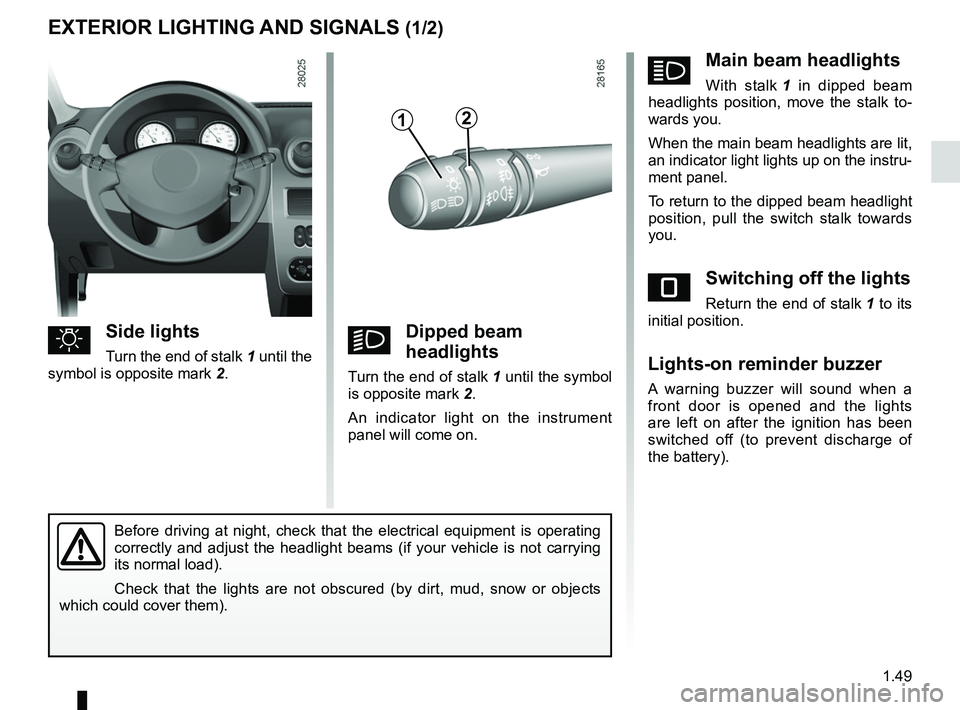
uSide lights
Turn the end of stalk 1 until the
symbol is opposite mark 2.kDipped beam
headlights
Turn the end of stalk 1 until the symbol
is opposite mark 2.
An indicator light on the instrument
panel will come on.
áMain beam headlights
With stalk 1 in dipped beam
headlights position, move the stalk to -
wards you.
When the main beam headlights are lit,
an indicator light lights up on the instru-
ment panel.
To return to the dipped beam headlight
position, pull the switch stalk towards
you.
eSwitching off the lights
Return the end of stalk 1 to its
initial position.
Lights-on reminder buzzer
A warning buzzer will sound when a
front door is opened and the lights
are left on after the ignition has been
switched off (to prevent discharge of
the battery).
Before driving at night, check that the electrical equipment is operating
correctly and adjust the headlight beams (if your vehicle is not carrying
its normal load).
Check that the lights are not obscured (by dirt, mud, snow or objects
which could cover them).
12
Page 56 of 183
warning buzzer ...................................................... (current page)
fog lights ................................................................ (current page)
lights: fog lights .......................................................... (current page)
1.50
ENG_UD18233_5
Éclairages et signalisations extérieures (B90 - L90 Ph2 - F90 Ph2\
- R90 Ph2 - Dacia)
ENG_NU_817-9_B90_Dacia_1
EXTERIOR LIGHTING AND SIGNALS (2/2)
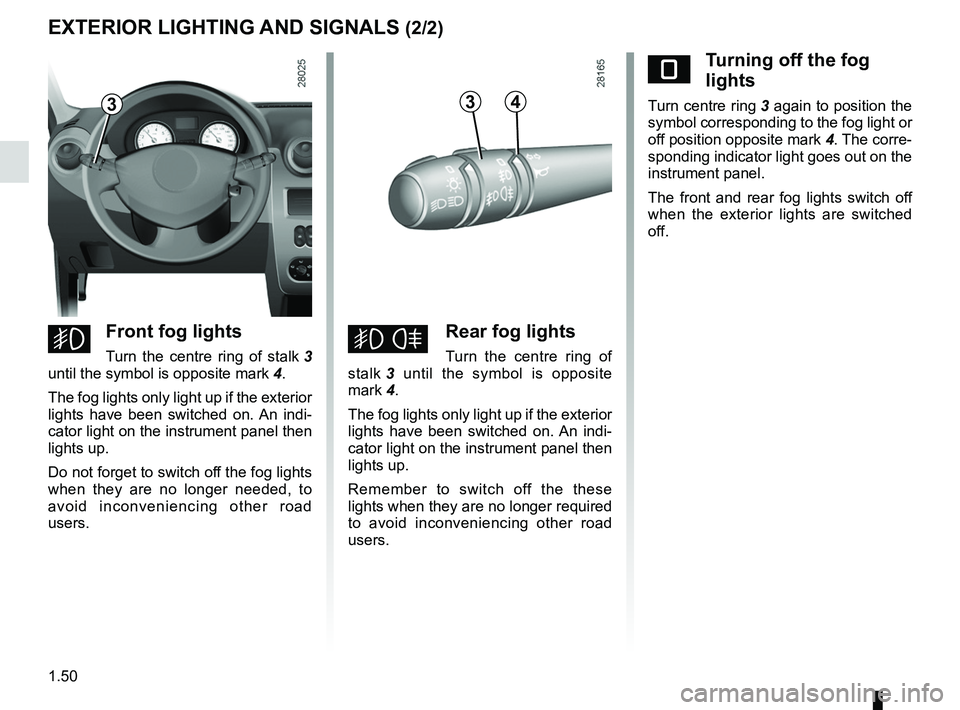
eTurning off the fog
lights
Turn centre ring 3 again to position the
symbol corresponding to the fog light or
off position opposite mark 4. The corre-
sponding indicator light goes out on the
instrument panel.
The front and rear fog lights switch off
when the exterior lights are switched
off.
gFront fog lights
Turn the centre ring of stalk 3
until the symbol is opposite mark 4.
The fog lights only light up if the exterior
lights have been switched on. An indi -
cator light on the instrument panel then
lights up.
Do not forget to switch off the fog lights
when they are no longer needed, to
avoid inconveniencing other road
users.hRear fog lights
Turn the centre ring of
stalk 3 until the symbol is opposite
mark 4.
The fog lights only light up if the exterior
lights have been switched on. An indi -
cator light on the instrument panel then
lights up.
Remember to switch off the these
lights when they are no longer required
to avoid inconveniencing other road
users.
334
Page 58 of 183
headlight flashers ................................. (up to the end of the DU)
horn ...................................................... (up to the end of the DU)
indicators .............................................. (up to the end of the DU)
lights: direction indicators .......................... (up to the end of the DU)
lights: hazard warning ............................... (up to the end of the DU)
indicators: direction indicators .......................... (up to the end of the DU)
hazard warning lights signal ................. (up to the end of the DU)
hazard warning lights signal ................. (up to the end of the DU)
1.52
ENG_UD20449_7
Avertisseurs sonore et lumineux (B90 - L90 Ph2 - F90 Ph2 - R90 Ph2 - Dac\
ia)
ENG_NU_817-9_B90_Dacia_1
Audible and visual signals
AUDIBLE AND VISUAL SIGNALS
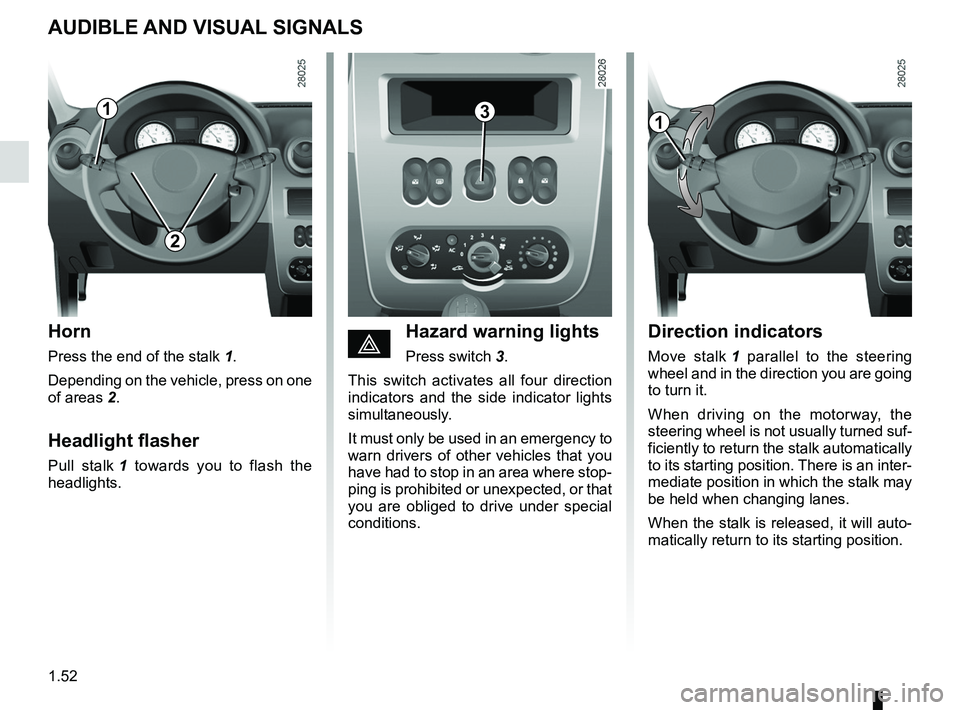
Horn
Press the end of the stalk 1.
Depending on the vehicle, press on one
of areas 2.
Headlight flasher
Pull stalk 1 towards you to flash the
headlights.
Direction indicators
Move stalk 1 parallel to the steering
wheel and in the direction you are going
to turn it.
When driving on the motorway, the
steering wheel is not usually turned suf-
ficiently to return the stalk automatically
to its starting position. There is an inter-
mediate position in which the stalk may
be held when changing lanes.
When the stalk is released, it will auto-
matically return to its starting position.éHazard warning lights
Press switch 3.
This switch activates all four direction
indicators and the side indicator lights
simultaneously.
It must only be used in an emergency to
warn drivers of other vehicles that you
have had to stop in an area where stop-
ping is prohibited or unexpected, or that
you are obliged to drive under special
conditions.
113
2
Page 63 of 183
JauneNoirNoir texte
1.57
ENG_UD22575_7
Réservoir carburant (B90 - Dacia)
ENG_NU_817-9_B90_Dacia_1
FUEL TANK (2/3)
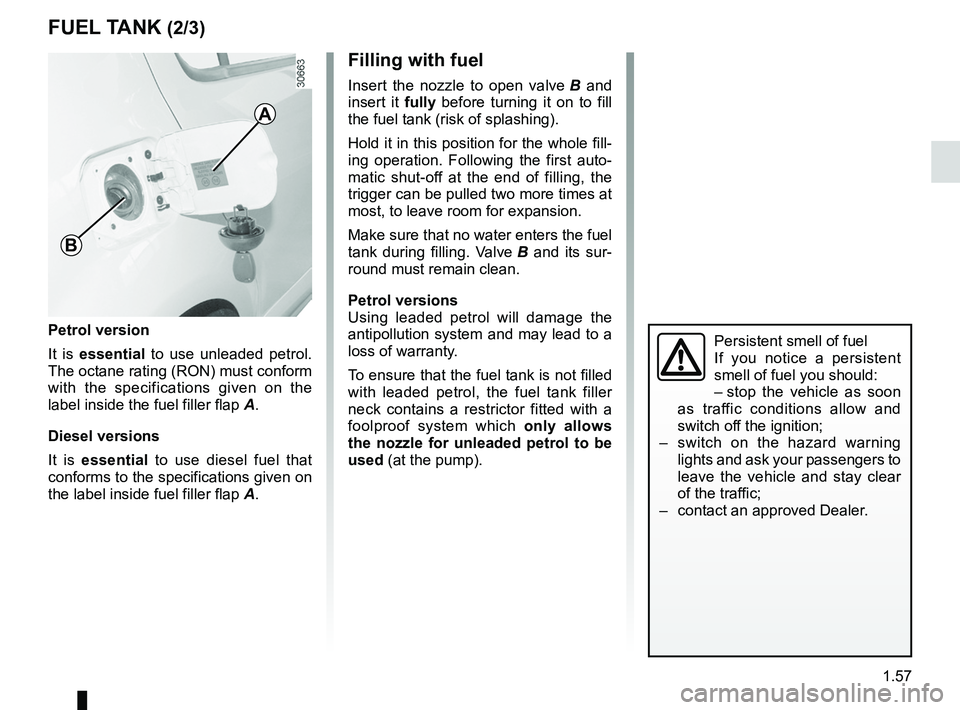
Petrol version
It is essential to use unleaded petrol.
The octane rating (RON) must conform
with the specifications given on the
label inside the fuel filler flap A.
Diesel versions
It is essential to use diesel fuel that
conforms to the specifications given on
the label inside fuel filler flap A.
Filling with fuel
Insert the nozzle to open valve B and
insert it fully before turning it on to fill
the fuel tank (risk of splashing).
Hold it in this position for the whole fill-
ing operation. Following the first auto -
matic shut-off at the end of filling, the
trigger can be pulled two more times at
most, to leave room for expansion.
Make sure that no water enters the fuel
tank during filling. Valve B and its sur -
round must remain clean.
Petrol versions
Using leaded petrol will damage the
antipollution system and may lead to a
loss of warranty.
To ensure that the fuel tank is not filled
with leaded petrol, the fuel tank filler
neck contains a restrictor fitted with a
foolproof system which only allows
the nozzle for unleaded petrol to be
used (at the pump).
Persistent smell of fuel
If you notice a persistent
smell of fuel you should:
– stop the vehicle as soon
as traffic conditions allow and
switch off the ignition;
– switch on the hazard warning
lights and ask your passengers to
leave the vehicle and stay clear
of the traffic;
– contact an approved Dealer.
A
B
Page 77 of 183

JauneNoirNoir texte
2.13
ENG_UD18242_8
Dispositifs de correction et d’assistance à la conduite (B90 - U9\
0 - L90 Ph2 - F90 P")
emergency brake assist........................(up to the end of the DU)
JauneNoirNoir texte
2.13
ENG_UD18242_8
Dispositifs de correction et d’assistance à la conduite (B90 - U9\
0 - L90 Ph2 - F90 Ph2 - R90 Ph2 - Dacia)
ENG_NU_817-9_B90_Dacia_2
DRIVER CORRECTION DEVICES/AIDS (2/2)
Emergency brake assist
This system supplements the ABS
and helps reduce vehicle stopping dis-
tances.
Operating principle
The system is for detecting an emer -
gency braking situation. In this case,
the braking assistance immediately de-
velops maximum power and may trig -
ger ABS regulation.
ABS braking is maintained as long as
the brake pedal is applied.
Operating faults
– Warning light x lights up on the
instrument panel: the ABS is deacti-
vated.
Braking safety is still guaranteed.
–
x and D are lit on the in -
strument panel, this indicates a
fault in the braking system.
In both cases, consult an approved
Dealer.
Yo u r b r a k i n g s y s t e m s
are partially operational.
However, it is dangerous
to brake suddenly and
it is essential to stop immediately,
as soon as traffic conditions allow.
Contact an approved dealer.
Page 125 of 183

ENG_NU_817-9_B90_Dacia_5
TYRE INFLATION KIT (2/3)
Depending on the vehicle, in")
JauneNoirNoir texte
5.5
ENG_UD22290_8
Kit de gonflage des pneumatiques (B90 - L90 Ph2 - F90 Ph2 - R90 Ph2 - D\
acia)
ENG_NU_817-9_B90_Dacia_5
TYRE INFLATION KIT (2/3)
Depending on the vehicle, in the event
of a puncture, use the kit located in the
boot. –
press switch 5 to inflate the tyre to
the recommended pressure (check
the label affixed to the edge of the
driver’s door);
– after a maximum of 5 minutes, stop
inflating and read the pressure (on
the pressure gauge 4);
Note: while the bottle is emptying
(approximately 30 seconds), pres -
sure gauge 4 will briefly indicate a
pressure of 6 bar, then the pressure
will drop.
– adjust the pressure: to increase
it, continue inflating with the kit, to
reduce it, turn button 7 located on
the inflation adapter.
If a minimum pressure of 1.8 bar is
not reached after 15 minutes, repair
is not possible; do not drive the vehi-
cle but contact an approved dealer .
1234
5
6
Before using this kit, park
the vehicle at a sufficient
distance from traffic, switch
on the hazard warning
lights, apply the handbrake, ask all
passengers to leave the vehicle and
keep them away from traffic.
8
Open the kit, remove caps 1 and 3 (it is
essential not to remove the cap from
the bottle) then screw bottle 2 to its sup-
port 3.
With the engine running and the
handbrake applied,
– unscrew the valve cap on the wheel
concerned and screw the inflation
adapter 6 onto valve;
– connect adapter 8 to accessories
socket 9 on the dashboard of the ve-
hicle;
9
7
Page 129 of 183
changing a wheel.................................. (up to the end of the DU)
practical advice ..................................... (up to the end of the DU)
jack ....................................................... (up to the end of the DU)
puncture ................................................ (up to the end of the DU)
lifting the vehicle changing a wheel ............................ (up to the end of the DU)
5.9
ENG_UD20462_6
Changement de roue (B90 - Dacia)
ENG_NU_817-9_B90_Dacia_5
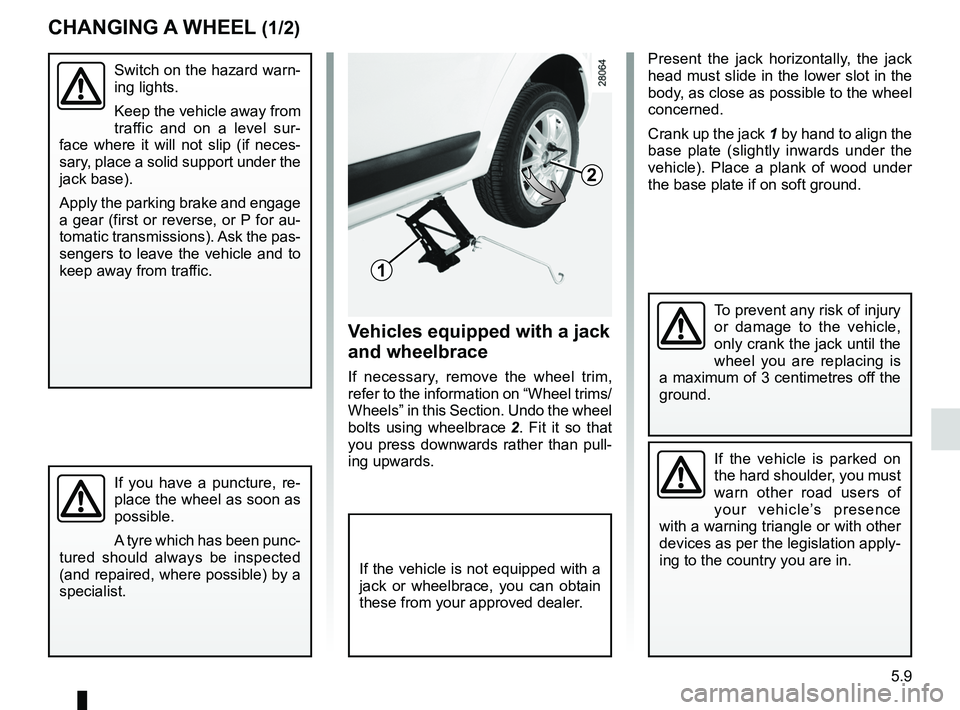
Present the jack horizontally, the jack
head must slide in the lower slot in the
body, as close as possible to the wheel
concerned.
Crank up the jack 1 by hand to align the
base plate (slightly inwards under the
vehicle). Place a plank of wood under
the base plate if on soft ground.
Changing a wheel
Switch on the hazard warn-
ing lights.
Keep the vehicle away from
traffic and on a level sur -
face where it will not slip (if neces -
sary, place a solid support under the
jack base).
Apply the parking brake and engage
a gear (first or reverse, or P for au-
tomatic transmissions). Ask the pas-
sengers to leave the vehicle and to
keep away from traffic.
If you have a puncture, re -
place the wheel as soon as
possible.
A tyre which has been punc-
tured should always be inspected
(and repaired, where possible) by a
specialist.
2
1
Vehicles equipped with a jack
and wheelbrace
If necessary, remove the wheel trim,
refer to the information on “Wheel trims/
Wheels” in this Section. Undo the wheel
bolts using wheelbrace 2 . Fit it so that
you press downwards rather than pull -
ing upwards.
To prevent any risk of injury
or damage to the vehicle,
only crank the jack until the
wheel you are replacing is
a maximum of 3 centimetres off the
ground.
If the vehicle is parked on
the hard shoulder, you must
warn other road users of
your vehicle’s presence
with a warning triangle or with other
devices as per the legislation apply-
ing to the country you are in.
CHANGING A WHEEL (1/2)
If the vehicle is not equipped with a
jack or wheelbrace, you can obtain
these from your approved dealer.
Page 149 of 183
towing hitch........................................... (up to the end of the DU)
practical advice ..................................... (up to the end of the DU)
towing breakdown ...................................... (up to the end of the DU)
5.29
ENG_UD17944_4
Remorquage : dépannage (B90 - Dacia)
ENG_NU_817-9_B90_Dacia_5
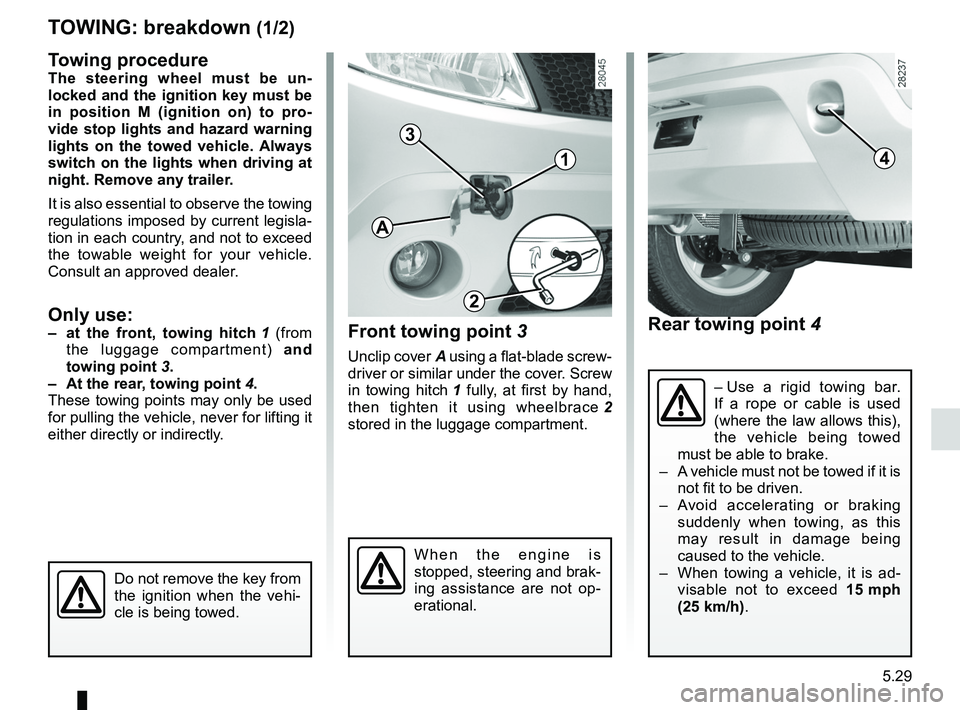
Rear towing point 4
Front towing point 3
Unclip cover A using a flat-blade screw-
driver or similar under the cover. Screw
in towing hitch 1 fully, at first by hand,
then tighten it using wheelbrace 2
stored in the luggage compartment.
Towing: breakdown
W h e n t h e e n g i n e i s
stopped, steering and brak-
ing assistance are not op -
erational.
41
3
Towing procedureThe steering wheel must be un -
locked and the ignition key must be
in position M (ignition on) to pro -
vide stop lights and hazard warning
lights on the towed vehicle. Always
switch on the lights when driving at
night. Remove any trailer.
It is also essential to observe the towing
regulations imposed by current legisla -
tion in each country, and not to exceed
the towable weight for your vehicle.
Consult an approved dealer.
Only use:– at the front, towing hitch 1 (from
the luggage compartment) and
towing point 3.
– At the rear, towing point 4.
These towing points may only be used
for pulling the vehicle, never for lifting it
either directly or indirectly.
Do not remove the key from
the ignition when the vehi -
cle is being towed.
– Use a rigid towing bar.
If a rope or cable is used
(where the law allows this),
the vehicle being towed
must be able to brake.
– A vehicle must not be towed if it is
not fit to be driven.
– Avoid accelerating or braking
suddenly when towing, as this
may result in damage being
caused to the vehicle.
– When towing a vehicle, it is ad -
visable not to exceed 15 mph
(25 km/h).
T OWING : breakdown (1/2)
A
2
Page 154 of 183
operating faults ..................................... (up to the end of the DU)
practical advice ..................................... (up to the end of the DU)
faults operating faults ............................... (up to the end of the DU)
5.34
ENG_UD19739_7
Anomalies de fonctionnement (B90 - U90 - L90 Ph2 - F90 Ph2 - R90 Ph2 - \
Dacia)
ENG_NU_817-9_B90_Dacia_5
Jaune NoirNoir texte
Operating faults
OPERATING FAULTS (1/5)
The following advice will enable you to carry out quick, temporary repairs. For safety reasons you should always contact
an approved dealer as soon as possible.
The starter is activated POSSIBLE CAUSESWHAT TO DO
Warning lights dim or fail to come on;
the starter does not run. Battery terminals disconnected,
oxidised or incorrectly secured.Retighten them, reconnect them or clean
them if they are oxidised.
Battery discharged or worn. Connect another battery to the faulty bat -
tery. Refer to the information on “Battery:
troubleshooting” in Section 5 or replace the
battery if necessary.
Do not push the vehicle if the steering
column is locked.
The engine will not start. Starting conditions are not fulfilled.Refer to the information on “Starting/stop -
ping the engine in Section 2.
The steering column remains locked. Steering wheel locked.To unlock, gently move the key and the
steering wheel (refer to the information on
the “Ignition switch” in Section 2).