gearbox RENAULT SCENIC 2013 J95 / 3.G Electronic Parking Brake User Guide
[x] Cancel search | Manufacturer: RENAULT, Model Year: 2013, Model line: SCENIC, Model: RENAULT SCENIC 2013 J95 / 3.GPages: 115, PDF Size: 0.64 MB
Page 37 of 115
37B-37
MR-372-J84-37B000$504.mif
V11
ELECTRONIC PARKING BRAKE
Fault finding – Interpretation of faults
FPA
Vdiag No.: 0C, 04, 08,
0D, 11
37B
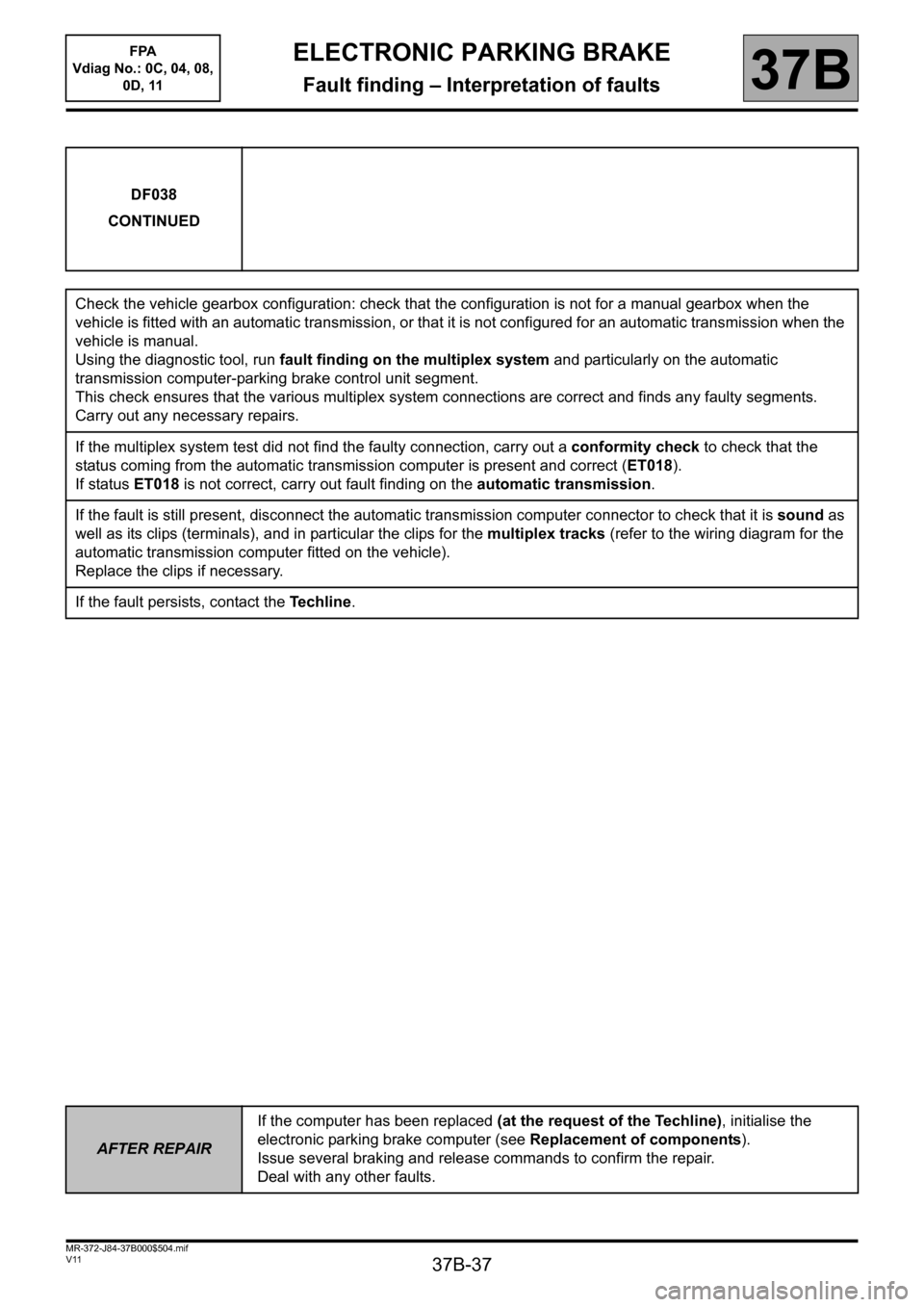
DF038
CONTINUED
Check the vehicle gearbox configuration: check that the configuration is not for a manual gearbox when the
vehicle is fitted with an automatic transmission, or that it is not configured for an automatic transmission when the
vehicle is manual.
Using the diagnostic tool, run fault finding on the multiplex system and particularly on the automatic
transmission computer-parking brake control unit segment.
This check ensures that the various multiplex system connections are correct and finds any faulty segments.
Carry out any necessary repairs.
If the multiplex system test did not find the faulty connection, carry out a conformity check to check that the
status coming from the automatic transmission computer is present and correct (ET018).
If status ET018 is not correct, carry out fault finding on the automatic transmission.
If the fault is still present, disconnect the automatic transmission computer connector to check that it is sound as
well as its clips (terminals), and in particular the clips for the multiplex tracks (refer to the wiring diagram for the
automatic transmission computer fitted on the vehicle).
Replace the clips if necessary.
If the fault persists, contact the Techline.
AFTER REPAIRIf the computer has been replaced (at the request of the Techline), initialise the
electronic parking brake computer (see Replacement of components).
Issue several braking and release commands to confirm the repair.
Deal with any other faults.
Page 40 of 115
37B-40
MR-372-J84-37B000$504.mif
V11
ELECTRONIC PARKING BRAKE
Fault finding – Interpretation of faults
FPA
Vdiag No.: 0C, 04, 08,
0D, 11
37B
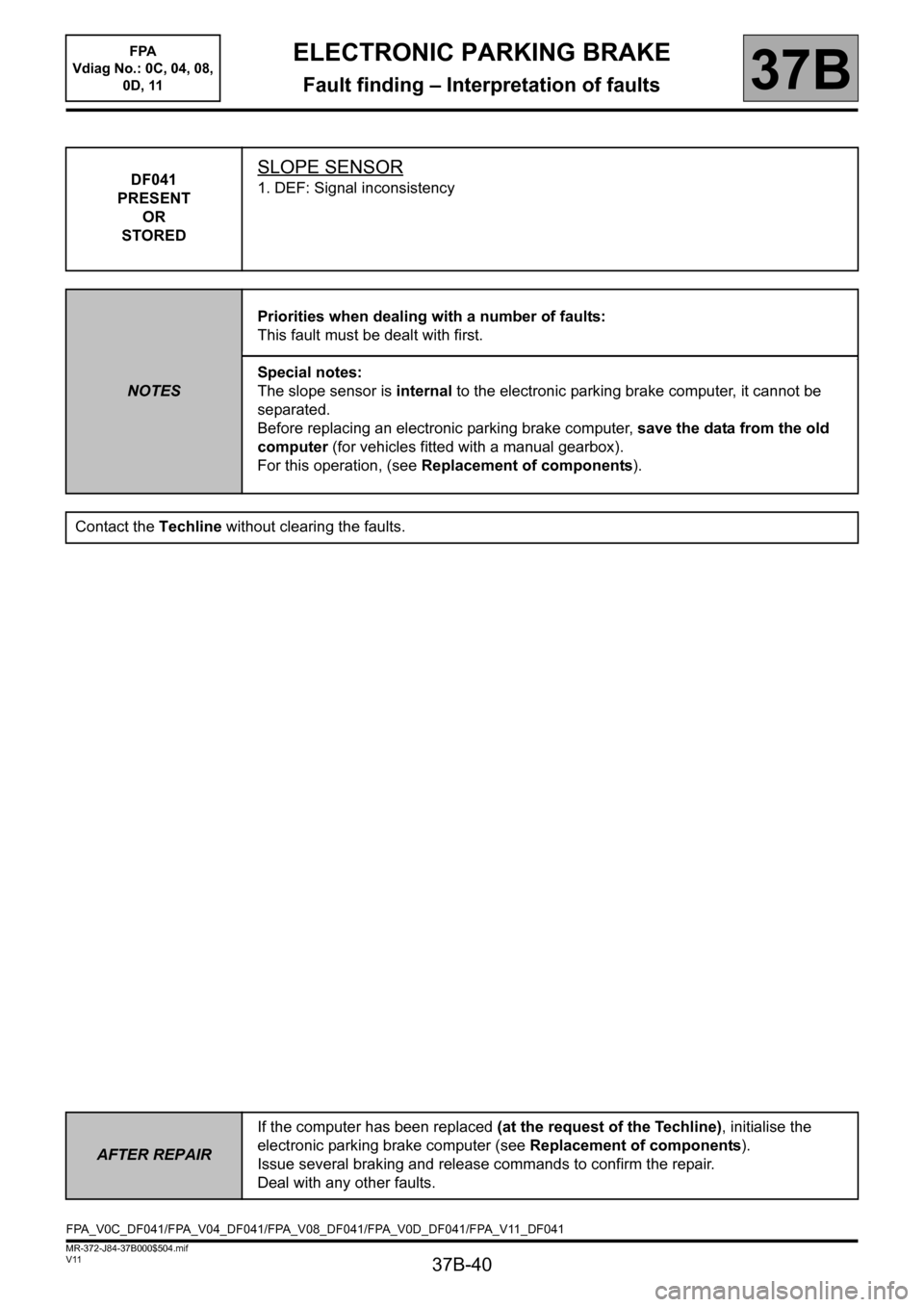
DF041
PRESENT
OR
STOREDSLOPE SENSOR
1. DEF: Signal inconsistency
NOTESPriorities when dealing with a number of faults:
This fault must be dealt with first.
Special notes:
The slope sensor is internal to the electronic parking brake computer, it cannot be
separated.
Before replacing an electronic parking brake computer, save the data from the old
computer (for vehicles fitted with a manual gearbox).
For this operation, (see Replacement of components).
Contact the Techline without clearing the faults.
AFTER REPAIRIf the computer has been replaced (at the request of the Techline), initialise the
electronic parking brake computer (see Replacement of components).
Issue several braking and release commands to confirm the repair.
Deal with any other faults.
FPA_V0C_DF041/FPA_V04_DF041/FPA_V08_DF041/FPA_V0D_DF041/FPA_V11_DF041
Page 41 of 115
37B-41
MR-372-J84-37B000$504.mif
V11
ELECTRONIC PARKING BRAKE
Fault finding – Interpretation of faults
FPA
Vdiag No.: 0C, 04, 08,
0D, 11
37B
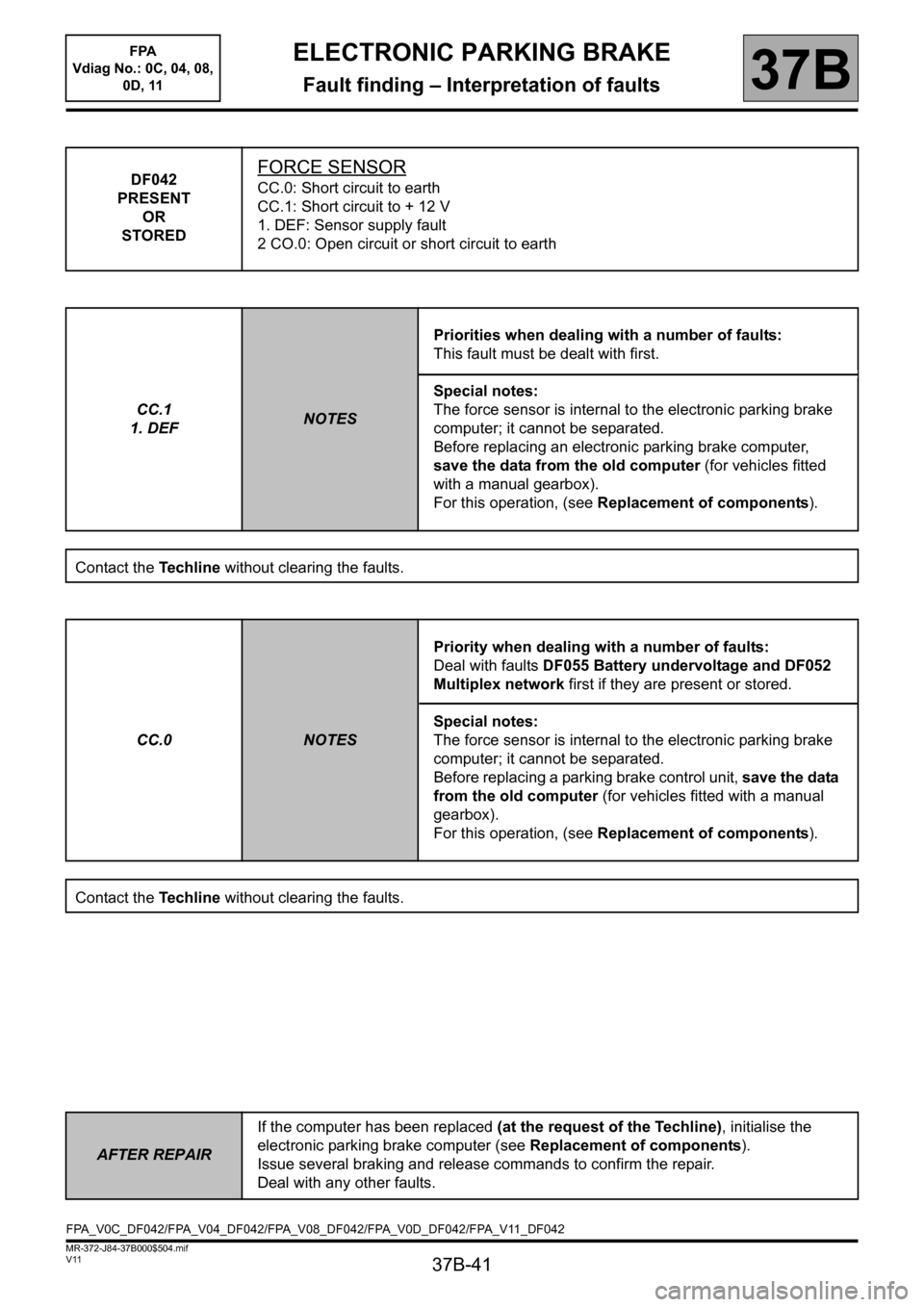
DF042
PRESENT
OR
STOREDFORCE SENSOR
CC.0: Short circuit to earth
CC.1: Short circuit to + 12 V
1. DEF: Sensor supply fault
2 CO.0: Open circuit or short circuit to earth
CC.1
1. DEF
NOTESPriorities when dealing with a number of faults:
This fault must be dealt with first.
Special notes:
The force sensor is internal to the electronic parking brake
computer; it cannot be separated.
Before replacing an electronic parking brake computer,
save the data from the old computer (for vehicles fitted
with a manual gearbox).
For this operation, (see Replacement of components).
Contact the Techline without clearing the faults.
CC.0
NOTESPriority when dealing with a number of faults:
Deal with faults DF055 Battery undervoltage and DF052
Multiplex network first if they are present or stored.
Special notes:
The force sensor is internal to the electronic parking brake
computer; it cannot be separated.
Before replacing a parking brake control unit, save the data
from the old computer (for vehicles fitted with a manual
gearbox).
For this operation, (see Replacement of components).
Contact the Techline without clearing the faults.
AFTER REPAIRIf the computer has been replaced (at the request of the Techline), initialise the
electronic parking brake computer (see Replacement of components).
Issue several braking and release commands to confirm the repair.
Deal with any other faults.
FPA_V0C_DF042/FPA_V04_DF042/FPA_V08_DF042/FPA_V0D_DF042/FPA_V11_DF042
Page 42 of 115
37B-42
MR-372-J84-37B000$504.mif
V11
ELECTRONIC PARKING BRAKE
Fault finding – Interpretation of faults
FPA
Vdiag No.: 0C, 04, 08,
0D, 11
37B
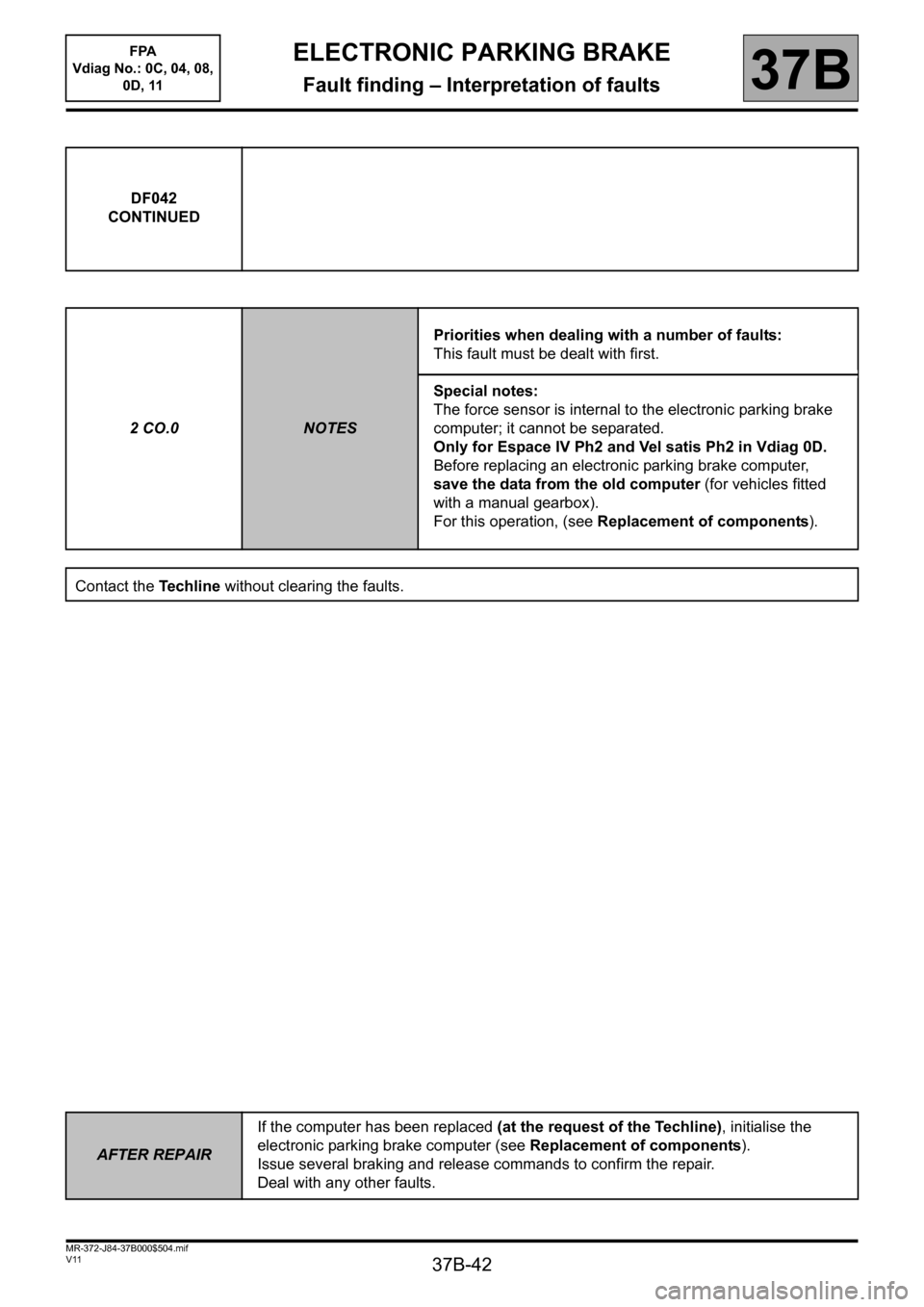
DF042
CONTINUED
2 CO.0
NOTESPriorities when dealing with a number of faults:
This fault must be dealt with first.
Special notes:
The force sensor is internal to the electronic parking brake
computer; it cannot be separated.
Only for Espace IV Ph2 and Vel satis Ph2 in Vdiag 0D.
Before replacing an electronic parking brake computer,
save the data from the old computer (for vehicles fitted
with a manual gearbox).
For this operation, (see Replacement of components).
Contact the Techline without clearing the faults.
AFTER REPAIRIf the computer has been replaced (at the request of the Techline), initialise the
electronic parking brake computer (see Replacement of components).
Issue several braking and release commands to confirm the repair.
Deal with any other faults.
Page 43 of 115
37B-43
MR-372-J84-37B000$504.mif
V11
ELECTRONIC PARKING BRAKE
Fault finding – Interpretation of faults
FPA
Vdiag No.: 0C, 04, 08,
0D, 11
37B
DF043
PRESENT
OR
STOREDPARKING BRAKE MOTOR
1. DEF: Internal electrical fault
NOTESPriorities when dealing with a number of faults:
This fault must be dealt with first.
Special notes:
Before replacing an electronic parking brake computer, save the data from the old
computer (for vehicles fitted with a manual gearbox).
For this operation, (see Replacement of components).
Check that the parking brake mechanical tensioning line is correct:
– Check the conformity, condition and correct operation of the brake callipers.
– Check the automatic adjustment of the rear brake callipers.
Contact the Techline without clearing the faults.
AFTER REPAIRIf the computer has been replaced (at the request of the Techline), initialise the
electronic parking brake computer (see Replacement of components).
Issue several braking and release commands to confirm the repair.
Deal with any other faults.
FPA_V0C_DF043/FPA_V04_DF043/FPA_V08_DF043/FPA_V0D_DF043/FPA_V11_DF043
Page 66 of 115
37B-66
MR-372-J84-37B000$504.mif
V11
ELECTRONIC PARKING BRAKE
Fault finding – Interpretation of faults
FPA
Vdiag No.: 0C, 04, 08,
0D, 11
37B
DF057
PRESENT
OR
STOREDCOMPUTER INTERNAL TEMPERATURE SENSOR
1. DEF: Temperature sensor outside correct range (internal fault)
2. DEF: Internal electronic fault
NOTESConditions for applying the fault finding procedure to a stored fault:
Apply the fault finding procedure even if the fault is stored.
Special notes:
Before replacing an electronic parking brake computer, save the data from the old
computer (for vehicles fitted with a manual gearbox).
For this operation, (see Replacement of components).
Contact the Techline without clearing the faults.
AFTER REPAIRIf the computer has been replaced (at the request of the Techline), initialise the
electronic parking brake computer (see Replacement of components).
Issue several braking and release commands to confirm the repair.
Deal with any other faults.
FPA_V0C_DF057/FPA_V04_DF057/FPA_V08_DF057/FPA_V0D_DF057/FPA_V11_DF057
Page 67 of 115
37B-67
MR-372-J84-37B000$504.mif
V11
ELECTRONIC PARKING BRAKE
Fault finding – Interpretation of faults
FPA
Vdiag No.: 0C, 04, 08,
0D, 11
37B
DF058
PRESENT
OR
STOREDPARKING BRAKE MOTOR CURRENT
1. DEF: Inconsistent current value
NOTESConditions for applying the fault finding procedure to a stored fault:
Apply the fault finding procedure even if the fault is stored.
Special notes:
Before replacing an electronic parking brake computer, save the data from the old
computer (for vehicles fitted with a manual gearbox).
For this operation, (see Replacement of components).
Check to see if battery polarity has been inverted, if this is the case, clear the fault and check that the electronic
parking brake computer is operating correctly (see System operation).
If the fault is still present, contact the Techline without clearing the fault.
AFTER REPAIRIf the computer has been replaced (at the request of the Techline), initialise the
electronic parking brake computer (see Replacement of components).
Issue several braking and release commands to confirm the repair.
Deal with any other faults.
FPA_V0C_DF058/FPA_V04_DF058/FPA_V08_DF058/FPA_V0D_DF058/FPA_V11_DF058
Page 69 of 115
37B-69
MR-372-J84-37B000$504.mif
V11
ELECTRONIC PARKING BRAKE
Fault finding – Interpretation of faults37B
DF059
CONTINUED
Use the diagnostic tool to carry out a multiplex system test.
This check ensures that the various multiplex system connections are correct and finds any faulty segments.
Carry out any necessary repairs.
If the multiplex network test did not find the faulty connection, carry out a conformity check to check that the
status from the Protection and Switching Unit computer is present and correct (ET016, PR015, PR017).
Check the gearbox contacts.
If the status and parameters shown here are not correct, carry out fault finding on the Protection and Switching
Unit (see 87G, Engine compartment connection unit).
If the fault is still present, disconnect the Protection and Switching Unit computer connector to check that the
connector and its clips (terminals) are in good condition, especially the multiplex track clips (see the wiring
diagram of the Protection and Switching Unit fitted to the vehicle).
Replace the clips if necessary.
If the fault persists, contact the Techline.
AFTER REPAIRIf the computer has been replaced (at the request of the Techline), initialise the
electronic parking brake computer (see Replacement of components).
Issue several braking and release commands to confirm the repair.
Deal with any other faults.
FPA
Vdiag No.: 0C, 08, 0D,
11
Page 70 of 115
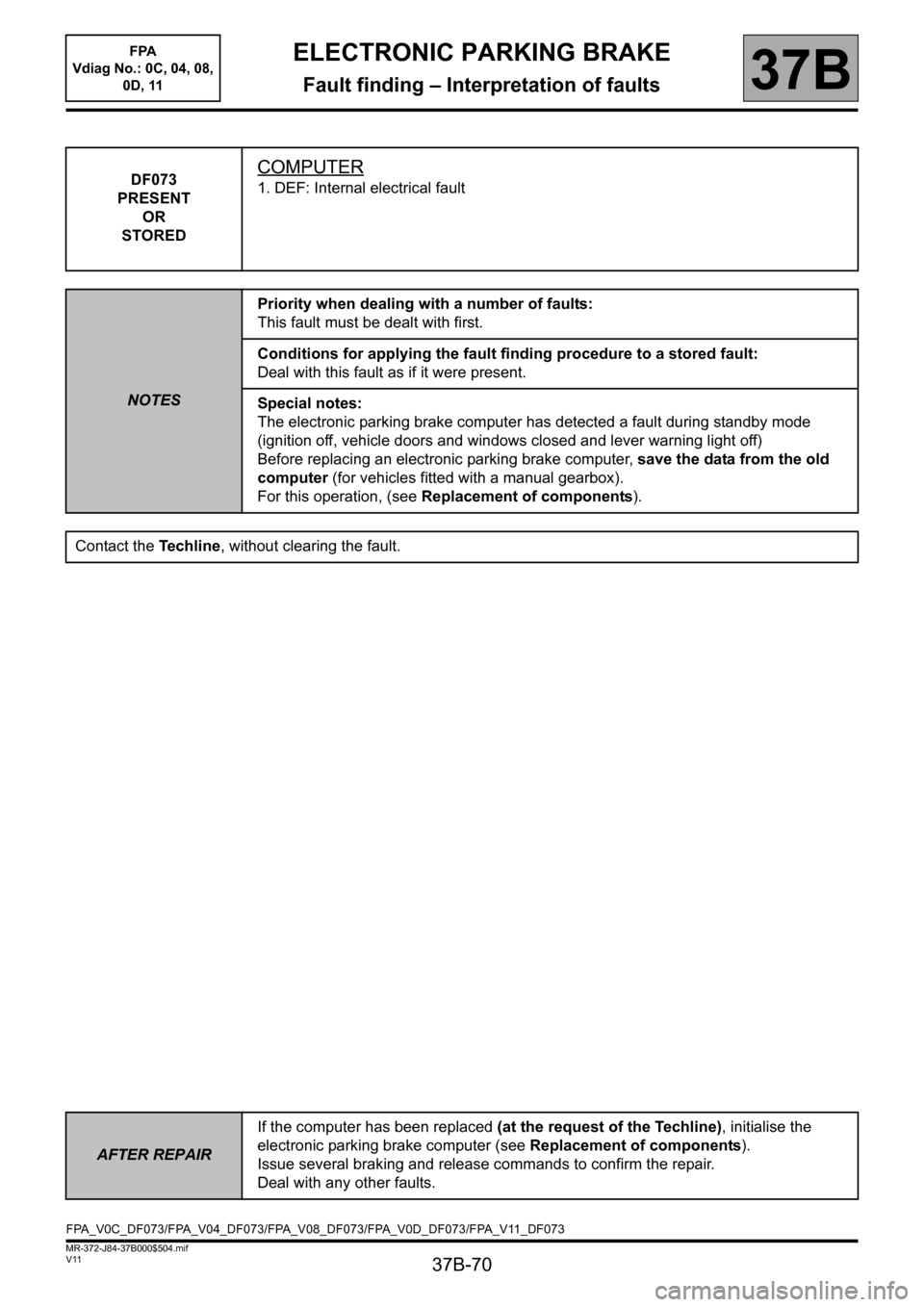
37B-70
MR-372-J84-37B000$504.mif
V11
ELECTRONIC PARKING BRAKE
Fault finding – Interpretation of faults
FPA
Vdiag No.: 0C, 04, 08,
0D, 11
37B
DF073
PRESENT
OR
STOREDCOMPUTER
1. DEF: Internal electrical fault
NOTESPriority when dealing with a number of faults:
This fault must be dealt with first.
Conditions for applying the fault finding procedure to a stored fault:
Deal with this fault as if it were present.
Special notes:
The electronic parking brake computer has detected a fault during standby mode
(ignition off, vehicle doors and windows closed and lever warning light off)
Before replacing an electronic parking brake computer, save the data from the old
computer (for vehicles fitted with a manual gearbox).
For this operation, (see Replacement of components).
Contact the Techline, without clearing the fault.
AFTER REPAIRIf the computer has been replaced (at the request of the Techline), initialise the
electronic parking brake computer (see Replacement of components).
Issue several braking and release commands to confirm the repair.
Deal with any other faults.
FPA_V0C_DF073/FPA_V04_DF073/FPA_V08_DF073/FPA_V0D_DF073/FPA_V11_DF073
Page 82 of 115
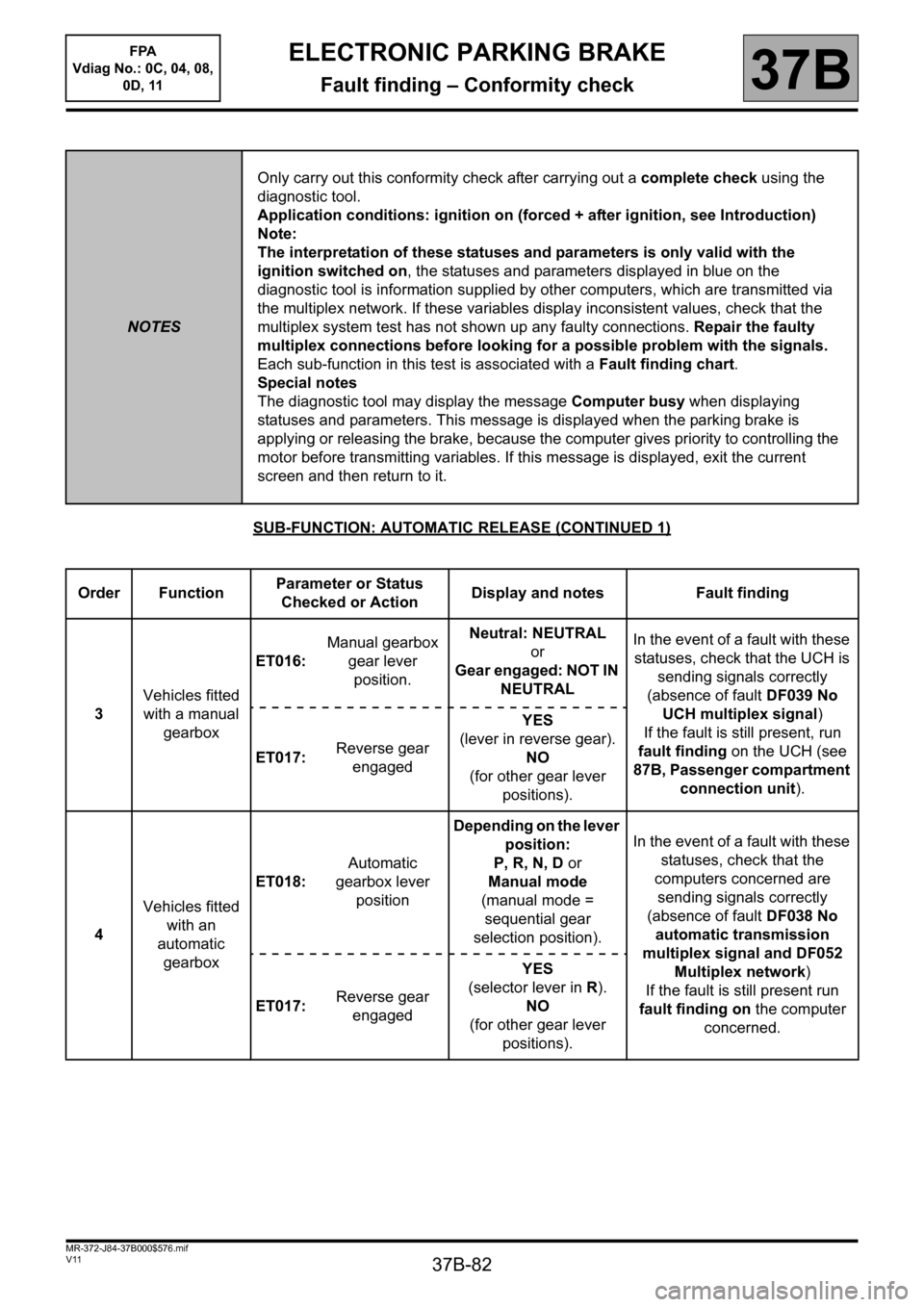
37B-82
MR-372-J84-37B000$576.mif
V11
FPA
Vdiag No.: 0C, 04, 08,
0D, 11ELECTRONIC PARKING BRAKE
Fault finding – Conformity check37B
SUB-FUNCTION: AUTOMATIC RELEASE (CONTINUED 1)
NOTESOnly carry out this conformity check after carrying out a complete check using the
diagnostic tool.
Application conditions: ignition on (forced + after ignition, see Introduction)
Note:
The interpretation of these statuses and parameters is only valid with the
ignition switched on, the statuses and parameters displayed in blue on the
diagnostic tool is information supplied by other computers, which are transmitted via
the multiplex network. If these variables display inconsistent values, check that the
multiplex system test has not shown up any faulty connections. Repair the faulty
multiplex connections before looking for a possible problem with the signals.
Each sub-function in this test is associated with a Fault finding chart.
Special notes
The diagnostic tool may display the message Computer busy when displaying
statuses and parameters. This message is displayed when the parking brake is
applying or releasing the brake, because the computer gives priority to controlling the
motor before transmitting variables. If this message is displayed, exit the current
screen and then return to it.
Order FunctionParameter or Status
Checked or ActionDisplay and notes Fault finding
3Vehicles fitted
with a manual
gearboxET016:Manual gearbox
gear lever
position.Neutral: NEUTRAL
or
Gear engaged: NOT IN
NEUTRALIn the event of a fault with these
statuses, check that the UCH is
sending signals correctly
(absence of fault DF039 No
UCH multiplex signal)
If the fault is still present, run
fault finding on the UCH (see
87B, Passenger compartment
connection unit). ET017:Reverse gear
engagedYES
(lever in reverse gear).
NO
(for other gear lever
positions).
4Vehicles fitted
with an
automatic
gearboxET018:Automatic
gearbox lever
positionDepending on the lever
position:
P, R, N, D or
Manual mode
(manual mode =
sequential gear
selection position).In the event of a fault with these
statuses, check that the
computers concerned are
sending signals correctly
(absence of fault DF038 No
automatic transmission
multiplex signal and DF052
Multiplex network)
If the fault is still present run
fault finding on the computer
concerned. ET017:Reverse gear
engagedYES
(selector lever in R).
NO
(for other gear lever
positions).