lock RENAULT SCENIC 2016 J95 / 3.G Repair Manual
[x] Cancel search | Manufacturer: RENAULT, Model Year: 2016, Model line: SCENIC, Model: RENAULT SCENIC 2016 J95 / 3.GPages: 270, PDF Size: 2.66 MB
Page 185 of 270
4.3
BONNET (2/2)
Closing the bonnet
Check that nothing has been left in the
engine compartment.
To close the bonnet again, hold the
bonnet in the middle and guide it down,
allowing a 30 cm gap before it is closed,
then release it. It will latch automatically
under its own weight.
After carrying out any work
in the engine compart-
ment, check that nothing
has been left behind (cloth,
tools, etc.).
These may damage the engine or
cause a fire.
Ensure that the bonnet is
properly locked.
Check that nothing is pre-
venting the catch from lock-
ing (gravel, cloth, etc.).
In the event of even a slight
impact involving the radia-
tor grille or bonnet, have the
bonnet lock checked by an
authorised dealer as soon as pos-
sible.
Page 199 of 270
4.17
Glass instrument panel(e.g.: instrument panel, clock, exterior
temperature display, radio display, mul-
timedia or multifunction display etc.)
Use a soft cloth (or cotton wool).
If this does not clean them properly,
use a soft cloth (or cotton wool) slightly
moistened with soapy water and then
wipe clean with another soft damp cloth
or cotton wool.
Finally, carefully dry off with a soft dry
cloth.
Do not use products containing alco-
hol and/or spray fluids on the area.
Seat belts
These must be kept clean.
Use products selected by our Technical
Department (Approved outlets) or
warm, soapy water and a sponge and
wipe with a dry cloth.
Detergents or dyes must not be used
under any circumstances.
INTERIOR TRIM MAINTENANCE (1/2)
Textiles (seats, door trim, etc)
Vacuum-clean the textiles regularly.
Liquid stain
Use soapy water.
Dab lightly (never rub) with a soft cloth,
rinse and remove the excess.
Solid or pasty stain
Carefully remove the excess solid or
pasty material immediately with a spa-
tula (working from the edges to the
centre to avoid spreading the stain).
Clean as for a liquid stain.
Special instructions for sweets or
chewing gum
Put an ice cube on the stain to solidify
it, then proceed as for a solid stain.
A well-maintained vehicle will last
longer. It is therefore recommended to
maintain the interior of the vehicle re-
gularly.
A stain should always be dealt with
swiftly.
Whatever type of stain is on the trim,
use
cold (or warm) soapy water with
natural soap.
Detergents (washing-up liquid, pow-
dered products, alcohol-based pro-
ducts) should not be used.
Use a soft cloth.
Rinse and soak up the excess.
For further recommendations for
maintaining the interior, and/or for
any unsatisfactory results, please
see an authorised dealer.
Page 203 of 270
5.3
PUNCTURE/EMERGENCY SPARE WHEEL (2/2)
B
5
5
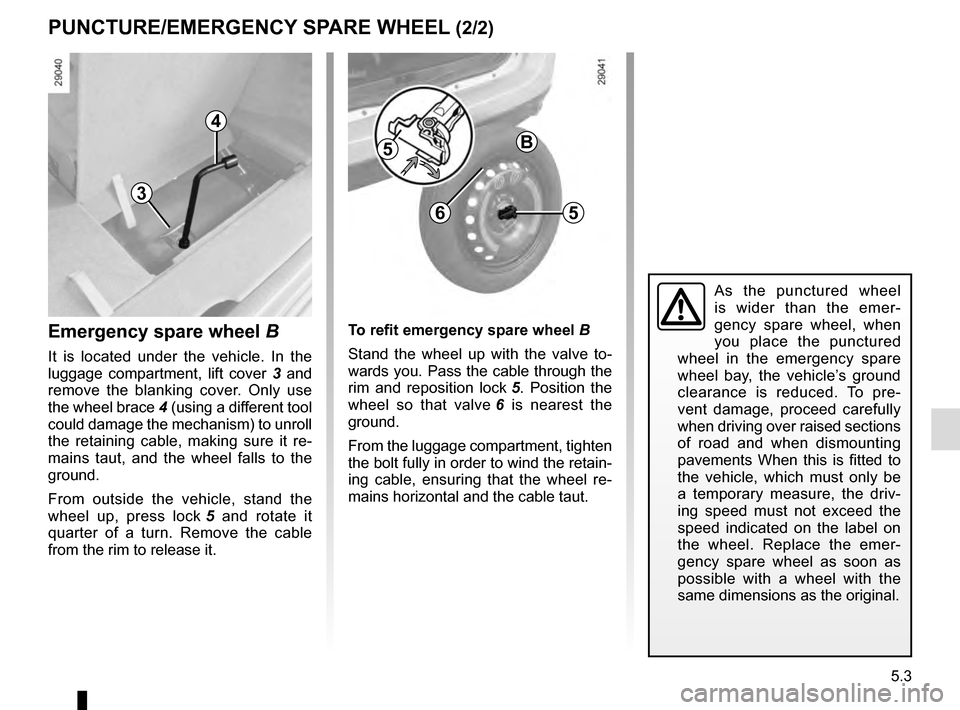
To refit emergency spare wheel B
Stand the wheel up with the valve to-
wards you. Pass the cable through the
rim and reposition lock 5. Position the
wheel so that valve 6 is nearest the
ground.
From the luggage compartment, tighten
the bolt fully in order to wind the retain-
ing cable, ensuring that the wheel re-
mains horizontal and the cable taut.
4
3
Emergency spare wheel B
It is located under the vehicle. In the
luggage compartment, lift cover 3 and
remove the blanking cover. Only use
the wheel brace 4 (using a different tool
could damage the mechanism) to unroll
the retaining cable, making sure it re-
mains taut, and the wheel falls to the
ground.
From outside the vehicle, stand the
wheel up, press lock 5 and rotate it
quarter of a turn. Remove the cable
from the rim to release it.
6
As the punctured wheel
is wider than the emer-
gency spare wheel, when
you place the punctured
wheel in the emergency spare
wheel bay, the vehicle’s ground
clearance is reduced. To pre-
vent damage, proceed carefully
when driving over raised sections
of road and when dismounting
pavements When this is fitted to
the vehicle, which must only be
a temporary measure, the driv-
ing speed must not exceed the
speed indicated on the label on
the wheel. Replace the emer-
gency spare wheel as soon as
possible with a wheel with the
same dimensions as the original.
Page 209 of 270
5.9
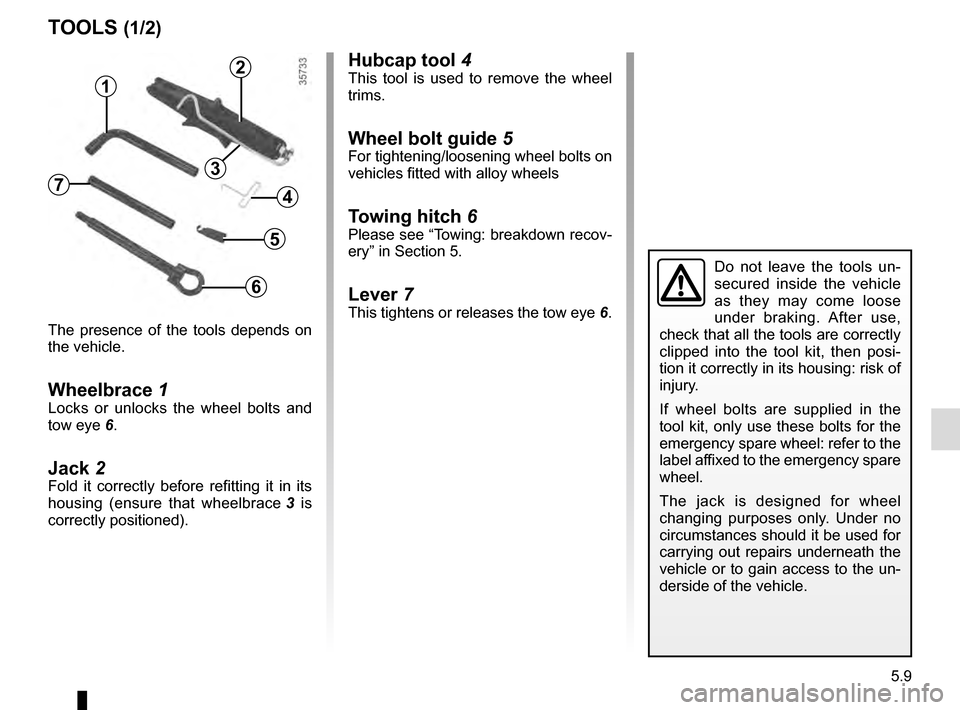
Hubcap tool 4This tool is used to remove the wheel
trims.
Wheel bolt guide 5For tightening/loosening wheel bolts on
vehicles fitted with alloy wheels
Towing hitch 6Please see “Towing: breakdown recov-
ery” in Section 5.
Lever 7This tightens or releases the tow eye 6.
The presence of the tools depends on
the vehicle.
Wheelbrace 1Locks or unlocks the wheel bolts and
tow eye 6.
Jack 2Fold it correctly before refitting it in its
housing (ensure that wheelbrace 3 is
correctly positioned).
TOOLS (1/2)
Do not leave the tools un-
secured inside the vehicle
as they may come loose
under braking. After use,
check that all the tools are correctly
clipped into the tool kit, then posi-
tion it correctly in its housing: risk of
injury.
If wheel bolts are supplied in the
tool kit, only use these bolts for the
emergency spare wheel: refer to the
label affixed to the emergency spare
wheel.
The jack is designed for wheel
changing purposes only. Under no
circumstances should it be used for
carrying out repairs underneath the
vehicle or to gain access to the un-
derside of the vehicle.
2
1
4
6
5
73
Page 226 of 270
5.26
FUSES (2/2)
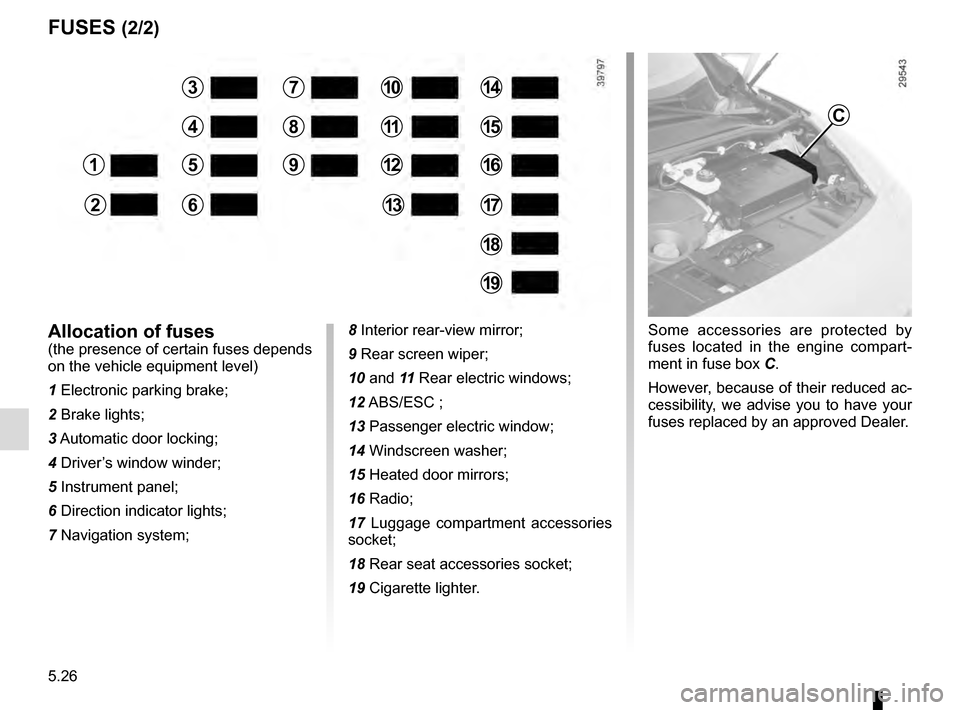
Some accessories are protected by
fuses located in the engine compart-
ment in fuse box C.
However, because of their reduced ac-
cessibility, we advise you to have your
fuses replaced by an approved Dealer.Allocation of fuses(the presence of certain fuses depends
on the vehicle equipment level)
1 Electronic parking brake;
2 Brake lights;
3 Automatic door locking;
4 Driver’s window winder;
5 Instrument panel;
6 Direction indicator lights;
7 Navigation system;8 Interior rear-view mirror;
9 Rear screen wiper;
10 and 11
Rear electric windows;
12 ABS/ESC ;
13 Passenger electric window;
14 Windscreen washer;
15 Heated door mirrors;
16 Radio;
17 Luggage compartment accessories
socket;
18 Rear seat accessories socket;
19 Cigarette lighter.
1
2
3
4
5
6
7
8
9
10
11
12
13
14
15
16
17
18
19
C
Page 229 of 270
5.29
Operating faultsIf the battery is too weak to ensure cor-
rect operation, you may start (insert the
RENAULT card in the card reader) and
lock/unlock the vehicle (refer to the in-
formation on “Locking/unlocking the
doors” in Section 1).
RENAULT CARD: battery
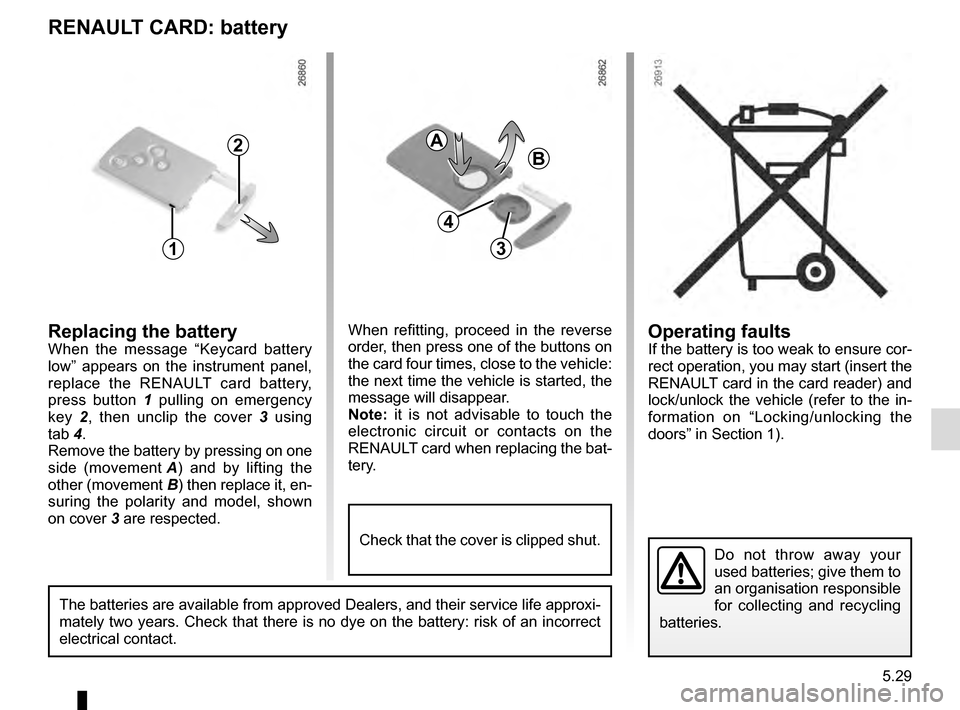
Replacing the batteryWhen the message “Keycard battery
low” appears on the instrument panel,
replace the RENAULT card battery,
press button 1 pulling on emergency
key 2, then unclip the cover 3 using
tab 4.
Remove the battery by pressing on one
side (movement A) and by lifting the
other (movement B) then replace it, en-
suring the polarity and model, shown
on cover 3 are respected.
Do not throw away your
used batteries; give them to
an organisation responsible
for collecting and recycling
batteries.
1
2
When refitting, proceed in the reverse
order, then press one of the buttons on
the card four times, close to the vehicle:
the next time the vehicle is started, the
message will disappear.
Note: it is not advisable to touch the
electronic circuit or contacts on the
RENAULT card when replacing the bat-
tery.
A
B
3
The batteries are available from approved Dealers, and their service lif\
e approxi-
mately two years. Check that there is no dye on the battery: risk of an \
incorrect
electrical contact.
4
Check that the cover is clipped shut.
Page 231 of 270
5.31
WIPER BLADES: replacing
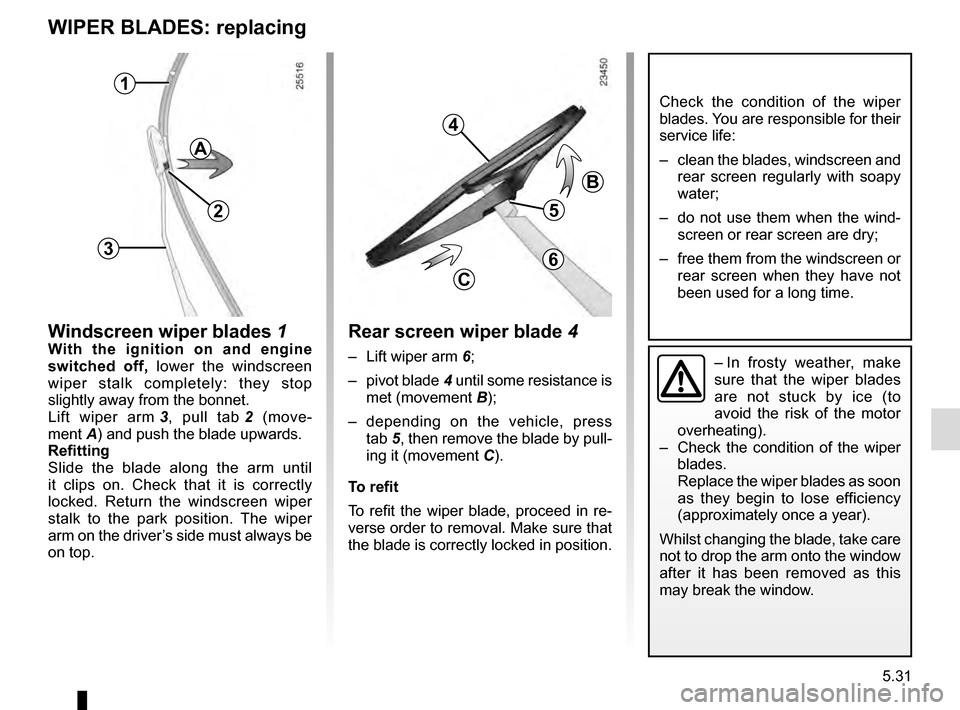
Windscreen wiper blades 1With the ignition on and engine
switched off, lower the windscreen
wiper stalk completely: they stop
slightly away from the bonnet.
Lift wiper arm 3, pull tab 2 (move-
ment A) and push the blade upwards.
Refitting
Slide the blade along the arm until
it clips on. Check that it is correctly
locked. Return the windscreen wiper
stalk to the park position. The wiper
arm on the driver’s side must always be
on top.– In frosty weather, make
sure that the wiper blades
are not stuck by ice (to
avoid the risk of the motor
overheating).
– Check the condition of the wiper
blades.
Replace the wiper blades as soon
as they begin to lose efficiency
(approximately once a year).
Whilst changing the blade, take care
not to drop the arm onto the window
after it has been removed as this
may break the window.
1
2
3
Check the condition of the wiper
blades. You are responsible for their
service life:
– clean the blades, windscreen and rear screen regularly with soapy
water;
– do not use them when the wind- screen or rear screen are dry;
– free them from the windscreen or rear screen when they have not
been used for a long time.
Rear screen wiper blade 4
– Lift wiper arm 6;
– pivot blade 4 until some resistance is
met (movement B);
– depending on the vehicle, press tab 5, then remove the blade by pull-
ing it (movement C).
To refit
To refit the wiper blade, proceed in re-
verse order to removal. Make sure that
the blade is correctly locked in position.
4
5
B
C
A
6
Page 232 of 270
5.32
TOWING: breakdown (1/2)
1
2
Before towing, unlock the steering
column: with the clutch depressed,
engage first gear (lever in position N
or R for vehicles with automatic gear-
boxes), insert the RENAULT card in the
card reader, then press the engine start
button for two seconds.
Reposition the lever to neutral (position
N for vehicles fitted with an automatic
gearbox).
The column is unlocked, the acces-
sory functions are supplied: the vehi-
cle lights can be used (indicators, brake
lights etc.). At night the vehicle must
have its lights on.
Once you have finished towing, press
the engine start button twice (risk of
running down the battery). The speed specified by current legis-
lation for towing must always be ob-
served. If your vehicle is the towing
vehicle, do not exceed the maximum
towing weight for your vehicle (refer to
the information on “Weights” in Section
6).
Towing a vehicle with an
automatic gearbox
With the engine switched off, the trans-
mission is no longer lubricated. It is
preferable to tow this type of vehicle on
a trailer or tow it with the front wheels
off the ground.
Under exceptional circumstances
,
you may tow the vehicle with all four
wheels on the ground, only going for-
ward, with the gear lever in the N posi-
tion, and for a distance not exceeding
48 miles (80 km).
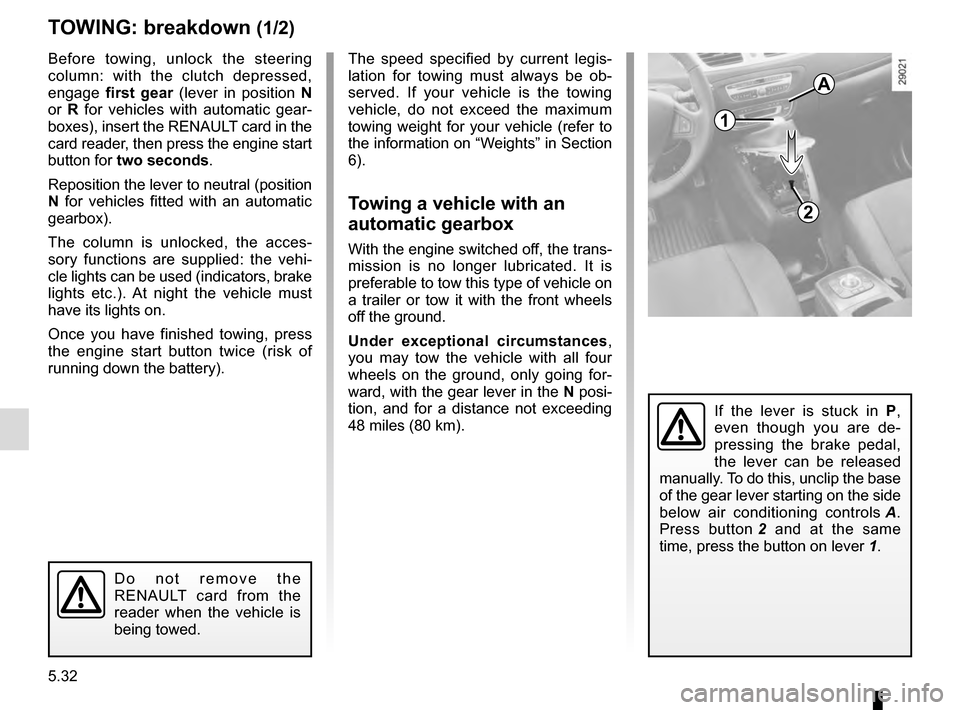
If the lever is stuck in P ,
even though you are de-
pressing the brake pedal,
the lever can be released
manually. To do this, unclip the base
of the gear lever starting on the side
below air conditioning controls A.
Press button 2 and at the same
time, press the button on lever 1.
Do not remove the
RENAULT card from the
reader when the vehicle is
being towed.
A
Page 233 of 270
5.33
TOWING: breakdown (2/2)
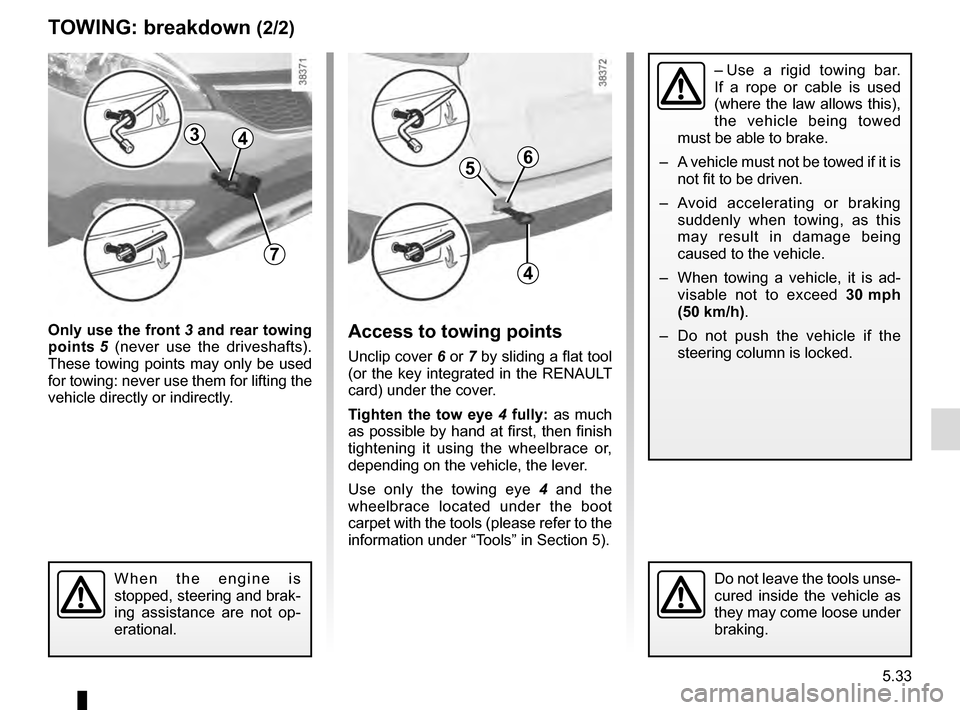
Only use the front 3 and rear towing
points 5 (never use the driveshafts).
These towing points may only be used
for towing: never use them for lifting the
vehicle directly or indirectly.Access to towing points
Unclip cover 6 or 7 by sliding a flat tool
(or the key integrated in the RENAULT
card) under the cover.
Tighten the tow eye 4 fully: as much
as possible by hand at first, then finish
tightening it using the wheelbrace or,
depending on the vehicle, the lever.
Use only the towing eye 4 and the
wheelbrace located under the boot
carpet with the tools (please refer to the
information under “Tools” in Section 5).
When the engine is
stopped, steering and brak-
ing assistance are not op-
erational.Do not leave the tools unse-
cured inside the vehicle as
they may come loose under
braking.
– Use a rigid towing bar.
If a rope or cable is used
(where the law allows this),
the vehicle being towed
must be able to brake.
– A vehicle must not be towed if it is not fit to be driven.
– Avoid accelerating or braking suddenly when towing, as this
may result in damage being
caused to the vehicle.
– When towing a vehicle, it is ad- visable not to exceed 30 mph
(50 km/h).
– Do not push the vehicle if the steering column is locked.
3
7
4
56
4
Page 234 of 270

The following advice will enable you to carry out quick, temporary repai\
rs. For safety reasons you should always contact
an approved Dealer as soon as possible.
Using th")
5.34
OPERATING FAULTS (1/6)
The following advice will enable you to carry out quick, temporary repai\
rs. For safety reasons you should always contact
an approved Dealer as soon as possible.
Using the RENAULT cardPOSSIBLE CAUSESWHAT TO DO
The RENAULT card does not lock or
unlock the doors. Card battery is flat.
Replace the battery. You can still lock/
unlock and start your vehicle (refer to the in-
formation on “Locking, unlocking the open-
ing elements” in Section 1 and “Starting,
stopping the engine” in Section 2).
Use of appliances operating on the
same frequency as the card (mobile
phone, etc.). Stop using the equipment or use the in-
tegrated key (refer to the information on
“Locking, unlocking the opening elements”
in Section 1).
Vehicle located in a high electromag-
netic radiation zone.
Vehicle battery flat. Use the key integrated in the card (refer to
the information on “Locking, unlocking the
opening elements” in Section 1).
The vehicle is started. With the engine running, the card’s locking/
unlocking device is blocked. Turn off the ig-
nition.