buttons RENAULT SCENIC 2017 J95 / 3.G User Guide
[x] Cancel search | Manufacturer: RENAULT, Model Year: 2017, Model line: SCENIC, Model: RENAULT SCENIC 2017 J95 / 3.GPages: 358, PDF Size: 10.42 MB
Page 229 of 358
3.15
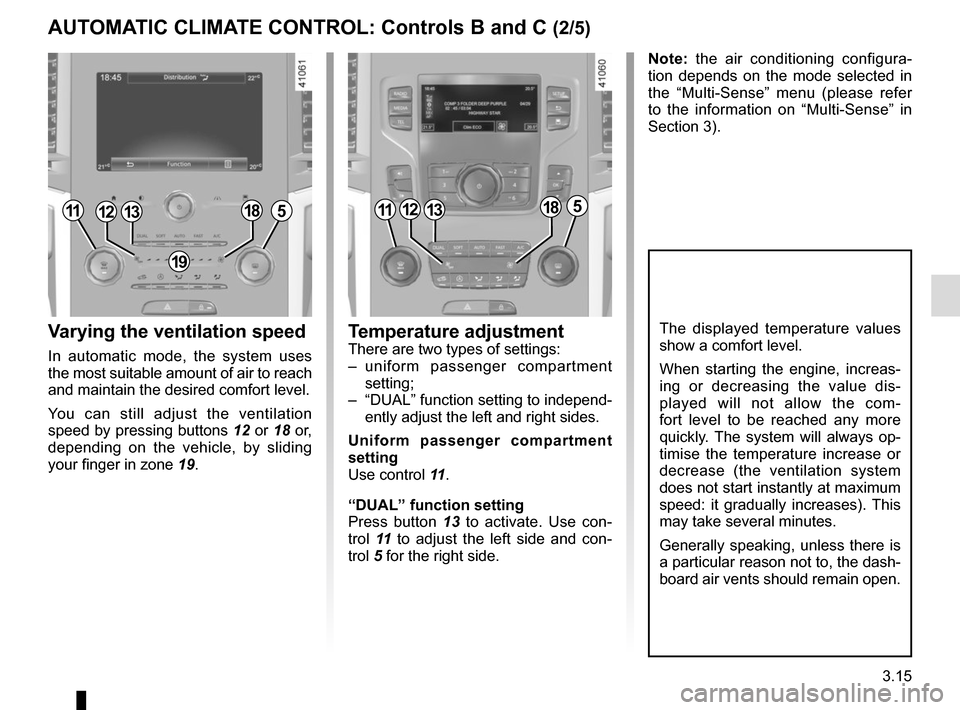
Varying the ventilation speed
In automatic mode, the system uses
the most suitable amount of air to reach
and maintain the desired comfort level.
You can still adjust the ventilation
speed by pressing buttons 12 or 18 or,
depending on the vehicle, by sliding
your finger in zone 19.
Temperature adjustmentThere are two types of settings:
– uniform passenger compartment
setting;
– “DUAL” function setting to independ- ently adjust the left and right sides.
Uniform passenger compartment
setting
Use control 11 .
“DUAL” function setting
Press button 13 to activate. Use con-
trol 11 to adjust the left side and con-
trol 5 for the right side.
The displayed temperature values
show a comfort level.
When starting the engine, increas-
ing or decreasing the value dis-
played will not allow the com-
fort level to be reached any more
quickly. The system will always op-
timise the temperature increase or
decrease (the ventilation system
does not start instantly at maximum
speed: it gradually increases). This
may take several minutes.
Generally speaking, unless there is
a particular reason not to, the dash-
board air vents should remain open.
Note: the air conditioning configura-
tion depends on the mode selected in
the “Multi-Sense” menu (please refer
to the information on “Multi-Sense” in
Section 3).
111312185111312185
19
AUTOMATIC CLIMATE CONTROL: Controls B and C (2/5)
Page 230 of 358
3.16
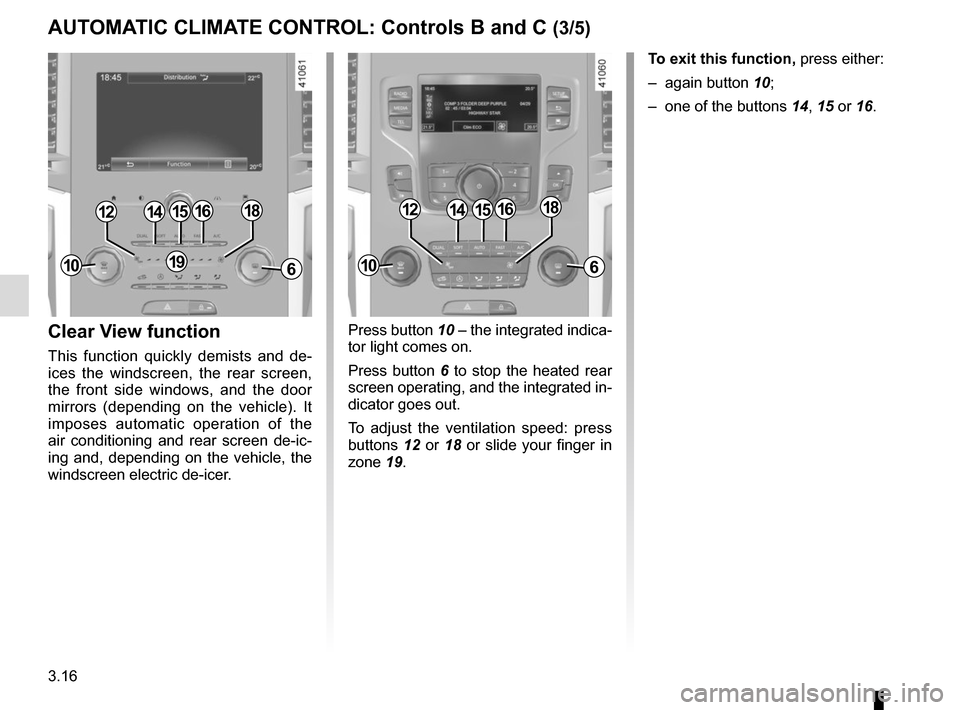
Press button 10 – the integrated indica-
tor light comes on.
Press button 6 to stop the heated rear
screen operating, and the integrated in-
dicator goes out.
To adjust the ventilation speed: press
buttons 12 or 18 or slide your finger in
zone 19.Clear View function
This function quickly demists and de-
ices the windscreen, the rear screen,
the front side windows, and the door
mirrors (depending on the vehicle). It
imposes automatic operation of the
air conditioning and rear screen de-ic-
ing and, depending on the vehicle, the
windscreen electric de-icer. To exit this function,
press either:
– again button 10;
– one of the buttons 14, 15 or 16.
141512
6
1816
191010
141512
6
1816
AUTOMATIC CLIMATE CONTROL: Controls B and C (3/5)
Page 232 of 358
3.18
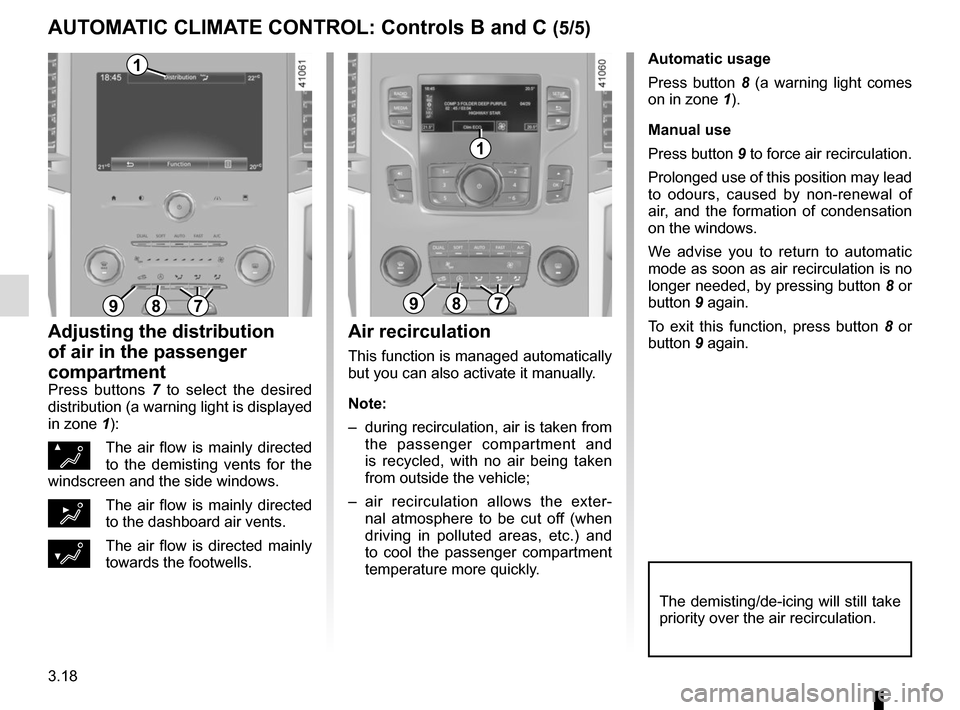
Automatic usage
Press button 8 (a warning light comes
on in zone 1).
Manual use
Press button 9 to force air recirculation.
Prolonged use of this position may lead
to odours, caused by non-renewal of
air, and the formation of condensation
on the windows.
We advise you to return to automatic
mode as soon as air recirculation is no
longer needed, by pressing button 8 or
button 9 again.
To exit this function, press button 8 or
button 9 again.
Adjusting the distribution
of air in the passenger
compartment
Press buttons 7 to select the desired
distribution (a warning light is displayed
in zone 1):
ØThe air flow is mainly directed
to the demisting vents for the
windscreen and the side windows.
½The air flow is mainly directed
to the dashboard air vents.
¿The air flow is directed mainly
towards the footwells.
The demisting/de-icing will still take
priority over the air recirculation.
Air recirculation
This function is managed automatically
but you can also activate it manually.
Note:
– during recirculation, air is taken from the passenger compartment and
is recycled, with no air being taken
from outside the vehicle;
– air recirculation allows the exter- nal atmosphere to be cut off (when
driving in polluted areas, etc.) and
to cool the passenger compartment
temperature more quickly.
897897
1
1
AUTOMATIC CLIMATE CONTROL: Controls B and C (5/5)
Page 317 of 358
5.31
Operating faults
If the battery is too weak to ensure cor-
rect operation, you can still start and
lock/unlock the vehicle (please refer to
the information on “Locking/unlocking
the opening elements” in Section 1).
RENAULT CARD: battery
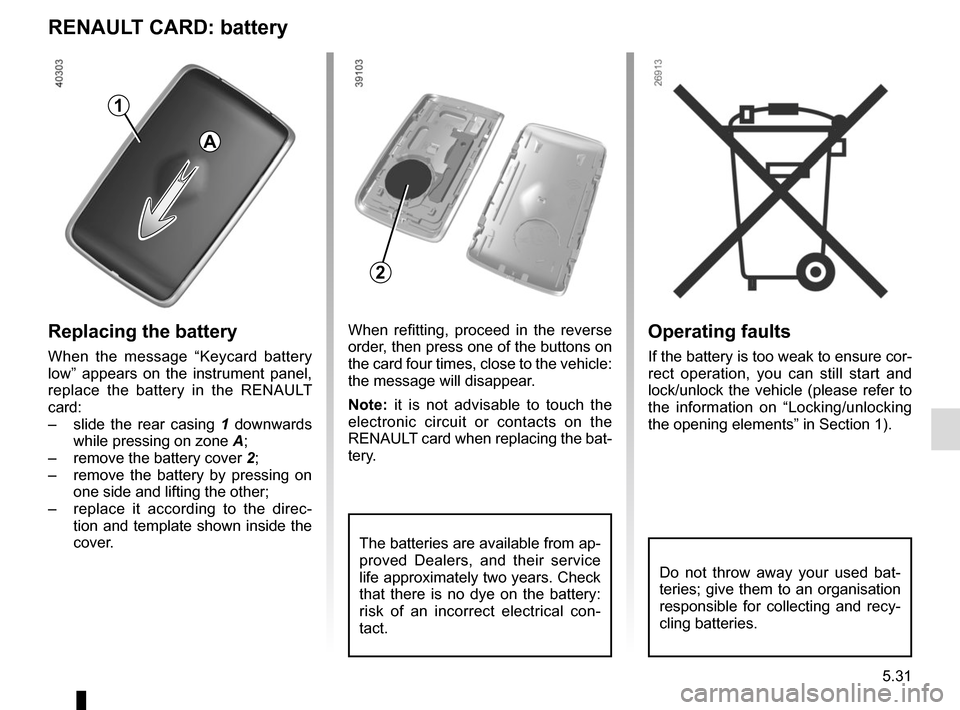
Replacing the battery
When the message “Keycard battery
low” appears on the instrument panel,
replace the battery in the RENAULT
card:
– slide the rear casing 1 downwards
while pressing on zone A;
– remove the battery cover 2;
– remove the battery by pressing on
one side and lifting the other;
– replace it according to the direc-
tion and template shown inside the
cover.
When refitting, proceed in the reverse
order, then press one of the buttons on
the card four times, close to the vehicle:
the message will disappear.
Note: it is not advisable to touch the
electronic circuit or contacts on the
RENAULT card when replacing the bat-
tery.
The batteries are available from ap-
proved Dealers, and their service
life approximately two years. Check
that there is no dye on the battery:
risk of an incorrect electrical con-
tact.
2
A
1
Do not throw away your used bat-
teries; give them to an organisation
responsible for collecting and recy-
cling batteries.