Headlight RENAULT SCENIC 2018 Owners Manual
[x] Cancel search | Manufacturer: RENAULT, Model Year: 2018, Model line: SCENIC, Model: RENAULT SCENIC 2018Pages: 364, PDF Size: 10.43 MB
Page 7 of 364
1.1
Section 1: Getting to know your vehicle
Key, radio frequency remote control: general information, use . . . . . . . . . . . . . . . . . . . . . . . . . . . . . 1.2
The RENAULT card: general information and use . . . . . . . . . . . . . . . . . . . . . . . . . . . . . . . . . . . .\
. . 1.6
Locking, unlocking the opening elements . . . . . . . . . . . . . . . . . . . . . . . . . . . . . . . . . . . .\
. . . . . . . . . 1.13
Opening and closing the doors . . . . . . . . . . . . . . . . . . . . . . . . . . . . . . . . . . . .\
. . . . . . . . . . . . . . . . . 1.16
Automatic locking when driving . . . . . . . . . . . . . . . . . . . . . . . . . . . . . . . . . . . . \
. . . . . . . . . . . . . . . . . 1.18
Headrests - Seats . . . . . . . . . . . . . . . . . . . . . . . . . . . . . . . . . . . .\
. . . . . . . . . . . . . . . . . . . . . . . . . . . 1.19
Seat belts. . . . . . . . . . . . . . . . . . . . . . . . . . . . . . . . . . . . \
. . . . . . . . . . . . . . . . . . . . . . . . . . . . . . . . . . 1.28
Additional methods of restraint: . . . . . . . . . . . . . . . . . . . . . . . . . . . . . . . . . . . . \
. . . . . . . . . . . . . . . . . 1.32in addition to the front seat belts . . . . . . . . . . . . . . . . . . . . . . . . . . . . . . . . . . . .\
. . . . . . . . . . 1.32
to the rear seat belts . . . . . . . . . . . . . . . . . . . . . . . . . . . . . . . . . . . .\
. . . . . . . . . . . . . . . . . . . 1.36
side protection . . . . . . . . . . . . . . . . . . . . . . . . . . . . . . . . . . . .\
. . . . . . . . . . . . . . . . . . . . . . . . 1.37
Child safety: general information . . . . . . . . . . . . . . . . . . . . . . . . . . . . . . . . . . . . \
. . . . . . . . . . . . . . . . 1.39 choosing a child seat mounting . . . . . . . . . . . . . . . . . . . . . . . . . . . . . . . . . . . .\
. . . . . . . . . . . 1.42
fitting a child seat, general information . . . . . . . . . . . . . . . . . . . . . . . . . . . . . . . . . . . . \
. . . . . . 1.45
Child seats: attachment by seat belt or by Isofix system . . . . . . . . . . . . . . . . . . . . . . . . . . . . . . . . . . 1.47 deactivating/activating the front passenger airbag . . . . . . . . . . . . . . . . . . . . . . . . . . . . . . . . . 1.59
Driving position . . . . . . . . . . . . . . . . . . . . . . . . . . . . . . . . . . . .\
. . . . . . . . . . . . . . . . . . . . . . . . . . . . . 1.62
Instrument panel . . . . . . . . . . . . . . . . . . . . . . . . . . . . . . . . . . . .\
. . . . . . . . . . . . . . . . . . . . . . . . . . . . 1.66 trip computer and warning system . . . . . . . . . . . . . . . . . . . . . . . . . . . . . . . . . . . . \
. . . . . . . . . 1.78
vehicle settings customisation menu . . . . . . . . . . . . . . . . . . . . . . . . . . . . . . . . . . . .\
. . . . . . . 1.88
Clock and outdoor temperature . . . . . . . . . . . . . . . . . . . . . . . . . . . . . . . . . . . . \
. . . . . . . . . . . . . . . . . 1.90
Steering wheel/Power-assisted steering . . . . . . . . . . . . . . . . . . . . . . . . . . . . . . . . . . . . \
. . . . . . . . . . 1.91
Rear view mirrors . . . . . . . . . . . . . . . . . . . . . . . . . . . . . . . . . . . .\
. . . . . . . . . . . . . . . . . . . . . . . . . . . 1.92
Audible and visual signals . . . . . . . . . . . . . . . . . . . . . . . . . . . . . . . . . . . . \
. . . . . . . . . . . . . . . . . . . . . 1.94
Exterior lighting and signals. . . . . . . . . . . . . . . . . . . . . . . . . . . . . . . . . . . . \
. . . . . . . . . . . . . . . . . . . . 1.95
Headlight beam adjustment . . . . . . . . . . . . . . . . . . . . . . . . . . . . . . . . . . . . \
. . . . . . . . . . . . . . . . . . . . 1.101
Windscreen wash/wipe . . . . . . . . . . . . . . . . . . . . . . . . . . . . . . . . . . . .\
. . . . . . . . . . . . . . . . . . . . . . . 1.103
Rear windscreen wash, wiper . . . . . . . . . . . . . . . . . . . . . . . . . . . . . . . . . . . .\
. . . . . . . . . . . . . . . . . . 1.109
Fuel tank (filling with fuel) . . . . . . . . . . . . . . . . . . . . . . . . . . . . . . . . . . . .\
. . . . . . . . . . . . . . . . . . . . . 1.111
Page 13 of 364
1.7
RENAULT CARD: general information (2/2)
Advice
Avoid leaving the card in hot, cold or
humid areas.
Do not keep the RENAULT card in
a place where it could be bent or
damaged accidentally, such as in a
back pocket of a garment.
Replacement: need for an
additional RENAULT Card
If you lose your RENAULT card or
require another, you can obtain one
from an approved dealer.
If a RENAULT card is replaced, it
will be necessary to take the vehi-
cle and all of its RENAULT cards
to an approved dealer to initialise
the system.
You may use up to four RENAULT
cards per vehicle.
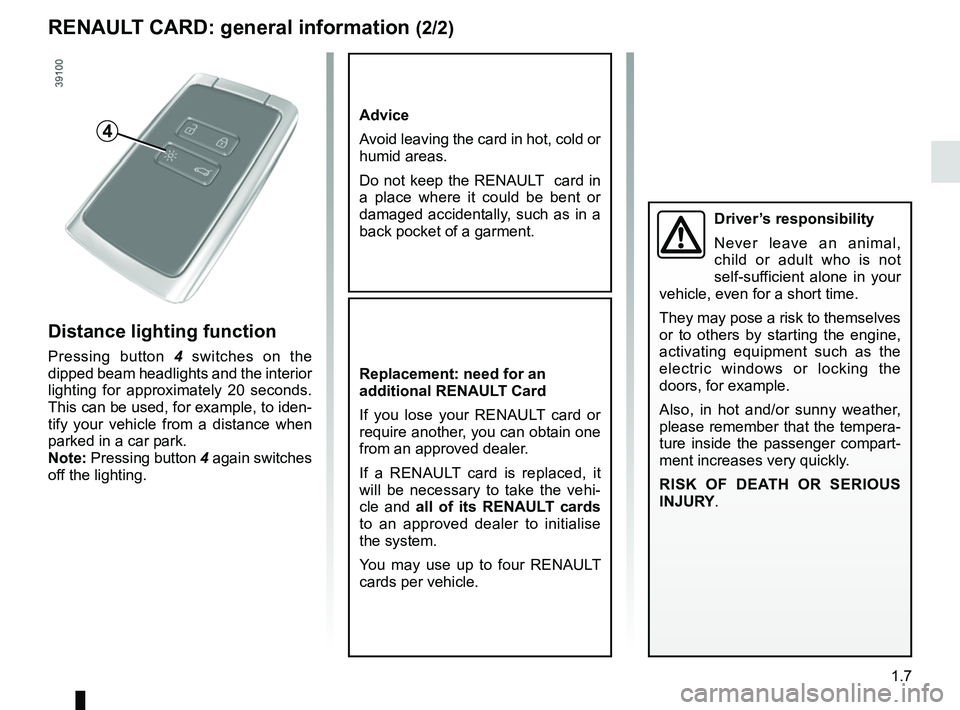
Distance lighting function
Pressing button 4 switches on the
dipped beam headlights and the interior
lighting for approximately 20 seconds.
This can be used, for example, to iden-
tify your vehicle from a distance when
parked in a car park.
Note: Pressing button 4 again switches
off the lighting.
4
Driver’s responsibility
Never leave an animal,
child or adult who is not
self-sufficient alone in your
vehicle, even for a short time.
They may pose a risk to themselves
or to others by starting the engine,
activating equipment such as the
electric windows or locking the
doors, for example.
Also, in hot and/or sunny weather,
please remember that the tempera-
ture inside the passenger compart-
ment increases very quickly.
RISK OF DEATH OR SERIOUS
INJURY.
Page 69 of 364
1.63
DRIVER’S POSITION, LEFT-HAND DRIVE (2/2)
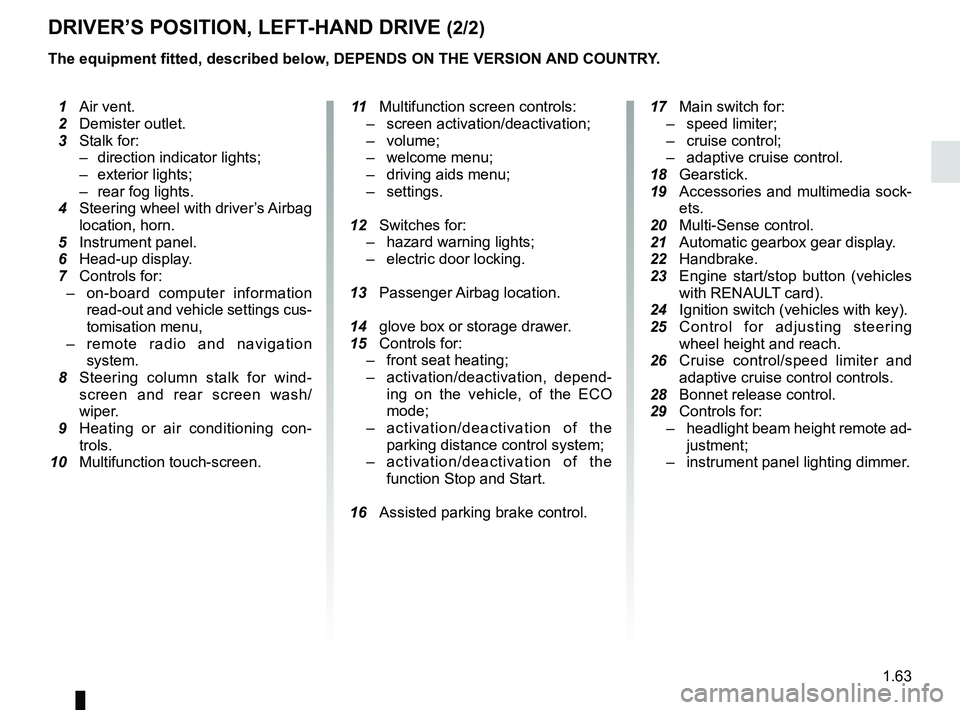
The equipment fitted, described below, DEPENDS ON THE VERSION AND COUNTRY.
1 Air vent.
2 Demister outlet.
3 Stalk for:
– direction indicator lights;
– exterior lights;
– rear fog lights.
4 Steering wheel with driver’s Airbag
location, horn.
5 Instrument panel.
6 Head-up display.
7 Controls for:
– on-board computer information
read-out and vehicle settings cus-
tomisation menu,
– remote radio and navigation
system.
8 Steering column stalk for wind-
screen and rear screen wash/
wiper.
9 Heating or air conditioning con-
trols.
10 Multifunction touch-screen.
11 Multifunction screen controls:
– screen activation/deactivation;
– volume;
– welcome menu;
– driving aids menu;
– settings.
12 Switches for:
– hazard warning lights;
– electric door locking.
13 Passenger Airbag location.
14 glove box or storage drawer.
15 Controls for:
– front seat heating;
– activation/deactivation, depend-
ing on the vehicle, of the ECO
mode;
– activation/deactivation of the
parking distance control system;
– activation/deactivation of the
function Stop and Start.
16 Assisted parking brake control.
17 Main switch for:
– speed limiter;
– cruise control;
– adaptive cruise control.
18 Gearstick.
19 Accessories and multimedia sock-
ets.
20 Multi-Sense control.
21
Automatic gearbox gear display.
22 Handbrake.
23 Engine start/stop button (vehicles
with RENAUL
T card).
24 Ignition switch (vehicles with key).
25 Control for adjusting steering
wheel height and reach.
26 Cruise control/speed limiter and
adaptive cruise control controls.
28 Bonnet release control.
29 Controls for:
– headlight beam height remote ad-
justment;
– instrument panel lighting dimmer.
Page 71 of 364
1.65
DRIVING POSITION: RIGHT-HAND DRIVE (2/2)
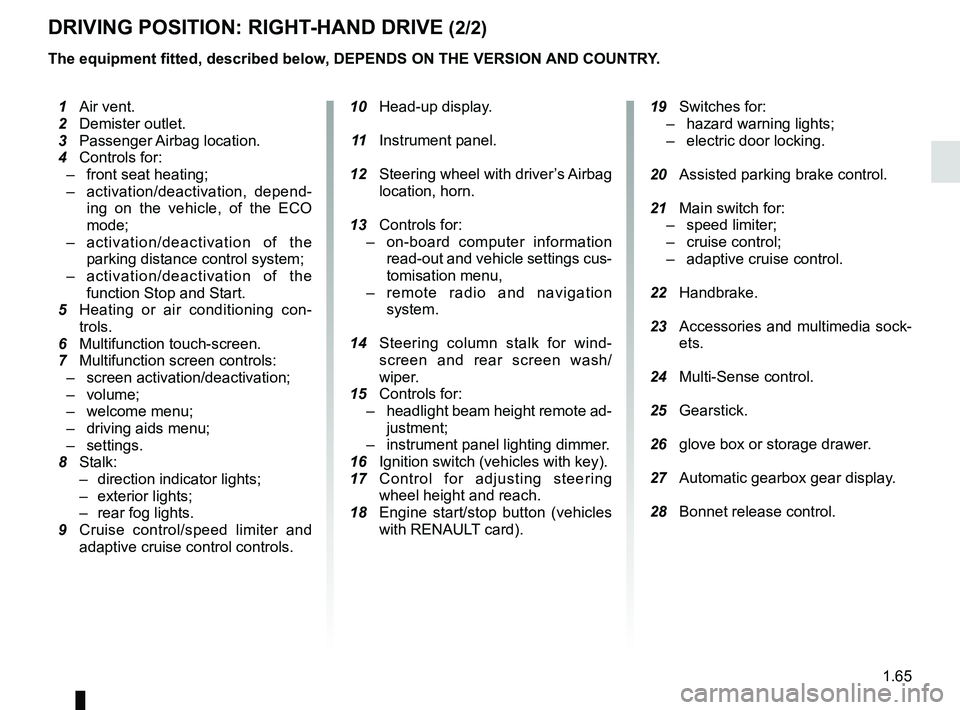
The equipment fitted, described below, DEPENDS ON THE VERSION AND COUNTRY.
10 Head-up display.
11 Instrument panel.
12 Steering wheel with driver’s Airbag
location, horn.
13 Controls for:
– on-board computer information
read-out and vehicle settings cus-
tomisation menu,
– remote radio and navigation
system.
14 Steering column stalk for wind-
screen and rear screen wash/
wiper.
15 Controls for:
– headlight beam height remote ad-
justment;
– instrument panel lighting dimmer.
16 Ignition switch (vehicles with key).
17 Control for adjusting steering
wheel height and reach.
18 Engine start/stop button (vehicles
with RENAULT card).
19 Switches for:
– hazard warning lights;
– electric door locking.
20 Assisted parking brake control.
21 Main switch for:
– speed limiter;
– cruise control;
– adaptive cruise control.
22 Handbrake.
23 Accessories and multimedia sock-
ets.
24 Multi-Sense control.
25 Gearstick.
26 glove box or storage drawer.
27 Automatic gearbox gear display.
28 Bonnet release control.
1 Air vent.
2 Demister outlet.
3 Passenger Airbag location.
4 Controls for:
– front seat heating;
– activation/deactivation, depend-
ing on the vehicle, of the ECO
mode;
– activation/deactivation of the
parking distance control system;
– activation/deactivation of the
function Stop and Start.
5
Heating or air conditioning con-
trols.
6 Multifunction touch-screen.
7 Multifunction screen controls:
– screen activation/deactivation;
– volume;
– welcome menu;
– driving aids menu;
– settings.
8 Stalk:
– direction indicator lights;
– exterior lights;
– rear fog lights.
9 Cruise control/speed limiter and
adaptive cruise control controls.
Page 72 of 364
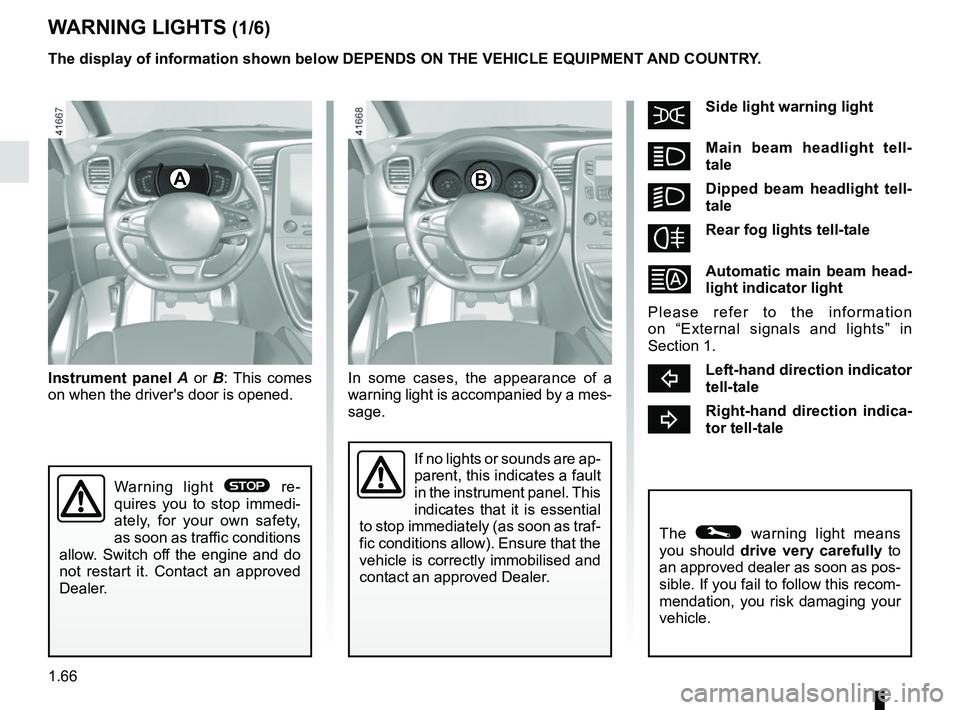
1.66
šSide light warning light
áMain beam headlight tell-
tale
kDipped beam headlight tell-
tale
fRear fog lights tell-tale
Automatic main beam head-
light indicator light
Please refer to the information
on “External signals and lights” in
Section 1.
cLeft-hand direction indicator
tell-tale
bRight-hand direction indica-
tor tell-tale
A
If no lights or sounds are ap-
parent, this indicates a fault
in the instrument panel. This
indicates that it is essential
to stop immediately (as soon as traf-
fic conditions allow). Ensure that the
vehicle is correctly immobilised and
contact an approved Dealer.
Instrument panel A or B: This comes
on when the driver's door is opened.
The © warning light means
you should drive very carefully to
an approved dealer as soon as pos-
sible. If you fail to follow this recom-
mendation, you risk damaging your
vehicle.
Warning light ® re-
quires you to stop immedi-
ately, for your own safety,
as soon as traffic conditions
allow. Switch off the engine and do
not restart it. Contact an approved
Dealer.
The display of information shown below DEPENDS ON THE VEHICLE EQUIPMENT \
AND COUNTRY.
WARNING LIGHTS (1/6)
B
In some cases, the appearance of a
warning light is accompanied by a mes-
sage.
Page 92 of 364

1.86
TRIP COMPUTER AND WARNING SYSTEM: operating fault messages
These appear with the © warning light and mean that you should drive very carefully to an author\
ised dealer as
soon as possible. If you fail to follow this recommendation, you risk da\
maging your vehicle.
They disappear when the display selection key is pressed or after severa\
l seconds and are stored in the computer log. The
© warning light stays on. Examples of operating fault messages are given \
in the following pages.
Examples of messages Interpreting the display selected
“Clean diesel filter” Indicates the presence of water in the diesel filter; contact an approve\
d Dealer
as soon as possible.
“Check lighting” Indicates a fault in the headlights.
“Check vehicle” Indicates a fault in one of the pedal sensors, battery management system\
or oil
level sensor.
“Check airbag” Indicates a fault in the restraint system in addition to the seat belts.\
In the event
of an accident, it is possible that they may not be triggered.
“Check anti- pollution system” Indicates a fault in the vehicle’s particle filter system.
Page 99 of 364
1.93
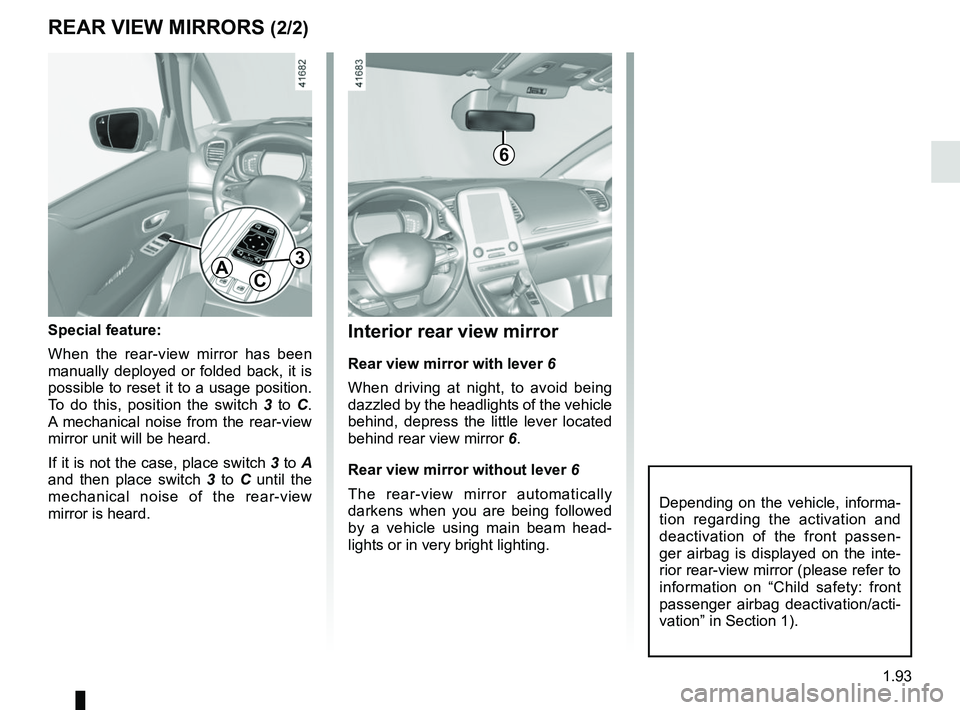
Interior rear view mirror
Rear view mirror with lever 6
When driving at night, to avoid being
dazzled by the headlights of the vehicle
behind, depress the little lever located
behind rear view mirror 6.
Rear view mirror without lever 6
The rear-view mirror automatically
darkens when you are being followed
by a vehicle using main beam head-
lights or in very bright lighting.
REAR VIEW MIRRORS (2/2)
Special feature:
When the rear-view mirror has been
manually deployed or folded back, it is
possible to reset it to a usage position.
To do this, position the switch 3 to C.
A mechanical noise from the rear-view
mirror unit will be heard.
If it is not the case, place switch 3 to A
and then place switch 3 to C until the
mechanical noise of the rear-view
mirror is heard.
AC
3
Depending on the vehicle, informa-
tion regarding the activation and
deactivation of the front passen-
ger airbag is displayed on the inte-
rior rear-view mirror (please refer to
information on “Child safety: front
passenger airbag deactivation/acti-
vation” in Section 1).
6
Page 100 of 364
1.94
AUDIBLE AND VISUAL SIGNALS
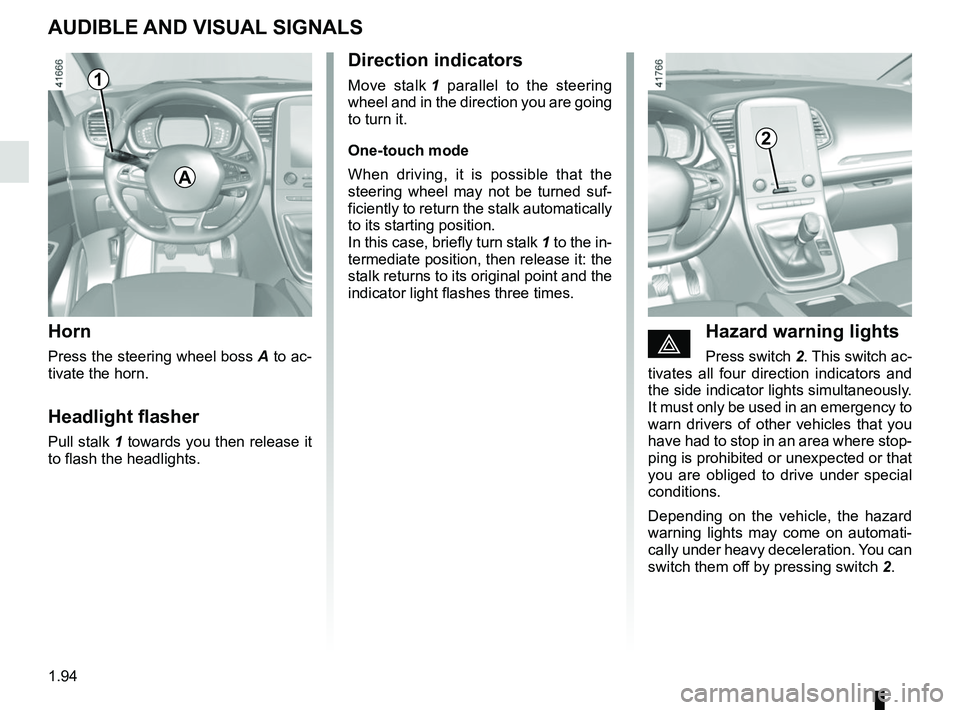
Horn
Press the steering wheel boss A to ac-
tivate the horn.
Headlight flasher
Pull stalk 1 towards you then release it
to flash the headlights.
éHazard warning lights
Press switch 2. This switch ac-
tivates all four direction indicators and
the side indicator lights simultaneously.
It must only be used in an emergency to
warn drivers of other vehicles that you
have had to stop in an area where stop-
ping is prohibited or unexpected or that
you are obliged to drive under special
conditions.
Depending on the vehicle, the hazard
warning lights may come on automati-
cally under heavy deceleration. You can
switch them off by pressing switch 2.
Direction indicators
Move stalk 1 parallel to the steering
wheel and in the direction you are going
to turn it.
One-touch mode
When driving, it is possible that the
steering wheel may not be turned suf-
ficiently to return the stalk automatically
to its starting position.
In this case, briefly turn stalk 1 to the in-
termediate position, then release it: the
stalk returns to its original point and the
indicator light flashes three times.
2
A
1
Page 101 of 364
1.95
EXTERIOR LIGHTING AND SIGNALS (1/6)
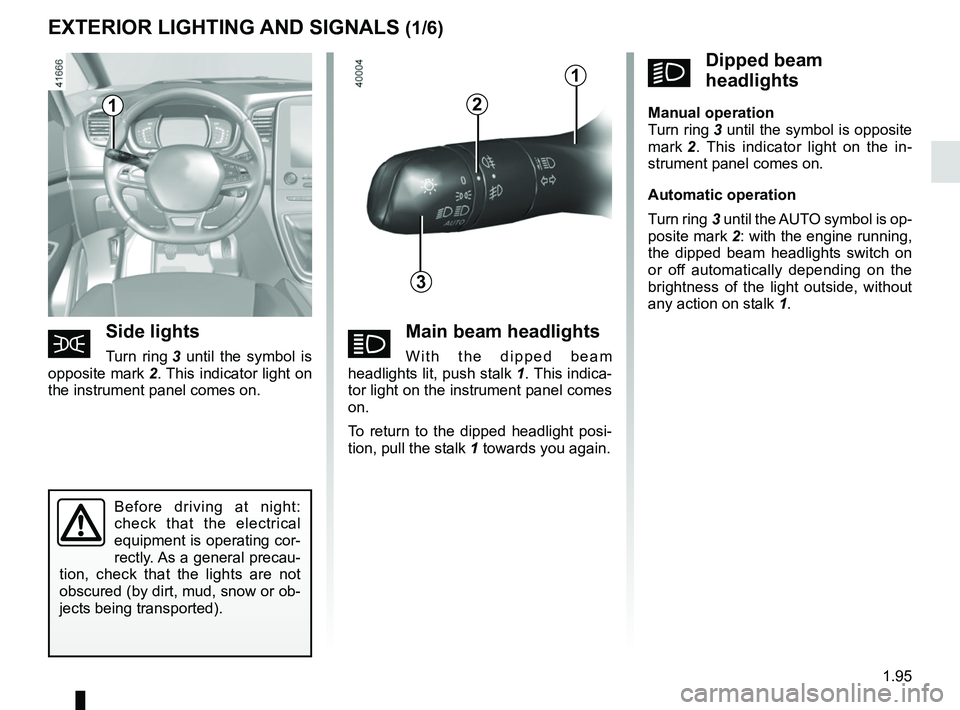
áMain beam headlights
With the dipped beam
headlights lit, push stalk 1. This indica-
tor light on the instrument panel comes
on.
To return to the dipped headlight posi-
tion, pull the stalk 1 towards you again.šSide lights
Turn ring 3 until the symbol is
opposite mark 2. This indicator light on
the instrument panel comes on.
kDipped beam
headlights
Manual operation
Turn ring 3 until the symbol is opposite
mark 2 . This indicator light on the in-
strument panel comes on.
Automatic operation
Turn ring 3 until the AUTO symbol is op-
posite mark 2: with the engine running,
the dipped beam headlights switch on
or off automatically depending on the
brightness of the light outside, without
any action on stalk 1.
Before driving at night:
check that the electrical
equipment is operating cor-
rectly. As a general precau-
tion, check that the lights are not
obscured (by dirt, mud, snow or ob-
jects being transported).
1
3
2
1
Page 102 of 364
1.96
EXTERIOR LIGHTING AND SIGNALS (2/6)
Automatic main beam
headlights
Depending on the vehicle, this system
switches the main beam headlights on
and off automatically. It uses a camera
located behind the interior rear-view
mirror to detect vehicles that are being
followed and those coming in the oppo-
site direction.
The main beam headlights come on au-
tomatically if:
– exterior light is weak;
– no other vehicles or lighting are de-tected;
– the vehicle speed is above approxi- mately 25 mph (40 km/h).
If any of the above conditions are not
fulfilled, the system switches to dipped
beam headlights.
The “automatic main beam
headlights” system should
under no circumstances be
used to replace driver atten-
tion and responsibility with regard
to vehicle lighting and adapting to
light, visibility and traffic conditions.
The system may encounter difficul-
ties under certain conditions, inclu-
ding :
– extreme weather conditions (rain, snow, fog, etc.);
– obstruction in front of the wind- screen or camera;
– when a following or oncoming ve- hicle has weak or hidden lighting;
– incorrect settings for the front headlights;
– reflective systems;
– ...
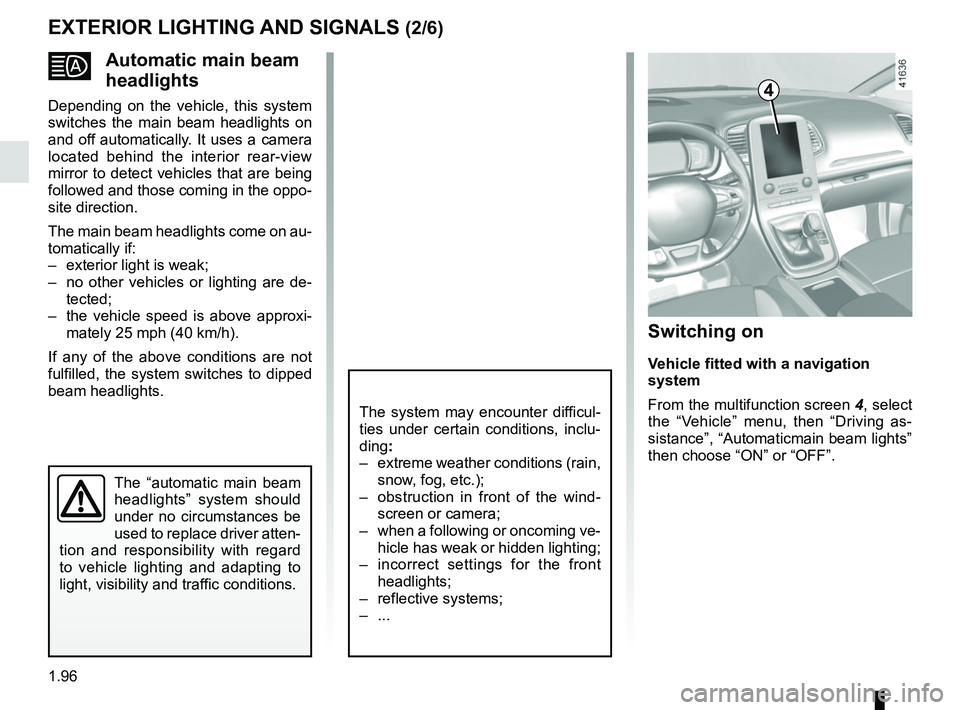
Switching on
Vehicle fitted with a navigation
system
From the multifunction screen 4, select
the “Vehicle” menu, then “Driving as-
sistance”, “Automaticmain beam lights”
then choose “ON” or “OFF”.
4