Multimedia RENAULT SCENIC 2018 User Guide
[x] Cancel search | Manufacturer: RENAULT, Model Year: 2018, Model line: SCENIC, Model: RENAULT SCENIC 2018Pages: 364, PDF Size: 10.43 MB
Page 222 of 364
3.6
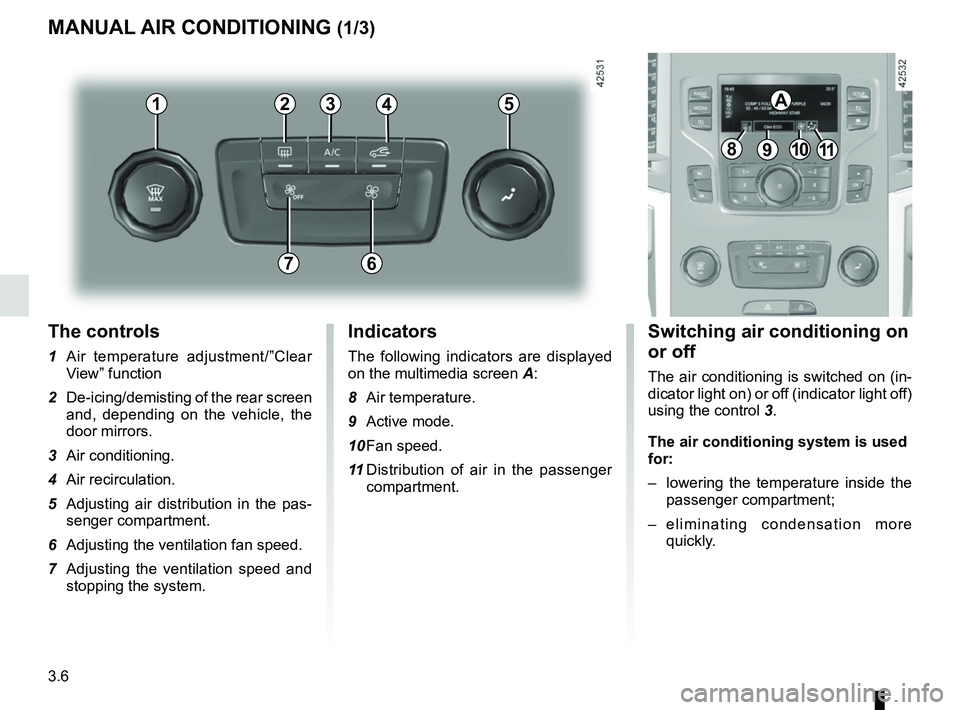
The controls
1 Air temperature adjustment/”Clear View” function
2 De-icing/demisting of the rear screen and, depending on the vehicle, the
door mirrors.
3 Air conditioning.
4 Air recirculation.
5 Adjusting air distribution in the pas- senger compartment.
6 Adjusting the ventilation fan speed.
7 Adjusting the ventilation speed and stopping the system.
MANUAL AIR CONDITIONING (1/3)
Switching air conditioning on
or off
The air conditioning is switched on (in-
dicator light on) or off (indicator light off)
using the control 3.
The air conditioning system is used
for:
– lowering the temperature inside the
passenger compartment;
– eliminating condensation more quickly.
Indicators
The following indicators are displayed
on the multimedia screen A:
8 Air temperature.
9 Active mode.
10 Fan speed.
11 Distribution of air in the passenger
compartment.
21
7
34
891011
A5
6
Page 223 of 364
3.7
MANUAL AIR CONDITIONING (2/3)
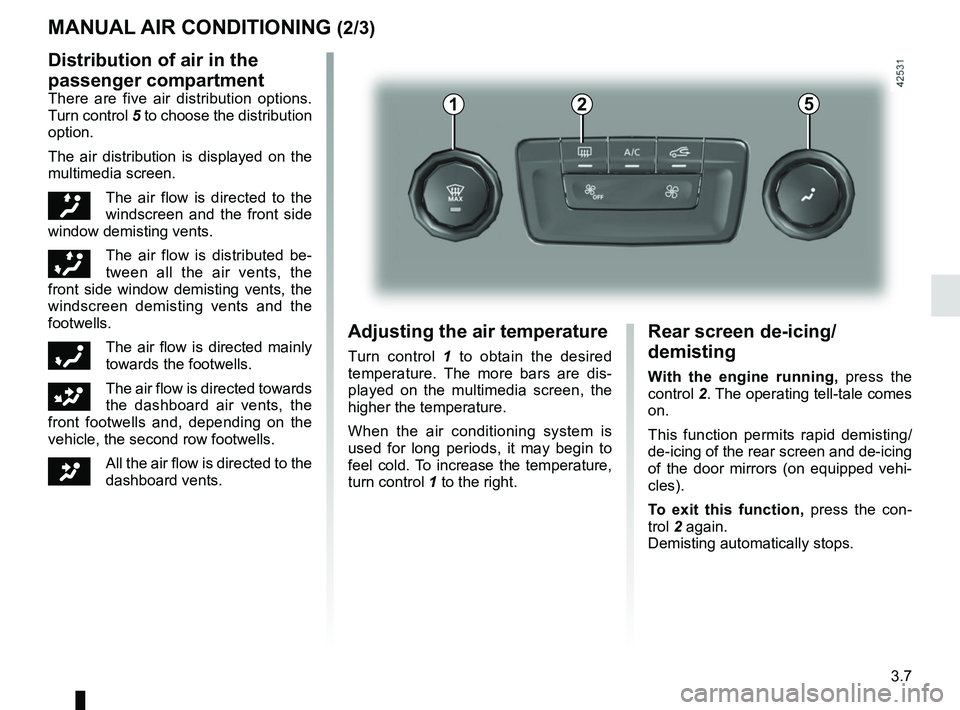
Distribution of air in the
passenger compartment
There are five air distribution options.
Turn control 5 to choose the distribution
option.
The air distribution is displayed on the
multimedia screen.
õThe air flow is directed to the
windscreen and the front side
window demisting vents.
÷The air flow is distributed be-
tween all the air vents, the
front side window demisting vents, the
windscreen demisting vents and the
footwells.
óThe air flow is directed mainly
towards the footwells.
GThe air flow is directed towards
the dashboard air vents, the
front footwells and, depending on the
vehicle, the second row footwells.
JAll the air flow is directed to the
dashboard vents.
5
Adjusting the air temperature
Turn control 1 to obtain the desired
temperature. The more bars are dis-
played on the multimedia screen, the
higher the temperature.
When the air conditioning system is
used for long periods, it may begin to
feel cold. To increase the temperature,
turn control 1 to the right.
Rear screen de-icing/
demisting
With the engine running, press the
control 2. The operating tell-tale comes
on.
This function permits rapid demisting/
de-icing of the rear screen and de-icing
of the door mirrors (on equipped vehi-
cles).
To exit this function, press the con-
trol 2 again.
Demisting automatically stops.
21
Page 224 of 364
3.8
4
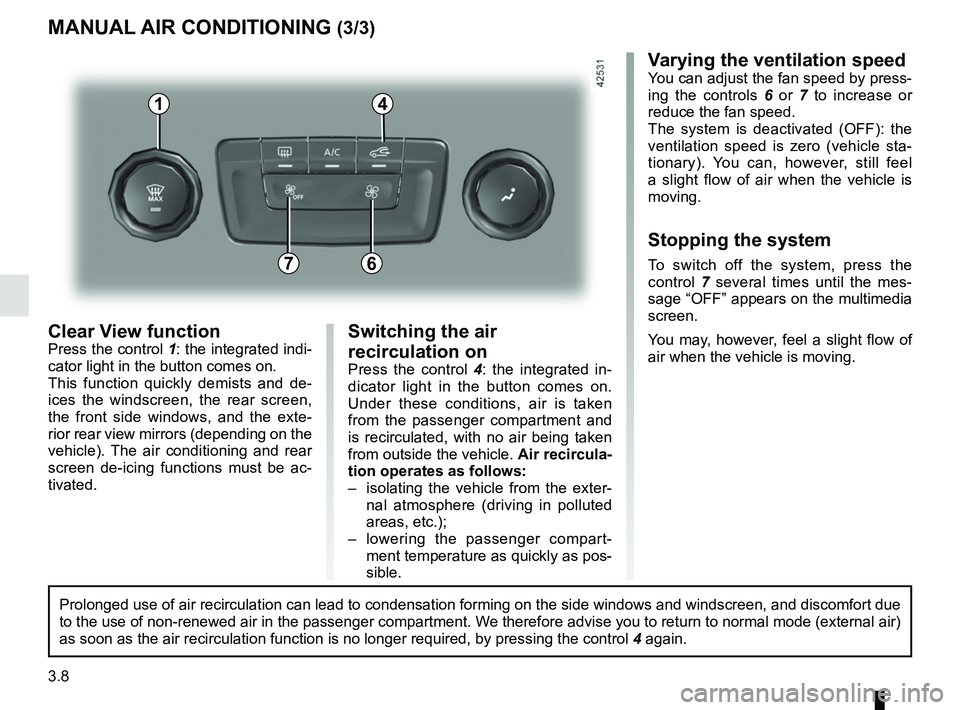
Clear View functionPress the control 1: the integrated indi-
cator light in the button comes on.
This function quickly demists and de-
ices the windscreen, the rear screen,
the front side windows, and the exte-
rior rear view mirrors (depending on the
vehicle). The air conditioning and rear
screen de-icing functions must be ac-
tivated.
MANUAL AIR CONDITIONING (3/3)
Varying the ventilation speedYou can adjust the fan speed by press-
ing the controls 6 or 7 to increase or
reduce the fan speed.
The system is deactivated (OFF): the
ventilation speed is zero (vehicle sta-
tionary). You can, however, still feel
a slight flow of air when the vehicle is
moving.
Stopping the system
To switch off the system, press the
control 7 several times until the mes-
sage “OFF” appears on the multimedia
screen.
You may, however, feel a slight flow of
air when the vehicle is moving.76
Prolonged use of air recirculation can lead to condensation forming on t\
he side windows and windscreen, and discomfort due
to the use of non-renewed air in the passenger compartment. We therefore advise you to return to normal mode (external air)
as soon as the air recirculation function is no longer required, by pres\
sing the control 4 again.
Switching the air
recirculation on
Press the control 4: the integrated in-
dicator light in the button comes on.
Under these conditions, air is taken
from the passenger compartment and
is recirculated, with no air being taken
from outside the vehicle. Air recircula-
tion operates as follows:
– isolating the vehicle from the exter- nal atmosphere (driving in polluted
areas, etc.);
– lowering the passenger compart- ment temperature as quickly as pos-
sible.
1
Page 237 of 364
3.21
OUTSIDE AIR QUALITY AND DEODORISATION FUNCTION
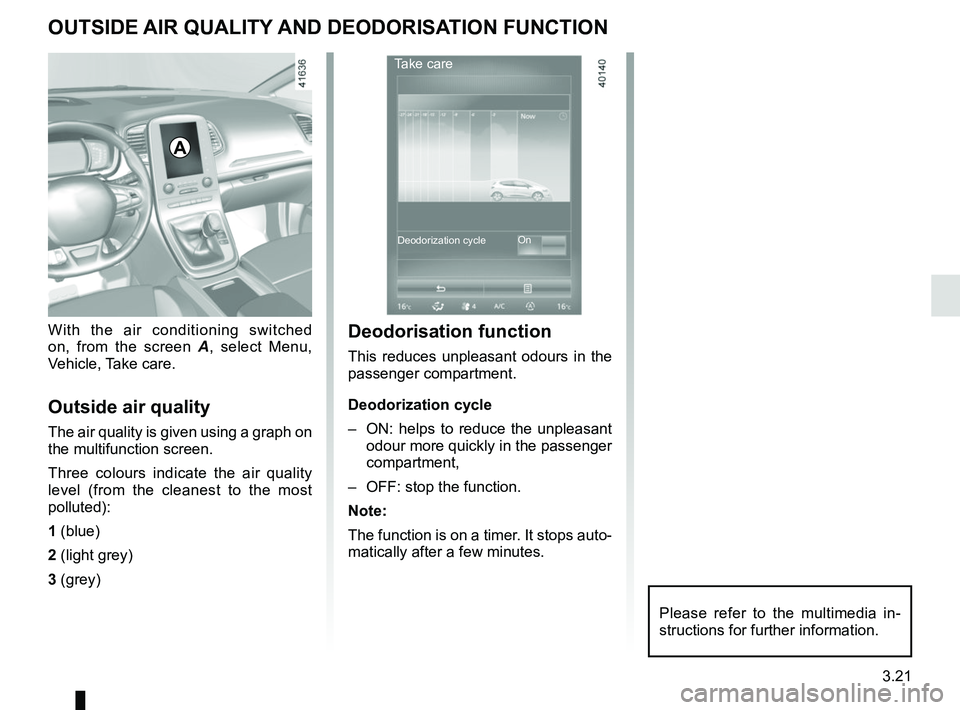
With the air conditioning switched
on, from the screen A, select Menu,
Vehicle, Take care.
Outside air quality
The air quality is given using a graph on
the multifunction screen.
Three colours indicate the air quality
level (from the cleanest to the most
polluted):
1 (blue)
2 (light grey)
3 (grey)
A
Deodorisation function
This reduces unpleasant odours in the
passenger compartment.
Deodorization cycle
– ON: helps to reduce the unpleasant odour more quickly in the passenger
compartment,
– OFF: stop the function.
Note:
The function is on a timer. It stops auto-
matically after a few minutes.
Take care
On
Deodorization cycle
Please refer to the multimedia in-
structions for further information.
Page 238 of 364
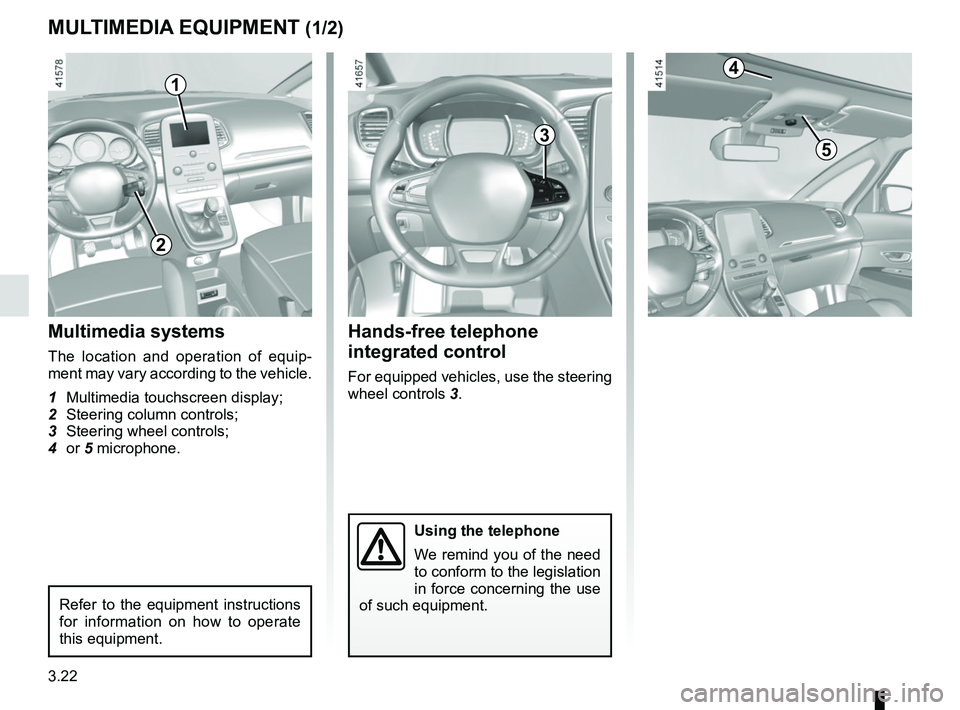
3.22
MULTIMEDIA EQUIPMENT (1/2)
Using the telephone
We remind you of the need
to conform to the legislation
in force concerning the use
of such equipment.
Hands-free telephone
integrated control
For equipped vehicles, use the steering
wheel controls 3.
Multimedia systems
The location and operation of equip-
ment may vary according to the vehicle.
1 Multimedia touchscreen display;
2 Steering column controls;
3 Steering wheel controls;
4 or 5 microphone.
1
3
Refer to the equipment instructions
for information on how to operate
this equipment.
2
4
5
Page 239 of 364
3.23
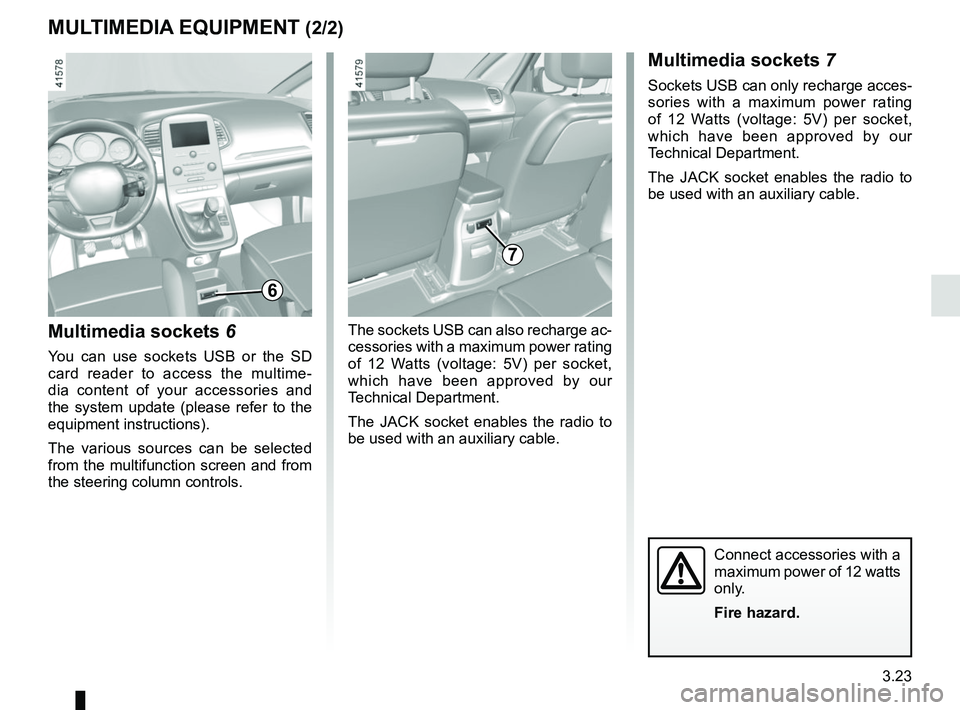
Multimedia sockets 6
You can use sockets USB or the SD
card reader to access the multime-
dia content of your accessories and
the system update (please refer to the
equipment instructions).
The various sources can be selected
from the multifunction screen and from
the steering column controls.
7
MULTIMEDIA EQUIPMENT (2/2)Multimedia sockets 7
Sockets USB can only recharge acces-
sories with a maximum power rating
of 12 Watts (voltage: 5V) per socket,
which have been approved by our
Technical Department.
The JACK socket enables the radio to
be used with an auxiliary cable.
The sockets USB can also recharge ac-
cessories with a maximum power rating
of 12 Watts (voltage: 5V) per socket,
which have been approved by our
Technical Department.
The JACK socket enables the radio to
be used with an auxiliary cable.
Connect accessories with a
maximum power of 12 watts
only.
Fire hazard.
6
Page 253 of 364
3.37
PASSENGER COMPARTMENT STORAGE SPACE AND FITTINGS (8/8)
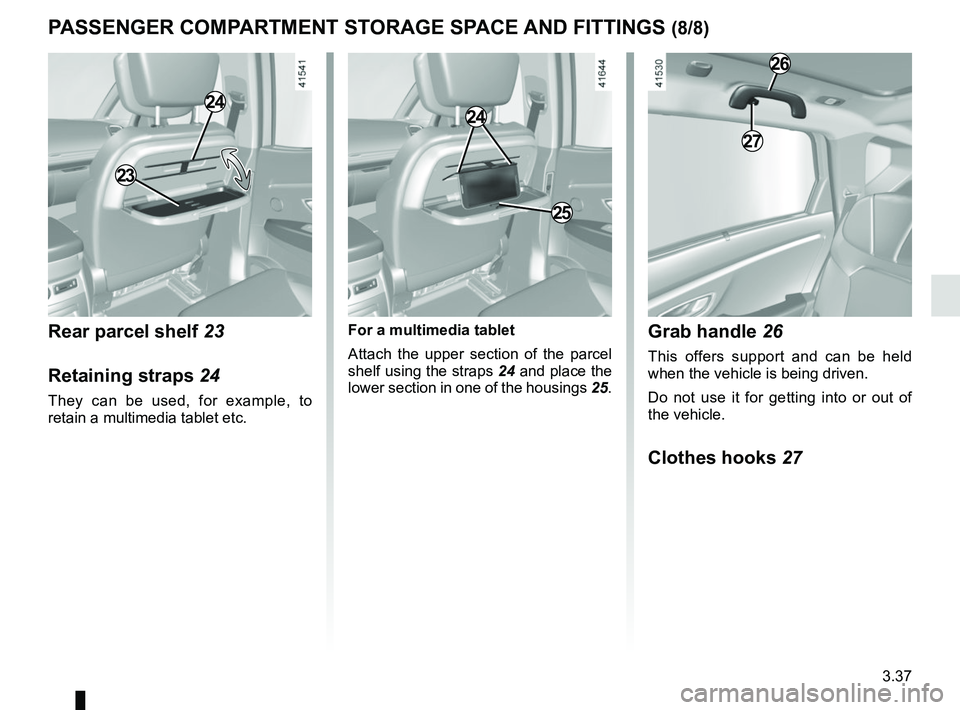
Rear parcel shelf 23
Retaining straps 24
They can be used, for example, to
retain a multimedia tablet etc.
23
26
27
Grab handle 26
This offers support and can be held
when the vehicle is being driven.
Do not use it for getting into or out of
the vehicle.
Clothes hooks 27
24
For a multimedia tablet
Attach the upper section of the parcel
shelf using the straps 24 and place the
lower section in one of the housings 25.
24
25
Page 320 of 364

Allocation of fuses
(the presence of certain fuses depends on the vehicle equipment level)\
Symbol Allocation SymbolAllocation
HWindscreen washer“Hybrid Assist” system
ëThi")
5.28
FUSES (2/2)
Allocation of fuses
(the presence of certain fuses depends on the vehicle equipment level)\
Symbol Allocation SymbolAllocation
HWindscreen washer“Hybrid Assist” system
ëThird row accessories socket, boot accessories
socketÝTowbar socket
ÆFront cigarette lighter, front and rear second row
accessories socketDiagnostic socket, audio alarm
Not usedÌHorn
Heated door mirrorsInstrument panel, dashboard control lighting
×Brake lights, passenger compartment central unitRear electric windows
\bParking brakefFront windscreen wiper
Additional servoDDirection indicator lights, hazard warning lights
îRadio, multifunction screen, multimedia acces-
sories sockets, parking brake controlRear USB sockets on console
Passenger compartment centre unit, rear wiper,
rear fog light
OLocking the doors and luggage compartment
Page 360 of 364
7.4
ALPHABETICAL INDEX (4/6)
lighting:exterior ....................................................1.7, 1.95 → 1.102
instrument panel .......................................................... 1.95
interior ..........................................3.27 – 3.28, 5.24 → 5.26
lights adjustment .................................................... 1.101 – 1.102
changing bulbs .................................................. 5.17 – 5.18
front ................................................................... 5.17 – 5.18
lights: adjusting ....................................................... 1.101 – 1.102
adjustment of headlight beam height ............ 1.101 – 1.102
brake lights .................................................................. 5.19
dipped beam headlights ........................... 1.95, 5.17 – 5.18
direction indicators ..................................1.94, 5.17 → 5.19
electric beam height adjustment ................... 1.101 – 1.102
fog lights ........................................................... 1.100, 5.19
hazard warning ............................................................ 1.94
main beam headlights ..................... 1.96, 1.98, 5.17 – 5.18
number plate lights ...................................................... 5.23
reversing lights ............................................................. 5.19
side lights ............................................................ 1.95, 5.19
locking the doors ........................ 1.4, 1.6 → 1.12, 1.16 → 1.18
luggage compartment cover .............................................. 3.48
luggage retaining net .............................................3.53 → 3.55
M
maintenance ............................................................\
.......... 2.30
maintenance: bodywork .........................................................4.15 → 4.17
interior trim ........................................................ 4.18 – 4.19
mechanical .........................................4.2 – 4.3, 6.9 → 6.14
manual air conditioning..............................................3.6 → 3.8
map reading lights .................................................. 3.27 – 3.28
menu for customising the vehicle settings .............. 1.88 – 1.89
methods of restraint in addition to the seat belts ...1.36 → 1.38
mulitfunction display ..............................................1.72 → 1.77multifunction screen...............................................1.72
→ 1.77
multimedia (equipment) .......................................... 3.22 – 3.23
multimedia equipment ............................................ 3.22 – 3.23
Multi-Sense................................................................. 3.2 – 3.3
N
navigation ............................................................... 3.22 – 3.23
navigation system ................................................... 3.22 – 3.23
O
oil change ..................................................................... 4.4, 4.7
opening the doors ..................................................1.13 → 1.17
operating faults ......................................................5.38 → 5.44
overspeed warning .......................................1.72, 2.64 → 2.66
P
paintwork maintenance ....................................................4.15 → 4.17
parking assistance: assisted parking 2.82 → 2.86, 2.89 → 2.92
parking distance control.........................................2.82 → 2.86
P
pedestrian detection ..............................................2.40 → 2.46
P
power-assisted steering..................................................... 1.91
puncture................................................. 5.2 → 5.4, 5.9 → 5.13
R
radio........................................................................\
3.22 – 3.23
radio frequency remote control/key use ....................................................................\
...1.2 → 1.4
rear parcel shelf ............................................. 3.37, 3.47 – 3.48
rear screen de-icing/demisting .......................................... 3.13
rear seats functions ..........................................................3.40 → 3.45