mirror RENAULT SCENIC 2018 User Guide
[x] Cancel search | Manufacturer: RENAULT, Model Year: 2018, Model line: SCENIC, Model: RENAULT SCENIC 2018Pages: 364, PDF Size: 10.43 MB
Page 112 of 364
1.106
Before any action involving
the windscreen (washing
the vehicle, de-icing,
cleaning the windscreen,
etc.) return stalk 1 to position B
(stop).
Risk of injury and/or damage.
In the event of obstacles on the
windscreen (dirt, snow, ice, etc.),
clean the windscreen (including the
central area located behind the in-
terior rear view mirror) and the rear
screen before starting the wipers
(risk of motor overheating).
If an object is preventing a blade
from moving, it may stop function-
ing. Remove the obstacle and react-
ivate the wiper using the wiper stalk.
WINDSCREEN WASH, WIPE (4/6)
Note:
Once the wipers have been switched
off, at least 1 minute after locking the
vehicle, it is possible to manually move
the blades. Do not force the blade arms
to move. This may risk damage to the
wiper motor, the arms and the blades.
After your intervention, to reposition the
blades correctly, make sure the blades
are resting on the windscreen, switch
on the ignition and activate the wiper
control.
The blade on the driver’s side must
always be above the passenger blade.
If this is not the case, a quick sweep of
the windscreen wipers should be per-
formed once the vehicle is travelling at
over 4 mph (7 km/h).
Specific front wiper position
(service position)
This position enables the blades to be
lifted to remove them from the winds-
creen.
This can be useful:
– to clean the blades;
– to release the blades from the winds-creen in winter;
– replace the blades (refer to the “Wiper blades: replacement” para-
graph in Section 5).
With the ignition on and the engine off,
lower the windscreen wiper stalk to
position E (fast continuous wipe). The
wiper arms stop in a position away from
the bonnet.
To return the blades to position, make
sure they have been placed on the
windscreen, then move the stalk to po-
sition B (stop) with the ignition on.
Before switching on the ignition,
place the wipers on the windscreen.
Otherwise, there may a risk of damage
to the bonnet or the wipers when they
are switched on.
Page 166 of 364

Limitation of the system operation
– A vehicle travelling in the opposite direction will not trigger any alert\
or any action on the system operation.
– The ra")
2.46
ACTIVE EMERGENCY BRAKING (7/7)
Limitation of the system operation
– A vehicle travelling in the opposite direction will not trigger any alert\
or any action on the system operation.
– The radar-camera area on the windscreen should be kept clean and free of\
any modifications in order to ensure the
proper operation of the system.
– The system cannot respond to small vehicles such as motorbikes or bicycl\
es as effectively as to other vehicles.
– The system may not operate properly when the road surface is slippery (\
rain, snow, black ice etc.).
– To ensure correct operation, the system needs to distinguish the complete\
outline of the pedestrian. So the system cannot detect:
– pedestrians in the darkness or in poor lighting conditions;
– partially visible pedestrians:
– pedestrians less than approximately 80 cm tall;
– pedestrians carrying large objects;
– ...
Deactivating the function
You must disable the function if:
– the brake lights are not functioning;
– the area of the radar-camera has been damaged (on the windscreen side o\
r the interior rear-view mirror side);
– the vehicle is being towed (breakdowns);
– the windscreen is cracked or distorted (do not carry out repairs on thi\
s area of the windscreen; have it changed by an Authorised Dealer).
Halting the function
You can halt the active braking function at any time by tapping the accel\
erator pedal or by turning the steering wheel in a avo id-
ance manoeuvre.
In the event of the system behaving abnormally, deactivate it and consult an authorised dealer.
Page 174 of 364

2.54
This function is an additional driving aid. This function is not under any circumstances intended to replace the due\
care
and attention of the driver, who should at all times be in control of the vehicle.
System servicing/repairs
– In the event of an impact, the camera alignment may be changed, and its \
operation may consequently be affected. Deactivate the function and consult an authorised dealer.
– Any work in the area where the camera is located (repairs, replacements\
, windscreen modifications etc.) must be carried out by a qualified professional.
Only an authorised dealer is qualified to service the system.
In the event of system disturbance
Some conditions can disturb or damage the operation of the system, such \
as:
– windscreen obscured (by dirt, ice, snow, condensation etc.);
– a complex environment (tunnel etc.);
– poor weather conditions (snow, hail, black ice etc.);
– poor visibility (night, fog etc.);
– road markings which are worn, lacking in contrast or very widely spaced \
from one another (lines partially erased etc);
– being dazzled (glaring sun, lights of vehicles travelling in the opposi\
te direction etc.);
– the road is narrow, winding or undulating (tight bends etc.);
– closely following a vehicle travelling in the same lane.
In this case, the “Lane Keeping Assist” may react incorrectly or not at all.
Risk of unwanted, incorrect correction or no correction of trajectory.
Deactivating the function
You must disable the function if:
– the area of the camera has been damaged (on the windscreen side or the \
interior rear-view mirror side);
– the road is slippery (snow, black ice, aquaplaning, gravel etc.) ;
– poor visibility (night, fog etc.);
– the windscreen is cracked or distorted (do not carry out windscreen rep\
airs in this area; have it changed by an Authorised Dealer);
– the vehicle is towing a trailer or a caravan;
– the vehicle is entering an area with several surface markings (an area \
with road works etc.).
LANE KEEPING ASSIST (4/4)
Page 177 of 364
2.57
1
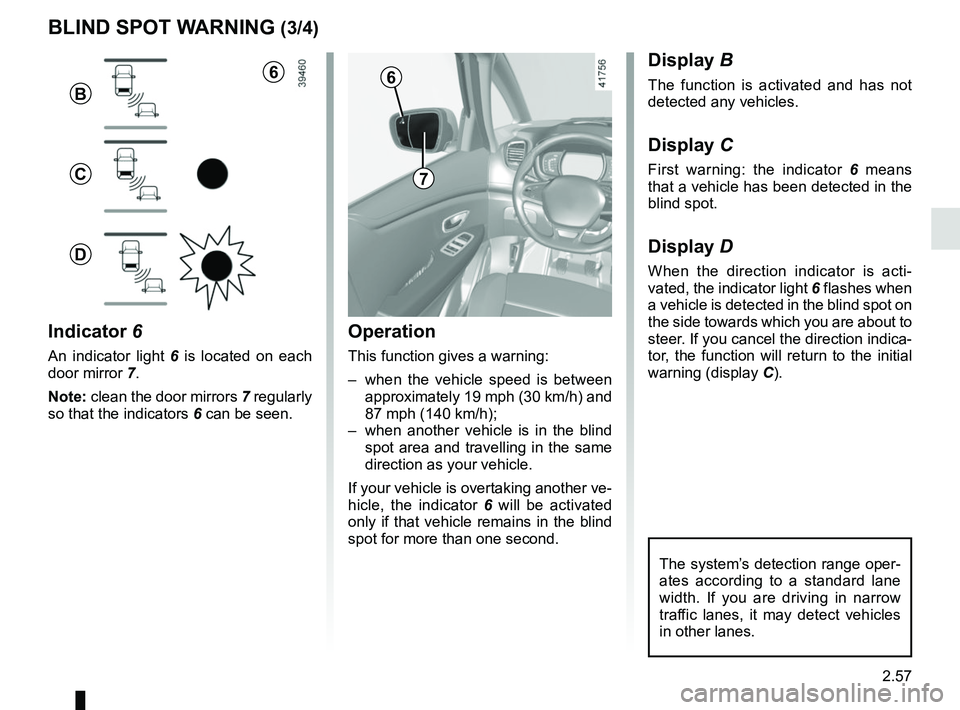
BLIND SPOT WARNING (3/4)
Operation
This function gives a warning:
– when the vehicle speed is between approximately 19 mph (30 km/h) and
87 mph (140 km/h);
– when another vehicle is in the blind spot area and travelling in the same
direction as your vehicle.
If your vehicle is overtaking another ve-
hicle, the indicator 6 will be activated
only if that vehicle remains in the blind
spot for more than one second.
Indicator 6
An indicator light 6 is located on each
door mirror 7.
Note: clean the door mirrors 7 regularly
so that the indicators 6 can be seen.
Display B
The function is activated and has not
detected any vehicles.
Display C
First warning: the indicator 6 means
that a vehicle has been detected in the
blind spot.
Display D
When the direction indicator is acti-
vated, the indicator light 6 flashes when
a vehicle is detected in the blind spot on
the side towards which you are about to
steer. If you cancel the direction indica-
tor, the function will return to the initial
warning (display C).
7
6
B
C
D
The system’s detection range oper-
ates according to a standard lane
width. If you are driving in narrow
traffic lanes, it may detect vehicles
in other lanes.
6
Page 184 of 364
2.64
OVERSPEED ALERT (1/3)
The overspeed alert with signage panel
recognition notifies the driver that they
are exceeding the speed limit for the
section of road on which they are cur-
rently travelling.For vehicles equipped with a navigation
system and if the vehicle is travelling in
a country where the speed units differ
from those of the vehicle, the system
displays the speed limit sign in the unit
of the country, alongside the speed limit
converted to the unit used by the vehi-
cle’s instrument panel.
For countries where the speed limit is
reduced during rainy weather on some
types of roads, on vehicles equipped
with a navigation system, the system
can modify the limited speed after a few
seconds of wiping the windscreen.
Special situations
The system does not take into account
exceptional speed limit measures, such
as peak pollution days.
On equipped vehicles, some infor-
mation is given on the head-up dis-
play.
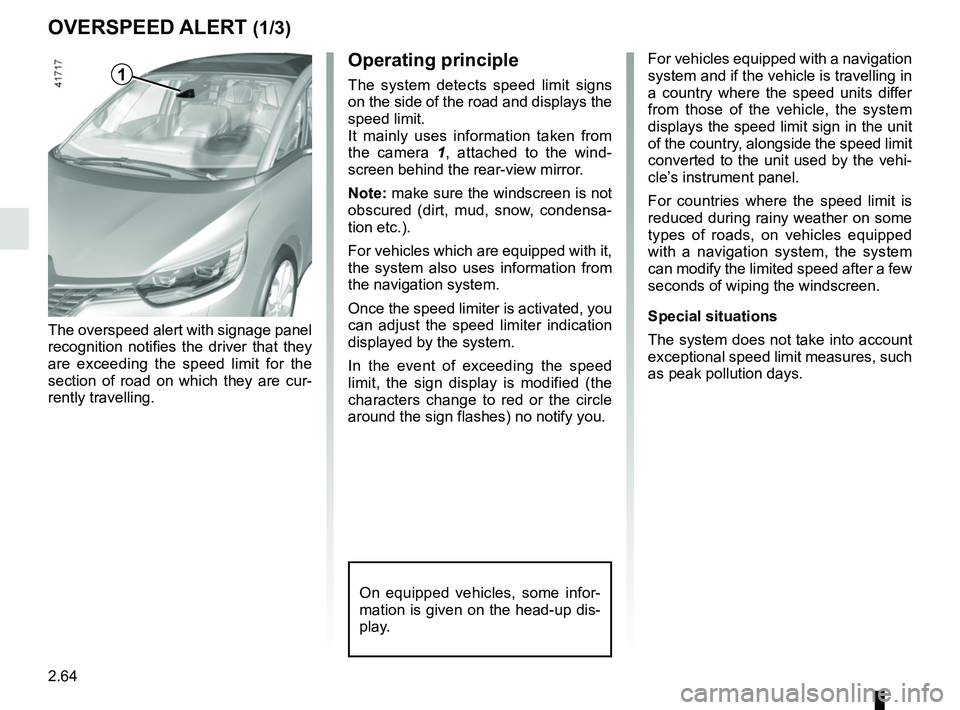
Operating principle
The system detects speed limit signs
on the side of the road and displays the
speed limit.
It mainly uses information taken from
the camera 1
, attached to the wind-
screen behind the rear-view mirror.
Note: make sure the windscreen is not
obscured (dirt, mud, snow, condensa-
tion etc.).
For vehicles which are equipped with it,
the system also uses information from
the navigation system.
Once the speed limiter is activated, you
can adjust the speed limiter indication
displayed by the system.
In the event of exceeding the speed
limit, the sign display is modified (the
characters change to red or the circle
around the sign flashes) no notify you.1
Page 200 of 364

This function is an additional driving aid. This function is not under any circumstances intended to replace the due\
care
and attention of the driver, who should")
2.80
ADAPTIVE CRUISE CONTROL (7/8)
This function is an additional driving aid. This function is not under any circumstances intended to replace the due\
care
and attention of the driver, who should at all times be in control of the vehicle.
The driver should always adapt their speed to the traffic conditions, regardless of the system indications.
The system should under no circumstances be taken to be an obstacle dete\
ctor or an anti-collision system.
System servicing/repairs
– In the event of an impact, the radar-camera alignment may be changed, an\
d its operation may consequently be affected. Deactivate the function and consult an authorised dealer.
– Any work in the area where the radar-camera is located (repairs, replac\
ements, windscreen modifications etc.) must be car- ried out by a qualified professional.
Only an authorised dealer is qualified to service the system.
Deactivating the function
You must disable the function if:
– the brake lights are not functioning;
– the area of the radar-camera has been damaged (on the windscreen side o\
r the interior rear-view mirror side);
– the vehicle is being towed (breakdowns);
– traffic is heavy;
– the vehicle is travelling in a tunnel;
– the vehicle is travelling on a windy road;
– the windscreen is cracked or distorted (do not carry out windscreen rep\
airs in this area; have it changed by an Authorised Dealer);
– the vehicle is travelling on a slippery road or in poor weather conditio\
ns (fog, snow, rain, side winds etc.).
In the event of the system behaving abnormally, deactivate it and consult an authorised dealer.
Page 208 of 364
2.88
This function is an additional
aid. It cannot, therefore,
under any circumstances
replace the vigilance or the
responsibility of the driver.
The driver should always be ready
for sudden incidents while driv-
ing: always ensure that there are
no small, narrow moving obstacles
(such as a child, animal, pushchair,
bicycle, stone, post etc.) in the blind
spot when manoeuvring.
The screen shows a reverse mirror
image.
The frames are a representation
projected on a flat surface. This in-
formation is to not be taken into ac-
count when superimposed on a
vertical object or an object on the
ground.
Objects which appear on the edge
of the screen may be deformed.
In very bright light (snow, vehicle in
sunshine etc.), the camera vision
may be adversely affected.
If the boot is open or poorly closed,
the message “Boot open” appears
and the camera display disappears.
You can also adjust the camera image
settings (brightness, contrast, etc.)
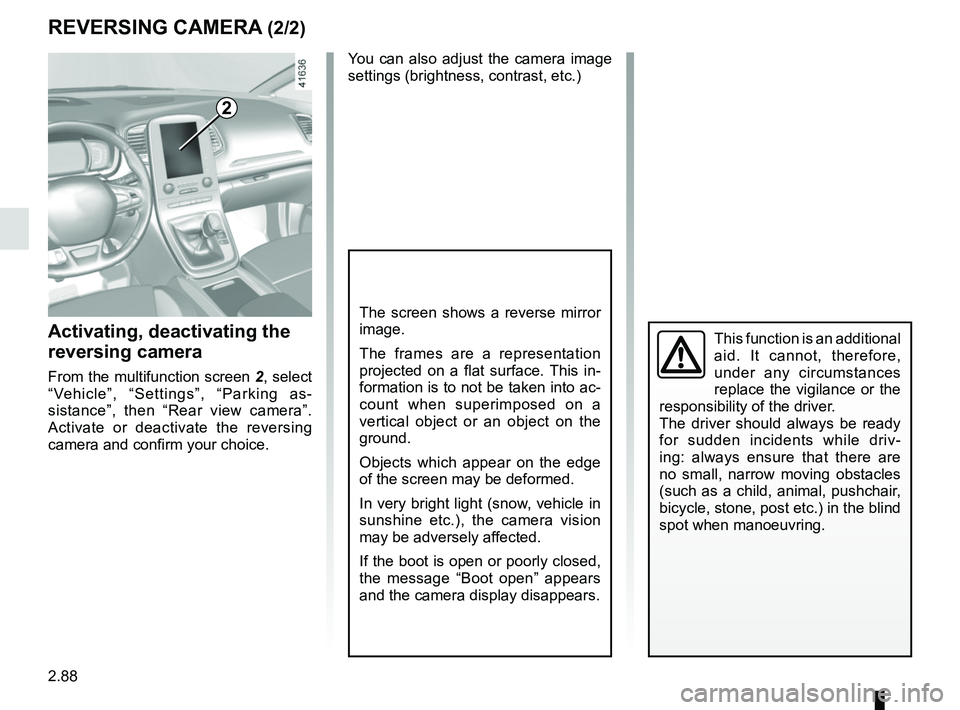
Activating, deactivating the
reversing camera
From the multifunction screen 2, select
“Vehicle”, “Settings”, “Parking as-
sistance”, then “Rear view camera”.
Activate or deactivate the reversing
camera and confirm your choice.
REVERSING CAMERA (2/2)
2
Page 222 of 364
3.6
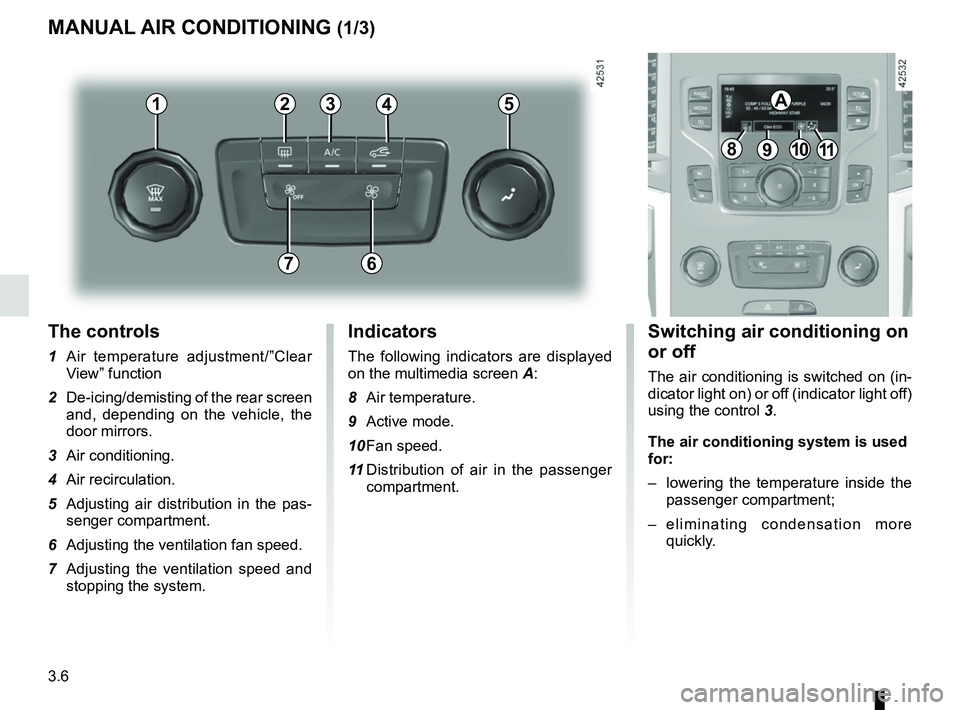
The controls
1 Air temperature adjustment/”Clear View” function
2 De-icing/demisting of the rear screen and, depending on the vehicle, the
door mirrors.
3 Air conditioning.
4 Air recirculation.
5 Adjusting air distribution in the pas- senger compartment.
6 Adjusting the ventilation fan speed.
7 Adjusting the ventilation speed and stopping the system.
MANUAL AIR CONDITIONING (1/3)
Switching air conditioning on
or off
The air conditioning is switched on (in-
dicator light on) or off (indicator light off)
using the control 3.
The air conditioning system is used
for:
– lowering the temperature inside the
passenger compartment;
– eliminating condensation more quickly.
Indicators
The following indicators are displayed
on the multimedia screen A:
8 Air temperature.
9 Active mode.
10 Fan speed.
11 Distribution of air in the passenger
compartment.
21
7
34
891011
A5
6
Page 223 of 364
3.7
MANUAL AIR CONDITIONING (2/3)
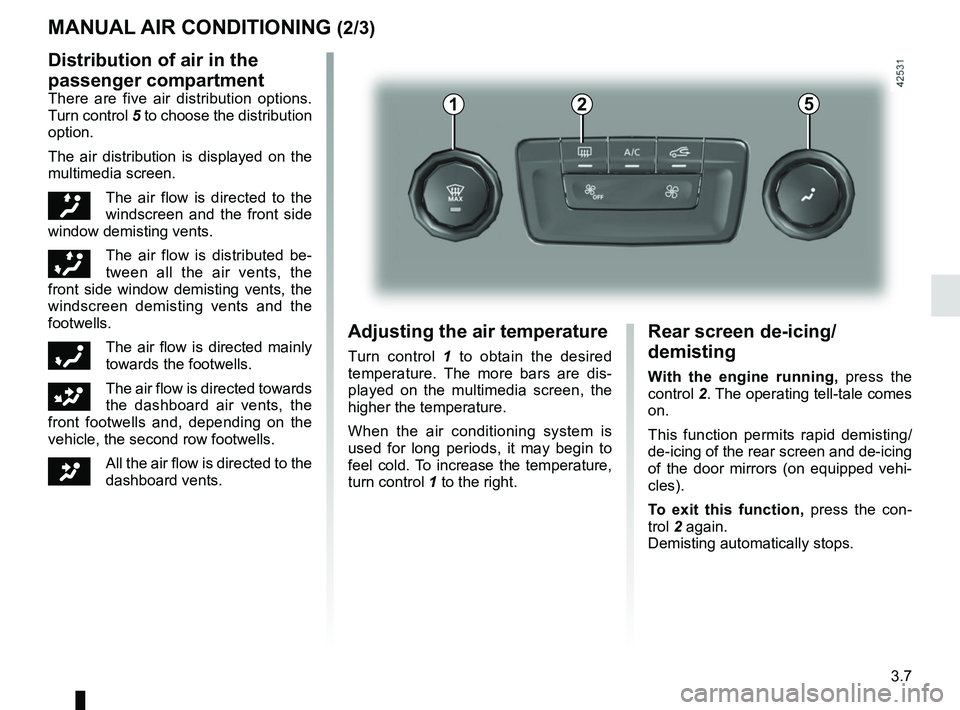
Distribution of air in the
passenger compartment
There are five air distribution options.
Turn control 5 to choose the distribution
option.
The air distribution is displayed on the
multimedia screen.
õThe air flow is directed to the
windscreen and the front side
window demisting vents.
÷The air flow is distributed be-
tween all the air vents, the
front side window demisting vents, the
windscreen demisting vents and the
footwells.
óThe air flow is directed mainly
towards the footwells.
GThe air flow is directed towards
the dashboard air vents, the
front footwells and, depending on the
vehicle, the second row footwells.
JAll the air flow is directed to the
dashboard vents.
5
Adjusting the air temperature
Turn control 1 to obtain the desired
temperature. The more bars are dis-
played on the multimedia screen, the
higher the temperature.
When the air conditioning system is
used for long periods, it may begin to
feel cold. To increase the temperature,
turn control 1 to the right.
Rear screen de-icing/
demisting
With the engine running, press the
control 2. The operating tell-tale comes
on.
This function permits rapid demisting/
de-icing of the rear screen and de-icing
of the door mirrors (on equipped vehi-
cles).
To exit this function, press the con-
trol 2 again.
Demisting automatically stops.
21
Page 224 of 364
3.8
4
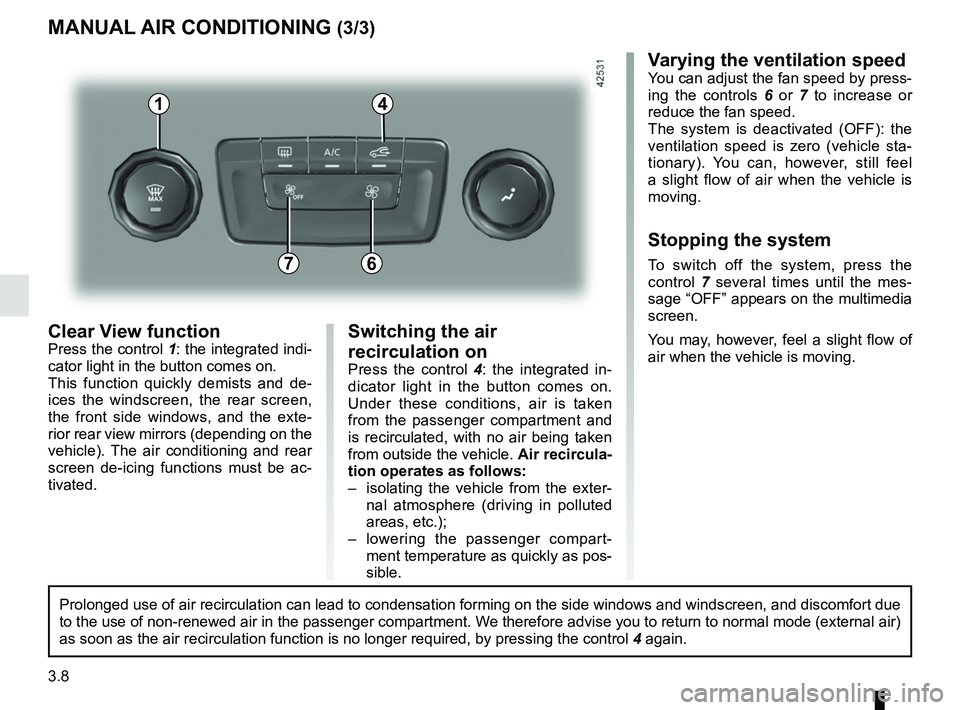
Clear View functionPress the control 1: the integrated indi-
cator light in the button comes on.
This function quickly demists and de-
ices the windscreen, the rear screen,
the front side windows, and the exte-
rior rear view mirrors (depending on the
vehicle). The air conditioning and rear
screen de-icing functions must be ac-
tivated.
MANUAL AIR CONDITIONING (3/3)
Varying the ventilation speedYou can adjust the fan speed by press-
ing the controls 6 or 7 to increase or
reduce the fan speed.
The system is deactivated (OFF): the
ventilation speed is zero (vehicle sta-
tionary). You can, however, still feel
a slight flow of air when the vehicle is
moving.
Stopping the system
To switch off the system, press the
control 7 several times until the mes-
sage “OFF” appears on the multimedia
screen.
You may, however, feel a slight flow of
air when the vehicle is moving.76
Prolonged use of air recirculation can lead to condensation forming on t\
he side windows and windscreen, and discomfort due
to the use of non-renewed air in the passenger compartment. We therefore advise you to return to normal mode (external air)
as soon as the air recirculation function is no longer required, by pres\
sing the control 4 again.
Switching the air
recirculation on
Press the control 4: the integrated in-
dicator light in the button comes on.
Under these conditions, air is taken
from the passenger compartment and
is recirculated, with no air being taken
from outside the vehicle. Air recircula-
tion operates as follows:
– isolating the vehicle from the exter- nal atmosphere (driving in polluted
areas, etc.);
– lowering the passenger compart- ment temperature as quickly as pos-
sible.
1