airbag RENAULT SCENIC 2018 Owner's Manual
[x] Cancel search | Manufacturer: RENAULT, Model Year: 2018, Model line: SCENIC, Model: RENAULT SCENIC 2018Pages: 364, PDF Size: 10.43 MB
Page 65 of 364
1.59
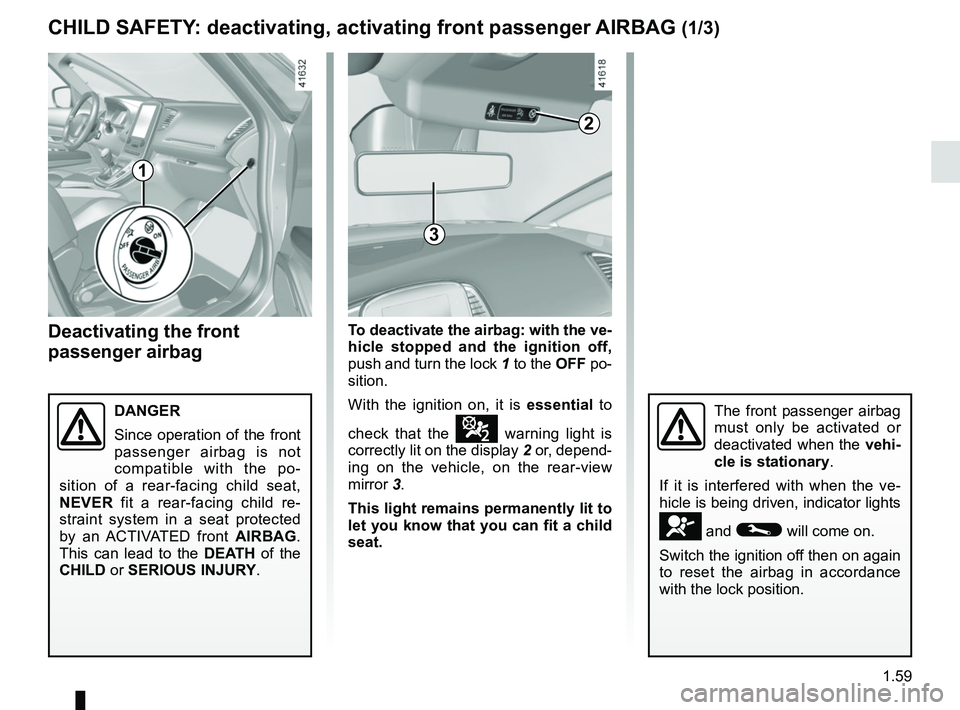
Deactivating the front
passenger airbag
The front passenger airbag
must only be activated or
deactivated when the vehi-
cle is stationary.
If it is interfered with when the ve-
hicle is being driven, indicator lights
å and © will come on.
Switch the ignition off then on again
to reset the airbag in accordance
with the lock position.
CHILD SAFETY: deactivating, activating front passenger AIRBAG (1/3)
To deactivate the airbag: with the ve-
hicle stopped and the ignition off,
push and turn the lock 1 to the OFF po-
sition.
With the ignition on, it is essential to
check that the
¹ warning light is
correctly lit on the display 2 or, depend-
ing on the vehicle, on the rear-view
mirror 3.
This light remains permanently lit to
let you know that you can fit a child
seat.
DANGER
Since operation of the front
passenger airbag is not
compatible with the po-
sition of a rear-facing child seat,
NEVER fit a rear-facing child re-
straint system in a seat protected
by an ACTIVATED front AIRBAG.
This can lead to the DEATH of the
CHILD or SERIOUS INJURY.
1
2
3
Page 66 of 364
1.60
4
A
A
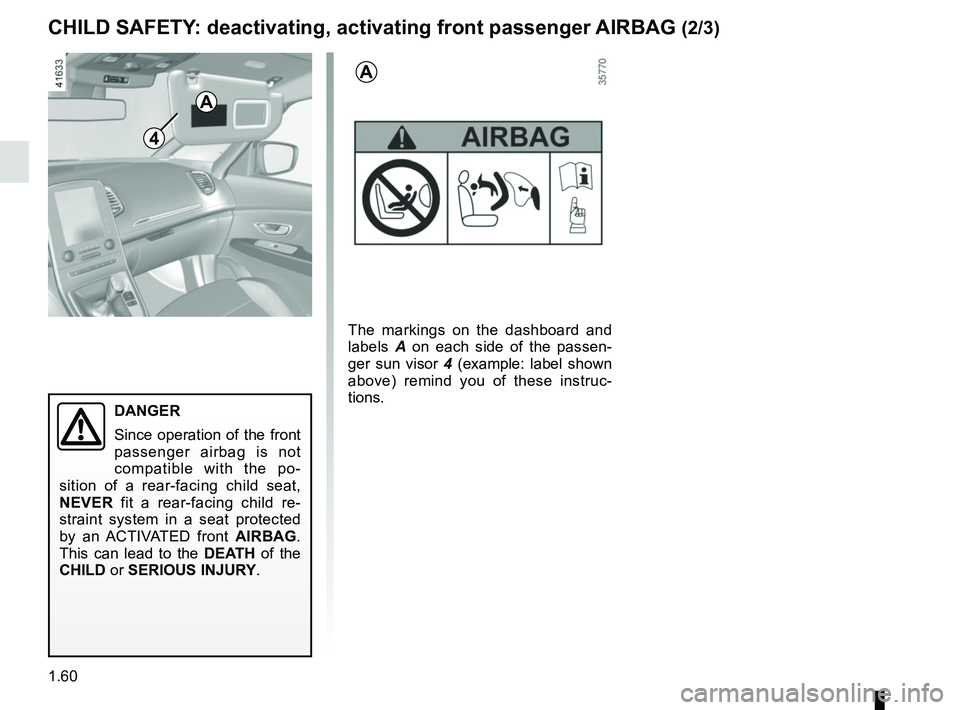
The markings on the dashboard and
labels A on each side of the passen-
ger sun visor 4 (example: label shown
above) remind you of these instruc-
tions.
CHILD SAFETY: deactivating, activating front passenger AIRBAG (2/3)
DANGER
Since operation of the front
passenger airbag is not
compatible with the po-
sition of a rear-facing child seat,
NEVER fit a rear-facing child re-
straint system in a seat protected
by an ACTIVATED front AIRBAG.
This can lead to the DEATH of the
CHILD or SERIOUS INJURY.
Page 67 of 364

1.61
CHILD SAFETY: deactivating, activating front passenger AIRBAG (3/3)
Operating faults
It is forbidden to fit a rear-facing child
seat to the front passenger seat if the
airbags activation/deactivation system
is faulty.
Allowing any other passenger to sit in
that seat is not recommended.
Contact your approved dealer as soon
as possible.
Activating the front
passenger airbag
You should reactivate the airbag as
soon as you remove the child seat from
the front passenger seat to ensure the
protection of the front passenger in the
event of an impact.To reactivate the
airbags : with the
vehicle at a standstill, and the igni-
tion off , push and turn lock 1 to the ON
position.
With the ignition on, it is essential to
check that the
] warning light is
off and that the
light is lit on the
display 2 or, depending on the vehicle,
on the rear-view mirror 3 for around
1 minute after each time the engine is
started.
The front passenger seat belt additional
restraint systems are activated.
The front passenger airbag
must only be activated or
deactivated when the vehi-
cle is stationary.
If it is interfered with when the ve-
hicle is being driven, indicator lights
å and © will come on.
Switch the ignition off then on again
to reset the airbag in accordance
with the lock position.
1
2
3
Page 69 of 364
1.63
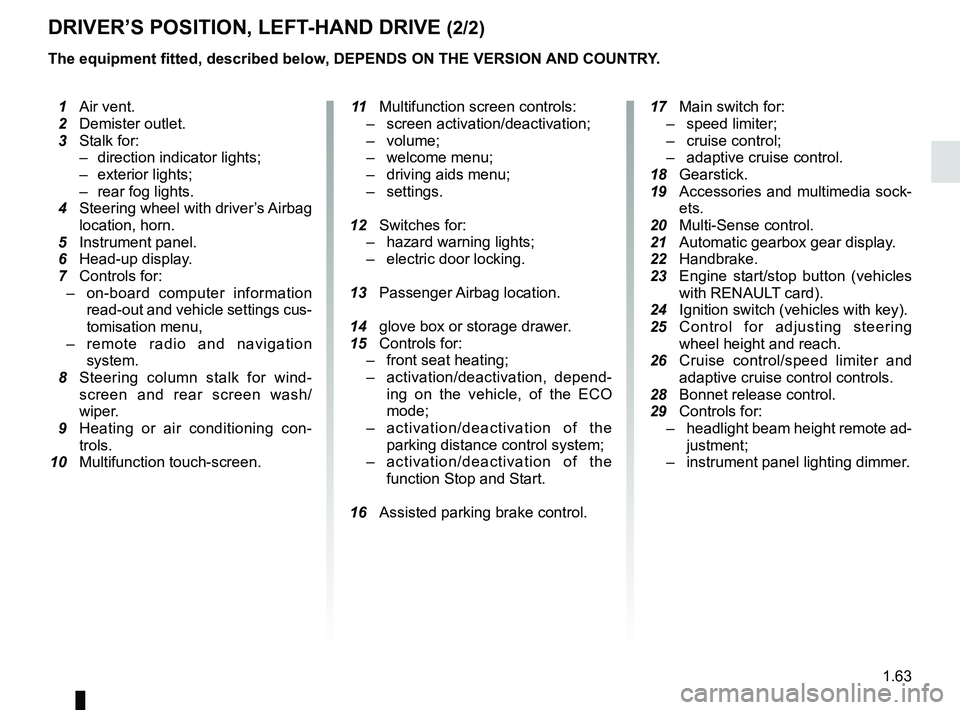
DRIVER’S POSITION, LEFT-HAND DRIVE (2/2)
The equipment fitted, described below, DEPENDS ON THE VERSION AND COUNTRY.
1 Air vent.
2 Demister outlet.
3 Stalk for:
– direction indicator lights;
– exterior lights;
– rear fog lights.
4 Steering wheel with driver’s Airbag
location, horn.
5 Instrument panel.
6 Head-up display.
7 Controls for:
– on-board computer information
read-out and vehicle settings cus-
tomisation menu,
– remote radio and navigation
system.
8 Steering column stalk for wind-
screen and rear screen wash/
wiper.
9 Heating or air conditioning con-
trols.
10 Multifunction touch-screen.
11 Multifunction screen controls:
– screen activation/deactivation;
– volume;
– welcome menu;
– driving aids menu;
– settings.
12 Switches for:
– hazard warning lights;
– electric door locking.
13 Passenger Airbag location.
14 glove box or storage drawer.
15 Controls for:
– front seat heating;
– activation/deactivation, depend-
ing on the vehicle, of the ECO
mode;
– activation/deactivation of the
parking distance control system;
– activation/deactivation of the
function Stop and Start.
16 Assisted parking brake control.
17 Main switch for:
– speed limiter;
– cruise control;
– adaptive cruise control.
18 Gearstick.
19 Accessories and multimedia sock-
ets.
20 Multi-Sense control.
21
Automatic gearbox gear display.
22 Handbrake.
23 Engine start/stop button (vehicles
with RENAUL
T card).
24 Ignition switch (vehicles with key).
25 Control for adjusting steering
wheel height and reach.
26 Cruise control/speed limiter and
adaptive cruise control controls.
28 Bonnet release control.
29 Controls for:
– headlight beam height remote ad-
justment;
– instrument panel lighting dimmer.
Page 71 of 364
1.65
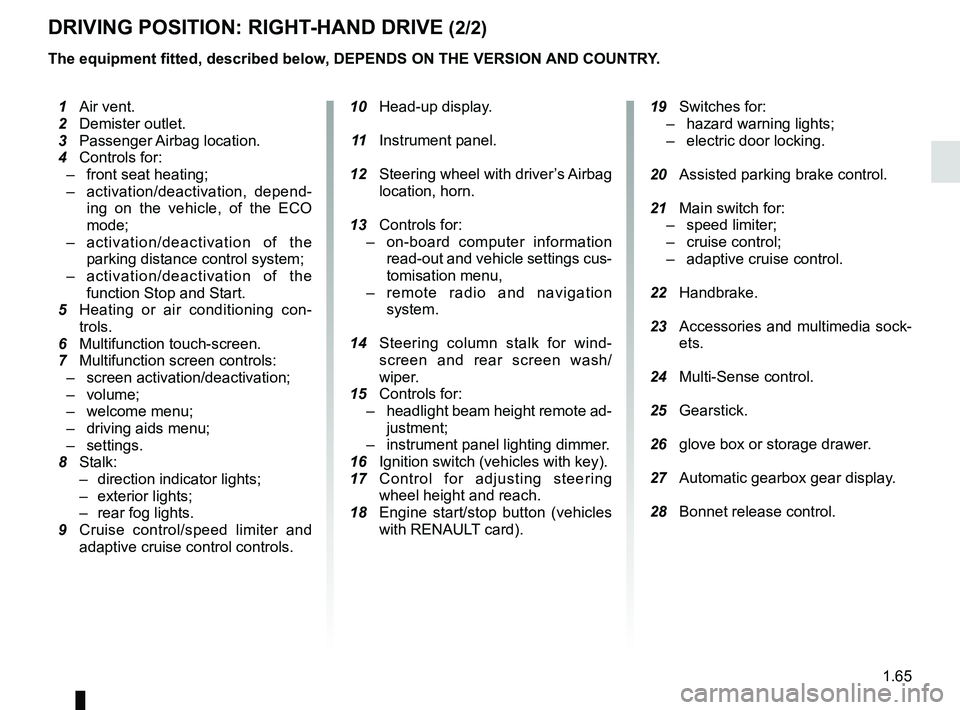
DRIVING POSITION: RIGHT-HAND DRIVE (2/2)
The equipment fitted, described below, DEPENDS ON THE VERSION AND COUNTRY.
10 Head-up display.
11 Instrument panel.
12 Steering wheel with driver’s Airbag
location, horn.
13 Controls for:
– on-board computer information
read-out and vehicle settings cus-
tomisation menu,
– remote radio and navigation
system.
14 Steering column stalk for wind-
screen and rear screen wash/
wiper.
15 Controls for:
– headlight beam height remote ad-
justment;
– instrument panel lighting dimmer.
16 Ignition switch (vehicles with key).
17 Control for adjusting steering
wheel height and reach.
18 Engine start/stop button (vehicles
with RENAULT card).
19 Switches for:
– hazard warning lights;
– electric door locking.
20 Assisted parking brake control.
21 Main switch for:
– speed limiter;
– cruise control;
– adaptive cruise control.
22 Handbrake.
23 Accessories and multimedia sock-
ets.
24 Multi-Sense control.
25 Gearstick.
26 glove box or storage drawer.
27 Automatic gearbox gear display.
28 Bonnet release control.
1 Air vent.
2 Demister outlet.
3 Passenger Airbag location.
4 Controls for:
– front seat heating;
– activation/deactivation, depend-
ing on the vehicle, of the ECO
mode;
– activation/deactivation of the
parking distance control system;
– activation/deactivation of the
function Stop and Start.
5
Heating or air conditioning con-
trols.
6 Multifunction touch-screen.
7 Multifunction screen controls:
– screen activation/deactivation;
– volume;
– welcome menu;
– driving aids menu;
– settings.
8 Stalk:
– direction indicator lights;
– exterior lights;
– rear fog lights.
9 Cruise control/speed limiter and
adaptive cruise control controls.
Page 75 of 364
1.69
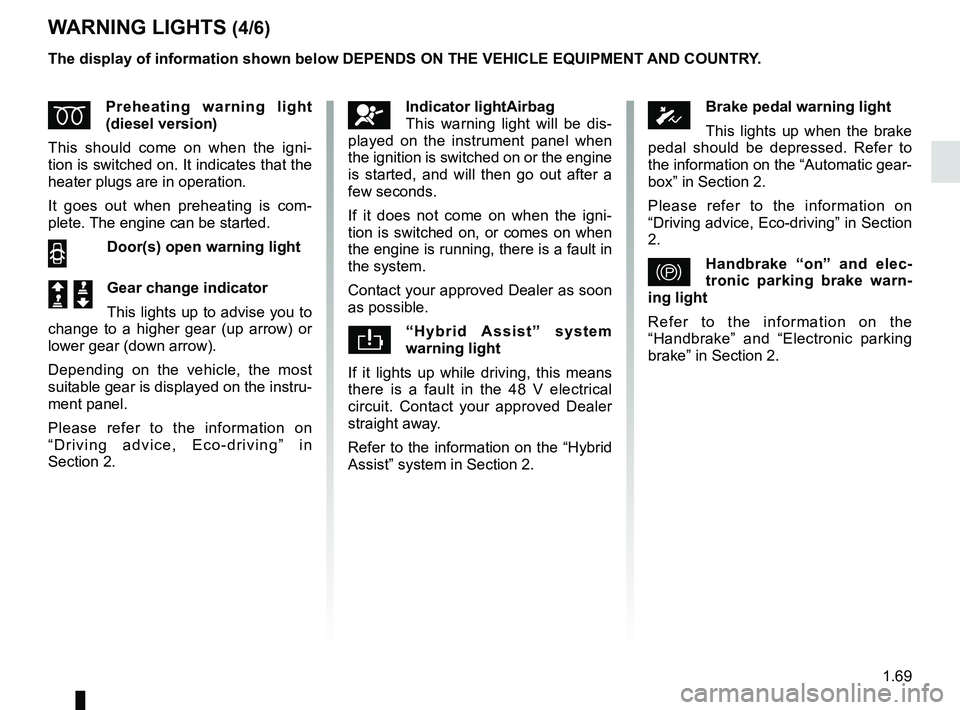
WARNING LIGHTS (4/6)
ÉPreheating warning light
(diesel version)
This should come on when the igni-
tion is switched on. It indicates that the
heater plugs are in operation.
It goes out when preheating is com-
plete. The engine can be started.
2 Door(s) open warning light
Š ‰Gear change indicator
This lights up to advise you to
change to a higher gear (up arrow) or
lower gear (down arrow).
Depending on the vehicle, the most
suitable gear is displayed on the instru-
ment panel.
Please refer to the information on
“Driving advice, Eco-driving” in
Section 2.
The display of information shown below DEPENDS ON THE VEHICLE EQUIPMENT \
AND COUNTRY.
ÓBrake pedal warning light
This lights up when the brake
pedal should be depressed. Refer to
the information on the “Automatic gear-
box” in Section 2.
Please refer to the information on
“Driving advice, Eco-driving” in Section
2.
}Handbrake “on” and elec-
tronic parking brake warn-
ing light
Refer to the information on the
“Handbrake” and “Electronic parking
brake” in Section 2.
åIndicator lightAirbag
This warning light will be dis-
played on the instrument panel when
the ignition is switched on or the engine
is started, and will then go out after a
few seconds.
If it does not come on when the igni-
tion is switched on, or comes on when
the engine is running, there is a fault in
the system.
Contact your approved Dealer as soon
as possible.
“Hybrid Assist” system
warning light
If it lights up while driving, this means
there is a fault in the 48 V electrical
circuit. Contact your approved Dealer
straight away.
Refer to the information on the “Hybrid
Assist” system in Section 2.
Page 77 of 364

The display of information shown below DEPENDS ON THE VEHICLE EQUIPMENT \
AND COUNTRY.
On display C or, depending on the
vehicle, on the rear-view mirror D
Passenger Air")
1.71
WARNING LIGHTS (6/6)
The display of information shown below DEPENDS ON THE VEHICLE EQUIPMENT \
AND COUNTRY.
On display C or, depending on the
vehicle, on the rear-view mirror D
Passenger Airbag ON
Refer to the information on
“Child safety: deactivating/activating
the front passenger airbag” in Section 1.
¹Passenger Airbag OFF
Refer to the information on
“Child safety: deactivating/activating
the front passenger airbag” in
Section 1).
ßDriver’s seat belt reminder
and, depending on the vehi-
cle, front passenger seat belt re-
minder.
This lights up when the ignition is
switched on if the driver's or front pas-
senger's seat belt (if the passenger
seat is occupied) is not fastened and
the vehicle has reached approximately
12.4 mph (20 km/h), it flashes and a
beep sounds for around 2 minutes.
Note: an object placed on the passen-
ger seat base can activate the warning
light.
C
D
Page 90 of 364

The display of information shown below DEPENDS ON THE VEHICLE EQUIPMENT \
AND COUNTRY.
Examples of selectionsInterpreting the display selected
e) Reset the")
1.84
ON-BOARD COMPUTER: trip settings (5/5)
The display of information shown below DEPENDS ON THE VEHICLE EQUIPMENT \
AND COUNTRY.
Examples of selectionsInterpreting the display selected
e) Reset the tyre pressure.
Refer to the information on the “Tyre pressure
monitoring system” in Section 2.
+ Tyre pressure
No message memorised
f) Trip log.
Successive display:
– information messages (passenger airbag OFF
etc.);
– operating fault messages (Check injection
system, etc.).
Page 92 of 364

1.86
TRIP COMPUTER AND WARNING SYSTEM: operating fault messages
These appear with the © warning light and mean that you should drive very carefully to an author\
ised dealer as
soon as possible. If you fail to follow this recommendation, you risk da\
maging your vehicle.
They disappear when the display selection key is pressed or after severa\
l seconds and are stored in the computer log. The
© warning light stays on. Examples of operating fault messages are given \
in the following pages.
Examples of messages Interpreting the display selected
“Clean diesel filter” Indicates the presence of water in the diesel filter; contact an approve\
d Dealer
as soon as possible.
“Check lighting” Indicates a fault in the headlights.
“Check vehicle” Indicates a fault in one of the pedal sensors, battery management system\
or oil
level sensor.
“Check airbag” Indicates a fault in the restraint system in addition to the seat belts.\
In the event
of an accident, it is possible that they may not be triggered.
“Check anti- pollution system” Indicates a fault in the vehicle’s particle filter system.
Page 99 of 364
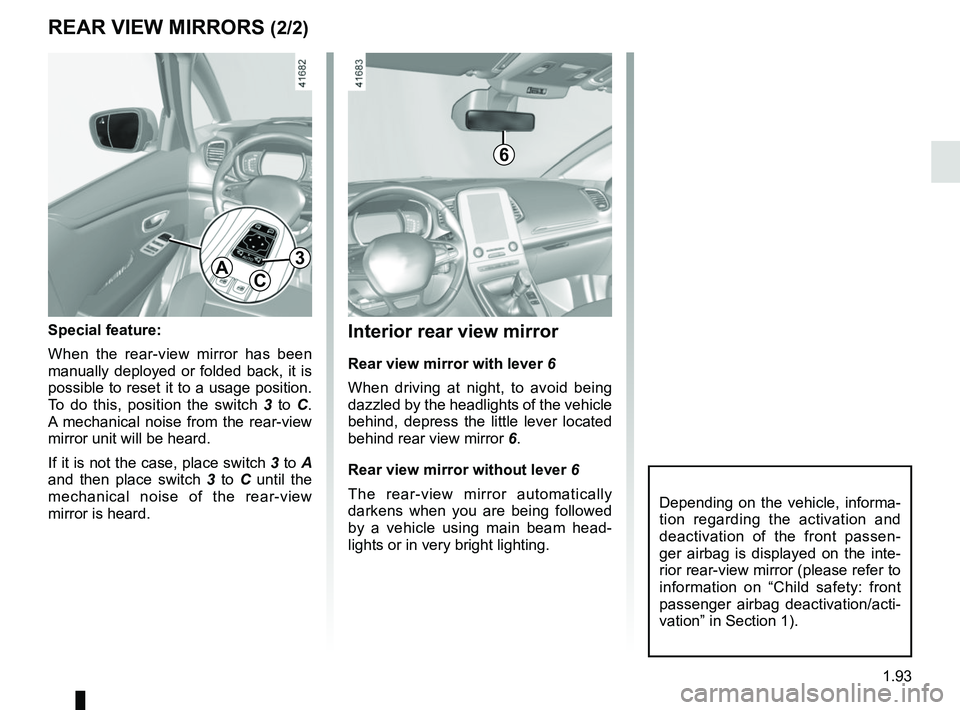
1.93
Interior rear view mirror
Rear view mirror with lever 6
When driving at night, to avoid being
dazzled by the headlights of the vehicle
behind, depress the little lever located
behind rear view mirror 6.
Rear view mirror without lever 6
The rear-view mirror automatically
darkens when you are being followed
by a vehicle using main beam head-
lights or in very bright lighting.
REAR VIEW MIRRORS (2/2)
Special feature:
When the rear-view mirror has been
manually deployed or folded back, it is
possible to reset it to a usage position.
To do this, position the switch 3 to C.
A mechanical noise from the rear-view
mirror unit will be heard.
If it is not the case, place switch 3 to A
and then place switch 3 to C until the
mechanical noise of the rear-view
mirror is heard.
AC
3
Depending on the vehicle, informa-
tion regarding the activation and
deactivation of the front passen-
ger airbag is displayed on the inte-
rior rear-view mirror (please refer to
information on “Child safety: front
passenger airbag deactivation/acti-
vation” in Section 1).
6