Multi media RENAULT TALISMAN 2016 1.G User Guide
[x] Cancel search | Manufacturer: RENAULT, Model Year: 2016, Model line: TALISMAN, Model: RENAULT TALISMAN 2016 1.GPages: 328, PDF Size: 3.39 MB
Page 212 of 328
3.22
When the doors or boot are un-
locked and opened, the reading and
footwell lights come on temporarily.
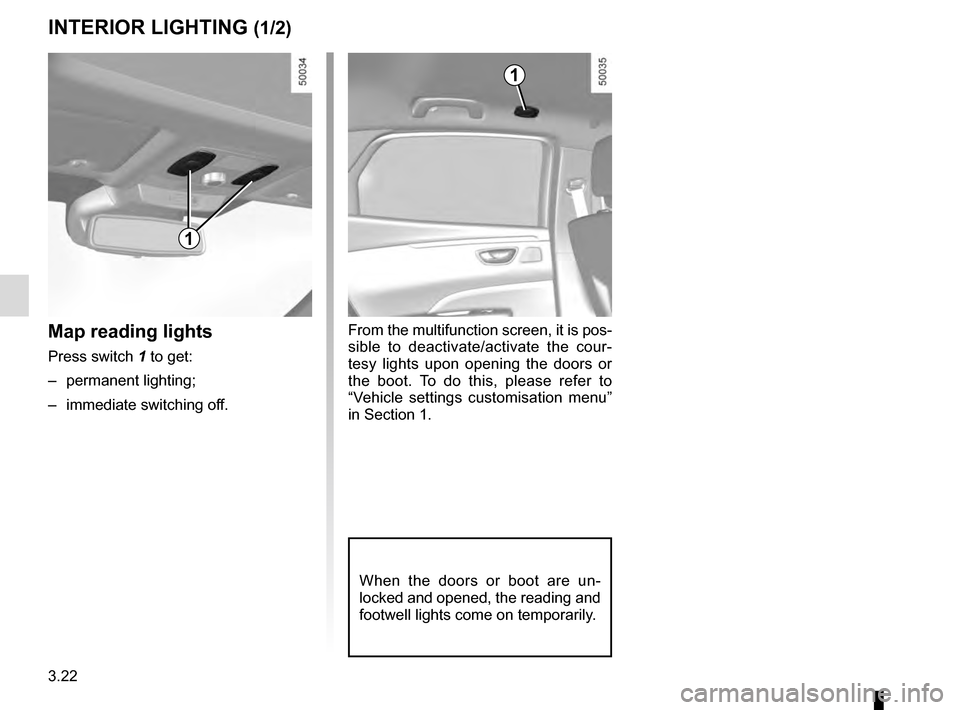
Map reading lights
Press switch 1 to get:
– permanent lighting;
– immediate switching off.
1
From the multifunction screen, it is pos-
sible to deactivate/activate the cour-
tesy lights upon opening the doors or
the boot. To do this, please refer to
“Vehicle settings customisation menu”
in Section 1.
INTERIOR LIGHTING (1/2)
1
Page 240 of 328
3.50
MULTIMEDIA EQUIPMENT (1/2)
Using the telephone
We remind you of the need
to conform to the legislation
in force concerning the use
of such equipment.
5
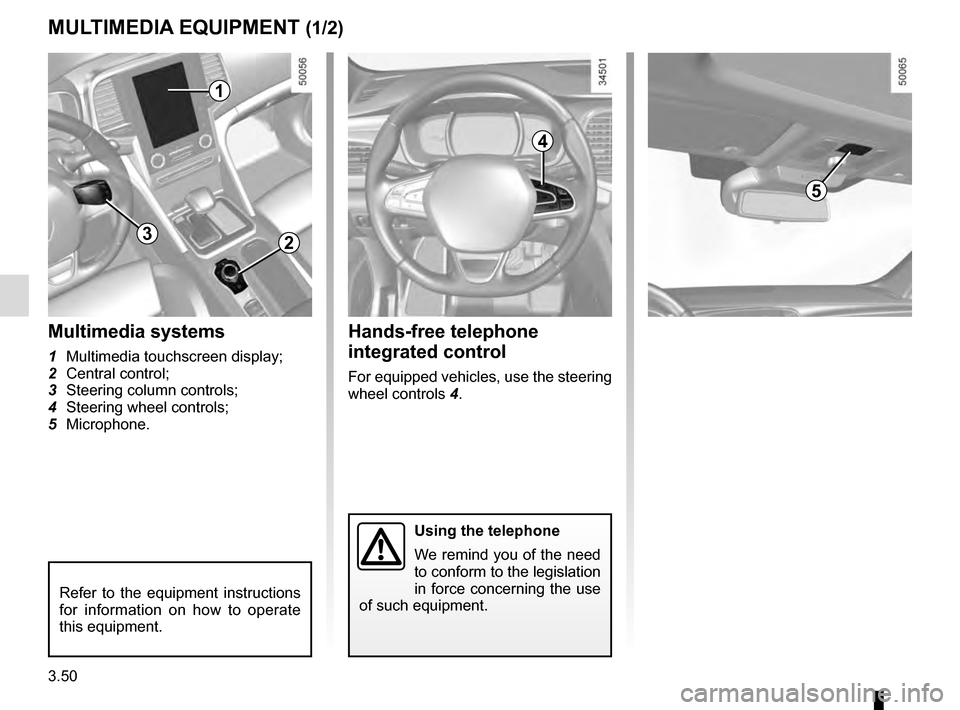
Hands-free telephone
integrated control
For equipped vehicles, use the steering
wheel controls 4.
Multimedia systems
1 Multimedia touchscreen display;
2 Central control;
3 Steering column controls;
4 Steering wheel controls;
5 Microphone.
1
2
4
Refer to the equipment instructions
for information on how to operate
this equipment.
3
Page 241 of 328
3.51
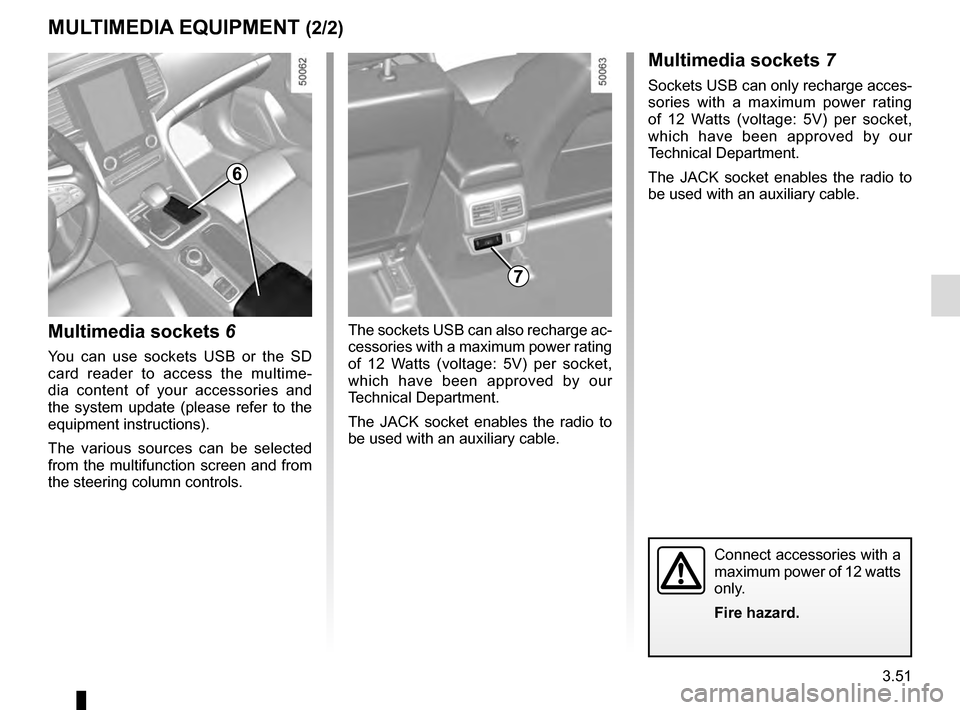
Multimedia sockets 6
You can use sockets USB or the SD
card reader to access the multime-
dia content of your accessories and
the system update (please refer to the
equipment instructions).
The various sources can be selected
from the multifunction screen and from
the steering column controls.
7
MULTIMEDIA EQUIPMENT (2/2)Multimedia sockets 7
Sockets USB can only recharge acces-
sories with a maximum power rating
of 12 Watts (voltage: 5V) per socket,
which have been approved by our
Technical Department.
The JACK socket enables the radio to
be used with an auxiliary cable.
The sockets USB can also recharge ac-
cessories with a maximum power rating
of 12 Watts (voltage: 5V) per socket,
which have been approved by our
Technical Department.
The JACK socket enables the radio to
be used with an auxiliary cable.
Connect accessories with a
maximum power of 12 watts
only.
Fire hazard.
6
Page 285 of 328

Allocation of fuses
(the presence of certain fuses depends on the vehicle equipment level)\
Symbol Allocation SymbolAllocation
HWindscreen washerNot used
ëThird row accessories")
5.25
FUSES (2/2)
Allocation of fuses
(the presence of certain fuses depends on the vehicle equipment level)\
Symbol Allocation SymbolAllocation
HWindscreen washerNot used
ëThird row accessories socket, boot accessories
socketÝTowbar socket
ÆFront cigarette lighter, front and rear accessories
socketDiagnostic socket, audio alarm
Not usedÌHorn
Heated door mirrorsInstrument panel, dashboard control lighting
×Brake lights, passenger compartment central unitPiloted dampened suspension
\bParking brakefFront windscreen wiper
Additional servoDDirection indicator lights, hazard warning lights
îRadio, multifunction screen, multimedia acces-
sories sockets, parking brake controlRear USB sockets on console
Passenger compartment centre unit, rear wiper,
rear fog light\fNot used
OLocking opening elements, trunk lid opening and
closing control
Page 324 of 328
7.4
ALPHABETICAL INDEX (4/5)
multimedia (equipment) .......................................... 3.50 – 3.51
multimedia equipment ............................................ 3.50 – 3.51
Multi-Sense.............................................................\
.... 3.2 – 3.3
N
navigation ............................................................... 3.50 – 3.51
navigation system ................................................... 3.50 – 3.51
O
oil change ..................................................................... 4.4, 4.6
opening the doors ..................................................1.12 → 1.17
operating faults ......................................................5.35 → 5.40
overspeed warning .......................................1.62, 2.52 → 2.54
P
paintwork maintenance ..................................................... 4.14 – 4.15
parking assistance: assisted parking 2.66 → 2.70, 2.74 → 2.77
parking distance control.........................................2.66 → 2.70
power-assisted steering................................. 1.79 – 1.80, 1.80
powered tailgate ....................................................3.37 → 3.41
puncture............................................................5.2,\
5.7 → 5.10
R
radio...................................................................\
..... 3.50 – 3.51
radio frequency remote control/key battery ................................................................\
.......... 5.28
use ....................................................................\
...1.2 → 1.4
rear drive wheels ..........................................2.28 → 2.39, 2.39
rear parcel shelf ................................................................. 3.42
rear screen de-icing/demisting ................................. 3.10, 3.13
rear seats functions ........................................................... 3.30 – 3.31
rear view camera ...................................................2.71 → 2.73
rear view mirrors ....................................................1.81 → 1.83
remote control door locking unit .......................................... 1.4 RENAULT anti-intruder device (RAID) .............................. 1.18
RENAULT card battery ................................................................\
.......... 5.29
use ....................................................................\
. 1.5 → 1.11
RENAULT card battery ...................................................... 5.29
replacement parts ................................................................ 6.8
reverse gear selecting ..................................................2.14, 2.79 → 2.81
reversing sensor ....................................................2.66 → 2.70
roof bars ........................................................................\
.... 3.49
roof rack roof bars ....................................................................... 3.49
running in .................................................................... 2.2 – 2.3
S
safety distance warning .......................................... 2.47 – 2.48
safety distances ...................................................... 2.47 – 2.48
screen fold-away screen .......................................................... 1.64
navigation display .................................. 1.63, 3.50 – 3.51
navigation screen ..................................... 1.63, 3.50 – 3.51
seat belt pretensioners ..........................................1.31 → 1.34
seat belts ......................................... 1.27 → 1.29, 1.31 → 1.34
see-me-home lighting ........................................................ 1.88
service sheets..........................................................\
6.9 → 6.14
shock absorbers ................................................................ 2.78
side indicator lights changing bulbs ............................................................. 5.20
sign detection: overspeed warning ........................2.52 → 2.54
signals and lights ...................................................1.85 → 1.90
ski rack ........................................................................\
...... 3.27
special features of diesel versions.....................................\
2.13
special features of petrol vehicles ..................................... 2.12
speed limiter ..........................................................2.49 → 2.51
starting the engine .....................................................2.3 → 2.7