Auto light RENAULT TALISMAN 2016 1.G Owner's Manual
[x] Cancel search | Manufacturer: RENAULT, Model Year: 2016, Model line: TALISMAN, Model: RENAULT TALISMAN 2016 1.GPages: 328, PDF Size: 3.39 MB
Page 117 of 328
2.9
Conditions for coming out of
engine standby
For automatic gearboxes:
– the brake pedal is released, position D or M engaged or ;
– the brake pedal is released, position N engaged and the parking brake off
or;
– the brake pedal is pressed again, with position P engaged or position
N engaged with the handbrake ap-
plied, or ;
– position R is engaged or ;
– the accelerator pedal is depressed or;
– in manual mode, the gear lever is moved towards + or -.
For manual gearboxes:
– the gearbox is in neutral and the clutch pedal is slightly depressed, or
– the engine is in gear and the clutch pedal is pressed right down.
To fill up with fuel, the engine must
be stopped (and not on standby):
stop the engine (please see
«Starting, stopping the engine»).
STOP AND START FUNCTION (2/4)
Preventing the engine from
standing by
In certain situations, such as negotiat-
ing a crossroads for instance, it is pos-
sible (with the system activated) to keep
the engine running so as to be ready to
move off quickly.
Automatic gearbox:
Keep the vehicle stationary without
pressing too hard on the brake pedal.
Manual gearbox:
Keep the clutch pedal pressed right
down.
Special note: depending on the vehi-
cle, if you switch off the ignition when
the engine is on standby, the warning
light
Ä is displayed for a few sec-
onds on the instrument panel.
Page 118 of 328
2.10
STOP AND START FUNCTION (3/4)
Conditions preventing the
standby of the engine
Certain conditions prevent the system
from using the engine standby function,
including when:
For vehicles with a RENAULT card:
– the driver’s door is not closed;
– the driver’s seatbelt is not fastened;
For all vehicles:
– reverse gear is engaged;
– the bonnet is not locked;
– the outdoor temperature is too low or too high (less than around 5°C or
higher than around 30°C);
– the battery is not sufficiently char- ged;
– the difference between the vehicle interior temperature and the automa-
tic climate control instruction is too
high;
– parking distance control is in opera- tion; – for vehicles with automatic gear-
boxes, the gradient is steeper than
approximately 12%;
– the «Clear View» function is activa- ted (please see «Automatic climate
control» in Section 3);
– the engine temperature is too low;
– the emission control system is being regenerated;
– ...
Warning light
is displayed on the
instrument panel. This notifies you that
engine standby is not available.
Deactivate the Stop and
Start function when perfor-
ming any operations in the
engine compartment.
Special cases for vehicles
with a RENAULT card
With the engine on standby (traffic jam,
traffic lights, etc.), if the driver unfastens
the seat belt and opens the driver’s
door, or gets out of the seat, the ignition
is switched off.
The assisted parking brake is applied
automatically.
To restart and reactivate the Stop and
Start system, start the engine (please
refer to “Starting, stopping the engine”
in Section 2).
Special case of vehicles with
a key
With the engine on standby (traffic
jam, traffic lights, etc.), if you get out of
the vehicle, a beep warns you that the
engine is on standby and has not been
stopped.
Page 119 of 328
2.11
STOP AND START FUNCTION (4/4)
Special feature of the automatic
engine re-start
Under certain conditions, the engine
can restart on its own in order to gua-
rantee your safety and comfort.
This can occur especially when:
– the outdoor temperature is too low or too high (less than around 0 °C or
higher than around 30 °C);
– the «Clear View» function is activa- ted (please see «Automatic climate
control» in Section 3);
– the battery is not sufficiently char- ged;
– the vehicle speed is above 3 mph (5 km/h) (downhill slope, etc.); ;
– repeated pressing on the brake pedal or braking system require-
ment;
– ...
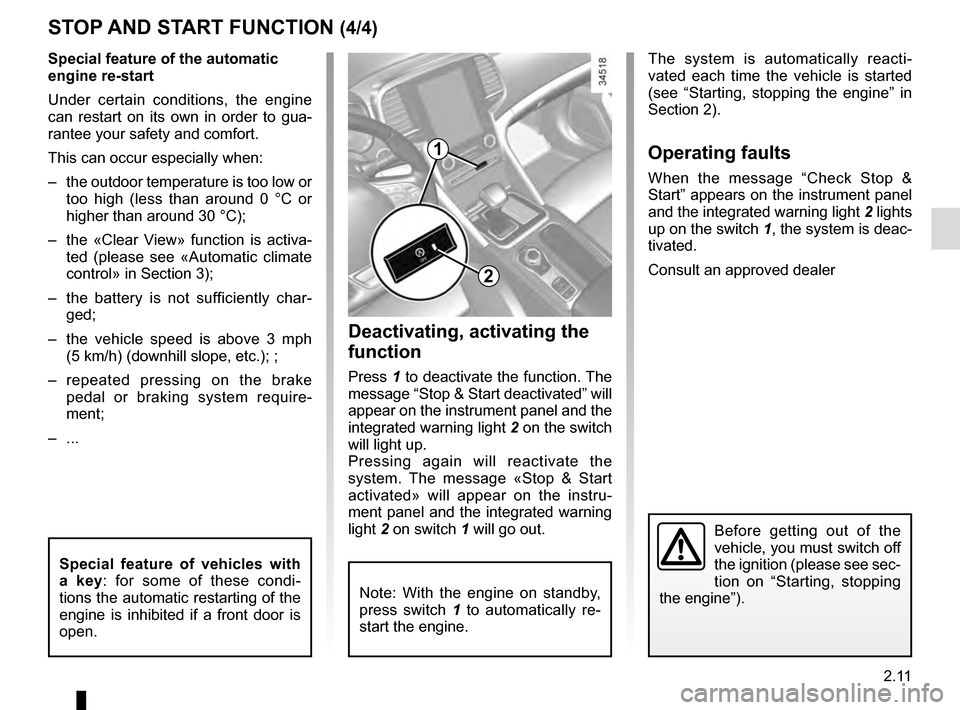
1
2
Deactivating, activating the
function
Press 1 to deactivate the function. The
message “Stop & Start deactivated” will
appear on the instrument panel and the
integrated warning light 2 on the switch
will light up.
Pressing again will reactivate the
system. The message «Stop & Start
activated» will appear on the instru-
ment panel and the integrated warning
light 2 on switch 1 will go out.
Note: With the engine on standby,
press switch 1 to automatically re-
start the engine.
The system is automatically reacti-
vated each time the vehicle is started
(see “Starting, stopping the engine” in
Section 2).
Operating faults
When the message “Check Stop &
Start” appears on the instrument panel
and the integrated warning light 2 lights
up on the switch 1, the system is deac-
tivated.
Consult an approved dealer
Before getting out of the
vehicle, you must switch off
the ignition (please see sec-
tion on “Starting, stopping
the engine”).
Special feature of vehicles with
a key: for some of these condi-
tions the automatic restarting of the
engine is inhibited if a front door is
open.
Page 121 of 328
2.13
SPECIAL FEATURES OF DIESEL VERSIONS
Diesel engine speed
Diesel engines are fitted with an injec-
tion pump which prevents the engine
speed being exceeded irrespective of
the gear selected.
If the message “Check antipollution
system” is displayed along with warn-
ing lights
Ä and ©, consult an
authorised dealer immediately.
When driving, depending on the fuel
grade used, it is possible that white
smoke may be emitted.
This is due to the exhaust particle filter
being cleaned automatically, and does
not affect the way the vehicle runs.
Running out of fuel
If the tank has been completely
drained, the system must be reprimed
after the tank is refilled: see information
on the “fuel tank” in section 1 before re-
starting the engine.
Do not park the vehicle or
run the engine in locations
where combustible sub-
stances or materials such
as grass or leaves can come into
contact with the hot exhaust system.
Precautions to be taken in
winter
To avoid any faults in icy weather:
– ensure that the battery is always fully charged,
– always keep the diesel tank rela- tively full to avoid water vapour con-
densing in it and accumulating at the
bottom of the tank.
Page 122 of 328
2.14
GEAR LEVER
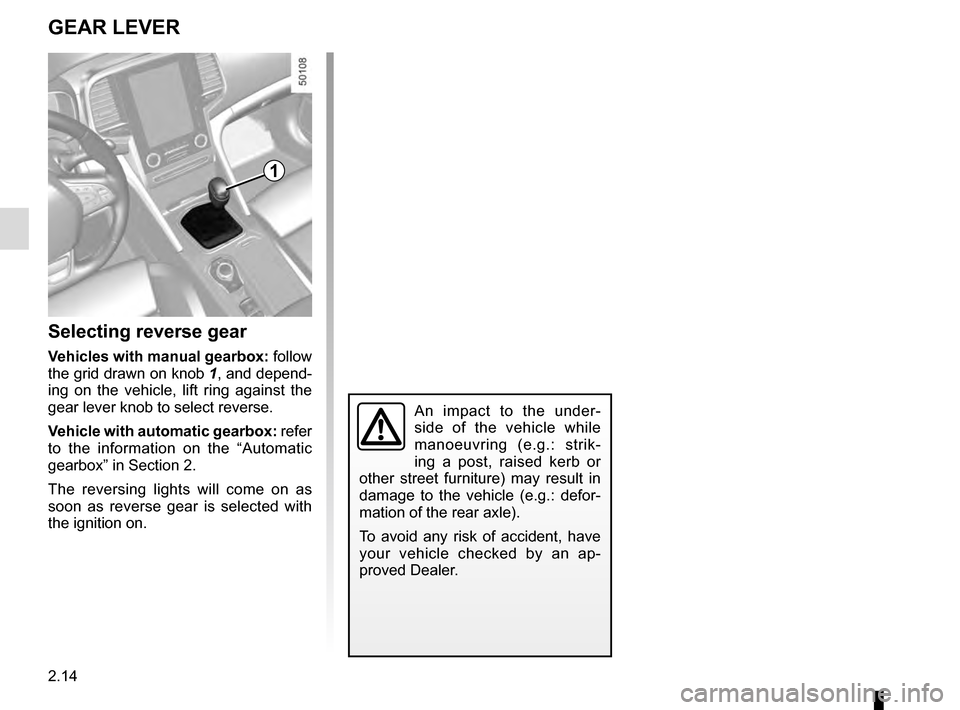
Selecting reverse gear
Vehicles with manual gearbox: follow
the grid drawn on knob 1, and depend-
ing on the vehicle, lift ring against the
gear lever knob to select reverse.
Vehicle with automatic gearbox: refer
to the information on the “Automatic
gearbox” in Section 2.
The reversing lights will come on as
soon as reverse gear is selected with
the ignition on.
An impact to the under-
side of the vehicle while
manoeuvring (e.g.: strik-
ing a post, raised kerb or
other street furniture) may result in
damage to the vehicle (e.g.: defor-
mation of the rear axle).
To avoid any risk of accident, have
your vehicle checked by an ap-
proved Dealer.
1
Page 123 of 328
2.15
ELECTRONIC PARKING BRAKE (1/3)
Note:
To indicate that the electronic parking
brake is released, a beep sounds and
the message “Apply parking brake” ap-
pears on the instrument panel:
– with the engine running: when the driver’s door is opened;
– with the engine switched off (eg. when the engine stalls): when a front
door is opened.
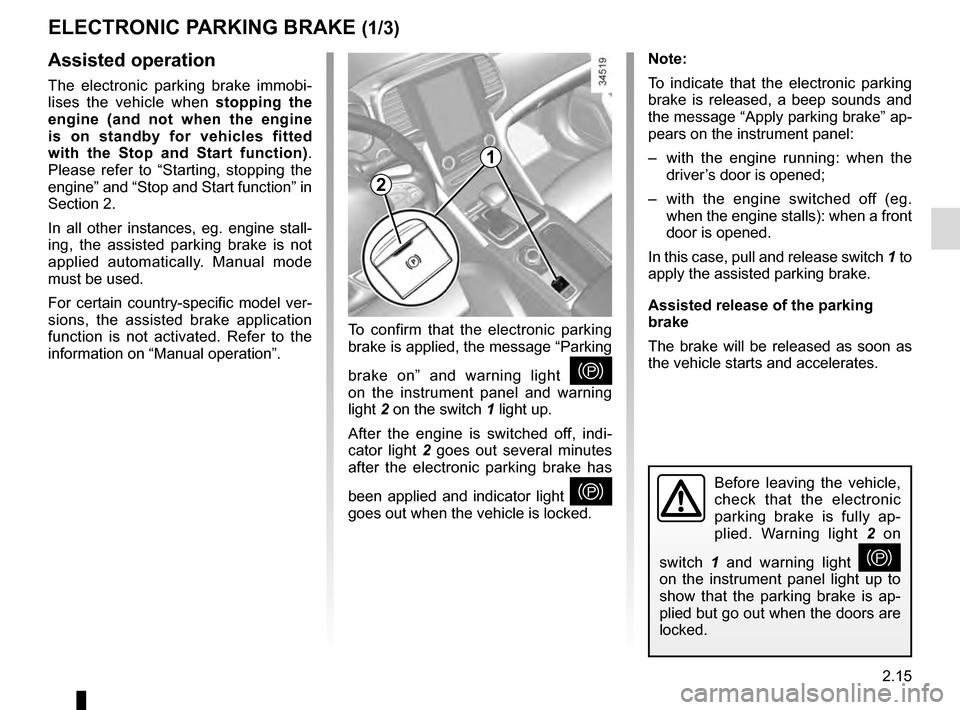
In this case, pull and release switch 1 to
apply the assisted parking brake.
Assisted release of the parking
brake
The brake will be released as soon as
the vehicle starts and accelerates.Assisted operation
The electronic parking brake immobi-
lises the vehicle when stopping the
engine (and not when the engine
is on standby for vehicles fitted
with the Stop and Start function) .
Please refer to “Starting, stopping the
engine” and “Stop and Start function” in
Section 2.
In all other instances, eg. engine stall-
ing, the assisted parking brake is not
applied automatically. Manual mode
must be used.
For certain country-specific model ver-
sions, the assisted brake application
function is not activated. Refer to the
information on “Manual operation”. To confirm that the electronic parking
brake is applied, the message “Parking
brake on” and warning light
}
on the instrument panel and warning
light 2 on the switch 1 light up.
After the engine is switched off, indi-
cator light 2 goes out several minutes
after the electronic parking brake has
been applied and indicator light
}
goes out when the vehicle is locked.Before leaving the vehicle,
check that the electronic
parking brake is fully ap-
plied. Warning light 2 on
switch 1 and warning light
}
on the instrument panel light up to
show that the parking brake is ap-
plied but go out when the doors are
locked.
2
1
Page 124 of 328
2.16
ELECTRONIC PARKING BRAKE (2/3)Special cases
To park on a slope or while towing a
trailer, for example, pull switch 1 for
a few seconds to gain the maximum
braking.
To park the vehicle without applying the
electronic parking brake (if there is a
risk of freezing, for example):
– with the engine running, while si- multaneously depressing the brake
pedal and the switch 1, stop the
engine (not standby for vehicles
fitted with Stop and Start);
– with a gear or position P engaged,
release the brake pedal and the
switch 1.
For vehicles fitted with a Stop and Start
function, with the engine on standby,
the electronic parking brake is automat-
ically activated if the driver unfastens
their seat belt and opens the driver’s
door or gets out of their seat.
Brief stop
To manually activate the electronic
parking brake, (when stopping at a red
light, or stopping when the engine is
running etc.) : pull and release switch 1.
The brake is released as soon as the
vehicle is started up again.
Manual operationYou can apply the electronic parking
brake manually.
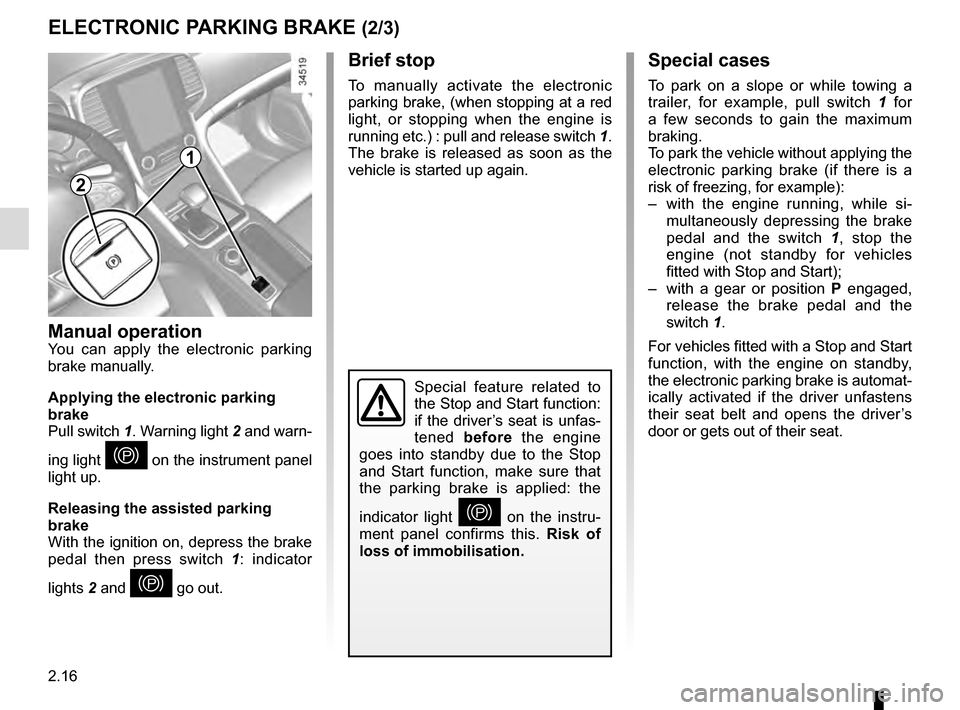
Applying the electronic parking
brake
Pull switch 1. Warning light 2 and warn-
ing light
} on the instrument panel
light up.
Releasing the assisted parking
brake
With the ignition on, depress the brake
pedal then press switch 1: indicator
lights 2 and
} go out.
Special feature related to
the Stop and Start function:
if the driver’s seat is unfas-
tened before the engine
goes into standby due to the Stop
and Start function, make sure that
the parking brake is applied: the
indicator light
} on the instru-
ment panel confirms this. Risk of
loss of immobilisation.
2
1
Page 125 of 328
2.17
Operating faults
– If there is a fault, the © warning
light illuminates on the instrument
panel accompanied by the “Check
parking brake” message and, in
some cases, the
} warning
light.
Please contact an authorised dealer
as soon as possible.
– If there is an electronic parking brake fault, the warning light
® comes
on, along with the message “Braking
system fault”, a beep and, in some
cases, the warning light
}.
This means that you must stop as
soon as traffic conditions allow.
Versions with an automatic
gearbox
For safety reasons, automatic release
is deactivated when the driver’s door
is open or not shut properly and the
engine is running (in order to prevent
the vehicle from moving without the
driver). The “Release parking brake
manually” message appears on the
instrument panel when the driver de-
presses the accelerator.
ELECTRONIC PARKING BRAKE (3/3)
It is therefore essential to
immobilise the vehicle by
engaging first gear (manual
gearbox) or position P (au-
tomatic gearbox). If the slope re-
quires it, chock the vehicle.
Never leave your vehicle
without moving the selector
lever to position P. This is
because when the vehicle
is stationary with the engine running
and a gear engaged, the vehicle
may begin to move if you acceler-
ate.
There is a risk of accidents.
If no lights or sounds are ap-
parent, this indicates a fault
in the instrument panel. This
indicates that it is essential
to stop immediately (as soon as traf-
fic conditions allow). Ensure that the
vehicle is correctly immobilised and
contact an approved Dealer.
In the event of the message
“Electric failure DANGER”
or “Check battery”, manu-
ally activate the electronic
parking brake by pulling switch 1 (or
position the gear lever in P for au-
tomatic gearboxes) before stopping
the engine.
Risk of loss of immobilisation of the
vehicle.
Contact an authorised dealer.
Page 128 of 328
2.20
DRIVING ADVICE, ECO-DRIVING (3/5)
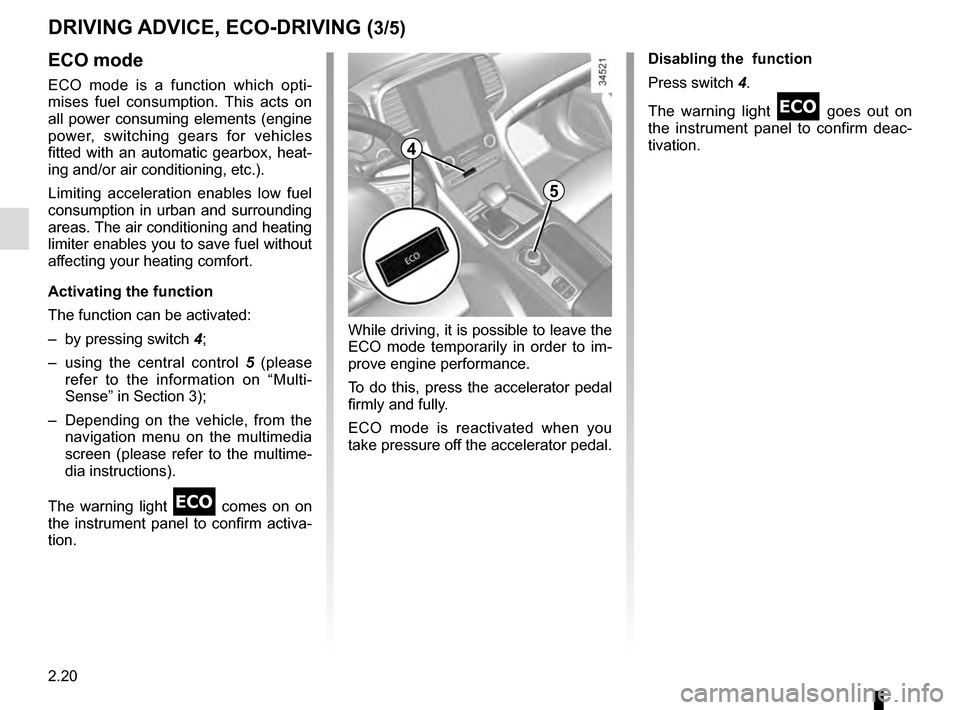
4
5
ECO mode
ECO mode is a function which opti-
mises fuel consumption. This acts on
all power consuming elements (engine
power, switching gears for vehicles
fitted with an automatic gearbox, heat-
ing and/or air conditioning, etc.).
Limiting acceleration enables low fuel
consumption in urban and surrounding
areas. The air conditioning and heating
limiter enables you to save fuel without
affecting your heating comfort.
Activating the function
The function can be activated:
– by pressing switch 4;
– using the central control 5 (please
refer to the information on “Multi-
Sense” in Section 3);
– Depending on the vehicle, from the navigation menu on the multimedia
screen (please refer to the multime-
dia instructions).
The warning light
comes on on
the instrument panel to confirm activa-
tion. Disabling the function
Press switch 4.
The warning light
goes out on
the instrument panel to confirm deac-
tivation.
While driving, it is possible to leave the
ECO mode temporarily in order to im-
prove engine performance.
To do this, press the accelerator pedal
firmly and fully.
ECO mode is reactivated when you
take pressure off the accelerator pedal.
Page 187 of 328
2.79
AUTOMATIC GEARBOX (1/3)
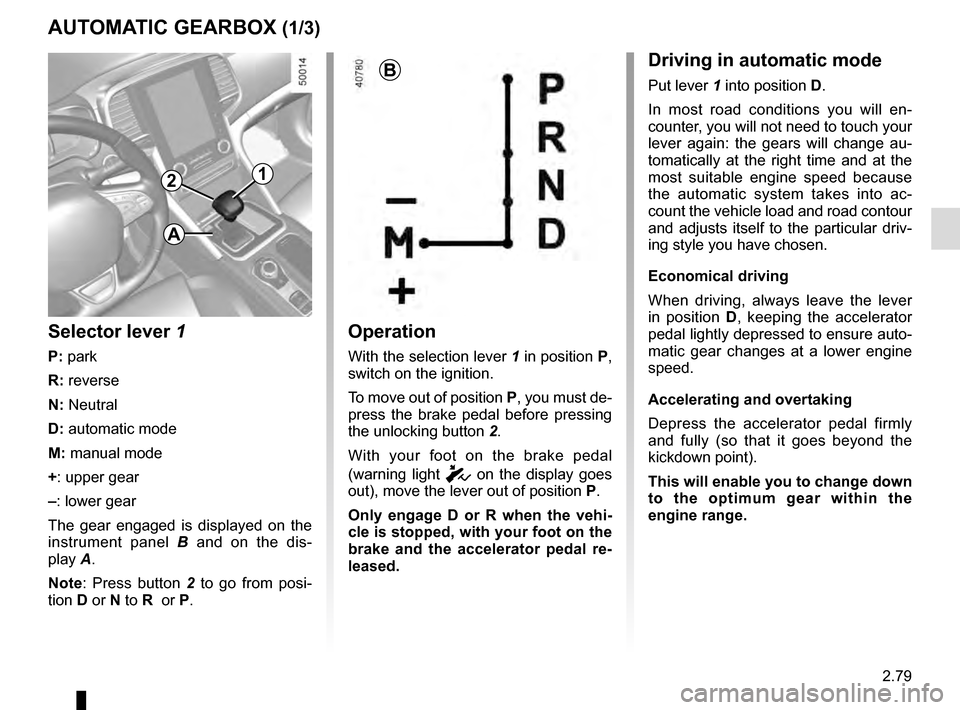
2
Operation
With the selection lever 1 in position P,
switch on the ignition.
To move out of position P, you must de-
press the brake pedal before pressing
the unlocking button 2.
With your foot on the brake pedal
(warning light
c on the display goes
out), move the lever out of position P.
Only engage D or R when the vehi-
cle is stopped, with your foot on the
brake and the accelerator pedal re-
leased.
1
B
Selector lever 1
P: park
R: reverse
N: Neutral
D: automatic mode
M: manual mode
+: upper gear
–: lower gear
The gear engaged is displayed on the
instrument panel B and on the dis-
play A.
Note: Press button 2 to go from posi-
tion D or N to R or P.
Driving in automatic mode
Put lever 1 into position D.
In most road conditions you will en-
counter, you will not need to touch your
lever again: the gears will change au-
tomatically at the right time and at the
most suitable engine speed because
the automatic system takes into ac-
count the vehicle load and road contour
and adjusts itself to the particular driv-
ing style you have chosen.
Economical driving
When driving, always leave the lever
in position D, keeping the accelerator
pedal lightly depressed to ensure auto-
matic gear changes at a lower engine
speed.
Accelerating and overtaking
Depress the accelerator pedal firmly
and fully (so that it goes beyond the
kickdown point).
This will enable you to change down
to the optimum gear within the
engine range.
A