warning RENAULT TALISMAN 2016 1.G Owner's Manual
[x] Cancel search | Manufacturer: RENAULT, Model Year: 2016, Model line: TALISMAN, Model: RENAULT TALISMAN 2016 1.GPages: 328, PDF Size: 3.39 MB
Page 64 of 328
1.58
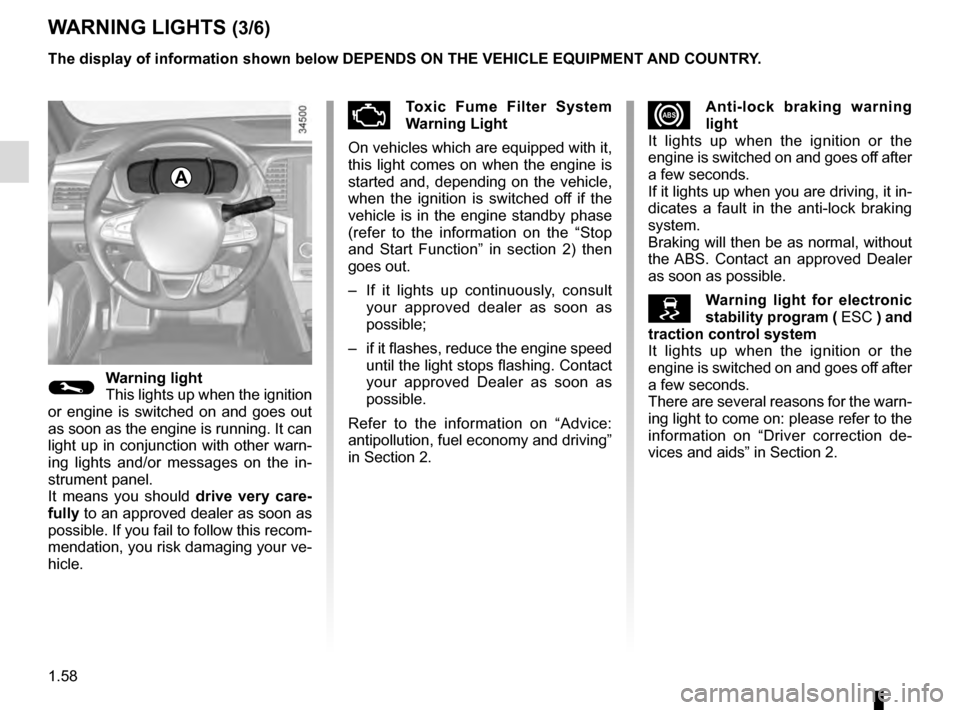
xAnti-lock braking warning
light
It lights up when the ignition or the
engine is switched on and goes off after
a few seconds.
If it lights up when you are driving, it in-
dicates a fault in the anti-lock braking
system.
Braking will then be as normal, without
the ABS. Contact an approved Dealer
as soon as possible.
Warning light for electronic
stability program ( ESC ) and
traction control system
It lights up when the ignition or the
engine is switched on and goes off after
a few seconds.
There are several reasons for the warn-
ing light to come on: please refer to the
information on “Driver correction de-
vices and aids” in Section 2.
WARNING LIGHTS (3/6)
©Warning light
This lights up when the ignition
or engine is switched on and goes out
as soon as the engine is running. It can
light up in conjunction with other warn-
ing lights and/or messages on the in-
strument panel.
It means you should drive very care-
fully to an approved dealer as soon as
possible. If you fail to follow this recom-
mendation, you risk damaging your ve-
hicle.
ÄToxic Fume Filter System
Warning Light
On vehicles which are equipped with it,
this light comes on when the engine is
started and, depending on the vehicle,
when the ignition is switched off if the
vehicle is in the engine standby phase
(refer to the information on the “Stop
and Start Function” in section 2) then
goes out.
– If it lights up continuously, consult your approved dealer as soon as
possible;
– if it flashes, reduce the engine speed until the light stops flashing. Contact
your approved Dealer as soon as
possible.
Refer to the information on “Advice:
antipollution, fuel economy and driving”
in Section 2.
A
The display of information shown below DEPENDS ON THE VEHICLE EQUIPMENT \
AND COUNTRY.
Page 65 of 328
1.59
WARNING LIGHTS (4/6)
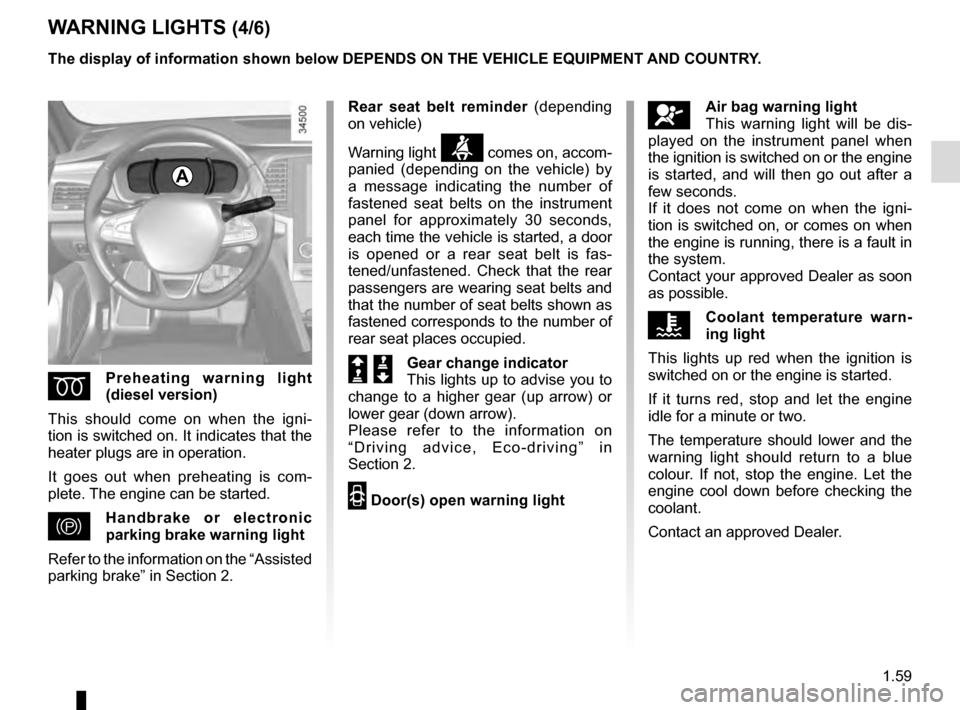
ÉPreheating warning light
(diesel version)
This should come on when the igni-
tion is switched on. It indicates that the
heater plugs are in operation.
It goes out when preheating is com-
plete. The engine can be started.
}Handbrake or electronic
parking brake warning light
Refer to the information on the “Assisted
parking brake” in Section 2.
A
The display of information shown below DEPENDS ON THE VEHICLE EQUIPMENT \
AND COUNTRY.
åAir bag warning light
This warning light will be dis-
played on the instrument panel when
the ignition is switched on or the engine
is started, and will then go out after a
few seconds.
If it does not come on when the igni-
tion is switched on, or comes on when
the engine is running, there is a fault in
the system.
Contact your approved Dealer as soon
as possible.
ÔCoolant temperature warn-
ing light
This lights up red when the ignition is
switched on or the engine is started.
If it turns red, stop and let the engine
idle for a minute or two.
The temperature should lower and the
warning light should return to a blue
colour. If not, stop the engine. Let the
engine cool down before checking the
coolant.
Contact an approved Dealer.
Rear seat belt reminder
(depending
on vehicle)
Warning light
ß comes on, accom-
panied (depending on the vehicle) by
a message indicating the number of
fastened seat belts on the instrument
panel for approximately 30 seconds,
each time the vehicle is started, a door
is opened or a rear seat belt is fas-
tened/unfastened. Check that the rear
passengers are wearing seat belts and
that the number of seat belts shown as
fastened corresponds to the number of
rear seat places occupied.
Š ‰Gear change indicator
This lights up to advise you to
change to a higher gear (up arrow) or
lower gear (down arrow).
Please refer to the information on
“Driving advice, Eco-driving” in
Section 2.
2 Door(s) open warning light
Page 66 of 328

The display of information shown below DEPENDS ON THE VEHICLE EQUIPMENT \
AND COUNTRY.
Assisted parking brake fault
light
Please refer to the information on the
“Assis")
1.60
WARNING LIGHTS (5/6)
The display of information shown below DEPENDS ON THE VEHICLE EQUIPMENT \
AND COUNTRY.
Assisted parking brake fault
light
Please refer to the information on the
“Assisted parking brake” in Section 2.
Emergency active brake
assist
Refer to the information on “Driving cor-
rection devices and aids” in Section 2.
\bECO mode warning light
This comes on when ECO
mode is activated.
Please refer to the information on “Eco-
driving” in Section 2.
ÓBrake pedal warning light
This lights up when the brake
pedal should be depressed. Refer to
the information on the “Automatic gear-
box” in Section 2.
Please refer to the information on
“Driving advice, Eco-driving” in
Section 2.
A
Φ Speed limiter,
cruise control and
adaptive cruise control warning
lights
Please refer to the information on the
“Speed limiter”, “Cruise control” and
“Adaptive cruise control” in Section 2.
Tyre pressure monitoring
system
Refer to the information on the “Tyre
pressure monitoring system” in
Section 2.
ßRear seat belt reminder
warning light
This comes on for approximately
30 seconds, each time the vehicle is
started, a door is opened or a rear seat
belt is fastened/unfastened. Please
see the information on “Seat belts” in
Section 1.
Engine standby warning
light
Please see information in the para-
graph on “Stop and Start Function” in
Section 2.
\fUnavailability of engine
standby warning light
Please see information in the para-
graph on “Stop and Start Function” in
Section 2.
Page 67 of 328

The display of information shown below DEPENDS ON THE VEHICLE EQUIPMENT \
AND COUNTRY.
On the rear-view mirror B
Passenger airbag ON
Please refer to the information
on")
1.61
WARNING LIGHTS (6/6)
The display of information shown below DEPENDS ON THE VEHICLE EQUIPMENT \
AND COUNTRY.
On the rear-view mirror B
Passenger airbag ON
Please refer to the information
on “Child safety: deactivating/activating
the front passenger airbag” in Section 1.
¹Passenger airbag OFF
Please refer to the information
on “Child safety: deactivating/activating
the front passenger airbag” in Section 1.
B
ßDriver’s seat belt reminder
and, depending on the vehi-
cle, front passenger seat belt re-
minder.
This lights up in the rear-view mirror
when the ignition is started, then, if the
driver or front passenger seat belt (if
this seat is occupied) is not fastened
and the vehicle has reached approxi-
mately 12.4 mph (20 km/h), it flashes
and a beep sounds for around 2 min-
utes.
Note: an object placed on the passen-
ger seat base can activate the warning
light.
Page 68 of 328
1.62
DISPLAYS AND INDICATORS (1/4)
A
2
3
1
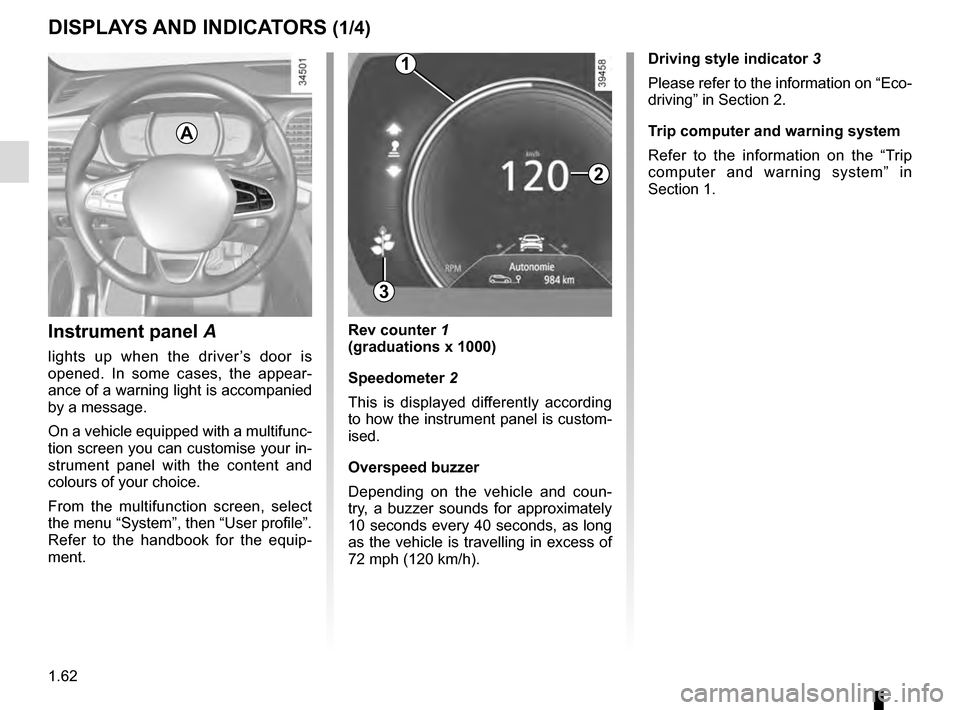
Instrument panel A
lights up when the driver’s door is
opened. In some cases, the appear-
ance of a warning light is accompanied
by a message.
On a vehicle equipped with a multifunc-
tion screen you can customise your in-
strument panel with the content and
colours of your choice.
From the multifunction screen, select
the menu “System”, then “User profile”.
Refer to the handbook for the equip-
ment.
Rev counter 1
(graduations x 1000)
Speedometer 2
This is displayed differently according
to how the instrument panel is custom-
ised.
Overspeed buzzer
Depending on the vehicle and coun-
try, a buzzer sounds for approximately
10 seconds every 40 seconds, as long
as the vehicle is travelling in excess of
72 mph (120 km/h). Driving style indicator
3
Please refer to the information on “Eco-
driving” in Section 2.
Trip computer and warning system
Refer to the information on the “Trip
computer and warning system” in
Section 1.
Page 69 of 328
1.63
DISPLAYS AND INDICATORS (2/4)
6
7A
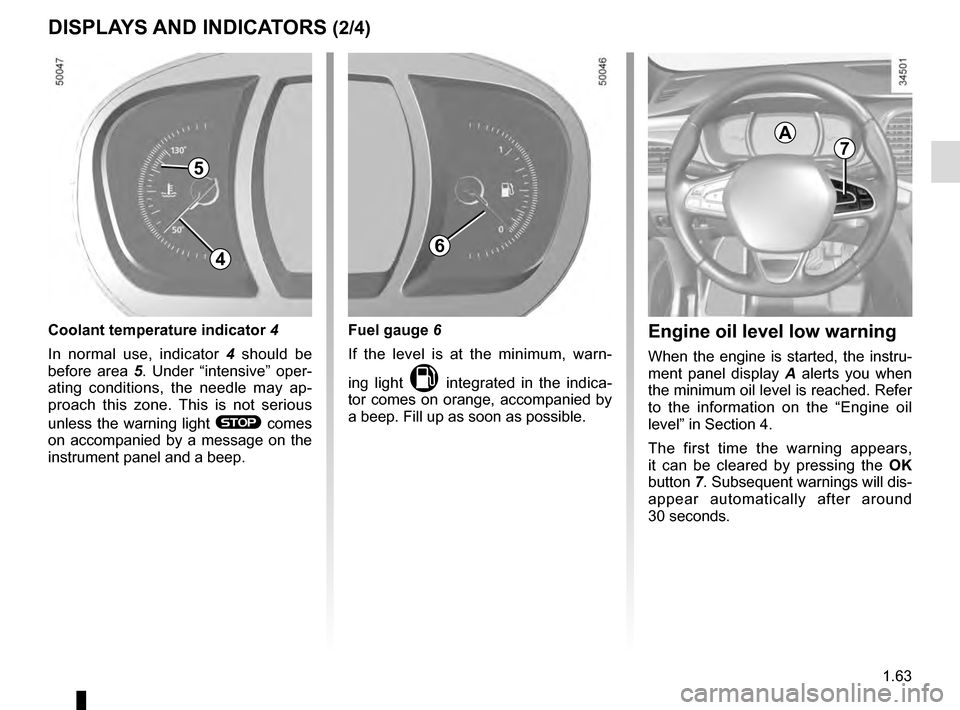
Engine oil level low warning
When the engine is started, the instru-
ment panel display A alerts you when
the minimum oil level is reached. Refer
to the information on the “Engine oil
level” in Section 4.
The first time the warning appears,
it can be cleared by pressing the OK
button 7. Subsequent warnings will dis-
appear automatically after around
30 seconds.
4
Fuel gauge 6
If the level is at the minimum, warn-
ing light
M integrated in the indica-
tor comes on orange, accompanied by
a beep. Fill up as soon as possible.
Coolant temperature indicator 4
In normal use, indicator 4 should be
before area 5. Under “intensive” oper-
ating conditions, the needle may ap-
proach this zone. This is not serious
unless the warning light
® comes
on accompanied by a message on the
instrument panel and a beep.
5
Page 72 of 328
1.66
1
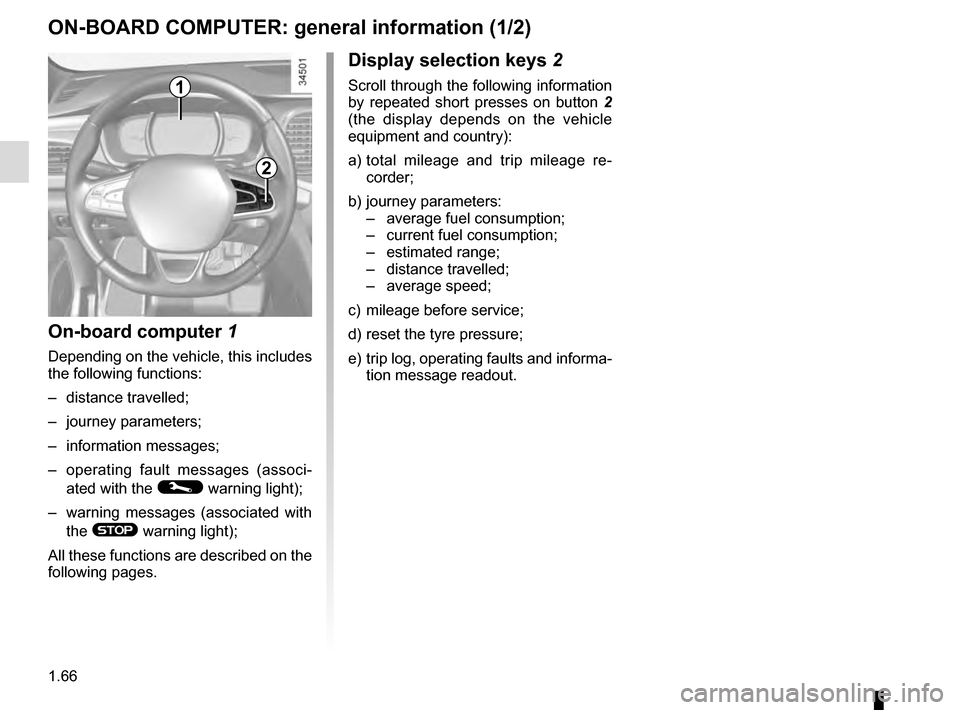
Display selection keys 2
Scroll through the following information
by repeated short presses on button 2
(the display depends on the vehicle
equipment and country):
a) total mileage and trip mileage re-
corder;
b) journey parameters: – average fuel consumption;
– current fuel consumption;
– estimated range;
– distance travelled;
– average speed;
c) mileage before service;
d) reset the tyre pressure;
e) trip log, operating faults and informa- tion message readout.
On-board computer 1
Depending on the vehicle, this includes
the following functions:
– distance travelled;
– journey parameters;
– information messages;
– operating fault messages (associ-
ated with the
© warning light);
– warning messages (associated with the
® warning light);
All these functions are described on the
following pages.
ON-BOARD COMPUTER: general information (1/2)
2
Page 76 of 328

The display of information shown below DEPENDS ON THE VEHICLE EQUIPMENT \
AND COUNTRY.
Examples of selectionsInterpreting the display selected
On-board comp")
1.70
ON-BOARD COMPUTER: trip settings (3/5)
The display of information shown below DEPENDS ON THE VEHICLE EQUIPMENT \
AND COUNTRY.
Examples of selectionsInterpreting the display selected
On-board computer with mileage-
before-service message
c) Mileage before service or oil change.Mileage before service
With the ignition switched on, the engine not running and
the display set to “Reichweite bis zur Wartung”, press button
OK for approximately 5 seconds to display the mileage before
service (distance or time to the next service). When the distance
value approaches its limit, there are several possible scenarios:
– distance/time remaining less than 900 miles (1,500 km) or
one month : the message “Service due in” is displayed along
with the nearest limit (distance or time);
– range equal to 0 km/miles or service date reached: the
message “Service required” is displayed accompanied by
warning light
©.
The vehicle requires a service as soon as possible.
Service Intervals
Service in
30 000 Kms / 12 mo
Service due in
300 Kms / 24 days
Service required
Resetting: to reset the distance before service, press and hold button 2 for approximately 10 seconds until the display shows
the mileage permanently.
Note: If a service is performed without changing the engine oil, only the mi\
leage before the next service should be reset. In the
event of an oil change, both the distance before the next service and th\
e next oil change should be reset.
Page 77 of 328

Examples of selectionsInterpreting the display selected
On-board comp")
1.71
The display of information shown below DEPENDS ON THE VEHICLE EQUIPMENT \
AND COUNTRY.
ON-BOARD COMPUTER: trip settings (4/5)
Examples of selectionsInterpreting the display selected
On-board computer with distance before
next service message (cntd.)
c) Mileage before service or oil change.Mileage before service
With the ignition on, the engine not running and the display
selected “Reichweite bis zur Wartung”, press button OK for about
5 seconds to display the mileage before the next service, then
press button 2 to view the mileage before the next oil change
(distance or time remaining before the next service). When the
distance value approaches its limit, there are several possible
scenarios:
– distance/time remaining less than 900 miles (1,500 km) or
one month : the message “Service due in” is displayed, ac-
companied by the nearest term (distance or time);
– range equal to 0 km/miles or service date reached: the
message “Service required” is displayed accompanied by
warning light
©.
The vehicle requires an oil change as soon as possible.
Service Intervals
Oil change in
30 000 Kms / 24 mo
Service due in
300 Kms / 24 days
Service required
Depending on the vehicle, the mileage before an oil change varies accord\
ing to the driving style (frequent driving at low speed ,
door-to-door journeys, extensive use at idling speed, towing a trailer, etc.). The distance remaining until the next oil change can
therefore decrease more quickly in some cases than the actual distance t\
ravelled.
Resetting: to reset the mileage before a service, press and hold button 2 for approximately 10 seconds until the display shows
the range permanently.
Note: If a service is performed without changing the engine oil, only the mi\
leage before the next service should be reset. In the
event of an oil change, both the distance before the next service and th\
e next oil change should be reset.
Page 79 of 328

1.73
TRIP COMPUTER AND WARNING SYSTEM: information messages
Examples of messagesInterpreting the display selected
« Parking brake on » Indicates that the parking brake has been applied.
« Checking control functions » Displayed with the ignition on when the vehicle is running self-diagnost\
ics.
« Turn steering
wheel + START » Turn the steering wheel slightly whilst pressing the vehicle start button\
to unlock the steering
column.
« Steering wheel not locked » Indicates that the steering column has not been locked.
These can help in the vehicle starting phase, or give information about \
a selection or a driving status.
Examples of information messages are given in the following pages.