lift RENAULT TALISMAN 2016 1.G Owners Manual
[x] Cancel search | Manufacturer: RENAULT, Model Year: 2016, Model line: TALISMAN, Model: RENAULT TALISMAN 2016 1.GPages: 328, PDF Size: 3.39 MB
Page 25 of 328
1.19
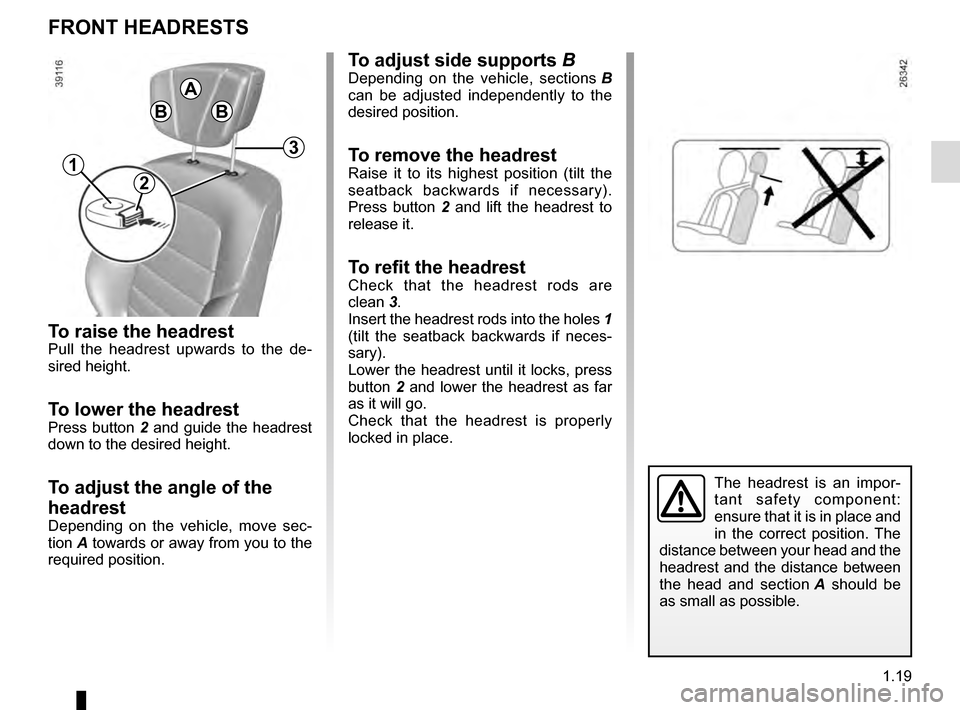
To raise the headrestPull the headrest upwards to the de-
sired height.
To lower the headrestPress button 2 and guide the headrest
down to the desired height.
To adjust the angle of the
headrest
Depending on the vehicle, move sec-
tion A towards or away from you to the
required position.
To adjust side supports BDepending on the vehicle, sections B
can be adjusted independently to the
desired position.
To remove the headrest
Raise it to its highest position (tilt the
seatback backwards if necessary).
Press button 2 and lift the headrest to
release it.
To refit the headrestCheck that the headrest rods are
clean 3.
Insert the headrest rods into the holes 1
(tilt the seatback backwards if neces-
sary).
Lower the headrest until it locks, press
button 2 and lower the headrest as far
as it will go.
Check that the headrest is properly
locked in place.
FRONT HEADRESTS
The headrest is an impor-
tant safety component:
ensure that it is in place and
in the correct position. The
distance between your head and the
headrest and the distance between
the head and section A should be
as small as possible.
B
A
B
2
3
1
Page 26 of 328
1.20
FRONT SEATS WITH MANUAL CONTROL (1/2)
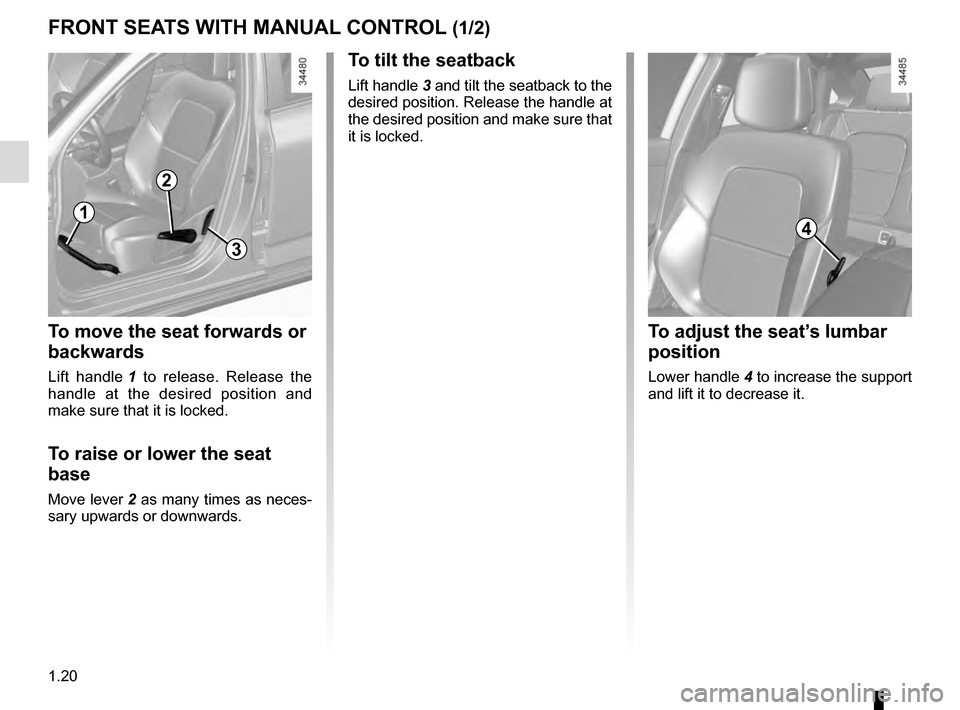
To move the seat forwards or
backwards
Lift handle 1 to release. Release the
handle at the desired position and
make sure that it is locked.
To raise or lower the seat
base
Move lever 2 as many times as neces-
sary upwards or downwards.
To tilt the seatback
Lift handle 3 and tilt the seatback to the
desired position. Release the handle at
the desired position and make sure that
it is locked.
1
2
3
4
To adjust the seat’s lumbar
position
Lower handle 4 to increase the support
and lift it to decrease it.
Page 28 of 328
1.22
FRONT SEATS WITH ELECTRIC CONTROLS (1/2)
For safety reasons, carry
out any adjustments when
the vehicle is not being
driven.
Make sure that the seatbacks are
correctly locked in place.
We would advise you not to recline
the seatbacks too far to ensure that
the effectiveness of the seat belts is
not reduced.
No object should be placed on the
floor (in front of the driver). such
objects may slide under the pedals
during sudden braking manoeuvres
and obstruct their use.
12
3
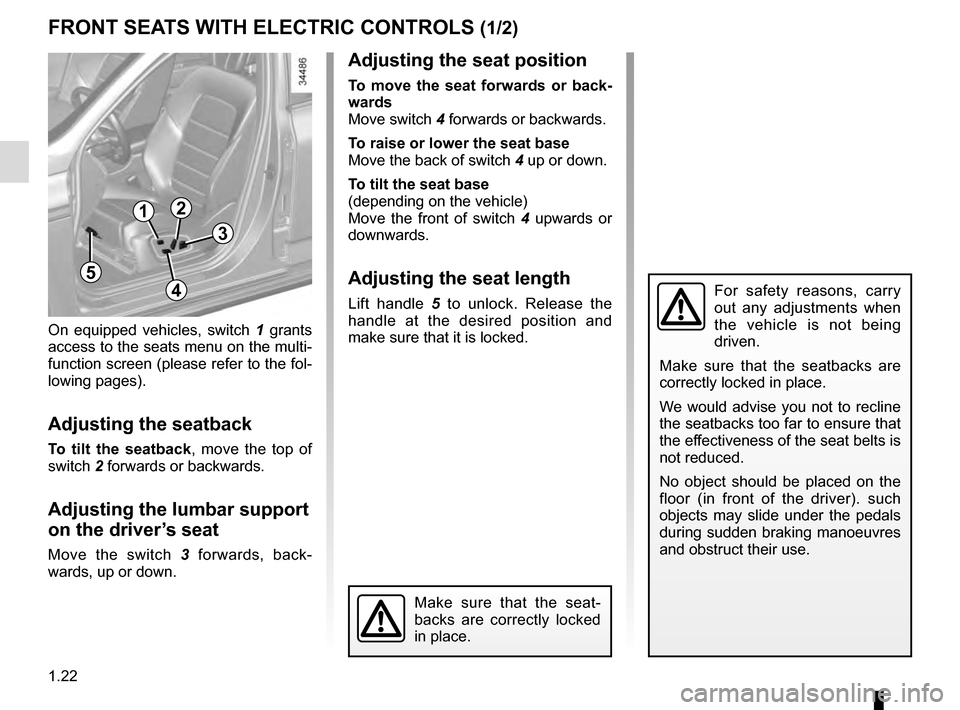
On equipped vehicles, switch 1 grants
access to the seats menu on the multi-
function screen (please refer to the fol-
lowing pages).
Adjusting the seatback
To tilt the seatback, move the top of
switch 2 forwards or backwards.
Adjusting the lumbar support
on the driver’s seat
Move the switch 3 forwards, back-
wards, up or down.
Make sure that the seat-
backs are correctly locked
in place.
4
5
Adjusting the seat position
To move the seat forwards or back-
wards
Move switch 4 forwards or backwards.
To raise or lower the seat base
Move the back of switch 4 up or down.
To tilt the seat base
(depending on the vehicle)
Move the front of switch 4 upwards or
downwards.
Adjusting the seat length
Lift handle 5 to unlock. Release the
handle at the desired position and
make sure that it is locked.
Page 100 of 328
1.94
Before any action involving
the windscreen (washing
the vehicle, de-icing,
cleaning the windscreen,
etc.) return stalk 1 to position B
(stop).
Risk of injury and/or damage.
In the event of obstacles present
on the windscreen (dirt, snow, ice,
etc.), clean the windscreen (inclu-
ding the central area located behind
the interior rear-view mirror) and
the rear screen before starting the
wipers (risk of motor overheating).
If an object is preventing a blade
from moving, it may stop functio-
ning. Remove the obstacle and
reactivate the wiper using the wiper
stalk.
FRONT WINDSCREEN WASH/WIPE (4/6)
Note:
Once the wipers have been switched
off, at least 1 minute after locking the
vehicle, it is possible to manually move
the blades. Do not force the blade arms
to move. This may risk damage to the
wiper motor, the arms and the blades.
After your intervention, to reposition the
blades correctly, make sure the blades
are resting on the windscreen, switch
on the ignition and activate the wiper
control.
The blade on the driver’s side must
always be above the passenger blade.
If this is not the case, a quick sweep of
the windscreen wipers should be per-
formed once the vehicle is travelling at
over 4 mph (7 km/h).
Specific front wiper position
(service position)
This position enables the blades to be
lifted to remove them from the winds-
creen.
It may be useful to:
– to clean the blades;
– to release the blades from the winds- creen in winter;
– to replace the blades (please refer to the information on the “Wiper
blades” in Section 5).
With the ignition on and the engine off,
lower the windscreen wiper stalk fully
(fast continuous wipe position). The
wiper arms stop in a position away from
the bonnet.
To return the blades to position, make
sure they have been placed on the
windscreen, then move the stalk to po-
sition B (stop) with the ignition on.
Before switching on the ignition,
place the wipers on the windscreen.
Otherwise, there may a risk of damage
to the bonnet or the wipers when they
are switched on.
Page 122 of 328
2.14
GEAR LEVER
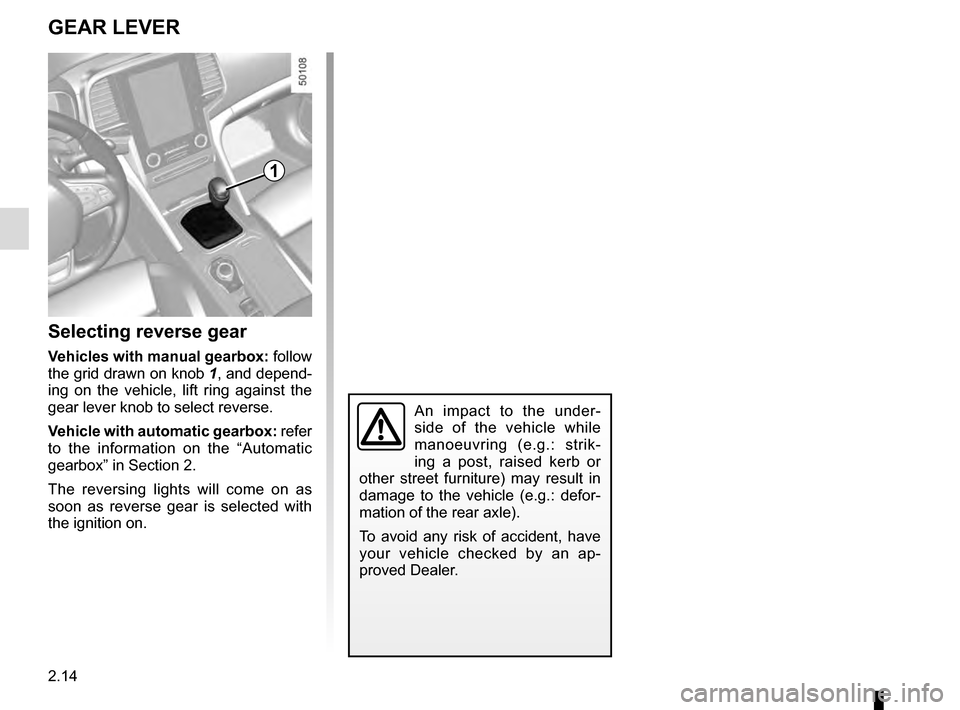
Selecting reverse gear
Vehicles with manual gearbox: follow
the grid drawn on knob 1, and depend-
ing on the vehicle, lift ring against the
gear lever knob to select reverse.
Vehicle with automatic gearbox: refer
to the information on the “Automatic
gearbox” in Section 2.
The reversing lights will come on as
soon as reverse gear is selected with
the ignition on.
An impact to the under-
side of the vehicle while
manoeuvring (e.g.: strik-
ing a post, raised kerb or
other street furniture) may result in
damage to the vehicle (e.g.: defor-
mation of the rear axle).
To avoid any risk of accident, have
your vehicle checked by an ap-
proved Dealer.
1
Page 146 of 328
2.38
DRIVER CORRECTION DEVICES AND AIDS (11/12)
Hill start assistance
Depending on the gradient of the in-
cline, this system assists the driver
when starting on a hill. It prevents the
vehicle from rolling backwards by au-
tomatically applying the brakes when
the driver lifts his/her foot off the brake
pedal to depress the accelerator pedal.
System operation
It only operates when the gear lever is
in a position other than neutral (other
than N or P for automatic transmis-
sions) and the vehicle is completely
stationary (brake pedal depressed)
The system holds the vehicle for ap-
proximately 2 seconds. The brakes are
then released (the vehicle will move ac-
cording to the slope).
The hill start assistance
system cannot completely
prevent the vehicle from
rolling backwards in all sit-
uations (extremely steep gradients,
etc.).
In all cases, the driver may depress
the brake pedal to prevent the vehi-
cle from rolling backwards.
The hill start assistance function
should not be used for prolonged
stops: use the brake pedal.
This function is not designed to im-
mobilise the vehicle permanently.
If necessary, use the brake pedal to
stop the vehicle.
The driver must remain particularly
vigilant when driving on slippery or
low-grip surfaces and/or on hills.
Risk of serious injury.
Page 164 of 328
2.56
CRUISE CONTROL/SPEED LIMITER: cruise control function (2/4)
Driving
Once a cruising speed is memorised
and the cruise control function is active,
you may lift your foot off the accelera-
tor pedal.
Please note that you are
strongly advised to keep
your feet close to the pedals
in order to react in an emer-
gency.
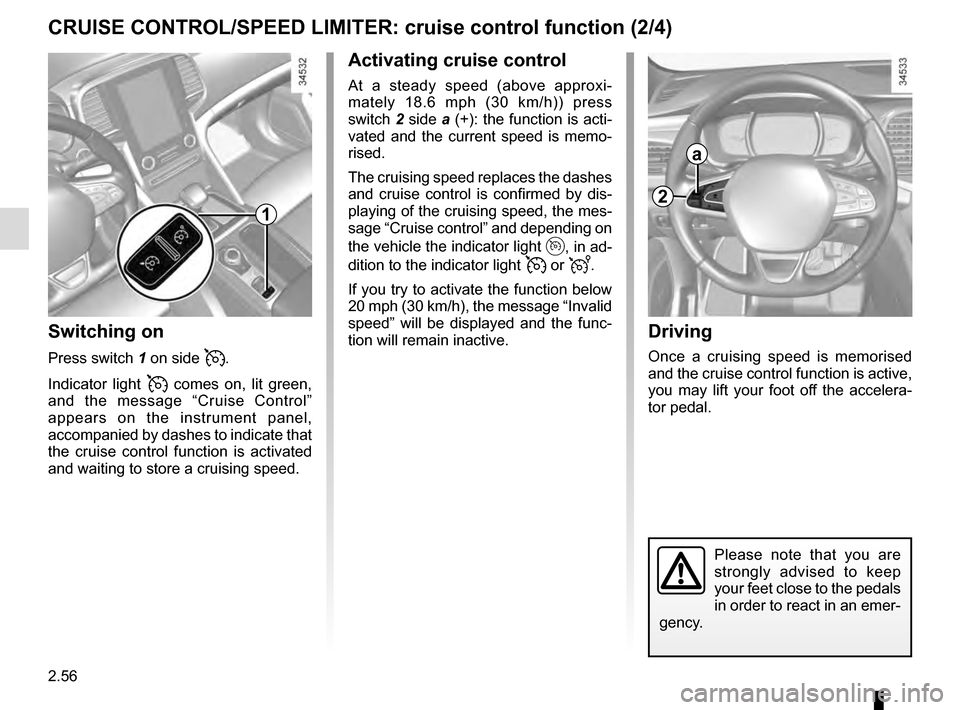
Switching on
Press switch 1 on side .
Indicator light
comes on, lit green,
and the message “Cruise Control”
appears on the instrument panel,
accompanied by dashes to indicate that
the cruise control function is activated
and waiting to store a cruising speed.
1
2
a
Activating cruise control
At a steady speed (above approxi-
mately 18.6 mph (30 km/h)) press
switch 2 side a (+): the function is acti-
vated and the current speed is memo-
rised.
The cruising speed replaces the dashes
and cruise control is confirmed by dis-
playing of the cruising speed, the mes-
sage “Cruise control” and depending on
the vehicle the indicator light
, in ad-
dition to the indicator light
or .
If you try to activate the function below
20 mph (30 km/h), the message “Invalid
speed” will be displayed and the func-
tion will remain inactive.
Page 169 of 328
2.61
Driving
Once a cruising speed is memorised
and the cruise control function is active,
you may lift your foot off the accelera-
tor pedal.
If a following distance is stored and a
vehicle travelling slower than yours is
detected by the system in your lane,
your vehicle will brake (with the brake
lights on) and adapt its speed to that of
the vehicle in front, respecting the fol-
lowing distance selected previously.
Overtaking
If your speed is lower than the cruise
control and you wish to perform an
overtaking manoeuvre, activating the
direction indicator will provide acceler-
ation enabling the overtaking manoeu-
vre.
Please note that you are
strongly advised to keep
your feet close to the pedals
in order to react in an emer-
gency.
ADAPTIVE CRUISE CONTROL (3/7)
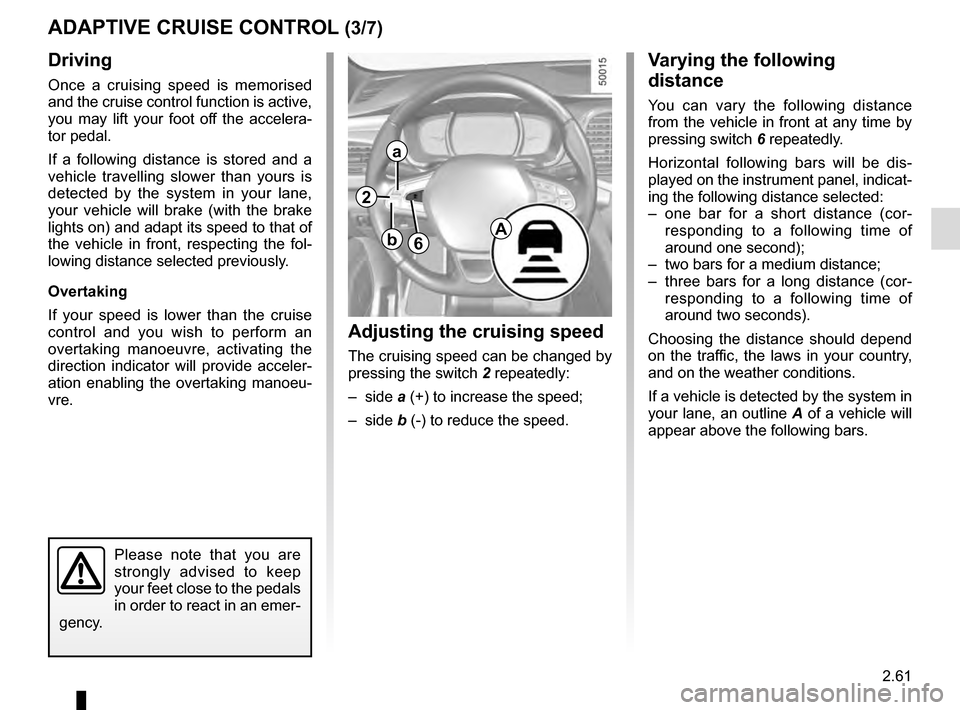
Adjusting the cruising speed
The cruising speed can be changed by
pressing the switch 2 repeatedly:
– side a (+) to increase the speed;
– side b (-) to reduce the speed.
Varying the following
distance
You can vary the following distance
from the vehicle in front at any time by
pressing switch 6 repeatedly.
Horizontal following bars will be dis-
played on the instrument panel, indicat-
ing the following distance selected:
– one bar for a short distance (cor- responding to a following time of
around one second);
– two bars for a medium distance;
– three bars for a long distance (cor- responding to a following time of
around two seconds).
Choosing the distance should depend
on the traffic, the laws in your country,
and on the weather conditions.
If a vehicle is detected by the system in
your lane, an outline A of a vehicle will
appear above the following bars.
6A
2
a
b
Page 214 of 328
3.24
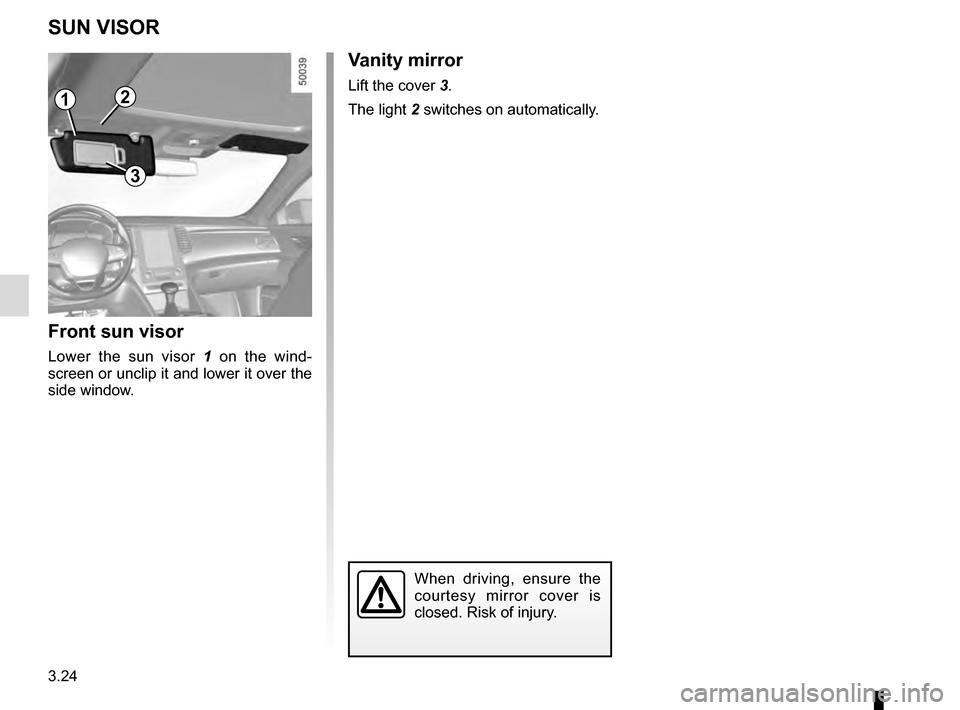
Vanity mirror
Lift the cover 3.
The light 2 switches on automatically.
SUN VISOR
Front sun visor
Lower the sun visor 1 on the wind-
screen or unclip it and lower it over the
side window.
2
3
When driving, ensure the
courtesy mirror cover is
closed. Risk of injury.
1
Page 225 of 328
3.35
LUGGAGE COMPARTMENT: estate version (1/2)
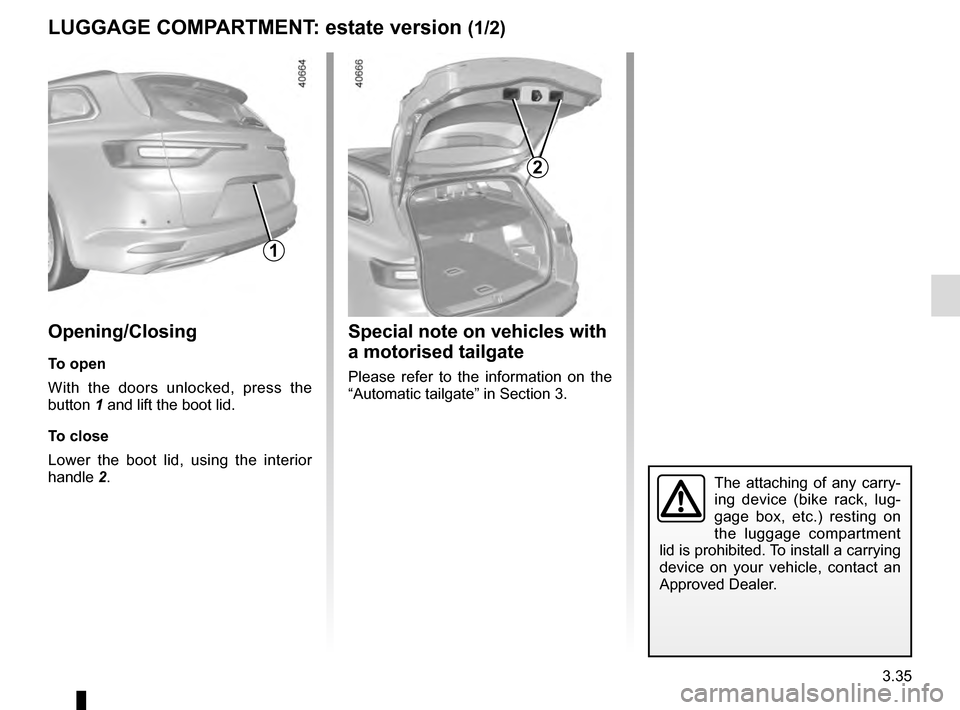
1
Opening/Closing
To open
With the doors unlocked, press the
button 1 and lift the boot lid.
To close
Lower the boot lid, using the interior
handle 2.
2
Special note on vehicles with
a motorised tailgate
Please refer to the information on the
“Automatic tailgate” in Section 3.
The attaching of any carry-
ing device (bike rack, lug-
gage box, etc.) resting on
the luggage compartment
lid is prohibited. To install a carrying
device on your vehicle, contact an
Approved Dealer.