phone RENAULT TALISMAN 2017 1.G R Link 2 Owner's Guide
[x] Cancel search | Manufacturer: RENAULT, Model Year: 2017, Model line: TALISMAN, Model: RENAULT TALISMAN 2017 1.GPages: 130, PDF Size: 5.83 MB
Page 86 of 130
4.14
TELEPHONE SETTINGS (2/2)
"Sound levels"
This option adjusts the sound level of:
– the "Phone ringtone";
– the "Phone call";
– the "Microphone gain";
Note: to reset the settings, press the
pop-up menu button, then "Reset".
"Voice mail settings"
For more information, please refer to
the information on “Configuring voice-
mail” in the relevant section.
"Automatic hold"
This option activates or deactivates the
automatic placing of incoming calls on
hold."Phone ringtone"
To activate/deactivate the transfer of
the ringtone from your telephone to
the vehicle's speakers when an incom-
ing call is received, press "On". If your
phone is on silent mode, the ringtone
transfer function is not available.
Note: if the setting is "OFF", or if your
telephone does not have the ringtone
transfer function, the ringtone used for
an incoming call will be that of the ve-
hicle.
“SMS”
You can activate or deactivate SMS.
Depending on the make and model
of your phone, certain functions
may not work.
Page 120 of 130
7.4
To adjust the level (brightness,
volume, etc.), press “+”, “–” or scroll
through the numbers.
Features linked to user profile
The following settings are stored in a
user profile:
– System language;
– Distance unit (when available);
– Home page configuration;
– Display Settings;
– Multi-Sense settings;
– Ambiant lighting settings;
– driver's seat settings;
– door mirror settings;
– Massage settings;
– multimedia sound settings;
– presets;
– Radio settings;
– Navigation settings;
– Navigation history;
– Navigation favorites;
– Paired phone;
– user settings (except rear wipers in reverse gear);
– privacy settings.
SYSTEM (3/6)
"Display"
The "Display" menu grants access to
the following information:
– "Central display";
– "Instrument panel";
– "Head-up display".
"Central display"
Select “Negative skin” or “Positive
skin” to change the appearance of
the touchscreen display.
Press “+ ” or “–” to adjust the
screen brightness from day/night.
Note: "Dimming day mode" is dis-
abled at night and "Dimming night
mode" is disabled in daytime.
"Instrument panel"
This menu changes the appear-
ance of the instrument panel
to one of four styles. To find out
more, please see your driver’s
handbook.
Press “+ ” or “–” to adjust the
brightness.
Note: the "Dimming night mode"
function only activates when the
lights are switched on.
Page 121 of 130
7.5
SYSTEM (4/6)
"Head-up display"
This menu enables you to adjust
the following settings:
– Activation, deactivation: select "On" or "OFF" to activate or
disable the "Head-up display"
function.
– "Dimming auto": select "On" to adjust luminosity automatically.
– "Dimming day mode": adjust the level by pressing " +" or "–".
– "Dimming night mode": adjust the level by pressing " +" or "–".
Note: this option is disabled
when the "Dimming auto" func-
tion is activated.
Note: the "Dimming day mode"
function is disabled at night and
the "Dimming night mode" func-
tion is disabled during the day-
time. – Height: press the up or down
arrow button to adjust the height
of the head up display.
Note: These settings are only
available when the head-up dis-
play is activated.
"Brightness"
This menu allows you to adjusts the
brightness:
– of the instrument panel;
– of the multimedia screen;
– of the head-up display.
Adjust the level by pressing “ +” or “-”.
"Volume"
This menu lets you adjust the follow-
ing settings by pressing “ +” or “–”:
– Main audio;
– Phone ringtone;
– telephone communications;
– Navigation;
– Warning;
– button sound;
– indicator volume:
– Obstacle detection;
– lane departure warning;
– voice controls.
To reset your selection, press the
pop-up menu button, then “Reset”.
Note: “0” adjustment is mute.
Note: the settings available may vary.
Page 123 of 130
7.7
SYSTEM (6/6)
“General reset”
This function lets you return all the
system factory settings. All the data and
configuration will be deleted.
To perform a general reset, press the
pop-up menu button from the "System"
menu, then "General reset".
When a confirmation message is dis-
played on screen, press “Yes” to con-
firm.
Note: After a reset, the system re-
starts in the factory set language. To
change the language, see the rele-
vant paragraph in this section.
Note: resetting the system by press-
ing and holding the on/off button on
the front panel does not result in loss
of data unlike the "General reset" func-
tion.
For more information, see the user
manual available in your multime-
dia system by pressing the pop-up
menu button from the "System"
menu screen, then "User manual".
"Suggestion bar"
This menu permits the displaying of
notifications whilst driving. Activate/
deactivate the displaying of notifica-
tions of the following categories:
– "Navigation";
– "Multimedia";
– "Phone";
– "Vehicle";
– "Apps";
– "System";
– "Others".
Note: when the "Notifications" func-
tion is deactivated, all of the catego-
ries above are deactivated automati-
cally.
Page 126 of 130
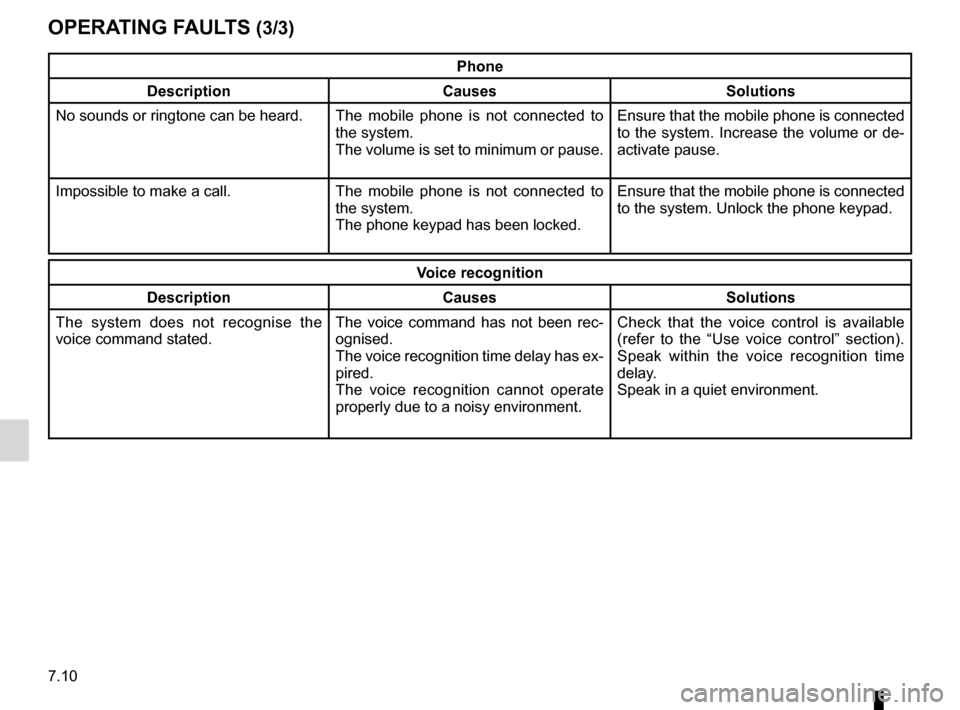
7.10
Phone
Description Causes Solutions
No sounds or ringtone can be heard. The mobile phone is not connected to
the system.
The volume is set to minimum or pause. Ensure that the mobile phone is connected
to the system. Increase the volume or de-
activate pause.
Impossible to make a call. The mobile phone is not connected to
the system.
The phone keypad has been locked. Ensure that the mobile phone is connected
to the system. Unlock the phone keypad.
Voice recognition
Description CausesSolutions
The system does not recognise the
voice command stated. The voice command has not been rec-
ognised.
The voice recognition time delay has ex-
pired.
The voice recognition cannot operate
properly due to a noisy environment. Check that the voice control is available
(refer to the “Use voice control” section).
Speak within the voice recognition time
delay.
Speak in a quiet environment.
OPERATING FAULTS (3/3)
Page 127 of 130

A
address ................................................................\
....2.6 → 2.12
address book .................................................................")
8.1
ALPHABETICAL INDEX (1/2)
A
address ................................................................\
....2.6 → 2.12
address book ....................................................................... 2.8
answering a call .......................................................... 4.6 – 4.7
B
blind spot: warning signal .................................................... 6.8
Bluetooth® .............................................................. 3.10 – 3.11
buttons ................................................................\
.......1.4 → 1.9
C
call history............................................................\
................ 4.9
call waiting .................................................................. 4.6 – 4.7
CD/MP3 CD listen ................................................................. 3.10 – 3.11
clock setting ................................................................\
............ 7.6
compass ................................................................\
.............. 2.2
confirm a destination ........................................................... 2.9
connect a telephone ................................................... 4.4 – 4.5
connected services .............................................5.2, 5.4 → 5.7
controls ...............................................................\
.......1.4 → 1.9
D
default settings .................................................................... 7.7
destination ............................................................\
...2.6 → 2.12
detour .................................................................\
...2.13 → 2.18
dialling a number ........................................................ 4.6 – 4.7
disconnect a telephone............................................... 4.4 – 4.5
distance units....................................................................... 7.6
driving aids ................................................................. 6.8 – 6.9
E
ECO driving ...........................................................6.13 → 6.16
emergency active braking.................................................... 6.8
ending a call ............................................................... 4.6 – 4.7 energy-saving ........................................................6.13
→ 6.16
environment ...........................................................6.13 → 6.16
F
fascias and steering wheel controls...........................1.4 → 1.8
favourite add .................................................................... 1.16 – 1.17
delete ................................................................ 1.16 – 1.17
fragrance diffuser ............................................................... 6.18
front seat driver’s position memory ................................................ 6.5
fuel economy .........................................................6.13 → 6.16
G
guidance activation ............................................................2.6 → 2.12
cancellation ......................................................2.15 → 2.18
map ....................................................................\
..2.2 → 2.5
H
head-up display ................................................................... 7.4
I
instrument panel .................................................................. 7.4
L
lane departure warning ........................................................ 6.8
language change .................................................................\
.......... 7.6
linking a telephone...................................................... 4.2 – 4.3
M
map display ................................................................\
..2.2 → 2.5
map symbols .................................................................. 2.2
scale ..................................................................\
............ 2.2
Page 128 of 130

massage seat ...................................................................... 6.3
MENU ...................................................................\
...1.9 â†")
8.2
ALPHABETICAL INDEX (2/2)
massage seat ...................................................................... 6.3
MENU ...................................................................\
...1.9 → 1.13
MP3 ........................................................................\
3.10 – 3.11
MP3 player ............................................................. 3.10 – 3.11
multifunction screen.................................................... 1.2 – 1.3
Multi-Sense................................................................. 6.6 – 6.7
N
navigation ............................................................... 2.13 – 2.14
navigation system ...............................................0.1, 2.2 → 2.5
numeric keypad ................................................................... 7.7
O
operating faults ...............................................7.8 → 7.10, 7.10
operation................................................................. 1.14 – 1.15
overspeed warning .............................................................. 6.9
P
parking distance control.........................................6.10 → 6.12
personal data delete .................................................................\
............ 5.7
precautions during use ........................................................ 0.1
R
radio automatic mode ...................................................3.2 → 3.9
automatic station storage .....................................3.2 → 3.9
choosing a station ................................................3.2 → 3.9
manual mode .......................................................3.2 → 3.9
station pretuning ..................................................3.2 → 3.9
rear view camera ...................................................6.10 → 6.12
receiving a call ............................................................ 4.6 – 4.7
rejecting a call............................................................. 4.6 – 4.7
S
safety distance warning ....................................................... 6.8 screen
menu ...................................................................\
........... 1.3
monitor .............................................................. 1.14 – 1.15
SD card............................................................ 0.1, 3.10 – 3.11
seats adjustment ............................................................ 6.4 – 6.5
second route ..........................................................2.13 → 2.18
settings ..................................4.13 – 4.14, 5.9, 6.17, 7.2 → 7.7
audio ................................................................3.16 → 3.18
brightness .............................................................\
......... 7.5
customising ..........................................................7.2 → 7.7
navigation ........................................................2.19 → 2.22
soft button ................................................1.2 – 1.3, 1.9 → 1.13
switching off ............................................................ 1.14 – 1.15
T
telephone contacts list ......................................................... 4.8
traffic information .................................................... 2.13 – 2.14
traction control ..................................................................... 6.9
trip computer and warning system..................................... 6.17
tyre pressure...................................................................... 6.19
U
unpairing a telephone ................................................. 4.2 – 4.3
USB key.................................................................\
. 3.10 – 3.11
V
voice control ...................................................1.18 → 1.26, 7.6
voice recognition....................................................1.18 → 1.26
volume .................................................................\
................ 7.5