fuel RENAULT TRAFIC 2018 User Guide
[x] Cancel search | Manufacturer: RENAULT, Model Year: 2018, Model line: TRAFIC, Model: RENAULT TRAFIC 2018Pages: 298, PDF Size: 8.05 MB
Page 121 of 298
1.115
No modifications what-
soever are permitted on
any part of the fuel supply
system (electronic units,
wiring, fuel circuit, injectors, pro-
tective covers, etc.) as this may be
dangerous (unless undertaken by
qualified Network personnel).
FUEL TANK (3/3)
Running out of fuel on diesel
versions
Vehicles with key/remote control
– Put the ignition key in “On” posi- tion M (please see the information on
the “Ignition switch” in Section 2) and
wait for a few minutes before start-
ing, to enable the fuel circuit to be
primed;
– turn the key to position D . If the
engine does not start, repeat the pro-
cedure.
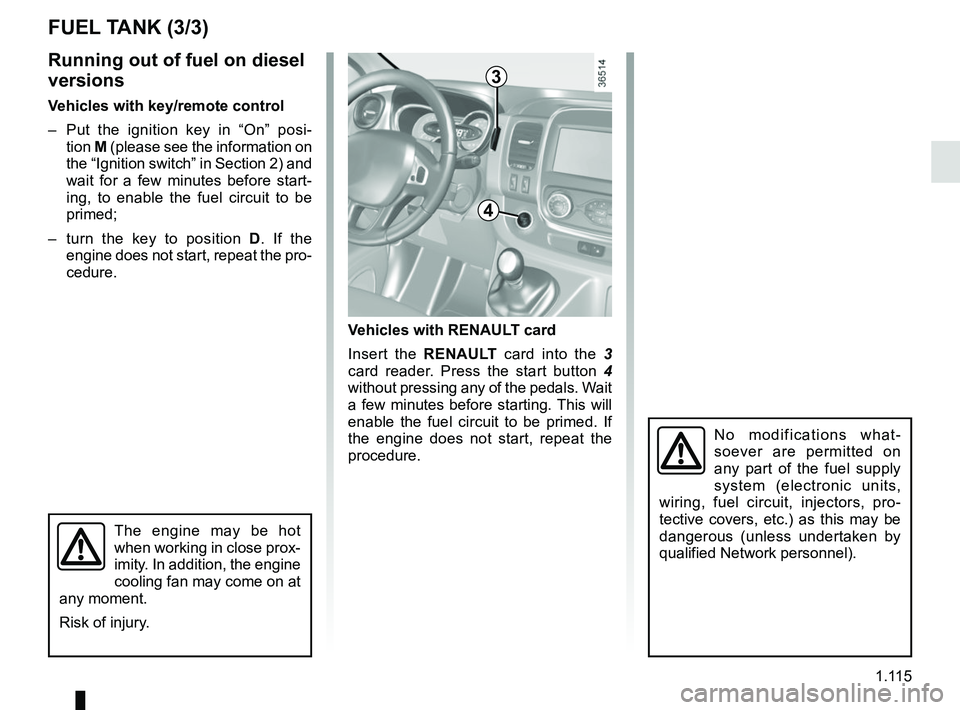
Vehicles with RENAULT card
Insert the RENAULT card into the 3
card reader. Press the start button 4
without pressing any of the pedals. Wait
a few minutes before starting. This will
enable the fuel circuit to be primed. If
the engine does not start, repeat the
procedure.
The engine may be hot
when working in close prox-
imity. In addition, the engine
cooling fan may come on at
any moment.
Risk of injury.
3
4
Page 122 of 298
1.116
Please ensure that you comply with the
legislation of your country.
It is important to remember that failure
to respect regulations in force could
lead to legal action being taken against
the vehicle owner.
Operating principleThe use of additives reduces exhaust
emissions by transforming the pollut-
ants into water vapour and nitrogen.
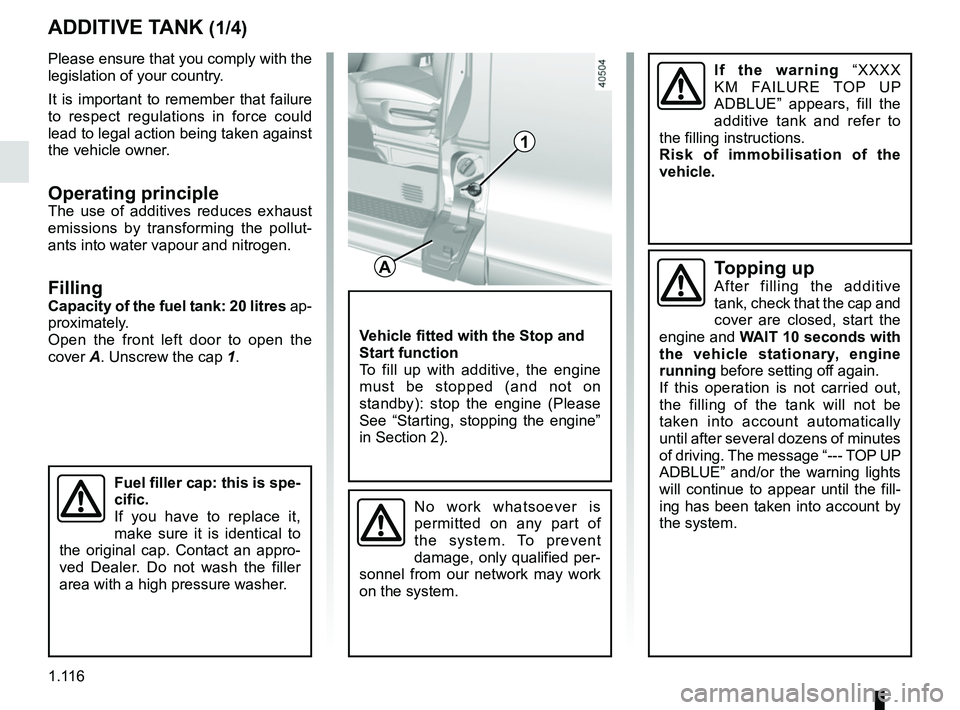
FillingCapacity of the fuel tank: 20 litres ap-
proximately.
Open the front left door to open the
cover A. Unscrew the cap 1.
ADDITIVE TANK (1/4)
A
1
Fuel filler cap: this is spe-
cific.
If you have to replace it,
make sure it is identical to
the original cap. Contact an appro-
ved Dealer. Do not wash the filler
area with a high pressure washer.
Vehicle fitted with the Stop and
Start function
To fill up with additive, the engine
must be stopped (and not on
standby): stop the engine (Please
See “Starting, stopping the engine”
in Section 2).
No work whatsoever is
permitted on any part of
the system. To prevent
damage, only qualified per-
sonnel from our network may work
on the system.
Topping upAfter filling the additive
tank, check that the cap and
cover are closed, start the
engine and WAIT 10 seconds with
the vehicle stationary, engine
running before setting off again.
If this operation is not carried out,
the filling of the tank will not be
taken into account automatically
until after several dozens of minutes
of driving. The message “--- TOP UP
ADBLUE” and/or the warning lights
will continue to appear until the fill-
ing has been taken into account by the system.
If the warning “XXXX
KM FAILURE TOP UP
ADBLUE” appears, fill the
additive tank and refer to
the filling instructions.
Risk of immobilisation of the
vehicle.
Page 123 of 298
1.117
Additive quality
Use only additives which conform
to standard ISO 22241 and in accor-
dance with the label on the fuel filler
flap.
Average fuel consumption
Approximately 807 mpg
(3.5 l/1,000 km) depending on the vehi-
cle and the driving style.
The additive must not come
into contact with eyes or
skin. If it does, wash the af-
fected area with plenty of
cold water. If necessary, consult a
doctor.
ADDITIVE TANK (2/4)
Precautions for use
Always read the information on the ad-
ditive can.
Handle additives with care. They can
damage clothes, shoes, bodywork
components etc.
If the additive overflows, or contami-
nates any paintwork, clean the affected
area quickly with a damp cloth.
In extreme cold weather conditions
The vehicle is fitted with a system for
reheating the additive fluid that enables
you to drive in extreme cold weather
conditions.
Precautions when filling the tank
The additive fluid freezes below about
-10°C.
In this case, do not attempt filling when
the fluid is frozen.
It is therefore advisable to top up the
additive fluid or have it topped up by a
qualified professional as soon as the
warning light on the instrument
panel first comes on.
Page 127 of 298

Running in . . . . . . . . . . . . . . . . . . . . . . . . . . . . . . . . . . . . \
. . . . . . . . . . . . . . . .")
2.1
Section 2: Driving
(Advice on use relating to fuel economy and the environment)
Running in . . . . . . . . . . . . . . . . . . . . . . . . . . . . . . . . . . . . \
. . . . . . . . . . . . . . . . . . . . . . . . . . . . . . . . . 2.2
Ignition switch . . . . . . . . . . . . . . . . . . . . . . . . . . . . . . . . . . . .\
. . . . . . . . . . . . . . . . . . . . . . . . . . . . . . 2.2
Starting, stopping the engine using the key/remote control unit . . . . . . . . . . . . . . . . . . . . . . . . . . . . 2.3
Starting/stopping the engine: vehicle with RENAULT card . . . . . . . . . . . . . . . . . . . . . . . . . . . . . . . . 2.4
Stop and Start Function . . . . . . . . . . . . . . . . . . . . . . . . . . . . . . . . . . . . \
. . . . . . . . . . . . . . . . . . . . . . . 2.7
Special features of diesel versions . . . . . . . . . . . . . . . . . . . . . . . . . . . . . . . . . . . .\
. . . . . . . . . . . . . . 2.10
Gear lever/Handbrake . . . . . . . . . . . . . . . . . . . . . . . . . . . . . . . . . . . . \
. . . . . . . . . . . . . . . . . . . . . . . . 2.11
Driving advice, Eco-driving . . . . . . . . . . . . . . . . . . . . . . . . . . . . . . . . . . . .\
. . . . . . . . . . . . . . . . . . . . 2.12
Maintenance and antipollution advice . . . . . . . . . . . . . . . . . . . . . . . . . . . . . . . . . . . . \
. . . . . . . . . . . . 2.16
Environment . . . . . . . . . . . . . . . . . . . . . . . . . . . . . . . . . . . .\
. . . . . . . . . . . . . . . . . . . . . . . . . . . . . . . 2.17
Tyre pressure loss warning . . . . . . . . . . . . . . . . . . . . . . . . . . . . . . . . . . . .\
. . . . . . . . . . . . . . . . . . . . 2.18
Driver correction devices/aids . . . . . . . . . . . . . . . . . . . . . . . . . . . . . . . . . . . . \
. . . . . . . . . . . . . . . . . . 2.21
Speed limiter . . . . . . . . . . . . . . . . . . . . . . . . . . . . . . . . . . . .\
. . . . . . . . . . . . . . . . . . . . . . . . . . . . . . . 2.26
Cruise control . . . . . . . . . . . . . . . . . . . . . . . . . . . . . . . . . . . .\
. . . . . . . . . . . . . . . . . . . . . . . . . . . . . . 2.29
Overspeed function . . . . . . . . . . . . . . . . . . . . . . . . . . . . . . . . . . . . \
. . . . . . . . . . . . . . . . . . . . . . . . . . 2.33
Fast idle speed . . . . . . . . . . . . . . . . . . . . . . . . . . . . . . . . . . . .\
. . . . . . . . . . . . . . . . . . . . . . . . . . . . . 2.34
Parking distance control . . . . . . . . . . . . . . . . . . . . . . . . . . . . . . . . . . . .\
. . . . . . . . . . . . . . . . . . . . . . 2.35
Reversing camera . . . . . . . . . . . . . . . . . . . . . . . . . . . . . . . . . . . . \
. . . . . . . . . . . . . . . . . . . . . . . . . . . 2.37
Page 133 of 298

2.7
The warning light is displayed on
the instrument panel to notify you that
the engine is on standby.
The vehicle equipment remain opera-
tional while the engine is stopped.
The engine will restart when you press
the clutch pedal and move into gear.
Special feature of the automatic
engine re-start
Under certain conditions, the engine
can restart on its own in order to guar-
antee your safety and comfort.
STOP AND START function (1/3)
This system enables a reduced fuel
consumption and lower greenhouse
gas emissions.
The system is activated automatically
when the vehicle is started.
While driving, the system stops the
engine (standby) when the vehicle is
at a standstill (traffic jam, traffic lights,
etc).
System operating conditionsEngine standby is activated if:
– the vehicle has been driven since its last stop;
– the gearbox is in neutral;
– the clutch pedal is released;
and
– the vehicle speed is less than ap- proximately 1.86 mph (3 km/h). This can occur especially when:
– the outdoor temperature is too low or
too high (less than around 0 °C or
higher than around 35 °C);
– the “Clear View” function is activated (please see the information on “Air
conditioning” in Section 3);
– the battery is not sufficiently charged;
– the vehicle speed is above 3 mph (5 km/h) (downhill slope etc.);
– repeated pressing on the brake pedal or braking system require-
ment;
– the engine restart may be interrupted if the clutch pedal is released too
quickly while a gear is engaged.
– ...
Before leaving the vehicle,
the engine must be stopped
and not put on standby
(please see the information
on “Starting, stopping the engine” in
Section 2).
Do not drive off when the
engine is on standby (warn-
ing light
is displayed
on the instrument panel).
If you get out of the vehicle, a beep
and the message “IGNITION OFF”
notifies you that the engine is on
standby and has not been switched
off.
Page 134 of 298
2.8
STOP AND START function (2/3)
Special cases
– For vehicles using a RENAULT card, while the system is operating and
the engine is in standby (traffic jam,
traffic lights, etc.), if the driver gets
out of their seat or unfastens their
seatbelt and opens the driver's door,
the ignition will be switched off. To
restart and reactivate the Stop and
Start system, press the start button
(please refer to "Starting, stopping
the engine" in Section 2).
– In the event of the engine stalling, if the system is operational, press
down the clutch pedal as far as it will
go to restart.
– the outdoor temperature is too low or
too high (less than around 0 °C or
higher than around 35 °C);
– the battery is not sufficiently charged;
– the difference between the vehicle interior temperature and the auto-
matic climate control instruction is
too high;
– the “Clear View” function is activated (please see the information on “Air
conditioning” in Section 3);
– the engine coolant temperature is too low;
– automatic particle filter cleaning is underway;
– the “Fast Idle Speed” function is acti- vated (please refer to the information
on “Fast Idle Speed” in section 2);
– ...
Warning light
is displayed on the
instrument panel. This notifies you that
engine standby is not available.
To fill up with fuel, the engine must
be stopped (and not on standby):
stop the engine (please refer to the
information on “Starting and stop-
ping the engine” in Section 2).
Special features of vehicles with
remote control
Some of these conditions prevent the
engine from automatically restarting
upon opening:
– one of the doors for vehicles using a key;
– the passenger side door for vehicles using a RENAULT card.
Conditions preventing the
standby of the engine
Depending on the vehicle, certain con-
ditions prevent the system from using
the engine standby function, including
when:
– reverse gear is engaged;
– the bonnet is not locked;
– for vehicles using a RENAULT card, the driver’s side door is not closed;
– for vehicles using a RENAULT card, the driver’s seat belt is not buckled;
Page 136 of 298

2.10
SPECIAL FEATURES OF DIESEL VERSIONS
Diesel engine speed
Diesel engines are fitted with injection
equipment which prevents the engine
speed being exceeded irrespective of
the gear selected.
If the message “Check antipollution
system” is displayed along with warn-
ing lights
Ä and ©, consult an
authorised dealer immediately.
When driving, depending on the fuel
grade used, it is possible that white
smoke may be emitted.
This is due to the exhaust particle filter
being cleaned automatically, and does
not affect the way the vehicle runs.
Running out of fuel
If the tank has been completely
drained, the system must be reprimed
after the tank is refilled: see information
on the “fuel tank” in section 1 before re-
starting the engine.
Do not park the vehicle or
run the engine in locations
where combustible sub-
stances or materials such
as grass or leaves can come into
contact with the hot exhaust system.
Precautions to be taken in
winter
To avoid any faults in icy weather:
– ensure that the battery is always fully charged,
– always keep the diesel tank rela- tively full to avoid water vapour con-
densing in it and accumulating at the
bottom of the tank.
Page 138 of 298

2.12
DRIVING ADVICE, ECO-DRIVING (1/4)
Driving style indicator 2
Informs you about the driving style
adopted in real time. You will be notified
by the colour of warning light 2.
– Green: measured, economical driv- ing;
– Yellow: opt for a calmer driving style;
– Orange: driving too fast.
To activate/deactivate the driving style
indicator, please see the multimedia
system instructions.
1
2
Gear change indicator 1
Depending on the vehicle, to obtain op-
timum consumption levels, a warning
light on the instrument panel lets you
know the best time to move up or down
a gear:
Š move up a gear;
‰ move down a gear.
Fuel consumption is accredited in ac-
cordance with a standard regulatory
method. Identical for all manufactu-
rers, this enables vehicles to be com-
pared with one another. Consumption
in real time depends on vehicle usage
conditions, the equipment fitted and the
user’s driving style. To optimise fuel
consumption, please refer to the fol-
lowing advice.
Depending on the vehicle, you will have
various functions which enable you to
lower your fuel consumption:
– the rev counter;
– gear change indicator;
– the driving style indicator;
– the journey record and eco-driving
advice via the multimedia display;
– ECO mode – activated by the ECO button.
If fitted on the vehicle, the navigation
system provides additional information.
Page 139 of 298

2.13
DRIVING ADVICE, ECO-DRIVING (2/4)
An overall rating from 0 to 100 is dis-
played to let you assess your eco driv-
ing performance. The higher the rating,
the lower the fuel consumption.
Eco advice is given to help improve
your performance.
With your favourite journeys saved, you
can evaluate your performance.
For more information, please see the
multimedia system instructions.
5
ECO mode
ECO mode is a function which op-
timises fuel consumption. It acts on
certain power consuming systems in
the vehicle (heating, air conditioning,
power-assisted steering, etc.) and on
certain driving actions (acceleration,
gear changing, cruise control, deceler-
ation, etc.).
Activating the function
Press switch 4.
The 5
warning light comes on on
the instrument panel to confirm activa-
tion.
While driving, it is possible to leave the
ECO mode temporarily in order to im-
prove engine performance.
For this, depress the accelerator pedal
firmly and fully.
ECO mode is reactivated when you
take pressure off the accelerator pedal.
Disabling the function
Press switch 4.
The 5
light goes out on the instru-
ment panel to confirm deactivation.
4
3
Journey record
Once the engine is switched off, you
will see “Journey record” displayed on
the screen 3, enabling you to view in-
formation relating to your last journey.
This indicates:
– average fuel consumption;
– number of miles/kilometres travelled;
– number of miles/kilometres saved.
Page 140 of 298

2.14
Driving advice, Eco-driving
Behaviour
– Drive carefully for the first few miles until the engine reaches its normal
operating temperature, rather than
let it warm up while the vehicle is sta-
tionary.
– Speed is expensive.
– Sporty driving uses a lot of fuel: drive with a light right foot.
– Do not overrev the engine in the in- termediate gears.
You should always use the highest gear possible.
DRIVING ADVICE, ECO-DRIVING (3/4)
Obstructions to the driver
On the driver’s side, only
use mats suitable for the
vehicle, attached with the
pre-fitted components, and check
the fitting regularly. Do not lay one
mat on top of another.
There is a risk of wedging the
pedals
– Avoid sudden acceleration.
– Brake as little as possible. If you an- ticipate an obstacle or bend in ad-
vance, you may then simply release
the accelerator pedal.
– Do not try to maintain the same speed up a hill, accelerate no more
than you would on the level. Keep
your foot in the same position on the
accelerator pedal.
– Double declutching and accelerating before switching off are unnecessary
in modern vehicles.
– Bad weather, flooded roads:
Do not drive through
floods if the water is
above the lower edge of
the wheel rims.