service RENAULT TRAFIC 2018 User Guide
[x] Cancel search | Manufacturer: RENAULT, Model Year: 2018, Model line: TRAFIC, Model: RENAULT TRAFIC 2018Pages: 298, PDF Size: 8.05 MB
Page 249 of 298
5.23
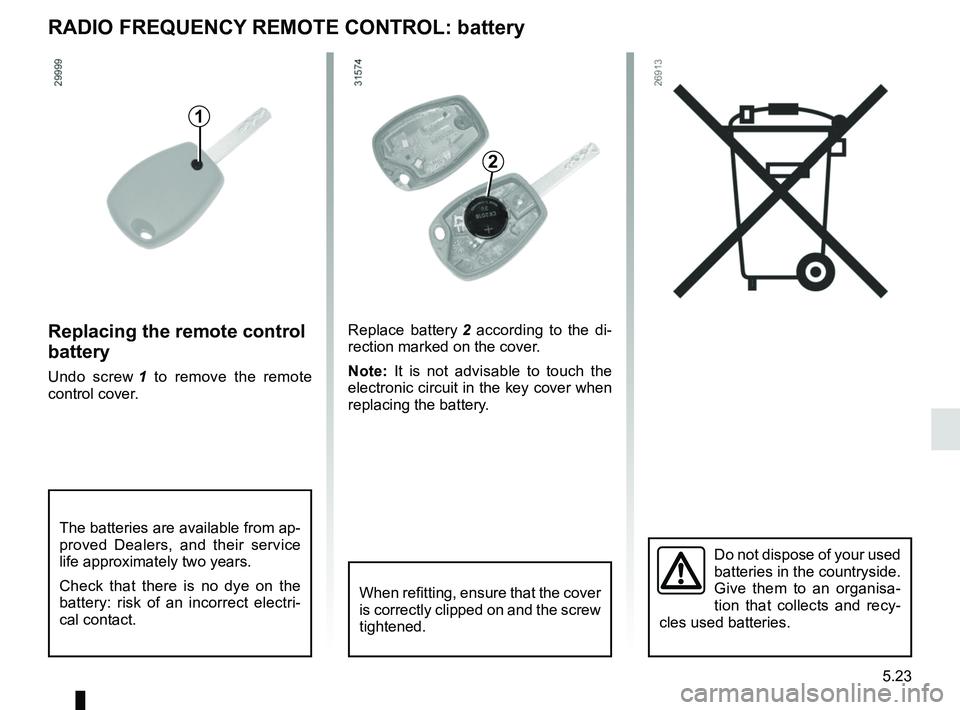
RADIO FREQUENCY REMOTE CONTROL: battery
Do not dispose of your used
batteries in the countryside.
Give them to an organisa-
tion that collects and recy-
cles used batteries.
1
Replacing the remote control
battery
Undo screw 1 to remove the remote
control cover. Replace battery
2 according to the di-
rection marked on the cover.
Note: It is not advisable to touch the
electronic circuit in the key cover when
replacing the battery.
When refitting, ensure that the cover
is correctly clipped on and the screw
tightened.
The batteries are available from ap-
proved Dealers, and their service
life approximately two years.
Check that there is no dye on the
battery: risk of an incorrect electri-
cal contact.
2
Page 250 of 298
5.24
Operating faultsIf the battery is too weak to ensure cor-
rect operation, you can still start (insert
the RENAULT card in the card reader)
and lock/unlock the vehicle (refer to the
information on "Locking/unlocking the
doors" in Section 1).
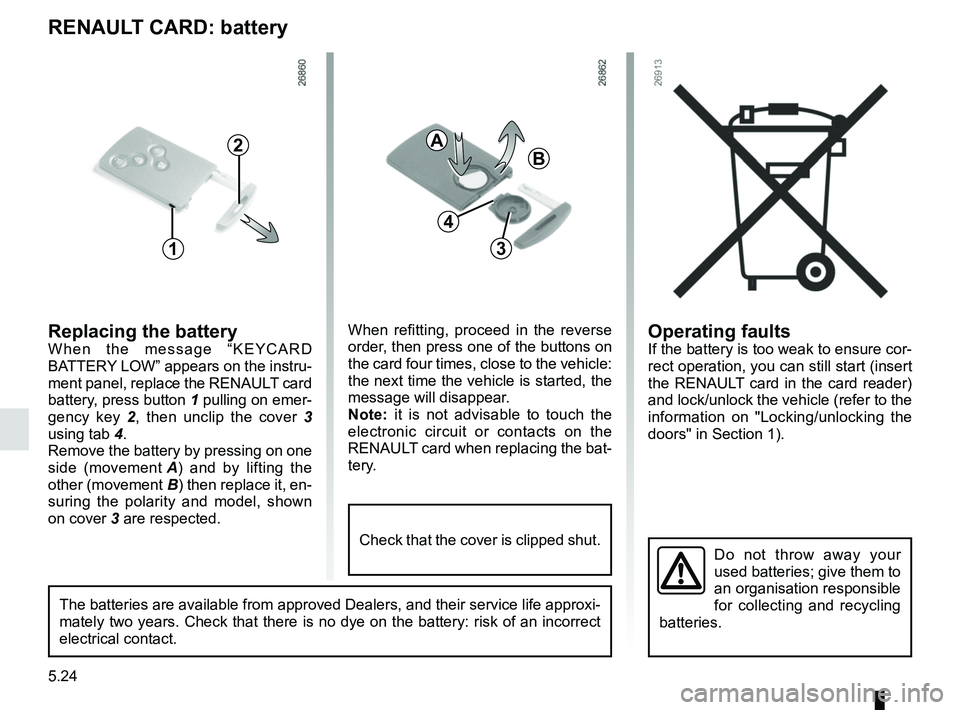
RENAULT CARD: battery
Replacing the batteryWhen the message “KEYCARD
BATTERY LOW” appears on the instru-
ment panel, replace the RENAULT card
battery, press button 1 pulling on emer-
gency key 2, then unclip the cover 3
using tab 4.
Remove the battery by pressing on one
side (movement A) and by lifting the
other (movement B) then replace it, en-
suring the polarity and model, shown
on cover 3 are respected.
Do not throw away your
used batteries; give them to
an organisation responsible
for collecting and recycling
batteries.
1
2
When refitting, proceed in the reverse
order, then press one of the buttons on
the card four times, close to the vehicle:
the next time the vehicle is started, the
message will disappear.
Note: it is not advisable to touch the
electronic circuit or contacts on the
RENAULT card when replacing the bat-
tery.
A
B
3
The batteries are available from approved Dealers, and their service lif\
e approxi-
mately two years. Check that there is no dye on the battery: risk of an \
incorrect
electrical contact.
4
Check that the cover is clipped shut.
Page 255 of 298
5.29
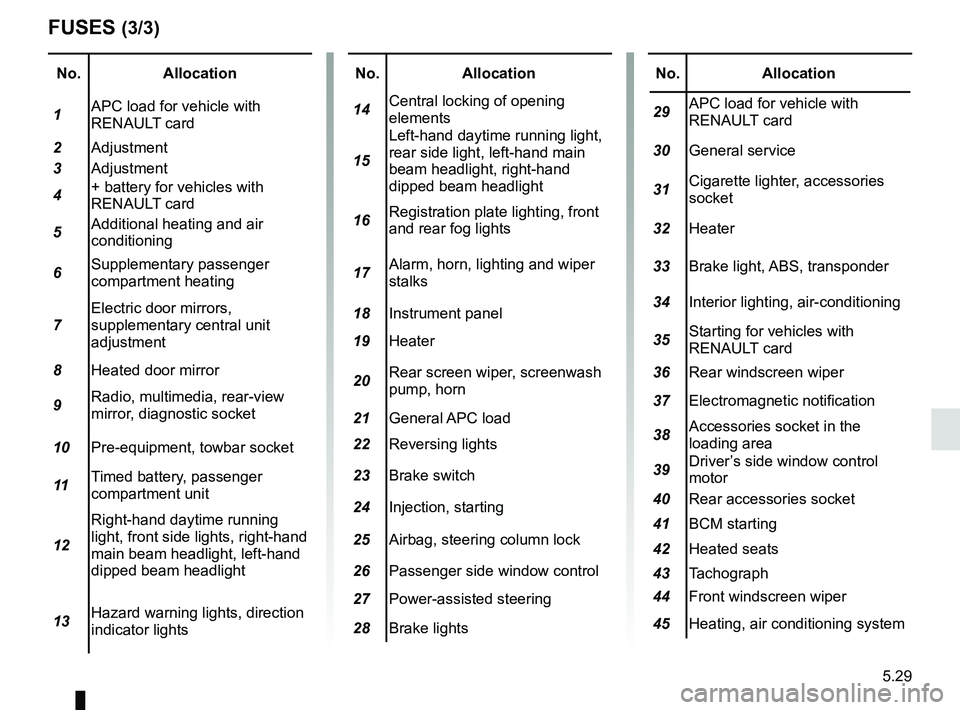
No.Allocation
1 APC load for vehicle with
RENAULT card
2 Adjustment
3 Adjustment
4 + battery for vehicles with
RENAULT card
5 Additional heating and air
conditioning
6 Supplementary passenger
compartment heating
7 Electric door mirrors,
supplementary central unit
adjustment
8 Heated door mirror
9 Radio, multimedia, rear-view
mirror, diagnostic socket
10 Pre-equipment, towbar socket
11 Timed battery, passenger
compartment unit
12 Right-hand daytime running
light, front side lights, right-hand
main beam headlight, left-hand
dipped beam headlight
13 Hazard warning lights, direction
indicator lights
FUSES (3/3)
No.
Allocation
14 Central locking of opening
elements
15 Left-hand daytime running light,
rear side light, left-hand main
beam headlight, right-hand
dipped beam headlight
16 Registration plate lighting, front
and rear fog lights
17 Alarm, horn, lighting and wiper
stalks
18 Instrument panel
19 Heater
20 Rear screen wiper, screenwash
pump, horn
21 General APC load
22 Reversing lights
23 Brake switch
24 Injection, starting
25 Airbag, steering column lock
26 Passenger side window control
27 Power-assisted steering
28 Brake lightsNo. Allocation
29 APC load for vehicle with
RENAULT card
30 General service
31 Cigarette lighter, accessories
socket
32 Heater
33 Brake light, ABS, transponder
34 Interior lighting, air-conditioning
35 Starting for vehicles with
RENAULT card
36 Rear windscreen wiper
37 Electromagnetic notification
38 Accessories socket in the
loading area
39 Driver’s side window control
motor
40 Rear accessories socket
41 BCM starting
42 Heated seats
43 Tachograph
44 Front windscreen wiper
45 Heating, air conditioning system
Page 257 of 298
5.31
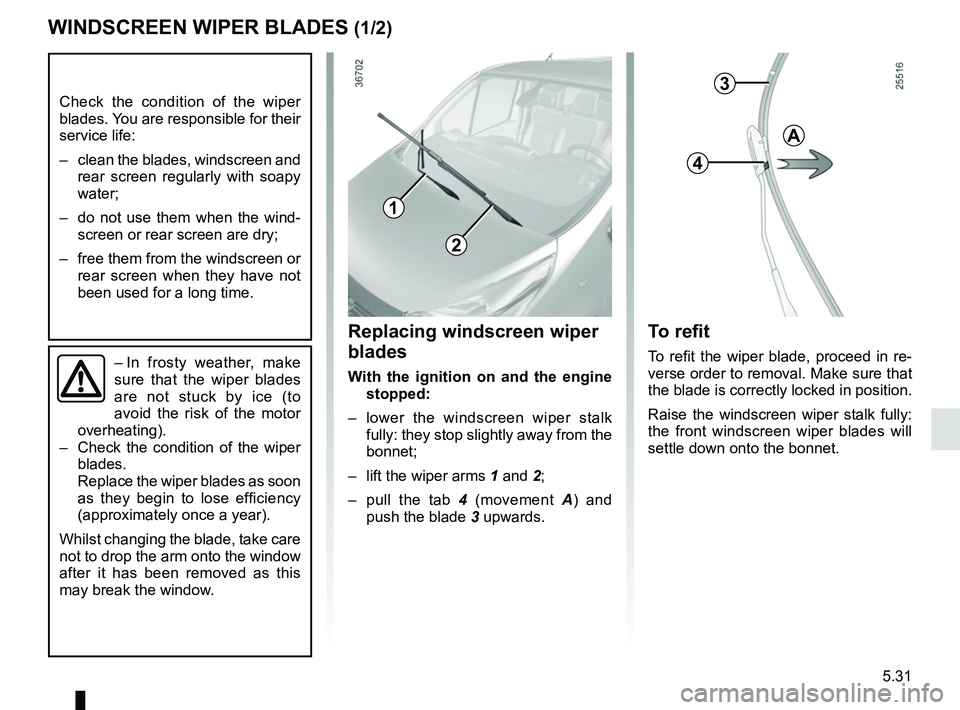
WINDSCREEN WIPER BLADES (1/2)
– In frosty weather, make
sure that the wiper blades
are not stuck by ice (to
avoid the risk of the motor
overheating).
– Check the condition of the wiper
blades.
Replace the wiper blades as soon
as they begin to lose efficiency
(approximately once a year).
Whilst changing the blade, take care
not to drop the arm onto the window
after it has been removed as this
may break the window.
Check the condition of the wiper
blades. You are responsible for their
service life:
– clean the blades, windscreen and rear screen regularly with soapy
water;
– do not use them when the wind- screen or rear screen are dry;
– free them from the windscreen or rear screen when they have not
been used for a long time.
To refit
To refit the wiper blade, proceed in re-
verse order to removal. Make sure that
the blade is correctly locked in position.
Raise the windscreen wiper stalk fully:
the front windscreen wiper blades will
settle down onto the bonnet.
Replacing windscreen wiper
blades
With the ignition on and the engine stopped:
– lower the windscreen wiper stalk fully: they stop slightly away from the
bonnet;
– lift the wiper arms 1 and 2;
– pull the tab 4 (movement A) and
push the blade 3 upwards.
3
4
A
1
2
Page 269 of 298

6.1
Section 6: Technical specifications
Vehicle identification plate . . . . . . . . . . . . . . . . . . . . . . . . . . . . . . . . . . . . \
. . . . . . . . . . . . . . . . . . . . . 6.2
Engine identification plate . . . . . . . . . . . . . . . . . . . . . . . . . . . . . . . . . . . .\
. . . . . . . . . . . . . . . . . . . . . 6.3
Dimensions . . . . . . . . . . . . . . . . . . . . . . . . . . . . . . . . . . . .\
. . . . . . . . . . . . . . . . . . . . . . . . . . . . . . . . 6.4
Engine specifications . . . . . . . . . . . . . . . . . . . . . . . . . . . . . . . . . . . . \
. . . . . . . . . . . . . . . . . . . . . . . . . 6.8
Towing weights . . . . . . . . . . . . . . . . . . . . . . . . . . . . . . . . . . . .\
. . . . . . . . . . . . . . . . . . . . . . . . . . . . . 6.9
Weights . . . . . . . . . . . . . . . . . . . . . . . . . . . . . . . . . . . .\
. . . . . . . . . . . . . . . . . . . . . . . . . . . . . . . . . . . 6.9
Replacement parts and repairs . . . . . . . . . . . . . . . . . . . . . . . . . . . . . . . . . . . . \
. . . . . . . . . . . . . . . . . 6.11
Service sheets . . . . . . . . . . . . . . . . . . . . . . . . . . . . . . . . . . . . \
. . . . . . . . . . . . . . . . . . . . . . . . . . . . . . 6.12
Anticorrosion check . . . . . . . . . . . . . . . . . . . . . . . . . . . . . . . . . . . . \
. . . . . . . . . . . . . . . . . . . . . . . . . . 6.18
Page 280 of 298
: \
Invoice number:Comments/miscellaneous
Type of operation: Stamp
Service □
..........")
6.12
Date: Miles (Km): \
Invoice number:Comments/miscellaneous
Type of operation: Stamp
Service □
....................................... □
Anti-corrosion check:
OK □ Not OK* □
*See specific page
Date: Miles (Km): \
Invoice number: Comments/miscellaneous
Type of operation: Stamp
Service □
....................................... □
Anti-corrosion check:
OK □ Not OK* □
*See specific page
Date: Miles (Km): \
Invoice number: Comments/miscellaneous
Type of operation: Stamp
Service □
....................................... □
Anti-corrosion check:
OK □ Not OK* □
*See specific page
VIN: .......................................................................\
...........
SERVICE SHEETS (1/6)
Page 281 of 298

VIN: .......................................................................\
...........
Date: Miles (Km): \
Invoic")
6.13
SERVICE SHEETS (2/6)
VIN: .......................................................................\
...........
Date: Miles (Km): \
Invoice number:Comments/miscellaneous
Type of operation: Stamp
Service □
....................................... □
Anti-corrosion check:
OK □ Not OK* □
*See specific page
Date: Miles (Km): \
Invoice number: Comments/miscellaneous
Type of operation: Stamp
Service □
....................................... □
Anti-corrosion check:
OK □ Not OK* □
*See specific page
Date: Miles (Km): \
Invoice number: Comments/miscellaneous
Type of operation: Stamp
Service □
....................................... □
Anti-corrosion check:
OK □ Not OK* □
*See specific page
Page 282 of 298

VIN: .......................................................................\
...........
Date: Miles (Km): \
Invoic")
6.14
SERVICE SHEETS (3/6)
VIN: .......................................................................\
...........
Date: Miles (Km): \
Invoice number:Comments/miscellaneous
Type of operation: Stamp
Service □
....................................... □
Anti-corrosion check:
OK □ Not OK* □
*See specific page
Date: Miles (Km): \
Invoice number: Comments/miscellaneous
Type of operation: Stamp
Service □
....................................... □
Anti-corrosion check:
OK □ Not OK* □
*See specific page
Date: Miles (Km): \
Invoice number: Comments/miscellaneous
Type of operation: Stamp
Service □
....................................... □
Anti-corrosion check:
OK □ Not OK* □
*See specific page
Page 283 of 298

VIN: .......................................................................\
...........
Date: Miles (Km): \
Invoic")
6.15
SERVICE SHEETS (4/6)
VIN: .......................................................................\
...........
Date: Miles (Km): \
Invoice number:Comments/miscellaneous
Type of operation: Stamp
Service □
....................................... □
Anti-corrosion check:
OK □ Not OK* □
*See specific page
Date: Miles (Km): \
Invoice number: Comments/miscellaneous
Type of operation: Stamp
Service □
....................................... □
Anti-corrosion check:
OK □ Not OK* □
*See specific page
Date: Miles (Km): \
Invoice number: Comments/miscellaneous
Type of operation: Stamp
Service □
....................................... □
Anti-corrosion check:
OK □ Not OK* □
*See specific page
Page 284 of 298

VIN: .......................................................................\
...........
Date: Miles (Km): \
Invoic")
6.16
SERVICE SHEETS (5/6)
VIN: .......................................................................\
...........
Date: Miles (Km): \
Invoice number:Comments/miscellaneous
Type of operation: Stamp
Service □
....................................... □
Anti-corrosion check:
OK □ Not OK* □
*See specific page
Date: Miles (Km): \
Invoice number: Comments/miscellaneous
Type of operation: Stamp
Service □
....................................... □
Anti-corrosion check:
OK □ Not OK* □
*See specific page
Date: Miles (Km): \
Invoice number: Comments/miscellaneous
Type of operation: Stamp
Service □
....................................... □
Anti-corrosion check:
OK □ Not OK* □
*See specific page