instrument panel RENAULT TWINGO 2018 User Guide
[x] Cancel search | Manufacturer: RENAULT, Model Year: 2018, Model line: TWINGO, Model: RENAULT TWINGO 2018Pages: 232, PDF Size: 6.88 MB
Page 81 of 232
2.5
Conditions for engine
standby
The vehicle has set off from where it
was parked;
For vehicles equipped with auto-
matic gearboxes:
– Gearbox is in position D, M or N;
and
– the brake pedal is depressed (suffi- ciently hard);
and
– the accelerator pedal is not de- pressed;
and
– the speed is zero for around 1 second.
The engine remains on standby if posi-
tion P is selected, or if position N is se-
lected with the handbrake engaged and
the brake pedal released. For vehicles equipped with manual
gearboxes:
– the gearbox is in neutral;
and
– the clutch pedal is released.
If the warning light
flashes,
this means that the clutch pedal is
not sufficiently released;
and
– the vehicle speed is less than ap- proximately 7 mph (3 km/h).
For all vehicles:
Warning light
on the instru-
ment panel is lit when the engine is on
standby.
The vehicle equipment remain opera-
tional while the engine is stopped.
FUNCTION STOP AND START (1/4)
This system enables a reduced fuel
consumption and lower greenhouse
gas emissions. The system is acti-
vated automatically when the vehicle is
started. While driving, the system stops
the engine (standby) when the vehicle
is at a standstill (traffic jam, traffic lights,
etc).
Keep your vehicle station-
ary when the engine is
on standby (shown by the
warning light
on the
instrument panel).
The ignition must be
switched off before leav-
ing the vehicle (please see
the information on “Starting,
stopping the engine” in Section 2).
If the engine stalls while the system
is in operation, pressing the clutch
pedal right down will start it again.
If you get out of the vehicle, a beep
notifies you that the engine is on
standby and has not been switched
off.
Page 82 of 232
2.6
FUNCTION STOP AND START (2/4)
To fill up with fuel, the engine must
be stopped (and not on standby):
stop the engine (Please See
“Starting, stopping the engine” in
Section 2).
Preventing the engine from
standing by
In certain situations, such as negotiat-
ing a crossroads for instance, it is pos-
sible to keep the engine running so as
to be ready to move off quickly.
For vehicles equipped with auto-
matic gearboxes:
Keep the vehicle stationary without
pressing too hard on the brake pedal.
For vehicles equipped with manual
gearboxes:
Keep the clutch pedal pressed right
down.
Conditions for coming out of
engine standby
For vehicles equipped with auto-
matic gearboxes:
– Brake pedal released, position D or
M engaged;
or
– Brake pedal is released, position N engaged and parking brake re-
leased;
or
– Parking brake is applied again, po- sition P engaged, or position N en-
gaged with parking brake applied;
or
– position R is engaged;
or
– the accelerator pedal is pressed.
For vehicles equipped with manual
gearboxes:
– Gearbox is in neutral and clutch pedal is slightly depressed;
or
– the engine is in gear and the clutch pedal is pressed right down. Special note:
depending on the vehi-
cle, if you switch off the ignition when
the engine is on standby, the warning
light Ä is displayed for a few sec-
onds on the instrument panel.
Page 83 of 232
2.7
– the engine temperature is too low;
– the emission control system is being regenerated;
– ...
Warning light
is displayed on the
instrument panel. This notifies you that
engine standby is not available.
FUNCTION STOP AND START (3/4)
Conditions preventing the
standby of the engine
Certain conditions prevent the system
from using the engine standby function,
including when:
– reverse gear is engaged;
– the bonnet is not locked;
– the outdoor temperature is too low or too high (less than around 0 °C or
higher than around 35 °C);
– the battery is not sufficiently charged;
– the difference between the vehicle interior temperature and the auto-
matic climate control instruction is
too high;
– for vehicles with automatic gear- boxes, the gradient is steeper than
approximately 5%;
– the “Clear View” function is activated (please see “Automatic Climate
Control” in Section 3);
Deactivate the Stop and
Start function for any opera-
tion performed in the engine
compartment.
Special feature of the automatic
engine re-start
Under certain conditions, the engine
can restart on its own in order to guar-
antee your safety and comfort.
This can occur especially when:
– the outdoor temperature is too low or too high (less than around 0 °C or
higher than around 35 °C);
– the “Clear View” function is activated (please see “Automatic Climate
Control” in Section 3);
– the battery is not sufficiently charged;
– the vehicle speed is above 3 mph (5 km/h) (downhill slope, etc.); ;
– repeated pressing on the brake pedal or braking system require-
ment;
– ...
Special note: for some of these
conditions, automatic restarting of
the engine is deactivated if a front
door or the tailgate is open.
Page 86 of 232
2.10
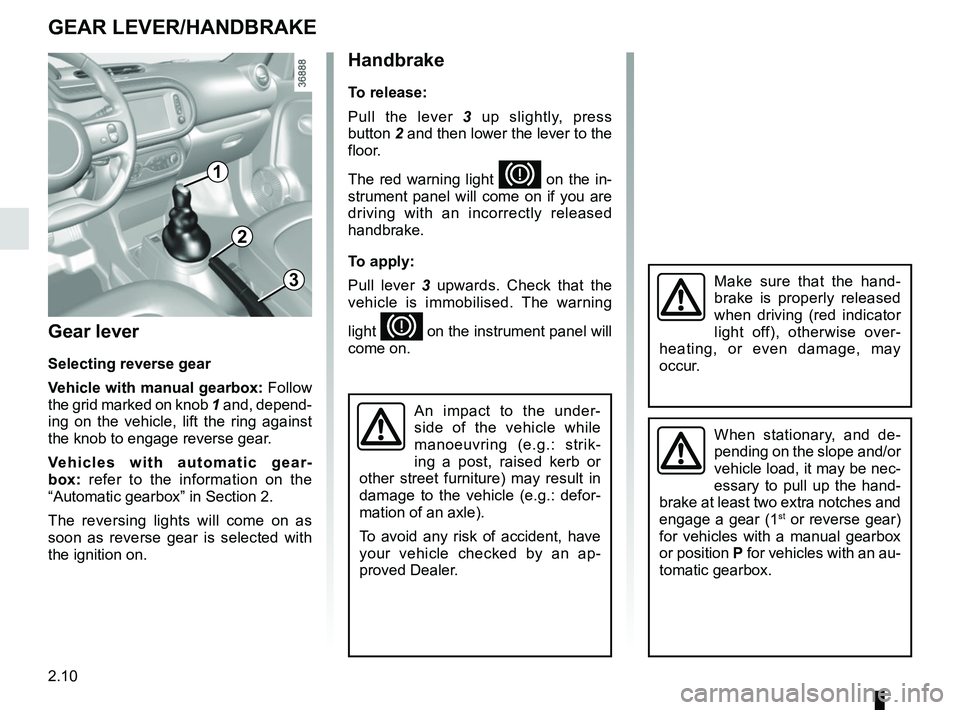
Gear lever
Selecting reverse gear
Vehicle with manual gearbox: Follow
the grid marked on knob 1 and, depend-
ing on the vehicle, lift the ring against
the knob to engage reverse gear.
Vehicles with automatic gear-
box: refer to the information on the
“Automatic gearbox” in Section 2.
The reversing lights will come on as
soon as reverse gear is selected with
the ignition on.
1
GEAR LEVER/HANDBRAKE
Handbrake
To release:
Pull the lever 3 up slightly, press
button 2 and then lower the lever to the
floor.
The red warning light
D on the in-
strument panel will come on if you are
driving with an incorrectly released
handbrake.
To apply:
Pull lever 3 upwards. Check that the
vehicle is immobilised. The warning
light
D on the instrument panel will
come on.
3
2
When stationary, and de-
pending on the slope and/or
vehicle load, it may be nec-
essary to pull up the hand-
brake at least two extra notches and
engage a gear (1
st or reverse gear)
for vehicles with a manual gearbox
or position P for vehicles with an au-
tomatic gearbox.
An impact to the under-
side of the vehicle while
manoeuvring (e.g.: strik-
ing a post, raised kerb or
other street furniture) may result in
damage to the vehicle (e.g.: defor-
mation of an axle).
To avoid any risk of accident, have
your vehicle checked by an ap-
proved Dealer.
Make sure that the hand-
brake is properly released
when driving (red indicator
light off), otherwise over-
heating, or even damage, may
occur.
Page 87 of 232

2.11
Fuel consumption is accredited in ac-
cordance with a standard regulatory
method. Identical for all manufactur-
ers, this enables vehicles to be com-
pared with one another. Consumption
in real time depends on vehicle usage
conditions, the equipment fitted and the
user’s driving style. To optimise fuel
consumption, please refer to the follow-
ing advice.
Depending on the vehicle, you will have
various functions which enable you to
lower your fuel consumption:
– gear change indicator;
– the journey record and eco-driving advice via the multimedia display;
– ECO mode activated by button ECO.
If fitted on the vehicle, the navigation
system provides additional information.
1
2
Journey recordOnce the engine is switched off, you
will see “Journey record” displayed on
the screen 2, enabling you to view in-
formation relating to your last journey.
This indicates:
– average fuel consumption;
– number of miles/kilometres travelled;
– number of miles/kilometres saved.
DRIVING ADVICE, ECO-DRIVING (1/4)
Gear change indicator 1
To obtain optimum consumption levels,
a warning light on the instrument panel
lets you know the best time to move up
or down a gear:
Š move up a gear;
‰ move down a gear.
Page 88 of 232

2.12
Mode ECO
ECO mode is a function which opti-
mises fuel consumption. It acts on all
elements which consume fuel (engine
power, heating and/or air conditioning,
etc).Activating the function
Press the switch 3.
The warning light
comes on on
the instrument panel to confirm activa-
tion.
While driving, it is possible to leave the
ECO mode temporarily in order to im-
prove engine performance.
To do this, press the accelerator pedal
firmly and fully.
ECO mode is reactivated when you
take pressure off the accelerator pedal.
Disabling the function
Press the switch 3.
The warning light
goes out on
the instrument panel to confirm deac-
tivation.
3
DRIVING ADVICE, ECO-DRIVING (2/4)
An overall rating from 0 to 100 is dis-
played to let you assess your eco driv-
ing performance. The higher the score,
the better your eco-driving perform-
ance.
Eco advice is given to help improve
your performance.
With your favourite journeys saved, you
can evaluate your performance.
For more information, please see the
multimedia system instructions.
Page 102 of 232

2.26
Depending on the vehicle, this is com-
posed of:
– anti-lock braking system (ABS);
– electronic stability control (ESC) with understeer control, traction
control and assistance with side
winds;
– emergency brake assist;
– hill start assistance.Operating faults:
–
© and x come on on the
instrument panel: ABS, ESC and
emergency brake assist are deacti-
vated. Braking is always enabled;
–
x, D, © and ®
come on on the instrument panel:
this indicates a fault in the brak-
ing system.
In both cases, consult an approved
Dealer.
Anti-lock braking system
(ABS)
Under heavy braking, the ABS prevents
the wheels from locking, allowing the
stopping distance to be managed and
keeping control of the vehicle.
Under these circumstances, the vehi-
cle can be steered to avoid an obstacle
whilst braking. In addition, this system
can increase stopping distances, par-
ticularly on roads with low surface grip
(wet ground etc.).
You will feel a pulsation through the
brake pedal each time the system is
activated. The ABS does not in any
way improve the vehicle's physical per-
formance relating to the road surface
and road-holding. It is still essential to
follow the rules of good driving practice
(such as driving at a safe distance from
the vehicle in front etc.).
DRIVER CORRECTION DEVICES AND AIDS (1/4)
These functions are an ad-
ditional aid in the event of
critical driving conditions,
enabling the vehicle behav-
iour to be adapted to suit the driving
conditions.
The functions do not take the place
of the driver. They do not increase
the vehicle’s limits and should
not encourage you to drive more
quickly. Therefore, they can under
no circumstances replace the vigi-
lance or responsibility of the driver
when manoeuvring the vehicle (the
driver must always be ready for
sudden incidents which may occur
when driving).
In an emergency, apply firm and
continuous pressure to the brake
pedal. There is no need to pump
it repeatedly. The ABS will modu-
late the force applied in the braking
system.
Your braking systems
are partially operational.
However, it is dangerous
to brake suddenly and
it is essential to stop immediately,
as soon as traffic conditions allow.
Contact an approved dealer.
Page 103 of 232
2.27
Electronic stability control
(ESC) with understeer
control, traction control and
assistance with side winds
Electronic stability control ESC
This system helps you to keep control
of the vehicle in critical driving condi-
tions (avoiding an obstacle, loss of grip
on a bend, etc.).
A sensor in the steering wheel detects
the direction selected by the driver.
Other sensors throughout the vehicle
measure the actual direction.
The system compares driver input to
the actual trajectory of the vehicle and
corrects the trajectory if necessary by
controlling the braking of certain wheels
and/or engine power. In the event that
the system is engaged, indicator light
flashes on the instrument panel.
DRIVER CORRECTION DEVICES AND AIDS (2/4)
Understeer control
This system optimises the action of the
ESC in the case of pronounced under-
steer (loss of front axle road holding).
Assistance with side winds
This system optimises the action of the
ESC and also helps to control the vehi-
cle in case of variation of side winds.
It helps maintain the vehicle trajectory
through the use of the brakes.
If the system is activated, the indicator
light
may flash on the instrument
panel.
Traction control
This system helps to limit wheelspin of
the drive wheels and to control the ve-
hicle when pulling away accelerating or
decelerating.
Using the wheel sensors, the system
measures and compares the speed of
the drive wheels at all times and slows
down their over-rotation. If a wheel is
starting to slip, the system brakes au-
tomatically until the drive supplied be-
comes compatible with the level of grip
under the wheel again. The system also adjusts the engine
speed to the grip available under the
wheels, independently of the pressure
exerted on the accelerator pedal.
Operating faults
When the system detects an operat-
ing fault the warning lights
© and
appear on the instrument panel.
In this case, the ESC and traction con-
trol system are deactivated.
Consult an approved dealer.
Page 104 of 232
2.28
DRIVER CORRECTION DEVICES AND AIDS (3/4)
Emergency brake assist
This system supplements the ABS
and helps reduce vehicle stopping dis-
tances.
The system allows an emergency brak-
ing situation to be detected when the
brake pedal is pressed. In this case, the
braking assistance immediately devel-
ops maximum power and may trigger
ABS regulation.
ABS braking is maintained as long as
the brake pedal is applied.Hazard warning lights switching on
Depending on the vehicle, these may
light up in the event of sudden decel-
eration.
Braking anticipation
Depending on the vehicle, when you
rapidly release the accelerator, the
system anticipates the braking ma-
noeuvre in order to reduce stopping
distances.
When using the cruise control:
– if you use the accelerator, when you
release it, the system may be trig-
gered;
– if you do not use the accelerator, the system will not be triggered.
Operating faults
When the system detects an operating
fault, the warning light
© comes
on on the instrument panel.
Consult an approved dealer.
These functions are an ad-
ditional aid in the event of
critical driving conditions,
enabling the vehicle behav-
iour to be adapted to suit the driving
conditions.
The functions do not take the place
of the driver. They do not increase
the vehicle’s limits and should
not encourage you to drive more
quickly. Therefore, they can under
no circumstances replace the vigi-
lance or responsibility of the driver
when manoeuvring the vehicle (the
driver must always be ready for
sudden incidents which may occur
when driving).
Page 106 of 232

2.30
LANE DEPARTURE WARNING (1/2)
This lane departure warning system no-
tifies the driver when they accidentally
cross a continuous or broken line.
This function uses a camera attached
to the windscreen, behind the rear-view
mirror.
This function is a driving aid in the event of the accidental crossing o\
f
a continuous or broken line in the road. However, the function is not in-
tended to replace the driver. The function can be disrupted under certain
conditions, including:
– poor visibility (rain, snow, fog, dirty windscreen, glare of the sun, partially obs- cured road lines, etc.);
– roads with tight bends;
– closely following a vehicle in the same lane;
– worn road markings, difficult to distinguish or spaced very widely apart;
– narrow roads;
– ...
In this case, warning light
on the instrument panel goes out to indicate that
the function will not operate (lines not detected).
Under no circumstances should this function replace the driver’s care or res-
ponsibility whilst performing manoeuvres.