rear light RENAULT ZOE 2017 1.G User Guide
[x] Cancel search | Manufacturer: RENAULT, Model Year: 2017, Model line: ZOE, Model: RENAULT ZOE 2017 1.GPages: 220, PDF Size: 4.07 MB
Page 73 of 220
1.67
TRIP COMPUTER: general information (1/2)
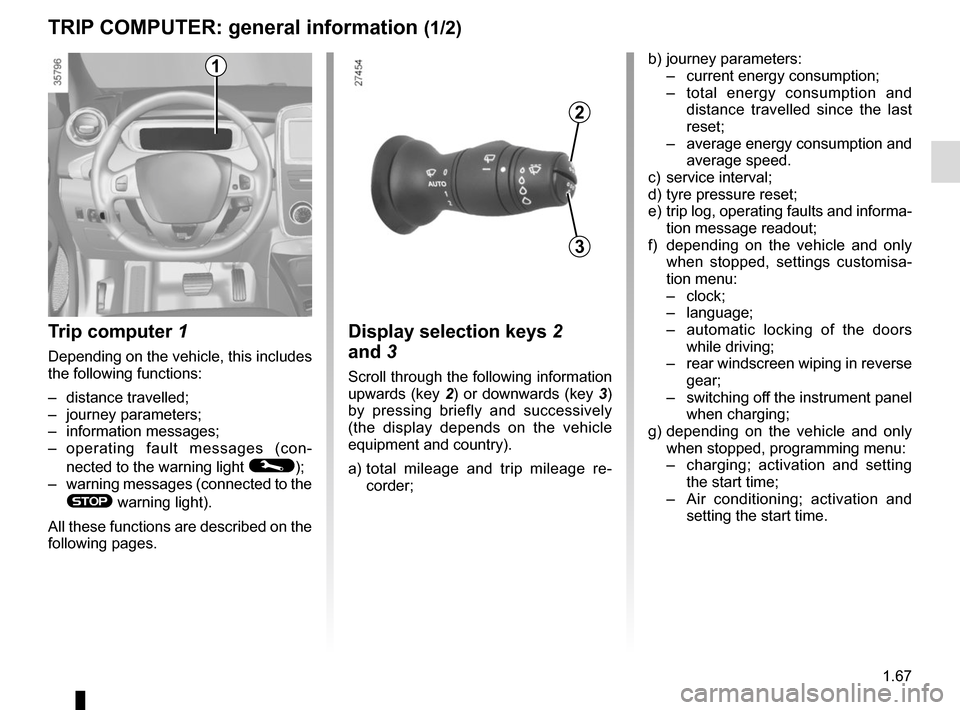
Trip computer 1
Depending on the vehicle, this includes
the following functions:
– distance travelled;
– journey parameters;
– information messages;
– operating fault messages (con-
nected to the warning light
©);
– warning messages (connected to the
® warning light).
All these functions are described on the
following pages.
Display selection keys 2
and 3
Scroll through the following information
upwards (key 2) or downwards (key 3)
by pressing briefly and successively
(the display depends on the vehicle
equipment and country).
a) total mileage and trip mileage re-
corder;
b) journey parameters:
– current energy consumption;
– total energy consumption and
distance travelled since the last
reset;
– average energy consumption and
average speed.
c) service interval;
d) tyre pressure reset;
e) trip log, operating faults and informa- tion message readout;
f) depending on the vehicle and only when stopped, settings customisa-
tion menu:
– clock;
– language;
– automatic locking of the doors
while driving;
– rear windscreen wiping in reverse
gear;
– switching off the instrument panel
when charging;
g) depending on the vehicle and only when stopped, programming menu:
– charging; activation and setting
the start time;
– Air conditioning; activation and
setting the start time.
3
2
1
Page 84 of 220
1.78
REAR-VIEW MIRRORS
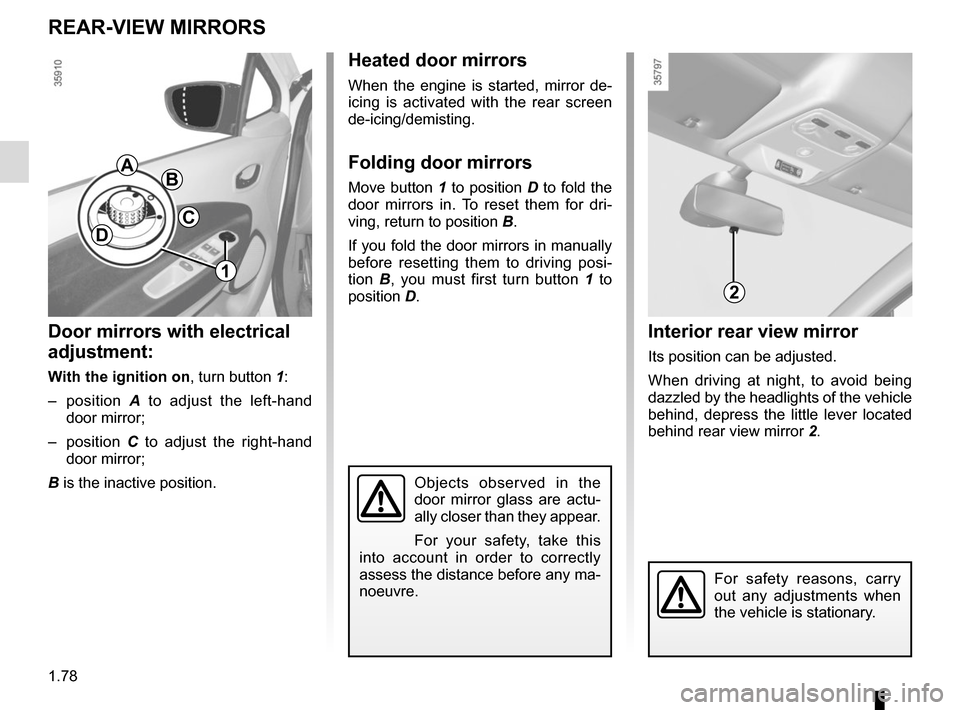
Interior rear view mirror
Its position can be adjusted.
When driving at night, to avoid being
dazzled by the headlights of the vehicle
behind, depress the little lever located
behind rear view mirror 2.
Door mirrors with electrical
adjustment:
With the ignition on, turn button 1:
– position A to adjust the left-hand
door mirror;
– position C to adjust the right-hand
door mirror;
B is the inactive position.
BA
C
1
2
Objects observed in the
door mirror glass are actu-
ally closer than they appear.
For your safety, take this
into account in order to correctly
assess the distance before any ma-
noeuvre.
For safety reasons, carry
out any adjustments when
the vehicle is stationary.
Heated door mirrors
When the engine is started, mirror de-
icing is activated with the rear screen
de-icing/demisting.
Folding door mirrors
Move button 1 to position D to fold the
door mirrors in. To reset them for dri-
ving, return to position B.
If you fold the door mirrors in manually
before resetting them to driving posi-
tion B, you must first turn button 1 to
position D.
D
Page 89 of 220
1.83
EXTERIOR LIGHTING AND SIGNALS (3/3)
When driving in fog or snow, or
when transporting objects which are
higher than the roof, the headlights
do not come on automatically.
The driver remains in full control of
switching on the fog lights: the indi-
cator lights on the instrument panel
inform you whether the fog lights
are lit (indicator light on) or not (indi-
cator light off).
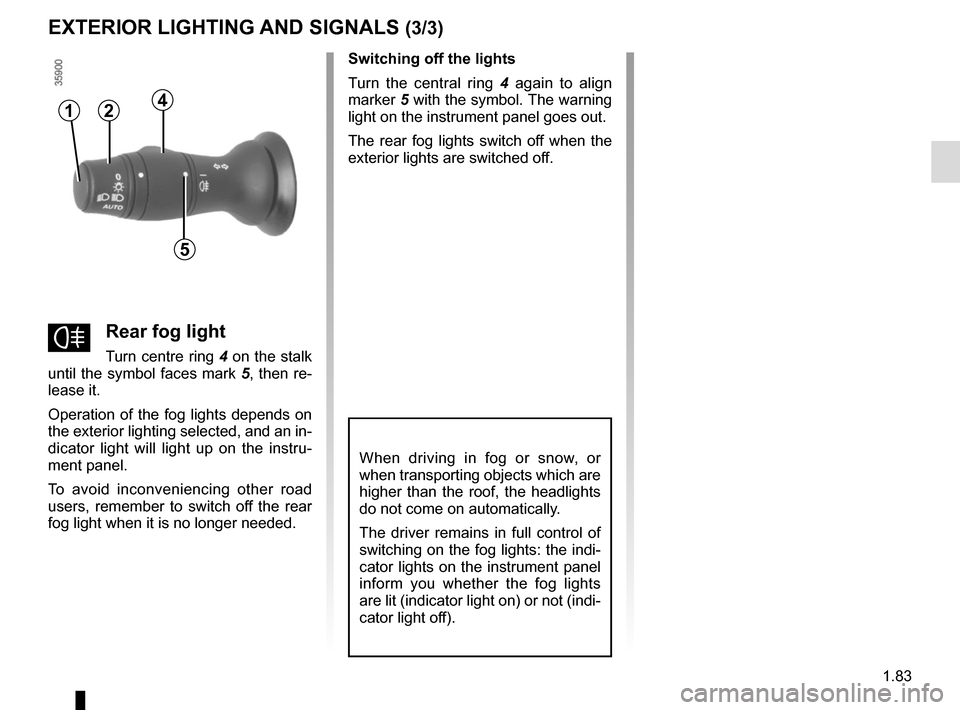
fRear fog light
Turn centre ring 4 on the stalk
until the symbol faces mark 5, then re-
lease it.
Operation of the fog lights depends on
the exterior lighting selected, and an in-
dicator light will light up on the instru-
ment panel.
To avoid inconveniencing other road
users, remember to switch off the rear
fog light when it is no longer needed. Switching off the lights
Turn the central ring
4 again to align
marker 5 with the symbol. The warning
light on the instrument panel goes out.
The rear fog lights switch off when the
exterior lights are switched off.
412
5
Page 90 of 220

1.84
For manual settings
Examples of positions for adjusting control A according to the load
0 Driver alone or with front passenger
1 Driver with one front passenger and two or
three rear passengers
2 Driver with one front passenger, three rear
passengers and luggage
2 Driver with luggage or load reaching the
maximum authorised load weight
3 Driver and luggage (reaching the maximum
permissible all-up weight)
4 Do not use
On vehicles fitted with this function,
control A allows you to adjust the height
of the beams according to the load.
Turn control A downwards to lower the
headlights and upwards to raise them.
For vehicles not fitted with control A ,
adjustment is automatic.
HEADLIGHT BEAM ADJUSTMENT
A
If driving on the left in a left-hand drive vehicle (or vice versa), d\
rivers must have
the lights adjusted by an authorised dealer for the duration of the trip\
.
Page 122 of 220
2.28
PARKING DISTANCE CONTROL (1/2)
Operating principle
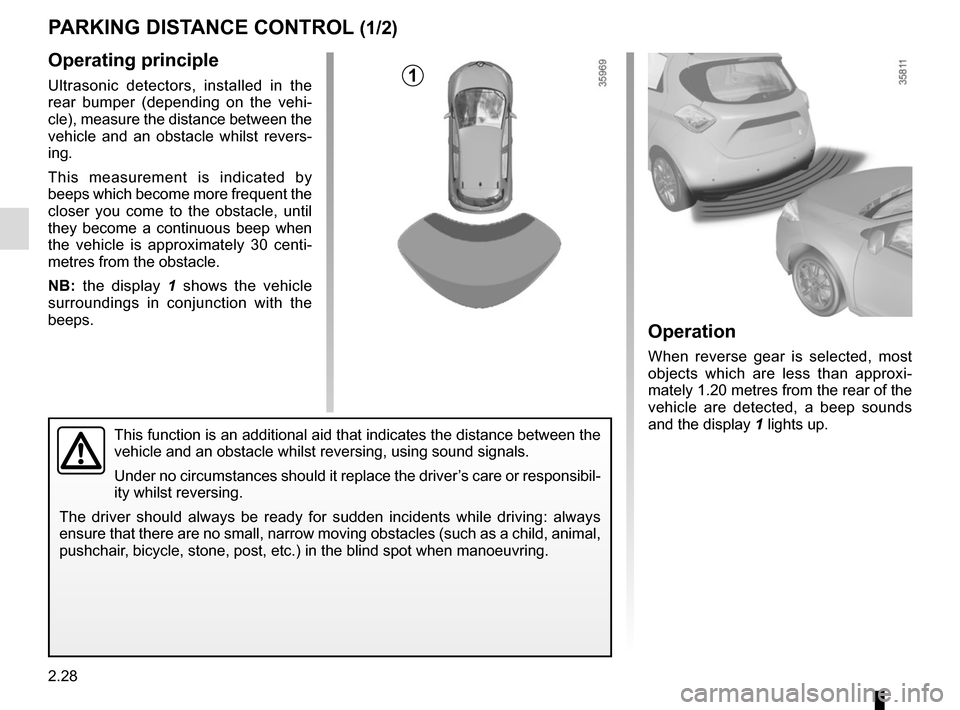
Ultrasonic detectors, installed in the
rear bumper (depending on the vehi-
cle), measure the distance between the
vehicle and an obstacle whilst revers-
ing.
This measurement is indicated by
beeps which become more frequent the
closer you come to the obstacle, until
they become a continuous beep when
the vehicle is approximately 30 centi-
metres from the obstacle.
NB: the display 1 shows the vehicle
surroundings in conjunction with the
beeps.
This function is an additional aid that indicates the distance between t\
he
vehicle and an obstacle whilst reversing, using sound signals.
Under no circumstances should it replace the driver’s care or responsibil-
ity whilst reversing.
The driver should always be ready for sudden incidents while driving: al\
ways
ensure that there are no small, narrow moving obstacles (such as a chil\
d, animal,
pushchair, bicycle, stone, post, etc.) in the blind spot when manoeuvring.
Operation
When reverse gear is selected, most
objects which are less than approxi-
mately 1.20 metres from the rear of the
vehicle are detected, a beep sounds
and the display 1 lights up.
1
Page 123 of 220
2.29
PARKING DISTANCE CONTROL (2/2)
In the event of an impact to
the underside of the vehicle
(e.g.: striking a post, raised
kerb or other street furni-
ture), this may result in damage to
the vehicle (e.g.: twisted axle), the
electrical circuit or the traction bat-
tery.
To avoid any risk of accident, have
your vehicle checked by an ap-
proved dealer.
Operating faults
Depending on the vehicle, when the
system detects an operating fault, the
message “check parking distance con-
trol” appears on the instrument panel,
accompanied by the warning light
© and a beep lasting approxi-
mately 5 seconds. Please contact an
authorised dealer.
Special featuresMake sure that the ultrasonic sensors
are not obscured (by dirt, mud, snow
etc.).
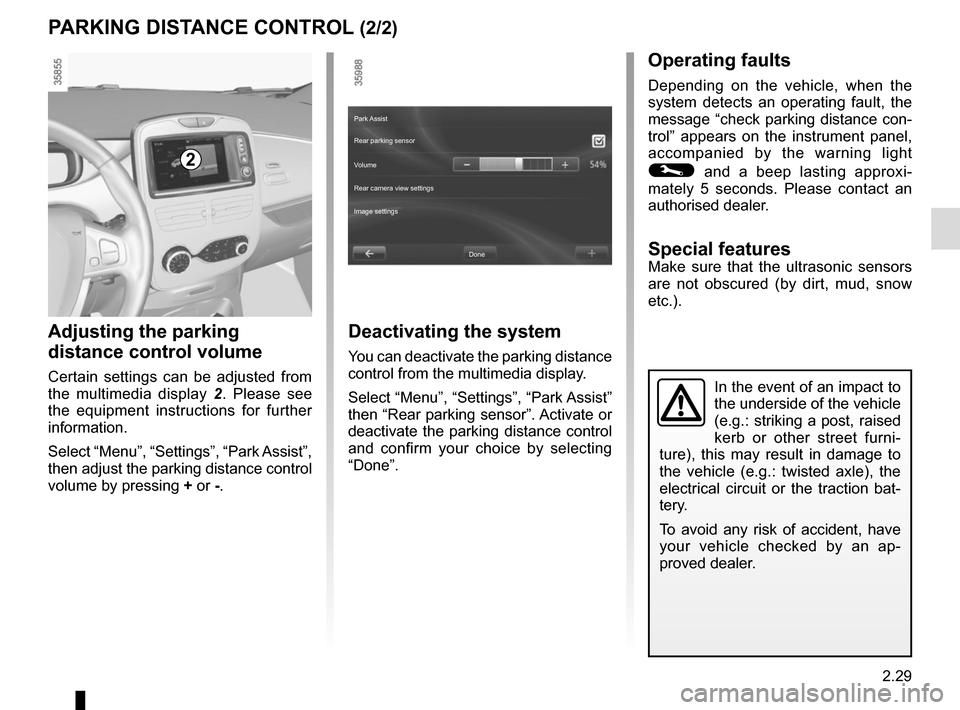
Adjusting the parking
distance control volume
Certain settings can be adjusted from
the multimedia display 2. Please see
the equipment instructions for further
information.
Select “Menu”, “Settings”, “Park Assist”,
then adjust the parking distance control
volume by pressing + or -.
2
Deactivating the system
You can deactivate the parking distance
control from the multimedia display.
Select “Menu”, “Settings”, “Park Assist”
then “Rear parking sensor”. Activate or
deactivate the parking distance control
and confirm your choice by selecting
“Done”.
Done
Park Assist
Rear parking sensor
Volume
Image settings Rear camera view settings
Page 125 of 220

This function is an additional aid. It cannot, therefore, under any circ\
um-
stances replace the vigilance or the responsibility of the driver.
The driver should always be")
2.31
REVERSING CAMERA (2/2)
This function is an additional aid. It cannot, therefore, under any circ\
um-
stances replace the vigilance or the responsibility of the driver.
The driver should always be ready for sudden incidents while driving:
always ensure that there are no small, narrow moving obstacles (such
as a child, animal, pushchair, bicycle, stone, post, etc.) in the blind spot when
manoeuvring.
The screen shows a reverse image.
The frames are a representation
projected onto flat ground; this in-
formation must not be taken into
account when superimposed on a
vertical object or an object on the
ground.
Objects which appear on the edge
of the screen may be deformed.
In very bright light (snow, vehicle in
sunshine etc.), the camera vision
may be adversely affected.
If the boot is open or poorly closed,
the message “Boot open” appears
and the camera display disappears.
Activating/deactivating the
reversing camera
From the multimedia display 2 , select
“Menu”, “Settings”, “Parking distance
control” then “Rear camera settings”.
Activate or deactivate the reversing
camera and confirm your choice by se-
lecting “End”.
2
You can also adjust the camera image
settings (brightness, contrast, etc.)
End
Parking distance control
Rear parking distance control
Parking sensor volume
Rear camera settings
Page 127 of 220

3.1
Section 3: Your comfort
Air Vents . . . . . . . . . . . . . . . . . . . . . . . . . . . . . . . . . . . .\
. . . . . . . . . . . . . . . . . . . . . . . . . . . . . . . . . . 3.2
Automatic climate control . . . . . . . . . . . . . . . . . . . . . . . . . . . . . . . . . . . .\
. . . . . . . . . . . . . . . . . . . . . 3.4
Air conditioning: remote activation. . . . . . . . . . . . . . . . . . . . . . . . . . . . . . . . . . . . \
. . . . . . . . . . . . . . . 3.8
Air conditioning: programming . . . . . . . . . . . . . . . . . . . . . . . . . . . . . . . . . . . . \
. . . . . . . . . . . . . . . . . . 3.9
Fragrance diffuser. . . . . . . . . . . . . . . . . . . . . . . . . . . . . . . . . . . . . \
. . . . . . . . . . . . . . . . . . . . . . . . . . . 3.13
Air ioniser. . . . . . . . . . . . . . . . . . . . . . . . . . . . . . .\
. . . . . . . . . . . . . . . . . . . . . . . . . . . . . . . . . . . . . . . 3.14
Air conditioning: information and advice on use . . . . . . . . . . . . . . . . . . . . . . . . . . . . . . . . . . . .\
. . . . 3.15
Electric windows . . . . . . . . . . . . . . . . . . . . . . . . . . . . . . . . . . . .\
. . . . . . . . . . . . . . . . . . . . . . . . . . . . 3.16
Interior lighting . . . . . . . . . . . . . . . . . . . . . . . . . . . . . . . . . . . . \
. . . . . . . . . . . . . . . . . . . . . . . . . . . . . . 3.18
Sun visor . . . . . . . . . . . . . . . . . . . . . . . . . . . . . . . . . . . .\
. . . . . . . . . . . . . . . . . . . . . . . . . . . . . . . . . . 3.18
Passenger compartment storage/fittings . . . . . . . . . . . . . . . . . . . . . . . . . . . . . . . . . . . . \
. . . . . . . . . . 3.19
Ashtray . . . . . . . . . . . . . . . . . . . . . . . . . . . . . . . . . . . .\
. . . . . . . . . . . . . . . . . . . . . . . . . . . . . . . . . . . 3.22
Accessories socket . . . . . . . . . . . . . . . . . . . . . . . . . . . . . . . . . . . .\
. . . . . . . . . . . . . . . . . . . . . . . . . . 3.22
Rear bench seat: functions . . . . . . . . . . . . . . . . . . . . . . . . . . . . . . . . . . . .\
. . . . . . . . . . . . . . . . . . . . 3.24
Rear parcel shelf . . . . . . . . . . . . . . . . . . . . . . . . . . . . . . . . . . . . \
. . . . . . . . . . . . . . . . . . . . . . . . . . . . 3.25
Luggage cover . . . . . . . . . . . . . . . . . . . . . . . . . . . . . . . . . . . . \
. . . . . . . . . . . . . . . . . . . . . . . . . . . . . . 3.26
Luggage compartment. . . . . . . . . . . . . . . . . . . . . . . . . . . . . . . . . . . . \
. . . . . . . . . . . . . . . . . . . . . . . . 3.27
Spoiler . . . . . . . . . . . . . . . . . . . . . . . . . . . . . . . . . . . . \
. . . . . . . . . . . . . . . . . . . . . . . . . . . . . . . . . . . . 3.27
Transporting objects in the luggage compartment . . . . . . . . . . . . . . . . . . . . . . . . . . . . . . . . . . . .\
. . 3.28
Multimedia equipment . . . . . . . . . . . . . . . . . . . . . . . . . . . . . . . . . . . . \
. . . . . . . . . . . . . . . . . . . . . . . . 3.29
Page 132 of 220
3.6
AUTOMATIC AIR-CONDITIONING (3/4)
Adjusting the ventilation
speed
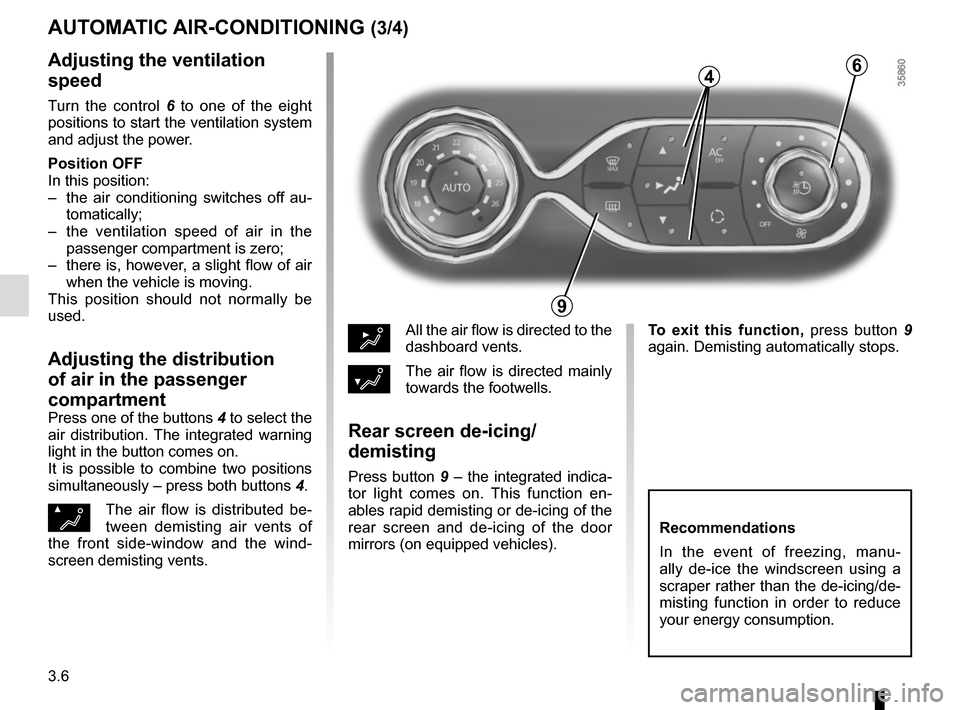
Turn the control 6 to one of the eight
positions to start the ventilation system
and adjust the power.
Position OFF
In this position:
– the air conditioning switches off au- tomatically;
– the ventilation speed of air in the passenger compartment is zero;
– there is, however, a slight flow of air when the vehicle is moving.
This position should not normally be
used.
Adjusting the distribution
of air in the passenger
compartment
Press one of the buttons 4 to select the
air distribution. The integrated warning
light in the button comes on.
It is possible to combine two positions
simultaneously – press both buttons 4.
ØThe air flow is distributed be-
tween demisting air vents of
the front side-window and the wind-
screen demisting vents.
½All the air flow is directed to the
dashboard vents.
¿The air flow is directed mainly
towards the footwells.
Rear screen de-icing/
demisting
Press button 9 – the integrated indica-
tor light comes on. This function en-
ables rapid demisting or de-icing of the
rear screen and de-icing of the door
mirrors (on equipped vehicles).
9
6
Recommendations
In the event of freezing, manu-
ally de-ice the windscreen using a
scraper rather than the de-icing/de-
misting function in order to reduce
your energy consumption.
To exit this function, press button 9
again. Demisting automatically stops.
4
Page 164 of 220
4.8
TYRE PRESSURE
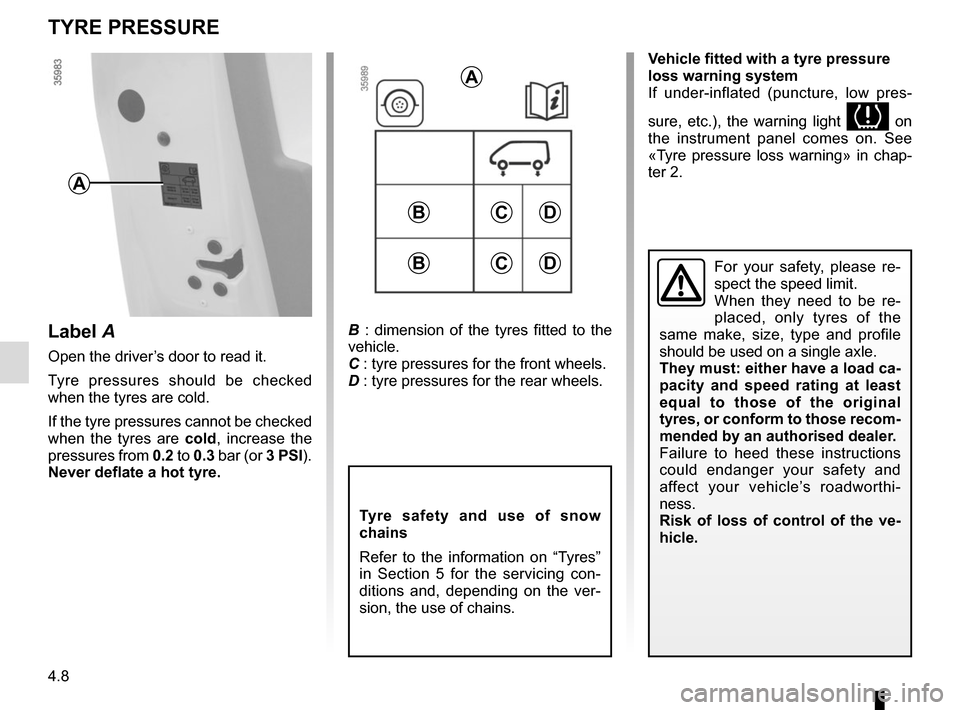
B : dimension of the tyres fitted to the
vehicle.
C : tyre pressures for the front wheels.
D : tyre pressures for the rear wheels.
Tyre safety and use of snow
chains
Refer to the information on “Tyres”
in Section 5 for the servicing con-
ditions and, depending on the ver-
sion, the use of chains.
CD
A
A
For your safety, please re-
spect the speed limit.
When they need to be re-
placed, only tyres of the
same make, size, type and profile
should be used on a single axle.
They must: either have a load ca-
pacity and speed rating at least
equal to those of the original
tyres, or conform to those recom-
mended by an authorised dealer.
Failure to heed these instructions
could endanger your safety and
affect your vehicle’s roadworthi-
ness.
Risk of loss of control of the ve-
hicle.
Label A
Open the driver’s door to read it.
Tyre pressures should be checked
when the tyres are cold.
If the tyre pressures cannot be checked
when the tyres are cold, increase the
pressures from 0.2 to 0.3 bar (or 3 PSI).
Never deflate a hot tyre.
B
CDB
Vehicle fitted with a tyre pressure
loss warning system
If under-inflated (puncture, low pres-
sure, etc.), the warning light
on
the instrument panel comes on. See
«Tyre pressure loss warning» in chap-
ter 2.