airbag RENAULT ZOE 2018 User Guide
[x] Cancel search | Manufacturer: RENAULT, Model Year: 2018, Model line: ZOE, Model: RENAULT ZOE 2018Pages: 226, PDF Size: 5.51 MB
Page 61 of 226
1.55
CHILD SAFETY: deactivating, activating the front passenger airbag (1/3)
Deactivating the front
passenger airbags
(on equipped vehicles)
You must deactivate the devices in ad-
dition to the front passenger seat belt
before fitting a child seat in the front
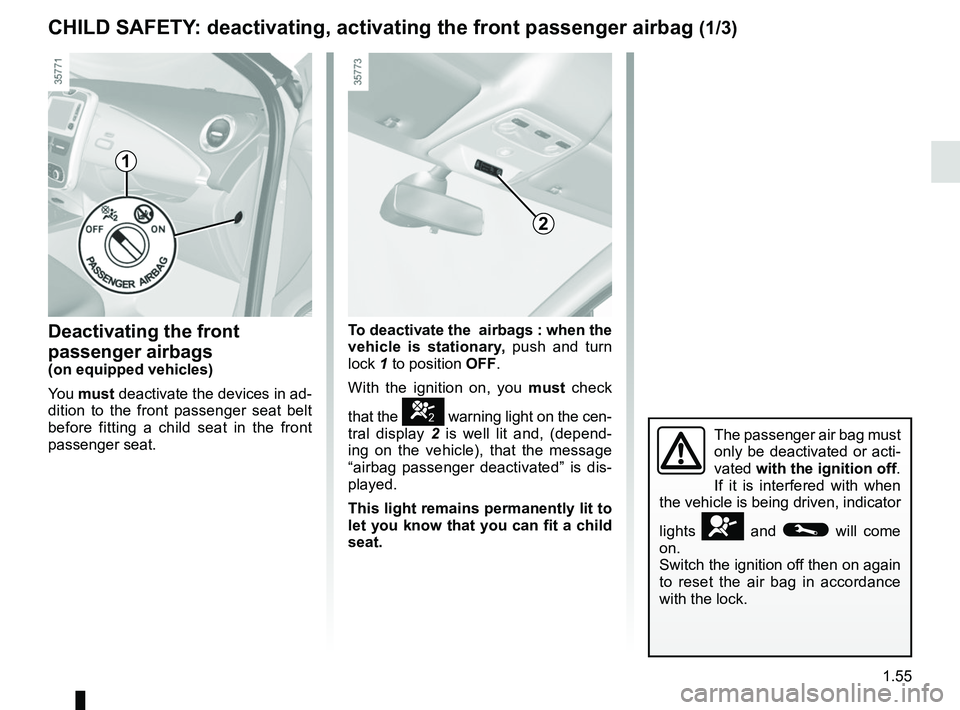
passenger seat. To deactivate the
airbags : when the
vehicle is stationary, push and turn
lock 1 to position OFF.
With the ignition on, you must check
that the
] warning light on the cen-
tral display 2 is well lit and, (depend-
ing on the vehicle), that the message
“airbag passenger deactivated” is dis-
played.
This light remains permanently lit to
let you know that you can fit a child
seat.
1
2
The passenger air bag must
only be deactivated or acti-
vated with the ignition off.
If it is interfered with when
the vehicle is being driven, indicator
lights
å and © will come
on.
Switch the ignition off then on again
to reset the air bag in accordance
with the lock.
Page 62 of 226
1.56
3
CHILD SAFETY: deactivating, activating the front passenger airbag (2/3)
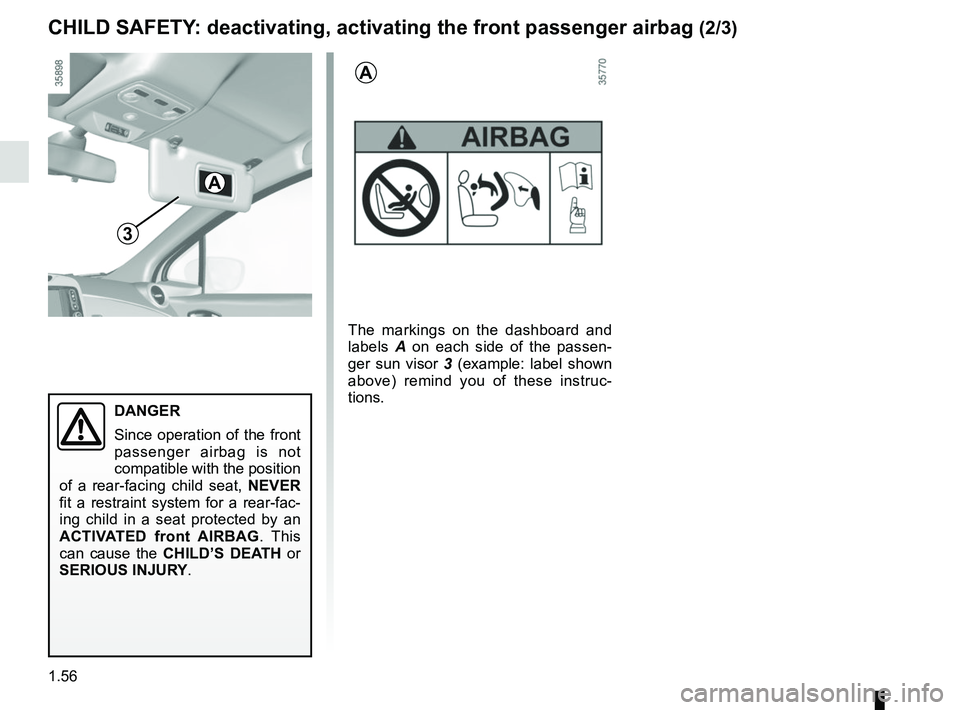
The markings on the dashboard and
labels A on each side of the passen-
ger sun visor 3 (example: label shown
above) remind you of these instruc-
tions.
A
A
DANGER
Since operation of the front
passenger airbag is not
compatible with the position
of a rear-facing child seat, NEVER
fit a restraint system for a rear-fac-
ing child in a seat protected by an
ACTIVATED front AIRBAG . This
can cause the CHILD’S DEATH or
SERIOUS INJURY.
Page 63 of 226
1.57
CHILD SAFETY: deactivating, activating the front passenger airbag (3/3)
Activating the front
passenger air bags
You should reactivate the airbags as
soon as you remove the child seat from
the front passenger seat to ensure the
protection of the front passenger in the
event of an impact.
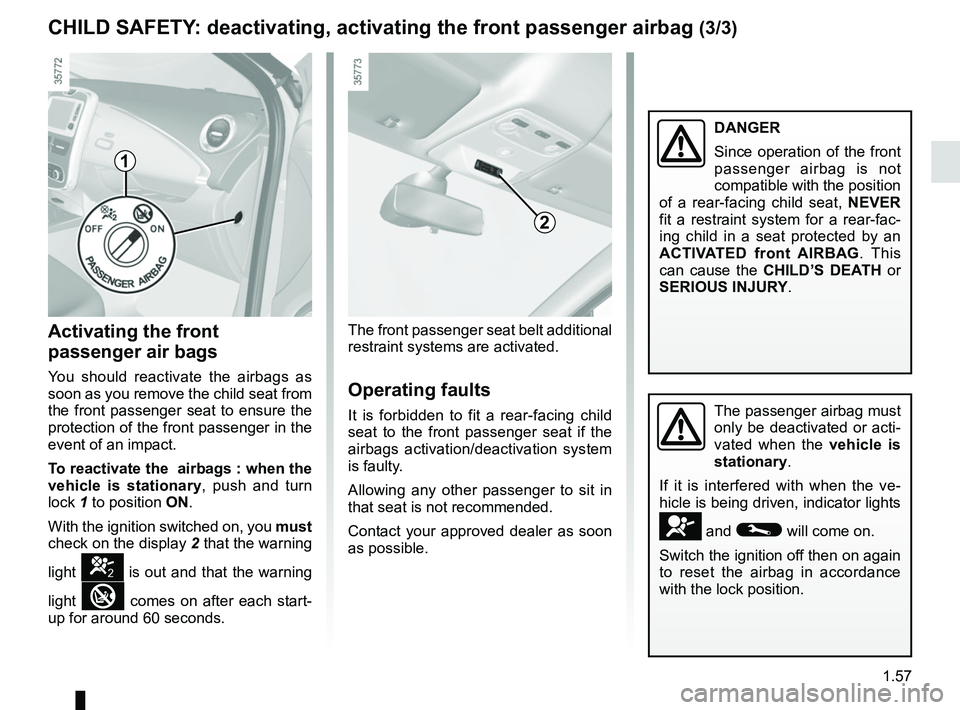
To reactivate the airbags : when the
vehicle is stationary , push and turn
lock 1 to position ON.
With the ignition switched on, you must
check on the display 2 that the warning
light
] is out and that the warning
light
comes on after each start-
up for around 60 seconds. The front passenger seat belt additional
restraint systems are activated.
Operating faults
It is forbidden to fit a rear-facing child
seat to the front passenger seat if the
airbags activation/deactivation system
is faulty.
Allowing any other passenger to sit in
that seat is not recommended.
Contact your approved dealer as soon
as possible.The passenger airbag must
only be deactivated or acti-
vated when the vehicle is
stationary.
If it is interfered with when the ve-
hicle is being driven, indicator lights
å and © will come on.
Switch the ignition off then on again
to reset the airbag in accordance
with the lock position.
1
2
DANGER
Since operation of the front
passenger airbag is not
compatible with the position
of a rear-facing child seat, NEVER
fit a restraint system for a rear-fac-
ing child in a seat protected by an
ACTIVATED front AIRBAG . This
can cause the CHILD’S DEATH or
SERIOUS INJURY.
Page 65 of 226
1.59
DRIVING POSITION: LEFT-HAND DRIVE (2/2)
The equipment fitted, described below, DEPENDS ON THE VERSION AND COUNTRY.
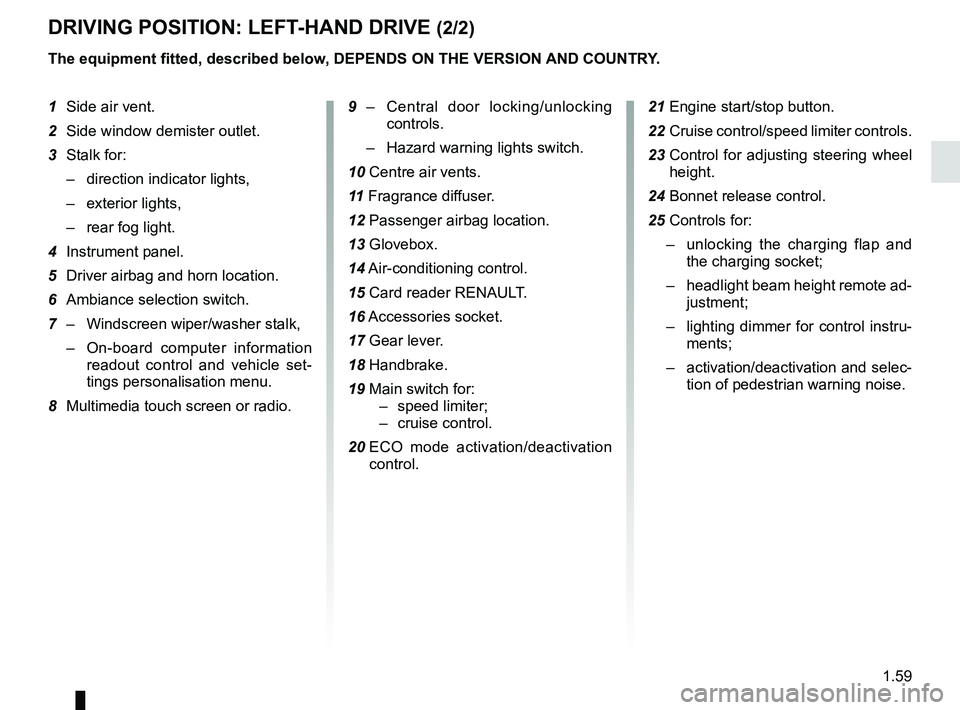
1 Side air vent.
2 Side window demister outlet.
3 Stalk for:
– direction indicator lights,
– exterior lights,
– rear fog light.
4 Instrument panel.
5 Driver airbag and horn location.
6 Ambiance selection switch.
7 – Windscreen wiper/washer stalk,
– On-board computer information
readout control and vehicle set-
tings personalisation menu.
8 Multimedia touch screen or radio. 9 –
Central door locking/unlocking
controls.
– Hazard warning lights switch.
10 Centre air vents.
11 Fragrance diffuser.
12 Passenger airbag location.
13 Glovebox.
14 Air-conditioning control.
15 Card reader RENAULT.
16 Accessories socket.
17 Gear lever.
18 Handbrake.
19 Main switch for: – speed limiter;
– cruise control.
20 ECO mode activation/deactivation
control. 21 Engine start/stop button.
22 Cruise control/speed limiter controls.
23 Control for adjusting steering wheel
height.
24 Bonnet release control.
25 Controls for: – unlocking the charging flap and
the charging socket;
– headlight beam height remote ad-
justment;
– lighting dimmer for control instru-
ments;
– activation/deactivation and selec-
tion of pedestrian warning noise.
Page 67 of 226
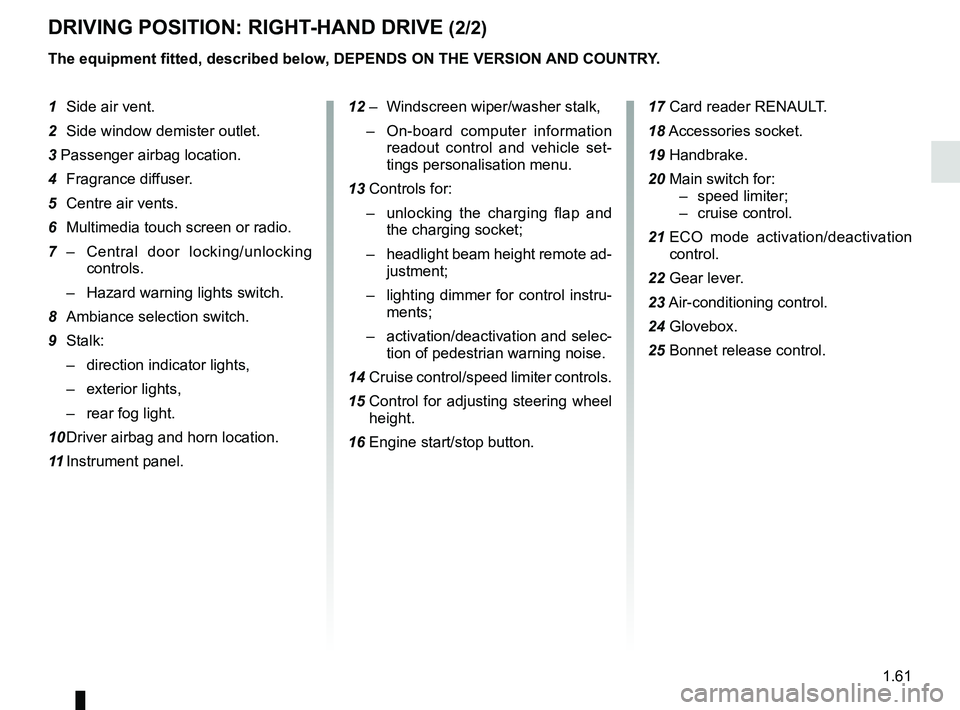
1.61
DRIVING POSITION: RIGHT-HAND DRIVE (2/2)
The equipment fitted, described below, DEPENDS ON THE VERSION AND COUNTRY.
1 Side air vent.
2 Side window demister outlet.
3 Passenger airbag location.
4 Fragrance diffuser.
5 Centre air vents.
6 Multimedia touch screen or radio.
7 – Central door locking/unlocking
controls.
– Hazard warning lights switch.
8 Ambiance selection switch.
9 Stalk: – direction indicator lights,
– exterior lights,
– rear fog light.
10 Driver airbag and horn location.
11 Instrument panel. 12 – Windscreen wiper/washer stalk,
– On-board computer information
readout control and vehicle set-
tings personalisation menu.
13 Controls for: – unlocking the charging flap and
the charging socket;
– headlight beam height remote ad-
justment;
– lighting dimmer for control instru-
ments;
– activation/deactivation and selec-
tion of pedestrian warning noise.
14 Cruise control/speed limiter controls.
15 Control for adjusting steering wheel
height.
16 Engine start/stop button. 17 Card reader RENAULT.
18
Accessories socket.
19 Handbrake.
20 Main switch for: – speed limiter;
– cruise control.
21 ECO mode activation/deactivation
control.
22 Gear lever.
23 Air-conditioning control.
24 Glovebox.
25 Bonnet release control.
Page 77 of 226

The display of information shown below DEPENDS ON THE VEHICLE EQUIPMENT \
AND COUNTRY.
Examples of selectionsInterpreting the display selected
LEARNING THE")
1.71
ON-BOARD COMPUTER: trip settings (3/3)
The display of information shown below DEPENDS ON THE VEHICLE EQUIPMENT \
AND COUNTRY.
Examples of selectionsInterpreting the display selected
LEARNING THE TYRE PRESSURE
d) Reset the tyre pressure.
Please refer to the information on the “Tyre pressure loss warning” in
Section 2.
Passenger airbag off
e) Trip log. Successive display:
– information messages;
– operating fault messages.
Page 79 of 226

1.73
TRIP COMPUTER AND WARNING SYSTEM: operating fault messages
These appear with the © warning light and mean that you should drive very carefully to an author\
ised dealer as
soon as possible. If you fail to follow this recommendation, you risk da\
maging your vehicle.
They disappear when the display selection key is pressed or after severa\
l seconds and are stored in the computer log. The
©
warning light stays on. Examples of operating fault messages are given i\
n the following pages.
Examples of messages Interpreting the display selected
«Check airbag» Indicates a fault in the restraint system in addition to the seat belts.\
In the event of an
accident, it is possible that they may not be triggered.
«Elec. System to check» Indicates a fault on one of the pedal sensors or in the 12 V battery man\
agement
system.
«Check braking system» Indicates wear or the need to check the braking system.
«Vehicle plug to be checked» Indicates overheating at the vehicle-side charging socket. Wait for about 20 minutes
and try again. If this does not work, contact an authorised dealer.
«Elec. System to check» Indicates a fault in the traction system.
«Always charging» Indicates a fault on the traction battery recharge system.