alarm SAAB 9-3 2000 User Guide
[x] Cancel search | Manufacturer: SAAB, Model Year: 2000, Model line: 9-3, Model: SAAB 9-3 2000Pages: 236, PDF Size: 10.85 MB
Page 57 of 236
57 Instruments and controls
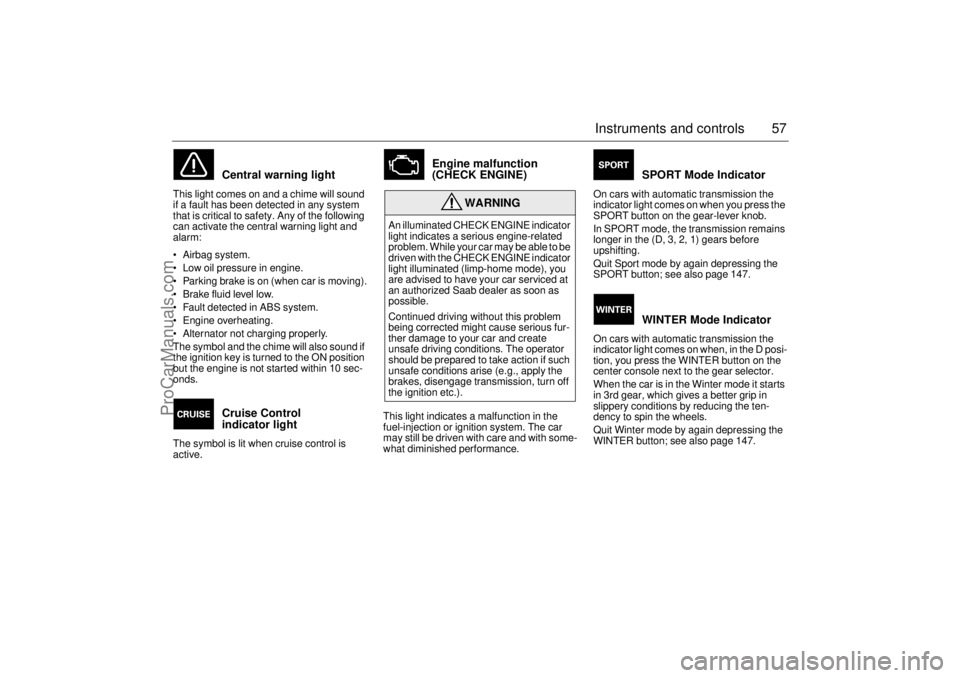
Central warning light
This light comes on and a chime will sound
if a fault has been detected in any system
that is critical to safety. Any of the following
can activate the central warning light and
alarm:
Airbag system.
Low oil pressure in engine.
Parking brake is on (when car is moving).
Brake fluid level low.
Fault detected in ABS system.
Engine overheating.
Alternator not charging properly.
The symbol and the chime will also sound if
the ignition key is turned to the ON position
but the engine is not started within 10 sec-
onds.
Cruise Control
indicator light
The symbol is lit when cruise control is
active.
Engine malfunction
(CHECK ENGINE)
This light indicates a malfunction in the
fuel-injection or ignition system. The car
may still be driven with care and with some-
what diminished performance.
SPORT Mode Indicator
On cars with automatic transmission the
indicator light comes on when you press the
SPORT button on the gear-lever knob.
In SPORT mode, the transmission remains
longer in the (D, 3, 2, 1) gears before
upshifting.
Quit Sport mode by again depressing the
SPORT button; see also page 147.
WINTER Mode Indicator
On cars with automatic transmission the
indicator light comes on when, in the D posi-
tion, you press the WINTER button on the
center console next to the gear selector.
When the car is in the Winter mode it starts
in 3rd gear, which gives a better grip in
slippery conditions by reducing the ten-
dency to spin the wheels.
Quit Winter mode by again depressing the
WINTER button; see also page 147.
WARNING
An illuminated CHECK ENGINE indicator
light indicates a serious engine-related
problem. While your car may be able to be
driven with the CHECK ENGINE indicator
light illuminated (limp-home mode), you
are advised to have your car serviced at
an authorized Saab dealer as soon as
possible.
Continued driving without this problem
being corrected might cause serious fur-
ther damage to your car and create
unsafe driving conditions. The operator
should be prepared to take action if such
unsafe conditions arise (e.g., apply the
brakes, disengage transmission, turn off
the ignition etc.).
ProCarManuals.com
Page 60 of 236
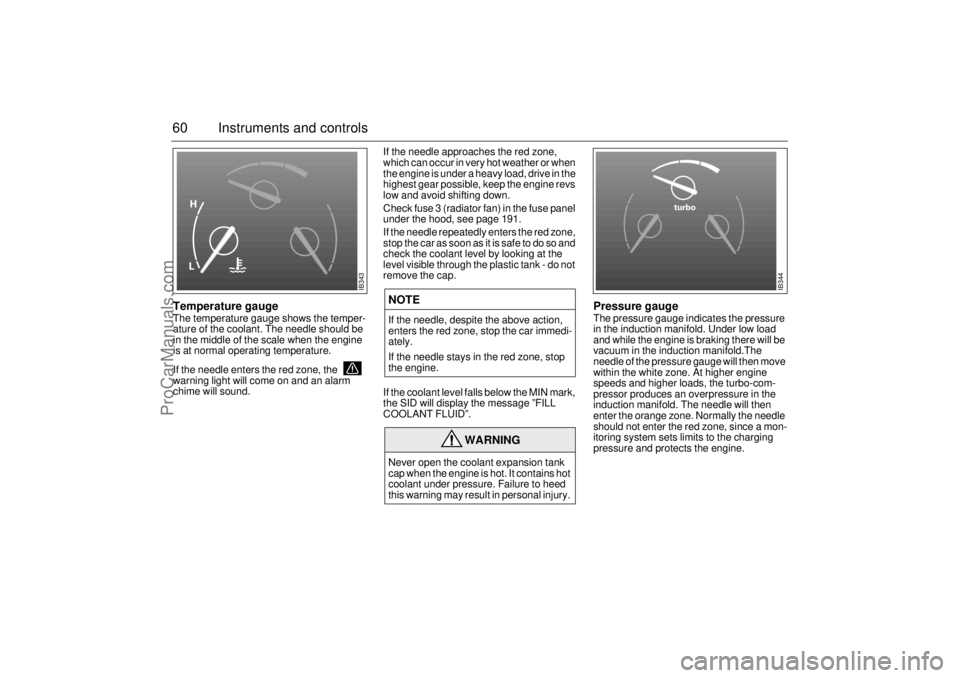
60 Instruments and controlsTemperature gaugeThe temperature gauge shows the temper-
ature of the coolant. The needle should be
in the middle of the scale when the engine
is at normal operating temperature.
If the needle enters the red zone, the
warning light will come on and an alarm
chime will sound. If the needle approaches the red zone,
which can occur in very hot weather or when
the engine is under a heavy load, drive in the
highest gear possible, keep the engine revs
low and avoid shifting down.
Check fuse 3 (radiator fan) in the fuse panel
under the hood, see page 191.
If the needle repeatedly enters the red zone,
stop the car as soon as it is safe to do so and
check the coolant level by looking at the
level visible through the plastic tank - do not
remove the cap.
If the coolant level falls below the MIN mark,
the SID will display the message ”FILL
COOLANT FLUID”.
Pressure gaugeThe pressure gauge indicates the pressure
in the induction manifold. Under low load
and while the engine is braking there will be
vacuum in the induction manifold.The
needle of the pressure gauge will then move
within the white zone. At higher engine
speeds and higher loads, the turbo-com-
pressor produces an overpressure in the
induction manifold. The needle will then
enter the orange zone. Normally the needle
should not enter the red zone, since a mon-
itoring system sets limits to the charging
pressure and protects the engine.
NOTEIf the needle, despite the above action,
enters the red zone, stop the car immedi-
ately.
If the needle stays in the red zone, stop
the engine.
WARNING
Never open the coolant expansion tank
cap when the engine is hot. It contains hot
coolant under pressure. Failure to heed
this warning may result in personal injury.
IB343
IB344
ProCarManuals.com
Page 63 of 236

63 Instruments and controls
CHECK messages When the engine is started, CHECKING will
appear on the display for about four sec-
onds, while the SID checks are being per-
formed.
When a CHECK message is generated
while the car is being driven, a chime will
sound, INFO DISPL will illuminate on the
main instrument panel, and the message
will appear on the SID. The number of mes-
sages that can be displayed by the SID
varies with the specification of the car.
If more than one CHECK message has
been generated, the
+ symbol will appear to
the left of the text on the display. The mes-
sages appear in order of priority.
If a new fault occurs while another message
is being displayed, the message relating to
the new one will appear for 10 seconds,
after which the display will return to the ear-
lier one.
Press CLEAR once to acknowledge a mes-
sage, whereupon it will be cleared from the
display. It will not be displayed again before
the ignition has been switched off and then
on again. The following CHECK messages may be
displayed:
1 This message cannot be removed by pressing
CLEAR. Press the brake pedal to clear.
2 This message will be displayed approxi-
mately 600 miles (1,000 km) before the next
scheduled service is due, or when 365 days
have elapsed since the last service. The
message should be cleared at the time of that
service (see the Saab Warranties & Service
Record Booklet).
If you have carried out the service yourself,
you can clear the message by pressing
CLEAR once. Reset by pressing CLEAR for
at least eight seconds, until ”SERVICE”
appears on the display and a chime sounds.
Night Panel To improve night-driving conditions inside
the car, the Night Panel mode can be
selected. In this mode, the amount of infor-
mation displayed is reduced, and only the
most important instruments and displays
will be illuminated.
When the Night Panel button is pressed,
only the speedometer will be illuminated (up
to the 87 mph or 140-km/h graduation), all
the other instruments illumination will be
extinguished and their needles moved to
zero. Both the SID and the ACC displays will
be extinguished and the backlighting for
switches and other controls will be dimmed.
Note: All indicator and warning lights,
together with the display of CHECK mes-
sages, will operate as normal.
The following conditions will wake up the
respective displays in the Night-Panel
mode:
Adjusting of the Audio System, SID or
ACC (display comes on for ten seconds).
CHECK message generated in the SID.
High engine revs cause the rev counter to
be illuminated until the engine speed has
fallen again.
If the quantity of fuel remaining falls below
4 gallons (15 liters), the fuel gauge will be
illuminated.
If the engine temperature rises above nor-
mal, the temperature gauge will be illumi-
nated. Display shows: See
page
TEST BRAKE LIGHTS
1)
183
BRAKE LIGHT FAILURE 183
FRONT LIGHT FAILURE 181
REAR LIGHT FAILURE 183
FOG LIGHT FAILURE 183
WASHER FLUID LEVEL LOW 180
FILL COOLANT FLUID 174
TIGHTEN FUEL FILLER CAP 138
KEY NOT ACCEPTED 39
REPLACE KEY BATTERY 39
SERVICE THEFT ALARM 39
TRANSMISSION OVERHEAT-
ING 144
TIME FOR SERVICE
2)
212
ProCarManuals.com
Page 65 of 236
65 Instruments and controls
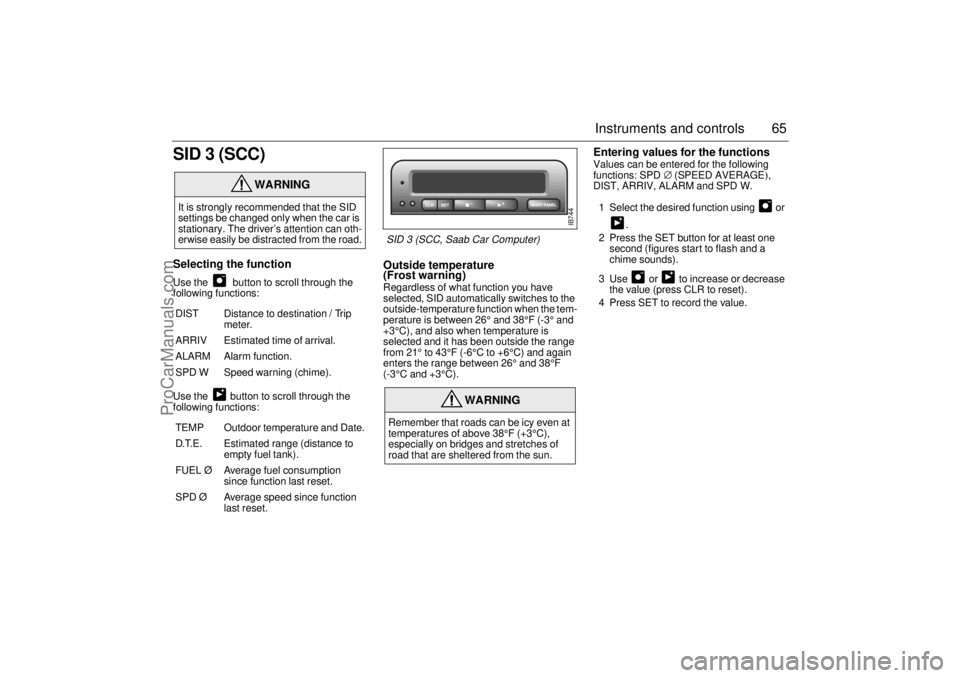
SID 3 (SCC)Selecting the function Use the button to scroll through the
following functions:
Use the button to scroll through the
following functions:
Outside temperature
(Frost warning) Regardless of what function you have
selected, SID automatically switches to the
outside-temperature function when the tem-
perature is between 26° and 38°F (-3° and
+3°C), and also when temperature is
selected and it has been outside the range
from 21° to 43°F (-6°C to +6°C) and again
enters the range between 26° and 38°F
(-3°C and +3°C).
Entering values for the functions Values can be entered for the following
functions: SPD∅ (SPEED AVERAGE),
DIST, ARRIV, ALARM and SPD W.
1 Select the desired function using or
.
2 Press the SET button for at least one
second (figures start to flash and a
chime sounds).
3 Use or to increase or decrease
the value (press CLR to reset).
4 Press SET to record the value.
WARNING
It is strongly recommended that the SID
settings be changed only when the car is
stationary. The driver’s attention can oth-
erwise easily be distracted from the road.
DIST Distance to destination / Trip
meter.
ARRIV Estimated time of arrival.
ALARM Alarm function.
SPD W Speed warning (chime).
TEMP Outdoor temperature and Date.
D.T.E. Estimated range (distance to
empty fuel tank).
FUEL Ø Average fuel consumption
since function last reset.
SPD Ø Average speed since function
last reset.
WARNING
Remember that roads can be icy even at
temperatures of above 38°F (+3°C),
especially on bridges and stretches of
road that are sheltered from the sun.
IB744
SID 3 (SCC, Saab Car Computer)
ProCarManuals.com
Page 66 of 236
66 Instruments and controlsSetting the date1 Use to select TEMP/DATE.
2 Press the SET button for at least one
second (year starts to flash and a chime
sounds).
3 Set the year using or .
4 Touch SET.
5 Set the month in the same way.
6 Touch SET.
7 Set the day in the same way.
8 Press SET to save the date setting.
Turning the Alarm and Speed
warning on or off 1 Select the Alarm or Speed-warning
function.
2 Press SET to turn on the function.
Press CLR to turn off the function.
When either function is on, an asterisk
* will
be visible on the far right of the display. The
function will be visible even if another func-
tion has been selected.
The Alarm and Speed-warning settings will
not be cancelled when the engine is
switched off.
When the Alarm has been set to come on at
a specified time, it will only be activated
once – it will not come on at the same time
every day. Press SET to turn it on again.
The Alarm will continue to beep for one
minute if not switched off.
Calculation of arrival time and
average speed The settings must be made before the jour-
ney is started.
Calculation of arrival time:
1 Select DIST using the button.
2 Hold SET until display starts flashing.
3 Set the destination distance using or
.
4 Press SET to store settings.
When ARRIV is selected during the journey,
the arrival time based on the average speed
over the past 20 minutes will be displayed.
Press DIST and the distance remaining to
the destination will be displayed in the same
way.
After the distance to destination has
decreased to zero, the DIST will function as
a trip meter (see ”Using DIST as a trip
meter”). The starting value for the trip meter
will be the last distance set in the DIST
function.
Example: The DIST setting was 100 miles.
Once 100 miles (160 km) has been cov-
ered, the DIST will start to function as a trip
meter, the initial reading of which will be
100 miles (160 km).
ProCarManuals.com
Page 68 of 236

68 Instruments and controlsResetting values
To reset the values, press CLR for at least
four seconds.
The following functions will be reset
simultaneously:
Estimated range on remaining fuel
(function based on a fuel consumption of
28 mpg)
Average fuel consumption
Average speed
Arrival time (function based on current
speed)
Programmed values for DIST, ALARM and
SPD W will not be reset (see the respective
function).
CHECK messages When the engine is started, CHECKING will
appear on the display for about four sec-
onds, while the SID checks are being per-
formed.
When a CHECK message is generated
while the car is being driven, a chime will
sound, INFO DISPL will illuminate on the
main instrument panel, and the message
will appear on the SID. The number of mes-
sages that can be displayed by the SID
varies with the specification of the car.
If more than one CHECK message has
been generated, the
+ symbol will appear to
the left of the text on the display. The mes-
sages appear in order of priority.
If a new fault occurs while another message
is being displayed, the message relating to
the new one will appear for 10 seconds,
after which the display will return to the ear-
lier one.
Press CLR once to acknowledge a mes-
sage, whereupon it will be cleared from the
display. It will not be displayed again before
the ignition has been switched off and then
on again. The following CHECK messages may be
displayed:
1 This message cannot be removed by pressing
CLR. Press the brake pedal to clear.
2 This message will be displayed approximately
600 miles (1,000 km) before the next sched-
uled service is due, or when 365 days have
elapsed since the last service. The message
should be cleared at the time of that service
(see the Saab Warranties & Service Record
Booklet).
If you have carried out the service yourself, you
can clear the message by pressing CLR once.
Reset by pressing CLR for at least eight sec-
onds, until ”SERVICE” appears on the display
and a chime sounds. Display shows: See
page
TEST BRAKE LIGHTS
1)
183
BRAKE LIGHT FAILURE 183
FRONT LIGHT FAILURE 181
REAR LIGHT FAILURE 183
FOG LIGHT FAILURE 184
WASHER FLUID LEVEL LOW 180
TIGHTEN FUEL FILLER CAP 138
FILL COOLANT FLUID 174
KEY NOT ACCEPTED 39
REPLACE KEY BATTERY 39
SERVICE THEFT ALARM 39
TRANSMISSION OVERHEAT-
ING 144
TIME FOR SERVICE
2)
212
ProCarManuals.com
Page 125 of 236
125 Interior equipment, trunk
Trunk, Coupé and 5-doorTrunk lid lockUnlock the trunk lid by pressing the lower button on the remote trans-
mitter, by pressing the remote release button on the driver’s door or
by using the key. The alarm horn sounds three times and the lights
flash when the trunk is released with the remote control.
Programming features, see page 231.
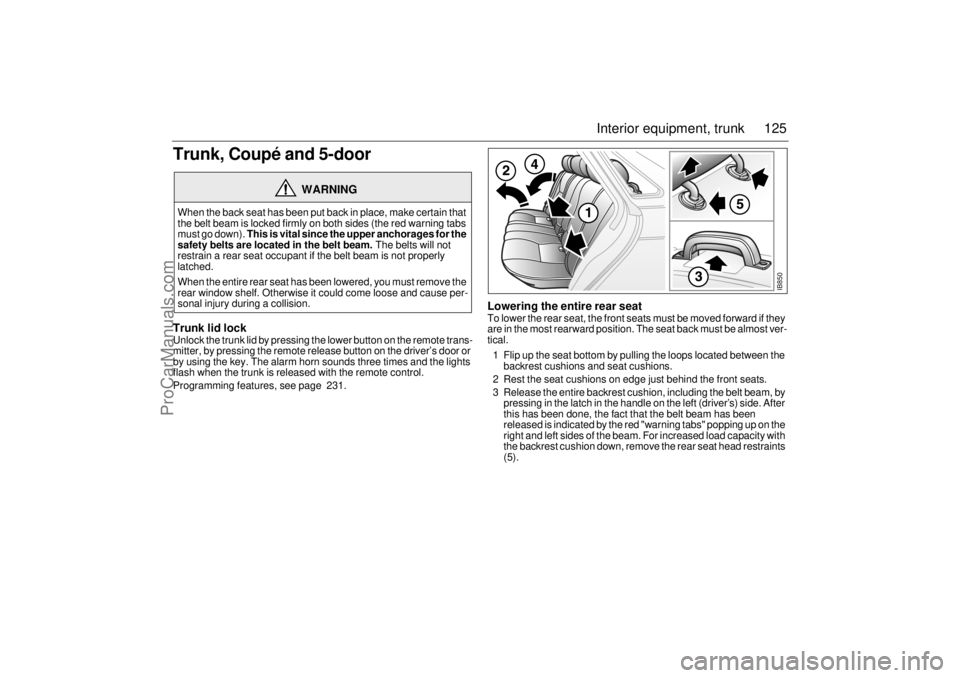
Lowering the entire rear seatTo lower the rear seat, the front seats must be moved forward if they
are in the most rearward position. The seat back must be almost ver-
tical.
1 Flip up the seat bottom by pulling the loops located between the
backrest cushions and seat cushions.
2 Rest the seat cushions on edge just behind the front seats.
3 Release the entire backrest cushion, including the belt beam, by
pressing in the latch in the handle on the left (driver’s) side. After
this has been done, the fact that the belt beam has been
released is indicated by the red "warning tabs" popping up on the
right and left sides of the beam. For increased load capacity with
the backrest cushion down, remove the rear seat head restraints
(5).
WARNING
When the back seat has been put back in place, make certain that
the belt beam is locked firmly on both sides (the red warning tabs
must go down). This is vital since the upper anchorages for the
safety belts are located in the belt beam. The belts will not
restrain a rear seat occupant if the belt beam is not properly
latched.
When the entire rear seat has been lowered, you must remove the
rear window shelf. Otherwise it could come loose and cause per-
sonal injury during a collision.
IB850
ProCarManuals.com
Page 188 of 236

188 Car careMAXI fusesThe MAXI fuses are housed in the fuse box
under the hood. These fuses can be
checked in the same way as the other fuses.
The MAXI fuses are designed to protect the
car’s electrical system from being dam-
aged. Each MAXI fuse protects a number of
electrical circuits and functions and there-
fore has a higher rating (amperage) than the
standard fuses. No spare MAXI fuses are
supplied with the car.
DICE / TWICEDICE = Dashboard Integrated Central Elec-
tronics
TWICE = Theft-Warning Central Electronics
DICE and TWICE are electronic control
modules.
DICE controls, among other things:
Front lights and interior lighting.
Instrument illumination.
Intermittent wiper operation.
Electric heating of rear window and door
mirrors.
TWICE controls, among other things:
Central locking.
Car alarm (Anti-theft system).
Engine immobilizer.
Auto checking of lights.
Electric heating of rear seat.
Safety belt reminder.
Electrically adjustable passenger seat.The DICE and TWICE control modules are
linked to a data bus, which is basically an
information carrier that allows information to
be exchanged between all the control mod-
ules and components connected to the bus.
If a fault occurs in any of these components,
diagnostic faults codes are set in the rele-
vant control module, which enhances fault
diagnosis at the Saab dealer.
The scan tool connector for fault diagnosis
is located under the instrument panel on the
drivers side.
NOTEIf a MAXI fuse blows, it means that there
is a major fault in the electrical system.
Have the car checked without delay by an
authorized Saab dealer.
IB920
MAXI fuse for soft-top system
(Convertible)
ProCarManuals.com
Page 231 of 236

231 Technical data
Several of the systems in your Saab
car may be adjusted to better fit your
individual needsSome functions are governed by legal
requirements and cannot therefore be
reprogrammed.
Consult an authorized Saab dealer for fur-
ther information.
Car alarm/central locking system:
The level of the siren when locking/
unlocking, HIGH or LOW.
The number of blinks when locking/
unlocking, 1 to 7.
Automatic locking of the trunk when the
car is driven, 1 to 8 mph (2-14 km/h), YES
or NO.
Preclude the unlocking of the trunk while
the car is driven, YES or NO.
Automatic locking of the trunk after
1 second-4 minutes if it has not been
opened, YES or NO.
Automatic locking of the trunk when it is
closed, YES or NO.Automatic climate control (ACC):
Indoor temperature can be
increased/decreased relative to the
selected temperature.
Delayed start of fan after starting the car,
to reduce risk of fogging windshield.
Temperature at which the defroster mode
is automatically selected.
Response time for the fan speed when
the selected temperature is changed.
Temperature at which the air distribution
switches from defrost mode to
defrost/floor mode.
Last manual selection will be selected the
next time the car is started.Saab Information Display (SID):
Outdoor temperature display can be
adjusted.
Days remaining to next service can be
activated/counted or not.
Delete “Test Brake Light“ message on
SID at start-up.
Miscellaneous:
Select the on-time for heated rear seat.
Coolant temperature gauge adjustment
can be increased/decreased.
Fuel level gauge adjustment can be
increased/decreased.
Additional sweep of the wipers after wind-
shield washer function (ON or OFF).
Follow me home on-time can vary from 20
to 50 seconds.
Night panel illumination deactivation
speed for the speedometer can be
adjusted.
ProCarManuals.com
Page 232 of 236

232 Technical dataFollowing adjustments can be done
by the driver:Automatic Climate Control (ACC):
To alter the preprogrammed “AUTO“ start
up mode with your own preferences you can
manually select the desired settings for:
Temperature.
Fan speed.
Air distribution.
See “Programming I” on page 86 and “Pro-
gramming II” on page 87.Saab 9-3 Audio System:
The following functions can be adjusted by
the driver (see page 104):
Maximum starting volume (when the
radio is switched on).
Telephone volume (if the car is equipped
with a phone connected to the audio sys-
tem).
Speed dependent volume (volume
increases or decreases with vehicle
speed).
Loudness.Alarm System:
The glass breakage sensor can be tempo-
rarily disabled, see page 36.
Daytime Running Lights:
To disable, turn off the ignition and pull out
fuse 15, see page 189.
ProCarManuals.com