fuel SAAB 9-3 2000 User Guide
[x] Cancel search | Manufacturer: SAAB, Model Year: 2000, Model line: 9-3, Model: SAAB 9-3 2000Pages: 236, PDF Size: 10.85 MB
Page 63 of 236

63 Instruments and controls
CHECK messages When the engine is started, CHECKING will
appear on the display for about four sec-
onds, while the SID checks are being per-
formed.
When a CHECK message is generated
while the car is being driven, a chime will
sound, INFO DISPL will illuminate on the
main instrument panel, and the message
will appear on the SID. The number of mes-
sages that can be displayed by the SID
varies with the specification of the car.
If more than one CHECK message has
been generated, the
+ symbol will appear to
the left of the text on the display. The mes-
sages appear in order of priority.
If a new fault occurs while another message
is being displayed, the message relating to
the new one will appear for 10 seconds,
after which the display will return to the ear-
lier one.
Press CLEAR once to acknowledge a mes-
sage, whereupon it will be cleared from the
display. It will not be displayed again before
the ignition has been switched off and then
on again. The following CHECK messages may be
displayed:
1 This message cannot be removed by pressing
CLEAR. Press the brake pedal to clear.
2 This message will be displayed approxi-
mately 600 miles (1,000 km) before the next
scheduled service is due, or when 365 days
have elapsed since the last service. The
message should be cleared at the time of that
service (see the Saab Warranties & Service
Record Booklet).
If you have carried out the service yourself,
you can clear the message by pressing
CLEAR once. Reset by pressing CLEAR for
at least eight seconds, until ”SERVICE”
appears on the display and a chime sounds.
Night Panel To improve night-driving conditions inside
the car, the Night Panel mode can be
selected. In this mode, the amount of infor-
mation displayed is reduced, and only the
most important instruments and displays
will be illuminated.
When the Night Panel button is pressed,
only the speedometer will be illuminated (up
to the 87 mph or 140-km/h graduation), all
the other instruments illumination will be
extinguished and their needles moved to
zero. Both the SID and the ACC displays will
be extinguished and the backlighting for
switches and other controls will be dimmed.
Note: All indicator and warning lights,
together with the display of CHECK mes-
sages, will operate as normal.
The following conditions will wake up the
respective displays in the Night-Panel
mode:
Adjusting of the Audio System, SID or
ACC (display comes on for ten seconds).
CHECK message generated in the SID.
High engine revs cause the rev counter to
be illuminated until the engine speed has
fallen again.
If the quantity of fuel remaining falls below
4 gallons (15 liters), the fuel gauge will be
illuminated.
If the engine temperature rises above nor-
mal, the temperature gauge will be illumi-
nated. Display shows: See
page
TEST BRAKE LIGHTS
1)
183
BRAKE LIGHT FAILURE 183
FRONT LIGHT FAILURE 181
REAR LIGHT FAILURE 183
FOG LIGHT FAILURE 183
WASHER FLUID LEVEL LOW 180
FILL COOLANT FLUID 174
TIGHTEN FUEL FILLER CAP 138
KEY NOT ACCEPTED 39
REPLACE KEY BATTERY 39
SERVICE THEFT ALARM 39
TRANSMISSION OVERHEAT-
ING 144
TIME FOR SERVICE
2)
212
ProCarManuals.com
Page 65 of 236
65 Instruments and controls
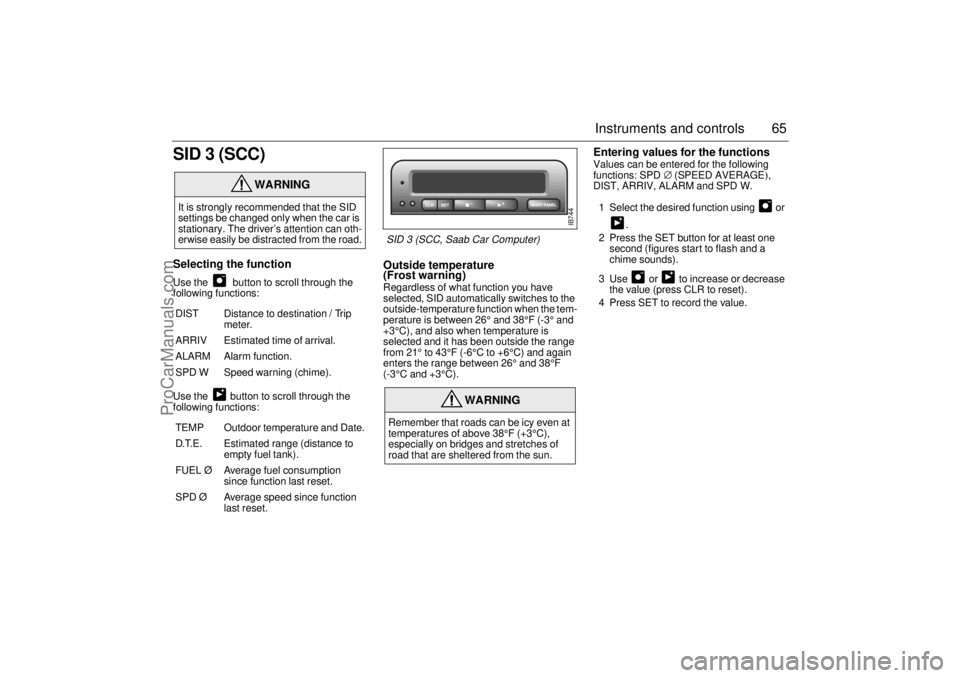
SID 3 (SCC)Selecting the function Use the button to scroll through the
following functions:
Use the button to scroll through the
following functions:
Outside temperature
(Frost warning) Regardless of what function you have
selected, SID automatically switches to the
outside-temperature function when the tem-
perature is between 26° and 38°F (-3° and
+3°C), and also when temperature is
selected and it has been outside the range
from 21° to 43°F (-6°C to +6°C) and again
enters the range between 26° and 38°F
(-3°C and +3°C).
Entering values for the functions Values can be entered for the following
functions: SPD∅ (SPEED AVERAGE),
DIST, ARRIV, ALARM and SPD W.
1 Select the desired function using or
.
2 Press the SET button for at least one
second (figures start to flash and a
chime sounds).
3 Use or to increase or decrease
the value (press CLR to reset).
4 Press SET to record the value.
WARNING
It is strongly recommended that the SID
settings be changed only when the car is
stationary. The driver’s attention can oth-
erwise easily be distracted from the road.
DIST Distance to destination / Trip
meter.
ARRIV Estimated time of arrival.
ALARM Alarm function.
SPD W Speed warning (chime).
TEMP Outdoor temperature and Date.
D.T.E. Estimated range (distance to
empty fuel tank).
FUEL Ø Average fuel consumption
since function last reset.
SPD Ø Average speed since function
last reset.
WARNING
Remember that roads can be icy even at
temperatures of above 38°F (+3°C),
especially on bridges and stretches of
road that are sheltered from the sun.
IB744
SID 3 (SCC, Saab Car Computer)
ProCarManuals.com
Page 68 of 236

68 Instruments and controlsResetting values
To reset the values, press CLR for at least
four seconds.
The following functions will be reset
simultaneously:
Estimated range on remaining fuel
(function based on a fuel consumption of
28 mpg)
Average fuel consumption
Average speed
Arrival time (function based on current
speed)
Programmed values for DIST, ALARM and
SPD W will not be reset (see the respective
function).
CHECK messages When the engine is started, CHECKING will
appear on the display for about four sec-
onds, while the SID checks are being per-
formed.
When a CHECK message is generated
while the car is being driven, a chime will
sound, INFO DISPL will illuminate on the
main instrument panel, and the message
will appear on the SID. The number of mes-
sages that can be displayed by the SID
varies with the specification of the car.
If more than one CHECK message has
been generated, the
+ symbol will appear to
the left of the text on the display. The mes-
sages appear in order of priority.
If a new fault occurs while another message
is being displayed, the message relating to
the new one will appear for 10 seconds,
after which the display will return to the ear-
lier one.
Press CLR once to acknowledge a mes-
sage, whereupon it will be cleared from the
display. It will not be displayed again before
the ignition has been switched off and then
on again. The following CHECK messages may be
displayed:
1 This message cannot be removed by pressing
CLR. Press the brake pedal to clear.
2 This message will be displayed approximately
600 miles (1,000 km) before the next sched-
uled service is due, or when 365 days have
elapsed since the last service. The message
should be cleared at the time of that service
(see the Saab Warranties & Service Record
Booklet).
If you have carried out the service yourself, you
can clear the message by pressing CLR once.
Reset by pressing CLR for at least eight sec-
onds, until ”SERVICE” appears on the display
and a chime sounds. Display shows: See
page
TEST BRAKE LIGHTS
1)
183
BRAKE LIGHT FAILURE 183
FRONT LIGHT FAILURE 181
REAR LIGHT FAILURE 183
FOG LIGHT FAILURE 184
WASHER FLUID LEVEL LOW 180
TIGHTEN FUEL FILLER CAP 138
FILL COOLANT FLUID 174
KEY NOT ACCEPTED 39
REPLACE KEY BATTERY 39
SERVICE THEFT ALARM 39
TRANSMISSION OVERHEAT-
ING 144
TIME FOR SERVICE
2)
212
ProCarManuals.com
Page 69 of 236

69 Instruments and controls
Night panelTo improve night-driving conditions inside
the car, the Night Panel mode can be
selected. In this mode, the amount of infor-
mation displayed is reduced, and only the
most important instruments and displays
will be illuminated.
When the Night Panel button is pressed,
only the speedometer will be illuminated (up
to the 87-mph or 140-km/h graduation), all
the other instruments illumination will be
extinguished and their needles moved to
zero. Both the SID and the ACC displays will
be extinguished and the backlighting for
switches and other controls will be dimmed.
Note: All indicator and warning lights,
together with the display of CHECK mes-
sages, will operate as normal. The following conditions will wake up the
respective displays in the Night-Panel
mode:
Setting of the Audio System, SID or ACC
(display comes on for ten seconds).
CHECK message generated in the SID.
High engine revs cause the rev counter to
be illuminated until the engine speed has
fallen again.
If the quantity of fuel remaining falls below
4 gallons (15 liters), the fuel gauge will be
illuminated.
If the engine temperature rises above nor-
mal, the temperature gauge will be illumi-
nated.
If the speed of the car exceeds 84 mph
(135 km/h), the entire speedometer will
be illuminated.
In cars with automatic transmission, if the
selector lever is moved from D to position
3, 2 or 1, the selector indication on the
main instrument panel will be illuminated.
To restore the displays and lighting to the
normal mode, press the Night-Panel button.
Units and language versions The SID has four sets of units:
CHECK messages can be displayed in six
language options: English, Swedish,
German, French, Italian and Spanish. METRIC IMP. 1 IMP. 2 US
km miles miles miles
km/h mph mph mph
litres gallons gallons US
gallons
°C °F °C °F
24 hours 12 hours 12 hours 12 hours
ProCarManuals.com
Page 87 of 236
87 Instruments and controls
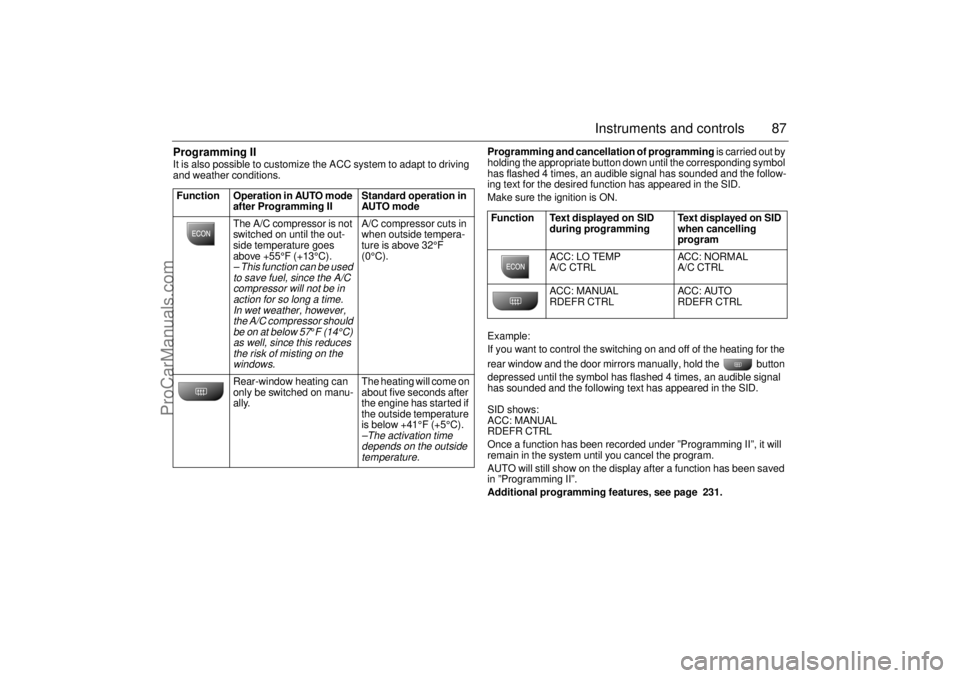
Programming II It is also possible to customize the ACC system to adapt to driving
and weather conditions. Programming and cancellation of programming is carried out by
holding the appropriate button down until the corresponding symbol
has flashed 4 times, an audible signal has sounded and the follow-
ing text for the desired function has appeared in the SID.
Make sure the ignition is ON.
Example:
If you want to control the switching on and off of the heating for the
rear window and the door mirrors manually, hold the button
depressed until the symbol has flashed 4 times, an audible signal
has sounded and the following text has appeared in the SID.
SID shows:
ACC: MANUAL
RDEFR CTRL
Once a function has been recorded under ”Programming II”, it will
remain in the system until you cancel the program.
AUTO will still show on the display after a function has been saved
in ”Programming II”.
Additional programming features, see page 231. Function Operation in AUTO mode
after Programming II Standard operation in
AUTO mode
The A/C compressor is not
switched on until the out-
side temperature goes
above +55°F (+13°C).
– This function can be used
to save fuel, since the A/C
compressor will not be in
action for so long a time.
In wet weather, however,
the A/C compressor should
be on at below 57
°F (14°C)
as well, since this reduces
the risk of misting on the
windows.
A/C compressor cuts in
when outside tempera-
ture is above 32°F
(0°C).
Rear-window heating can
only be switched on manu-
ally. The heating will come on
about five seconds after
the engine has started if
the outside temperature
is below +41°F (+5°C).–The activation time
depends on the outside
temperature.
Function Text displayed on SID
during programming Text displayed on SID
when cancelling
program
ACC: LO TEMP
A/C CTRL ACC: NORMAL
A/C CTRL
ACC: MANUAL
RDEFR CTRL ACC: AUTO
RDEFR CTRL
ProCarManuals.com
Page 88 of 236
88 Instruments and controlsUseful tips: If the ACC system is not functioning
satisfactorily the following should be tried
before you take the car to an authorized
Saab dealer.
If the indication AUTO does not light up
after starting (the ignition must have been
switched off for at least 10 minutes): See
Cancelling programming of ACC.
If you think that the ACC system is not
functioning satisfactorily you should:
1. Check that the cigarette lighter plug is
in its socket (since if the socket is empty
heated air can flow out and affect the
cabin sensor).
2. Recalibrate: See the section headed
Calibration.
If the battery has been disconnected or
has died, the ACC system should be reca-
librated: See Calibration.
Programmed settings are not deleted if the
battery has been disconnected. Extinguishing the lighting in ACC See section Night Panel, page 63.
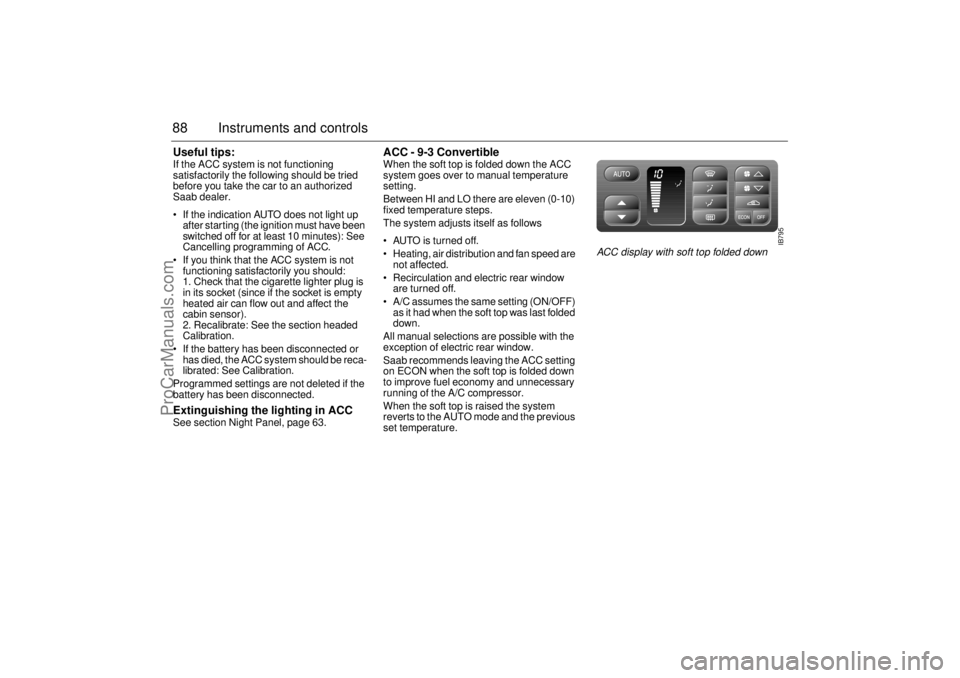
ACC - 9-3 Convertible When the soft top is folded down the ACC
system goes over to manual temperature
setting.
Between HI and LO there are eleven (0-10)
fixed temperature steps.
The system adjusts itself as follows
AUTO is turned off.
Heating, air distribution and fan speed are
not affected.
Recirculation and electric rear window
are turned off.
A/C assumes the same setting (ON/OFF)
as it had when the soft top was last folded
down.
All manual selections are possible with the
exception of electric rear window.
Saab recommends leaving the ACC setting
on ECON when the soft top is folded down
to improve fuel economy and unnecessary
running of the A/C compressor.
When the soft top is raised the system
reverts to the AUTO mode and the previous
set temperature.
IB795
ACC display with soft top folded down
ProCarManuals.com
Page 111 of 236
111 Interior equipment, trunk
Interior equipment,
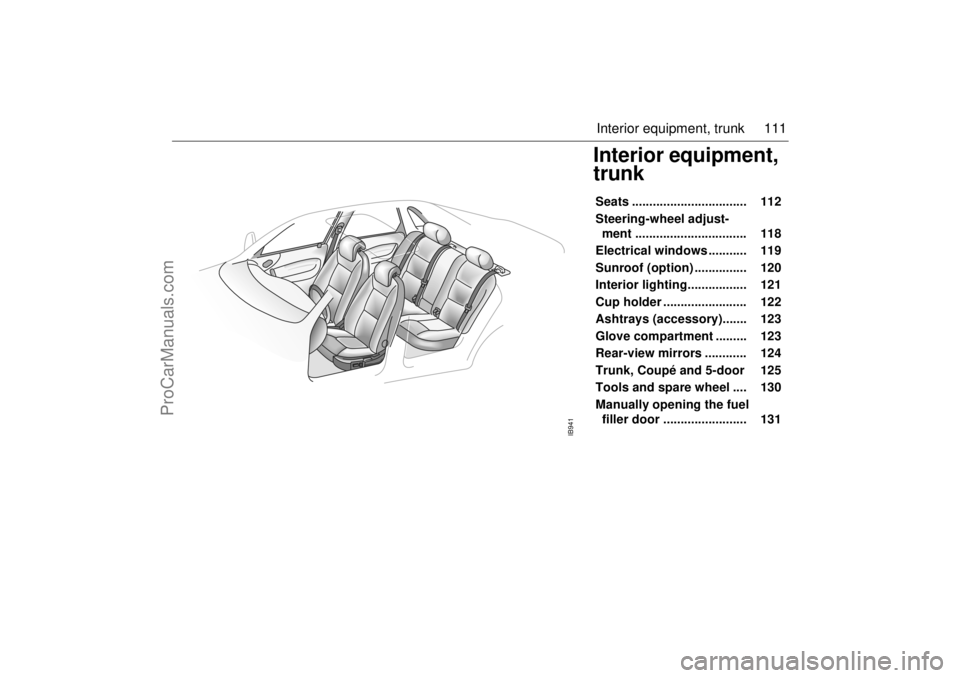
trunkSeats ................................. 112
Steering-wheel adjust-
ment ................................ 118
Electrical windows ........... 119
Sunroof (option) ............... 120
Interior lighting................. 121
Cup holder ........................ 122
Ashtrays (accessory)....... 123
Glove compartment ......... 123
Rear-view mirrors ............ 124
Trunk, Coupé and 5-door 125
Tools and spare wheel .... 130
Manually opening the fuel
filler door ........................ 131
IB941
ProCarManuals.com
Page 131 of 236
131 Interior equipment, trunk
Manually opening the
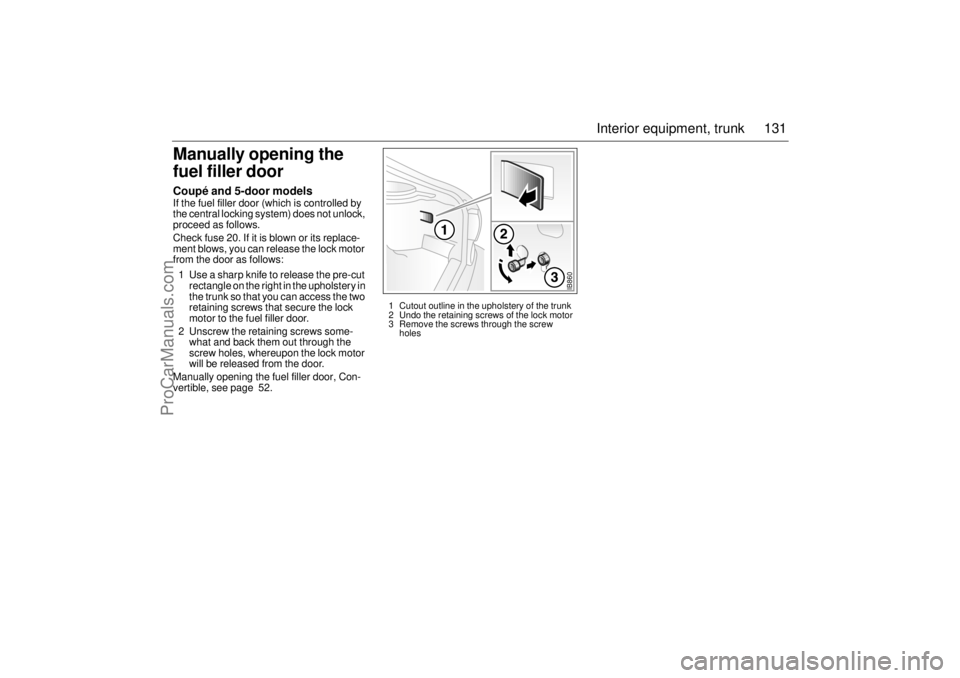
fuel filler door Coupé and 5-door models If the fuel filler door (which is controlled by
the central locking system) does not unlock,
proceed as follows.
Check fuse 20. If it is blown or its replace-
ment blows, you can release the lock motor
from the door as follows:
1 Use a sharp knife to release the pre-cut
rectangle on the right in the upholstery in
the trunk so that you can access the two
retaining screws that secure the lock
motor to the fuel filler door.
2 Unscrew the retaining screws some-
what and back them out through the
screw holes, whereupon the lock motor
will be released from the door.
Manually opening the fuel filler door, Con-
vertible, see page 52.
IB860
1 Cutout outline in the upholstery of the trunk
2 Undo the retaining screws of the lock motor
3 Remove the screws through the screw
holes
ProCarManuals.com
Page 136 of 236

136 Starting and drivingUseful tips on cold climate startingIf the engine has failed to start after several
attempts in very cold weather, press and
hold the accelerator down to the floor and
run the starter for 5–10 seconds. This will
prevent the engine being flooded (exces-
sively rich fuel-air mixture).
Now start the engine in the normal way – do
not touch the accelerator.
If the engine stalls immediately after starting
(e.g. if the clutch was released too quickly),
do not touch the accelerator when restarting
the engine.
Every time the engine is switched off the
spark plugs are automatically cleaned. If
your attempt to start nevertheless fails, let
go of the ignition key and allow it to spring
back. This initiates more vigorous cleaning
of the sparking plugs which goes on for
about 5 seconds. Then start in the ordinary
way. Do not touch the accelerator; if the
accelerator is pressed to the floor the fuel
supply is shut off.
Important
considerations for
drivingThe engine-management system in the
Saab 9-3 is called Saab Trionic T7. The
system manages the ignition, fuel injection
and turbo boost pressure.
The Trionic T7 system developed by Saab
is an intelligent engine-management
system designed to achieve optimum drive-
ability under differing driving conditions.
The system makes adjustments automati-
cally, for instance, if the car is being driven
at altitude (oxygen-deficient air), for differ-
ent grades of fuel (AON 87–93) and for dif-
ferent load conditions.
1 Starting and driving
Refrain from using full throttle before
the engine has warmed up (before
needle is in the mid-range on tempera-
ture gauge) to avoid unnecessary
wear. If the needle of the pressure
gauge repeatedly enters the red zone
the engine may suddenly lose power,
owing to the intervention of a monitor-
ing system which curtails the charging
pressure. Get in touch with an autho-
rized Saab dealer at once.
A safety function prevents the engine
from revving faster than 6,200 rpm by
temporarily shutting of the fuel injec-
tors.2 Stopping the engine
Do not rev the engine immediately
before switching it off - stop the engine
when it is idling.
3 Regulating the charging pressure
The system is optimized for fuel with an
octane rating of AON 90. For cars with
205 hp engines and the Viggen, the
system is optimized for AON 93. One of
the advantages of the system is that it
enables the engine to be run safely on
lower-grade fuel, although not lower
than AON 87. However, engine perfor-
mance will fall off slightly, and heavy
loading should be avoided. For best
performance you should use the rec-
ommended grade of fuel, AON 90
(205 hp engine and Viggen AON 93).
The maximum boost pressure is
adjusted automatically to the knocking
or pinging tendency of the engine.
Occasional, short-lived knocking when
the engine is under a heavy load is per-
fectly normal; the extent will depend on
the grade of fuel in the tank.
Isolated instances of knocking are
more likely to occur with low-octane
fuel. This controlled form of knocking,
followed by a reduction in the boost
pressure, is a sign that the wastegate is
functioning and is perfectly safe for the
engine.
ProCarManuals.com
Page 137 of 236
137 Starting and driving
Saab 9-3 Viggen: The Saab 9-3 Viggen has
a high-performance engine which means
that a certain amount of care should be
exercised, in particular when accelerating in
the lower gears. This is especially important
when the road surface is slippery to avoid
the driving wheels losing their grip
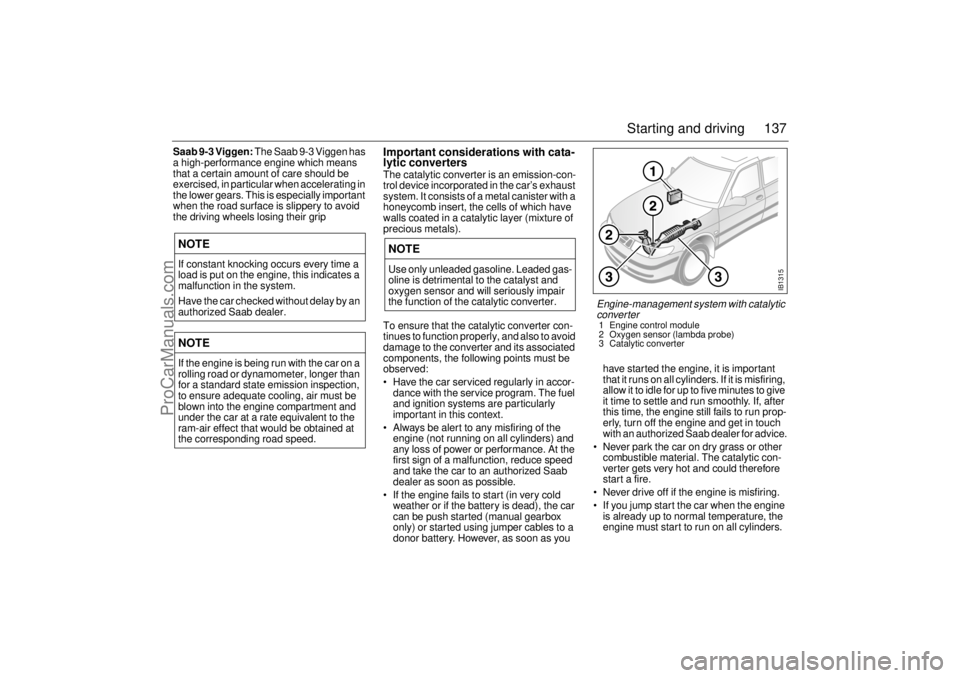
Important considerations with cata-
lytic convertersThe catalytic converter is an emission-con-
trol device incorporated in the car’s exhaust
system. It consists of a metal canister with a
honeycomb insert, the cells of which have
walls coated in a catalytic layer (mixture of
precious metals).
To ensure that the catalytic converter con-
tinues to function properly, and also to avoid
damage to the converter and its associated
components, the following points must be
observed:
Have the car serviced regularly in accor-
dance with the service program. The fuel
and ignition systems are particularly
important in this context.
Always be alert to any misfiring of the
engine (not running on all cylinders) and
any loss of power or performance. At the
first sign of a malfunction, reduce speed
and take the car to an authorized Saab
dealer as soon as possible.
If the engine fails to start (in very cold
weather or if the battery is dead), the car
can be push started (manual gearbox
only) or started using jumper cables to a
donor battery. However, as soon as you have started the engine, it is important
that it runs on all cylinders. If it is misfiring,
allow it to idle for up to five minutes to give
it time to settle and run smoothly. If, after
this time, the engine still fails to run prop-
erly, turn off the engine and get in touch
with an authorized Saab dealer for advice.
Never park the car on dry grass or other
combustible material. The catalytic con-
verter gets very hot and could therefore
start a fire.
Never drive off if the engine is misfiring.
If you jump start the car when the engine
is already up to normal temperature, the
engine must start to run on all cylinders.
NOTEIf constant knocking occurs every time a
load is put on the engine, this indicates a
malfunction in the system.
Have the car checked without delay by an
authorized Saab dealer. NOTEIf the engine is being run with the car on a
rolling road or dynamometer, longer than
for a standard state emission inspection,
to ensure adequate cooling, air must be
blown into the engine compartment and
under the car at a rate equivalent to the
ram-air effect that would be obtained at
the corresponding road speed.
NOTEUse only unleaded gasoline. Leaded gas-
oline is detrimental to the catalyst and
oxygen sensor and will seriously impair
the function of the catalytic converter.
IB1315
Engine-management system with catalytic
converter 1 Engine control module
2 Oxygen sensor (lambda probe)
3 Catalytic converter
ProCarManuals.com