CD changer SAAB 9-3 2000 Owners Manual
[x] Cancel search | Manufacturer: SAAB, Model Year: 2000, Model line: 9-3, Model: SAAB 9-3 2000Pages: 236, PDF Size: 10.85 MB
Page 89 of 236
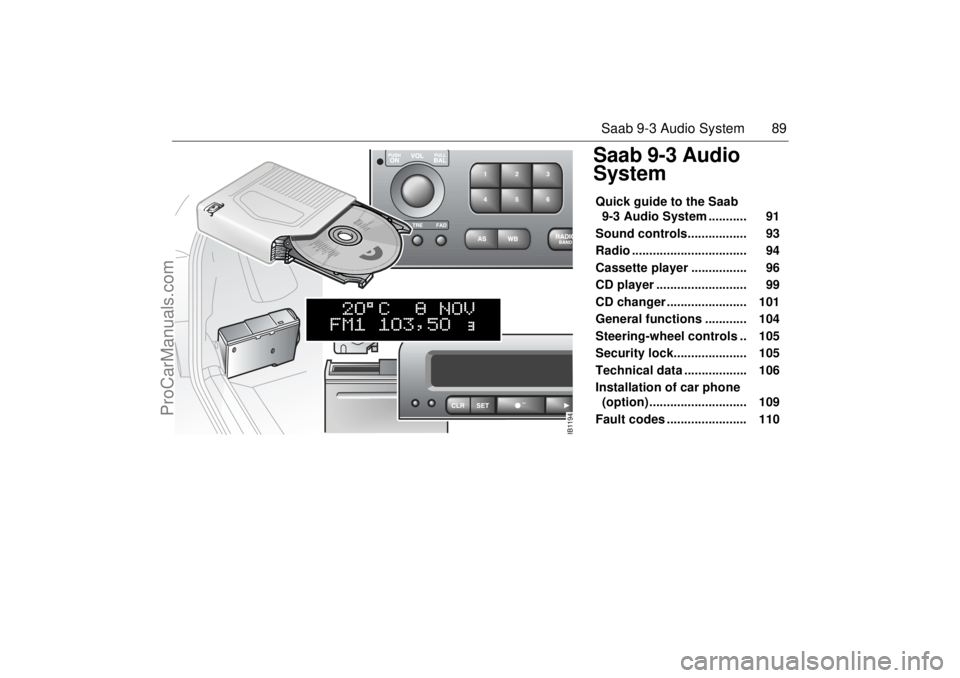
89 Saab 9-3 Audio System
Saab 9-3 Audio
SystemQuick guide to the Saab
9-3 Audio System ........... 91
Sound controls................. 93
Radio ................................. 94
Cassette player ................ 96
CD player .......................... 99
CD changer ....................... 101
General functions ............ 104
Steering-wheel controls .. 105
Security lock..................... 105
Technical data .................. 106
Installation of car phone
(option) ............................ 109
Fault codes ....................... 110
IB1194
ProCarManuals.com
Page 90 of 236
90 Saab 9-3 Audio SystemSaab 9-3 Audio SystemThe Saab 9-3 Audio System comes in two
levels, Premium and Prestige. They are
specially adapted to the cabin space in the
Saab 9-3.
The Saab 9-3 Audio System consists of a
main unit with a radio and a cassette player.
There is a also a CD player and a CD
changer for 6 CD discs available as an
accessory.
The Premium Audio System has two loud-
speakers at the front and two at the rear.
Output is 4x20 watts.
The Prestige Audio System 3 has two addi-
tional loudspeakers. They are mounted in
the front doors and reproduce bass tones
below 200 Hz. These subwoofers have their
own amplifier of 2x40 watts. The Audio Systems are interconnected with
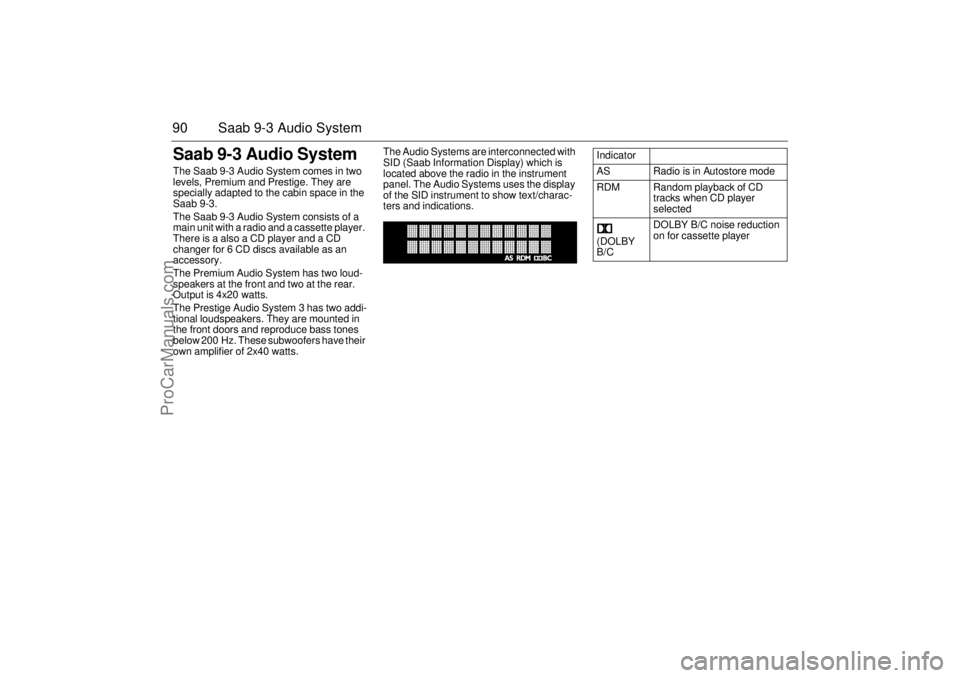
SID (Saab Information Display) which is
located above the radio in the instrument
panel. The Audio Systems uses the display
of the SID instrument to show text/charac-
ters and indications.
Indicator
AS Radio is in Autostore mode
RDM Random playback of CD
tracks when CD player
selected
(DOLBY
B/CDOLBY B/C noise reduction
on for cassette player
ProCarManuals.com
Page 92 of 236
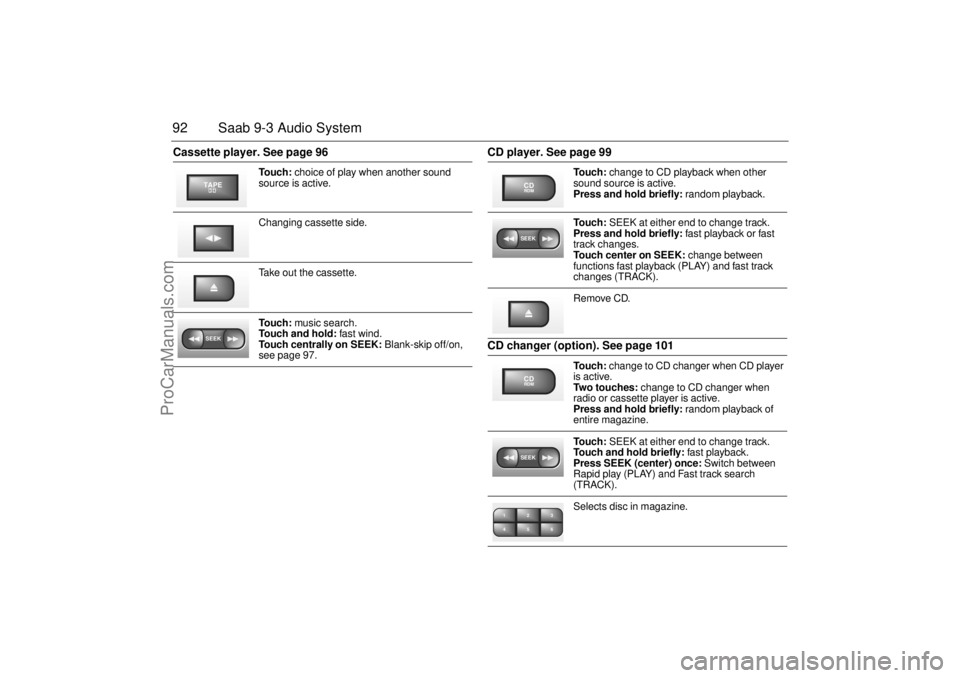
92 Saab 9-3 Audio SystemCassette player. See page 96 CD player. See page 99
CD changer (option). See page 101
To u c h : choice of play when another sound
source is active.
Changing cassette side.
Take out the cassette.
To u c h : music search.
Touch and hold: fast wind.
Touch centrally on SEEK: Blank-skip off/on,
see page 97.
TAPESEEK
To u c h : change to CD playback when other
sound source is active.
Press and hold briefly: random playback.
To u c h : SEEK at either end to change track.
Press and hold briefly: fast playback or fast
track changes.
Touch center on SEEK: change between
functions fast playback (PLAY) and fast track
changes (TRACK).
Remove CD.
To u c h : change to CD changer when CD player
is active.
Two touches: change to CD changer when
radio or cassette player is active.
Press and hold briefly: random playback of
entire magazine.
To u c h : SEEK at either end to change track.
Touch and hold briefly: fast playback.
Press SEEK (center) once: Switch between
Rapid play (PLAY) and Fast track search
(TRACK).
Selects disc in magazine.
CDRDMSEEKCDRDMSEEK2 13
5 46
ProCarManuals.com
Page 101 of 236
101 Saab 9-3 Audio System
CD changer (option/accessory)Important! Always keep the sliding cover
closed to keep dust out of the CD changer,
so that it will continue to provide satisfactory
service for a long time.
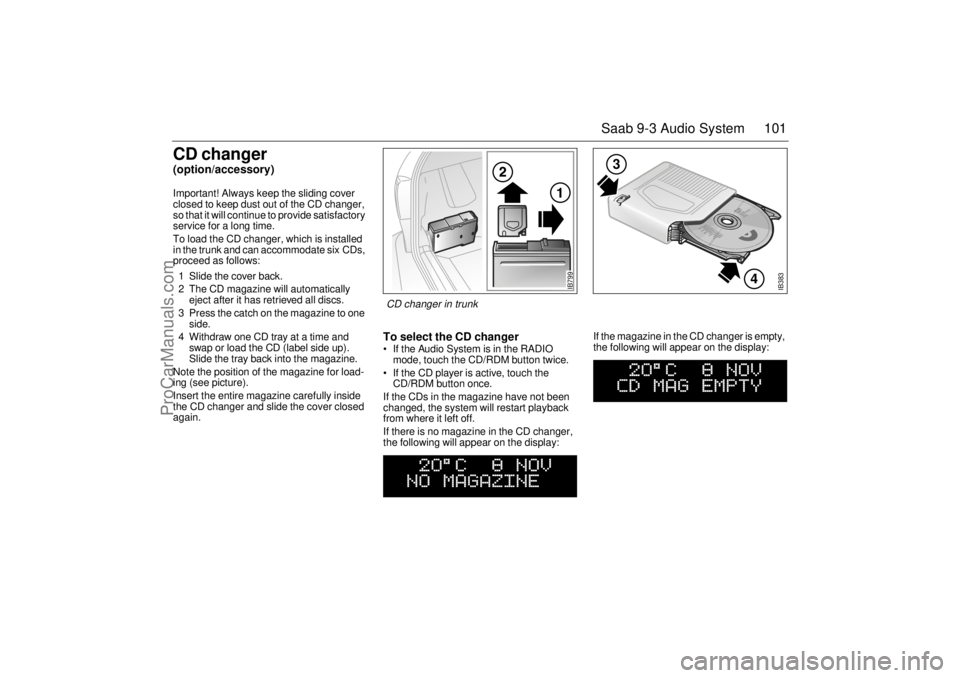
To load the CD changer, which is installed
in the trunk and can accommodate six CDs,
proceed as follows:
1 Slide the cover back.
2 The CD magazine will automatically
eject after it has retrieved all discs.
3 Press the catch on the magazine to one
side.
4 Withdraw one CD tray at a time and
swap or load the CD (label side up).
Slide the tray back into the magazine.
Note the position of the magazine for load-
ing (see picture).
Insert the entire magazine carefully inside
the CD changer and slide the cover closed
again.
To select the CD changer If the Audio System is in the RADIO
mode, touch the CD/RDM button twice.
If the CD player is active, touch the
CD/RDM button once.
If the CDs in the magazine have not been
changed, the system will restart playback
from where it left off.
If there is no magazine in the CD changer,
the following will appear on the display: If the magazine in the CD changer is empty,
the following will appear on the display:
IB383
4
3
IB799
CD changer in trunk
ProCarManuals.com
Page 102 of 236
102 Saab 9-3 Audio SystemIf the CD changer is activated immediately
after a magazine has been loaded, the fol-
lowing will appear on the display:
The CD number will change as each CD is
played.
After a magazine has been loaded, play-
back will start with the first track on the first
CD when the CD changer is selected, and
the following will appear on the display:
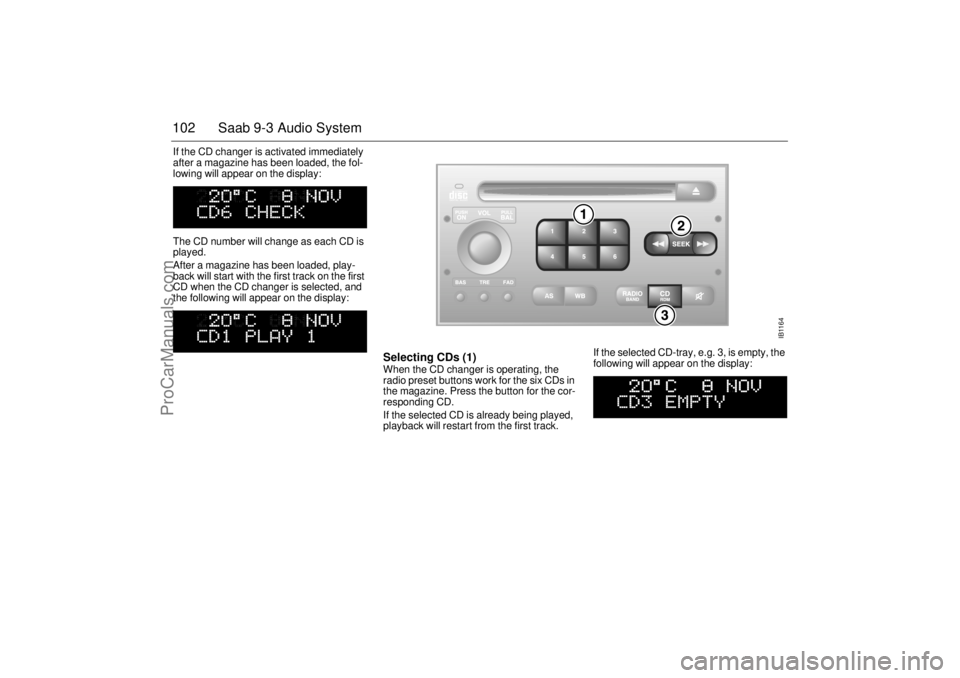
Selecting CDs (1) When the CD changer is operating, the
radio preset buttons work for the six CDs in
the magazine. Press the button for the cor-
responding CD.
If the selected CD is already being played,
playback will restart from the first track. If the selected CD-tray, e.g. 3, is empty, the
following will appear on the display:
IB1164
ProCarManuals.com
Page 103 of 236
103 Saab 9-3 Audio System
After two seconds, the status of the trays in
the magazine (i.e. loaded or empty) will be
shown on the display, e.g.:
If for some reason the CD selected by the
preset button cannot be played, playback of
the current CD will continue. Track change (2) Touch << SEEK or SEEK >> repeatedly to
move to preceding or following tracks.
Pressing << SEEK once will restart play-
back from the beginning of the current track.
Thus, to play the preceding track, touch
<< SEEK twice. Rapid play When << SEEK or SEEK >> is pressed and
held, rapid play will be initiated, with the time
and track showing on the display, e.g.:
If the button is depressed for more than
5 seconds, the rapid play will be even faster.
Rapid play stops when the button is
released.
Fast track changes Touch SEEK (mid-segment) to switch
between the CD PLAY and CD TRACK
modes.
The CD-PLAY and CD-TRACK modes
change the function of << SEEK and
SEEK >>. The selected mode will also be
active the next time the system is switched
on. Choose the mode that you find most
convenient.
Random playback (RDM) (3) Press and hold the CD/RDM button to
select/deselect random playback of the
CDs in the magazine. When this function is
selected, RDM will appear at the bottom of
the display.
Touch SEEK >> to move from the current
track to the next during random playback.
Touch << SEEK to repeat the current track
during random playback.
Pressing and holding << SEEK or SEEK >>
will start Rapid play.
To stop playback from the CD changer,
simply select another source (RADIO/CD).
The CD changer will now enter stand-by
mode.
CD PLAY Pressing and holding
<< SEEK or SEEK >>
starts Rapid play.
CD TRACK Pressing and holding
<< SEEK or SEEK >> acti-
vates track changes.
ProCarManuals.com
Page 105 of 236
105 Saab 9-3 Audio System
Steering-wheel
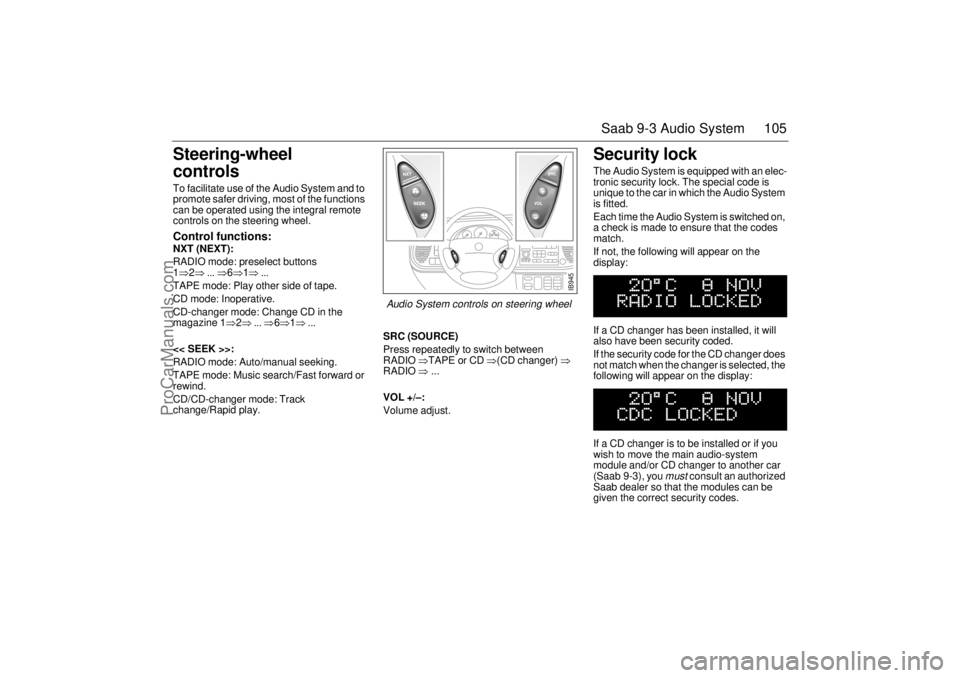
controls To facilitate use of the Audio System and to
promote safer driving, most of the functions
can be operated using the integral remote
controls on the steering wheel. Control functions: NXT (NEXT):
RADIO mode: preselect buttons
1⇒2⇒ ... ⇒6⇒1⇒ ...
TAPE mode: Play other side of tape.
CD mode: Inoperative.
CD-changer mode: Change CD in the
magazine 1⇒2⇒ ... ⇒6⇒1⇒ ...
<< SEEK >>:
RADIO mode: Auto/manual seeking.
TAPE mode: Music search/Fast forward or
rewind.
CD/CD-changer mode: Track
change/Rapid play.SRC (SOURCE)
Press repeatedly to switch between
RADIO ⇒TAPE or CD ⇒(CD changer) ⇒
RADIO ⇒ ...
VOL +/–:
Volume adjust.
Security lock The Audio System is equipped with an elec-
tronic security lock. The special code is
unique to the car in which the Audio System
is fitted.
Each time the Audio System is switched on,
a check is made to ensure that the codes
match.
If not, the following will appear on the
display:
If a CD changer has been installed, it will
also have been security coded.
If the security code for the CD changer does
not match when the changer is selected, the
following will appear on the display:
If a CD changer is to be installed or if you
wish to move the main audio-system
module and/or CD changer to another car
(Saab 9-3), you
must
consult an authorized
Saab dealer so that the modules can be
given the correct security codes.
IB945
Audio System controls on steering wheel
ProCarManuals.com
Page 106 of 236

106 Saab 9-3 Audio SystemTechnical data
These specifications comply with the new IHF Standard
Since the policy at Saab is one of continual improvement, we retain the right to alter
specifications and design without prior notice.
Dolby noise reduction is produced under licence from Dolby Laboratories Licensing
Corporation
”Dolby” and the double-D symbol are trademarks of Dolby Laboratories Licens-
ing Corporation
Changes or modifications not expressly approved by the manufacturer for compliance
could void the user´s authority to operate the equipment.
Tone controls
Bass _________________________ ±12 dB at 40 Hz
Treble ________________________ ±10 dB at 15,000 Hz
Power output __________________4 x 20 W (4 x 12 W at 1%
THD (total harmonic dis-
tortion) and 13.5 V)
Radio module
Radio system __________________ PLL dual-synthesizer
tuner
Number of presets
FM __________________________ 3 x 6
AM __________________________ 2 x 6
Frequency range
FM __________________________ 87.9 MHz – 107.9 MHz
AM __________________________ 530 kHz – 1710 kHz
WB ___________________________ 162.40 – 162.55 MHz
Scanning steps
Automatic seek tuning: ___________ VHF (FM) 200 kHz
AM 10 kHz
WB 50 kHz
Manual seek tuning: _____________ VHF (FM) 200 kHz
AM 10 kHz Cassette player
Fast forward/rewind ______________ < 110 s (C-60)
Frequency range ________________ 50 Hz - 12500 Hz ±3 dB
WOW _________________________ 0.1% WRMS
Signal-to-noise ratio______________ 45 dB
Dolby NR effect _________________ 10 dB
CD player and CD changer
1-bit system and 8 x oversampling
Frequency range ________________ 5-20000 Hz
±0.5 dB
Stereo separation _______________ 45 dB
Distortion _____________________ < 0.008%
Dynamics _____________________ > 95 dB (1 kHz)
CD-changer capacity: 6 discs
Amplifier (cars with extra speakers in
front doors)
Power output ___________________ 2 x 40 W (2 x 30 W at 1%
THD 50 Hz)
Crossover frequency _____________ 110 Hz (-3 dB)
ProCarManuals.com
Page 110 of 236
110 Saab 9-3 Audio SystemMobile phones and
communications radios Mobile phones and communications radios
that do not have a separate external
antenna radiate an electromagnetic field
inside the car.
Saab therefore recommends that a car
phone/radio transmitter should always be
connected to an external antenna.
An external antenna also provides
improved transmission/reception and a
greater range.
Mobile phones and communications radios
that are not supplied as standard equipment
by Saab can interfere with the car’s electri-
cal system and cause misleading fault
codes to be generated.
Fault codesThe Audio System has a built-in diagnostics
function. If a fault is detected, a fault code is
generated to help dealer technicians to
diagnose the fault. Below is an example of
a fault code that you might be able to rectify
yourself.
Adjusting the frequency steps
North America/Europe If the car is taken from Europe to North
America, the radio’s frequency steps will
need to be adjusted.
With the radio off, press and hold SEEK
(mid-segment) and switch the radio on at
the same time.
The station presets will be cancelled and
replaced by preset frequencies.
WARNING
The electromagnetic field inside the car
can be detrimental to your health. NOTEThe electromagnetic field can cause
interference with other electrical systems
in the car, such as the Audio System.
WARNING
Always consult an authorized Saab
dealer for installation guidance.
If you feel that any of the warnings or fault
indications are unclear, have the equip-
ment checked by an authorized Saab
dealer. NOTEGreat care should be exercised in trying
to rectify a fault. If you are at all unsure,
contact an authorized Saab dealer.
Fault code Possible cause
CD/CDC
ERROR
12/17/19 CD is dirty, loaded
wrong side up or defec-
tive.
TAPE ERR 01 Tape broken or
mechanical fault in
deck.
TAPE ERR
02/03Tape snarled up or
mechanical fault in
deck.
TAPE ERR 11 Cassette jammed: can-
not be loaded/ejected.
WARNING
The CD player/CD changer is classified
as Class 1 laser equipment.
Service and repair work must only be
carried out by authorized technicians.
If the casing is damaged, hazardous
laser radiation can occur.
ProCarManuals.com
Page 222 of 236
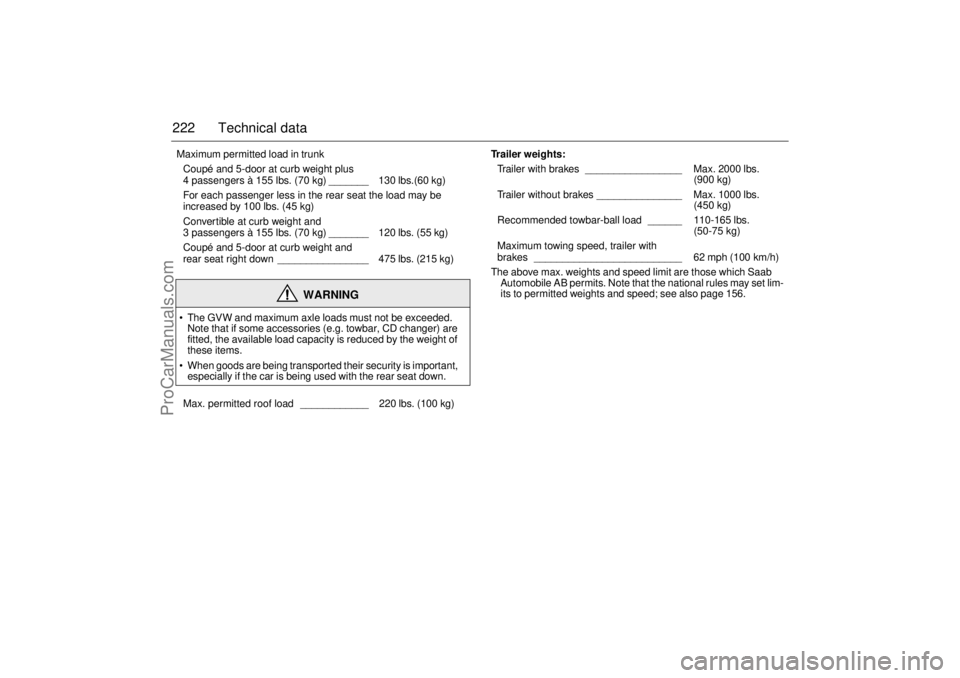
222 Technical data Maximum permitted load in trunk
Coupé and 5-door at curb weight plus
4 passengers à 155 lbs. (70 kg) _______ 130 lbs.(60 kg)
For each passenger less in the rear seat the load may be
increased by 100 lbs. (45 kg)
Convertible at curb weight and
3 passengers à 155 lbs. (70 kg) _______ 120 lbs. (55 kg)
Coupé and 5-door at curb weight and
rear seat right down ________________ 475 lbs. (215 kg)
WARNING
The GVW and maximum axle loads must not be exceeded.
Note that if some accessories (e.g. towbar, CD changer) are
fitted, the available load capacity is reduced by the weight of
these items.
When goods are being transported their security is important,
especially if the car is being used with the rear seat down.
Max. permitted roof load ____________ 220 lbs. (100 kg)
Trailer weights:
Trailer with brakes _________________ Max. 2000 lbs.
(900 kg)
Trailer without brakes _______________ Max. 1000 lbs.
(450 kg)
Recommended towbar-ball load ______ 110-165 lbs.
(50-75 kg)
Maximum towing speed, trailer with
brakes __________________________ 62 mph (100 km/h)
The above max. weights and speed limit are those which Saab
Automobile AB permits. Note that the national rules may set lim-
its to permitted weights and speed; see also page 156.
ProCarManuals.com