warning lights SAAB 9-3 2000 Owners Manual
[x] Cancel search | Manufacturer: SAAB, Model Year: 2000, Model line: 9-3, Model: SAAB 9-3 2000Pages: 236, PDF Size: 10.85 MB
Page 3 of 236
3
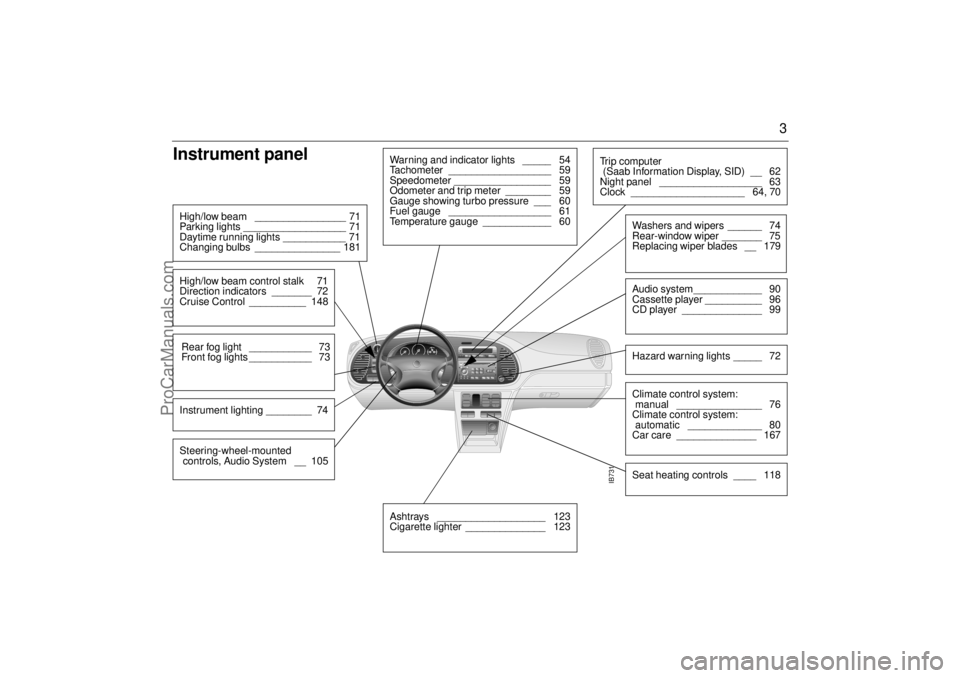
Instrument panel High/low beam ________________ 71
Parking lights __________________ 71
Daytime running lights ___________ 71
Changing bulbs _______________ 181High/low beam control stalk 71
Direction indicators _______ 72
Cruise Control __________ 148Rear fog light ___________ 73
Front fog lights ___________ 73Instrument lighting ________ 74
Warning and indicator lights _____ 54
Tachometer __________________ 59
Speedometer _________________ 59
Odometer and trip meter ________ 59
Gauge showing turbo pressure ___ 60
Fuel gauge __________________ 61
Temperature gauge ____________ 60
IB731
Ashtrays ___________________ 123
Cigarette lighter ______________ 123
Tr i p c o m p u t e r
(Saab Information Display, SID) __ 62
Night panel __________________ 63
Clock ____________________ 64, 70
Washers and wipers ______ 74
Rear-window wiper _______ 75
Replacing wiper blades __ 179Audio system____________ 90
Cassette player __________ 96
CD player ______________ 99Hazard warning lights _____ 72Climate control system:
manual _______________ 76
Climate control system:
automatic _____________ 80
Car care ______________ 167Seat heating controls ____ 118
Steering-wheel-mounted
controls, Audio System __ 105
ProCarManuals.com
Page 31 of 236
31 Security
Electronic starting interlock
(immobilizer)Each time the key is removed from the igni-
tion, the electronic starting interlock is acti-
vated and the car is thus immobilized, see
also page 36.
Locking/unlocking the carWhen the car is locked and unlocked with
the remote control or the key (see page 35),
the theft alarm is also affected.
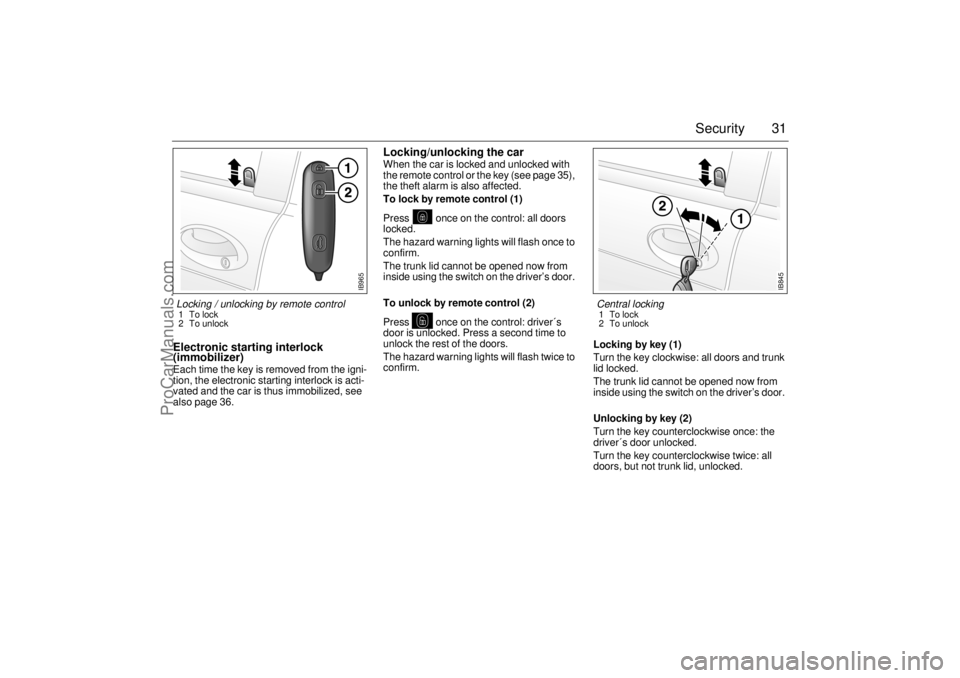
To lock by remote control (1)
Press once on the control: all doors
locked.
The hazard warning lights will flash once to
confirm.
The trunk lid cannot be opened now from
inside using the switch on the driver’s door.
To unlock by remote control (2)
Press once on the control: driver´s
door is unlocked. Press a second time to
unlock the rest of the doors.
The hazard warning lights will flash twice to
confirm. Locking by key (1)
Turn the key clockwise: all doors and trunk
lid locked.
The trunk lid cannot be opened now from
inside using the switch on the driver’s door.
Unlocking by key (2)
Turn the key counterclockwise once: the
driver´s door unlocked.
Turn the key counterclockwise twice: all
doors, but not trunk lid, unlocked.
IB845
Central locking 1To lock
2 To unlock
IB965
Locking / unlocking by remote control 1To lock
2 To unlock
ProCarManuals.com
Page 37 of 236

37 Security
Alarm signals When the car alarm is armed, it will be trig-
gered if any door, the trunk lid or hood, is
opened, or if a window is broken.
The alarm will also be triggered if an attempt
is made to bypass or short-circuit the igni-
tion switch, or to disconnect the battery.
If the alarm is triggered, the following alarm
signals will be set off:
Flashing of hazard warning lights for five
minutes.
Siren wailing for 30 seconds.
The alarm signals will stop if the alarm is
deactivated (car unlocked) during the alarm
period.
Panic-functionIn the car alarm system is a function called
"Panic-function".
To activate panic function:
Push and hold one of the buttons on the
remote control for 2 seconds, or if you are
sitting inside the car...
Push the LOCK-switch on the center con-
sole for 2 seconds (not Convertibles).
These actions will trigger the alarm (hazard
warning lights and siren).
To deactivate panic function:
Push one of the buttons on the remote
control, push the LOCK-switch in the
center console, turn the key in one of the
doors or turn the ignition to ON.
When the panic-function is activated the car
will be locked/unlocked depending upon
which button was pushed.
When the ignition is ON the panic-function
cannot be activated.
NOTE It is possible to inadvertently deacti-
vate the car alarm and at the same
time unlock the car, if the button on the
remote control is pressed by mistake
when the control is still within range of
the car.
When locking the car by remote con-
trol in extremely cold weather, it is
advisable to check that the lock
system has operated properly. To do
so, check that the interior locking but-
tons are all down.
If not, unlock and relock the car again.
ProCarManuals.com
Page 38 of 236

38 SecurityOverview of functions
Alarm signals may differ between model variants for different coun-
tries.
Some of the car-alarm functions can be reprogrammed – con-
sult your Saab dealer for further details (see page 231). Locking/
activation Hazard warning lights flash once (0.5 seconds).
Horn chirps once.
The LED will come on for 10 seconds.
Unlocking/
deactivation Hazard warning lights flash twice.
Horn chirps twice.
The LED will come on for two seconds.
Unlocking/
deactivation of
trunk lid alarm Hazard warning lights flash three times.
Horn chirps three times.
The LED will flash three times per second for 10
seconds.
Alarm triggered Hazard warning lights flash for 5 min.
Siren wails for 30 seconds.
To switch off the alarm, deactivate the system in
the normal way (unlocking) by unlocking the
door with the key or the remote
Window-glass
sensor The sensor detects if any window is broken and
triggers the alarm.
To disable the sensor, see page 36.
Remote control The range of the remote control is normally
5-10 yds. (5-10 metres), although it can be sub-
stantially more than this in ideal conditions.
If a remote control is lost, the new one will have
to be programmed from one of the remaining
remote controls to match the car’s unique secu-
rity code. Get in touch with an authorized Saab
dealer. Your dealer will need your second remote
to program a new one
If another remote or key is desired (up to total of
4), all keys and remotes must be present when
programming additional ones.Battery for
remote control The battery for the remote control will normally
have a life of 4-5 years. When the battery needs
changing, ”REPLACE KEY BATTERY” will
appear on the SID.
After fitting a new battery, press the unlock but-
ton on the remote control at least four times in
succession, so that the car alarm can recognize
the signals from the transmitter.
If the remote control has been exposed to very
low temperatures, it may not function properly. If
this happens, warm it in your hands for a few
minutes.
If the remote control is not working, it may be
because the code signal has not been synchro-
nized with that in the control module for the car
alarm. To rectify this, press the unlock button on
the remote control at least four times in quick
succession. When it is recognized, the door
locks will cycle.
Car-battery
voltage If the car-battery voltage is lost while the alarm is
activated - for instance, if the battery has died -
the car alarm will be deactivated. Once battery
voltage is present again, the alarm will revert to
its status at the time the voltage went down.
If the battery is disconnected, e.g. in an attempt
to break into the car, the alarm will be triggered
ProCarManuals.com
Page 53 of 236
53
Instruments and
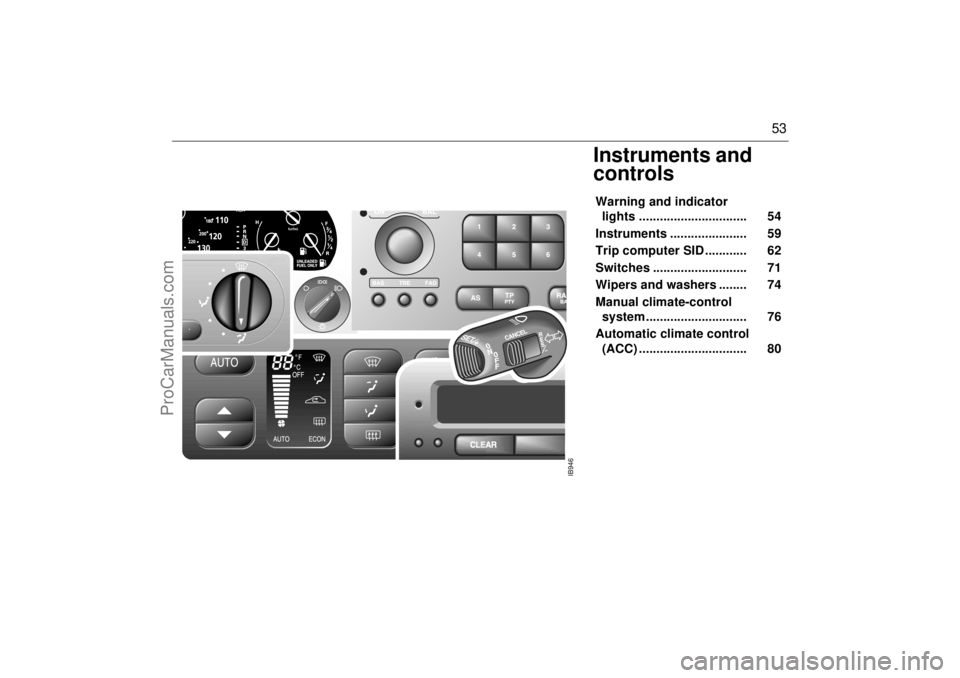
controlsWarning and indicator
lights ............................... 54
Instruments ...................... 59
Trip computer SID ............ 62
Switches ........................... 71
Wipers and washers ........ 74
Manual climate-control
system ............................. 76
Automatic climate control
(ACC) ............................... 80
IB946
ProCarManuals.com
Page 54 of 236
54 Instruments and controlsMain instrument panel
Warning and
indicator lightsA number of warning and indicator lights will
come on when the ignition is switched on
prior to starting (see page 58). Under
normal conditions, these should go out a
few seconds after the engine has started.
Warning, oil pressure (en-
gine oil)
This symbol comes on together with if
the oil pressure in the engine is too low. If
the symbol flashes or comes on while you
are driving, stop as soon as possible and
where it is safe to do so, switch off the
engine and check the engine oil level, see
page 172. NOTEThe car must not be driven under any cir-
cumstances when the warning lamp is on.
Too low oil pressure will damage the
engine.
IB1356
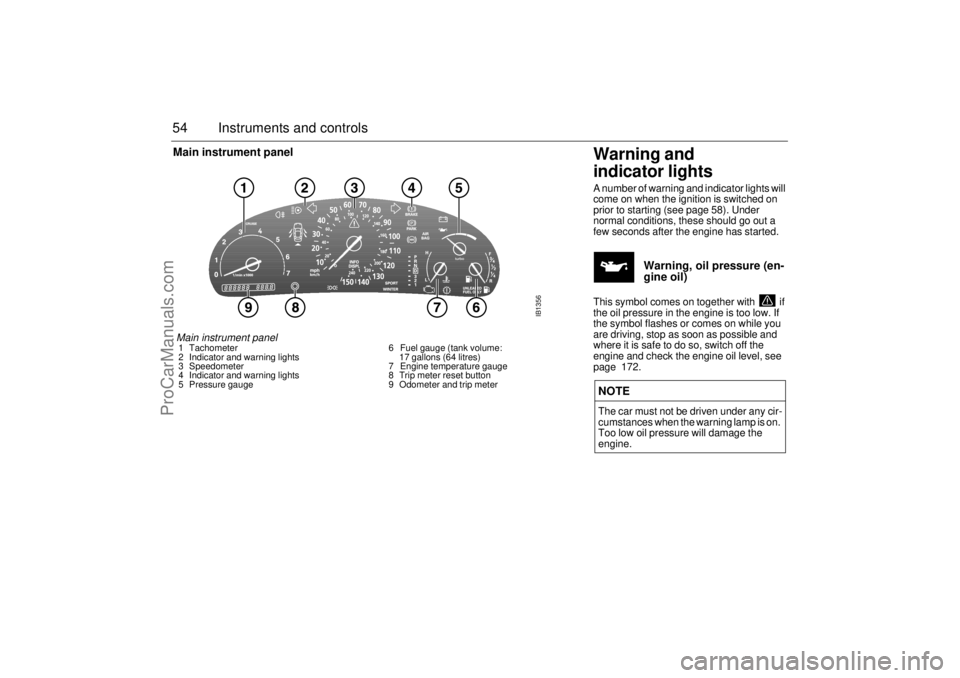
Main instrument panel 1 Tachometer
2 Indicator and warning lights
3 Speedometer
4 Indicator and warning lights
5 Pressure gauge 6 Fuel gauge (tank volume:
17 gallons (64 litres)
7 Engine temperature gauge
8 Trip meter reset button
9 Odometer and trip meter
ProCarManuals.com
Page 55 of 236
55 Instruments and controls
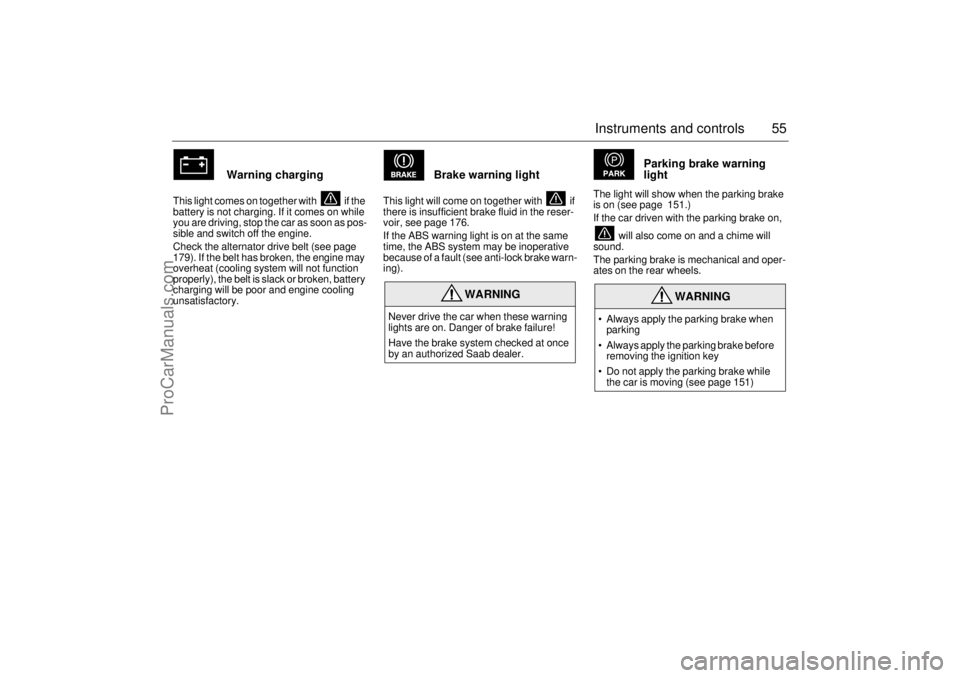
Warning charging
This light comes on together with if the
battery is not charging. If it comes on while
you are driving, stop the car as soon as pos-
sible and switch off the engine.
Check the alternator drive belt (see page
179). If the belt has broken, the engine may
overheat (cooling system will not function
properly), the belt is slack or broken, battery
charging will be poor and engine cooling
unsatisfactory.
Brake warning light
This light will come on together with if
there is insufficient brake fluid in the reser-
voir, see page 176.
If the ABS warning light is on at the same
time, the ABS system may be inoperative
because of a fault (see anti-lock brake warn-
ing).
Parking brake warning
light
The light will show when the parking brake
is on (see page 151.)
If the car driven with the parking brake on,
will also come on and a chime will
sound.
The parking brake is mechanical and oper-
ates on the rear wheels.
WARNING
Never drive the car when these warning
lights are on. Danger of brake failure!
Have the brake system checked at once
by an authorized Saab dealer.
WARNING
• Always apply the parking brake when
parking
Always apply the parking brake before
removing the ignition key
Do not apply the parking brake while
the car is moving (see page 151)
ProCarManuals.com
Page 58 of 236
58 Instruments and controls
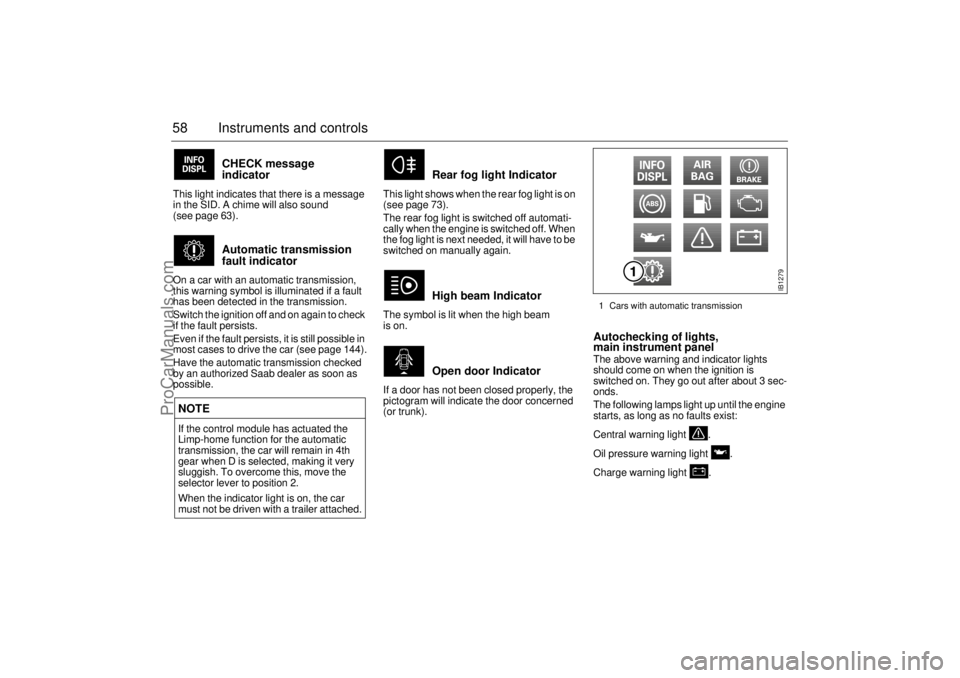
CHECK message
indicator
This light indicates that there is a message
in the SID. A chime will also sound
(see page 63).
Automatic transmission
fault indicator
On a car with an automatic transmission,
this warning symbol is illuminated if a fault
has been detected in the transmission.
Switch the ignition off and on again to check
if the fault persists.
Even if the fault persists, it is still possible in
most cases to drive the car (see page 144).
Have the automatic transmission checked
by an authorized Saab dealer as soon as
possible.
Rear fog light Indicator
This light shows when the rear fog light is on
(see page 73).
The rear fog light is switched off automati-
cally when the engine is switched off. When
the fog light is next needed, it will have to be
switched on manually again.
High beam Indicator
The symbol is lit when the high beam
is on.
Open door Indicator
If a door has not been closed properly, the
pictogram will indicate the door concerned
(or trunk).
Autochecking of lights,
main instrument panel The above warning and indicator lights
should come on when the ignition is
switched on. They go out after about 3 sec-
onds.
The following lamps light up until the engine
starts, as long as no faults exist:
Central warning light .
Oil pressure warning light .
Charge warning light .
NOTEIf the control module has actuated the
Limp-home function for the automatic
transmission, the car will remain in 4th
gear when D is selected, making it very
sluggish. To overcome this, move the
selector lever to position 2.
When the indicator light is on, the car
must not be driven with a trailer attached.
IB1279
1 Cars with automatic transmission
ProCarManuals.com
Page 63 of 236

63 Instruments and controls
CHECK messages When the engine is started, CHECKING will
appear on the display for about four sec-
onds, while the SID checks are being per-
formed.
When a CHECK message is generated
while the car is being driven, a chime will
sound, INFO DISPL will illuminate on the
main instrument panel, and the message
will appear on the SID. The number of mes-
sages that can be displayed by the SID
varies with the specification of the car.
If more than one CHECK message has
been generated, the
+ symbol will appear to
the left of the text on the display. The mes-
sages appear in order of priority.
If a new fault occurs while another message
is being displayed, the message relating to
the new one will appear for 10 seconds,
after which the display will return to the ear-
lier one.
Press CLEAR once to acknowledge a mes-
sage, whereupon it will be cleared from the
display. It will not be displayed again before
the ignition has been switched off and then
on again. The following CHECK messages may be
displayed:
1 This message cannot be removed by pressing
CLEAR. Press the brake pedal to clear.
2 This message will be displayed approxi-
mately 600 miles (1,000 km) before the next
scheduled service is due, or when 365 days
have elapsed since the last service. The
message should be cleared at the time of that
service (see the Saab Warranties & Service
Record Booklet).
If you have carried out the service yourself,
you can clear the message by pressing
CLEAR once. Reset by pressing CLEAR for
at least eight seconds, until ”SERVICE”
appears on the display and a chime sounds.
Night Panel To improve night-driving conditions inside
the car, the Night Panel mode can be
selected. In this mode, the amount of infor-
mation displayed is reduced, and only the
most important instruments and displays
will be illuminated.
When the Night Panel button is pressed,
only the speedometer will be illuminated (up
to the 87 mph or 140-km/h graduation), all
the other instruments illumination will be
extinguished and their needles moved to
zero. Both the SID and the ACC displays will
be extinguished and the backlighting for
switches and other controls will be dimmed.
Note: All indicator and warning lights,
together with the display of CHECK mes-
sages, will operate as normal.
The following conditions will wake up the
respective displays in the Night-Panel
mode:
Adjusting of the Audio System, SID or
ACC (display comes on for ten seconds).
CHECK message generated in the SID.
High engine revs cause the rev counter to
be illuminated until the engine speed has
fallen again.
If the quantity of fuel remaining falls below
4 gallons (15 liters), the fuel gauge will be
illuminated.
If the engine temperature rises above nor-
mal, the temperature gauge will be illumi-
nated. Display shows: See
page
TEST BRAKE LIGHTS
1)
183
BRAKE LIGHT FAILURE 183
FRONT LIGHT FAILURE 181
REAR LIGHT FAILURE 183
FOG LIGHT FAILURE 183
WASHER FLUID LEVEL LOW 180
FILL COOLANT FLUID 174
TIGHTEN FUEL FILLER CAP 138
KEY NOT ACCEPTED 39
REPLACE KEY BATTERY 39
SERVICE THEFT ALARM 39
TRANSMISSION OVERHEAT-
ING 144
TIME FOR SERVICE
2)
212
ProCarManuals.com
Page 69 of 236

69 Instruments and controls
Night panelTo improve night-driving conditions inside
the car, the Night Panel mode can be
selected. In this mode, the amount of infor-
mation displayed is reduced, and only the
most important instruments and displays
will be illuminated.
When the Night Panel button is pressed,
only the speedometer will be illuminated (up
to the 87-mph or 140-km/h graduation), all
the other instruments illumination will be
extinguished and their needles moved to
zero. Both the SID and the ACC displays will
be extinguished and the backlighting for
switches and other controls will be dimmed.
Note: All indicator and warning lights,
together with the display of CHECK mes-
sages, will operate as normal. The following conditions will wake up the
respective displays in the Night-Panel
mode:
Setting of the Audio System, SID or ACC
(display comes on for ten seconds).
CHECK message generated in the SID.
High engine revs cause the rev counter to
be illuminated until the engine speed has
fallen again.
If the quantity of fuel remaining falls below
4 gallons (15 liters), the fuel gauge will be
illuminated.
If the engine temperature rises above nor-
mal, the temperature gauge will be illumi-
nated.
If the speed of the car exceeds 84 mph
(135 km/h), the entire speedometer will
be illuminated.
In cars with automatic transmission, if the
selector lever is moved from D to position
3, 2 or 1, the selector indication on the
main instrument panel will be illuminated.
To restore the displays and lighting to the
normal mode, press the Night-Panel button.
Units and language versions The SID has four sets of units:
CHECK messages can be displayed in six
language options: English, Swedish,
German, French, Italian and Spanish. METRIC IMP. 1 IMP. 2 US
km miles miles miles
km/h mph mph mph
litres gallons gallons US
gallons
°C °F °C °F
24 hours 12 hours 12 hours 12 hours
ProCarManuals.com