fuel SAAB 9-3 2003 User Guide
[x] Cancel search | Manufacturer: SAAB, Model Year: 2003, Model line: 9-3, Model: SAAB 9-3 2003Pages: 256, PDF Size: 21.66 MB
Page 58 of 256
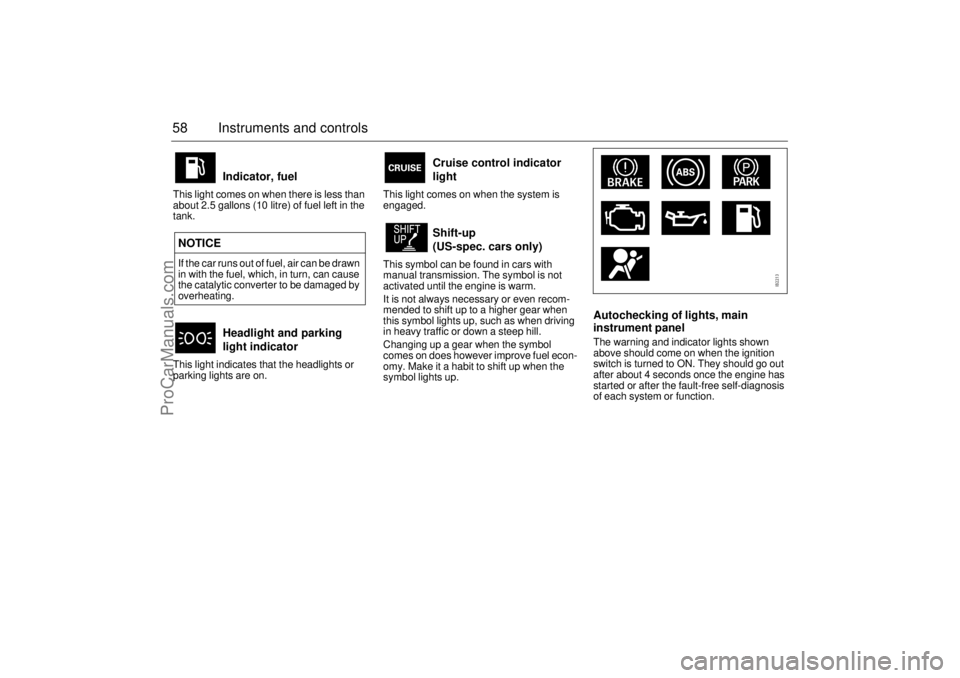
58 Instruments and controlsThis light comes on when there is less than
about 2.5 gallons (10 litre) of fuel left in the
tank.
This light indicates that the headlights or
parking lights are on.This light comes on when the system is
engaged.
This symbol can be found in cars with
manual transmission. The symbol is not
activated until the engine is warm.
It is not always necessary or even recom-
mended to shift up to a higher gear when
this symbol lights up, such as when driving
in heavy traffic or down a steep hill.
Changing up a gear when the symbol
comes on does however improve fuel econ-
omy. Make it a habit to shift up when the
symbol lights up.
Autochecking of lights, main
instrument panelThe warning and indicator lights shown
above should come on when the ignition
switch is turned to ON. They should go out
after about 4 seconds once the engine has
started or after the fault-free self-diagnosis
of each system or function.
Indicator, fuel
NOTICE
If the car runs out of fuel, air can be drawn
in with the fuel, which, in turn, can cause
the catalytic converter to be damaged by
overheating.
Headlight and parking
light indicator
Cruise control indicator
light
Shift-up
(US-spec. cars only)
ProCarManuals.com
Page 59 of 256
59 Instruments and controls
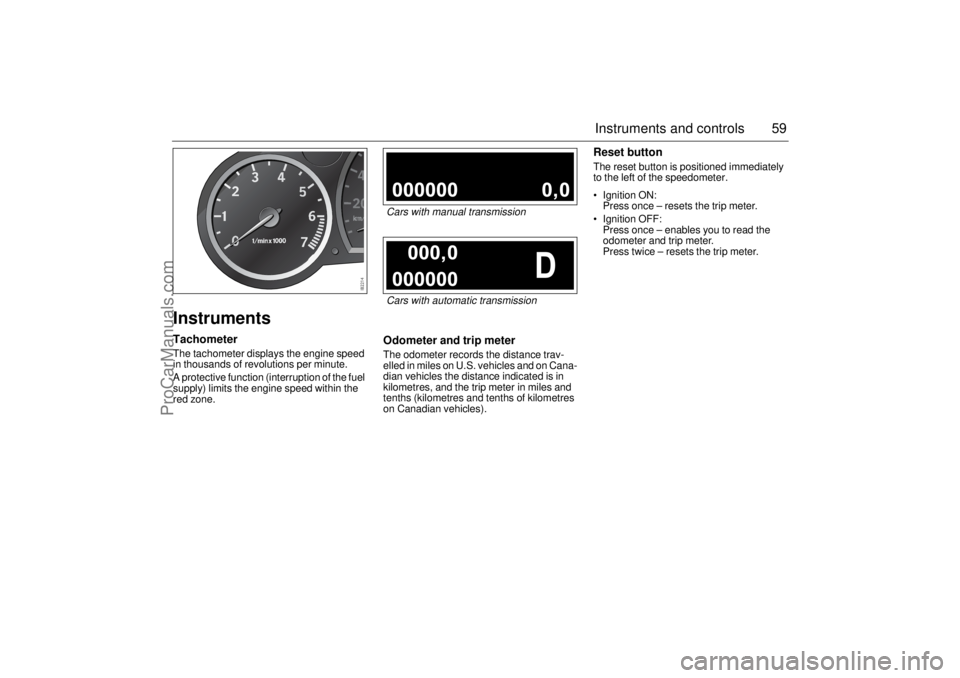
InstrumentsTachometerThe tachometer displays the engine speed
in thousands of revolutions per minute.
A protective function (interruption of the fuel
supply) limits the engine speed within the
red zone.
Odometer and trip meterThe odometer records the distance trav-
elled in miles on U.S. vehicles and on Cana-
dian vehicles the distance indicated is in
kilometres, and the trip meter in miles and
tenths (kilometres and tenths of kilometres
on Canadian vehicles).
Reset buttonThe reset button is positioned immediately
to the left of the speedometer.
Ignition ON:
Press once – resets the trip meter.
Ignition OFF:
Press once – enables you to read the
odometer and trip meter.
Press twice – resets the trip meter.
Cars with manual transmissionCars with automatic transmission
ProCarManuals.com
Page 61 of 256
61 Instruments and controls
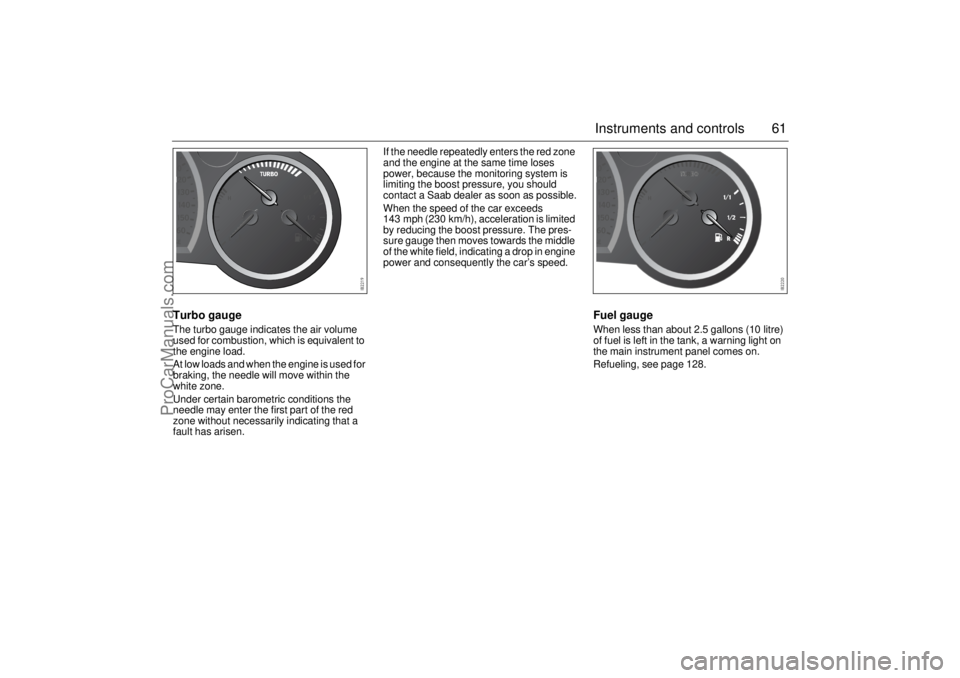
Turbo gaugeThe turbo gauge indicates the air volume
used for combustion, which is equivalent to
the engine load.
At low loads and when the engine is used for
braking, the needle will move within the
white zone.
Under certain barometric conditions the
needle may enter the first part of the red
zone without necessarily indicating that a
fault has arisen.If the needle repeatedly enters the red zone
and the engine at the same time loses
power, because the monitoring system is
limiting the boost pressure, you should
contact a Saab dealer as soon as possible.
When the speed of the car exceeds
143 mph (230 km/h), acceleration is limited
by reducing the boost pressure. The pres-
sure gauge then moves towards the middle
of the white field, indicating a drop in engine
power and consequently the car’s speed.
Fuel gaugeWhen less than about 2.5 gallons (10 litre)
of fuel is left in the tank, a warning light on
the main instrument panel comes on.
Refueling, see page 128.
ProCarManuals.com
Page 65 of 256
65 Instruments and controls
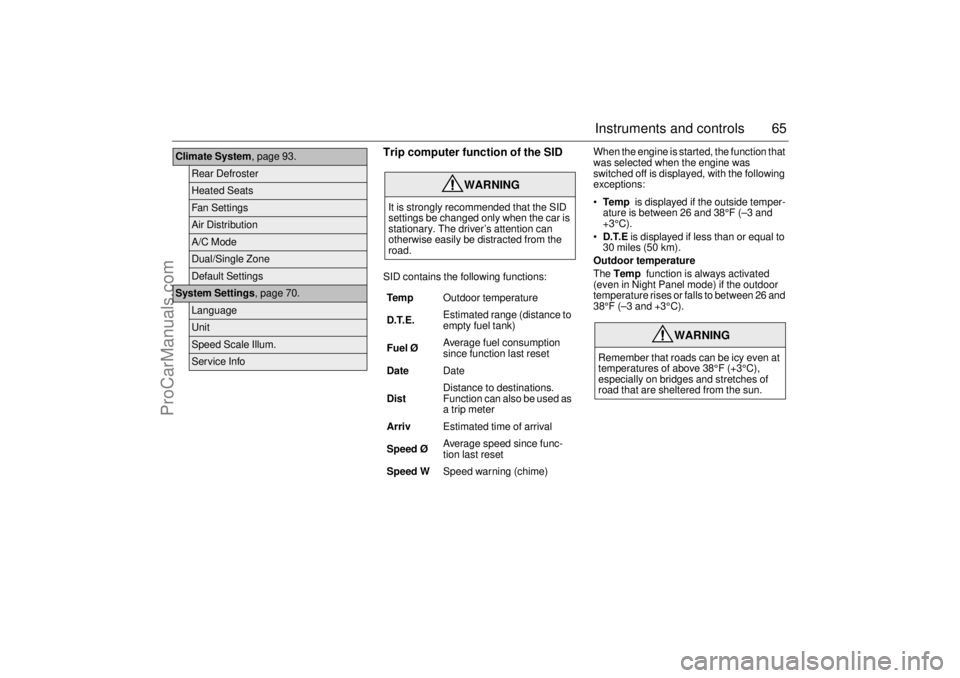
Trip computer function of the SIDSID contains the following functions:When the engine is started, the function that
was selected when the engine was
switched off is displayed, with the following
exceptions:
Te m p is displayed if the outside temper-
ature is between 26 and 38°F (–3 and
+3°C).
D.T.E is displayed if less than or equal to
30 miles (50 km).
Outdoor temperature
The Temp function is always activated
(even in Night Panel mode) if the outdoor
temperature rises or falls to between 26 and
38°F (–3 and +3°C).
Climate System, page 93.
Rear DefrosterHeated SeatsFan SettingsAir DistributionA/C ModeDual/Single ZoneDefault Settings
System Settings, page 70.
LanguageUnitSpeed Scale Illum.Service Info
WARNING
It is strongly recommended that the SID
settings be changed only when the car is
stationary. The driver’s attention can
otherwise easily be distracted from the
road.
Tem pOutdoor temperature
D.T.E. Estimated range (distance to
empty fuel tank)
Fuel ØAverage fuel consumption
since function last reset
DateDate
DistDistance to destinations.
Function can also be used as
a trip meter
ArrivEstimated time of arrival
Speed Ø Average speed since func-
tion last reset
Speed WSpeed warning (chime)
WARNING
Remember that roads can be icy even at
temperatures of above 38°F (+3°C),
especially on bridges and stretches of
road that are sheltered from the sun.
ProCarManuals.com
Page 66 of 256

66 Instruments and controlsSetting values
1 Select one of the functions using the
INFO dial.
Speed W (preset to 55 mph (90 km/h)
Dist (preset to 100 miles (100 km) if not
previously set)
Speed Ø
Arriv
Date
2 Press and hold the INFO dial until given
audible confirmation.
3 Turn the INFO dial to change the value.
(Press CLEAR to reset the value.)
4 Press the INFO dial to finish setup.
Using DIST as a trip meter
1 Select Dist using the INFO dial.
2 Press and hold the CLEAR button for
approx. 1 second.
An arrow will now appear on the right-hand
side of the display, indicating that the trip
meter is running.Resetting a single function
1 Select the function you wish to reset with
the INFO dial.
Fuel Ø
Speed Ø
Tr i p (Dist used as trip meter)
2 Press and hold the CLEAR button for
approx. 1 second.
The selected function will now be reset.
Resetting the trip computer
1 Select one of the functions using the
INFO dial.
Fuel Ø
Speed Ø
D.T.E.
Arriv
Tr i p (Dist used as trip meter)
2 Press and hold the CLEAR button
(approx. 3 seconds) until audible confir-
mation is given.Speed warning
This value is preset to 55 mph (90 km/h).
The value can be set to between 0 and
150 mph (0 and 250 km/h).
1 Select Speed W using the INFO dial.
2 Press and hold the INFO dial until given
audible confirmation.
3 Adjust the speed using the INFO dial.
4 Confirm the setting by pressing the
INFO dial.
A star on the right-hand side of the display
indicates when the speed warning function
is active.
An audible alarm will sound if the set speed
is exceeded.
Disengage the function with the CLEAR
button. Re-engage the function using
the INFO dial.
ProCarManuals.com
Page 68 of 256

68 Instruments and controlsCalculating the requisite average speed
(What average speed do I need to maintain
to get to my destination in time?)
This function should be used before starting
out a journey.
To calculate the requisite average speed,
the distance must first be given.
First, set the distance under Dist.
1 Then use the INFO dial to select the
Arriv function.
2 Press and hold the INFO dial until given
audible confirmation.
3 Turn the INFO dial to set the estimated
time of arrival.
4 Press the INFO dial to finish setup.
The average speed (Speed Ø) will be
shown for 10 seconds.
This average speed will be updated during
the journey.Setting the date
1 Select the Date function using the
INFO dial.
2 Press and hold the INFO dial until given
audible confirmation.
3 Turn the INFO dial to set the year.
4 Press the INFO dial.
5 Turn the INFO dial to set the month.
6 Press the INFO dial.
7 Turn the INFO dial to set the day.
8 Confirm the setting by pressing the
INFO dial.
Night PanelTo improve night-driving conditions inside
the car, the Night Panel mode can be
selected. In this mode, the amount of infor-
mation displayed is reduced, and only the
most important instruments and displays
will be illuminated.
When the NIGHT PANEL button is pressed,
only the speedometer will be illuminated.
All other instrument lighting will be switched
off and the needles drop to zero.
Note: All indicator and warning lights and
messages will operate normally if required.
Temp (when the outside temperature falls
or rises to between 26 and 38°F (–3 and
+3°C)) and D.T.E. (when the remaining fuel
is only sufficient for approx. 80 miles
(50 km) of driving) are even shown in Night
Panel model.
ProCarManuals.com
Page 121 of 256
121 Starting and driving
Ignition switch ________ 122
Steering wheel lock ____ 123
Starting the engine ____ 123
Important considerations
for driving __________ 125
Refueling ____________ 128
Engine Break-in Period _ 132
Manual transmission___ 133
Automatic transmission 134
Cruise control ________ 140
Braking ______________ 141
Traction Control System
(TCS) ______________ 144
Electronic Stability
Program (ESP) ______ 146
Parking brake_________ 148
Parking ______________ 148 Economical driving _____ 153
Driving in cold weather__ 155
Driving in hot climates __ 156
Towing a trailer ________ 157
Driving with a roof rack
load ________________ 161
Driving with a load _____ 162
Driving with the trunk lid
open________________ 163
Driving in deep water ___ 163
Driving at night ________ 163
Towing the car _________ 164
Driving with the compact
spare wheel__________ 167
Jump starting _________ 168
For long trips __________ 170
Starting and driving
ProCarManuals.com
Page 125 of 256

125 Starting and driving
Useful tips on starting the engineIf the engine has failed to start after several
attempts in very cold weather, proceed as
follows:
1 Turn the ignition switch to ON (it is
essential that you turn the ignition to
ON before depressing the accelerator).
2 Press the accelerator to the floor and run
the starter motor for 5-10 seconds. This
will prevent the engine being flooded
(fully depressed accelerator cuts off the
fuel supply).
3 Now start the engine in the normal way
- do not touch the accelerator.
If the engine stalls immediately after starting
(e.g. if the clutch was released too quickly),
do not touch the accelerator when restarting
the engine.
Important
considerations for
driving1 Starting and driving
Do not use full throttle until the engine
is warm, so as to avoid unnecessary
wear. If the needle of the turbo gauge
repeatedly enters the red zone, the
engine may suddenly lose power, due
to the initiation of a monitoring system
that limits the boost pressure. Contact
a Saab dealer as soon as possible.
Under certain barometric conditions
(high outside temperature and/or high
altitude) the needle may enter the first
part of the red zone without necessarily
indicating that a fault has arisen.
A protective function (interruption of the
fuel supply) limits the engine speed.2 Stopping the engine
Do not rev the engine immediately
before switching it off - stop the engine
when it is idling.
3 Regulating the charging pressure
The system is optimized for AON 90.
One of the advantages of boost pres-
sure regulation is that the engine can
also be run safely on gasoline with a
lower octane rating, although not lower
than AON 87. Severe engine damage
will occur if gasoline lower than 87
octane is used. However, engine
performance will fall slightly and heavy
loading and laboring should be
avoided. For optimum performance,
use the recommended grade of fuel.
The maximum boost pressure is regu-
lated according to the tendency of the
engine to knock. Short-lived knocking
is perfectly normal. This can occur
when the engine is running at about
3,000 rpm under a heavy load. The
extent of this knocking will depend on
the grade of fuel in the tank.
Isolated instances of knocking can
occur with low-octane fuel. This
controlled form of knocking, followed
by a reduction in the boost pressure, is
a sign that the control system is work-
ing normally, and is perfectly safe for
the engine.
ProCarManuals.com
Page 126 of 256

126 Starting and drivingLimp-homeThe engine management system has a
diagnostic feature that checks a number of
internal functions. If a fault is detected in the
throttle valve, the engine management
system will set the throttle system to the
limp-home mode. This means:
idling control will be poor (uneven idling
since regulated by ignition and fuel
supply)
engine performance will be reduced
the cruise control will not function
the capacity of the A/C compressor will be
limited.If the diagnosis function detects a fault in the
engine management system, the light
"Engine malfunction (CHECK ENGINE)" in
the instrument panel will come on (see page
55). Have the car checked at a Saab dealer
as soon as possible.
The following message is shown on the SID:
Important considarations with
catalytic convertersThe catalytic converter is an emission con-
trol device incorporated in the car’s exhaust
system. It consists of a metal canister with a
honeycomb insert, the cells of which have
walls coated in a catalytic layer (precious
metal alloy).
To ensure that the catalytic converter con-
tinues to function properly, and also to avoid
damage to the converter and its associated
components, the following points must be
observed:
NOTICE If the engine sounds strange there is a
malfunction. Contact a Saab dealer
immediately.
The use of fuel with too low an octane
rating can cause serious engine
damage.
Reduced engine power.
Contact Saab dealer.
NOTICEIf "Engine malfunction (CHECK
ENGINE)" warning light starts to flash
(indicating that the engine is misfiring and
the catalytic converter can be damaged),
ease off the accelerator slightly. The light
should go out or start to shine constantly.
If the light continues to flash despite
easing off the accelerator, you may
continue to drive the car but at the mini-
mum throttle permitted by the current traf-
fic situation. Have the car checked as
soon as possible at a Saab dealer.
NOTICEUse only unleaded gasoline. Leaded
gasoline is detrimental to the catalyst and
oxygen sensor and will seriously impair
the function of the catalytic converter.
ProCarManuals.com
Page 127 of 256
127 Starting and driving
Have the car serviced regularly in accord-
ance with the service program.
Always be alert to any misfiring of the
engine (not running on all cylinders) and
any loss of power or performance. At the
first sign of a malfunction, reduce speed
and take the car to a Saab dealer.
If the engine fails to start (in severe cold
or if the battery is flat), the car can be
bump started (manual transmission only)
or started using jump leads to a donor
battery. However, as soon as you have
started the engine, it is important that it
runs on all cylinders. If it is misfiring, allow
it to idle for up to 5 minutes to give it time
to settle and run smoothly. If, after this
time, the engine still fails to run properly,
switch off the engine to avoid serious
damage to the catalytic converter.
Contact a Saab dealer for advice. Never park the car on dry grass or other
combustible material. The catalytic
converter gets very hot and could there-
fore start a fire.
Never drive off if the engine is misfiring.
If you bump start the car when the engine
is already at normal working temperature,
the engine must start to run on all cylin-
ders. Abort bump starting if the engine
fails to start immediately.
Failure to strictly follow these instructions
can result in damage to the catalytic con-
verter and associated components, and
could represent a breach of the warranty
conditions.
NOTICEIf the car runs out of gas, air may be drawn
in with the fuel, which, in turn, can cause
the catalytic converter to be damaged by
overheating.
WARNING
If the engine is being run with the car on a
rolling road or dynamometer, to ensure
adequate cooling, air must be blown into
the engine compartment and under the
car at a rate equivalent to the ram-air
effect that would obtain at the corre-
sponding road speed.
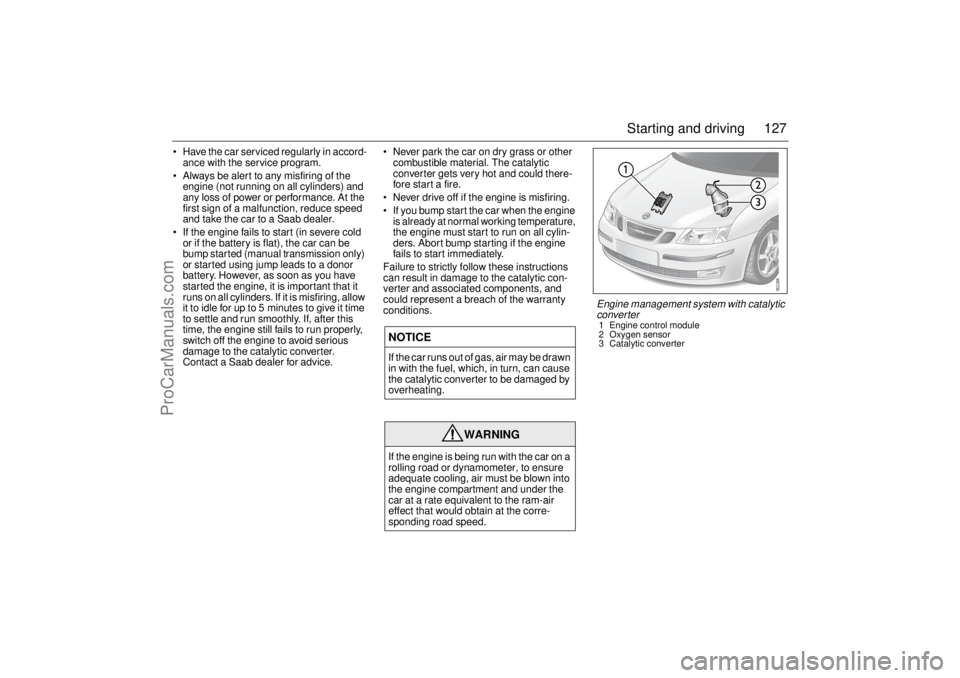
Engine management system with catalytic
converter1 Engine control module
2 Oxygen sensor
3 Catalytic converter
ProCarManuals.com