transmission SAAB 9-3 2003 User Guide
[x] Cancel search | Manufacturer: SAAB, Model Year: 2003, Model line: 9-3, Model: SAAB 9-3 2003Pages: 256, PDF Size: 21.66 MB
Page 127 of 256
127 Starting and driving
Have the car serviced regularly in accord-
ance with the service program.
Always be alert to any misfiring of the
engine (not running on all cylinders) and
any loss of power or performance. At the
first sign of a malfunction, reduce speed
and take the car to a Saab dealer.
If the engine fails to start (in severe cold
or if the battery is flat), the car can be
bump started (manual transmission only)
or started using jump leads to a donor
battery. However, as soon as you have
started the engine, it is important that it
runs on all cylinders. If it is misfiring, allow
it to idle for up to 5 minutes to give it time
to settle and run smoothly. If, after this
time, the engine still fails to run properly,
switch off the engine to avoid serious
damage to the catalytic converter.
Contact a Saab dealer for advice. Never park the car on dry grass or other
combustible material. The catalytic
converter gets very hot and could there-
fore start a fire.
Never drive off if the engine is misfiring.
If you bump start the car when the engine
is already at normal working temperature,
the engine must start to run on all cylin-
ders. Abort bump starting if the engine
fails to start immediately.
Failure to strictly follow these instructions
can result in damage to the catalytic con-
verter and associated components, and
could represent a breach of the warranty
conditions.
NOTICEIf the car runs out of gas, air may be drawn
in with the fuel, which, in turn, can cause
the catalytic converter to be damaged by
overheating.
WARNING
If the engine is being run with the car on a
rolling road or dynamometer, to ensure
adequate cooling, air must be blown into
the engine compartment and under the
car at a rate equivalent to the ram-air
effect that would obtain at the corre-
sponding road speed.
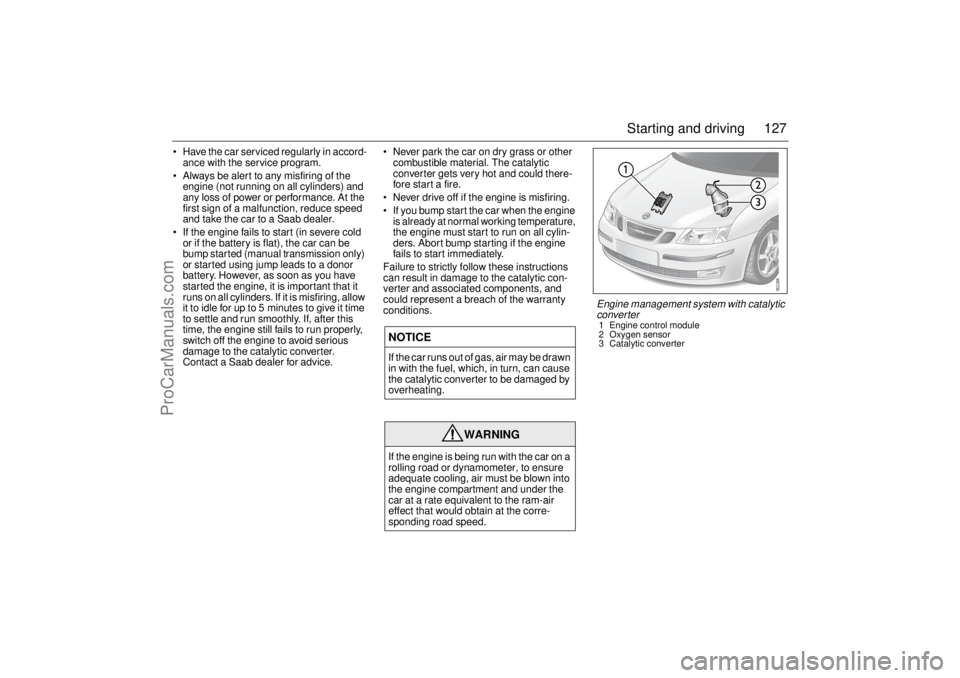
Engine management system with catalytic
converter1 Engine control module
2 Oxygen sensor
3 Catalytic converter
ProCarManuals.com
Page 133 of 256
133 Starting and driving
Manual transmissionClutch interlockTo start the car, the clutch pedal must be
depressed.
When changing gear, fully depress the
clutch pedal and then release it smoothly. It
is inadvisable to drive with your hand resting
on the gear lever, as this can increase the
wear on the gearbox.
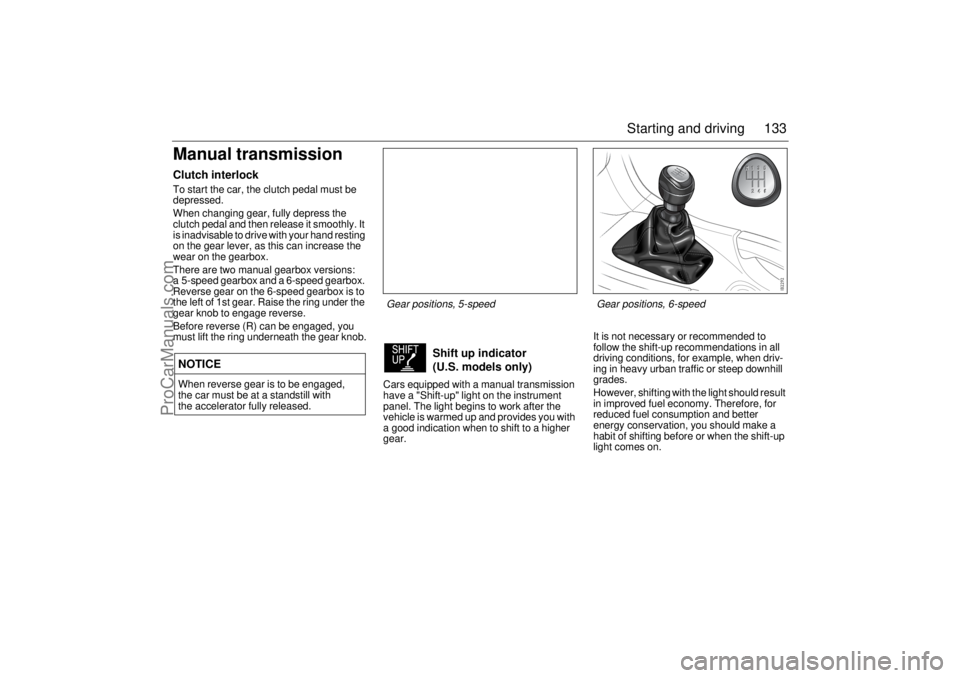
There are two manual gearbox versions:
a 5-speed gearbox and a 6-speed gearbox.
Reverse gear on the 6-speed gearbox is to
the left of 1st gear. Raise the ring under the
gear knob to engage reverse.
Before reverse (R) can be engaged, you
must lift the ring underneath the gear knob.
Cars equipped with a manual transmission
have a "Shift-up" light on the instrument
panel. The light begins to work after the
vehicle is warmed up and provides you with
a good indication when to shift to a higher
gear.It is not necessary or recommended to
follow the shift-up recommendations in all
driving conditions, for example, when driv-
ing in heavy urban traffic or steep downhill
grades.
However, shifting with the light should result
in improved fuel economy. Therefore, for
reduced fuel consumption and better
energy conservation, you should make a
habit of shifting before or when the shift-up
light comes on.NOTICEWhen reverse gear is to be engaged,
the car must be at a standstill with
the accelerator fully released.
Shift up indicator
(U.S. models only)
Gear positions, 5-speed Gear positions, 6-speed
ProCarManuals.com
Page 134 of 256
134 Starting and drivingAutomatic transmissionThe automatic transmission has an elec-
tronic control module. The control module
receives information including accelerator
position and road speed. Using this and
other information, it controls the hydraulic
pressure of the transmission to ensure that
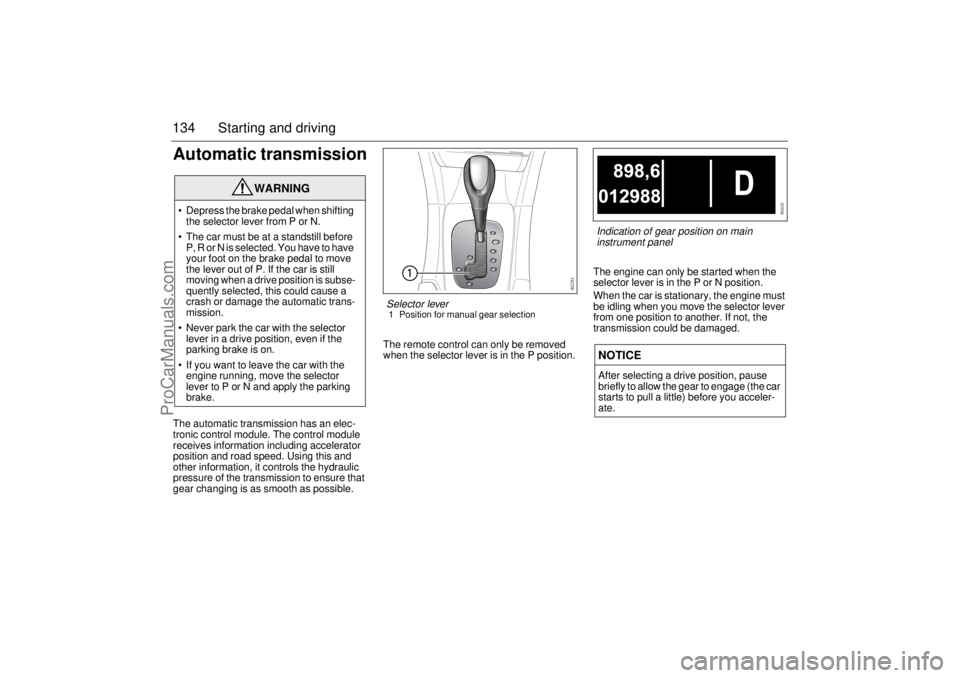
gear changing is as smooth as possible.The remote control can only be removed
when the selector lever is in the P position.The engine can only be started when the
selector lever is in the P or N position.
When the car is stationary, the engine must
be idling when you move the selector lever
from one position to another. If not, the
transmission could be damaged.
WARNING
Depress the brake pedal when shifting
the selector lever from P or N.
The car must be at a standstill before
P, R or N is selected. You have to have
your foot on the brake pedal to move
the lever out of P. If the car is still
moving when a drive position is subse-
quently selected, this could cause a
crash or damage the automatic trans-
mission.
Never park the car with the selector
lever in a drive position, even if the
parking brake is on.
If you want to leave the car with the
engine running, move the selector
lever to P or N and apply the parking
brake.
NOTICEAfter selecting a drive position, pause
briefly to allow the gear to engage (the car
starts to pull a little) before you acceler-
ate.
Selector lever1 Position for manual gear selection
Indication of gear position on main
instrument panel
ProCarManuals.com
Page 135 of 256
135 Starting and driving
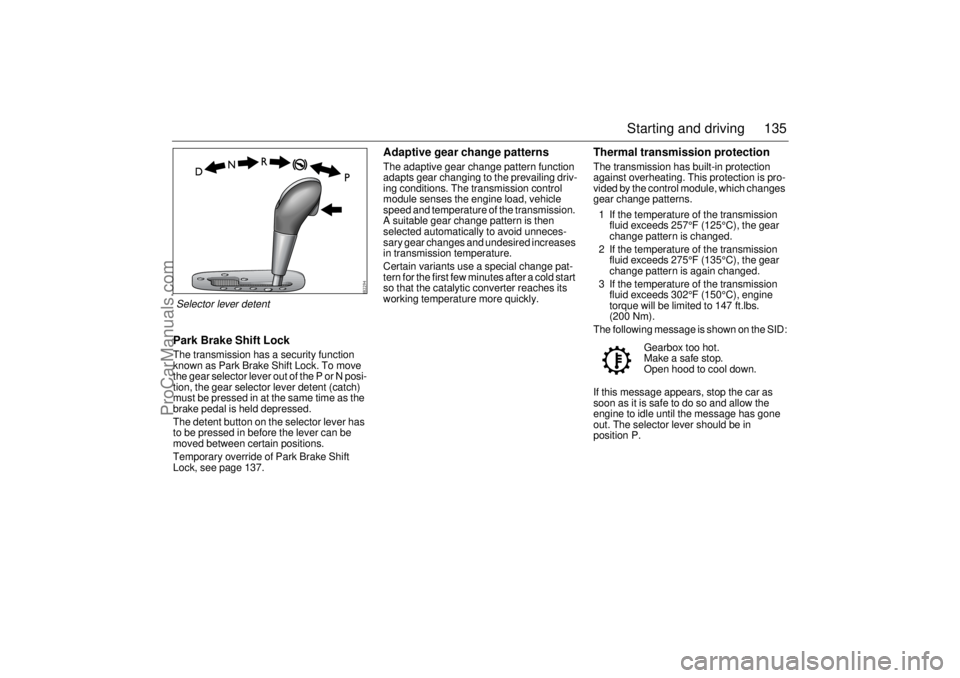
Park Brake Shift LockThe transmission has a security function
known as Park Brake Shift Lock. To move
the gear selector lever out of the P or N posi-
tion, the gear selector lever detent (catch)
must be pressed in at the same time as the
brake pedal is held depressed.
The detent button on the selector lever has
to be pressed in before the lever can be
moved between certain positions.
Temporary override of Park Brake Shift
Lock, see page 137.
Adaptive gear change patternsThe adaptive gear change pattern function
adapts gear changing to the prevailing driv-
ing conditions. The transmission control
module senses the engine load, vehicle
speed and temperature of the transmission.
A suitable gear change pattern is then
selected automatically to avoid unneces-
sary gear changes and undesired increases
in transmission temperature.
Certain variants use a special change pat-
tern for the first few minutes after a cold start
so that the catalytic converter reaches its
working temperature more quickly.
Thermal transmission protectionThe transmission has built-in protection
against overheating. This protection is pro-
vided by the control module, which changes
gear change patterns.
1 If the temperature of the transmission
fluid exceeds 257°F (125°C), the gear
change pattern is changed.
2 If the temperature of the transmission
fluid exceeds 275°F (135°C), the gear
change pattern is again changed.
3 If the temperature of the transmission
fluid exceeds 302°F (150°C), engine
torque will be limited to 147 ft.lbs.
(200 Nm).
The following message is shown on the SID:
If this message appears, stop the car as
soon as it is safe to do so and allow the
engine to idle until the message has gone
out. The selector lever should be in
position P.Gearbox too hot.
Make a safe stop.
Open hood to cool down.
Selector lever detent
ProCarManuals.com
Page 136 of 256
136 Starting and drivingLock-upThe transmission’s torque converter has a
lock-up function. This can lock the torque
converter in 3rd, 4th and 5th gears, thus
reducing the engine speed and fuel con-
sumption.Kick-downWhen the accelerator is pressed down fully,
a down change is made to optimize acceler-
ation, e.g. for overtaking.
Following this, the next higher gear will be
selected at the optimum engine speed,
unless you ease off the accelerator before
reaching this. Kick-down works in manual
mode in 4th and 5th gears if the engine
speed is lower than 2,000 rpm.
Driving in hilly country with a heavy
loadThe transmission fluid can overheat when
the gearbox is strained, for example, when
driving with a trailer on hilly roads. To avoid
the transmission fluid overheating, always
drive with the selector lever in the D posi-
tion. The adaptive gear change patterns are
then active.
High air temperatures or a faulty oil cooler
can also cause the transmission fluid to
overheat. Overheating reduces the service
life of the fluid.TowingTowing of cars with automatic transmission,
see page 164.
Descending hillsIf the speed of the car increases while
descending a steep hill, despite the acceler-
ator being released, the control module will
change down to 4th gear. If you desire more
powerful engine braking, manually select a
lower gear (see page 139).
WARNING
Remember to use the braking effect of the
engine (1st, 2nd or 3rd gear) when you
are descending long or steep hills to
spare the brakes.
Overheating can cause the brakes to
fade!
ProCarManuals.com
Page 137 of 256

137 Starting and driving
Limp-homeIf the transmission malfunctions, the control
module will activate limp-home mode. In
this mode, only 2nd and 5th gears are avail-
able. Select 2nd gear when driving at low
speeds and 5th gear at higher speeds. 2nd
gear must be selected manually. Select 5th
gear manually or move the selector lever
to D (see page 139).
The following message is shown on the SID:Temporary override of Park Brake Shift
Lock
1 Apply the parking brake.
2 Lift up the rubber mat in the storage
compartment ahead of the selector
lever.
3 Under the floor of the storage compart-
ment is a yellow plastic lever. Use a thin
tool, such as a screwdriver, to press and
hold the plastic lever while moving the
selector lever from P to N.
4 Remove the tool.
5 Release the parking brake if the car is to
be moved immediately, otherwise it
should remain on.
Check fuse 6 in the engine bay fuse box.
If the fuse is OK the battery may be dead.
Contact a Saab dealer to have the problem
checked and rectified. Gearbox malfunction.
Limited performance.
Contact Saab dealer.
NOTICEDue to electrical problems it may not be
possible to move the selector lever out of
the park position, even if the ignition is
ON. If for some reason the selector lever
has to be moved out of the park position
(i.e. to tow the car a short distance) do as
described below.
Temporary override of Park Brake Shift
Lock
ProCarManuals.com
Page 138 of 256
138 Starting and drivingSelector lever positions
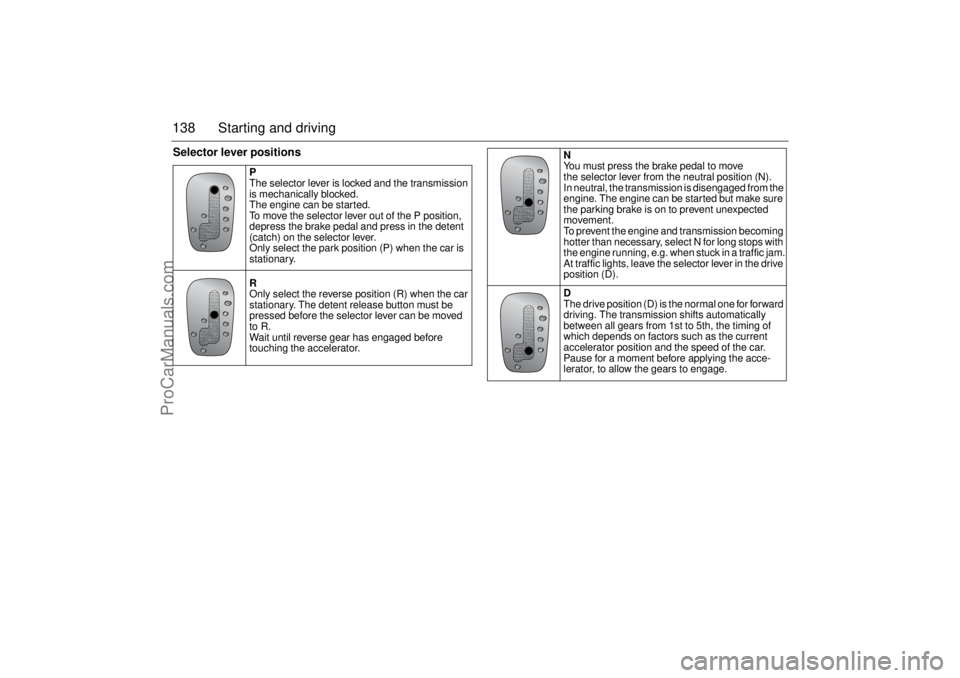
P
The selector lever is locked and the transmission
is mechanically blocked.
The engine can be started.
To move the selector lever out of the P position,
depress the brake pedal and press in the detent
(catch) on the selector lever.
Only select the park position (P) when the car is
stationary.
R
Only select the reverse position (R) when the car
stationary. The detent release button must be
pressed before the selector lever can be moved
to R.
Wait until reverse gear has engaged before
touching the accelerator.
N
You must press the brake pedal to move
the selector lever from the neutral position (N).
In neutral, the transmission is disengaged from the
engine. The engine can be started but make sure
the parking brake is on to prevent unexpected
movement.
To prevent the engine and transmission becoming
hotter than necessary, select N for long stops with
the engine running, e.g. when stuck in a traffic jam.
At traffic lights, leave the selector lever in the drive
position (D).
D
The drive position (D) is the normal one for forward
driving. The transmission shifts automatically
between all gears from 1st to 5th, the timing of
which depends on factors such as the current
accelerator position and the speed of the car.
Pause for a moment before applying the acce-
lerator, to allow the gears to engage.
ProCarManuals.com
Page 139 of 256
139 Starting and driving
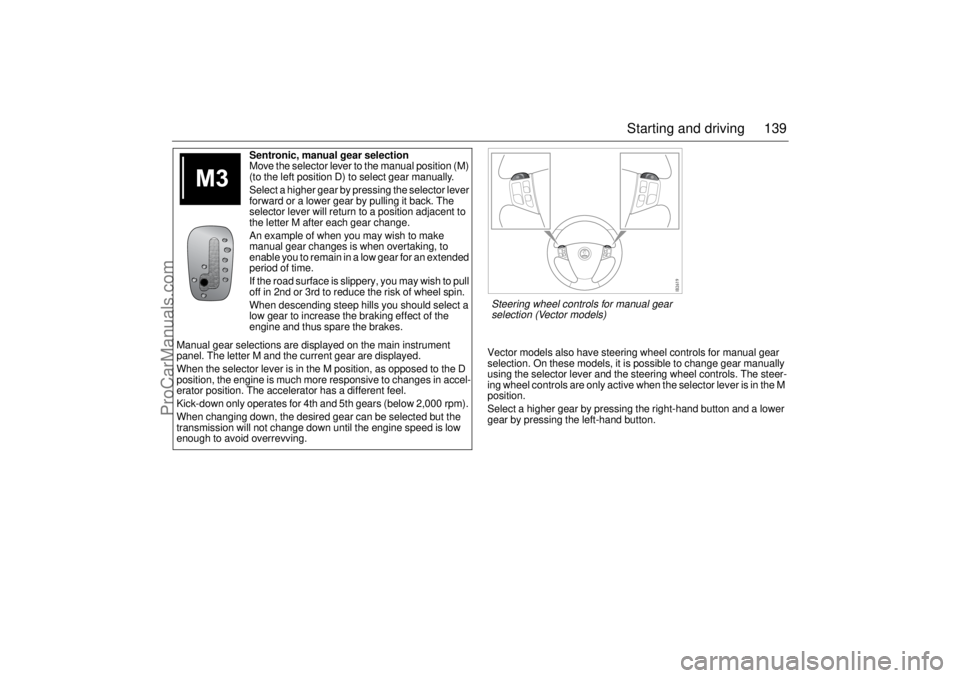
Vector models also have steering wheel controls for manual gear
selection. On these models, it is possible to change gear manually
using the selector lever and the steering wheel controls. The steer-
ing wheel controls are only active when the selector lever is in the M
position.
Select a higher gear by pressing the right-hand button and a lower
gear by pressing the left-hand button. Sentronic, manual gear selection
Move the selector lever to the manual position (M)
(to the left position D) to select gear manually.
Select a higher gear by pressing the selector lever
forward or a lower gear by pulling it back. The
selector lever will return to a position adjacent to
the letter M after each gear change.
An example of when you may wish to make
manual gear changes is when overtaking, to
enable you to remain in a low gear for an extended
period of time.
If the road surface is slippery, you may wish to pull
off in 2nd or 3rd to reduce the risk of wheel spin.
When descending steep hills you should select a
low gear to increase the braking effect of the
engine and thus spare the brakes.
Manual gear selections are displayed on the main instrument
panel. The letter M and the current gear are displayed.
When the selector lever is in the M position, as opposed to the D
position, the engine is much more responsive to changes in accel-
erator position. The accelerator has a different feel.
Kick-down only operates for 4th and 5th gears (below 2,000 rpm).
When changing down, the desired gear can be selected but the
transmission will not change down until the engine speed is low
enough to avoid overrevving.Steering wheel controls for manual gear
selection (Vector models)
ProCarManuals.com
Page 141 of 256

141 Starting and driving
To reduce the preset speedYou can reduce speed in any of the follow-
ing ways:
Brake to the desired speed. Jog the
control to SET/+ or SET/–.
Jog the control to SET/– to reduce the
speed by 1 mph (1.6 km/h).
Hold the control in the SET/– position until
the desired speed is reached.Temporary increase in speedAccelerate, without shifting down (manual
transmission), to exceed the set speed such
as for overtaking. When you release the
accelerator, the car will return to the set
speed.To disengage the system
temporarilySlide the switch to the left towards OFF, but
only as far as to disengage the cruise con-
trol. Allow the switch to spring back.
To re-engage the systemSlide the switch to RESUME. The car will
return to the previously set speed. Vehicle
speed must exceed 15 mph (25 km/h).To disengage the systemThe system will be disengaged:
As soon as the brake or clutch pedal is
depressed (cars with manual transmis-
sion).
When the switch is slid to To disengage
the system temporarily.
When the switch is slid to OFF.
When the TCS/ESP system is operative.
When position N is selected (cars with
automatic transmission).
BrakingIt is good practice to try your brakes period-
ically while driving. This is particularly
important when driving in heavy rain, on
roads with a lot of surface water, in snow or
in salty slush. In such conditions a slight
delay in the braking effect may be noticed.
To minimize this delay, dry the brakes by
applying them lightly now and again. This
should also be done after the car has been
washed, and in extremely damp weather.
To avoid the brakes becoming overheated,
such as when negotiating long descents
with a drop of several hundred yards (hun-
dred metres), select a low gear to utilize the
braking effect of the engine. If the car has
automatic transmission, select 1st or 2nd
gear.
You can help to prolong the life of the brakes
by thinking ahead and braking harder over
short periods, rather than braking more
moderately over long stretches.
ProCarManuals.com
Page 153 of 256
153 Starting and driving
Economical drivingFactors affecting fuel consumptionThe fuel consumption of a car is greatly
affected by driving conditions, climate, road
conditions, speed, driving technique, and
so on.Breaking-inFuel consumption may be somewhat
higher during the break-in period (the
first 3,000–4,000 miles (5,000–7,000 km)).Weather conditionsSummer temperatures give better fuel
economy than winter ones. The difference
can be as much as about 10%. Consump-
tion increases in cold weather because the
engine takes longer to reach its normal
operating temperature. The transmission
and wheel bearings also take longer to
warm up. Even distance affects consump-
tion: short journeys of 3–5 miles (5–8 km)
do not give the engine enough time to
reach its optimum temperature. Wind con-
ditions also have a marked effect on fuel
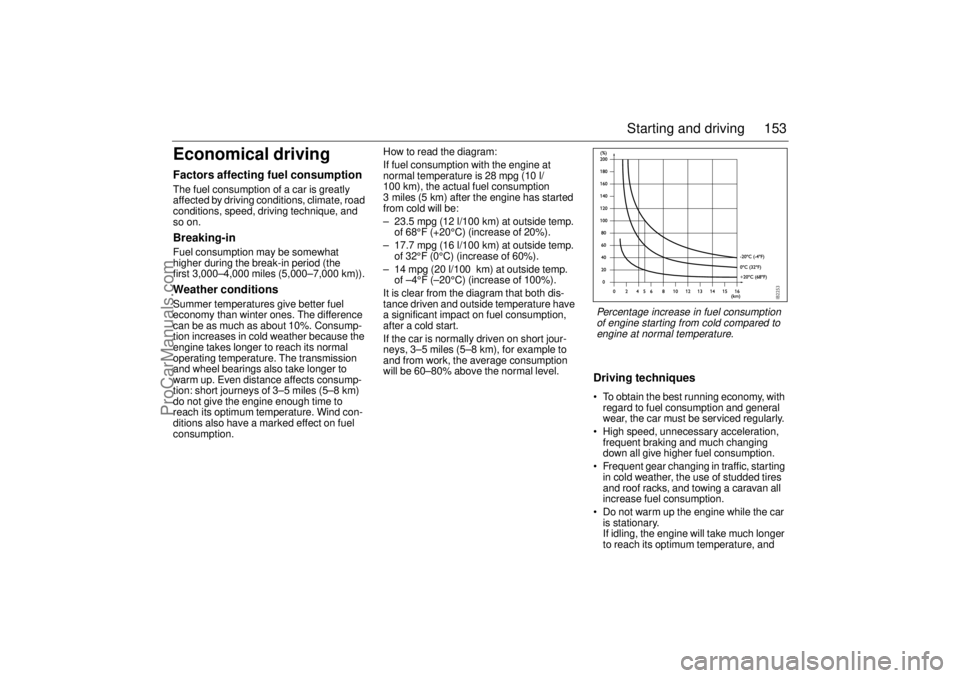
consumption.How to read the diagram:
If fuel consumption with the engine at
normal temperature is 28 mpg (10 l/
100 km), the actual fuel consumption
3 miles (5 km) after the engine has started
from cold will be:
– 23.5 mpg (12 l/100 km) at outside temp.
of 68°F (+20°C) (increase of 20%).
– 17.7 mpg (16 l/100 km) at outside temp.
of 32°F (0°C) (increase of 60%).
– 14 mpg (20 l/100 km) at outside temp.
of –4°F (–20°C) (increase of 100%).
It is clear from the diagram that both dis-
tance driven and outside temperature have
a significant impact on fuel consumption,
after a cold start.
If the car is normally driven on short jour-
neys, 3–5 miles (5–8 km), for example to
and from work, the average consumption
will be 60–80% above the normal level.
Driving techniques To obtain the best running economy, with
regard to fuel consumption and general
wear, the car must be serviced regularly.
High speed, unnecessary acceleration,
frequent braking and much changing
down all give higher fuel consumption.
Frequent gear changing in traffic, starting
in cold weather, the use of studded tires
and roof racks, and towing a caravan all
increase fuel consumption.
Do not warm up the engine while the car
is stationary.
If idling, the engine will take much longer
to reach its optimum temperature, and Percentage increase in fuel consumption
of engine starting from cold compared to
engine at normal temperature.
ProCarManuals.com