ECU SAAB 9-3 2003 Owner's Manual
[x] Cancel search | Manufacturer: SAAB, Model Year: 2003, Model line: 9-3, Model: SAAB 9-3 2003Pages: 256, PDF Size: 21.66 MB
Page 49 of 256
49 Security
The functions of Full theft alarm and Door
alarm only modes are explained below.
Panic functionThe car alarm includes a panic function.
This function allows the alarm to be started
manually, for example, to attract attention.
The panic alarm can only be activated while
the car is stationary. The alarm is silenced if
the car is driven off.
When the alarm is tripped, the lights and
horn come on for 3 minutes or until you
press one of the remote control buttons.
To start the alarm manually proceed as
follows:
Press and hold the button on the
remote control for more than 2 seconds,
or if you are sitting in the car...
Press and hold the or button on
one of the front doors for more than
2 seconds.
To switch off the alarm:
Press one of the remote control buttons
or, if you are sitting in the car, the or
buttons on one of the front doors. Full theft alarm:
The alarm will be triggered if a window
is smashed and someone sticks in their
arm to take something from the car. All
windows and the sunroof should be
shut when the car is locked in Full theft
alarm mode.
Door alarm only:
In this mode, the movement and tilt
sensors are disabled. This can be use-
ful if you wish to leave a dog in the car
or are travelling by ferry, for example.
ProCarManuals.com
Page 50 of 256

50 SecurityOverview of functionsLocking/arming Direction indicators flash once.
Unlocking/
disarmingHazard warning lights flash twice.
Unlocking/
disarming trunk
lidHazard warning lights flash three times.
Alarm triggered Direction indicators flash for 5 min.
The horn sounds for 30-second intervals with
10-second breaks (max. 10 cycles) or until you
press one of the remote control buttons or turn
the remote control ON in the ignition switch.
Movement
sensorThe movement sensor trips the alarm if it regis-
ters a movement in the cabin.
Remote control Normal range: 5–16 yds. (5–15 metres).
In favorable conditions the range can be signif-
icantly greater.
Remote control
batteryNormal life: approx. 4 years.
Change the battery when the SID displays:
Remote control battery low. Replace battery.
See Changing the key battery, page 44.
Car battery The alarm will trip if the battery is disconnected
when the alarm is armed.
Some car alarm functions and indications can be reprogrammed.
Contact a Saab dealer for details of the possibilities and refer to
page 248.
ProCarManuals.com
Page 51 of 256

51 Security
Quick guide, LED and Saab Information Display (SID)
messagesActivity LED signal
Arming (delay period) Shines for 11 s.
Alarm armed Flashes once every 3 s.
Disarming Off.
Alarm not armed Off.
A door, the hood or the tailgate is
open or opened during the delay
period.Flashes for 11 s then flashes
once every 3 s.
Car immobilized but not locked. Off.
Change of status of immobilizer
system, valid remote control
inserted or removed from ignition
switch.Double-flashes for 3 s.
SID message Reason/action
Key not accepted.
Contact Saab dealer.Error when remote control
inserted into ignition switch.
Remote control battery low.
Replace battery.Battery needs replacing.
See page 44.
X: standard key
Y: va l e t key
Key No: ZCheck of the number of remote
controls programmed for your
car. See page 43.
Alarm has been triggered
since being armed.The alarm has been tripped
since the car was last locked.
Immobilizer failure.
Try starting again.
Contact Saab dealer.Error when immobilizer code
checked.
ProCarManuals.com
Page 52 of 256
52 SecurityManually opening the
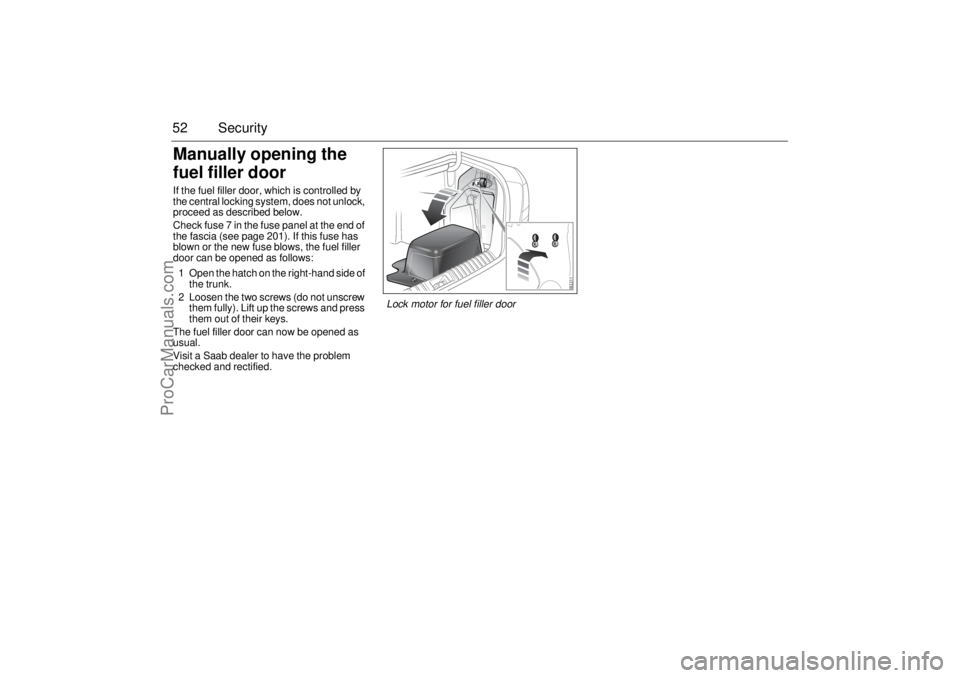
fuel filler doorIf the fuel filler door, which is controlled by
the central locking system, does not unlock,
proceed as described below.
Check fuse 7 in the fuse panel at the end of
the fascia (see page 201). If this fuse has
blown or the new fuse blows, the fuel filler
door can be opened as follows:
1 Open the hatch on the right-hand side of
the trunk.
2 Loosen the two screws (do not unscrew
them fully). Lift up the screws and press
them out of their keys.
The fuel filler door can now be opened as
usual.
Visit a Saab dealer to have the problem
checked and rectified.
Lock motor for fuel filler door
ProCarManuals.com
Page 112 of 256
112 Interior equipmentInterior rearview mirror with garage
opener, autodimming function and
compass (certain variants only)
Retain your original garage door opener
(transmitter) for future programming proce-
dures (i.e., new vehicle purchase). It is also
suggested that upon the sale of the vehicle,
the programmed garage opener buttons be
erased for security purposes, see page 113.Preparations for first-time programming
Before programming the garage opener for
the first time, you must delete any factory
codes.
Press and hold buttons 1 and 3 for about
20 seconds until the LED starts to flash.
This deletes the factory codes and initiates
the programming phase.
Programming the garage opener
The garage opener can record and store the
frequencies of three different remote con-
trols.
The battery in the remote control should be
fairly new for programming to work well.
1 Turn the ignition ON.
2 Hold your existing garage door opener
1–3 in. (3–7 cm) below the rearview
mirror. Sit where you can see the LED
(4) during programming.
3 Press the button on the remote control
and the desired button on the rear view
mirror at the same time.
4 The LED will now start to flash, slowly at
first and then rapidly. The rapidly flash-
ing LED indicates that programming is
complete and that you can release the
buttons.
The remote control may stop transmitting
during programming. If so, continue to hold
the button on the rearview mirror and
release and press the button on the remote
control every other second, "cycling" until
programming is completed.
WARNING
Make sure that people and objects are out
of the way of moving door or gate to
prevent potential harm or damage.
When programming the garage opener,
you may be operating a garage door or
gate operator.
Do not use the garage opener with any
garage door opener that lacks the safety
stop and reverse feature as required by
federal safety standards. (This includes
any garage door opener model manufac-
tured before April 1, 1982.). A garage
door opener which cannot detect an
object, signaling the door to stop and
reverse, does not meet current federal
safety standards. Using a garage door
opener without these features increases
risk of serious injury or death.
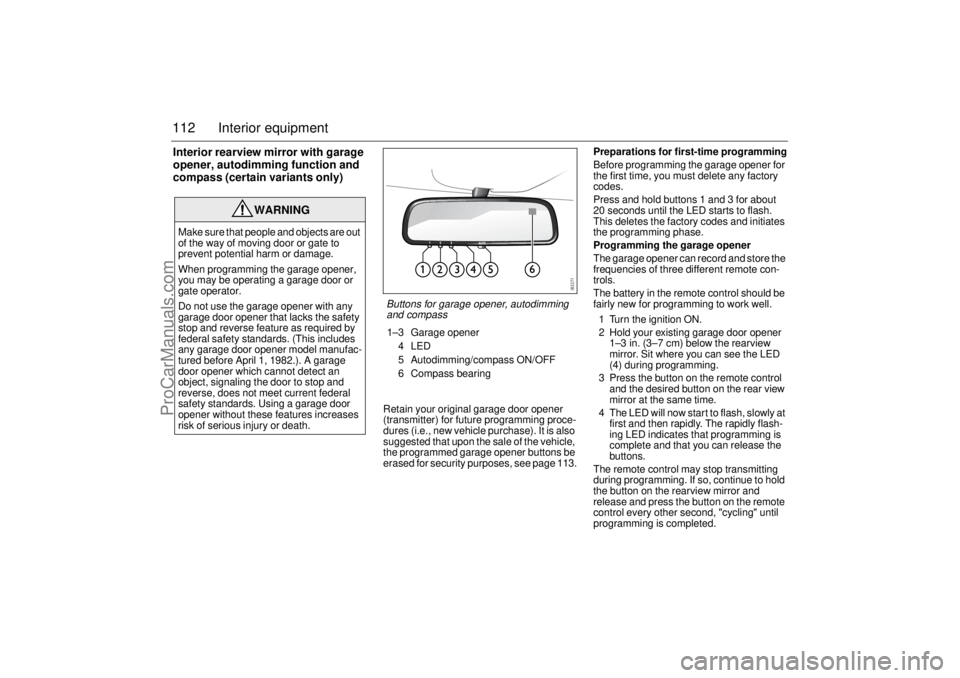
Buttons for garage opener, autodimming
and compass1–3 Garage opener
4LED
5 Autodimming/compass ON/OFF
6 Compass bearing
ProCarManuals.com
Page 113 of 256

113 Interior equipment
The LED will flash slowly at first and then
rapidly. The rapidly flashing LED indicates
that programming is complete and that you
can release the buttons.
Reprogramming a button that has previ-
ously been programmed
1 Press and hold the desired button on the
rearview mirror for the entire program-
ming sequence.
2 The LED will start to flash slowly after
20 seconds.
3 Hold your existing garage door opener
1–3 in. (3–7 cm) from the rearview
mirror and press the button on the
remote control.
4 Reprogramming is complete when the
LED starts to flash rapidly.
The previous frequency is now erased and
replaced by the new one. Reprogramming
one button does not affect the other buttons.Complete erase
Completely erase the memory of the garage
opener by pressing and holding buttons
1 and 3 simultaneously for 20 seconds.
Confirmation is provided by the LED flash-
ing rapidly for 10 seconds.
A complete erase deletes the frequencies
from all three buttons. It is not possible to
erase the memory of a single button.
Opening a garage door
Press and hold the appropriate button until
the garage door starts to open.
You can of course still use your original
garage door opener even if you have pro-
grammed the garage opener in the rearview
mirror.Garage doors with rolling security codes
Garage doors with rolling security codes
manufactured after 1996 can be identified
as follows:
Read the instruction manual for the
garage door.
Programming the garage opener in the
rearview mirror seems to be successful
but the garage door does not open.
Press and hold the programmed button.
The garage door uses a rolling security
code if the LED flashes rapidly and after
2 seconds shines constantly.
If the garage door remote control uses roll-
ing security codes, proceed as follows
having programmed the garage opener:
1 Localise the button labelled "learn" or
"smart" on the motor unit of the garage
door. The location and color of this
button varies between makes.
2 Press and release the "learn" button on
the motor unit. Step 3 must be
performed within 30 seconds of Step 2.
3 Press the programmed button on the
rearview mirror twice (some garage
doors require the button to be pressed
three times; refer to the door’s instruc-
tion manual).NOTICESwitch off the power supply to the garage
door or gate (or park the car beyond the
range of the remote control) while
programming using the "cycling" method
to prevent damaging the electrical motor.
ProCarManuals.com
Page 117 of 256
117 Interior equipment
Load-through hatchA load-through hatch is incorporated in the rear seat backrest to
enable long, narrow items to be carried inside the car.
Before loading or unloading long items, switch off the engine and
apply the parking brake. This avoids the danger of the car moving
off if a long item were to knock the gear or selector lever into gear.
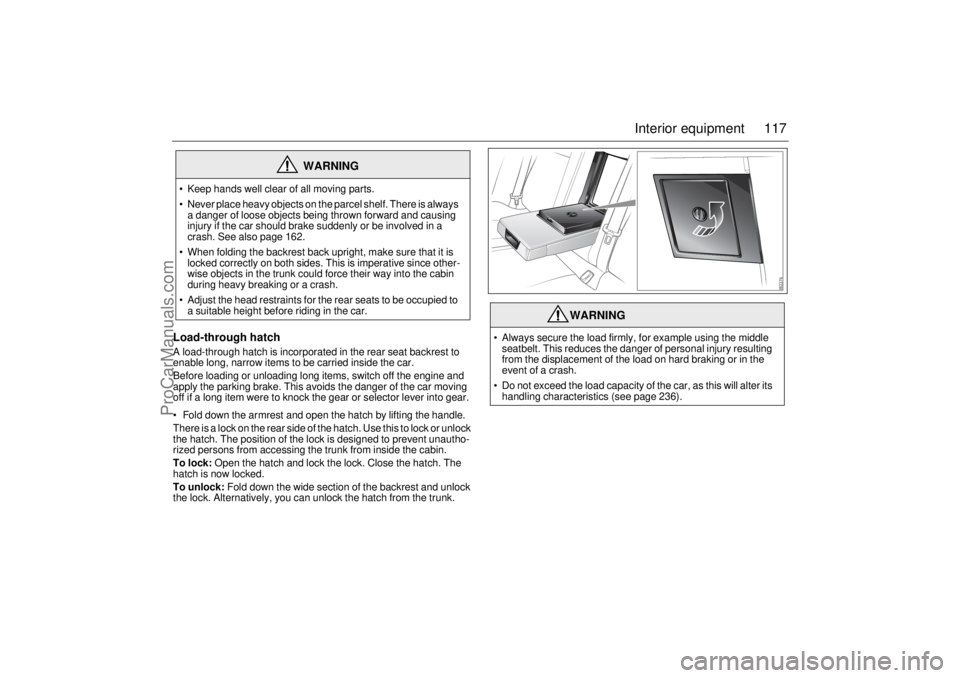
Fold down the armrest and open the hatch by lifting the handle.
There is a lock on the rear side of the hatch. Use this to lock or unlock
the hatch. The position of the lock is designed to prevent unautho-
rized persons from accessing the trunk from inside the cabin.
To lock: Open the hatch and lock the lock. Close the hatch. The
hatch is now locked.
To unlock: Fold down the wide section of the backrest and unlock
the lock. Alternatively, you can unlock the hatch from the trunk.
WARNING
Keep hands well clear of all moving parts.
Never place heavy objects on the parcel shelf. There is always
a danger of loose objects being thrown forward and causing
injury if the car should brake suddenly or be involved in a
crash. See also page 162.
When folding the backrest back upright, make sure that it is
locked correctly on both sides. This is imperative since other-
wise objects in the trunk could force their way into the cabin
during heavy breaking or a crash.
Adjust the head restraints for the rear seats to be occupied to
a suitable height before riding in the car.
WARNING
Always secure the load firmly, for example using the middle
seatbelt. This reduces the danger of personal injury resulting
from the displacement of the load on hard braking or in the
event of a crash.
Do not exceed the load capacity of the car, as this will alter its
handling characteristics (see page 236).
ProCarManuals.com
Page 118 of 256
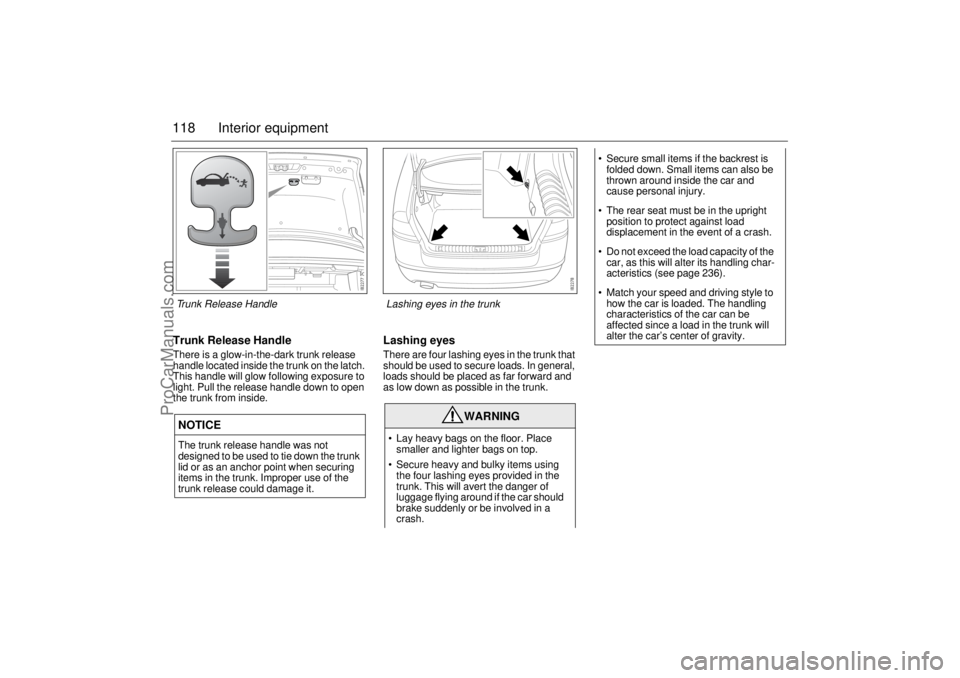
118 Interior equipmentTrunk Release HandleThere is a glow-in-the-dark trunk release
handle located inside the trunk on the latch.
This handle will glow following exposure to
light. Pull the release handle down to open
the trunk from inside.
Lashing eyesThere are four lashing eyes in the trunk that
should be used to secure loads. In general,
loads should be placed as far forward and
as low down as possible in the trunk.
NOTICEThe trunk release handle was not
designed to be used to tie down the trunk
lid or as an anchor point when securing
items in the trunk. Improper use of the
trunk release could damage it.
WARNING
Lay heavy bags on the floor. Place
smaller and lighter bags on top.
Secure heavy and bulky items using
the four lashing eyes provided in the
trunk. This will avert the danger of
luggage flying around if the car should
brake suddenly or be involved in a
crash.
Secure small items if the backrest is
folded down. Small items can also be
thrown around inside the car and
cause personal injury.
The rear seat must be in the upright
position to protect against load
displacement in the event of a crash.
Do not exceed the load capacity of the
car, as this will alter its handling char-
acteristics (see page 236).
Match your speed and driving style to
how the car is loaded. The handling
characteristics of the car can be
affected since a load in the trunk will
alter the car’s center of gravity.
Trunk Release Handle Lashing eyes in the trunk
ProCarManuals.com
Page 135 of 256
135 Starting and driving
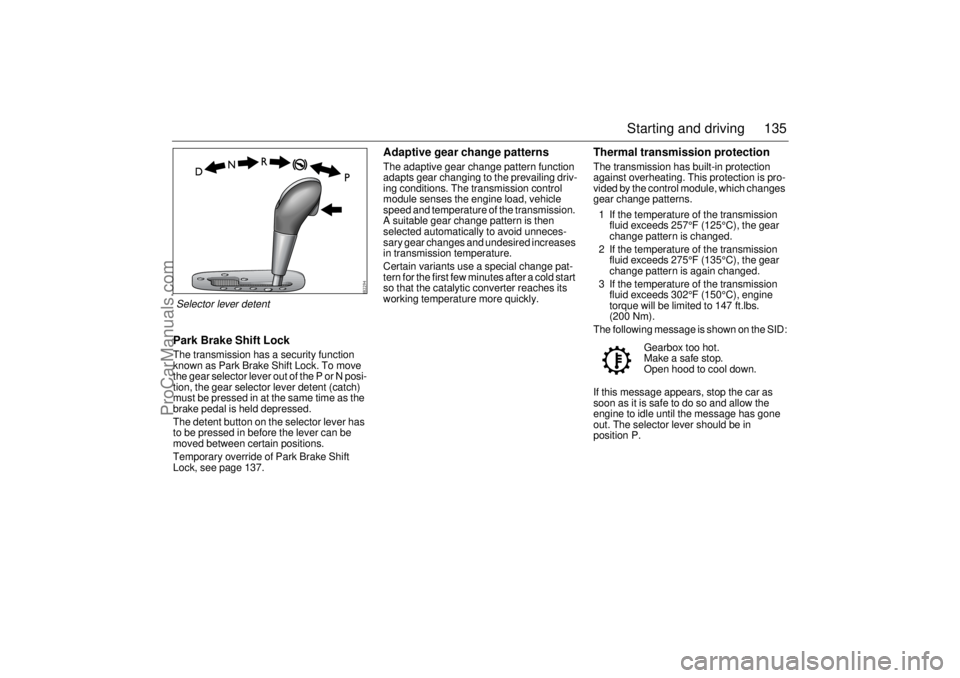
Park Brake Shift LockThe transmission has a security function
known as Park Brake Shift Lock. To move
the gear selector lever out of the P or N posi-
tion, the gear selector lever detent (catch)
must be pressed in at the same time as the
brake pedal is held depressed.
The detent button on the selector lever has
to be pressed in before the lever can be
moved between certain positions.
Temporary override of Park Brake Shift
Lock, see page 137.
Adaptive gear change patternsThe adaptive gear change pattern function
adapts gear changing to the prevailing driv-
ing conditions. The transmission control
module senses the engine load, vehicle
speed and temperature of the transmission.
A suitable gear change pattern is then
selected automatically to avoid unneces-
sary gear changes and undesired increases
in transmission temperature.
Certain variants use a special change pat-
tern for the first few minutes after a cold start
so that the catalytic converter reaches its
working temperature more quickly.
Thermal transmission protectionThe transmission has built-in protection
against overheating. This protection is pro-
vided by the control module, which changes
gear change patterns.
1 If the temperature of the transmission
fluid exceeds 257°F (125°C), the gear
change pattern is changed.
2 If the temperature of the transmission
fluid exceeds 275°F (135°C), the gear
change pattern is again changed.
3 If the temperature of the transmission
fluid exceeds 302°F (150°C), engine
torque will be limited to 147 ft.lbs.
(200 Nm).
The following message is shown on the SID:
If this message appears, stop the car as
soon as it is safe to do so and allow the
engine to idle until the message has gone
out. The selector lever should be in
position P.Gearbox too hot.
Make a safe stop.
Open hood to cool down.
Selector lever detent
ProCarManuals.com
Page 157 of 256
157 Starting and driving
Towing a trailerMake sure you are familiar with the legal
requirements regarding speed limits for
towing, maximum trailer weights, trailer
braking requirements, and also any spe-
cial driving licence provisions.
Trailer hitch attachmentTrailer hitch attachments are available as
accessories. These are designed for a max-
imum trailer weight of 3500 lbs (1588 kg),
with trailer brakes.
An electrical socket is provided for connect-
ing the trailer electrics. This is located under
the floor trim by the left-hand tail light.
The Saab genuine electrical socket enables
the battery in the trailer on tow to be charged
during while driving. Also, if the car has
SPA, this is deactivated automatically if a
trailer is hitched up and correctly connected
to the Saab genuine trailer socket.
Saab recommendations:
Use a genuine Saab towbar that is
designed and tested for your Saab.
Contact your Saab dealer for advice on
which towbar is designed for your car.
WARNING
Do not drive with a trailer on inclines
steeper than 15 %. The load on the
drive (front) wheels will be so low that
the wheels can start to spin and
prevent further progress.
In addition, the car’s parking brake
may not always be sufficient to hold
the car and trailer securely, as the
wheels may start to slide.
Always apply the trailer’s parking
brake when unhitching it. There is
otherwise a risk of personal injury or
damage to the bumper should the
trailer start to roll.
When you hitch up the trailer be sure
to attach its safety chains to the holes
by the hitch attachment.
NOTICE Use only a genuine Saab trailer hitch,
since other models can damage the
car’s bodywork and electrical system.
Consult a Saab dealer for guidance on
how to connect a trailer hitch.
Exercise care when driving on uneven
roads or against the curb if the car is
heavily laden. This particularly applies
to cars with 18" wheels.
ProCarManuals.com