lock SAAB 9-3 2003 Owner's Manual
[x] Cancel search | Manufacturer: SAAB, Model Year: 2003, Model line: 9-3, Model: SAAB 9-3 2003Pages: 256, PDF Size: 21.66 MB
Page 48 of 256
48 Security
Movement sensorThe movement sensor monitors the cabin.
The alarm will be triggered if a movement is
detected, such as if someone sticks in their
arm through a smashed window.
Note: Always contact your Saab dealer if
you intend to use a separate cabin heater as
this can interfere with the movement
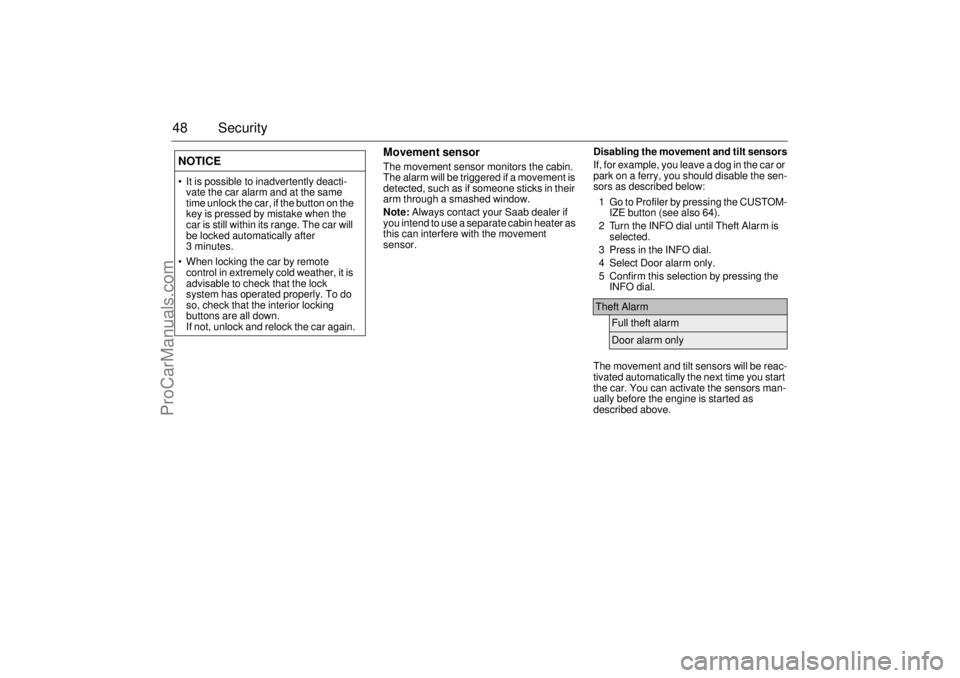
sensor.Disabling the movement and tilt sensors
If, for example, you leave a dog in the car or
park on a ferry, you should disable the sen-
sors as described below:
1 Go to Profiler by pressing the CUSTOM-
IZE button (see also 64).
2 Turn the INFO dial until Theft Alarm is
selected.
3 Press in the INFO dial.
4 Select Door alarm only.
5 Confirm this selection by pressing the
INFO dial.
The movement and tilt sensors will be reac-
tivated automatically the next time you start
the car. You can activate the sensors man-
ually before the engine is started as
described above.
NOTICE It is possible to inadvertently deacti-
vate the car alarm and at the same
time unlock the car, if the button on the
key is pressed by mistake when the
car is still within its range. The car will
be locked automatically after
3 minutes.
When locking the car by remote
control in extremely cold weather, it is
advisable to check that the lock
system has operated properly. To do
so, check that the interior locking
buttons are all down.
If not, unlock and relock the car again.
Theft Alarm
Full theft alarmDoor alarm only
ProCarManuals.com
Page 49 of 256
49 Security
The functions of Full theft alarm and Door
alarm only modes are explained below.
Panic functionThe car alarm includes a panic function.
This function allows the alarm to be started
manually, for example, to attract attention.
The panic alarm can only be activated while
the car is stationary. The alarm is silenced if
the car is driven off.
When the alarm is tripped, the lights and
horn come on for 3 minutes or until you
press one of the remote control buttons.
To start the alarm manually proceed as
follows:
Press and hold the button on the
remote control for more than 2 seconds,
or if you are sitting in the car...
Press and hold the or button on
one of the front doors for more than
2 seconds.
To switch off the alarm:
Press one of the remote control buttons
or, if you are sitting in the car, the or
buttons on one of the front doors. Full theft alarm:
The alarm will be triggered if a window
is smashed and someone sticks in their
arm to take something from the car. All
windows and the sunroof should be
shut when the car is locked in Full theft
alarm mode.
Door alarm only:
In this mode, the movement and tilt
sensors are disabled. This can be use-
ful if you wish to leave a dog in the car
or are travelling by ferry, for example.
ProCarManuals.com
Page 50 of 256

50 SecurityOverview of functionsLocking/arming Direction indicators flash once.
Unlocking/
disarmingHazard warning lights flash twice.
Unlocking/
disarming trunk
lidHazard warning lights flash three times.
Alarm triggered Direction indicators flash for 5 min.
The horn sounds for 30-second intervals with
10-second breaks (max. 10 cycles) or until you
press one of the remote control buttons or turn
the remote control ON in the ignition switch.
Movement
sensorThe movement sensor trips the alarm if it regis-
ters a movement in the cabin.
Remote control Normal range: 5–16 yds. (5–15 metres).
In favorable conditions the range can be signif-
icantly greater.
Remote control
batteryNormal life: approx. 4 years.
Change the battery when the SID displays:
Remote control battery low. Replace battery.
See Changing the key battery, page 44.
Car battery The alarm will trip if the battery is disconnected
when the alarm is armed.
Some car alarm functions and indications can be reprogrammed.
Contact a Saab dealer for details of the possibilities and refer to
page 248.
ProCarManuals.com
Page 51 of 256

51 Security
Quick guide, LED and Saab Information Display (SID)
messagesActivity LED signal
Arming (delay period) Shines for 11 s.
Alarm armed Flashes once every 3 s.
Disarming Off.
Alarm not armed Off.
A door, the hood or the tailgate is
open or opened during the delay
period.Flashes for 11 s then flashes
once every 3 s.
Car immobilized but not locked. Off.
Change of status of immobilizer
system, valid remote control
inserted or removed from ignition
switch.Double-flashes for 3 s.
SID message Reason/action
Key not accepted.
Contact Saab dealer.Error when remote control
inserted into ignition switch.
Remote control battery low.
Replace battery.Battery needs replacing.
See page 44.
X: standard key
Y: va l e t key
Key No: ZCheck of the number of remote
controls programmed for your
car. See page 43.
Alarm has been triggered
since being armed.The alarm has been tripped
since the car was last locked.
Immobilizer failure.
Try starting again.
Contact Saab dealer.Error when immobilizer code
checked.
ProCarManuals.com
Page 52 of 256
52 SecurityManually opening the
fuel filler doorIf the fuel filler door, which is controlled by
the central locking system, does not unlock,
proceed as described below.
Check fuse 7 in the fuse panel at the end of
the fascia (see page 201). If this fuse has
blown or the new fuse blows, the fuel filler
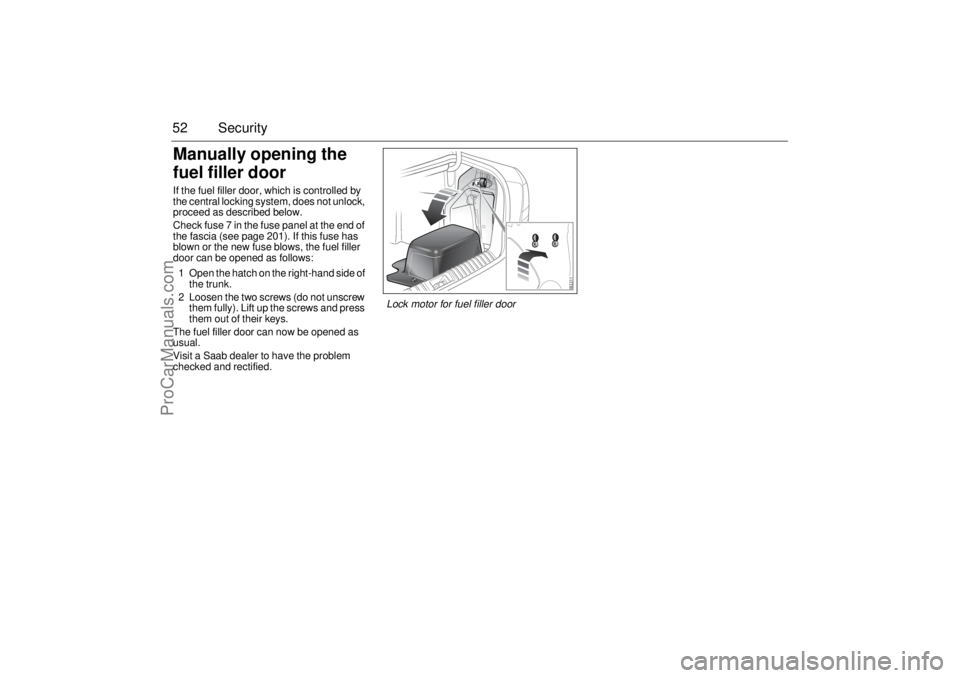
door can be opened as follows:
1 Open the hatch on the right-hand side of
the trunk.
2 Loosen the two screws (do not unscrew
them fully). Lift up the screws and press
them out of their keys.
The fuel filler door can now be opened as
usual.
Visit a Saab dealer to have the problem
checked and rectified.
Lock motor for fuel filler door
ProCarManuals.com
Page 54 of 256
54 Instruments and controlsMain instrument panel
Warning and indicator
lightsThe following warning and indicate lights
are found on the main instrument panel.This warning light illuminates when a fault
arises in the antilock brake system.
The following message is shown on the
Saab Information Display (SID):
The brake system will continue to function
but without ABS modulation.
Antilock braking warningAntilock brake malfunction.
Contact Saab dealer.
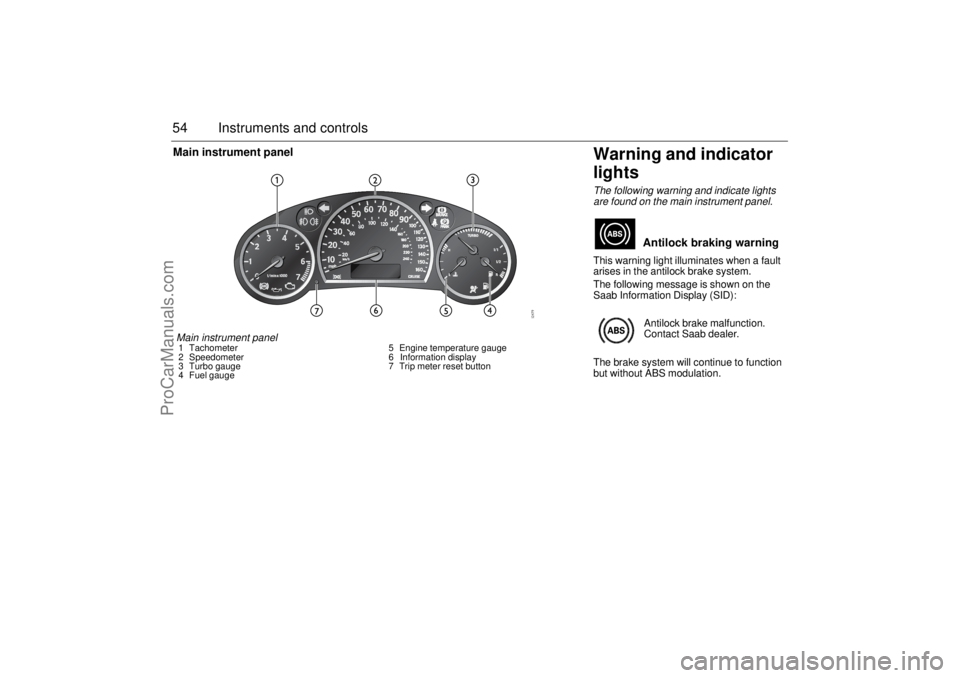
Main instrument panel1 Tachometer
2 Speedometer
3 Turbo gauge
4 Fuel gauge5 Engine temperature gauge
6 Information display
7 Trip meter reset button
ProCarManuals.com
Page 56 of 256
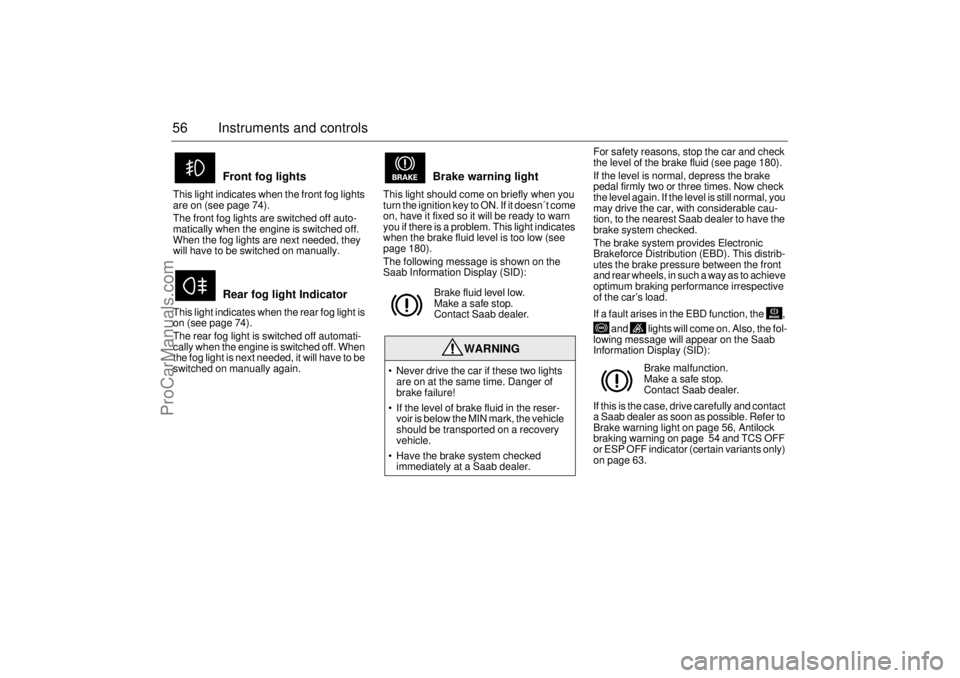
56 Instruments and controlsThis light indicates when the front fog lights
are on (see page 74).
The front fog lights are switched off auto-
matically when the engine is switched off.
When the fog lights are next needed, they
will have to be switched on manually.
This light indicates when the rear fog light is
on (see page 74).
The rear fog light is switched off automati-
cally when the engine is switched off. When
the fog light is next needed, it will have to be
switched on manually again.This light should come on briefly when you
turn the ignition key to ON. If it doesn´t come
on, have it fixed so it will be ready to warn
you if there is a problem. This light indicates
when the brake fluid level is too low (see
page 180).
The following message is shown on the
Saab Information Display (SID):For safety reasons, stop the car and check
the level of the brake fluid (see page 180).
If the level is normal, depress the brake
pedal firmly two or three times. Now check
the level again. If the level is still normal, you
may drive the car, with considerable cau-
tion, to the nearest Saab dealer to have the
brake system checked.
The brake system provides Electronic
Brakeforce Distribution (EBD). This distrib-
utes the brake pressure between the front
and rear wheels, in such a way as to achieve
optimum braking performance irrespective
of the car’s load.
If a fault arises in the EBD function, the ,
and lights will come on. Also, the fol-
lowing message will appear on the Saab
Information Display (SID):
If this is the case, drive carefully and contact
a Saab dealer as soon as possible. Refer to
Brake warning light on page 56, Antilock
braking warning on page 54 and TCS OFF
or ESP OFF indicator (certain variants only)
on page 63.
Front fog lights
Rear fog light Indicator
Brake warning lightBrake fluid level low.
Make a safe stop.
Contact Saab dealer.
WARNING
Never drive the car if these two lights
are on at the same time. Danger of
brake failure!
If the level of brake fluid in the reser-
voir is below the MIN mark, the vehicle
should be transported on a recovery
vehicle.
Have the brake system checked
immediately at a Saab dealer.
Brake malfunction.
Make a safe stop.
Contact Saab dealer.
ProCarManuals.com
Page 64 of 256

64 Instruments and controlsSaab Information
Display (SID)Various types of information are shown on
the SID: warnings, indications, trip com-
puter information and information from the
car’s Infotainment System.
The warnings and indications that can be
shown on the SID are listed on page 249.
When the engine is switched off, the current
warnings and indications are displayed.
If there is more than one message on the
SID, a plus sign will be displayed to the left
of the first message. Each message will be
displayed for 10 seconds.
Press the CLEAR button to acknowledge
a SID message. If you acknowledge a mes-
sage but do nothing about it, the message
will be displayed again the next time you
start the car.
You can adjust the settings of several of the
car’s systems, such as the clock, alarm and
climate control system. These are known as
Profiler.
ProfilerAdjustments can be made with the control
unit situated between the main instrument
panel and the audio system. This is called
Profiler.
1 Activate Profiler by pressing the
CUSTOMIZE button.
2 Turn the INFO dial until the appropriate
system is selected.
3 Confirm selection by pressing the
INFO dial.
Select Exit once you have made the desired
settings.The number of systems that are displayed
on the SID depends on the car’s equipment
level. The list shown below includes the
systems that can be found in your car.
Theft Alarm, page 46.
Full theft alarmDoor alarm only
Park Assistance, page 152.
SPA onSPA off
Clock / Alarm, page 69.
Set ClockSet Alarm
Rain Sensor, page 77.
HighMediumLow
SID, control unit and display
ProCarManuals.com
Page 69 of 256

69 Instruments and controls
Under Profiler you can choose whether the
entire speedometer scale (0–160 mph) or
only part of the scale (0–90 mph) should be
illuminated in Night Panel mode.
1 Press the CUSTOMIZE button to go to
Profiler.
2 Select System Settings using the INFO
dial.
3 Press in the INFO dial.
4 Select Speed Scale Illum.
Select 0–160 mph or 0–90 mph.
ClockSettings can be made from Profiler.
1 Press the CUSTOMIZE button to go to
Profiler.
2 Select Clock / Alarm using the INFO dial.
3 Press in the INFO dial.
4 Select Set Clock.
5 Select Manual.Explanation of setting the clock.
System Settings
Speed Scale Illum.
0–160 mph0–90 mph
Clock / Alarm
Set Clock
Manual
Clock
Set Clock
Manual:
Use the INFO dial to set
manually.
ProCarManuals.com
Page 70 of 256

70 Instruments and controlsAlarmSettings can be made from Profiler.
1 Press the CUSTOMIZE button to go to
Profiler.
2 Select Clock / Alarm using the INFO dial.
3 Press in the INFO dial.
4 Select Set Alarm.
If the alarm is not activated: set using the
INFO dial.
If the alarm is activated (Set Alarm on):
select Alarm on or Alarm off.Explanation of setting the alarm time.
System SettingsUnder this heading you can make system
settings, such as change the display lan-
guage, units and service information.
1 Press the CUSTOMIZE button to go to
Profiler.
2 Select System Settings using the
INFO dial.
3 Press in the INFO dial.
4 Select the desired heading using the
INFO dial.
5 Press in the INFO dial.
Clock / Alarm
Set Alarm
Alarm
00:00
Set Alarm on
Alarm onAlarm off
Set Alarm
Set Alarm:
A new alarm time can be set.
Use the INFO dial.
Set Alarm on:
A preset alarm time exists.
Select Alarm on or Alarm off.
ProCarManuals.com