lock SAAB 9-3 2004 Service Manual
[x] Cancel search | Manufacturer: SAAB, Model Year: 2004, Model line: 9-3, Model: SAAB 9-3 2004Pages: 288, PDF Size: 23.54 MB
Page 84 of 288
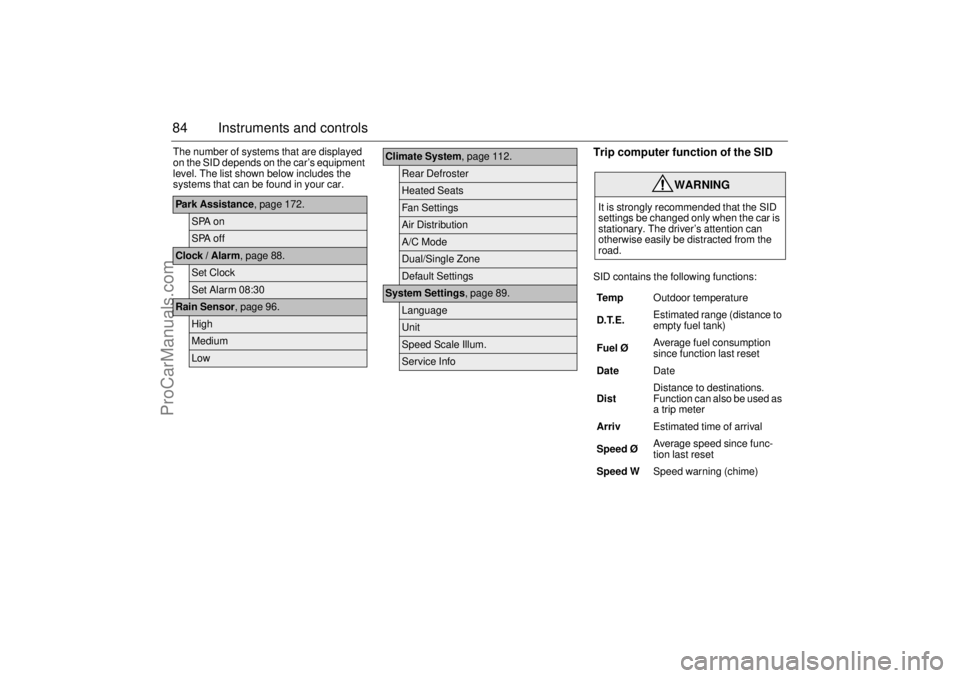
84 Instruments and controlsThe number of systems that are displayed
on the SID depends on the car’s equipment
level. The list shown below includes the
systems that can be found in your car.
Trip computer function of the SIDSID contains the following functions:
Park Assistance, page 172.
SPA onSPA off
Clock / Alarm, page 88.
Set ClockSet Alarm 08:30
Rain Sensor, page 96.
HighMediumLow
Climate System, page 112.
Rear DefrosterHeated SeatsFan SettingsAir DistributionA/C ModeDual/Single ZoneDefault Settings
System Settings, page 89.
LanguageUnitSpeed Scale Illum.Service Info
WARNING
It is strongly recommended that the SID
settings be changed only when the car is
stationary. The driver’s attention can
otherwise easily be distracted from the
road.
Te m pOutdoor temperature
D.T.E. Estimated range (distance to
empty fuel tank)
Fuel ØAverage fuel consumption
since function last reset
DateDate
DistDistance to destinations.
Function can also be used as
a trip meter
ArrivEstimated time of arrival
Speed Ø Average speed since func-
tion last reset
Speed WSpeed warning (chime)
ProCarManuals.com
Page 88 of 288
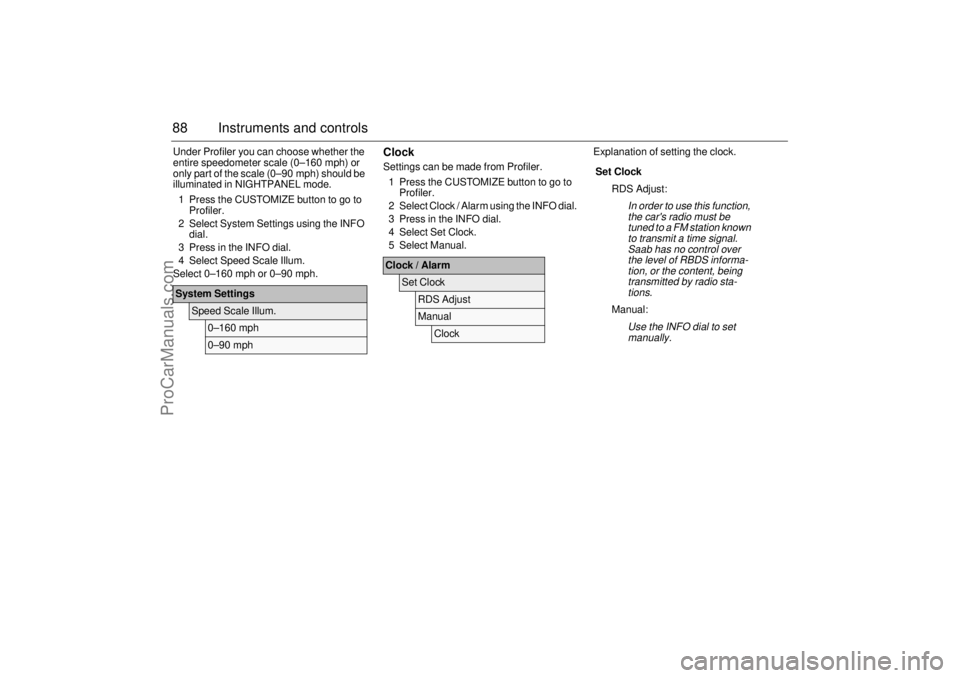
88 Instruments and controlsUnder Profiler you can choose whether the
entire speedometer scale (0–160 mph) or
only part of the scale (0–90 mph) should be
illuminated in NIGHTPANEL mode.
1 Press the CUSTOMIZE button to go to
Profiler.
2 Select System Settings using the INFO
dial.
3 Press in the INFO dial.
4 Select Speed Scale Illum.
Select 0–160 mph or 0–90 mph.
ClockSettings can be made from Profiler.
1 Press the CUSTOMIZE button to go to
Profiler.
2 Select Clock / Alarm using the INFO dial.
3 Press in the INFO dial.
4 Select Set Clock.
5 Select Manual.Explanation of setting the clock.
System Settings
Speed Scale Illum.
0–160 mph0–90 mph
Clock / Alarm
Set Clock
RDS AdjustManual
Clock
Set Clock
RDS Adjust:
In order to use this function,
the car's radio must be
tuned to a FM station known
to transmit a time signal.
Saab has no control over
the level of RBDS informa-
tion, or the content, being
transmitted by radio sta-
tions.
Manual:
Use the INFO dial to set
manually.
ProCarManuals.com
Page 89 of 288
89 Instruments and controls
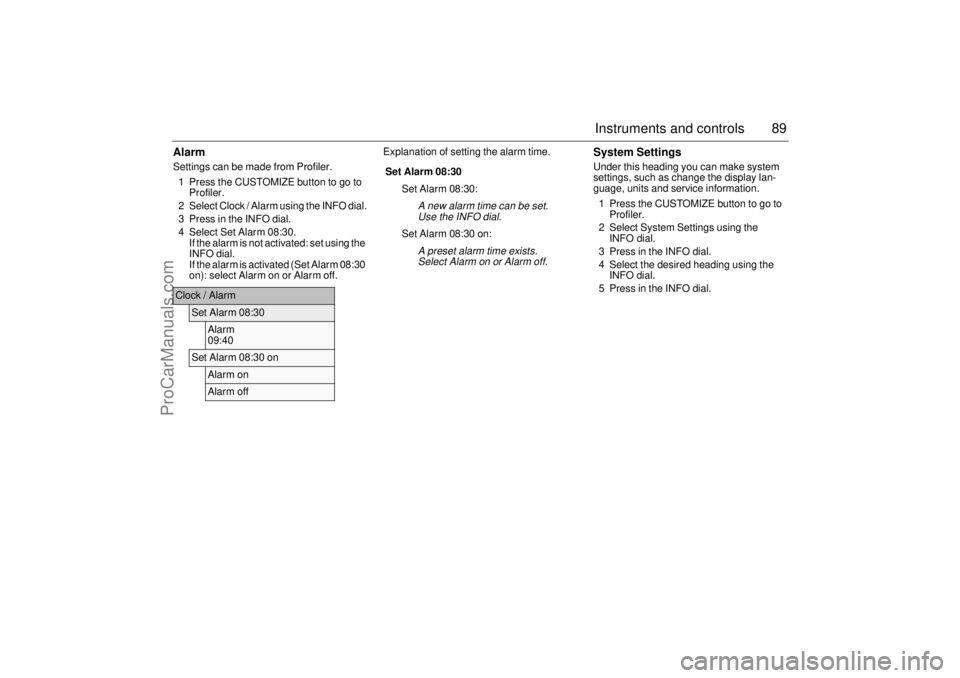
AlarmSettings can be made from Profiler.
1 Press the CUSTOMIZE button to go to
Profiler.
2 Select Clock / Alarm using the INFO dial.
3 Press in the INFO dial.
4 Select Set Alarm 08:30.
If the alarm is not activated: set using the
INFO dial.
If the alarm is activated (Set Alarm 08:30
on): select Alarm on or Alarm off.Explanation of setting the alarm time.
System SettingsUnder this heading you can make system
settings, such as change the display lan-
guage, units and service information.
1 Press the CUSTOMIZE button to go to
Profiler.
2 Select System Settings using the
INFO dial.
3 Press in the INFO dial.
4 Select the desired heading using the
INFO dial.
5 Press in the INFO dial.
Clock / Alarm
Set Alarm 08:30
Alarm
09:40
Set Alarm 08:30 on
Alarm onAlarm off
Set Alarm 08:30
Set Alarm 08:30:
A new alarm time can be set.
Use the INFO dial.
Set Alarm 08:30 on:
A preset alarm time exists.
Select Alarm on or Alarm off.
ProCarManuals.com
Page 91 of 288

91 Instruments and controls
SwitchesThe parking lights and daytime running
lights come on automatically when the igni-
tion switch is in the ON position.
High beam can not be activated in this posi-
tion but headlight flasher can.
The parking lights can be turned on irre-
spective of the position of the ignition
switch. If the parking lights are on and the
driver’s door is opened, a reminder to turn
them off will sound.
Do not use the parking lights alone while
driving.
The parking lights may be used in combina-
tion with the front fog lights (see page 93).
Low beam headlights are turned on when
the ignition switch is turned to ON and
turned off when the switch is turned back to
LOCK.
Headlight levelling(cars with Bi-Xenon headlights)
Cars with Bi-Xenon headlights are
equipped with an automatic headlight level-
ling system, with self-calibrates each time
the vehicle is started.
If a fault arises in the automatic headlight
levelling system, the headlights will be
angled down to avoid dazzling drivers in
oncoming traffic. Adjust your speed accord-
ingly as the range of the headlights will be
reduced. Check fuse 20 in the engine bay
fuse box (see page 227).
A fault in the system will produce the follow-
ing message on the Saab Information Dis-
play (SID):
Special equipment is required for adjusting
the basic headlight alignment.
Daytime Running Lights
Parking lights
Headlights
Headlight levelling
malfunction.
Contact Saab dealer.
Light switches
ProCarManuals.com
Page 99 of 288

99 Instruments and controls
Air distributionThe air distribution control is used to direct the flow of air to the
defroster, panel and floor vents.
The control also permits settings in between the three main settings
defroster, panel and floor:
defroster and floor
panel and floor
defroster, panel and floor (11 o’clock position)
To counter cold drafts from the front side windows when the control
has been set to defroster or floor, a small flow of air issues from
the outer vents on the fascia.
As the winter comfort setting, we recommend that the distribution
knob be turned to .
Recommended settings in severe coldOn starting with a cold engine, set the fan speed to 2 or 3 and select
maximum heat and defroster to heat the cabin and demist the wind-
shield as quickly as possible.
When the engine is warmer and the temperature gauge starts to
rise, fan setting 4 may be chosen. Once the windshield is clear, the
air distribution control should be turned to .
If the rear seat passengers desire more warmth to the feet, turn the
distribution knob one step clockwise.
How quickly the engine warms up will depend on how the car is
driven. It will take longer for the engine to warm up if the car is driven
in a high gear at low engine speeds, such as in town, than if it is
driven at high engine speeds on a highway, for example.
Do not use fan speed 5. This is primarily intended for rapid cooling
during the summer.
ProCarManuals.com
Page 106 of 288
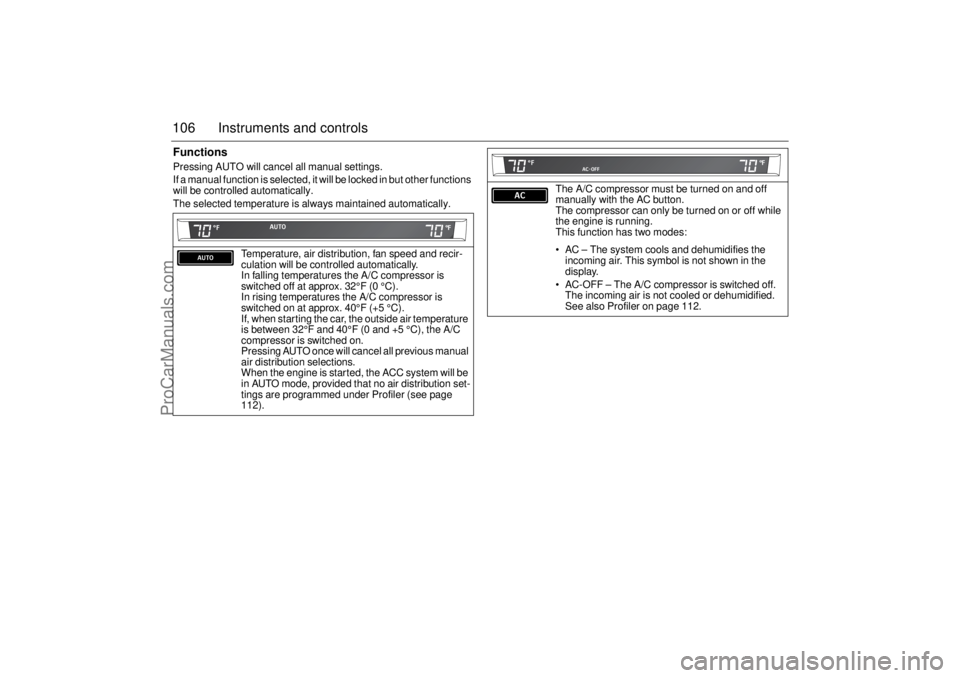
106 Instruments and controlsFunctionsPressing AUTO will cancel all manual settings.
If a manual function is selected, it will be locked in but other functions
will be controlled automatically.
The selected temperature is always maintained automatically.
Temperature, air distribution, fan speed and recir-
culation will be controlled automatically.
In falling temperatures the A/C compressor is
switched off at approx. 32°F (0 °C).
In rising temperatures the A/C compressor is
switched on at approx. 40°F (+5 °C).
If, when starting the car, the outside air temperature
is between 32°F and 40°F (0 and +5 °C), the A/C
compressor is switched on.
Pressing AUTO once will cancel all previous manual
air distribution selections.
When the engine is started, the ACC system will be
in AUTO mode, provided that no air distribution set-
tings are programmed under Profiler (see page
112).
The A/C compressor must be turned on and off
manually with the AC button.
The compressor can only be turned on or off while
the engine is running.
This function has two modes:
AC – The system cools and dehumidifies the
incoming air. This symbol is not shown in the
display.
AC-OFF – The A/C compressor is switched off.
The incoming air is not cooled or dehumidified.
See also Profiler on page 112.
ProCarManuals.com
Page 116 of 288
116 Interior equipmentSteering wheel
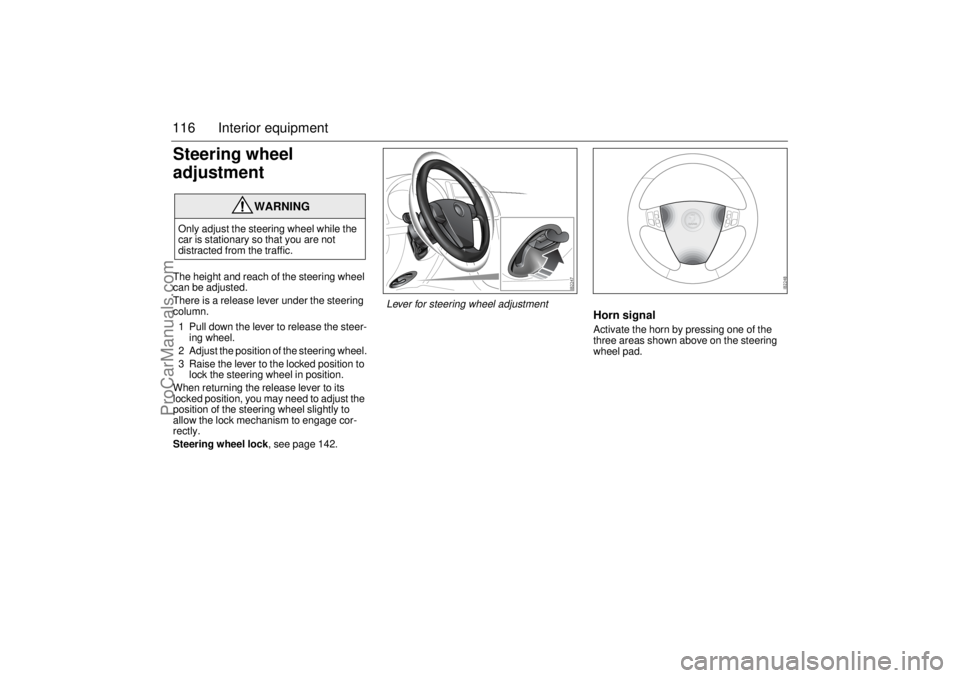
adjustmentThe height and reach of the steering wheel
can be adjusted.
There is a release lever under the steering
column.
1 Pull down the lever to release the steer-
ing wheel.
2 Adjust the position of the steering wheel.
3 Raise the lever to the locked position to
lock the steering wheel in position.
When returning the release lever to its
locked position, you may need to adjust the
position of the steering wheel slightly to
allow the lock mechanism to engage cor-
rectly.
Steering wheel lock, see page 142.
Horn signalActivate the horn by pressing one of the
three areas shown above on the steering
wheel pad.
WARNING
Only adjust the steering wheel while the
car is stationary so that you are not
distracted from the traffic.
Lever for steering wheel adjustment
ProCarManuals.com
Page 117 of 288
117 Interior equipment
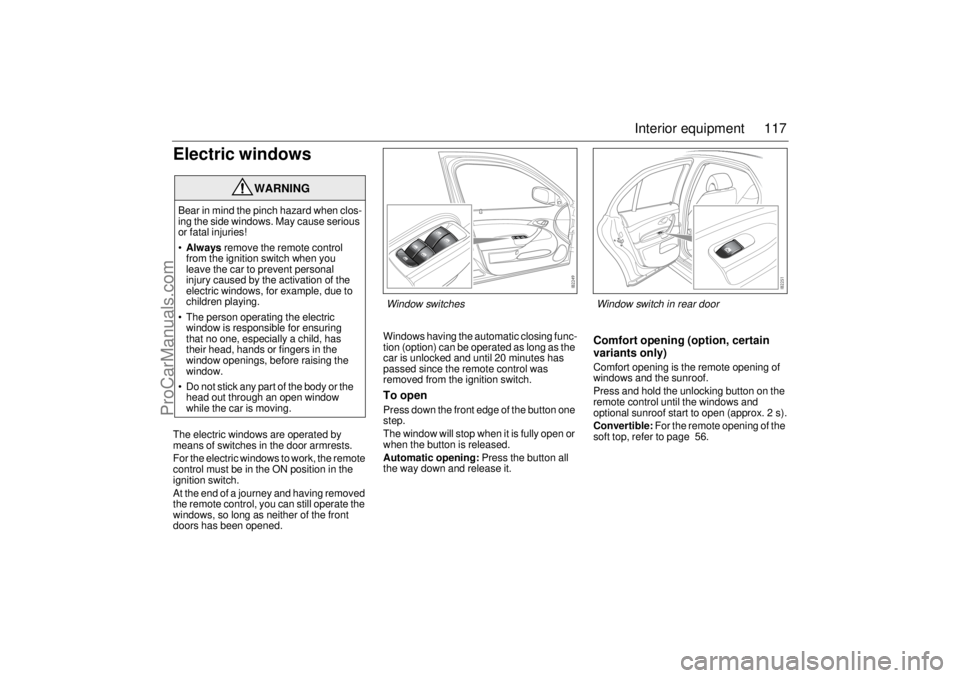
Electric windowsThe electric windows are operated by
means of switches in the door armrests.
For the electric windows to work, the remote
control must be in the ON position in the
ignition switch.
At the end of a journey and having removed
the remote control, you can still operate the
windows, so long as neither of the front
doors has been opened.Windows having the automatic closing func-
tion (option) can be operated as long as the
car is unlocked and until 20 minutes has
passed since the remote control was
removed from the ignition switch.
To openPress down the front edge of the button one
step.
The window will stop when it is fully open or
when the button is released.
Automatic opening: Press the button all
the way down and release it.
Comfort opening (option, certain
variants only)Comfort opening is the remote opening of
windows and the sunroof.
Press and hold the unlocking button on the
remote control until the windows and
optional sunroof start to open (approx. 2 s).
Convertible: For the remote opening of the
soft top, refer to page 56.
WARNING
Bear in mind the pinch hazard when clos-
ing the side windows. May cause serious
or fatal injuries!
•Always remove the remote control
from the ignition switch when you
leave the car to prevent personal
injury caused by the activation of the
electric windows, for example, due to
children playing.
The person operating the electric
window is responsible for ensuring
that no one, especially a child, has
their head, hands or fingers in the
window openings, before raising the
window.
Do not stick any part of the body or the
head out through an open window
while the car is moving.
Window switches
Window switch in rear door
ProCarManuals.com
Page 120 of 288
120 Interior equipmentSunroof (optional)
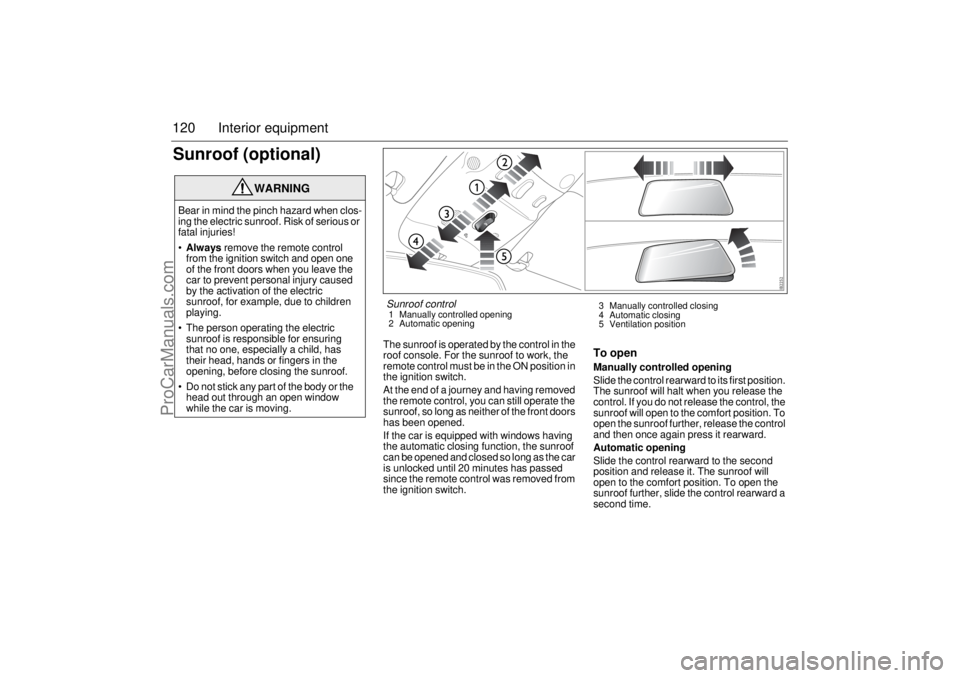
The sunroof is operated by the control in the
roof console. For the sunroof to work, the
remote control must be in the ON position in
the ignition switch.
At the end of a journey and having removed
the remote control, you can still operate the
sunroof, so long as neither of the front doors
has been opened.
If the car is equipped with windows having
the automatic closing function, the sunroof
can be opened and closed so long as the car
is unlocked until 20 minutes has passed
since the remote control was removed from
the ignition switch.
To openManually controlled opening
Slide the control rearward to its first position.
The sunroof will halt when you release the
control. If you do not release the control, the
sunroof will open to the comfort position. To
open the sunroof further, release the control
and then once again press it rearward.
Automatic opening
Slide the control rearward to the second
position and release it. The sunroof will
open to the comfort position. To open the
sunroof further, slide the control rearward a
second time.
WARNING
Bear in mind the pinch hazard when clos-
ing the electric sunroof. Risk of serious or
fatal injuries!
Always remove the remote control
from the ignition switch and open one
of the front doors when you leave the
car to prevent personal injury caused
by the activation of the electric
sunroof, for example, due to children
playing.
The person operating the electric
sunroof is responsible for ensuring
that no one, especially a child, has
their head, hands or fingers in the
opening, before closing the sunroof.
Do not stick any part of the body or the
head out through an open window
while the car is moving.
Sunroof control1 Manually controlled opening
2 Automatic opening3 Manually controlled closing
4 Automatic closing
5 Ventilation position
ProCarManuals.com
Page 121 of 288

121 Interior equipment
To closeManually controlled closing
Slide the control forward to its first position.
The sunroof will halt when you release the
control.
Automatic closing (certain variants only)
Slide the control forward to its second posi-
tion and release it. The sunroof will close
fully.
The sunroof pinch protection halts closing
and opens the sunroof slightly if something
obstructs closing.Ventilation position (rear edge of
sunroof open)
To open – press in the control.
To close – slide the control forward to the
second position.
It is also possible to select the ventilation
position when the sunroof is open by press-
ing in the control. The sunroof will then close
automatically. Press the control once
more to open the sunroof to its ventilation
position.
If you wish to open the sunroof fully from
the ventilation position, you must first close
it (slide the control forward). You can then
slide the control rearward to open the sun-
roof.
The sunroof incorporates an interior, man-
ual, sliding sun blind.
Comfort opening (option, certain
variants only)Comfort opening is the remote opening of
windows and the sunroof.
Press and hold the unlocking button on the
remote control until the windows and
optional sunroof start to open (approx. 2 s).
If the sunroof is in the ventilation position, it
will not open.
Convertible: For the remote opening of the
soft top, refer to page 56.
WARNING
Exercise great care when closing the
sunroof to ensure that nothing gets
trapped.
ProCarManuals.com