alarm SAAB 9-3 2005 User Guide
[x] Cancel search | Manufacturer: SAAB, Model Year: 2005, Model line: 9-3, Model: SAAB 9-3 2005Pages: 292, PDF Size: 23 MB
Page 89 of 292
87 Instruments and controls
The following message is shown on the
Saab Information Display (SID):
or
If so, have the system checked at a Saab
dealer.
See also Traction Control System (TCS) on
page 169 and Electronic Stability Program
(ESP) on page 171.
Saab Information
Display (SID)Various types of information are shown on
the SID: warnings, indications, trip com-
puter information and information from the
car’s Infotainment System.
The warnings and indications that can be
shown on the SID are listed on page 281.
When the engine is switched off, the current
warnings and indications are displayed.
If there is more than one message on the
SID, a plus sign will be displayed to the left
of the first message. Each message will be
displayed for 10 seconds.
Press the CLEAR button to acknowledge
a SID message. If you acknowledge a mes-
sage but do nothing about it, the message
will be displayed again the next time you
start the car.
You can adjust the settings of several of the
car’s systems, such as the clock, alarm and
climate control system. These are known as
Profiler.
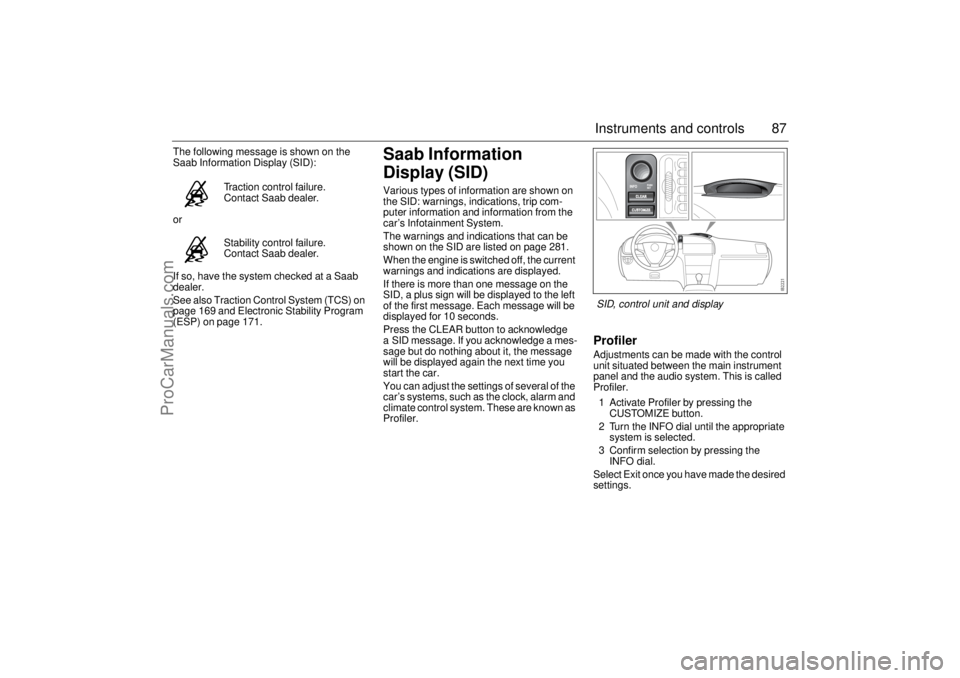
ProfilerAdjustments can be made with the control
unit situated between the main instrument
panel and the audio system. This is called
Profiler.
1 Activate Profiler by pressing the
CUSTOMIZE button.
2 Turn the INFO dial until the appropriate
system is selected.
3 Confirm selection by pressing the
INFO dial.
Select Exit once you have made the desired
settings. Traction control failure.
Contact Saab dealer.
Stability control failure.
Contact Saab dealer.SID, control unit and display
ProCarManuals.com
Page 90 of 292
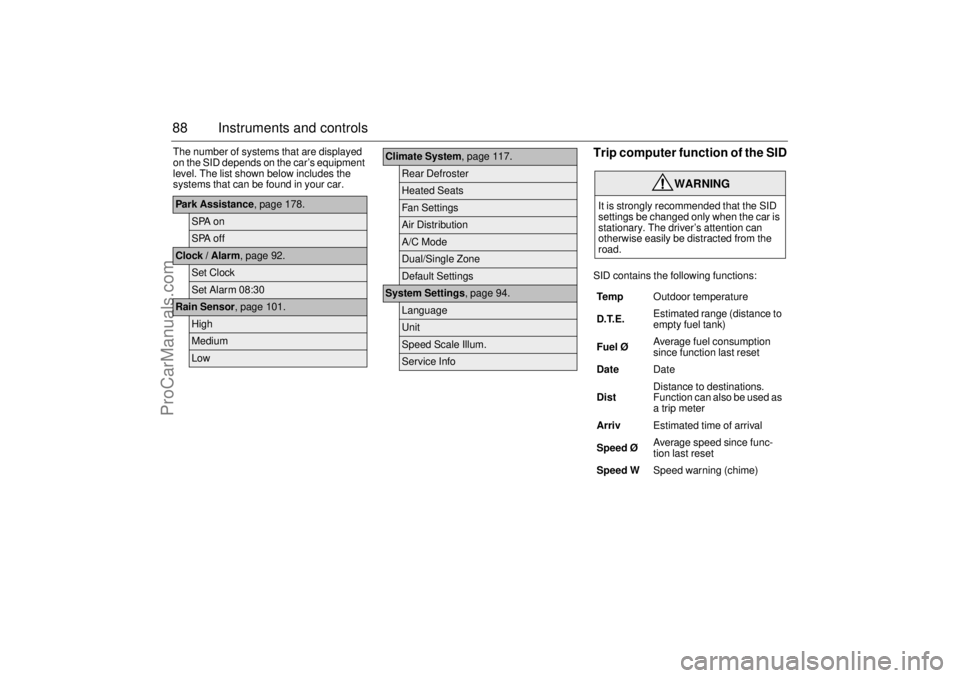
88 Instruments and controlsThe number of systems that are displayed
on the SID depends on the car’s equipment
level. The list shown below includes the
systems that can be found in your car.
Trip computer function of the SIDSID contains the following functions:
Park Assistance, page 178.
SPA onSPA off
Clock / Alarm, page 92.
Set ClockSet Alarm 08:30
Rain Sensor, page 101.
HighMediumLow
Climate System, page 117.
Rear DefrosterHeated SeatsFan SettingsAir DistributionA/C ModeDual/Single ZoneDefault Settings
System Settings, page 94.
LanguageUnitSpeed Scale Illum.Service Info
WARNING
It is strongly recommended that the SID
settings be changed only when the car is
stationary. The driver’s attention can
otherwise easily be distracted from the
road.
Te m pOutdoor temperature
D.T.E. Estimated range (distance to
empty fuel tank)
Fuel ØAverage fuel consumption
since function last reset
DateDate
DistDistance to destinations.
Function can also be used as
a trip meter
ArrivEstimated time of arrival
Speed Ø Average speed since func-
tion last reset
Speed WSpeed warning (chime)
ProCarManuals.com
Page 92 of 292

90 Instruments and controlsSpeed warning
This value is preset to 55 mph (90 km/h).
The value can be set to between 0 and
150 mph (0 and 250 km/h).
1 Select Speed W using the INFO dial.
2 Press and hold the INFO dial until given
audible confirmation.
3 Adjust the speed using the INFO dial.
4 Confirm the setting by pressing the
INFO dial.
A star on the right-hand side of the display
indicates when the speed warning function
is active.
An audible alarm will sound if the set speed
is exceeded.
Disengage the function with the CLEAR
button. Re-engage the function using
the INFO dial.Calculating the arrival time
(When will I arrive if I know how far I have to
drive?)
This function should be used before starting
out a journey.
To calculate the arrival time, the distance
must first be given.
1 Select the Dist function using the
INFO dial.
2 Press and hold the INFO dial until given
audible confirmation.
3 Set the distance to the destination using
the INFO dial.
4 Press the INFO dial to finish setup.
Select Arriv during the journey to display
the arrival time based on the average speed
since Dist was set. If you take a break, this
time will be added to the previously calcu-
lated arrival time.
Similarly, you can check the distance left by
selecting Dist.
After the distance to destination has
decreased to zero, Dist will function as a trip
meter (see Using DIST as a trip meter). The
starting value for the trip meter will be the
last distance set for the Dist function.
Example: The Dist function is set to
100 miles. After the count-down has
reached 0 miles, Dist will act as a trip meter
beginning at 100 miles.Calculating the arrival time if a specified
average speed is maintained
(When will I arrive if I know how far I have to
drive and know what my average speed will
be?)
This function should be used before starting
out a journey.
First, set the distance under Dist.
1 Then use the INFO dial to select the
Speed Ø function.
2 Press and hold the INFO dial until given
audible confirmation.
3 Turn the INFO dial to set the estimated
average speed.
4 Press the INFO dial to finish setup.
The time of arrival is updated during the
journey based on the average speed since
Dist was set. The speed of the car must
exceed 12 mph (20 km/h).
By selecting Dist during the journey, you
can see how much distance is left to travel.
When Dist reaches zero it acts as a trip
meter. The tip meter starts from the distance
that was set previously.
ProCarManuals.com
Page 94 of 292
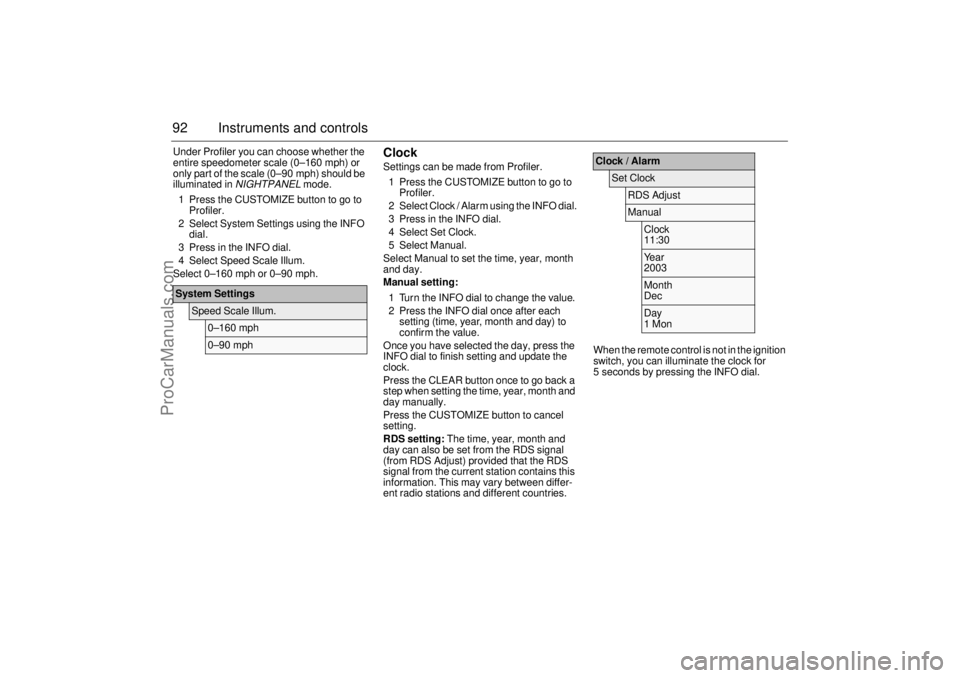
92 Instruments and controlsUnder Profiler you can choose whether the
entire speedometer scale (0–160 mph) or
only part of the scale (0–90 mph) should be
illuminated in
NIGHTPANEL
mode.
1 Press the CUSTOMIZE button to go to
Profiler.
2 Select System Settings using the INFO
dial.
3 Press in the INFO dial.
4 Select Speed Scale Illum.
Select 0–160 mph or 0–90 mph.
ClockSettings can be made from Profiler.
1 Press the CUSTOMIZE button to go to
Profiler.
2 Select Clock / Alarm using the INFO dial.
3 Press in the INFO dial.
4 Select Set Clock.
5 Select Manual.
Select Manual to set the time, year, month
and day.
Manual setting:
1 Turn the INFO dial to change the value.
2 Press the INFO dial once after each
setting (time, year, month and day) to
confirm the value.
Once you have selected the day, press the
INFO dial to finish setting and update the
clock.
Press the CLEAR button once to go back a
step when setting the time, year, month and
day manually.
Press the CUSTOMIZE button to cancel
setting.
RDS setting: The time, year, month and
day can also be set from the RDS signal
(from RDS Adjust) provided that the RDS
signal from the current station contains this
information. This may vary between differ-
ent radio stations and different countries.When the remote control is not in the ignition
switch, you can illuminate the clock for
5 seconds by pressing the INFO dial.
System Settings
Speed Scale Illum.
0–160 mph0–90 mph
Clock / Alarm
Set Clock
RDS AdjustManual
Clock
11:30Year
2003Month
DecDay
1 Mon
ProCarManuals.com
Page 95 of 292
93 Instruments and controls
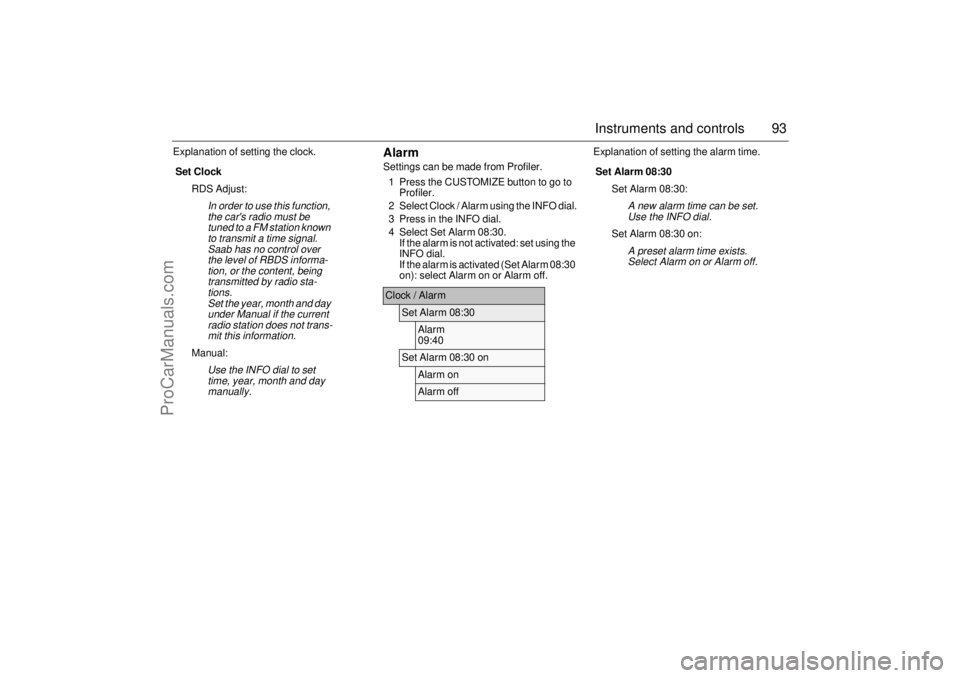
Explanation of setting the clock.
AlarmSettings can be made from Profiler.
1 Press the CUSTOMIZE button to go to
Profiler.
2 Select Clock / Alarm using the INFO dial.
3 Press in the INFO dial.
4 Select Set Alarm 08:30.
If the alarm is not activated: set using the
INFO dial.
If the alarm is activated (Set Alarm 08:30
on): select Alarm on or Alarm off.Explanation of setting the alarm time.
Set Clock
RDS Adjust:
In order to use this function,
the car's radio must be
tuned to a FM station known
to transmit a time signal.
Saab has no control over
the level of RBDS informa-
tion, or the content, being
transmitted by radio sta-
tions.
Set the year, month and day
under Manual if the current
radio station does not trans-
mit this information.
Manual:
Use the INFO dial to set
time, year, month and day
manually.
Clock / Alarm
Set Alarm 08:30
Alarm
09:40
Set Alarm 08:30 on
Alarm onAlarm off
Set Alarm 08:30
Set Alarm 08:30:
A new alarm time can be set.
Use the INFO dial.
Set Alarm 08:30 on:
A preset alarm time exists.
Select Alarm on or Alarm off.
ProCarManuals.com
Page 150 of 292
148 Starting and drivingSteering wheel lockThe steering wheel lock is electronic. The
lock engages when the remote control is
removed from the ignition and unlocks when
the remote control is inserted. A click can be
heard when the steering wheel lock locks
and unlocks.
If the car is parked with one front wheel
touching the curb, for example, you may
need to turn the steering wheel slightly
when you insert the remote control to allow
the steering wheel lock to unlock. If you do
not succeed on first attempt you must
remove the remote control before trying
again. Turn the steering wheel and insert
the remote control into the ignition switch.
If the steering wheel lock does not disen-
gage it will not be possible to turn the remote
control in the ignition switch.
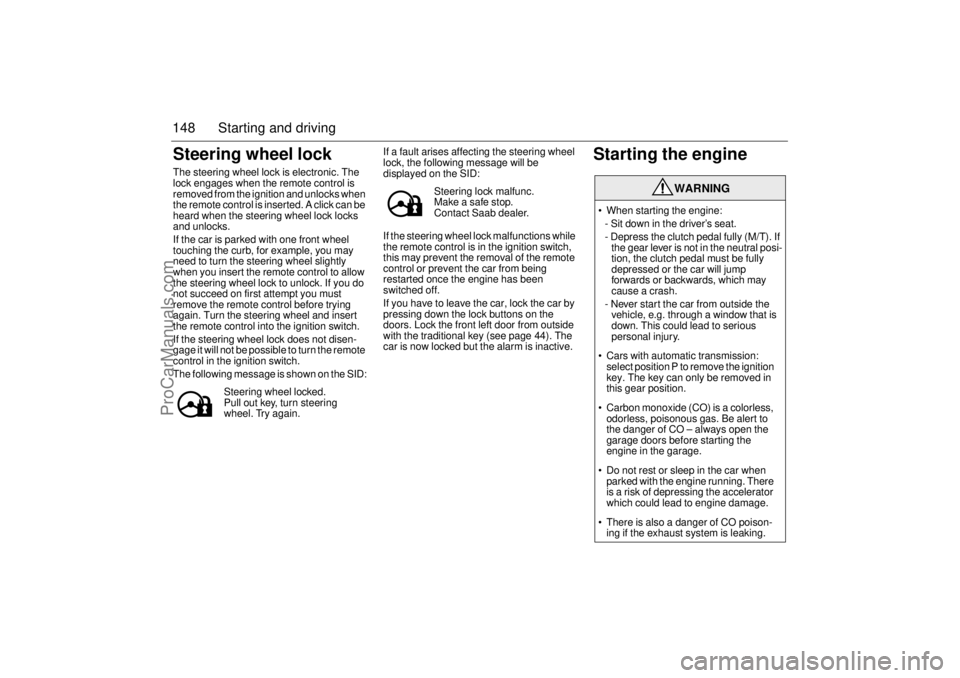
The following message is shown on the SID:If a fault arises affecting the steering wheel
lock, the following message will be
displayed on the SID:
If the steering wheel lock malfunctions while
the remote control is in the ignition switch,
this may prevent the removal of the remote
control or prevent the car from being
restarted once the engine has been
switched off.
If you have to leave the car, lock the car by
pressing down the lock buttons on the
doors. Lock the front left door from outside
with the traditional key (see page 44). The
car is now locked but the alarm is inactive.
Starting the engine
Steering wheel locked.
Pull out key, turn steering
wheel. Try again.
Steering lock malfunc.
Make a safe stop.
Contact Saab dealer.
WARNING
When starting the engine:
- Sit down in the driver’s seat.
- Depress the clutch pedal fully (M/T). If
the gear lever is not in the neutral posi-
tion, the clutch pedal must be fully
depressed or the car will jump
forwards or backwards, which may
cause a crash.
- Never start the car from outside the
vehicle, e.g. through a window that is
down. This could lead to serious
personal injury.
Cars with automatic transmission:
select position P to remove the ignition
key. The key can only be removed in
this gear position.
Carbon monoxide (CO) is a colorless,
odorless, poisonous gas. Be alert to
the danger of CO – always open the
garage doors before starting the
engine in the garage.
Do not rest or sleep in the car when
parked with the engine running. There
is a risk of depressing the accelerator
which could lead to engine damage.
There is also a danger of CO poison-
ing if the exhaust system is leaking.
ProCarManuals.com
Page 282 of 292

280 Technical dataSeveral of the systems in your
Saab can be customized to better
suit your individual needs.
Contact your Saab dealerCentral locking system
Some functions are governed by legal
requirements and cannot therefore be
reprogrammed.
Consult a Saab dealer for further informa-
tion.
Listed below are a number of examples of
programmable functions.
Audible confirmation of arming/disarming
the car alarm.
Automatic unlocking when car stopped
and remote control removed from the igni-
tion switch.
Trunk lid locked when car driven off or
30 s after being shut.Courtesy Headlamp Feature
The length of time the lights are on.
Whether the reversing light or tail lights
should come on as well as the dipped
beam.
Automatic Climate System (ACC)
To prevent the smell of washer fluid from
entering the car, recirculation can be acti-
vated automatically while the windshield
is washed. The recirculation symbol will
however not light up. This function is
optional; contact a Saab dealer.
Convertible: A/C compressor not
switched off when the soft top is open.
ProCarManuals.com
Page 283 of 292
281 Technical data
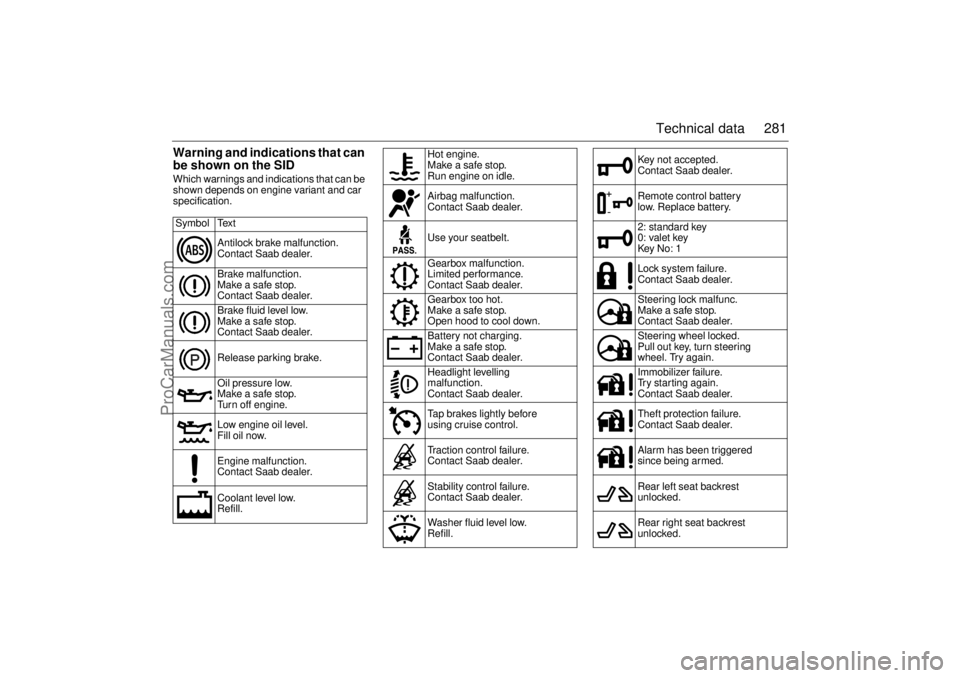
Warning and indications that can
be shown on the SIDWhich warnings and indications that can be
shown depends on engine variant and car
specification.
Symbol Text
Antilock brake malfunction.
Contact Saab dealer.
Brake malfunction.
Make a safe stop.
Contact Saab dealer.
Brake fluid level low.
Make a safe stop.
Contact Saab dealer.
Release parking brake.
Oil pressure low.
Make a safe stop.
Turn off engine.
Low engine oil level.
Fill oil now.
Engine malfunction.
Contact Saab dealer.
Coolant level low.
Refill.
Hot engine.
Make a safe stop.
Run engine on idle.
Airbag malfunction.
Contact Saab dealer.
Use your seatbelt.
Gearbox malfunction.
Limited performance.
Contact Saab dealer.
Gearbox too hot.
Make a safe stop.
Open hood to cool down.
Battery not charging.
Make a safe stop.
Contact Saab dealer.
Headlight levelling
malfunction.
Contact Saab dealer.
Tap brakes lightly before
using cruise control.
Traction control failure.
Contact Saab dealer.
Stability control failure.
Contact Saab dealer.
Washer fluid level low.
Refill.
Key not accepted.
Contact Saab dealer.
Remote control battery
low. Replace battery.
2: standard key
0: valet key
Key No: 1
Lock system failure.
Contact Saab dealer.
Steering lock malfunc.
Make a safe stop.
Contact Saab dealer.
Steering wheel locked.
Pull out key, turn steering
wheel. Try again.
Immobilizer failure.
Try starting again.
Contact Saab dealer.
Theft protection failure.
Contact Saab dealer.
Alarm has been triggered
since being armed.
Rear left seat backrest
unlocked.
Rear right seat backrest
unlocked.
ProCarManuals.com
Page 285 of 292

283 Index
Index
AA/C
__________________________ 106
ABS brakes
____________________ 167
ACC
_________________________ 108
Adjustment, steering wheel
________ 122
Air conditioning
_________________ 106
Air filter
_______________________ 204
Airbag
_________________________ 29
Anchorage eyes
________________ 143
Anti-corrosion treatment
__________ 254
Antilock braking system __________ 167
Anti-spin
______________________ 169
Ashtrays ______________________ 132
Autochecking of lights, warning and
indicator lights
__________________ 82
Autodimming
_______________ 135
, 136
Automatic climate control (ACC)
____ 108
Automatic transmission
___________ 159
BBattery
________________________ 208
Bedding-in of new brake pads
_____ 157
Before towing a trailer
____________ 187
Brake fluid, grade
_______________ 274
Brakes
________________________ 166Braking
_______________________ 166
Bulb changing
__________________ 213
Bulb table
_____________________ 226
Buying new tires
________________ 236
CCabin lighting
__________________ 129
Cabin lighting, Convertible
_________ 72
Car alarm
______________________ 50
Car transport ___________________ 192
Care of air conditioning
___________ 257
Change of address notification
_____ 264
Changing a tire
_________________ 248
Changing bulbs _________________ 213
Changing engine oil
_____________ 203
Changing the battery, remote control
_48
Changing wiper blades
___________ 211
Checking the number of remote
controls
_______________________ 47
Checks before towing a trailer
______ 187
Child safety
_____________________ 22
Child safety locks, rear doors
_______ 46
Child seats
_____________________ 22
Cigarette lighter
_________________ 132
Cleaning the engine bay
__________ 252
Cleaning upholstery
_____________ 251
Climate control system, manual
____ 103
Closing the soft top manually,
Convertible
____________________ 62
Closing the soft top, Convertible
_____ 58Clutch interlock
_________________ 158
Compact spare _________________ 246
Compass
______________________ 139
Condensation water, A/C
_________ 106
Convertible
_____________________ 55
Convertible, washing
_____________ 253
Coolant
_______________________ 205
Crash memory, see EDR
_________ 266
Cruise control
__________________ 165
Cup holder
_____________________ 130
DDate codes, tires
________________ 246
Deep water, driving through
_______ 189
Definitions and terminology, tire ____ 243
Determining correct load, tires
_____ 245
Direction indicator stalk switch ______ 98
Direction indicators
_______________ 98
Dome light, Convertible
___________ 223
Dome light, Sport Sedan __________ 222
Donor battery, boost starting
_______ 193
Door handles
____________________ 42
Door mirrors ___________________ 134
Drive belt
______________________ 210
Drive belt, length
________________ 272
Driver’s seat with memory
__________ 20
Driving at night
_________________ 190
Driving in cold climates
___________ 181
Driving in deep water
_____________ 189
Driving in hot climates ____________ 183
ProCarManuals.com
Page 286 of 292

284 IndexDriving techniques
______________ 179
Driving with a heavy load on hilly
roads
________________________ 161
Driving with a load
_______________ 189
Driving with a roof load
___________ 188
Driving with the compact spare wheel
193
Driving with the trunk lid open
______ 189
EEDR (Event Data Recorders)
______ 266
ESP, anti-skid system
____________ 171
Easy entry, Convertible ____________ 67
Economical motoring
____________ 179
Electric engine heater ____________ 180
Electric heating, front seats
____ 107
, 116
Electric windows
________________ 123
Electric windows, Convertible
_______ 71
Electrical system, technical data ____ 272
Electrically adjustable seats
________ 19
Electronic Stability Program (ESP)
__ 171
Electronic steering wheel lock
______ 148
Emergency opening of the narrow
backrest
_____________________ 144
Emergency operation of the sunroof
_ 128
Engine bay, cleaning
_____________ 252
Engine heater
__________________ 180
Engine immobilizer
_______________ 49
Engine number
_________________ 278
Engine oil, checking
_____________ 202
Engine oil, grade
________________ 270Engine oil, volume
_______________ 271
Engine temperature gauge
_________ 84
Engine, description
______________ 199
Engine, technical data ____________ 270
Engines
_______________________ 271
Event Data Recorders (EDR)
______ 266
Extra electrical socket
____________ 132
FFacilitating entry to rear seat,
Convertible
____________________ 67
Factors affecting fuel consumption
__ 179
Filler cap
______________________ 154
Filling a portable fuel container
_____ 155
Filling up
______________________ 153
Flat spots, tires
_________________ 235
Floor jack
______________________ 249
Folding down the rear seat
________ 140
Front fog lights
__________________ 98
Front towing eye ________________ 190
Fuel container
__________________ 155
Fuel gauge
_____________________ 85
Fuel grade _____________________ 271
Fuel information
________________ 155
Functions, car alarm ______________ 53
Fuse panel in luggage compartment
_230
Fuse table
_____________________ 229
Fuses
________________________ 227
GGDO, garage door opener
_________ 136
Gear selector indicator, automatic trans-
mission
_______________________ 86
Gearbox number
________________ 278
General safety instructions, Convertible
56
Glovebox
______________________ 132
Glovebox lighting
________________ 224
HHandbrake
_____________________ 173
Hazard warning lights
_____________ 99
Head restraint, Convertible
_________ 68
Head restraints
__________________ 21
Headlight flasher _________________ 97
Headlight levelling ________________ 96
Headlights
______________________ 96
Heated door mirrors
_____________ 107
Hood
_________________________ 198
Horn __________________________ 122
Horn button
____________________ 122
IIf a tire goes flat
_________________ 240
Ignition switch
__________________ 146
Immobilizer
_____________________ 49
Important considerations for driving
_ 150
ProCarManuals.com