manual radio set SAAB 9-5 2000 User Guide
[x] Cancel search | Manufacturer: SAAB, Model Year: 2000, Model line: 9-5, Model: SAAB 9-5 2000Pages: 256, PDF Size: 14.24 MB
Page 93 of 256
93 Saab 9-5 Audio System
General functionsVolume-preset modeTo select the volume-preset mode, press
and hold the WB button at the same time as
you switch the Audio System on.
Use the << SEEK >> button to select the
desired function.
The following volume settings can be
preselected:
STARTVOL - maximum volume level
when the Audio System is switched on
TEL VOL - preset volume level when an
in-car phone is activated
SP D VOL - speed-dependent volume.
The Audio System will automatically
adjust the volume level to suit the back-
ground noise, such as road noise, occur-
ring while the car is under way.
LOUDNESS ON/OFF - boosting of the
highest and lowest frequency ranges to
enhance the sound image when the
volume is set to a low level.
Adjusting the volume The default setting for START VOL is
volume setting 9, and that for TEL VOL is
volume setting 14 (the highest volume set-
ting is 30).
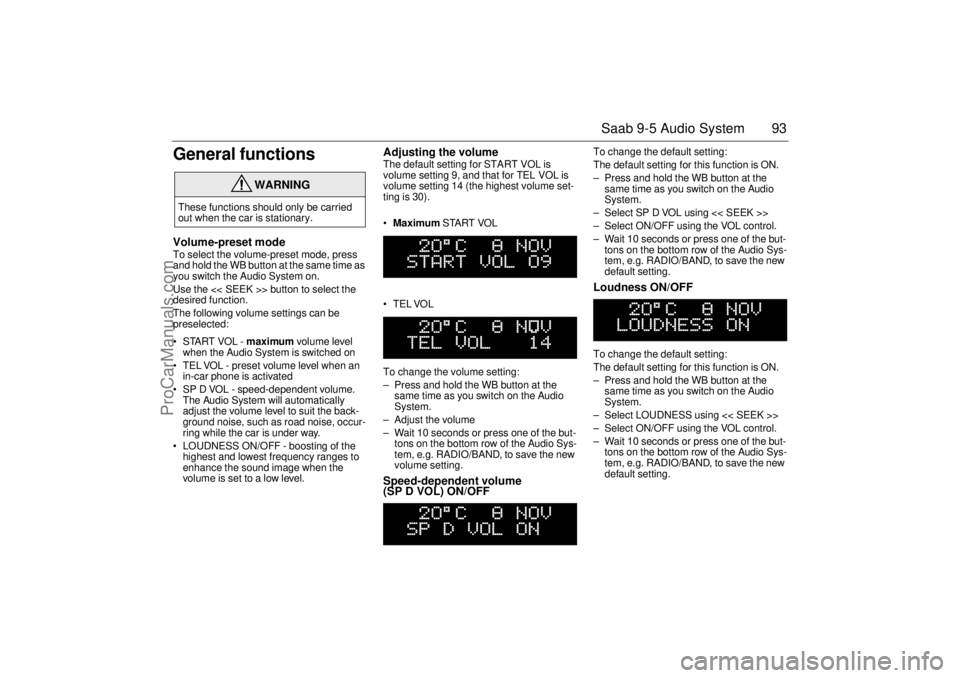
Maximum START VOL
TELVOL
To change the volume setting:
– Press and hold the WB button at the
same time as you switch on the Audio
System.
– Adjust the volume
– Wait 10 seconds or press one of the but-
tons on the bottom row of the Audio Sys-
tem, e.g. RADIO/BAND, to save the new
volume setting.Speed-dependent volume
(SP D VOL) ON/OFF
To change the default setting:
The default setting for this function is ON.
– Press and hold the WB button at the
same time as you switch on the Audio
System.
– Select SP D VOL using << SEEK >>
– Select ON/OFF using the VOL control.
– Wait 10 seconds or press one of the but-
tons on the bottom row of the Audio Sys-
tem, e.g. RADIO/BAND, to save the new
default setting. Loudness ON/OFF To change the default setting:
The default setting for this function is ON.
– Press and hold the WB button at the
same time as you switch on the Audio
System.
– Select LOUDNESS using << SEEK >>
– Select ON/OFF using the VOL control.
– Wait 10 seconds or press one of the but-
tons on the bottom row of the Audio Sys-
tem, e.g. RADIO/BAND, to save the new
default setting.
WARNING
These functions should only be carried
out when the car is stationary.
ProCarManuals.com
Page 95 of 256

95 Saab 9-5 Audio System
Technical data
These specifications comply with the new IHF Standard
Since the policy at Saab is one of continual improvement, we retain the right to alter
specifications and design without prior notice.
Dolby noise reduction is produced under licence from Dolby Laboratories Licensing
Corporation
”Dolby” and the double-D symbol are trademarks of Dolby Laboratories Licens-
ing Corporation
Changes or modifications not expressly approved by the manufacturer for compliance
could void the user´s authority to operate the equipment.
Tone controls
Bass ______________________ ±10 dB at 100 Hz
Treble _____________________ ±10 dB at 10,000 Hz
Power output
Premium __________________ 150 W
110 W at 1% THD (total har-
monic distortion) and 13.5 V
Prestige __________________ 200 W
150 W at 1% THD (total har-
monic distortion) and 13.5 V
Radio module
Radio system _______________ PLL dual-synthesizer tuner
Number of presets:
FM ______________________ 3 x 6
AM ______________________ 2 x 6
Frequency range:
FM ______________________ 87.9 – 107.9 MHz
MW ______________________ 530 – 1710 kHz
WB ______________________ 162.40 – 162.55 MHz
Tuning steps:
Automatic seek tuning: _______ FM 200 kHz
AM 10 kHz
WB 50 kHz
Manual tuning: _____________ FM 200 kHz
AM 10 kHzFrequency range (FM) ________ 40-15000 Hz
±1 dB
Distortion (FM) ______________ < 0.5%
Cassette player
Fast forward/rewind __________ < 120 seconds (C-60)
Frequency range _____________ 40 – 16000 Hz
±2 dB
Wow and flutter ______________ 0.2% WRMS
Signal-to-noise ratio __________ 45 dB
Dolby B/C NR effect __________ 8/16 dB
CD player and CD changer
1-bit system and 8 x oversampling
Frequency range _____________ 20-20000 Hz
±0.5 dB
Distortion __________________ < 0.008%
Dynamics __________________ > 80 dB (1 kHz)
CD-changer capacity __________ 6 discs
ProCarManuals.com
Page 98 of 256
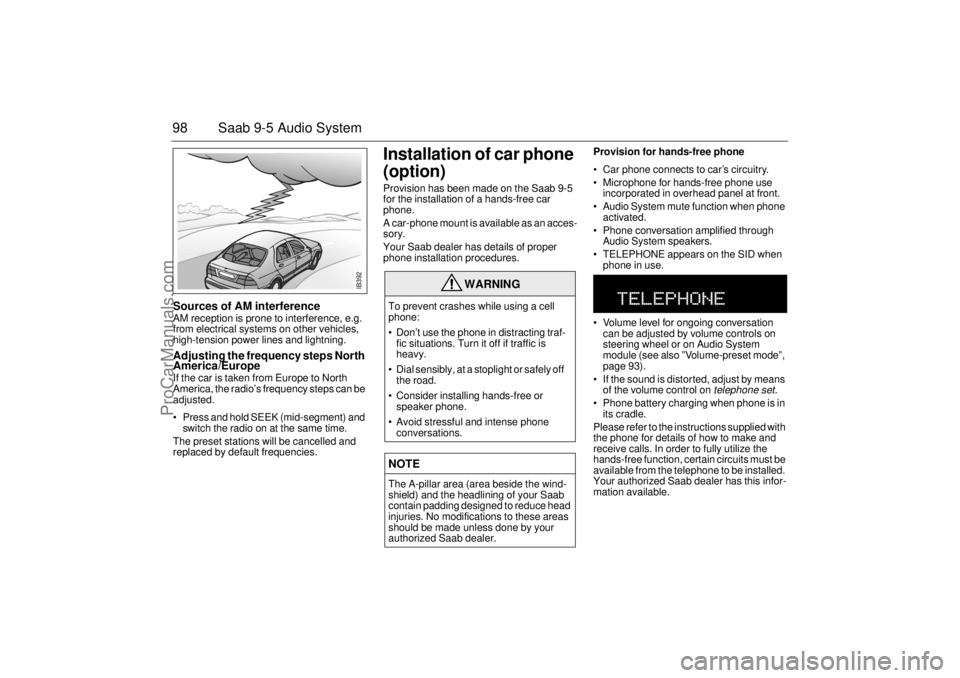
98 Saab 9-5 Audio SystemSources of AM interference AM reception is prone to interference, e.g.
from electrical systems on other vehicles,
high-tension power lines and lightning. Adjusting the frequency steps North
America/Europe If the car is taken from Europe to North
America, the radio’s frequency steps can be
adjusted.
Press and hold SEEK (mid-segment) and
switch the radio on at the same time.
The preset stations will be cancelled and
replaced by default frequencies.
Installation of car phone
(option)Provision has been made on the Saab 9-5
for the installation of a hands-free car
phone.
A car-phone mount is available as an acces-
sory.
Your Saab dealer has details of proper
phone installation procedures. Provision for hands-free phone
Car phone connects to car’s circuitry.
Microphone for hands-free phone use
incorporated in overhead panel at front.
Audio System mute function when phone
activated.
Phone conversation amplified through
Audio System speakers.
TELEPHONE appears on the SID when
phone in use.
Volume level for ongoing conversation
can be adjusted by volume controls on
steering wheel or on Audio System
module (see also ”Volume-preset mode”,
page 93).
If the sound is distorted, adjust by means
of the volume control on
telephone set
.
Phone battery charging when phone is in
its cradle.
Please refer to the instructions supplied with
the phone for details of how to make and
receive calls. In order to fully utilize the
hands-free function, certain circuits must be
available from the telephone to be installed.
Your authorized Saab dealer has this infor-
mation available.
WARNING
To prevent crashes while using a cell
phone:
Don’t use the phone in distracting traf-
fic situations. Turn it off if traffic is
heavy.
Dial sensibly, at a stoplight or safely off
the road.
Consider installing hands-free or
speaker phone.
Avoid stressful and intense phone
conversations.NOTEThe A-pillar area (area beside the wind-
shield) and the headlining of your Saab
contain padding designed to reduce head
injuries. No modifications to these areas
should be made unless done by your
authorized Saab dealer.
IB392
ProCarManuals.com
Page 99 of 256
99 Saab 9-5 Audio System
Mobile phones and
communications radiosMobile phones and communications radios
that do not have a separate external
antenna radiate an electromagnetic field
inside the car.
Saab therefore recommends that a car
phone/radio transmitter should always be
connected to an external antenna.
An external antenna also provides
improved transmission/reception and a
greater range.
Mobile phones and communications radios
that are not supplied as standard equipment
by Saab can interfere with the car’s electri-
cal system and cause spurious fault codes
to be generated.
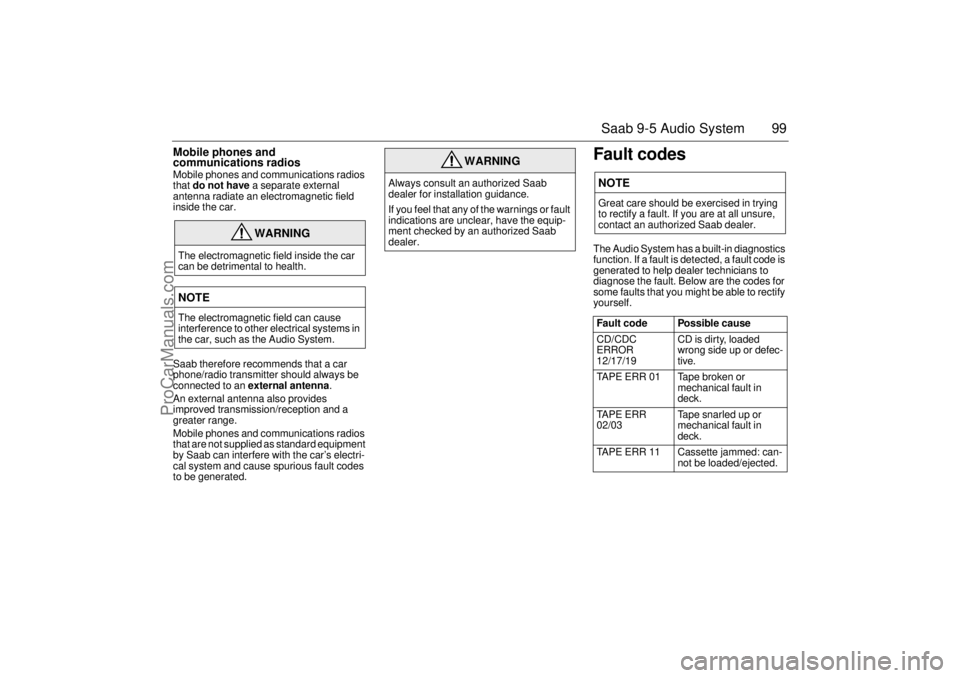
Fault codesThe Audio System has a built-in diagnostics
function. If a fault is detected, a fault code is
generated to help dealer technicians to
diagnose the fault. Below are the codes for
some faults that you might be able to rectify
yourself.
WARNING
The electromagnetic field inside the car
can be detrimental to health.NOTEThe electromagnetic field can cause
interference to other electrical systems in
the car, such as the Audio System.
WARNING
Always consult an authorized Saab
dealer for installation guidance.
If you feel that any of the warnings or fault
indications are unclear, have the equip-
ment checked by an authorized Saab
dealer.
NOTEGreat care should be exercised in trying
to rectify a fault. If you are at all unsure,
contact an authorized Saab dealer.
Fault code Possible cause
CD/CDC
ERROR
12/17/19 CD is dirty, loaded
wrong side up or defec-
tive.
TAPE ERR 01 Tape broken or
mechanical fault in
deck.
TAPE ERR
02/03 Tape snarled up or
mechanical fault in
deck.
TAPE ERR 11 Cassette jammed: can-
not be loaded/ejected.
ProCarManuals.com
Page 160 of 256

160 Starting and drivingJump startingIf your battery has run down, you may want
to use another vehicle and some jumper
cables to start your Saab. Follow the steps
below to do it safely.
To jump start your vehicle:
1 Check the other vehicle. It must have a
12-volt battery with a negative ground
system.
2 Get the vehicles close enough so the
jumper cables can reach, but be sure the
vehicles are not touching each other. If a
poor connection on the negative jumper
cable should exist, it is possible for
damage to be caused to electrical sys-
tems/components of either vehicle
should inadvertent contact be made.
You would not be able to start your car and bad grounding could damage elec-
trical systems.
3 Turn off the ignition on both vehicles.
Turn off all lights that are not needed,
and radios. This will avoid sparks and
help save both batteries and it could
save your radio.
4 Open the hood and locate the battery.
Find the positive (+) and negative (-) termi-
nals on the battery.
WARNING
Batteries can cause injury. They can be
dangerous because:
They contain acid that can burn you.
They contain gas that can explode or
ignite.
They contain enough electricity to
injure you.
If you do not follow these steps exactly,
some or all of these things can hurt you.NOTEIgnoring these steps could result in costly
damage to your vehicle that would not be
covered by your warranty.
Trying to start your car by pushing or pull-
ing it could damage your vehicle, even if
you have a manual transmission. If you
have an automatic transmission, your
vehicle cannot be started by pushing or
pulling it.
NOTEIf the other system is not a 12-volt system
with a negative ground, both vehicles can
be damaged.
WARNING
You could be injured if the vehicles roll.
Set the parking brake firmly on each vehi-
cle. Put an automatic transmission in P
(Park) or a manual transmission in Neu-
tral.NOTEIf you leave your radio on, it could be
badly damaged. The repairs would not be
covered by your warranty.
+
–
+
–
IB484
ProCarManuals.com
Page 238 of 256

238 SpecificationsFollowing adjustments can be done
by the driver:Automatic Climate Control (ACC):
To alter the preprogrammed “AUTO“ start
up mode with your own preferences you can
manually select the desired settings for:
Temperature.
Fan speed.
Air distribution.
See “Programming I“ on page 73 and “Pro-
gramming II“ on page 74.Saab 9-5 Audio System (see page 93):
Maximum starting volume (when the
radio is switched on).
Telephone volume (if the car is equipped
with a phone connected to the audio sys-
tem).
Speed dependent volume (volume
increases or decreases with vehicle
speed).
Loudness.Alarm system:
The glass breakage sensor can be tempo-
rarily disabled, see page 39.
Daytime Running Lights:
To disable, turn off the ignition and pull out
fuse 35, see page 194.
ProCarManuals.com
Page 243 of 256

243 Index
Light horn ______________________ 61
Light switches ___________________ 61
Luggage-compartment lighting ______ 64MMain instrument panel _____________ 46
Main/dipped beam ________________ 61
Maintenance schedule ___________ 218
Manual gearbox, technical data ____ 231
Maxi fuses _____________________ 193
Milometer ______________________ 52
Motoring abroad ________________ 213NNight Panel _____________________ 59OOil capacity, engine ______________ 228
Oil change, engine ______________ 172
Oil specification _________________ 228
OnStar ________________________ 100
Outdoor temperature ______________ 54
Owner assistance _______________ 219PPaintwork, touching-in ____________ 210
Parking lights ____________________ 61Plates and labels ________________ 235
Poly-V-belt _____________________ 179
Power steering _________________ 176
Power-steering fluid ______________ 176
Programming I, ACC ______________ 73
Programming II, ACC _____________ 74
Programming the ACC ____________ 73
QQuestions on function of airbag ______ 26
Quick guide, Audio System _________ 79RRadio __________________________ 82
Rear fog light ____________________ 62
Rear seat, 9-5 Sedan, folding ______ 116
Rear seat, 9-5 Wagon, folding ______ 119
Rear-seat head restraints _________ 105
Rear-view mirror, antidazzle _______ 109
Rearview mirrors ________________ 108
Reclamation ___________________ 213
Refuelling _____________________ 134
Relay panel ____________________ 195
Remote control __________________ 32
Remote-control battery, changing ____ 35
Reporting safety defects __________ 220
Reprogramming of systems _______ 237
Reservoir, power-steering fluid _____ 176
Rev counter _____________________ 52
Reversing lights __________________ 63Roof load ______________________ 155
Running-in _____________________ 149
SSID ____________________________ 54
SRS (airbag) ____________________ 23
SRS, supplementary restraint system _ 23
Saab 9-5 Audio System ____________ 77
Saab Information Display (SID) ______ 54
Safety belts _____________________ 12
Safety belts, care of ______________ 207
Safety-belt pretensioners ___________ 12
Safety-belt reminder ______________ 12
Seats _________________________ 102
Securing a load __________________ 36
Selector lever indication,
automatic transmission ___________ 54
Service costs ___________________ 219
Service information ______________ 220
Service intervals ________________ 218
Service record retention __________ 219
Settings, seats __________________ 102
Side airbags _____________________ 28
Signalling, horn _________________ 107
Sliding floor, 9-5 Wagon __________ 124
Snow chains ___________________ 150
Spare wheel ____________________ 202
Spare wheel and tools ____________ 126
Spark plugs ____________________ 230
Speed rating ___________________ 198
Speedometer _________________ 52, 53
ProCarManuals.com