change time SAAB 9-5 2000 Owners Manual
[x] Cancel search | Manufacturer: SAAB, Model Year: 2000, Model line: 9-5, Model: SAAB 9-5 2000Pages: 256, PDF Size: 14.24 MB
Page 3 of 256
3
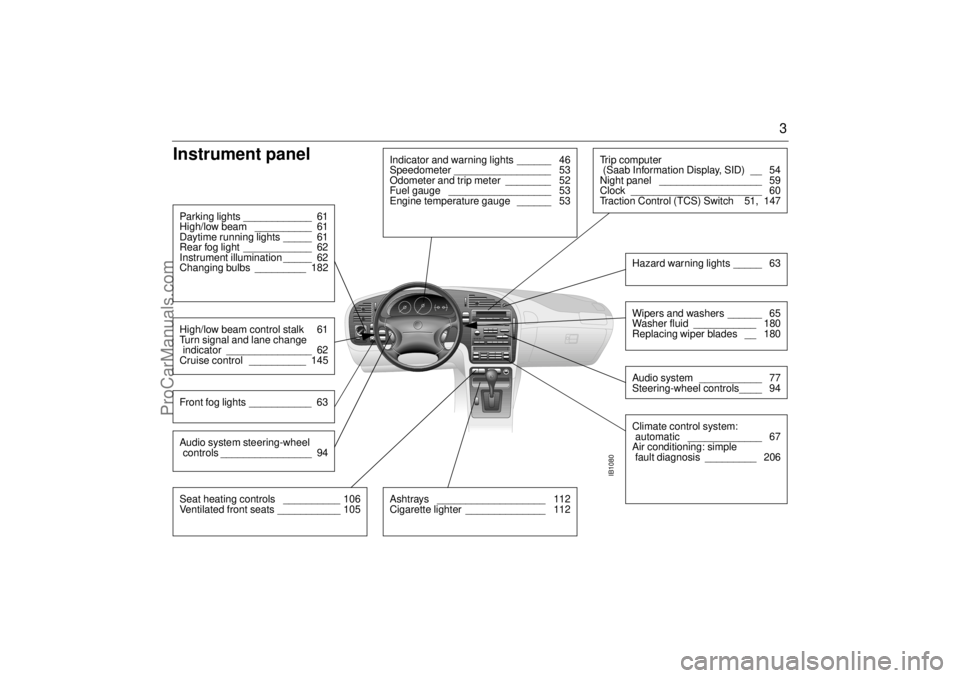
Instrument panel
IB1080
Indicator and warning lights ______ 46
Speedometer _________________ 53
Odometer and trip meter ________ 52
Fuel gauge __________________ 53
Engine temperature gauge ______ 53
Parking lights ____________ 61
High/low beam __________ 61
Daytime running lights _____ 61
Rear fog light ____________ 62
Instrument illumination _____ 62
Changing bulbs _________ 182High/low beam control stalk 61
Turn signal and lane change
indicator _______________ 62
Cruise control __________ 145Front fog lights ___________ 63
Ashtrays ___________________ 112
Cigarette lighter ______________ 112
Tr i p c o m p u t e r
(Saab Information Display, SID) __ 54
Night panel __________________ 59
Clock _______________________ 60
Traction Control (TCS) Switch 51, 147
Wipers and washers ______ 65
Washer fluid ___________ 180
Replacing wiper blades __ 180Audio system ___________ 77
Steering-wheel controls____ 94Hazard warning lights _____ 63Climate control system:
automatic _____________ 67
Air conditioning: simple
fault diagnosis _________ 206
Seat heating controls __________ 106
Ventilated front seats ___________ 105Audio system steering-wheel
controls ________________ 94
ProCarManuals.com
Page 35 of 256
35 Security
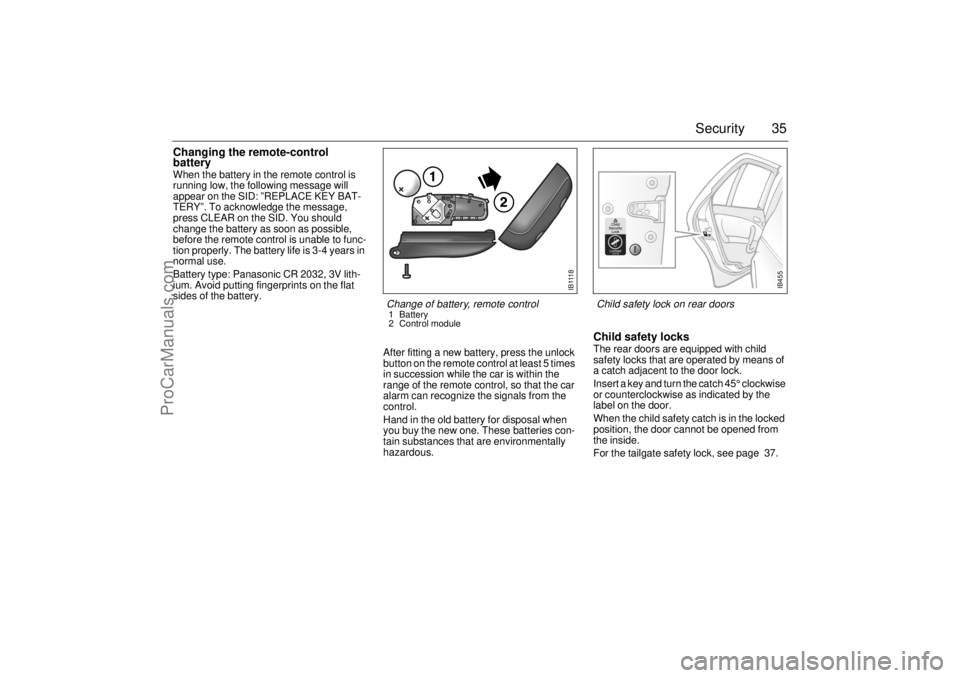
Changing the remote-control
batteryWhen the battery in the remote control is
running low, the following message will
appear on the SID: ”REPLACE KEY BAT-
TERY”. To acknowledge the message,
press CLEAR on the SID. You should
change the battery as soon as possible,
before the remote control is unable to func-
tion properly. The battery life is 3-4 years in
normal use.
Battery type: Panasonic CR 2032, 3V lith-
ium. Avoid putting fingerprints on the flat
sides of the battery.
After fitting a new battery, press the unlock
button on the remote control at least 5 times
in succession while the car is within the
range of the remote control, so that the car
alarm can recognize the signals from the
control.
Hand in the old battery for disposal when
you buy the new one. These batteries con-
tain substances that are environmentally
hazardous.
Child safety locksThe rear doors are equipped with child
safety locks that are operated by means of
a catch adjacent to the door lock.
Insert a key and turn the catch 45° clockwise
or counterclockwise as indicated by the
label on the door.
When the child safety catch is in the locked
position, the door cannot be opened from
the inside.
For the tailgate safety lock, see page 37.
I B 111 8
Change of battery, remote control1Battery
2 Control module
IB455
Child safety lock on rear doors
ProCarManuals.com
Page 40 of 256

40 SecurityAlarm signals When the car alarm is armed, it will be trig-
gered if any door, or the trunk lid or hood, is
opened or if a window is broken.
The alarm will also be triggered if an attempt
is made to bypass or short-circuit the igni-
tion switch, or to disconnect the battery.
If the alarm is triggered, the following alarm
signals will be set off:
Flashing of hazard warning lights for five
minutes.
Siren wailing for 30 seconds.
The alarm signals will stop if the alarm is
deactivated (car unlocked) during the alarm
period.
The alarm siren has a long-life battery
(approx. 10 years), see "SERVICE THEFT
ALARM", on page 42. When the battery
goes dead, the siren must be replaced: it is
not possible to change the batteries.
Panic-functionIn the car alarm system is a function called
"Panic-function".
To activate panic function:
Push and hold one of the buttons on the
remote control for 2 seconds, or if you are
sitting inside the car
Push the LOCK-switch on the center con-
sole for 2 seconds.
These actions will trigger the alarm (hazard
warning lights and siren).
To deactivate panic function:
Push one of the buttons on the remote
control, push the LOCK-switch in the
center console, turn the key in one of the
doors or turn the ignition to ON.
When the panic-function is activated the car
will be locked/unlocked depending upon
which button was pushed.
When the ignition is ON the panic-function
cannot be activated.
NOTE It is possible to inadvertently deacti-
vate the car alarm and at the same
time unlock the car, if the button on the
remote control is pressed by mistake
when the control is still within range of
the car.
When locking the car by remote con-
trol in extremely cold weather, it is
advisable to check that the lock
system has operated properly. To do
so, check that the interior locking but-
tons are all down.
If not, unlock and relock the car again.
ProCarManuals.com
Page 57 of 256
57 Instruments and controls
Using DIST as a trip meter If no value has been set for the DIST func-
tion, DIST will now function as a trip meter
(indicated by an arrow on the far right of the
display).
Press CLEAR to reset the trip meter.
Under 1000 miles the distance will be
shown in increments of 0.1 miles,
there-after, the reading will change in incre-
ments of 1.0 miles.
Metric units: for just under a kilometer, the
distance will be shown in increments of
10 meters, there-after, the reading will
change in increments of 100 meters.
When DIST is functioning as a trip meter,
the ARRIV function will display the current
time. To calculate the arrival time if a specified
average speed is maintained
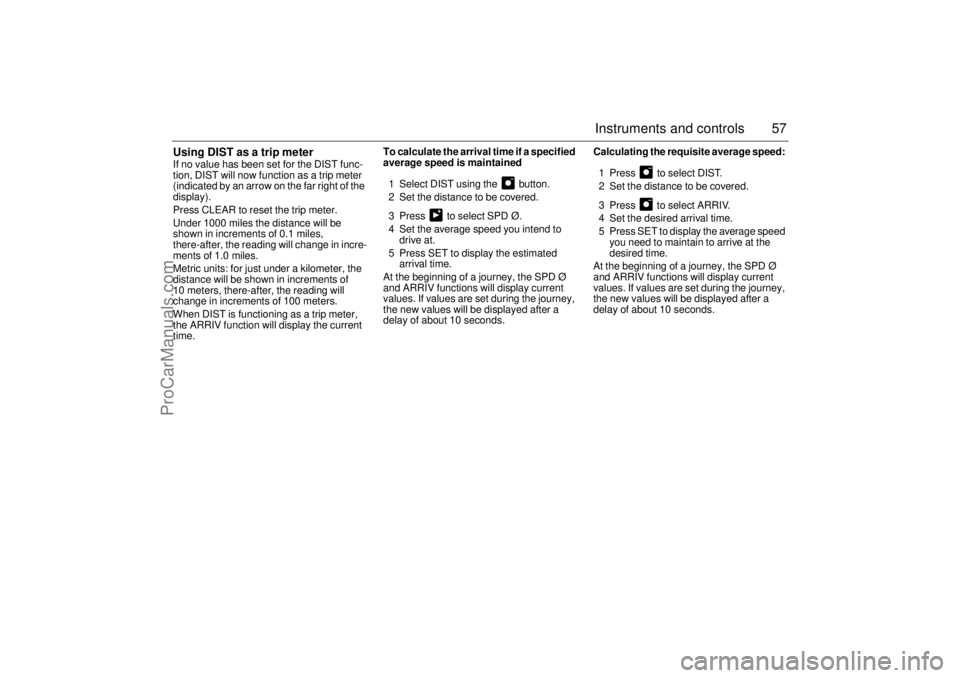
1 Select DIST using the button.
2 Set the distance to be covered.
3 Press to select SPD Ø.
4 Set the average speed you intend to
drive at.
5 Press SET to display the estimated
arrival time.
At the beginning of a journey, the SPD Ø
and ARRIV functions will display current
values. If values are set during the journey,
the new values will be displayed after a
delay of about 10 seconds. Calculating the requisite average speed:
1 Press to select DIST.
2 Set the distance to be covered.
3 Press to select ARRIV.
4 Set the desired arrival time.
5 Press SET to display the average speed
you need to maintain to arrive at the
desired time.
At the beginning of a journey, the SPD Ø
and ARRIV functions will display current
values. If values are set during the journey,
the new values will be displayed after a
delay of about 10 seconds.
ProCarManuals.com
Page 82 of 256
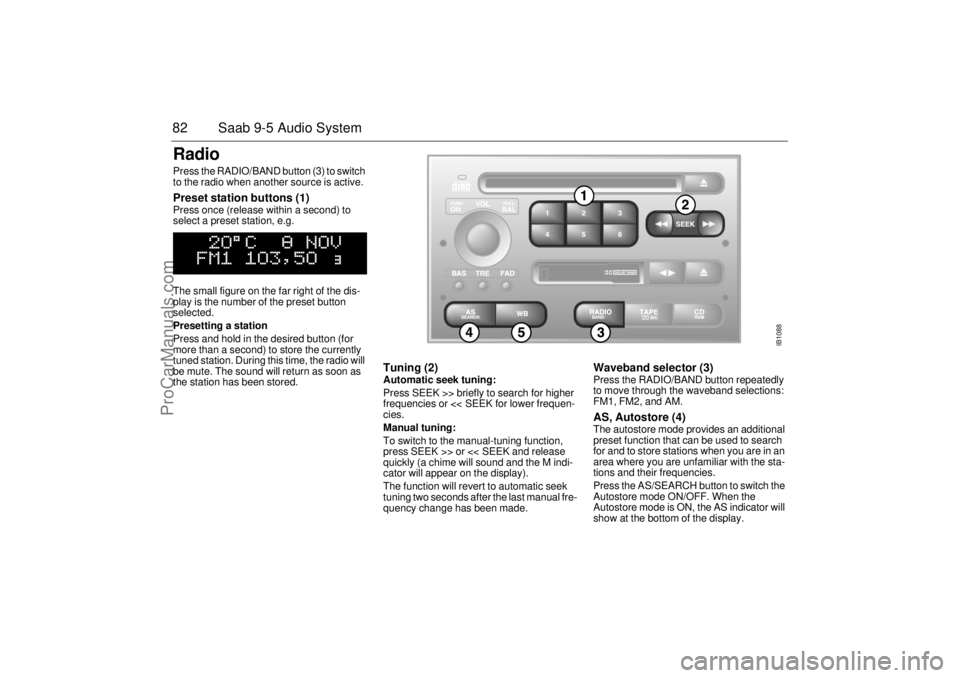
82 Saab 9-5 Audio SystemRadio Press the RADIO/BAND button (3) to switch
to the radio when another source is active. Preset station buttons (1) Press once (release within a second) to
select a preset station, e.g.
The small figure on the far right of the dis-
play is the number of the preset button
selected.
Presetting a station
Press and hold in the desired button (for
more than a second) to store the currently
tuned station. During this time, the radio will
be mute. The sound will return as soon as
the station has been stored.
Tuning (2) Automatic seek tuning:
Press SEEK >> briefly to search for higher
frequencies or << SEEK for lower frequen-
cies.
Manual tuning:
To switch to the manual-tuning function,
press SEEK >> or << SEEK and release
quickly (a chime will sound and the M indi-
cator will appear on the display).
The function will revert to automatic seek
tuning two seconds after the last manual fre-
quency change has been made.
Waveband selector (3) Press the RADIO/BAND button repeatedly
to move through the waveband selections:
FM1, FM2, and AM. AS, Autostore (4) The autostore mode provides an additional
preset function that can be used to search
for and to store stations when you are in an
area where you are unfamiliar with the sta-
tions and their frequencies.
Press the AS/SEARCH button to switch the
Autostore mode ON/OFF. When the
Autostore mode is ON, the AS indicator will
show at the bottom of the display.
IB1088
ProCarManuals.com
Page 83 of 256

83 Saab 9-5 Audio System
Press and hold in the AS/SEARCH button
for more than a second to initiate a search
for the six strongest stations.
Each time the system finds and stores a sta-
tion, the number on the far right of the dis-
play will change. If the system cannot find
six stations with good reception, the remain-
ing preset buttons will be empty. If one of
these empty buttons is pressed, U**** (FM)
or AM**** will appear on the display.
When the system leaves the AS mode, it
returns to the station that was selected
before the AS mode was activated.
The AS mode can also be used in the AM
band.
WB (Weather Band) (5)Press the WB button to select the Weather
Band mode. The radio will automatically
search for the strongest national weather
service station in the area. When a weather
band station is received, the display indi-
cates "WB". The strongest station generally
provides the most accurate information for
the area in which you are travelling.
To exit the Weather Band mode, depress
the WB button again. Weather Band recep-
tion is available in CD, TAPE and RADIO
mode. If the radio is unable to find a suffi-
ciently strong station to lock onto, the unit
will continue to search and the display will
indicate "NO WB".
ProCarManuals.com
Page 88 of 256
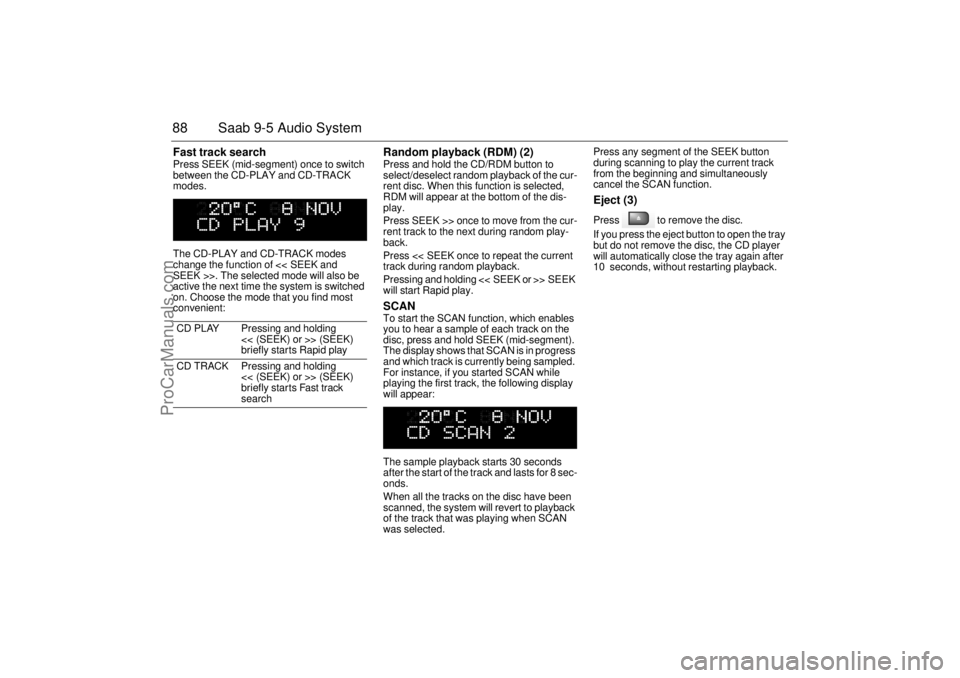
88 Saab 9-5 Audio SystemFast track search Press SEEK (mid-segment) once to switch
between the CD-PLAY and CD-TRACK
modes.
The CD-PLAY and CD-TRACK modes
change the function of << SEEK and
SEEK >>. The selected mode will also be
active the next time the system is switched
on. Choose the mode that you find most
convenient:
Random playback (RDM) (2) Press and hold the CD/RDM button to
select/deselect random playback of the cur-
rent disc. When this function is selected,
RDM will appear at the bottom of the dis-
play.
Press SEEK >> once to move from the cur-
rent track to the next during random play-
back.
Press << SEEK once to repeat the current
track during random playback.
Pressing and holding << SEEK or >> SEEK
will start Rapid play. SCAN To start the SCAN function, which enables
you to hear a sample of each track on the
disc, press and hold SEEK (mid-segment).
The display shows that SCAN is in progress
and which track is currently being sampled.
For instance, if you started SCAN while
playing the first track, the following display
will appear:
The sample playback starts 30 seconds
after the start of the track and lasts for 8 sec-
onds.
When all the tracks on the disc have been
scanned, the system will revert to playback
of the track that was playing when SCAN
was selected. Press any segment of the SEEK button
during scanning to play the current track
from the beginning and simultaneously
cancel the SCAN function.
Eject (3) Press to remove the disc.
If you press the eject button to open the tray
but do not remove the disc, the CD player
will automatically close the tray again after
10 seconds, without restarting playback.
CD PLAY Pressing and holding
<< (SEEK) or >> (SEEK)
briefly starts Rapid play
CD TRACK Pressing and holding
<< (SEEK) or >> (SEEK)
briefly starts Fast track
search
ProCarManuals.com
Page 89 of 256
89 Saab 9-5 Audio System
CD changer(accessory)Important! Always keep the sliding cover
closed to keep dust out of the CD changer,
so that it will continue to provide satisfactory
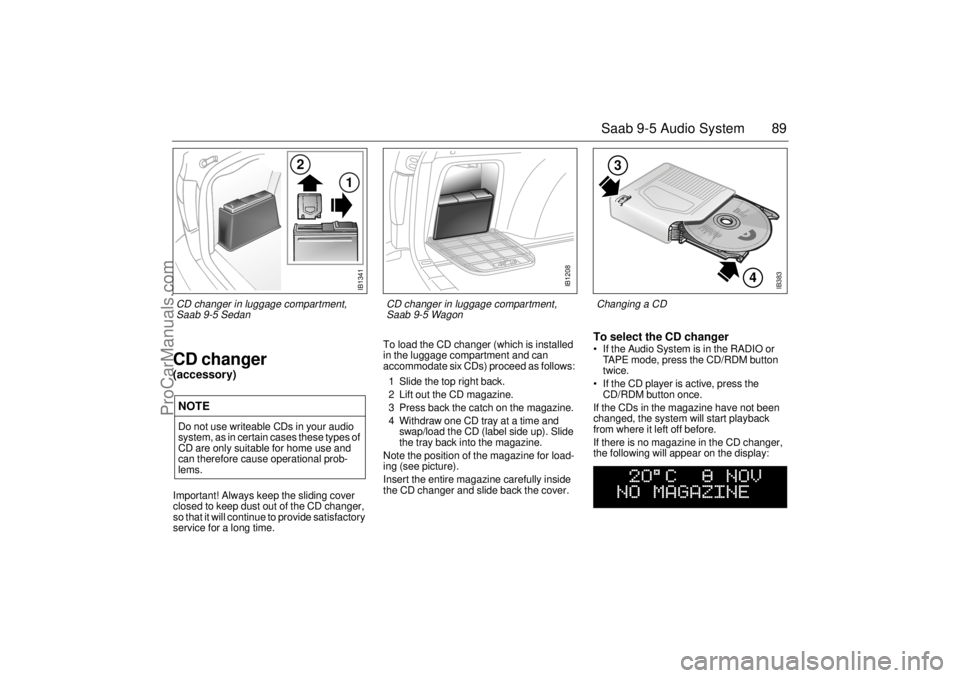
service for a long time. To load the CD changer (which is installed
in the luggage compartment and can
accommodate six CDs) proceed as follows:
1 Slide the top right back.
2 Lift out the CD magazine.
3 Press back the catch on the magazine.
4 Withdraw one CD tray at a time and
swap/load the CD (label side up). Slide
the tray back into the magazine.
Note the position of the magazine for load-
ing (see picture).
Insert the entire magazine carefully inside
the CD changer and slide back the cover.
To select the CD changer If the Audio System is in the RADIO or
TAPE mode, press the CD/RDM button
twice.
If the CD player is active, press the
CD/RDM button once.
If the CDs in the magazine have not been
changed, the system will start playback
from where it left off before.
If there is no magazine in the CD changer,
the following will appear on the display:
NOTEDo not use writeable CDs in your audio
system, as in certain cases these types of
CD are only suitable for home use and
can therefore cause operational prob-
lems.
IB383
4
3
Changing a CD
IB1341
2
1
CD changer in luggage compartment,
Saab 9-5 Sedan
IB1208
CD changer in luggage compartment,
Saab 9-5 Wagon
ProCarManuals.com
Page 91 of 256

91 Saab 9-5 Audio System
After two seconds, the status of the trays in
the magazine (i.e. loaded or empty) will be
shown on the display, e.g.:
If for some reason the CD selected by the
preset button cannot be played, playback of
the current CD will continue. Track search (2) Press << (SEEK) or (SEEK) >> repeatedly
to move to preceding or following tracks.
Pressing << (SEEK) once will restart play-
back from the beginning of the current track.
Thus, to play the preceding track, press
<< (SEEK) twice. Rapid play When << (SEEK) or (SEEK) >> is pressed
and held, rapid play will be initiated, with the
time and track showing on the display, e.g.:
If the button is depressed for more than
5 seconds, the rapid play will be even faster.
Rapid play stops when the button is
released.
Fast track search Press SEEK (mid-segment) once to switch
between the CD-PLAY and CD-TRACK
modes.
The CD-PLAY and CD-TRACK modes
change the function of << (SEEK) and
(SEEK) >>. The selected mode will also be
active the next time the system is switched
on. Choose the mode that you find most
convenient:
CD PLAY Pressing and holding
<< (SEEK) or >> (SEEK)
briefly starts Rapid play
CD TRACK Pressing and holding
<< (SEEK) or (SEEK) >>
briefly starts Fast track
search
IB1104
VOL
TREBAL ON
FA D BAS
PULL PUSH
CDRDM
RADIO BAND
ASSEARCH
2 13
5 46
DOLBY B NR
SEEK
3
1
2
ProCarManuals.com
Page 93 of 256
93 Saab 9-5 Audio System
General functionsVolume-preset modeTo select the volume-preset mode, press
and hold the WB button at the same time as
you switch the Audio System on.
Use the << SEEK >> button to select the
desired function.
The following volume settings can be
preselected:
STARTVOL - maximum volume level
when the Audio System is switched on
TEL VOL - preset volume level when an
in-car phone is activated
SP D VOL - speed-dependent volume.
The Audio System will automatically
adjust the volume level to suit the back-
ground noise, such as road noise, occur-
ring while the car is under way.
LOUDNESS ON/OFF - boosting of the
highest and lowest frequency ranges to
enhance the sound image when the
volume is set to a low level.
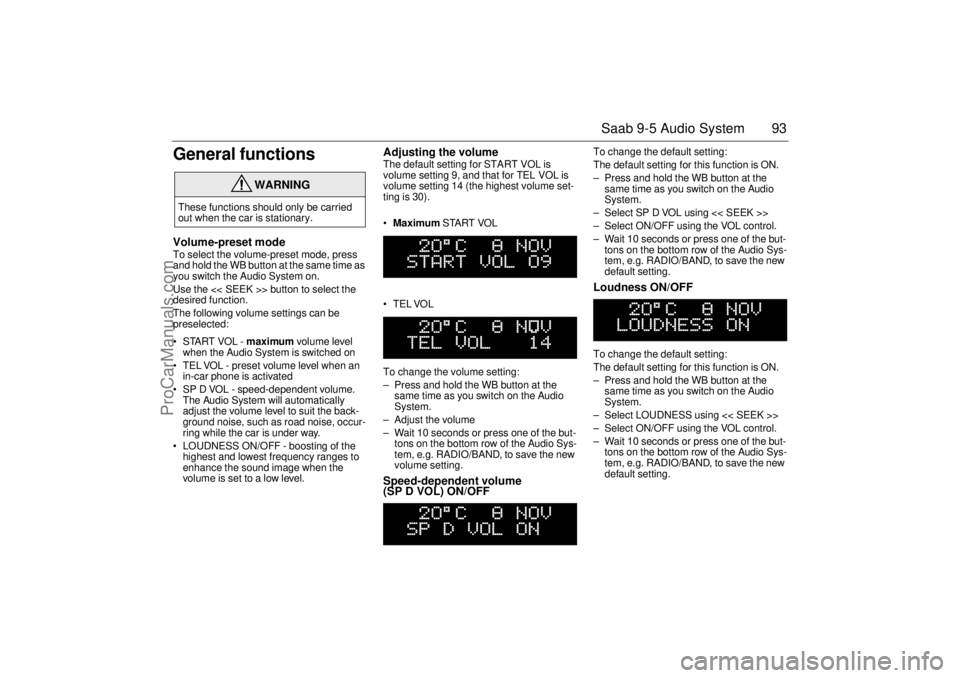
Adjusting the volume The default setting for START VOL is
volume setting 9, and that for TEL VOL is
volume setting 14 (the highest volume set-
ting is 30).
Maximum START VOL
TELVOL
To change the volume setting:
– Press and hold the WB button at the
same time as you switch on the Audio
System.
– Adjust the volume
– Wait 10 seconds or press one of the but-
tons on the bottom row of the Audio Sys-
tem, e.g. RADIO/BAND, to save the new
volume setting.Speed-dependent volume
(SP D VOL) ON/OFF
To change the default setting:
The default setting for this function is ON.
– Press and hold the WB button at the
same time as you switch on the Audio
System.
– Select SP D VOL using << SEEK >>
– Select ON/OFF using the VOL control.
– Wait 10 seconds or press one of the but-
tons on the bottom row of the Audio Sys-
tem, e.g. RADIO/BAND, to save the new
default setting. Loudness ON/OFF To change the default setting:
The default setting for this function is ON.
– Press and hold the WB button at the
same time as you switch on the Audio
System.
– Select LOUDNESS using << SEEK >>
– Select ON/OFF using the VOL control.
– Wait 10 seconds or press one of the but-
tons on the bottom row of the Audio Sys-
tem, e.g. RADIO/BAND, to save the new
default setting.
WARNING
These functions should only be carried
out when the car is stationary.
ProCarManuals.com