alarm SAAB 9-5 2001 User Guide
[x] Cancel search | Manufacturer: SAAB, Model Year: 2001, Model line: 9-5, Model: SAAB 9-5 2001Pages: 272, PDF Size: 14.83 MB
Page 45 of 272

45 Security
Overview of LED signals and SID messagesSome signals may differ between model variants for different
countries.Status LED signal
Activation (during 10-second delay). Comes on for 10 seconds.
Alarm activated (after delay). Flashes once every other
second.
Deactivation. Comes on for 2 seconds.
Alarm not activated. Off.
Door, trunk lid/tailgate or hood open
or opened during delay period.Flashes three times per sec-
ond for 10 seconds.
Unlocking the trunk lid/tailgate. Flashes three times per sec-
ond for 10 seconds.
Closing of door, trunk lid/tailgate or
hood after delay period.Comes on for 10 seconds.
Car immobilized but not locked.
Car alarm not activated.Flashes twice at three sec-
onds intervals.
Fault in a switch serving doors, hood
or trunk lid.Flashing (instead of being
on continuously) during
delay period.
SID message Reason/action
SERVICE THEFT ALARM Probably a fault in one of the sensors
or the alarm siren.
Have the car checked by an autho-
rized Saab dealer.
KEY NOT ACCEPTED Fault in key transmitter or in igni-
tion-switch receiver.
Turn ignition switch to ON and press
the unlock button on the key. Start
the engine.
Have the car checked by an autho-
rized Saab dealer.
REPLACE KEY BATTERY Fit a new battery in the key, see page
37.
DOOR ALARM ONLY Window-glass sensor disabled.
FULL THEFT ALARM Window-glass sensor in circuit.
REMOTE KEY
TRANSPONDRTurn the ignition key to position ON
and then press the button for open-
ing the trunk lid. SID displays the
number of keys and transmitters
(transponders) coded to the car.
ProCarManuals.com
Page 51 of 272
51 Instruments and controls
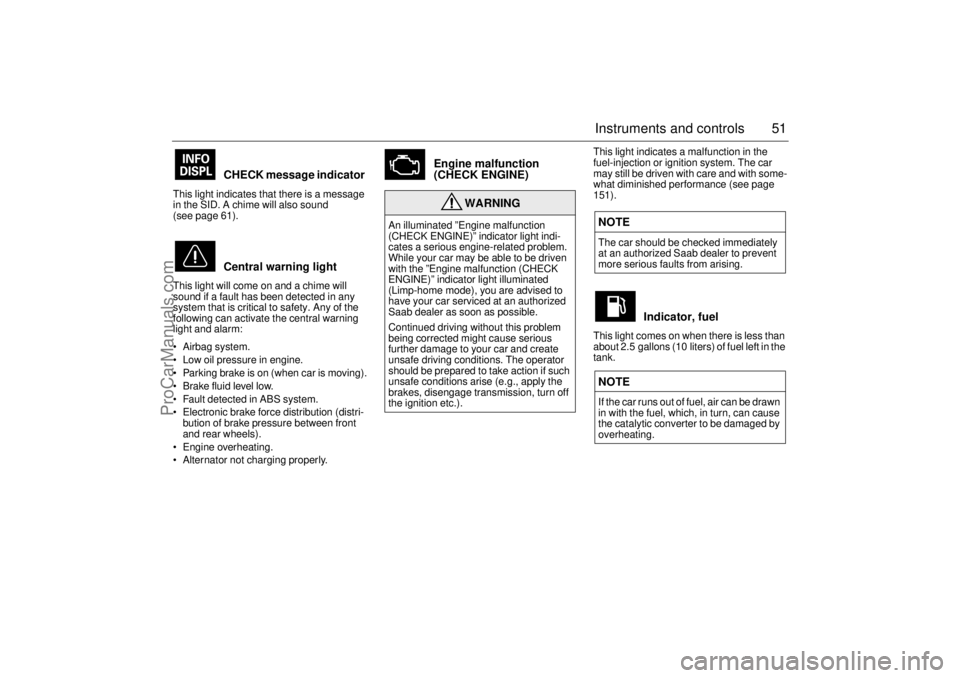
CHECK message indicator
This light indicates that there is a message
in the SID. A chime will also sound
(see page 61).
Central warning light
This light will come on and a chime will
sound if a fault has been detected in any
system that is critical to safety. Any of the
following can activate the central warning
light and alarm:
Airbag system.
Low oil pressure in engine.
Parking brake is on (when car is moving).
Brake fluid level low.
Fault detected in ABS system.
Electronic brake force distribution (distri-
bution of brake pressure between front
and rear wheels).
Engine overheating.
Alternator not charging properly.
Engine malfunction
(CHECK ENGINE)
This light indicates a malfunction in the
fuel-injection or ignition system. The car
may still be driven with care and with some-
what diminished performance (see page
151).
Indicator, fuel
This light comes on when there is less than
about 2.5 gallons (10 liters) of fuel left in the
tank.
WARNING
An illuminated ”Engine malfunction
(CHECK ENGINE)” indicator light indi-
cates a serious engine-related problem.
While your car may be able to be driven
with the ”Engine malfunction (CHECK
ENGINE)” indicator light illuminated
(Limp-home mode), you are advised to
have your car serviced at an authorized
Saab dealer as soon as possible.
Continued driving without this problem
being corrected might cause serious
further damage to your car and create
unsafe driving conditions. The operator
should be prepared to take action if such
unsafe conditions arise (e.g., apply the
brakes, disengage transmission, turn off
the ignition etc.).
NOTEThe car should be checked immediately
at an authorized Saab dealer to prevent
more serious faults from arising.NOTEIf the car runs out of fuel, air can be drawn
in with the fuel, which, in turn, can cause
the catalytic converter to be damaged by
overheating.
ProCarManuals.com
Page 55 of 272
55 Instruments and controls
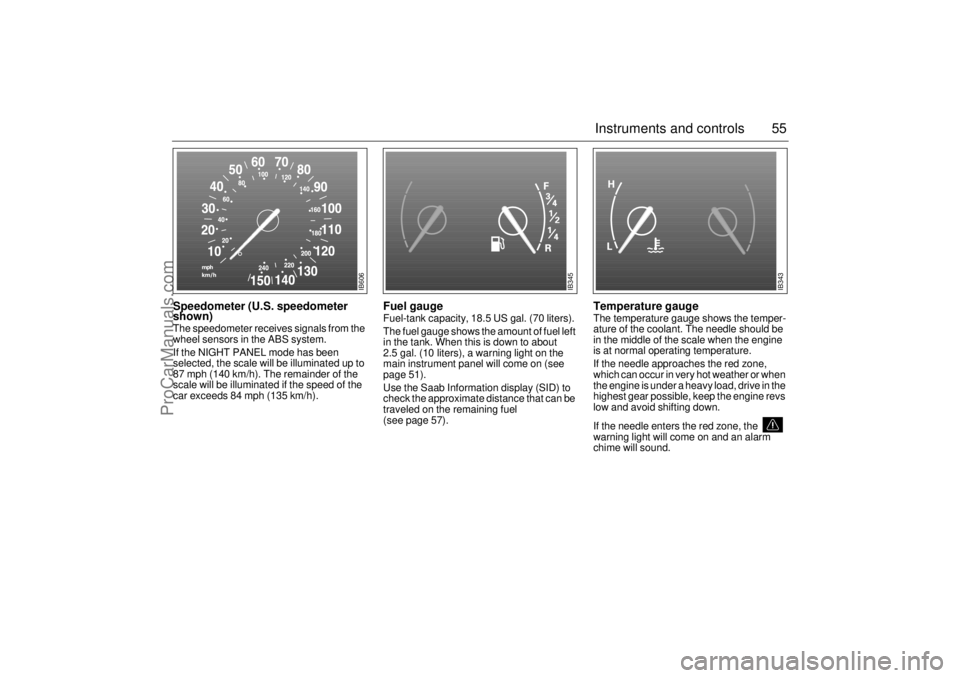
Speedometer (U.S. speedometer
shown)The speedometer receives signals from the
wheel sensors in the ABS system.
If the NIGHT PANEL mode has been
selected, the scale will be illuminated up to
87 mph (140 km/h). The remainder of the
scale will be illuminated if the speed of the
car exceeds 84 mph (135 km/h).
Fuel gauge Fuel-tank capacity, 18.5 US gal. (70 liters).
The fuel gauge shows the amount of fuel left
in the tank. When this is down to about
2.5 gal. (10 liters), a warning light on the
main instrument panel will come on (see
page 51).
Use the Saab Information display (SID) to
check the approximate distance that can be
traveled on the remaining fuel
(see page 57).
Temperature gauge The temperature gauge shows the temper-
ature of the coolant. The needle should be
in the middle of the scale when the engine
is at normal operating temperature.
If the needle approaches the red zone,
which can occur in very hot weather or when
the engine is under a heavy load, drive in the
highest gear possible, keep the engine revs
low and avoid shifting down.
If the needle enters the red zone, the
warning light will come on and an alarm
chime will sound.
IB606
IB345
IB343
ProCarManuals.com
Page 57 of 272
57 Instruments and controls
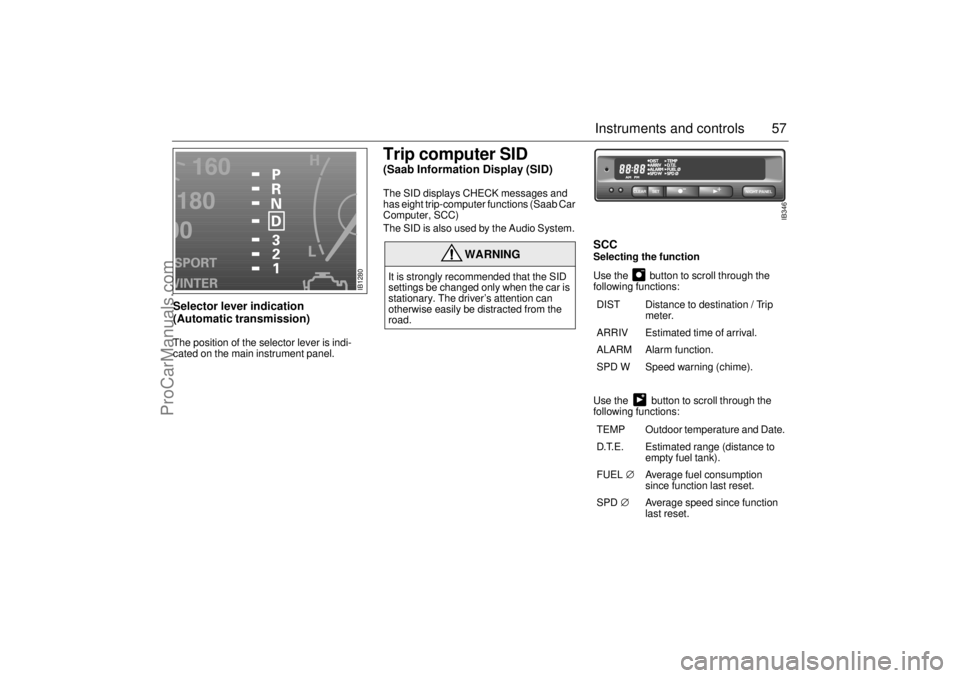
Selector lever indication
(Automatic transmission) The position of the selector lever is indi-
cated on the main instrument panel.
Trip computer SID (Saab Information Display (SID) The SID displays CHECK messages and
has eight trip-computer functions (Saab Car
Computer, SCC)
The SID is also used by the Audio System.
SCCSelecting the function
Use the button to scroll through the
following functions:
Use the button to scroll through the
following functions:
WARNING
It is strongly recommended that the SID
settings be changed only when the car is
stationary. The driver’s attention can
otherwise easily be distracted from the
road.
DIST Distance to destination / Trip
meter.
ARRIV Estimated time of arrival.
ALARM Alarm function.
SPD W Speed warning (chime).
TEMP Outdoor temperature and Date.
D.T.E. Estimated range (distance to
empty fuel tank).
FUEL∅ Average fuel consumption
since function last reset.
SPD∅ Average speed since function
last reset.
NIGHT PANEL
CLEAR
SET
IB346
IB1280
ProCarManuals.com
Page 58 of 272
58 Instruments and controlsOutdoor temperature
(Frost warning)Regardless of which function has been
selected, except Night Panel Mode, SID will
automatically display the outdoor tempera-
ture when it is between 26° and 38°F (-3°
and +3°C). This also applies if the
temperature has moved outside the range
of 21° to 43°F (-6° to +6°C) but is again
between 26° and 38°F (-3° and +3°C).
Entering values for the functions Values can be entered for the following
functions: SPD∅, DIST, ARRIV, ALARM
and SPD W.
1 Select the desired function using or
.
2 Press the SET button for at least one
second (figures start to flash and a
chime sounds).
3 Use or to increase or decrease
the value (press CLEAR to reset).
4 Press SET to record the value.
Setting the date1 Use to select TEMP.
2 Press the SET button for at least one
second (year starts to flash and a chime
sounds).
3 Set the year using or .
4 Touch SET.
5 Set the month in the same way.
6 Touch SET.
7 Set the day in the same way.
8 Press SET to save the date setting.
WARNING
Remember that roads can be icy even at
temperatures of above 38°F (+3°C),
especially on bridges and stretches of
road that are sheltered from the sun.
ProCarManuals.com
Page 59 of 272

59 Instruments and controls
Turning the Alarm and Speed
warning on or off 1 Select the Alarm or Speed-warning
function.
2 Press SET to turn on the function.
Press CLEAR to turn off the function.
When either function is on, ALARM/SPD W
respectively will be visible on the display. An
asterisk
* will be visible on the far right of the
display when either function is selected.
The Alarm and Speed-warning settings will
not be cancelled when the engine is
switched off.
When the Alarm has been set to come on at
a specified time, it will only be activated
once – it will not come on at the same time
every day. Press SET to turn it on again.
The Alarm will continue to beep for one
minute if not switched off.
Calculation of arrival time and
average speed The settings must be made before the jour-
ney is started.
Calculation of arrival time:
1 Select DIST using the button.
2 Set the destination distance.
3 Press SET.
When ARRIV is selected during the journey,
the arrival time based on the average speed
over the past 20 minutes will be displayed.
The trip computer will include any stops in
the calculation of the estimated time of
arrival.
Press DIST and the distance remaining to
the destination will be displayed in the same
way.
After the distance to destination has
decreased to zero, the DIST will function as
a trip meter (see ”Using DIST as a trip
meter”). The starting value for the trip meter
will be the last distance set in the DIST
function.
Example: The DIST setting was 100 miles.
Once 100 miles (160 km) has been cov-
ered, the DIST will start to function as a trip
meter, the initial reading of which will be
100 miles (160 km).
Using DIST as a trip meter If no value has been set for the DIST func-
tion, DIST will now function as a trip meter
(indicated by an arrow on the far right of the
display).
Press CLEAR to reset the trip meter.
Under 1000 miles the distance will be
shown in increments of 0.1 miles,
there-after, the reading will change in incre-
ments of 1.0 mile.
Metric units: for just under a kilometer, the
distance will be shown in increments of
10 meters, there-after, the reading will
change in increments of 100 meters.
When DIST is functioning as a trip meter,
the ARRIV function will display the current
time.
ProCarManuals.com
Page 60 of 272
60 Instruments and controlsTo calculate the arrival time if a specified
average speed is maintained
1 Select DIST using the button.
2 Set the distance to be covered.
3 Press to select SPD Ø.
4 Set the average speed you intend to
drive.
5 Press SET to display the estimated
arrival time.
At the beginning of a journey, the SPD Ø
and ARRIV functions will display current
values. If values are set during the journey,
the new values will be displayed after a
delay of about 10 seconds. Calculating the requisite average speed:
1 Press to select DIST.
2 Set the distance to be covered.
3 Press to select ARRIV.
4 Set the desired arrival time.
5 Press SET to display the average speed
you need to maintain to arrive at the
desired time.
At the beginning of a journey, the SPD Ø
and ARRIV functions will display current
values. If values are set during the journey,
the new values will be displayed after a
delay of about 10 seconds.Resetting values
To reset the values, press CLEAR for at
least four seconds.
The following functions will be reset
simultaneously:
Estimated range on remaining fuel
(function based on a fuel consumption of
28 mpg).
Average fuel consumption.
Average speed.
Arrival time (function based on current
speed).
Programmed values for DIST, ALARM and
SPD W will not be reset (see the respective
function).
ProCarManuals.com
Page 61 of 272

61 Instruments and controls
CHECK messages When the engine is started, CHECKING will
appear on the display for about four sec-
onds, while the SID checks are being per-
formed.
When a CHECK message is generated
while the car is being driven, a chime will
sound, INFO DISPL will illuminate on on the
main instrument panel, and the message
will appear on the SID. The number of mes-
sages that can be displayed by the SID
varies with the specification of the car.
If more than one CHECK message has
been generated, the
+ symbol will appear to
the left of the text on the display. The mes-
sages appear in order of priority.
If a new fault occurs while another message
is being displayed, the message relating to
the new one will appear for 10 seconds,
after which the display will return to the ear-
lier one.
Press CLEAR once to acknowledge a mes-
sage, whereupon it will be cleared from the
display. It will not be displayed again before
the ignition has been switched off and then
on again. The following messages may be displayed:
1 This message will be displayed approxi-
mately 600 miles (1,000 km) before the next
scheduled service is due, or when 365 days
have elapsed since the last service. The
message should be cleared at the time of that
service (see the Saab Warranties & Service
Record Booklet).
This message can also be deleted by first
briefly pressing the CLEAR button, then
depressing it a second time for at least eight
seconds until ”SERVICE” appears on the dis-
play and a chime sounds. The message can
only be deleted when it is shown on the SID.
Night panelTo improve night-driving conditions inside
the car, the Night Panel mode can be
selected. In this mode, the amount of infor-
mation displayed is reduced, and only the
most important instruments and displays
will be illuminated.
When the Night Panel button is pressed,
only the speedometer will be illuminated (up
to the 87-mph or 140-km/h graduation), all
the other instruments illumination being
extinguished and their needles moved to
zero. Both the SID and the ACC displays will
be extinguished and the backlighting for
switches and other controls will be dimmed.
Note: All indicator and warning lights,
together with the display of CHECK mes-
sages, will operate as normal, except ”Out-
door temperature (Frost warning)”, see
page 58. Message See
page
FRONT LIGHT FAILURE 205
REAR LIGHT FAILURE 208
FOG LIGHT FAILURE 209
BRAKE LIGHT FAILURE 208
WASHER FLUID LEVEL LOW 204
FILL COOLANT FLUID 196
REPLACE KEY BATTERY 37
KEY NOT ACCEPTED 45
SERVICE THEFT ALARM 45
TRANSMISSION OVERHEATING 162
TIGHTEN FUEL FILLER CAP 154
TIME FOR SERVICE
1)
242
ProCarManuals.com
Page 216 of 272
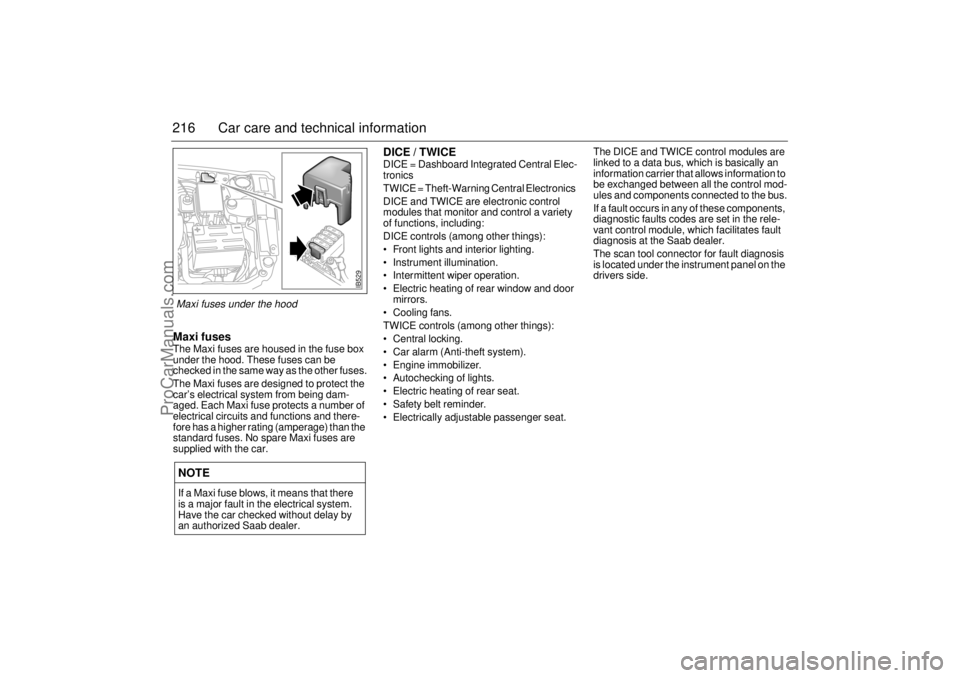
216 Car care and technical informationMaxi fusesThe Maxi fuses are housed in the fuse box
under the hood. These fuses can be
checked in the same way as the other fuses.
The Maxi fuses are designed to protect the
car’s electrical system from being dam-
aged. Each Maxi fuse protects a number of
electrical circuits and functions and there-
fore has a higher rating (amperage) than the
standard fuses. No spare Maxi fuses are
supplied with the car.
DICE / TWICEDICE = Dashboard Integrated Central Elec-
tronics
TWICE = Theft-Warning Central Electronics
DICE and TWICE are electronic control
modules that monitor and control a variety
of functions, including:
DICE controls (among other things):
Front lights and interior lighting.
Instrument illumination.
Intermittent wiper operation.
Electric heating of rear window and door
mirrors.
Cooling fans.
TWICE controls (among other things):
Central locking.
Car alarm (Anti-theft system).
Engine immobilizer.
Autochecking of lights.
Electric heating of rear seat.
Safety belt reminder.
Electrically adjustable passenger seat.The DICE and TWICE control modules are
linked to a data bus, which is basically an
information carrier that allows information to
be exchanged between all the control mod-
ules and components connected to the bus.
If a fault occurs in any of these components,
diagnostic faults codes are set in the rele-
vant control module, which facilitates fault
diagnosis at the Saab dealer.
The scan tool connector for fault diagnosis
is located under the instrument panel on the
drivers side.
NOTEIf a Maxi fuse blows, it means that there
is a major fault in the electrical system.
Have the car checked without delay by
an authorized Saab dealer.
IB529
Maxi fuses under the hood
ProCarManuals.com
Page 219 of 272
219 Car care and technical information
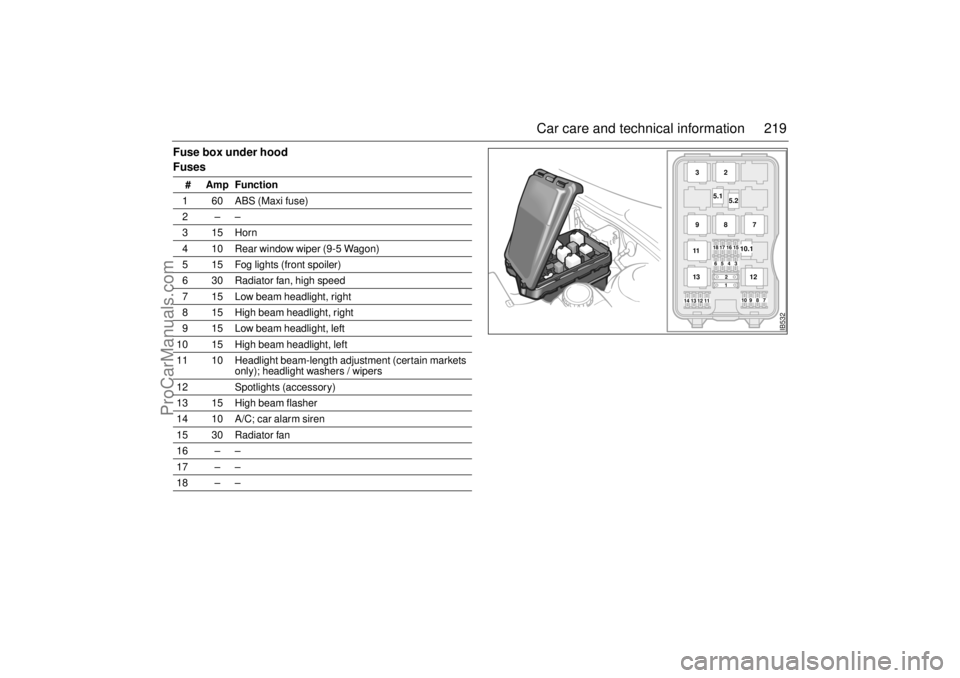
Fuse box under hood
Fuses
# Amp Function
1 60 ABS (Maxi fuse)
2––
315Horn
4 10 Rear window wiper (9-5 Wagon)
5 15 Fog lights (front spoiler)
6 30 Radiator fan, high speed
7 15 Low beam headlight, right
8 15 High beam headlight, right
9 15 Low beam headlight, left
10 15 High beam headlight, left
11 10 Headlight beam-length adjustment (certain markets
only); headlight washers / wipers
12 Spotlights (accessory)
13 15 High beam flasher
14 10 A/C; car alarm siren
15 30 Radiator fan
16 – –
17 – –
18 – –
IB532
18171615
14131211
10987
654312
10.1
3
5.2
5.12
9
8
7
11
12
13
ProCarManuals.com