radio SAAB 9-5 2001 User Guide
[x] Cancel search | Manufacturer: SAAB, Model Year: 2001, Model line: 9-5, Model: SAAB 9-5 2001Pages: 272, PDF Size: 14.83 MB
Page 94 of 272
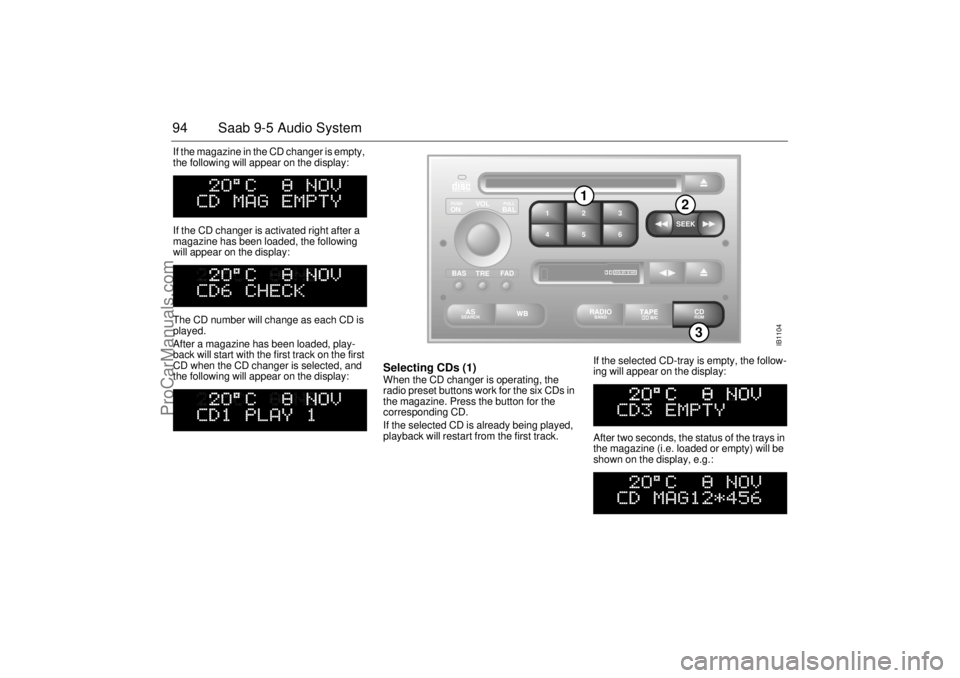
94 Saab 9-5 Audio SystemIf the magazine in the CD changer is empty,
the following will appear on the display:
If the CD changer is activated right after a
magazine has been loaded, the following
will appear on the display:
The CD number will change as each CD is
played.
After a magazine has been loaded, play-
back will start with the first track on the first
CD when the CD changer is selected, and
the following will appear on the display:
Selecting CDs (1) When the CD changer is operating, the
radio preset buttons work for the six CDs in
the magazine. Press the button for the
corresponding CD.
If the selected CD is already being played,
playback will restart from the first track. If the selected CD-tray is empty, the follow-
ing will appear on the display:
After two seconds, the status of the trays in
the magazine (i.e. loaded or empty) will be
shown on the display, e.g.:
IB1104
VOL
TREBAL ON
FA D BAS
PULL PUSH
CDRDM
RADIO BAND
ASSEARCH
2 13
5 46
DOLBY B NR
SEEK
3
1
2
ProCarManuals.com
Page 95 of 272
95 Saab 9-5 Audio System
If for some reason the CD selected by the
preset button cannot be played, playback of
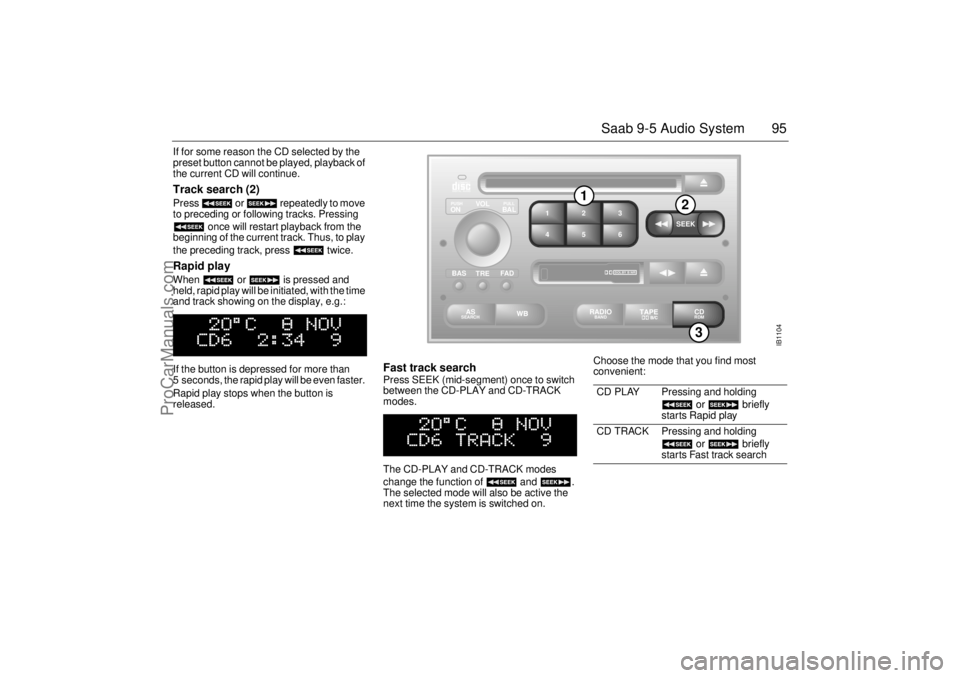
the current CD will continue. Track search (2) Press or repeatedly to move
to preceding or following tracks. Pressing
once will restart playback from the
beginning of the current track. Thus, to play
the preceding track, press twice. Rapid play When or is pressed and
held, rapid play will be initiated, with the time
and track showing on the display, e.g.:
If the button is depressed for more than
5 seconds, the rapid play will be even faster.
Rapid play stops when the button is
released.
Fast track search Press SEEK (mid-segment) once to switch
between the CD-PLAY and CD-TRACK
modes.
The CD-PLAY and CD-TRACK modes
change the function of and .
The selected mode will also be active the
next time the system is switched on. Choose the mode that you find most
convenient:
CD PLAY Pressing and holding
or briefly
starts Rapid play
CD TRACK Pressing and holding
or briefly
starts Fast track search
IB1104
VOL
TREBAL ON
FA D BAS
PULL PUSH
CDRDM
RADIO BAND
ASSEARCH
2 13
5 46
DOLBY B NR
SEEK
3
1
2
ProCarManuals.com
Page 96 of 272
96 Saab 9-5 Audio SystemSCAN Scanning the current CD:
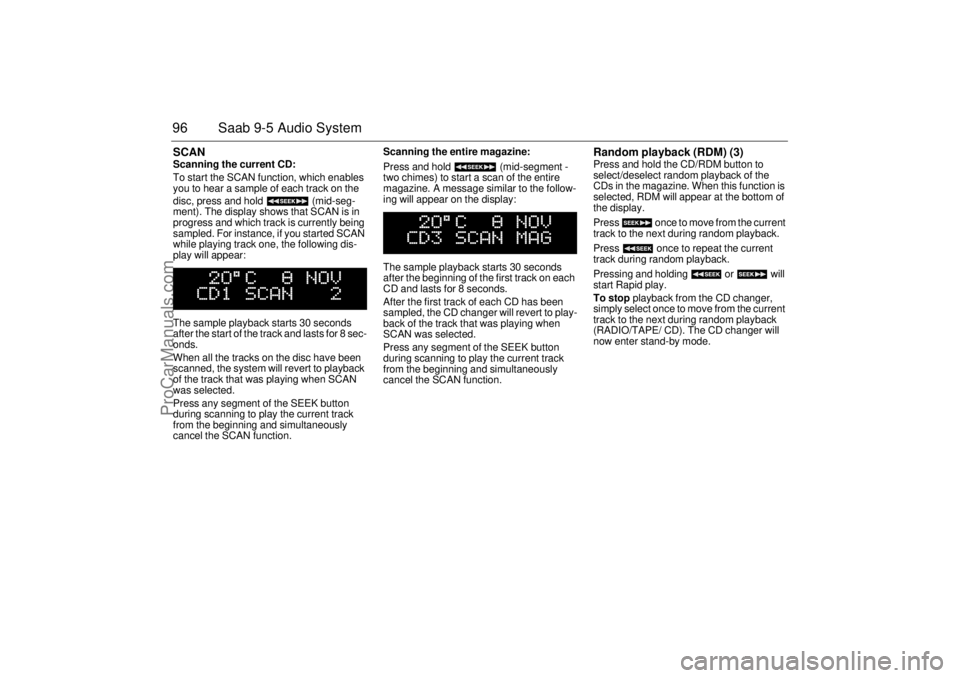
To start the SCAN function, which enables
you to hear a sample of each track on the
disc, press and hold (mid-seg-
ment). The display shows that SCAN is in
progress and which track is currently being
sampled. For instance, if you started SCAN
while playing track one, the following dis-
play will appear:
The sample playback starts 30 seconds
after the start of the track and lasts for 8 sec-
onds.
When all the tracks on the disc have been
scanned, the system will revert to playback
of the track that was playing when SCAN
was selected.
Press any segment of the SEEK button
during scanning to play the current track
from the beginning and simultaneously
cancel the SCAN function. Scanning the entire magazine:
Press and hold (mid-segment -
two chimes) to start a scan of the entire
magazine. A message similar to the follow-
ing will appear on the display:
The sample playback starts 30 seconds
after the beginning of the first track on each
CD and lasts for 8 seconds.
After the first track of each CD has been
sampled, the CD changer will revert to play-
back of the track that was playing when
SCAN was selected.
Press any segment of the SEEK button
during scanning to play the current track
from the beginning and simultaneously
cancel the SCAN function.
Random playback (RDM) (3) Press and hold the CD/RDM button to
select/deselect random playback of the
CDs in the magazine. When this function is
selected, RDM will appear at the bottom of
the display.
Press once to move from the current
track to the next during random playback.
Press once to repeat the current
track during random playback.
Pressing and holding or will
start Rapid play.
To stop playback from the CD changer,
simply select once to move from the current
track to the next during random playback
(RADIO/TAPE/ CD). The CD changer will
now enter stand-by mode.
ProCarManuals.com
Page 97 of 272
97 Saab 9-5 Audio System
Programmable
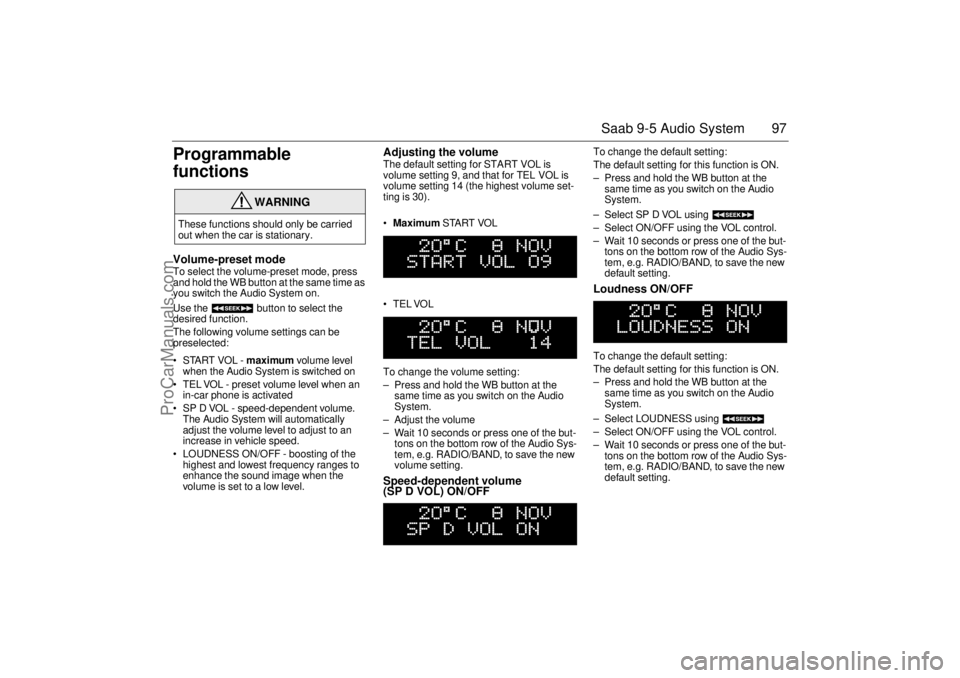
functionsVolume-preset modeTo select the volume-preset mode, press
and hold the WB button at the same time as
you switch the Audio System on.
Use the button to select the
desired function.
The following volume settings can be
preselected:
STARTVOL - maximum volume level
when the Audio System is switched on
TEL VOL - preset volume level when an
in-car phone is activated
SP D VOL - speed-dependent volume.
The Audio System will automatically
adjust the volume level to adjust to an
increase in vehicle speed.
LOUDNESS ON/OFF - boosting of the
highest and lowest frequency ranges to
enhance the sound image when the
volume is set to a low level.
Adjusting the volume The default setting for START VOL is
volume setting 9, and that for TEL VOL is
volume setting 14 (the highest volume set-
ting is 30).
Maximum START VOL
TELVOL
To change the volume setting:
– Press and hold the WB button at the
same time as you switch on the Audio
System.
– Adjust the volume
– Wait 10 seconds or press one of the but-
tons on the bottom row of the Audio Sys-
tem, e.g. RADIO/BAND, to save the new
volume setting.Speed-dependent volume
(SP D VOL) ON/OFF
To change the default setting:
The default setting for this function is ON.
– Press and hold the WB button at the
same time as you switch on the Audio
System.
– Select SP D VOL using
– Select ON/OFF using the VOL control.
– Wait 10 seconds or press one of the but-
tons on the bottom row of the Audio Sys-
tem, e.g. RADIO/BAND, to save the new
default setting. Loudness ON/OFF To change the default setting:
The default setting for this function is ON.
– Press and hold the WB button at the
same time as you switch on the Audio
System.
– Select LOUDNESS using
– Select ON/OFF using the VOL control.
– Wait 10 seconds or press one of the but-
tons on the bottom row of the Audio Sys-
tem, e.g. RADIO/BAND, to save the new
default setting.
WARNING
These functions should only be carried
out when the car is stationary.
ProCarManuals.com
Page 98 of 272
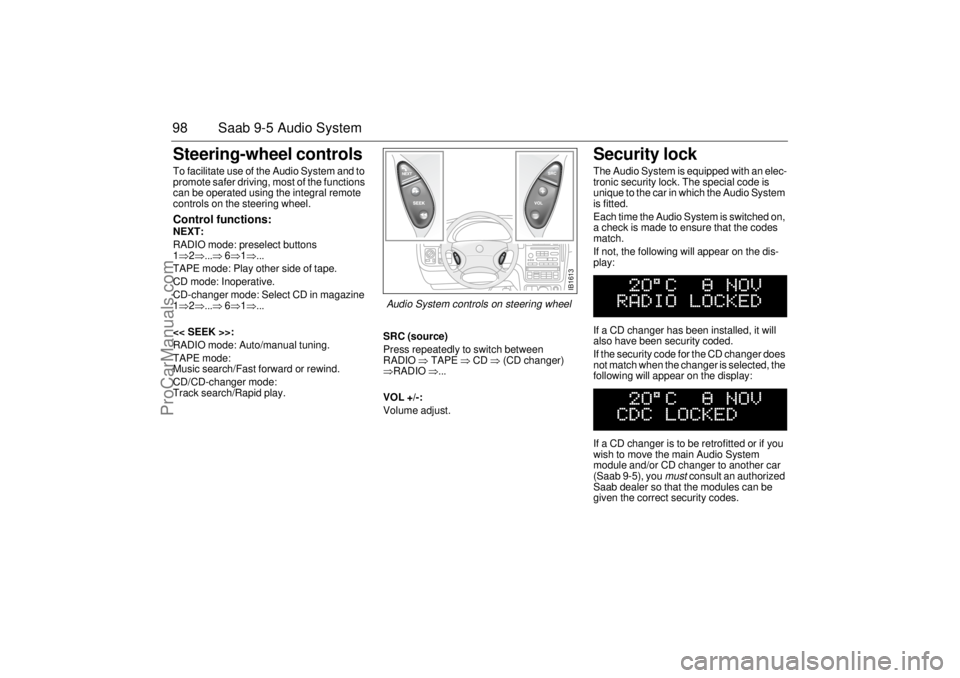
98 Saab 9-5 Audio SystemSteering-wheel controls To facilitate use of the Audio System and to
promote safer driving, most of the functions
can be operated using the integral remote
controls on the steering wheel. Control functions: NEXT:
RADIO mode: preselect buttons
1⇒2⇒...⇒ 6⇒1⇒...
TAPE mode: Play other side of tape.
CD mode: Inoperative.
CD-changer mode: Select CD in magazine
1⇒2⇒...⇒ 6⇒1⇒...
<< SEEK >>:
RADIO mode: Auto/manual tuning.
TAPE mode:
Music search/Fast forward or rewind.
CD/CD-changer mode:
Track search/Rapid play.SRC (source)
Press repeatedly to switch between
RADIO ⇒ TAPE ⇒ CD ⇒ (CD changer)
⇒RADIO ⇒...
VOL +/-:
Volume adjust.
Security lock The Audio System is equipped with an elec-
tronic security lock. The special code is
unique to the car in which the Audio System
is fitted.
Each time the Audio System is switched on,
a check is made to ensure that the codes
match.
If not, the following will appear on the dis-
play:
If a CD changer has been installed, it will
also have been security coded.
If the security code for the CD changer does
not match when the changer is selected, the
following will appear on the display:
If a CD changer is to be retrofitted or if you
wish to move the main Audio System
module and/or CD changer to another car
(Saab 9-5), you
must
consult an authorized
Saab dealer so that the modules can be
given the correct security codes.
IB1613
Audio System controls on steering wheel
ProCarManuals.com
Page 99 of 272

99 Saab 9-5 Audio System
Technical data
These specifications comply with the new IHF Standard
Since the policy at Saab is one of continual improvement, we retain the right to alter
specifications and design without prior notice.
Dolby noise reduction is produced under licence from Dolby Laboratories Licensing
Corporation
”Dolby” and the double-D symbol are trademarks of Dolby Laboratories Licens-
ing Corporation
Changes or modifications not expressly approved by the manufacturer for compliance
could void the user´s authority to operate the equipment.
Tone controls
Bass ______________________ ±10 dB at 100 Hz
Treble _____________________ ±10 dB at 10,000 Hz
Power output
Premium __________________ 150 W
110 W at 1% THD (total har-
monic distortion) and 13.5 V
Prestige __________________ 200 W
150 W at 1% THD (total har-
monic distortion) and 13.5 V
Radio module
Radio system _______________ PLL dual-synthesizer tuner
Number of presets:
FM ______________________ 3 x 6
AM ______________________ 2 x 6
Frequency range:
FM ______________________ 87.9 – 107.9 MHz
MW ______________________ 530 – 1710 kHz
WB ______________________ 162.40 – 162.55 MHz
Tuning steps:
Automatic seek tuning: _______ FM 200 kHz
AM 10 kHz
WB 50 kHz
Manual tuning: _____________ FM 200 kHz
AM 10 kHzFrequency range (FM) ________ 40-15000 Hz
±1 dB
Distortion (FM) ______________ < 0.5%
Cassette player
Fast forward/rewind __________ < 120 seconds (C-60)
Frequency range _____________ 40 – 16000 Hz
±2 dB
Wow and flutter ______________ 0.2% WRMS
Signal-to-noise ratio __________ 45 dB
Dolby B/C NR effect __________ 8/16 dB
CD player and CD changer
1-bit system and 8 x oversampling
Frequency range _____________ 20-20000 Hz
±0.5 dB
Distortion __________________ < 0.008%
Dynamics __________________ > 80 dB (1 kHz)
CD-changer capacity __________ 6 discs
ProCarManuals.com
Page 100 of 272
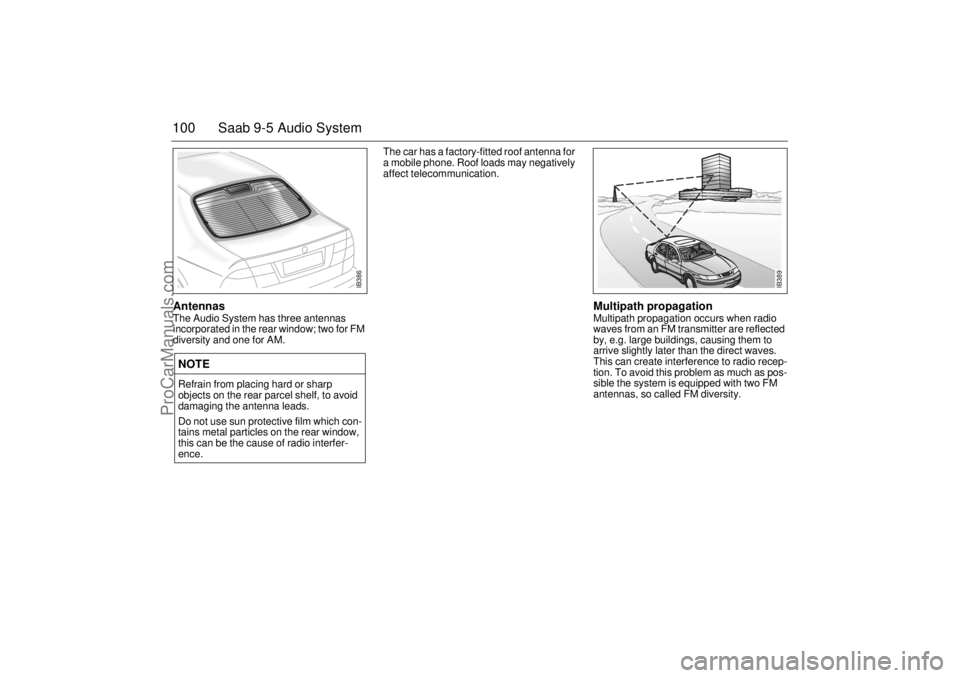
100 Saab 9-5 Audio SystemAntennas The Audio System has three antennas
incorporated in the rear window; two for FM
diversity and one for AM. The car has a factory-fitted roof antenna for
a mobile phone. Roof loads may negatively
affect telecommunication.
Multipath propagation Multipath propagation occurs when radio
waves from an FM transmitter are reflected
by, e.g. large buildings, causing them to
arrive slightly later than the direct waves.
This can create interference to radio recep-
tion. To avoid this problem as much as pos-
sible the system is equipped with two FM
antennas, so called FM diversity.
NOTERefrain from placing hard or sharp
objects on the rear parcel shelf, to avoid
damaging the antenna leads.
Do not use sun protective film which con-
tains metal particles on the rear window,
this can be the cause of radio interfer-
ence.
IB386
IB389
ProCarManuals.com
Page 101 of 272
101 Saab 9-5 Audio System
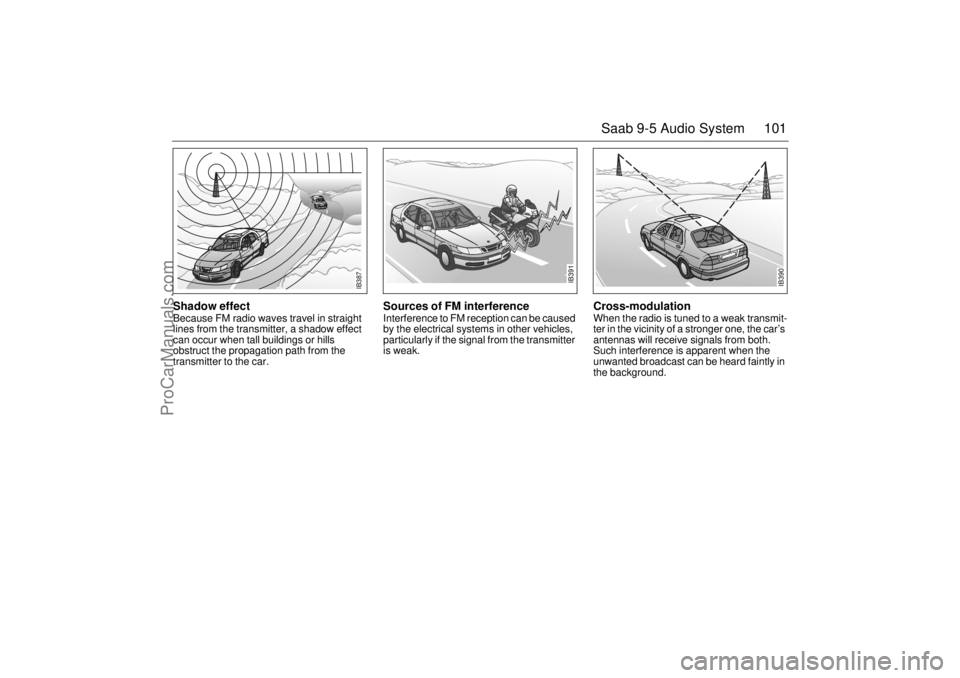
Shadow effect Because FM radio waves travel in straight
lines from the transmitter, a shadow effect
can occur when tall buildings or hills
obstruct the propagation path from the
transmitter to the car.
Sources of FM interference Interference to FM reception can be caused
by the electrical systems in other vehicles,
particularly if the signal from the transmitter
is weak.
Cross-modulation When the radio is tuned to a weak transmit-
ter in the vicinity of a stronger one, the car’s
antennas will receive signals from both.
Such interference is apparent when the
unwanted broadcast can be heard faintly in
the background.
IB391
IB390
IB387
ProCarManuals.com
Page 102 of 272
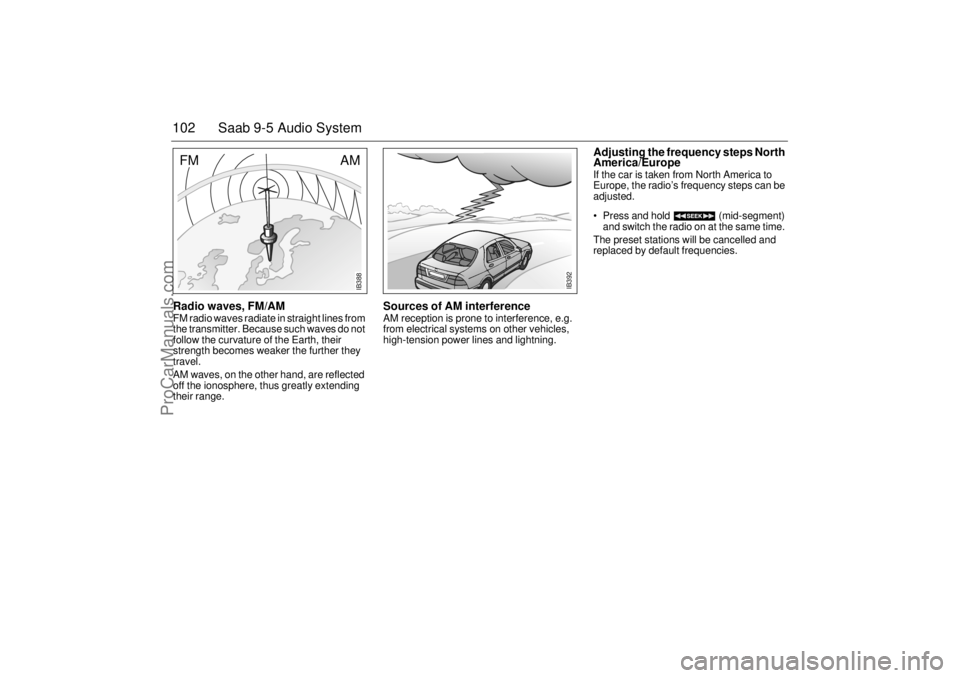
102 Saab 9-5 Audio SystemRadio waves, FM/AM FM radio waves radiate in straight lines from
the transmitter. Because such waves do not
follow the curvature of the Earth, their
strength becomes weaker the further they
travel.
AM waves, on the other hand, are reflected
off the ionosphere, thus greatly extending
their range.
Sources of AM interference AM reception is prone to interference, e.g.
from electrical systems on other vehicles,
high-tension power lines and lightning.
Adjusting the frequency steps North
America/Europe If the car is taken from North America to
Europe, the radio’s frequency steps can be
adjusted.
Press and hold (mid-segment)
and switch the radio on at the same time.
The preset stations will be cancelled and
replaced by default frequencies.
IB392
IB388
AM
FM
ProCarManuals.com
Page 104 of 272
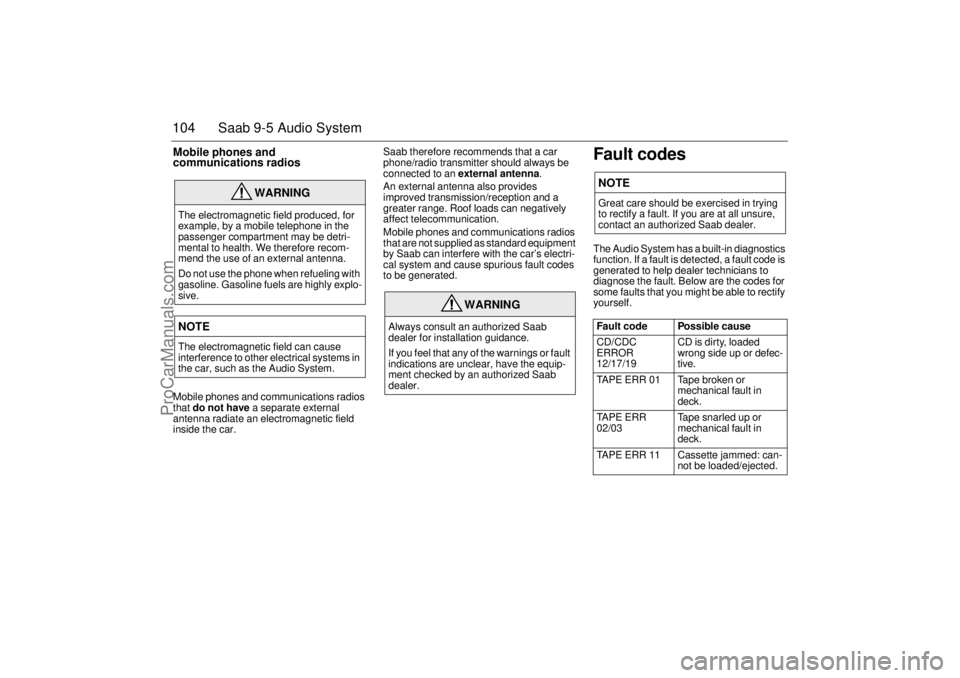
104 Saab 9-5 Audio SystemMobile phones and
communications radios Mobile phones and communications radios
that do not have a separate external
antenna radiate an electromagnetic field
inside the car.Saab therefore recommends that a car
phone/radio transmitter should always be
connected to an external antenna.
An external antenna also provides
improved transmission/reception and a
greater range. Roof loads can negatively
affect telecommunication.
Mobile phones and communications radios
that are not supplied as standard equipment
by Saab can interfere with the car’s electri-
cal system and cause spurious fault codes
to be generated.
Fault codesThe Audio System has a built-in diagnostics
function. If a fault is detected, a fault code is
generated to help dealer technicians to
diagnose the fault. Below are the codes for
some faults that you might be able to rectify
yourself.
WARNING
The electromagnetic field produced, for
example, by a mobile telephone in the
passenger compartment may be detri-
mental to health. We therefore recom-
mend the use of an external antenna.
Do not use the phone when refueling with
gasoline. Gasoline fuels are highly explo-
sive.NOTEThe electromagnetic field can cause
interference to other electrical systems in
the car, such as the Audio System.
WARNING
Always consult an authorized Saab
dealer for installation guidance.
If you feel that any of the warnings or fault
indications are unclear, have the equip-
ment checked by an authorized Saab
dealer.
NOTEGreat care should be exercised in trying
to rectify a fault. If you are at all unsure,
contact an authorized Saab dealer.
Fault code Possible cause
CD/CDC
ERROR
12/17/19 CD is dirty, loaded
wrong side up or defec-
tive.
TAPE ERR 01 Tape broken or
mechanical fault in
deck.
TAPE ERR
02/03 Tape snarled up or
mechanical fault in
deck.
TAPE ERR 11 Cassette jammed: can-
not be loaded/ejected.
ProCarManuals.com