ECU SAAB 9-5 2001 Owner's Guide
[x] Cancel search | Manufacturer: SAAB, Model Year: 2001, Model line: 9-5, Model: SAAB 9-5 2001Pages: 272, PDF Size: 14.83 MB
Page 110 of 272

110 OnStar - TelematicsThe OnStar CenterConnecting to the OnStar centerIn addition to using the 3-button system
found in your Saab, there are two other
ways to connect to the OnStar Center.
Toll-Free Call
To take advantage of your OnStar Services
from outside your Saab, you can call OnStar
toll-free at 1-888-4-OnStar
(1-888-466-7827). Remember to have your
Personal Identification Number (PIN)
handy.
Automatic Notification
A priority signal will be sent to the OnStar
Center with your exact location if an airbag
deploy.(Vehicle electrical system and cellular service
must be operable.)
Your personal identification number
(PIN)When you signed up with OnStar, you were
asked to provide a Personal Identification
Number (PIN). You’ll need your PIN to
access many of OnStar’s services. If, for
example, your vehicle has been stolen, an
Advisor will ask for your PIN in order to pro-
vide assistance.
Changing your PIN is easy. Call the OnStar
Center and provide the Advisor with your
current number, and he or she will assist
you in setting up a new number. If you have
forgotten your PIN, just call the OnStar Cen-
ter. For security reasons, we will send your
PIN to you in the mail.
The OnStar Safety and
Security PlanThe OnStar Safety and Security Plan is part
of the Premium Plan that comes with your
vehicle.* With it, you have access to a com-
plete range of services providing you with
an unsurpassed level of safety and security
— 24 hours a day, 7 days a week. And you
have it all at the touch of a button.
So whether you’re on a lonesome country
road or stuck in highway traffic, you have at
your disposal a complete range of services
providing you with unsurpassed security.
And you have it all at the touch of a button.Automatic notification of air bag
deploymentShould your front air bags deploy, a priority
signal will be sent to the OnStar Center with
your Saab´s location (as long as cellular
service and the vehicle’s electrical system
are operable). An Advisor will attempt to
contact you to assess the nature of your
emergency, and then notify the necessary
emergency services provider.Emergency servicesShould you require emergency assistance,
press the red emergency button and we will
contact the nearest emergency services
provider with your exact location and your
request for help.* New retail deliveries only.
ProCarManuals.com
Page 111 of 272

111 OnStar - Telematics
Roadside assistance**There’s nothing worse than being stranded
on the road with car trouble. No matter what
the problem is (flat tire, out of gas, or engine
trouble), just call OnStar. We will contact the
help you need to get you quickly back on the
road.Stolen vehicle trackingOnStar doesn’t just protect you, it protects
your Saab, too. If your vehicle is ever stolen,
just contact OnStar by calling
1-888-4-ONSTAR. We will put you in touch
with the authorities and aid them in locating
your Saab. Ask your insurance carrier about
possible premium discounts.Accident Assist™Accident Assist™ provides step-by-step
guidance about what to do in case of an
accident. Working with leading insurance
companies we have developed a ”best
practices” list to assist you through most
accident situations. OnStar Accident
Assist™ can make the process of complet-
ing a police report and/or insurance claim
less stressful.
OnStar Med-Net***OnStar MED-NET securely stores your per-
sonal medical information (e.g., physician’s
name, emergency contacts, medications,
chronic conditions) and, in an emergency,
can quickly send it to a medical facility. This
important information can help assist with
diagnosis and treatment. **There will be no charge for Roadside Assistance as
long as your vehicle is under warranty.
***Requires activation and additional fee.Hands-free communicationTalking to an OnStar Advisor is easy and
hands-free. Simply press the OnStar but-
ton, and a small microphone picks up your
voice while the OnStar Advisor talks to you
through your stereo speakers. You can
even adjust the volume to your liking with
the steering wheel controls or the radio
volume knob. Your hands remain on the
steering wheel, while your eyes remain on
the road.Being safe on the road is important, but
there’s more to life than security. There’s liv-
ing. That’s why we have created the OnStar
Premium Plan. It gives you not only the
important protections of the Safety and
Security Plan, but also a whole range of ser-
vices which truly change driving from a
chore to a luxury. All new Saab models
come with a full year of the OnStar Premium
Service Plan.* * New retail deliveries only.
The OnStar Premium
Plan *Route supportWith OnStar Route Support, an Advisor can
help you find your way, no matter how far off
course you are. You can get exact street
directions, or guidance to nearby gas sta-
tions, restaurants, hotels or ATMs.Ride AssistIf you need a lift, anytime of the day or night,
just call OnStar. We’ll contact transportation
and send it right to you.Information and Convenience ser-
vicesOur Advisors have access to over five mil-
lion service listings including hotels, restau-
rants, gas stations, dealerships, hospitals,
ATMs and airports — more than 250 service
categories in all. Our Advisors can even
assist you with hotel and restaurant reser-
vations.*All Saab models come with a full year of Premium Ser-
vice. New retail deliveries only.
ProCarManuals.com
Page 112 of 272

112 OnStar - TelematicsConcierge servicesFrom the simple to the extraordinary,
OnStar Concierge is always ready to help.
Whether it’s tickets to that ”hard-to-get”
play, or even complete planning of your next
vacation, OnStar Concierge can make all
the arrangements you need — at home or
on the road. There is no additional cost to
you for the efforts of the OnStar Concierge.
You will not pay more than retail value for
goods and services, or current market value
for tickets, specialty items or unique ser-
vices. For your convenience, we will bill your
credit card for any purchases and/or ship-
ping you authorize.
Additional ServicesPersonal CallingAs an OnStar Safety and Security Plan or
Premium Plan subscriber, you have access
to OnStar Personal Calling. OnStar Per-
sonal Calling provides you with a nation-
wide wireless phone service in your Saab
that you can activate simply by pressing a
button and using your voice. You can use
Personal Calling in your Saab to place or to
receive calls. The voice-activated system
will dial the number. Your party will answer
through your stereo speakers.
With OnStar Personal Calling, you can
enjoy the simplicity of a one-touch wireless
connection. Whether you are placing or
receiving a call, once you press the button,
you never have to take your hands off the
wheel or your eyes off the road. The ease of
the hands-free communication service
allows you to enjoy an even greater level of
safety, security and convenience while driv-
ing.
This new service is not yet available in all
areas. Complete availability in the U.S. is
anticipated in the first quarter of 2001*. For
system limitations and details, call OnStar
at 1-800-ONSTAR-7.* Availability in Canada was undetermined at time of
publication. Please contact your local dealer in Canada.
Signing Up for Personal CallingAs an OnStar subscriber, the Personal Call-
ing capability is already built into your
Saab’s OnStar hardware. In order to use
this service, an OnStar Advisor must set up
your cellular account. You must also pro-
vide a credit card in order to establish your
prepaid cellular account. Usage charges
will be deducted from this prepaid account
of ”units.” Units are easily replenished using
the credit card on file at OnStar. Once you
sign up for OnStar Personal Calling, you will
be given your own personal phone number
that others can use to call into your Saab. To sign up for Personal Calling,
simply Press the OnStar button in your Saab.
Inform the Advisor that you would like to
sign up for Personal Calling.
The Advisor will set up your account.
You will need to provide account and
credit card information.
ProCarManuals.com
Page 115 of 272

115 OnStar - Telematics
Contact OnStar
You will need your OnStar Personal Identi-
fication Number (PIN) to authorize the
charge to your credit card on file.
If you are not in your Saab, you may call an
OnStar Advisor at 1-888-4-ONSTAR
(1-888-466-7827) to request unit replenish-
ment.
Security/Locking your SystemYou can set up a four-digit Personal Secu-
rity Code to ensure that unauthorized
people do not use the calling capability of
your system. With security set to ON, the
system will not allow any personal calls. You
must turn security OFF before calls can be
made.
Volume ControlIf your Saab is equipped with steering wheel
controls, the volume of the audio portion of
Personal Calling is controlled with your
steering wheel volume control. In vehicles
without steering wheel controls, and in
some other vehicles, you can control the
volume with the radio volume knob. 1Press the
OnStar DOT
buttonOnStar will respond
”Ready”
2 Say ”Units” OnStar will respond
”Verify or Add”
3 Say ”Add” You will be connected to
OnStar for replenish-
ment
1 Press the
OnStar DOT but-
tonOnStar will respond
”Ready”
2 Say ”Security” OnStar will respond
”Enter Four-Digit
Security Code”
3 Say the 1st Digit OnStar will repeat
the digit
4 Say the 2nd Digit OnStar will repeat
the digit
5 Say the 3rd Digit OnStar will repeat
the digit
6 Say the 4th Digit OnStar reply ”Secu-
rity (code # # # #) is
now ON/OFF”
ProCarManuals.com
Page 117 of 272

117 OnStar - Telematics
News HeadlinesThe OnStar Virtual Advisor will provide cur-
rent headlines for many different catego-
ries, including:
International News Headlines
National News Headlines
Technology Headlines
Business Headlines
Sports Headlines
Entertainment HeadlinesE-mail ReaderThe OnStar Virtual Advisor allows you to lis-
ten, and soon respond, to your e-mails any
time you want. E-mail availability is based
on the address(es) you provide to OnStar.
Every Virtual Advisor enrollee will receive
an E-mail account.
OnStar Subscriber
Website(Expected availability Fourth Quarter 2000)
As an OnStar subscriber, you have access
to the OnStar Subscriber Website. The Sub-
scriber Website will provide you with impor-
tant facts about your OnStar subscription
and allow you to customize your Virtual
Advisor Mobile Profile. All this allows you to
access up-to-the-minute information that
can make your driving experience safer and
more enjoyable.
The Subscriber Website was designed to
provide you with easy access to personal-
ized information, learn more about OnStar,
update your account information, plan your
travel, receive weather information and
interact with OnStar.
You can also act like an OnStar Advisor and
pinpoint your Saab. To access the Sub-
scriber Website, simply go to
www.onstar.com, and then click on the
OnStar Subscriber link. The OnStar Sub-
scriber Website is a secured site that is
password protected. You will be required to
provide your OnStar account number and
personal identification number (PIN). If you
do not know your account number or PIN,
contact OnStar at 1-888-4-ONSTAR. For
security reasons, your PIN will be mailed to
your address on record.
LimitationsNotwithstanding anything contained herein,
OnStar's nonperformance hereunder shall
be excused if caused by act or omission of
a cellular carrier or a third-party service pro-
vider, equipment failure, acts of god, strikes,
equipment or facility shortage, or other
causes beyond OnStar’s reasonable con-
trol. In addition, the liability of OnStar, if any,
for any mistake, omission, interruption,
delay, error, defect or other failure in the ser-
vice furnished, or in the equipment used in
furnishing service, shall in no event exceed
the amount of OnStar’s charges to sub-
scriber for said service during the period so
affected, provided that no liability shall
result for outages of 24 hours or less.
This manual includes the latest information
at the time it was printed. We reserve the
right to make changes in the products and
services without prior notification.
In order to provide you with excellent ser-
vice, any call to the OnStar Center may be
monitored or recorded.
All features may not be available on all mod-
els. Please consult your dealer for details.
ProCarManuals.com
Page 135 of 272
135 Interior equipment and trunk
WARNING
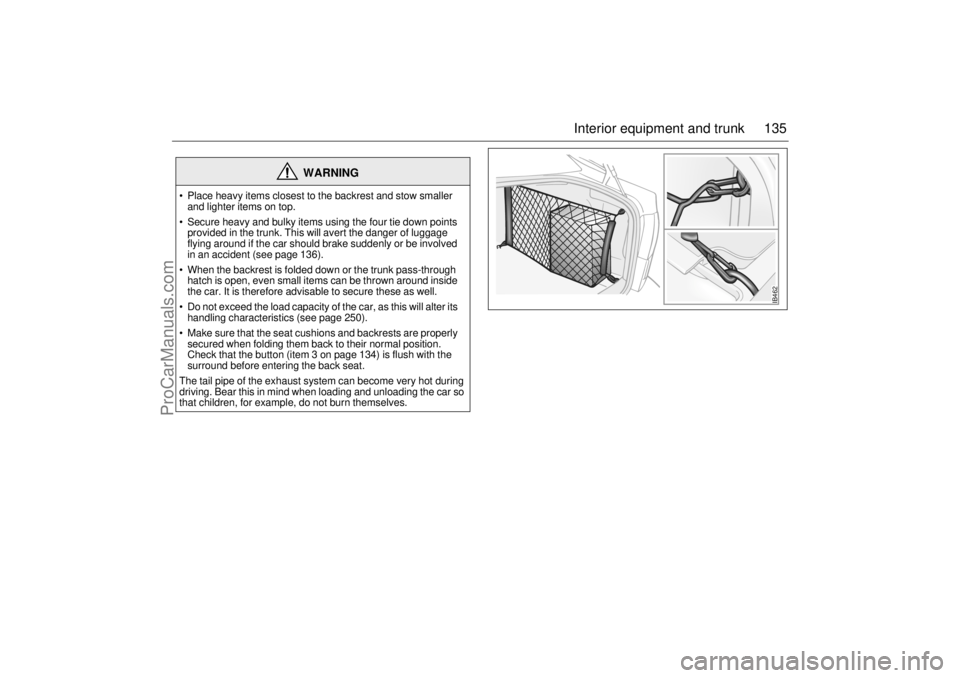
Place heavy items closest to the backrest and stow smaller
and lighter items on top.
Secure heavy and bulky items using the four tie down points
provided in the trunk. This will avert the danger of luggage
flying around if the car should brake suddenly or be involved
in an accident (see page 136).
When the backrest is folded down or the trunk pass-through
hatch is open, even small items can be thrown around inside
the car. It is therefore advisable to secure these as well.
Do not exceed the load capacity of the car, as this will alter its
handling characteristics (see page 250).
Make sure that the seat cushions and backrests are properly
secured when folding them back to their normal position.
Check that the button (item 3 on page 134) is flush with the
surround before entering the back seat.
The tail pipe of the exhaust system can become very hot during
driving. Bear this in mind when loading and unloading the car so
that children, for example, do not burn themselves.
IB462
ProCarManuals.com
Page 136 of 272
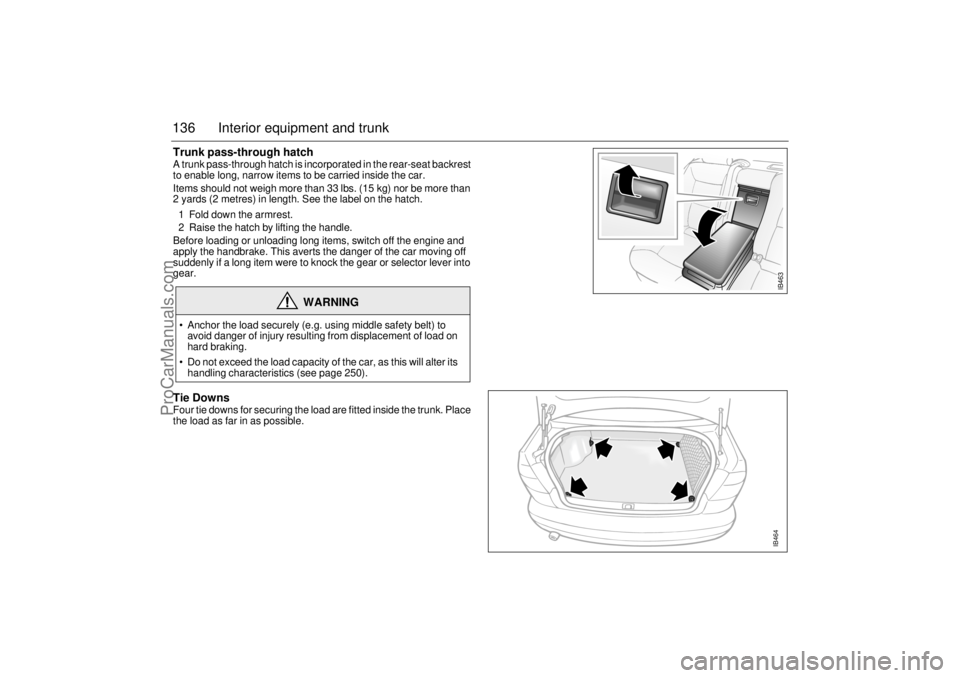
136 Interior equipment and trunkTrunk pass-through hatch A trunk pass-through hatch is incorporated in the rear-seat backrest
to enable long, narrow items to be carried inside the car.
Items should not weigh more than 33 lbs. (15 kg) nor be more than
2 yards (2 metres) in length. See the label on the hatch.
1 Fold down the armrest.
2 Raise the hatch by lifting the handle.
Before loading or unloading long items, switch off the engine and
apply the handbrake. This averts the danger of the car moving off
suddenly if a long item were to knock the gear or selector lever into
gear. Tie DownsFour tie downs for securing the load are fitted inside the trunk. Place
the load as far in as possible.
WARNING
Anchor the load securely (e.g. using middle safety belt) to
avoid danger of injury resulting from displacement of load on
hard braking.
Do not exceed the load capacity of the car, as this will alter its
handling characteristics (see page 250).
IB463IB464
ProCarManuals.com
Page 139 of 272
139 Interior equipment and trunk
Load anchoring
Driving with the trunk lid/tailgate open, see
page 180.WARNING
Put heavy loads as low down and as
far forward as possible in the luggage
compartment, i.e. against the back of
the rear seat.
Never stack cargo so high that any part
of the cargo lies above the edge of the
backrest, if a cargo guard (accessory)
is not being used.
Always tie down the cargo so that it
cannot be thrown forward during
heavy braking or in the event of a
collision.
Unsecured and heavy cargo can
increase the risk of injury during hard
braking, sudden avoidance maneu-
vers and in the event of a collision.
For the best load anchoring, use the
special cargo bolt and load straps
(accessory).
Load the cargo bolts evenly. Never
attach more than one strap to each tie
down eye.
Provide protection on sharp edges to
prevent damage to the load straps.
Never use the elastic floor net and
elastic side net when the rear seat is
folded down. These nets are only
intended to keep light objects tidy, not
for the anchoring of loads.
If possible, avoid having the rear seat
folded down when driving with a heavy
load because the anchoring possibili-
ties are restricted when the rear seat is
in this position. That the rear seat is in
the upright position is a basic require-
ment for protection against cargo dis-
placement in the event of a collision.
Cargo can intrude into the passenger
compartment during a sudden stop or
front crash if the outer safety belts are
not fastened. Check that the two red
warning-indication flags are fully
down. This shows that the backrests
are locked.
WARNING
The driving characteristics of the car
can be affected because the center of
gravity is altered when there is a cargo
in the luggage compartment. There-
fore match the speed and driving style
according to how the car is loaded.
An object weighing 55 lbs. (25 kg) cor-
responds to a weight of 2200 lbs.
(1000 kg) in a head on collision at
32 mph (50 km/h).
Adjust the car’s load (passengers and
luggage) so that the gross vehicle
weight or the axle weight is not
exceeded, see page 250.
ProCarManuals.com
Page 142 of 272
142 Interior equipment and trunkSliding floor (accessory)
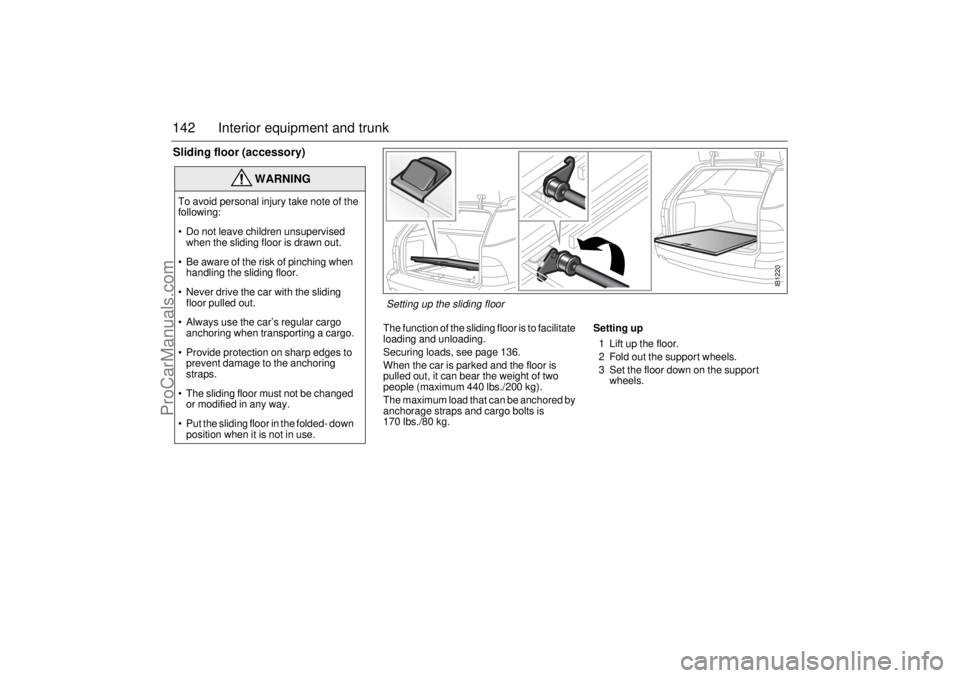
The function of the sliding floor is to facilitate
loading and unloading.
Securing loads, see page 136.
When the car is parked and the floor is
pulled out, it can bear the weight of two
people (maximum 440 lbs./200 kg).
The maximum load that can be anchored by
anchorage straps and cargo bolts is
170 lbs./80 kg.Setting up
1 Lift up the floor.
2 Fold out the support wheels.
3 Set the floor down on the support
wheels.
WARNING
To avoid personal injury take note of the
following:
Do not leave children unsupervised
when the sliding floor is drawn out.
Be aware of the risk of pinching when
handling the sliding floor.
Never drive the car with the sliding
floor pulled out.
Always use the car’s regular cargo
anchoring when transporting a cargo.
Provide protection on sharp edges to
prevent damage to the anchoring
straps.
The sliding floor must not be changed
or modified in any way.
Put the sliding floor in the folded- down
position when it is not in use.
IB1220
Setting up the sliding floor
ProCarManuals.com
Page 144 of 272
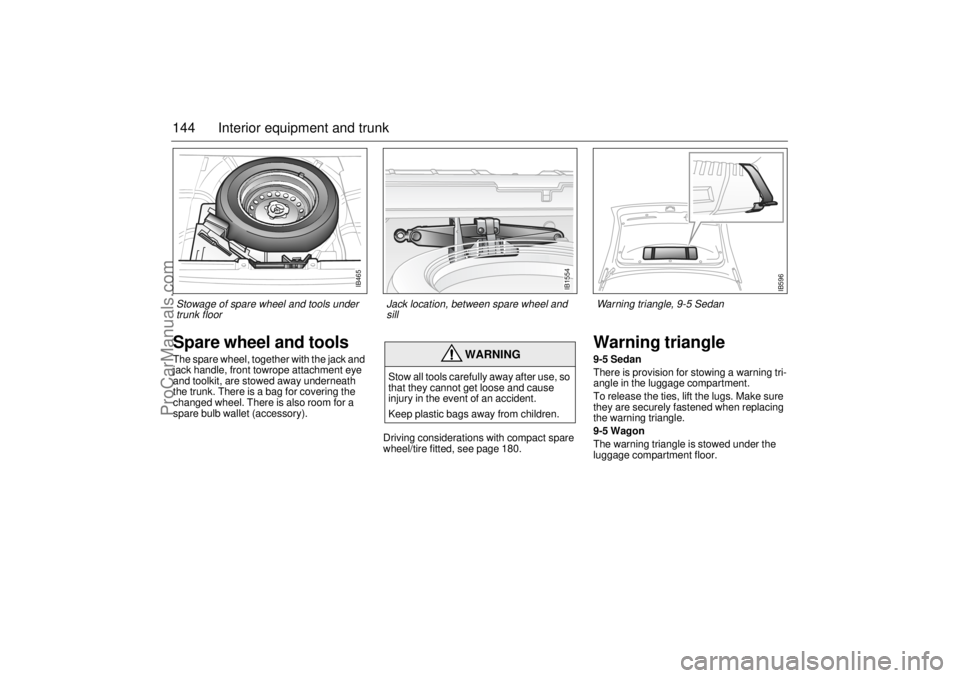
144 Interior equipment and trunkSpare wheel and toolsThe spare wheel, together with the jack and
jack handle, front towrope attachment eye
and toolkit, are stowed away underneath
the trunk. There is a bag for covering the
changed wheel. There is also room for a
spare bulb wallet (accessory).
Driving considerations with compact spare
wheel/tire fitted, see page 180.
Warning triangle9-5 Sedan
There is provision for stowing a warning tri-
angle in the luggage compartment.
To release the ties, lift the lugs. Make sure
they are securely fastened when replacing
the warning triangle.
9-5 Wagon
The warning triangle is stowed under the
luggage compartment floor.
WARNING
Stow all tools carefully away after use, so
that they cannot get loose and cause
injury in the event of an accident.
Keep plastic bags away from children.
IB465
Stowage of spare wheel and tools under
trunk floor
IB1554
IB596
Jack location, between spare wheel and
sillWarning triangle, 9-5 Sedan
ProCarManuals.com