start stop button SAAB 9-5 2003 Owners Manual
[x] Cancel search | Manufacturer: SAAB, Model Year: 2003, Model line: 9-5, Model: SAAB 9-5 2003Pages: 288, PDF Size: 16.78 MB
Page 56 of 288
56 Instruments and controls
Indicator and warning
lights A number of indicator and warning lights will
come on when the ignition is switched on
prior to starting. Under normal conditions,
these should go out a few seconds after the
engine has started (see page 62).
Warning, oil pressure
(engine oil)
This light will come on together with if
the engine oil pressure is dangerously low.
If the light flashes or comes on while you are
driving, stop the car, switch off the engine
and check the engine oil level (see page
203). NOTICEUnder no circumstances must the car be
driven when this warning light is on. Low
oil pressure can result in serious engine
damage.
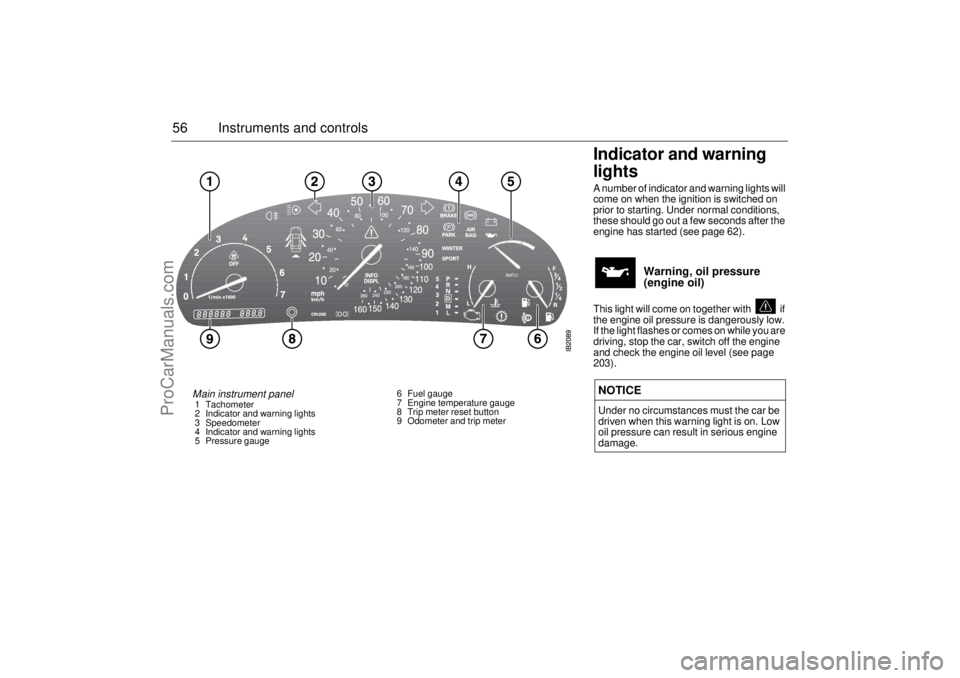
Main instrument panel 1 Tachometer
2 Indicator and warning lights
3 Speedometer
4 Indicator and warning lights
5 Pressure gauge6 Fuel gauge
7 Engine temperature gauge
8 Trip meter reset button
9 Odometer and trip meter
ProCarManuals.com
Page 67 of 288

67 Instruments and controls
Turning the Alarm and Speed
warning on or off 1 Select the Alarm or Speed-warning
function.
2 Press SET to turn on the function.
Press CLEAR to turn off the function.
When either function is on, ALARM/SPD W
respectively will be visible on the display. An
asterisk
* will be visible on the far right of the
display when either function is selected.
The Alarm and Speed-warning settings will
not be cancelled when the engine is
switched off.
When the Alarm has been set to come on at
a specified time, it will only be activated
once – it will not come on at the same time
every day. Press SET to turn it on again.
The Alarm will continue to beep for one
minute if not switched off.
Calculation of arrival time and
average speed The settings must be made before the jour-
ney is started.
Calculation of arrival time:
1 Select DIST using the button.
2 Set the destination distance.
3 Press SET.
When ARRIV is selected during the journey,
the arrival time based on the average speed
over the past 20 minutes will be displayed.
The trip computer will include any stops in
the calculation of the estimated time of
arrival.
Press DIST and the distance remaining to
the destination will be displayed in the same
way.
After the distance to destination has
decreased to zero, the DIST will function as
a trip meter (see ”Using DIST as a trip
meter”). The starting value for the trip meter
will be the last distance set in the DIST
function.
Example: The DIST setting was 100 miles.
Once 100 miles (160 km) has been cov-
ered, the DIST will start to function as a trip
meter, the initial reading of which will be
100 miles (160 km).
Using DIST as a trip meter If no value has been set for the DIST func-
tion, DIST will now function as a trip meter
(indicated by an arrow on the far right of the
display).
Press CLEAR to reset the trip meter.
Under 1000 miles the distance will be
shown in increments of 0.1 miles,
there-after, the reading will change in incre-
ments of 1.0 mile.
Metric units: for just under a kilometer, the
distance will be shown in increments of
10 meters, there-after, the reading will
change in increments of 100 meters.
When DIST is functioning as a trip meter,
the ARRIV function will display the current
time.
ProCarManuals.com
Page 87 of 288

87 Instruments and controls
Afterheater, V6-engine
carsThe afterheater enables a comfortable tem-
perature to be maintained inside the car
even after the engine has been switched off.
The heater can be activated up to 10 min-
utes after the engine has stopped, although
the coolant temperature must be at least
104°F (40°C) for the heater to operate.
To start the heater:
1 The ignition should be OFF.
2 Press and hold the AUTO button on the
ACC panel for about a second, until a
chime is sounded and the following
appears on the SID:
”SPARE HEATER
ACTIVATED”.
After five seconds, the SID will indicate how
much heat is available (0–100 %).
To switch off the heater:
1 Press the OFF button on the ACC panel.
The heater will also be switched off if the
ignition is turned ON. The following settings will be used when the
heater is running:
Air distribution in AUTO mode.
Recirculation not active but can be
selected manually.
Fan speed is automatic and cannot be
changed.
Only the fan speed is shown on the dis-
play. If AUTO is pressed, the system
selections will be indicated.
The following controls do not operate while
the afterheater is on:
Rear-window heating.
ECON.
User presets.
Some of the functions can be repro-
grammed. For further information, please
consult your Saab dealer (see page 271).
ProCarManuals.com
Page 96 of 288
96 Saab 9-5 Audio SystemCassette player Before playing a tape, make sure that the
label is secure and that the cassette is not
warped, otherwise the cassette can
become jammed in the deck. The cassette
player automatically senses whether the
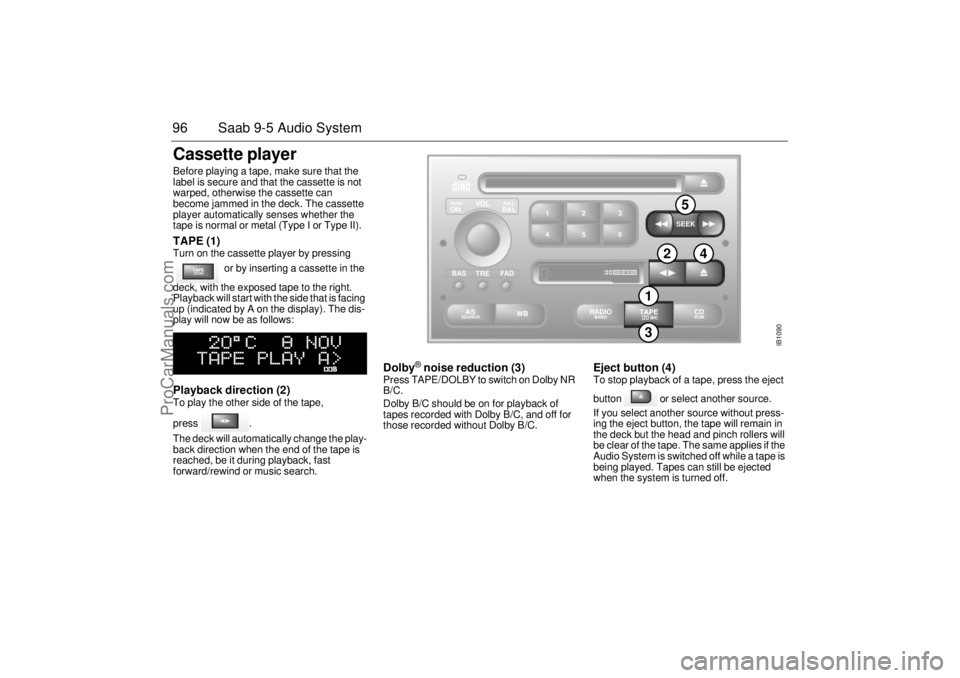
tape is normal or metal (Type I or Type II). TAPE (1) Turn on the cassette player by pressing
or by inserting a cassette in the
deck, with the exposed tape to the right.
Playback will start with the side that is facing
up (indicated by A on the display). The dis-
play will now be as follows: Playback direction (2) To play the other side of the tape,
press .
The deck will automatically change the play-
back direction when the end of the tape is
reached, be it during playback, fast
forward/rewind or music search.
Dolby
® noise reduction (3)
Press TAPE/DOLBY to switch on Dolby NR
B/C.
Dolby B/C should be on for playback of
tapes recorded with Dolby B/C, and off for
those recorded without Dolby B/C.
Eject button (4) To stop playback of a tape, press the eject
button or select another source.
If you select another source without press-
ing the eject button, the tape will remain in
the deck but the head and pinch rollers will
be clear of the tape. The same applies if the
Audio System is switched off while a tape is
being played. Tapes can still be ejected
when the system is turned off.
IB1090
VOL
TREBAL ON
FA D BAS
PULL PUSH
CDRDM
RADIO BAND
ASSEARCH
2 13
5 46
DOLBY B NR
SEEK
3
5
2
4
1
ProCarManuals.com
Page 99 of 288
99 Saab 9-5 Audio System
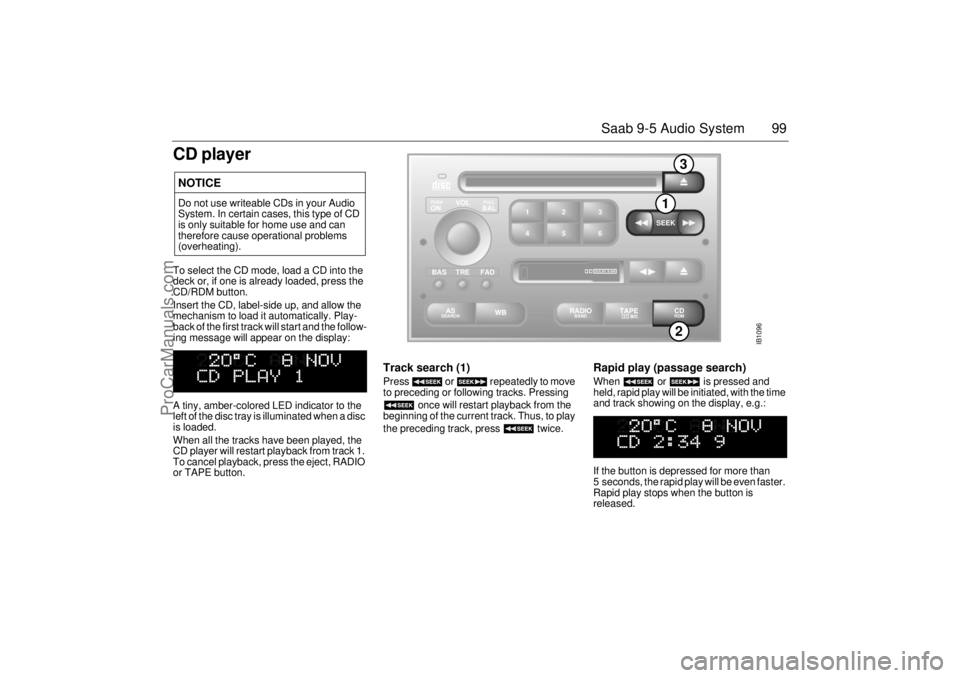
CD playerTo select the CD mode, load a CD into the
deck or, if one is already loaded, press the
CD/RDM button.
Insert the CD, label-side up, and allow the
mechanism to load it automatically. Play-
back of the first track will start and the follow-
ing message will appear on the display:
A tiny, amber-colored LED indicator to the
left of the disc tray is illuminated when a disc
is loaded.
When all the tracks have been played, the
CD player will restart playback from track 1.
To cancel playback, press the eject, RADIO
or TAPE button.
Track search (1) Press or repeatedly to move
to preceding or following tracks. Pressing
once will restart playback from the
beginning of the current track. Thus, to play
the preceding track, press twice.
Rapid play (passage search) When or is pressed and
held, rapid play will be initiated, with the time
and track showing on the display, e.g.:
If the button is depressed for more than
5 seconds, the rapid play will be even faster.
Rapid play stops when the button is
released.
NOTICEDo not use writeable CDs in your Audio
System. In certain cases, this type of CD
is only suitable for home use and can
therefore cause operational problems
(overheating).
IB1096
VOL
TREBAL ON
FAD BAS
PULL PUSH
CDRDM
RADIO BAND
ASSEARCH
2 13
5 46
DOLBY B NR
SEEK
2
1
3
ProCarManuals.com
Page 103 of 288
103 Saab 9-5 Audio System
If for some reason the CD selected by the
preset button cannot be played, playback of
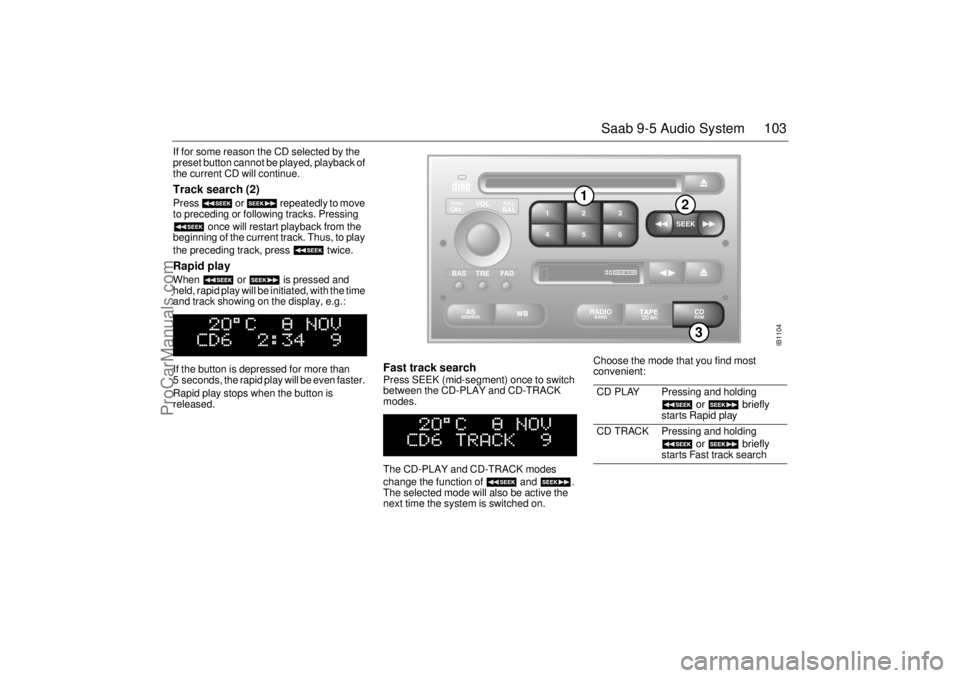
the current CD will continue. Track search (2) Press or repeatedly to move
to preceding or following tracks. Pressing
once will restart playback from the
beginning of the current track. Thus, to play
the preceding track, press twice. Rapid play When or is pressed and
held, rapid play will be initiated, with the time
and track showing on the display, e.g.:
If the button is depressed for more than
5 seconds, the rapid play will be even faster.
Rapid play stops when the button is
released.
Fast track search Press SEEK (mid-segment) once to switch
between the CD-PLAY and CD-TRACK
modes.
The CD-PLAY and CD-TRACK modes
change the function of and .
The selected mode will also be active the
next time the system is switched on. Choose the mode that you find most
convenient:
CD PLAY Pressing and holding
or briefly
starts Rapid play
CD TRACK Pressing and holding
or briefly
starts Fast track search
IB1104
VOL
TREBAL ON
FA D BAS
PULL PUSH
CDRDM
RADIO BAND
ASSEARCH
2 13
5 46
DOLBY B NR
SEEK
3
1
2
ProCarManuals.com
Page 104 of 288
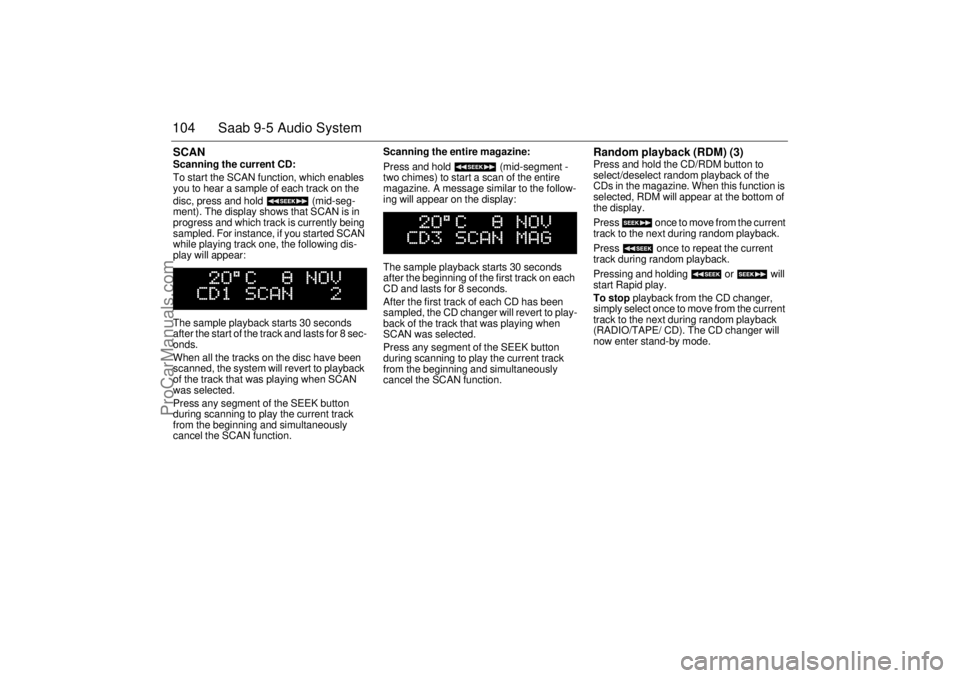
104 Saab 9-5 Audio SystemSCAN Scanning the current CD:
To start the SCAN function, which enables
you to hear a sample of each track on the
disc, press and hold (mid-seg-
ment). The display shows that SCAN is in
progress and which track is currently being
sampled. For instance, if you started SCAN
while playing track one, the following dis-
play will appear:
The sample playback starts 30 seconds
after the start of the track and lasts for 8 sec-
onds.
When all the tracks on the disc have been
scanned, the system will revert to playback
of the track that was playing when SCAN
was selected.
Press any segment of the SEEK button
during scanning to play the current track
from the beginning and simultaneously
cancel the SCAN function. Scanning the entire magazine:
Press and hold (mid-segment -
two chimes) to start a scan of the entire
magazine. A message similar to the follow-
ing will appear on the display:
The sample playback starts 30 seconds
after the beginning of the first track on each
CD and lasts for 8 seconds.
After the first track of each CD has been
sampled, the CD changer will revert to play-
back of the track that was playing when
SCAN was selected.
Press any segment of the SEEK button
during scanning to play the current track
from the beginning and simultaneously
cancel the SCAN function.
Random playback (RDM) (3) Press and hold the CD/RDM button to
select/deselect random playback of the
CDs in the magazine. When this function is
selected, RDM will appear at the bottom of
the display.
Press once to move from the current
track to the next during random playback.
Press once to repeat the current
track during random playback.
Pressing and holding or will
start Rapid play.
To stop playback from the CD changer,
simply select once to move from the current
track to the next during random playback
(RADIO/TAPE/ CD). The CD changer will
now enter stand-by mode.
ProCarManuals.com
Page 153 of 288
153 Starting and driving
If the car does not startIf the text ”KEY NOT ACCEPTED” is shown
on the SID, after a failed start attempt, the
cause could be a fault in the transmitter in
the key, or in the receiver in the ignition lock.
The following should be done:
Turn the key back to the LOCK position.
Turn the key to ON.
Press one of the buttons on the remote
control (the LED stops blinking).
Start the engine.
Try another key. If this works, then the fault
is in the first key.
Contact an authorized Saab dealer for
checking and rectification.
Note:
Certain electronic items, such as cellular
phones, may affect the starting produce-
dure. Be sure that all devices are clear of the
key/ignition switch area.
Starting the engine
NOTICETake care not to spill drinks or to drop
crumbs over the ignition switch. If dirt or
liquid gets into it, the switch may not
operate properly.
WARNING
Always remove the key before leaving
the car.
Always apply the parking brake before
removing the ignition key.
WARNING
When starting the engine:
- Sit down in the driver’s seat.
- Depress the clutch pedal fully. If the
gear lever is not in the neutral posi-
tion, the clutch pedal must be fully
depressed or the car will jump for-
wards or backwards, which may
cause a crash.
- Never start the car from outside the
vehicle, e.g. through a wound down
window. This could lead to serious
personal injury.
Engage reverse (R) (position P for
automatic transmission) to remove the
ignition key. The key can only be
removed in this gear position.
Carbon monoxide (CO) is a colorless,
odorless, poisonous gas. Be alert to
the danger of CO – always open the
garage doors before starting the
engine in the garage.
There is also a danger of CO poison-
ing if the exhaust system is leaking.
ProCarManuals.com
Page 157 of 288
157 Starting and driving
battery. However, as soon as you have
started the engine, it is important that it
runs on all cylinders. If it is misfiring, allow
i t t o i d l e f o r u p t o f i v e m i n u t e s t o g i v e i t t i m e
to settle and run smoothly. If, after this
time, the engine still fails to run properly,
turn off the engine and get in touch with an
authorized Saab dealer for advice. Never park the car on dry grass or other
combustible material. The catalytic con-
verter gets very hot and could therefore
start a fire.
Never drive off if the engine is misfiring.
If you jump start the car when the engine
is already up to normal temperature, the
engine must start to run on all cylinders.
Stop jump-starting if the engine fails to
start immediately.
Failure to follow these directions could
result in the catalytic converter and associ-
ated components being damaged, and
could represent a breach of the warranty
conditions.
3.0t V6: When starting the engine from cold
an electrical pump is activated. This pump
forces air into the exhaust system so that
the catalytic converter will reach its normal
operating temperature more rapidly. The
pump is active for 30–60 seconds.
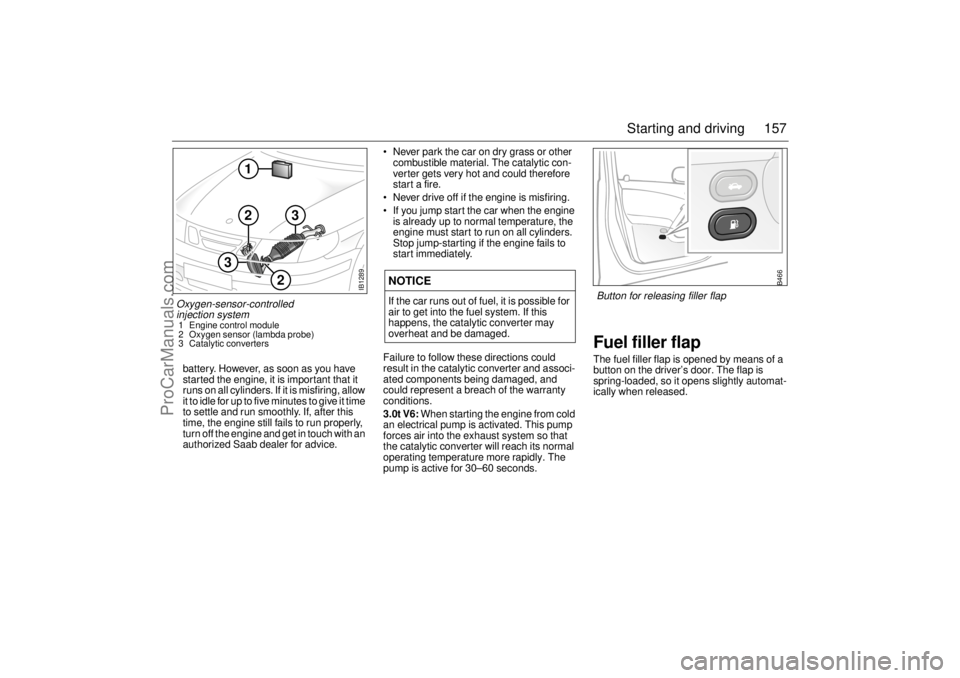
Fuel filler flapThe fuel filler flap is opened by means of a
button on the driver’s door. The flap is
spring-loaded, so it opens slightly automat-
ically when released.
NOTICEIf the car runs out of fuel, it is possible for
air to get into the fuel system. If this
happens, the catalytic converter may
overheat and be damaged.
IB1289
2
2
1
3
3
Oxygen-sensor-controlled
injection system 1 Engine control module
2 Oxygen sensor (lambda probe)
3 Catalytic converters
B466
Button for releasing filler flap
ProCarManuals.com
Page 165 of 288

165 Starting and driving
Park Brake Shift lockThe transmission has a security function
known as Park Brake Shift Lock. To move
the gear selector out of the P position, the
brake pedal must be depressed at the same
time as the gear selector catch (detente) is
pressed in.
Shift Lock overrideCheck fuse No. 1 (see page 228). If the
problem was cured by changing the fuse or
battery, you do not have to contact a Saab
dealer.
If the fuse blows again as soon as the Shift
Lock feature is activated you should contact
your Saab dealer.
If the fuse is OK, check the battery regarding
the voltage.
1 Apply the parking brake
2 Make sure the key is in position ON
3 Use a small tool such as a screwdriver
and push the lever (see picture) down-
wards so that the detent button can be
pressed approx. 10 mm
4 Move the selector out of position P to N
5 Remove the tool
6 Release the parking brake if the car is to
be moved immediately; otherwise keep
it applied
Automatic transmission,
fault indicator
If ”Automatic transmission, fault indicator”
light appears on the main instrument panel,
the system has detected a fault in the auto-
matic transmission or its control module
(see page 61).
This also means that the Limp-home mode
has been selected, to guard against further
damage being done to the transmission. In
this mode, the automatic transmission
starts in 5th gear, and gear changes (if nec-
essary) will have to be made manually.
Stop the car in a safe place. Switch off then
restart the engine. If the fault is intermittent,
the transmission will operate as normal
despite the fault indicator being on. Have
the car checked at an authorized Saab
dealer.
It is not possible to select the SPORT,
WINTER or Sentronic mode when the
Limp-home mode is active.
Gear changes must be made manually.
The following gears will be engaged in the
respective selector positions when the auto-
matic transmission is in Limp-home mode:
NOTICEDue to electrical problems it may not be
possible to move the selector out of the
park position, even if the ignition is ON. If
for some reason the selector has to be
moved out of the park position (i.e. to tow
the car a short distance) do as described
below.
Position R D M L
Gear Reverse 5th 5th 2nd
ProCarManuals.com