alarm SAAB 9-5 2004 User Guide
[x] Cancel search | Manufacturer: SAAB, Model Year: 2004, Model line: 9-5, Model: SAAB 9-5 2004Pages: 288, PDF Size: 16.91 MB
Page 61 of 288
61 Instruments and controls
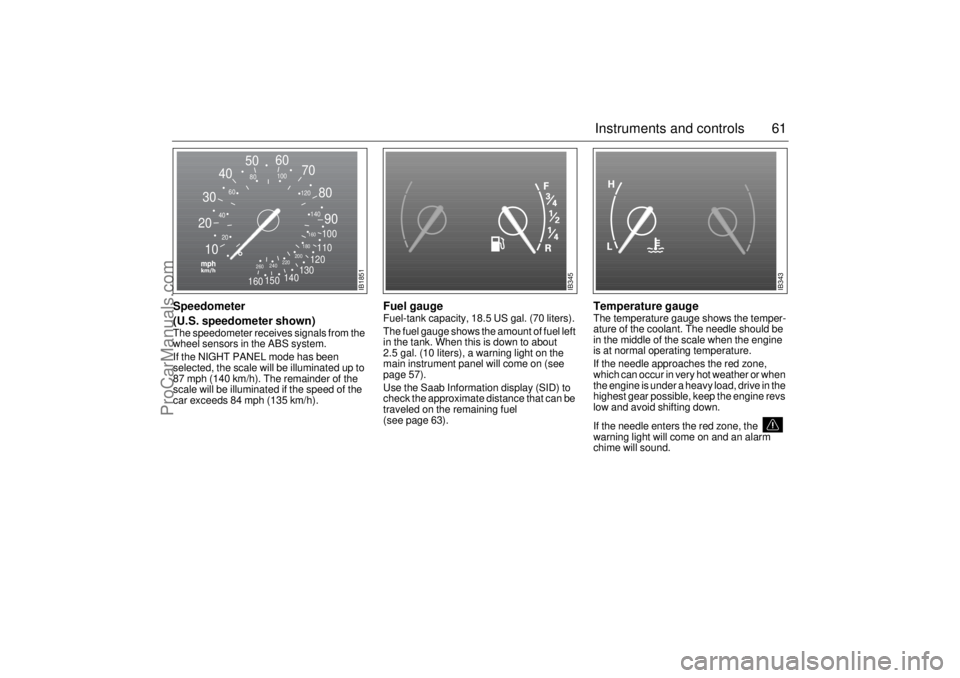
Speedometer
(U.S. speedometer shown)The speedometer receives signals from the
wheel sensors in the ABS system.
If the NIGHT PANEL mode has been
selected, the scale will be illuminated up to
87 mph (140 km/h). The remainder of the
scale will be illuminated if the speed of the
car exceeds 84 mph (135 km/h).
Fuel gauge Fuel-tank capacity, 18.5 US gal. (70 liters).
The fuel gauge shows the amount of fuel left
in the tank. When this is down to about
2.5 gal. (10 liters), a warning light on the
main instrument panel will come on (see
page 57).
Use the Saab Information display (SID) to
check the approximate distance that can be
traveled on the remaining fuel
(see page 63).
Temperature gauge The temperature gauge shows the temper-
ature of the coolant. The needle should be
in the middle of the scale when the engine
is at normal operating temperature.
If the needle approaches the red zone,
which can occur in very hot weather or when
the engine is under a heavy load, drive in the
highest gear possible, keep the engine revs
low and avoid shifting down.
If the needle enters the red zone, the
warning light will come on and an alarm
chime will sound.
2030405060
70
80
90
100
110
120
130
140
150
160
240
260220200180160
140 120 100
80
60
40
20
10
IB1851
IB345
IB343
ProCarManuals.com
Page 63 of 288
63 Instruments and controls
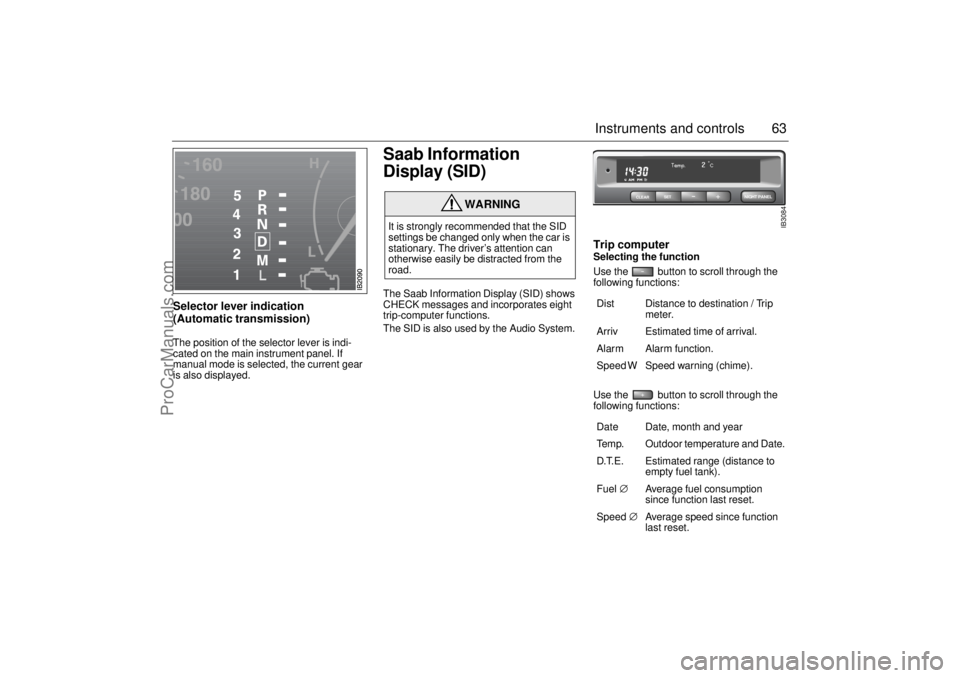
Selector lever indication
(Automatic transmission) The position of the selector lever is indi-
cated on the main instrument panel. If
manual mode is selected, the current gear
is also displayed.
Saab Information
Display (SID) The Saab Information Display (SID) shows
CHECK messages and incorporates eight
trip-computer functions.
The SID is also used by the Audio System.
Trip computerSelecting the function
Use the button to scroll through the
following functions: Use the button to scroll through the
following functions:
WARNING
It is strongly recommended that the SID
settings be changed only when the car is
stationary. The driver’s attention can
otherwise easily be distracted from the
road.
Dist Distance to destination / Trip
meter.
Arriv Estimated time of arrival.
Alarm Alarm function.
Speed W Speed warning (chime).
Date Date, month and year
Temp. Outdoor temperature and Date.
D.T.E. Estimated range (distance to
empty fuel tank).
Fuel∅ Average fuel consumption
since function last reset.
Speed∅ Average speed since function
last reset.
CLEARSET
NIGHT PANEL
IB3084
ProCarManuals.com
Page 64 of 288
64 Instruments and controlsOutdoor temperature
(Frost warning)Regardless of which function has been
selected, except Night Panel Mode, SID will
automatically display the outdoor tempera-
ture when it is between 26° and 38°F (–3°
and +3°C). This also applies if the
temperature has moved outside the range
of 21° to 43°F (–6° to +6°C) but is again
between 26° and 38°F (–3° and +3°C).
Entering values for the functions Values can be entered for the following
functions: Speed∅, Dist, Arriv, Alarm and
Speed W.
1 Select the desired function using
or .
2 Press the SET button for at least one
second (figures start to flash and a
chime sounds).
3 Use or to increase or
decrease the value (press CLEAR to
reset).
4 Press SET to record the value.Average fuel consumptionThe average fuel consumption is calculated
using the values for fuel consumed and dis-
tance driven since last reset. This value is
stored in the car’s trip computer even when
the engine is switched off.
Select Fuel Ø with .
To reset the value, press the CLEAR button
for 4 seconds. A chime will be heard and
CLEARED will be displayed.
Setting the date1 Use to select Date.
2 Press the SET button for at least one
second (year starts to flash and a chime
sounds).
3 Set the year using or .
4 Touch SET.
5 Set the month in the same way.
6 Touch SET.
7 Set the day in the same way.
8 Press SET to save the date setting.
WARNING
Remember that roads can be icy even at
temperatures of above 38°F (+3°C),
especially on bridges and stretches of
road that are sheltered from the sun.
ProCarManuals.com
Page 65 of 288

65 Instruments and controls
Turning the Alarm and Speed
warning on or off 1 Select the Alarm or Speed-warning
function.
2 Press SET to turn on the function.
Press CLEAR to turn off the function.
When either function is on, Alarm/Speed W
respectively will be visible on the display. An
asterisk
* will be visible on the right of the
display when either function is selected.
The Alarm and Speed-warning settings will
not be cancelled when the engine is
switched off.
When the Alarm has been set to come on at
a specified time, it will only be activated
once – it will not come on at the same time
every day. Press SET to turn it on again.
The Alarm will continue to beep for one
minute if not switched off.
Calculation of arrival time and
average speed The settings must be made before the jour-
ney is started.
Calculation of arrival time:
1 Select Dist using the button.
2 Set the destination distance.
3 Press SET.
When Arriv. is selected during the journey,
the arrival time based on the average speed
over the past 20 minutes will be displayed.
The trip computer will include any stops in
the calculation of the estimated time of
arrival.
Press Dist and the distance remaining to the
destination will be displayed in the same
way.
After the distance to destination has
decreased to zero, the Dist will function as
a trip meter (see ”Using Dist as a trip
meter”). The starting value for the trip meter
will be the last distance set in the Dist
function.
Example: The Dist setting was 100 miles.
Once 100 miles (160 km) has been cov-
ered, the Dist will start to function as a trip
meter, the initial reading of which will be
100 miles (160 km).
Using Dist as a trip meter If no value has been set for the Dist function,
Dist will now function as a trip meter (indi-
cated by an arrow on the far right of the dis-
play).
Press CLEAR to reset the trip meter.
Under 1000 miles the distance will be
shown in increments of 0.1 miles,
there-after, the reading will change in incre-
ments of 1.0 mile.
Metric units: for just under a kilometer, the
distance will be shown in increments of
10 meters, there-after, the reading will
change in increments of 100 meters.
When Dist is functioning as a trip meter, the
Arriv function will display the current time.
ProCarManuals.com
Page 66 of 288

66 Instruments and controlsTo calculate the arrival time if a specified
average speed is maintained
1 Select Dist using the button.
2 Set the distance to be covered.
3 Press to select Speed Ø.
4 Set the average speed you intend to
drive.
5 Press SET to display the estimated
arrival time.
At the beginning of a journey, the Speed Ø
and Arriv functions will display current val-
ues. If values are set during the journey, the
new values will be displayed after a delay of
about 10 seconds. Calculating the requisite average speed:
1 Press to select Dist.
2 Set the distance to be covered.
3 Press to select Arriv.
4 Set the desired arrival time.
5 Press SET to display the average speed
you need to maintain to arrive at the
desired time.
At the beginning of a journey, the Speed Ø
and Arriv functions will display current val-
ues. If values are set during the journey, the
new values will be displayed after a delay of
about 10 seconds.Resetting values
To reset the values, press CLEAR for at
least four seconds.
The following functions will be reset
simultaneously:
Estimated range on remaining fuel
(function based on a fuel consumption of
28 mpg).
Average fuel consumption.
Average speed.
Arrival time (function based on current
speed).
Programmed values for Dist, Alarm and
Speed W will not be reset (see the respec-
tive function).
ProCarManuals.com
Page 228 of 288
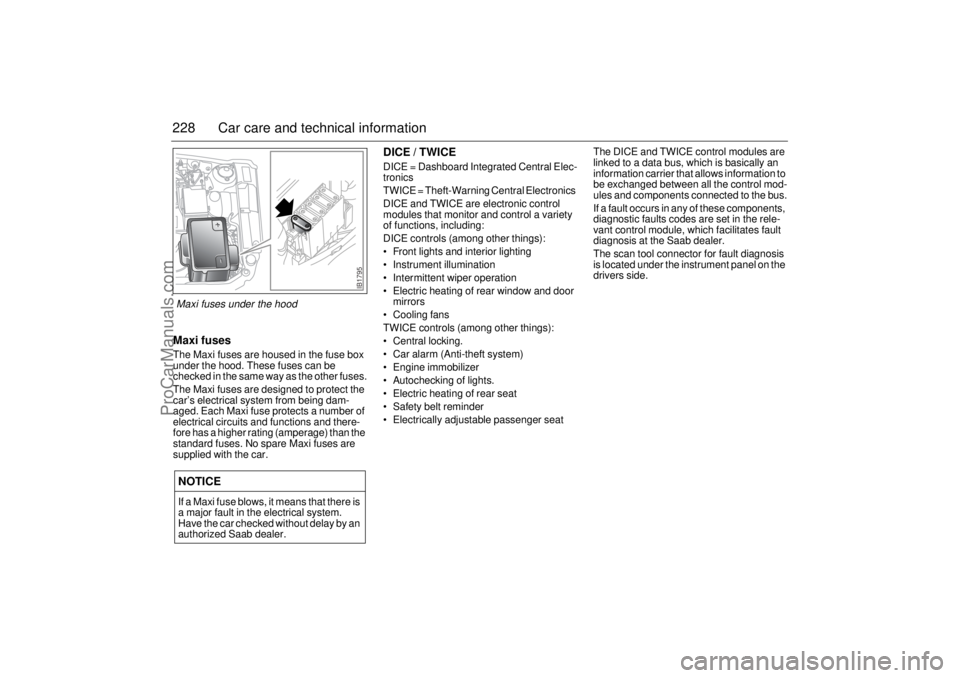
228 Car care and technical informationMaxi fusesThe Maxi fuses are housed in the fuse box
under the hood. These fuses can be
checked in the same way as the other fuses.
The Maxi fuses are designed to protect the
car’s electrical system from being dam-
aged. Each Maxi fuse protects a number of
electrical circuits and functions and there-
fore has a higher rating (amperage) than the
standard fuses. No spare Maxi fuses are
supplied with the car.
DICE / TWICEDICE = Dashboard Integrated Central Elec-
tronics
TWICE = Theft-Warning Central Electronics
DICE and TWICE are electronic control
modules that monitor and control a variety
of functions, including:
DICE controls (among other things):
Front lights and interior lighting
Instrument illumination
Intermittent wiper operation
Electric heating of rear window and door
mirrors
Cooling fans
TWICE controls (among other things):
Central locking.
Car alarm (Anti-theft system)
Engine immobilizer
Autochecking of lights.
Electric heating of rear seat
Safety belt reminder
Electrically adjustable passenger seatThe DICE and TWICE control modules are
linked to a data bus, which is basically an
information carrier that allows information to
be exchanged between all the control mod-
ules and components connected to the bus.
If a fault occurs in any of these components,
diagnostic faults codes are set in the rele-
vant control module, which facilitates fault
diagnosis at the Saab dealer.
The scan tool connector for fault diagnosis
is located under the instrument panel on the
drivers side.
NOTICEIf a Maxi fuse blows, it means that there is
a major fault in the electrical system.
Have the car checked without delay by an
authorized Saab dealer.
IB1795
Maxi fuses under the hood
ProCarManuals.com
Page 231 of 288
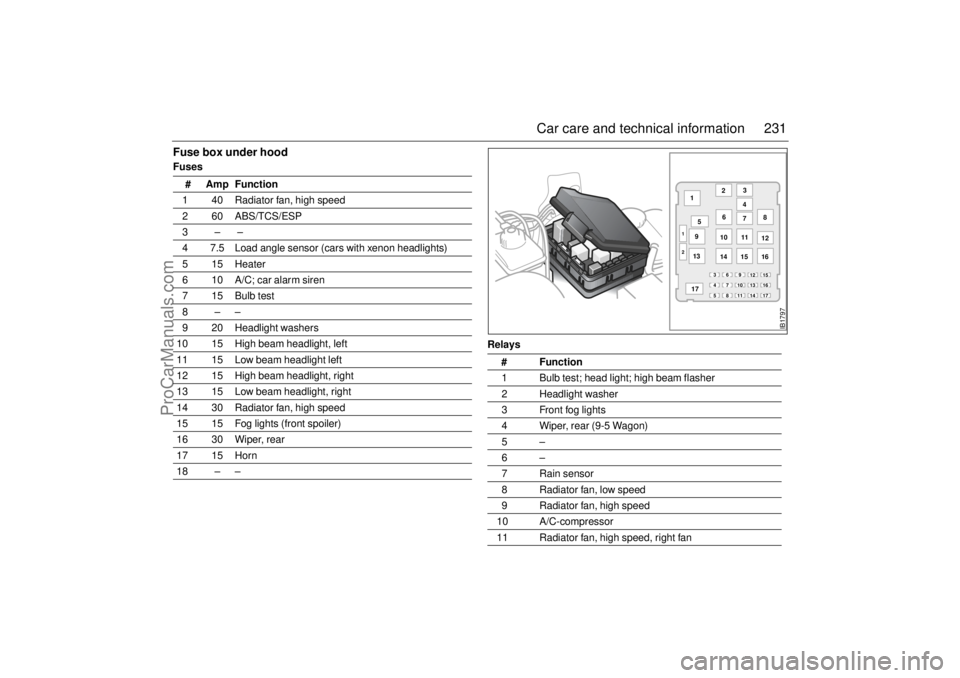
231 Car care and technical information
Fuse box under hoodFuses
Relays # Amp Function
1 40 Radiator fan, high speed
2 60 ABS/TCS/ESP
3– –
4 7.5 Load angle sensor (cars with xenon headlights)
5 15 Heater
6 10 A/C; car alarm siren
7 15 Bulb test
8––
9 20 Headlight washers
10 15 High beam headlight, left
11 15 Low beam headlight left
12 15 High beam headlight, right
13 15 Low beam headlight, right
14 30 Radiator fan, high speed
15 15 Fog lights (front spoiler)
16 30 Wiper, rear
17 15 Horn
18 – –
# Function
1 Bulb test; head light; high beam flasher
2 Headlight washer
3 Front fog lights
4 Wiper, rear (9-5 Wagon)
5–
6–
7 Rain sensor
8 Radiator fan, low speed
9 Radiator fan, high speed
10 A/C-compressor
11 Radiator fan, high speed, right fan
43
2
IB1797
2 1
14 1312 7 6
5 1
15 168
11
10 9
178 5
17 14 11 7 4
16 13 69
10 3
15 12
ProCarManuals.com
Page 282 of 288

282 SpecificationsSeveral of the systems in your Saab
car can be adjusted to better fit your
individual needsSome functions are governed by legal
requirements and cannot therefore be
reprogrammed.
Consult an authorized Saab dealer for fur-
ther information.
Car alarm/central locking system:
The sound level of the siren when locking/
unlocking, HIGH or LOW.
The number of blinks when locking/
unlocking, 1 to 7.
Automatic locking of the trunk when the
car is driven, 1 to 8 mph (2–14 km/h), YES
or NO.
Preclude the unlocking of the trunk while
the car is driven, YES or NO.
Automatic locking of the trunk after
1 second–4 minutes if it has not been
opened, YES or NO.
Automatic locking of the trunk when it is
closed, YES or NO.
Automatic locking of all doors when the
car is driven above 7.5 mph (12 km/h),
YES or NO.Saab Information Display:
Outdoor temperature display can be
adjusted.
Miscellaneous:
Select the on-time for heated rear seat.
Coolant temperature gauge adjustment
can be increased/decreased.
Fuel level gauge adjustment can be
increased/decreased.
Additional sweep of the wipers after wind-
shield washer function (ON or OFF).
Follow me home on-time can vary from 20
to 50 seconds.
Night panel illumination deactivation
speed for the speedometer can be
adjusted.
Following adjustments can be done
by the driver:Automatic Climate Control (ACC):
To alter the preprogrammed ”AUTO” start
up mode with your own preferences you can
manually select the desired settings for:
Temperature.
Fan speed.
Air distribution.
See ”Programming I” on page 81 and ”Pro-
gramming II” on page 82.
Saab 9-5 Audio System (see page 101):
Maximum starting volume (when the
radio is switched on).
Telephone volume (if the car is equipped
with a phone connected to the audio sys-
tem).
Speed dependent volume (volume
increases or decreases with vehicle
speed).
Loudness.
Daytime Running Lights:
To disable, turn off the ignition and pull out
fuse 35, see page 229.
ProCarManuals.com
Page 283 of 288

283 Index
Index
AA/C system, fault diagnosis
_______ 252
A/C system, maintenance
_________ 252
ABS brakes
____________________ 168
ACC
__________________________ 75
ACC functions
___________________ 78
ACC, automatic climate control
_____ 75
ACC, calibration
_________________ 83
ACC, condensation _______________ 84
ACC, programming _______________ 81
ACC, useful tips
_________________ 83
Adjusting the steering wheel
_______ 120
Adjustment, seats
________________ 12
Air conditioning (A/C), fault diagnosis
and maintenance ______________ 252
Air distribution, ACC ______________ 80
Airbag
_________________________ 31
Alarm _________________________ 46
Alarm functions
__________________ 49
Alarm signals
________________ 46
, 49
Alternator
_____________________ 212
Alternator drive belt
__________ 212
, 275
Alternator rating
________________ 275
Anticorrosion treatment
___________ 256
Antidazzle rear-view mirror
________ 125
Ashtrays
______________________ 131
Audio System
___________________ 85
Audio System, quick guide
_________ 87
Autochecking of lights on starting
____ 60Automatic climate control (ACC)
_____ 75
Automatic transmission, technical
data
_________________________ 276
Aviod theft, tip
__________________ 197
BBattery
________________________ 210
Battery charging/replacing
________ 211
Battery, boost starting
____________ 191
Before a long journey ____________ 258
Before towing a camper or trailer
___ 181
Belt guide
______________________ 17
Boost starting using jump leads
____ 191
Brake and clutch fluid
____________ 208
Brake-fluid reservoir
_____________ 208
Brakes, technical data ____________ 277
Bulbs, changing
________________ 215
Bulbs, table of
__________________ 226
Buying new tires ________________ 235
CCD changer
_____________________ 97
CD player
______________________ 95
CHECK messages
_______________ 67
CHECKING
_____________________ 67
Calibration, ACC
_________________ 83
Cancelling the programmed settings
_81
Car alarm
______________________ 46
Car care
______________________ 199
Cargo net, 9-5 Wagon
____________ 142Carpeting, care of
_______________ 253
Cassette player
__________________ 92
Catalytic converter, important
considerations _________________ 152
Central locking ___________________ 40
Change language in SID
___________ 68
Change of address notification
_____ 266
Changing a wheel
_______________ 247
Changing bulbs
_________________ 215
Changing wiper blades
___________ 213
Charger/Jump starting ____________ 193
Charging the battery/Jump starting
__ 193
Chassis number
________________ 280
Chassis number, key to
___________ 281
Checks before towing a camper or
trailer
________________________ 181
Child safety
_____________________ 23
Child safety locks, rear doors
_______ 43
Cleaning, engine bay
_____________ 255
Clock
_______________________ 67
, 68
Color code, body
________________ 280
Color code, trim _________________ 280
Compact spare wheel
____________ 246
Compass
______________________ 126
Condensation, ACC
_______________ 84
Coolant
_______________________ 207
Courtesy Headlight Feature
________ 70
Cruise control
__________________ 167
Cup holder
_____________________ 134
ProCarManuals.com