change time SAAB 9-5 2004 User Guide
[x] Cancel search | Manufacturer: SAAB, Model Year: 2004, Model line: 9-5, Model: SAAB 9-5 2004Pages: 288, PDF Size: 16.91 MB
Page 99 of 288
99 Saab 9-5 Audio System
If for some reason the CD selected by the
preset button cannot be played, playback of
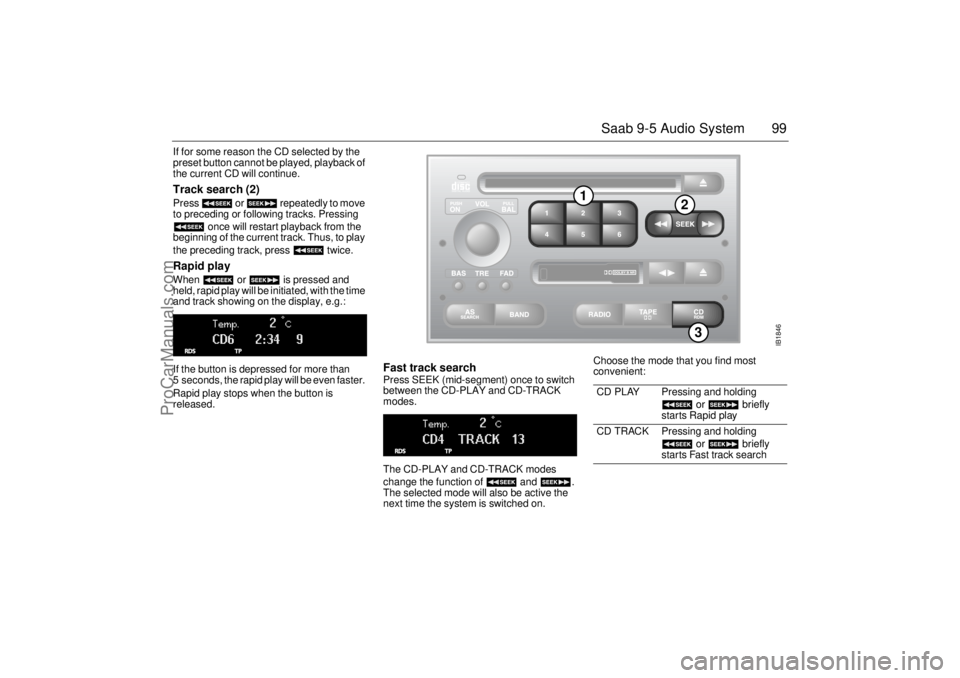
the current CD will continue. Track search (2) Press or repeatedly to move
to preceding or following tracks. Pressing
once will restart playback from the
beginning of the current track. Thus, to play
the preceding track, press twice. Rapid play When or is pressed and
held, rapid play will be initiated, with the time
and track showing on the display, e.g.:
If the button is depressed for more than
5 seconds, the rapid play will be even faster.
Rapid play stops when the button is
released.
Fast track search Press SEEK (mid-segment) once to switch
between the CD-PLAY and CD-TRACK
modes.
The CD-PLAY and CD-TRACK modes
change the function of and .
The selected mode will also be active the
next time the system is switched on. Choose the mode that you find most
convenient:
CD PLAY Pressing and holding
or briefly
starts Rapid play
CD TRACK Pressing and holding
or briefly
starts Fast track search
IB1846
3
1
2
ProCarManuals.com
Page 101 of 288
101 Saab 9-5 Audio System
Programmable
functionsVolume-preset modeTo select the volume-preset mode, press
and hold the WB button at the same time as
you switch the Audio System on.
Use the button to select the
desired function.
The following volume settings can be
preselected:
STARTVOL – maximum volume level
when the Audio System is switched on
TEL VOL – preset volume level when an
in-car phone is activated
SP D VOL – speed-dependent volume.
The Audio System will automatically
adjust the volume level to compensate for
background noise, such as road noise,
which increases with vehicle speed.
LOUDNESS ON/OFF – boosting of the
highest and lowest frequency ranges to
enhance the sound image when the
volume is set to a low level.
Adjusting the volume The default setting for START VOL is
volume setting 9, and that for TEL VOL is
volume setting 14 (the highest volume set-
ting is 30).
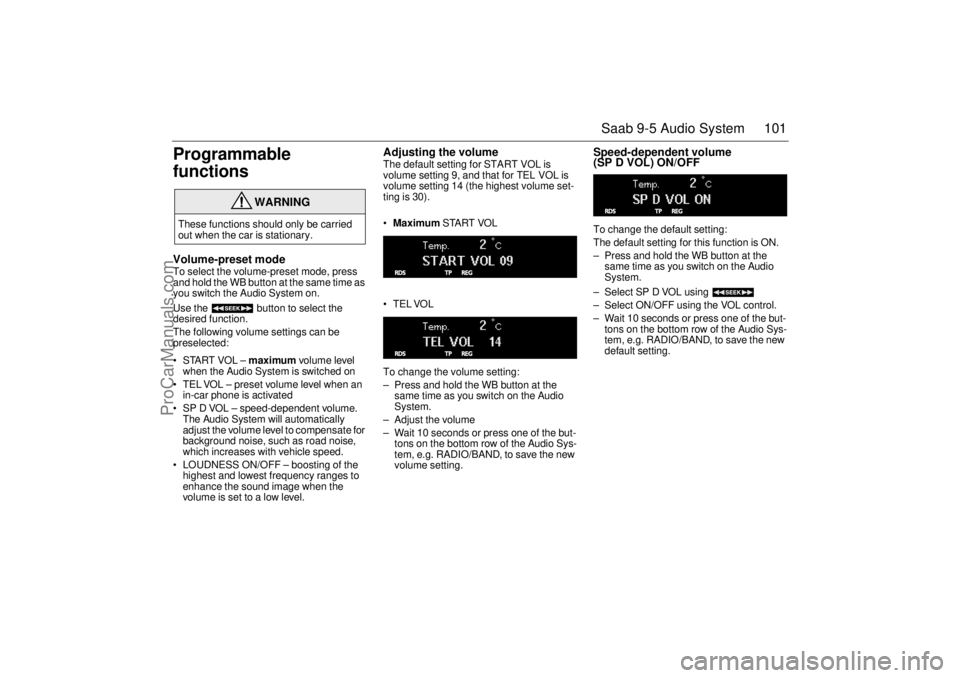
Maximum START VOL
TELVOL
To change the volume setting:
– Press and hold the WB button at the
same time as you switch on the Audio
System.
– Adjust the volume
– Wait 10 seconds or press one of the but-
tons on the bottom row of the Audio Sys-
tem, e.g. RADIO/BAND, to save the new
volume setting.
Speed-dependent volume
(SP D VOL) ON/OFF To change the default setting:
The default setting for this function is ON.
– Press and hold the WB button at the
same time as you switch on the Audio
System.
– Select SP D VOL using
– Select ON/OFF using the VOL control.
– Wait 10 seconds or press one of the but-
tons on the bottom row of the Audio Sys-
tem, e.g. RADIO/BAND, to save the new
default setting.
WARNING
These functions should only be carried
out when the car is stationary.
ProCarManuals.com
Page 102 of 288
102 Saab 9-5 Audio SystemLoudness ON/OFF To change the default setting:
The default setting for this function is ON.
– Press and hold the WB button at the
same time as you switch on the Audio
System.
– Select LOUDNESS using
– Select ON/OFF using the VOL control.
– Wait 10 seconds or press one of the but-
tons on the bottom row of the Audio Sys-
tem, e.g. RADIO/BAND, to save the new
default setting.
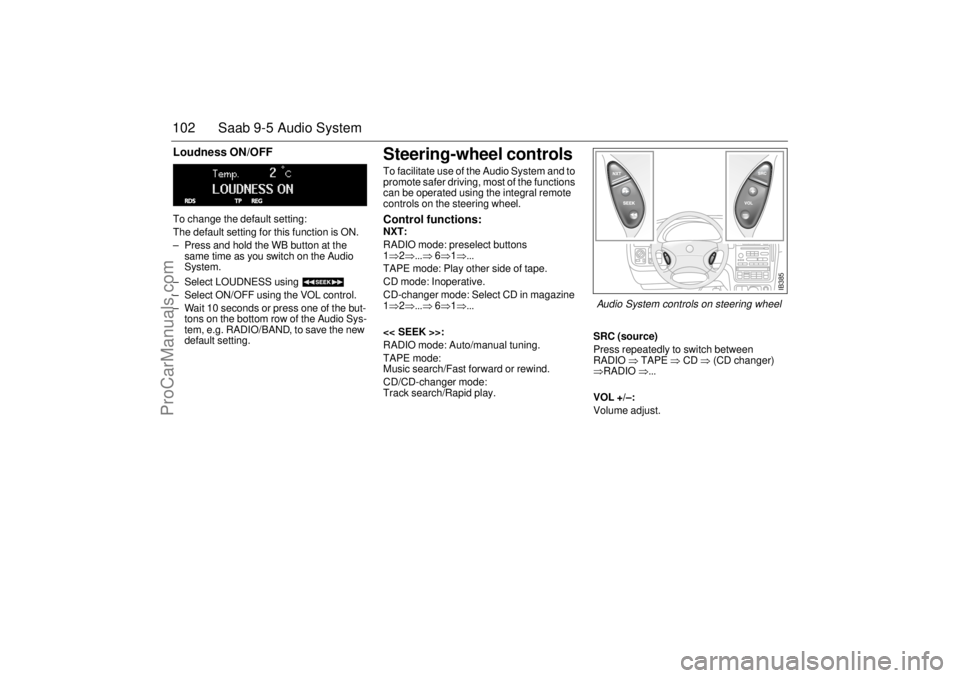
Steering-wheel controls To facilitate use of the Audio System and to
promote safer driving, most of the functions
can be operated using the integral remote
controls on the steering wheel. Control functions: NXT:
RADIO mode: preselect buttons
1⇒2⇒...⇒ 6⇒1⇒...
TAPE mode: Play other side of tape.
CD mode: Inoperative.
CD-changer mode: Select CD in magazine
1⇒2⇒...⇒ 6⇒1⇒...
<< SEEK >>:
RADIO mode: Auto/manual tuning.
TAPE mode:
Music search/Fast forward or rewind.
CD/CD-changer mode:
Track search/Rapid play.SRC (source)
Press repeatedly to switch between
RADIO ⇒ TAPE ⇒ CD ⇒ (CD changer)
⇒RADIO ⇒...
VOL +/–:
Volume adjust.
IB385
Audio System controls on steering wheel
ProCarManuals.com
Page 103 of 288
103 Saab 9-5 Audio System
Security lock The Audio System is equipped with an elec-
tronic security lock. The special code is
unique to the car in which the Audio System
is fitted.
Each time the Audio System is switched on,
a check is made to ensure that the codes
match.
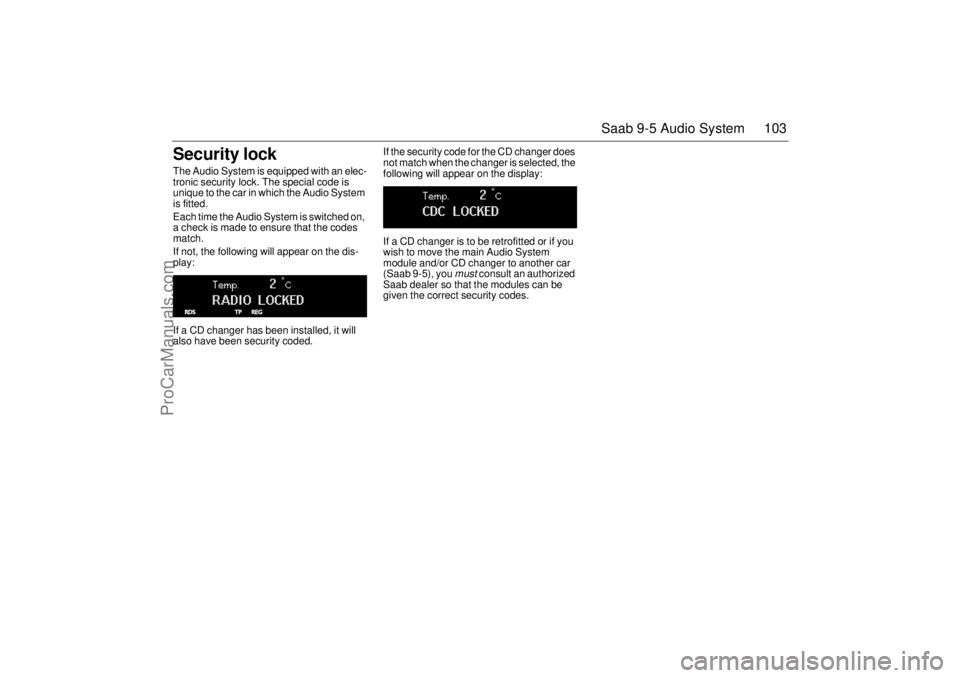
If not, the following will appear on the dis-
play:
If a CD changer has been installed, it will
also have been security coded. If the security code for the CD changer does
not match when the changer is selected, the
following will appear on the display:
If a CD changer is to be retrofitted or if you
wish to move the main Audio System
module and/or CD changer to another car
(Saab 9-5), you
must
consult an authorized
Saab dealer so that the modules can be
given the correct security codes.
ProCarManuals.com
Page 106 of 288
106 Saab 9-5 Audio SystemAdjusting the frequency steps North
America/Europe If the car is taken from North America to
Europe, the radio’s frequency steps can be
adjusted.
Press and hold (mid-segment)
and switch the radio on at the same time.
The preset stations will be cancelled and
replaced by default frequencies.
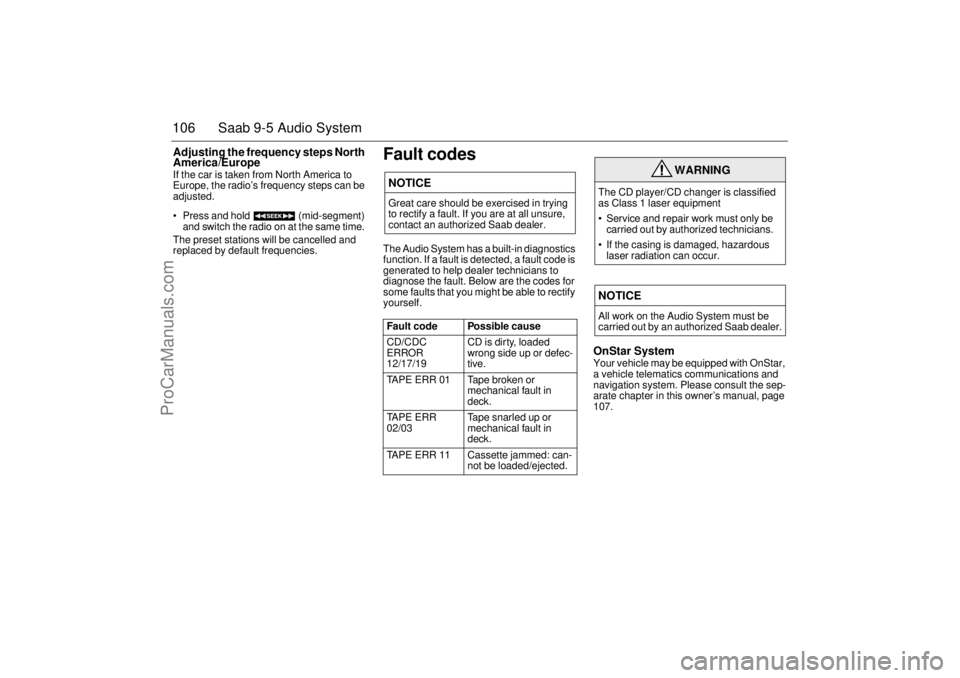
Fault codesThe Audio System has a built-in diagnostics
function. If a fault is detected, a fault code is
generated to help dealer technicians to
diagnose the fault. Below are the codes for
some faults that you might be able to rectify
yourself.
OnStar SystemYour vehicle may be equipped with OnStar,
a vehicle telematics communications and
navigation system. Please consult the sep-
arate chapter in this owner’s manual, page
107.
NOTICEGreat care should be exercised in trying
to rectify a fault. If you are at all unsure,
contact an authorized Saab dealer.
Fault code Possible cause
CD/CDC
ERROR
12/17/19 CD is dirty, loaded
wrong side up or defec-
tive.
TAPE ERR 01 Tape broken or
mechanical fault in
deck.
TAPE ERR
02/03 Tape snarled up or
mechanical fault in
deck.
TAPE ERR 11 Cassette jammed: can-
not be loaded/ejected.
WARNING
The CD player/CD changer is classified
as Class 1 laser equipment
Service and repair work must only be
carried out by authorized technicians.
If the casing is damaged, hazardous
laser radiation can occur. NOTICEAll work on the Audio System must be
carried out by an authorized Saab dealer.
ProCarManuals.com
Page 111 of 288

111 OnStar - Telematics
Roadside assistance**There’s nothing worse than being stranded
on the road with car trouble. No matter what
the problem is (flat tire, out of gas, or engine
trouble), just call OnStar. They will contact
the help you need to get you quickly back on
the road.Stolen vehicle trackingOnStar doesn’t just protect you, it protects
your Saab, too. If your vehicle is ever stolen,
just contact OnStar by calling
1-888-4-ONSTAR. They will put you in
touch with the authorities and aid them in
locating your Saab. Ask your insurance car-
rier about possible premium discounts.Accident Assist™Accident Assist™ provides step-by-step
guidance about what to do in case of a
crash. Working with leading insurance com-
panies OnStar has developed a ”best prac-
tices” list to assist you through most acci-
dent situations. OnStar Accident Assist™
can make the process of completing a
police report and/or insurance claim less
stressful. **There will be no charge for Roadside Assistance as
long as your vehicle is under warranty.
Hands-free communicationTalking to an OnStar advisor is easy and
hands-free. Simply press the OnStar but-
ton, and a small microphone picks up your
voice while the OnStar advisor talks to you
through your stereo speakers. Note: Audio
system must be switched on. You can even
adjust the volume to your liking with the
steering wheel controls or the radio volume
knob. Your hands remain on the steering
wheel, while your eyes remain on the road.Being safe on the road is important, but
there’s more to life than security. There’s liv-
ing. That’s why we have created the OnStar
Directions and Connections Plan. It gives
you not only the important protections of the
Safe and Sound Plan, but also a whole
range of services which truly change driving
from a chore to a luxury.
The OnStar Directions &
Connections PlanRoute supportWith OnStar Route Support, an advisor can
help you find your way, no matter how far off
course you are. You can get exact street
directions, or guidance to nearby gas sta-
tions, restaurants, hotels or ATMs.Ride AssistIf you need a lift, anytime of the day or night,
just call OnStar. They’ll contact transporta-
tion and send it right to you.Information and Convenience ser-
vicesOnStar advisors have access to over five
million service listings including hotels, res-
taurants, gas stations, dealerships, hospi-
tals, ATMs and airports — more than 250
service categories in all. OnStar advisors
can even assist you with hotel and restau-
rant reservations.
ProCarManuals.com
Page 114 of 288

114 OnStar - TelematicsStoring/Deleting Numbers in
Memory(Nametags)Storing a numberYour OnStar system can store up to 20
numbers (up to 32 digits each) in memory
that can be dialed by simply repeating the
”nametag.”To store a number:Deleting a Number from Memory
To delete a nametag:Setting Tone or Voice ResponseYour system comes from the factory with
voice responses to your commands to con-
firm that the system received the command
or number you intended. For example,
when you are entering a number, OnStar
repeats the number back to you. You may
change the system to respond with a tone
response if you prefer. A ready tone, a digit
tone, or a goodbye tone will respond instead
of the voice. All other responses will still be
by voice.
Units RemainingOnStar keeps track of the amount of calling
time you have purchased and used in units.
The number of total remaining units is
stored within the OnStar system, and can be
accessed easily.Adding More Calling Minutes / UnitsYou can charge additional calling units with
automatic refill by contacting OnStar, or by
authorizing automatic unit refill on the
OnStar subscriber website. For more infor-
mation about the OnStar subscriber web-
site, please see page 117.Automatic ReplenishmentIf you run out of units during a call, your call
will be terminated and you will be connected
to OnStar for approval to replenish. You will
be warned at the beginning of a call when
you have ten or fewer calling units remain-
ing. 1Press the
OnStar White
Dot buttonOnStar will respond
”Ready”
2 Say ”STORE” OnStar will respond
”Number Please”
3 Say the 1st
DigitOnStar will repeat the
number
4 Say the 2nd
DigitOnStar will repeat the
digit
Continue saying numbers in this manner
until finished5 Say ”STORE”
againOnStar will respond
”Nametag Please”
6Say ”
”Again”
7Say ”
”Once More”
8Say ”
”Storing
1 Press the
OnStar White
Dot buttonOnStar will respond
”Ready”
2 Say ”DELETE” OnStar will respond
”Nametag Please”
3Say
”
”Delete
YES or NO”
4 Say ”YES” OnStar will respond
”Deleting
1 Press the
OnStar White
Dot buttonOnStar will respond
”Ready”
2Say ”Voice
Feedback”OnStar will respond
”Voice Feedback is
now ON/OFF”
1Press the
OnStar White
Dot buttonOnStar will respond
”Ready”
2 Say ”Units” OnStar will respond
”Verify or Add”
3 Say ”Verify” OnStar will respond
”You have # units
remaining”
ProCarManuals.com
Page 116 of 288

116 OnStar - TelematicsVirtual Advisor(expected availability fourth quarter 2000)
Once you have activated Personal Calling,
you can enjoy your time in your Saab even
more with the OnStar Virtual Advisor. This
service allows you to listen to your favorite
news and information topics, such as
weather reports, stock quotes and sports
scores. You can even listen to your e-mail,
whenever you want, without ever taking
your eyes off the road. Using simple voice
commands, you can browse your personal
topics and skip or listen to those you
choose. You can also search for additional
information on special topics that interest
you.
To find out how to set up a customized pro-
file, visit the OnStar subscriber website at
www.onstar.com, or turn to the OnStar sub-
scriber website section on page 31 of this
guide. If you do not have Internet access,
you can still take advantage of the OnStar
Virtual Advisor services as a default profile
will be set up for you. *
*Availability in Canada was undetermined
at the time of publication. Please contact
your local dealer in Canada.
Calling the Virtual Advisor
Getting Information from the Virtual
AdvisorThe OnStar Virtual Advisor will prompt you
for information you desire. These offerings
will change to provide you with services and
information that you and other subscribers
want and need. The prompts are very clear
and easy to understand and use.Information AvailableOnStar will continue to add new features
and categories to the Virtual Advisor. The
following general categories will give you an
overview of the types of information avail-
able to you. For complete up-to-date cate-
gories, you can go to the Saab Cars USA,
Inc. website at www.saabusa.com or the
OnStar website at www.onstar.com, and
then click on the link to the subscriber web-
site.
WeatherThe OnStar Virtual advisor will deliver an
up-to-date weather forecast for the current
location of the vehicle. The forecast
includes current temperature, daily
high/low, tomorrow’s high/low, precipitation
forecast, and unusual conditions.Stock QuotesThe OnStar Virtual advisor can provide you
with current quotes for the stocks you have
specified in your customized profile as well
as other requested stocks. All market data
is delayed by twenty minutes. If you have
not set your profile, you can still access the
stock quote feature through your default
profile and then request the stock of your
choice.Sports ScoresThe OnStar Virtual advisor can provide you
with scores for your favorite college and pro-
fessional teams with up-to-the- minute high-
lights, even if they are being broadcast on a
local station. See the team selection option
in your Mobile Profiler section of the sub-
scriber section of OnStar.com.
If you have not set your profile or are still
using the default profile, you can access the
sports option of the Virtual advisor and ask
for an update on your favorite sport. You
always have access to the options in the Vir-
tual Advisor. 1 Press the
OnStar White
Dot buttonOnStar will respond
”Ready”
2Say ”Virtual
Advisor”You will be connected
to Virtual Advisor
ProCarManuals.com
Page 117 of 288

117 OnStar - Telematics
News HeadlinesThe OnStar Virtual Advisor will provide cur-
rent headlines for many different catego-
ries, including:
International News Headlines
National News Headlines
Technology Headlines
Business Headlines
Sports Headlines
Entertainment HeadlinesE-mail ReaderThe OnStar Virtual Advisor allows you to lis-
ten, and soon respond, to your e-mails any
time you want. E-mail availability is based
on the address(es) you provide to OnStar.
Every Virtual Advisor enrollee will receive
an E-mail account.
OnStar Subscriber
WebsiteIf you are an OnStar subscriber, you have
access to the OnStar subscriber website.
The subscriber website will provide you with
important facts about your OnStar subscrip-
tion and allow you to customize your Virtual
Advisor Mobile Profile. All this allows you to
access up-to-the-minute information that
can make your driving experience safer and
more enjoyable.
The subscriber website was designed to
provide you with easy access to personal-
ized information, learn more about OnStar,
update your account information, plan your
travel, receive weather information and
interact with OnStar.
To access the subscriber website, simply go
to www.onstar.com, and then click on the
OnStar subscriber link. The OnStar Sub-
scriber website is a secured site that is
password protected. You will be required to
provide your OnStar account number and
personal identification number (PIN). If you
do not know your account number or PIN,
contact OnStar at 1-888-4-ONSTAR. For
security reasons, your PIN will be mailed to
your address on record.
LimitationsNot withstanding anything contained
herein, OnStar's nonperformance hereun-
der shall be excused if caused by act or
omission of a cellular carrier or a third-party
service provider, equipment failure, acts of
God, strikes, equipment or facility shortage,
or other causes beyond OnStar’s reason-
able control. In addition, the liability of
OnStar, if any, for any mistake, omission,
interruption, delay, error, defect or other fail-
ure in the service furnished, or in the equip-
ment used in furnishing service, shall in no
event exceed the amount of OnStar’s
charges to subscriber for said service
during the period so affected, provided that
no liability shall result for outages of 24
hours or less.
This manual includes the latest information
at the time it was printed. We reserve the
right to make changes to the products and
services without prior notification.
In order to provide you with excellent ser-
vice, any call to the OnStar Center may be
monitored or recorded.
All features may not be available on all mod-
els. Please consult your dealer for details.
ProCarManuals.com
Page 123 of 288

123 Interior equipment and trunk
Preparations for first-time programming
Before programming the garage opener for
the first time, you must delete any factory
codes.
Press and hold the two outer buttons until
the indicator light begins to flash-after
20 seconds. Release both buttons. Do not
hold for longer that 30 seconds. The garage
opener is now in the train (or learning) mode
and can be programmed at any time begin-
ning with "Programming" - step 2.
Programming
The garage opener can record and store the
frequencies of three different remote con-
trols.
The battery in the remote control should be
fairly new for programming to work well.
Do not repeat "Programming" - step two
to train additional devices to a second or
third button. Begin with "Programming" -
step three.
1 Turn the ignition ON.
2 Press and hold the two outer buttons
(buttons one and three) - releasing only
when the indicator light begins to flash
(after 20 seconds). Do not hold the but-
tons for longer than 30 seconds and do
not repeat step two to program a
second and/or third hand-held transmit-
ter to the remaining two buttons.
3 Position the end of your hand-held trans-
mitter 1-3 inches (5-14 cm) away from
the button you wish to program while
keeping the indicator light in view. The transmitter should face the mirror from
below or left side of the mirror.
4 Simultaneously press and hold both the
chosen and hand-held transmitter but-
tons. Do not release the buttons until
step 5 has been completed.
Note: Some gate operators and garage
door openers may require you to replace
this Programming Step 4 with procedures
noted in the "Gate Operator / Canadian Pro-
gramming" section.
5 After the indicator light changes from a
slow to a rapidly blinking light, release
both the mirror and hand-held transmit-
ter buttons.
6 Press and hold the just-trained button
and observe the indicator light.
If the indicator light stays on con-
stantly, programming is complete
and your device should activate when
the button is pressed and released.
Note: To program the remaining two but-
tons, begin with "Programming" - step
three. Do not repeat step two.
If the indicator light blinks rapidly for two
seconds and then turns to a constant
light continue with "Programming"
steps 7-9 to complete the programming of
a rolling code equipped device (most com-
monly a garage door opener).
7 At the garage door opener receiver
(motor-head unit) in the garage, locate
the "learn" or "smart" button. This can
usually
be found where the hanging antenna wire is attached to the
motor-head unit.
8 Firmly press and release the "learn" or
"smart" button. (The name and color of
the button may vary by manufacturer.)
Note: There are 30 seconds in which to ini-
tiate step nine.
9 Return to the vehicle and firmly press,
hold for two seconds and release the
programmed button. Repeat the
"press/hold/release" sequence a
second time, and, depending on the
brand of the garage door opener (or
other rolling code equipped device),
repeat this sequence a third time to com-
plete the programming process.
The garage opener should now activate
your rolling code equipped device.
Note: To program the remaining two but-
tons, begin with "Programming" -
step
three
. Do not repeat step two.
ProCarManuals.com