ECU SAAB 9-5 2004 Owner's Guide
[x] Cancel search | Manufacturer: SAAB, Model Year: 2004, Model line: 9-5, Model: SAAB 9-5 2004Pages: 288, PDF Size: 16.91 MB
Page 117 of 288

117 OnStar - Telematics
News HeadlinesThe OnStar Virtual Advisor will provide cur-
rent headlines for many different catego-
ries, including:
International News Headlines
National News Headlines
Technology Headlines
Business Headlines
Sports Headlines
Entertainment HeadlinesE-mail ReaderThe OnStar Virtual Advisor allows you to lis-
ten, and soon respond, to your e-mails any
time you want. E-mail availability is based
on the address(es) you provide to OnStar.
Every Virtual Advisor enrollee will receive
an E-mail account.
OnStar Subscriber
WebsiteIf you are an OnStar subscriber, you have
access to the OnStar subscriber website.
The subscriber website will provide you with
important facts about your OnStar subscrip-
tion and allow you to customize your Virtual
Advisor Mobile Profile. All this allows you to
access up-to-the-minute information that
can make your driving experience safer and
more enjoyable.
The subscriber website was designed to
provide you with easy access to personal-
ized information, learn more about OnStar,
update your account information, plan your
travel, receive weather information and
interact with OnStar.
To access the subscriber website, simply go
to www.onstar.com, and then click on the
OnStar subscriber link. The OnStar Sub-
scriber website is a secured site that is
password protected. You will be required to
provide your OnStar account number and
personal identification number (PIN). If you
do not know your account number or PIN,
contact OnStar at 1-888-4-ONSTAR. For
security reasons, your PIN will be mailed to
your address on record.
LimitationsNot withstanding anything contained
herein, OnStar's nonperformance hereun-
der shall be excused if caused by act or
omission of a cellular carrier or a third-party
service provider, equipment failure, acts of
God, strikes, equipment or facility shortage,
or other causes beyond OnStar’s reason-
able control. In addition, the liability of
OnStar, if any, for any mistake, omission,
interruption, delay, error, defect or other fail-
ure in the service furnished, or in the equip-
ment used in furnishing service, shall in no
event exceed the amount of OnStar’s
charges to subscriber for said service
during the period so affected, provided that
no liability shall result for outages of 24
hours or less.
This manual includes the latest information
at the time it was printed. We reserve the
right to make changes to the products and
services without prior notification.
In order to provide you with excellent ser-
vice, any call to the OnStar Center may be
monitored or recorded.
All features may not be available on all mod-
els. Please consult your dealer for details.
ProCarManuals.com
Page 122 of 288
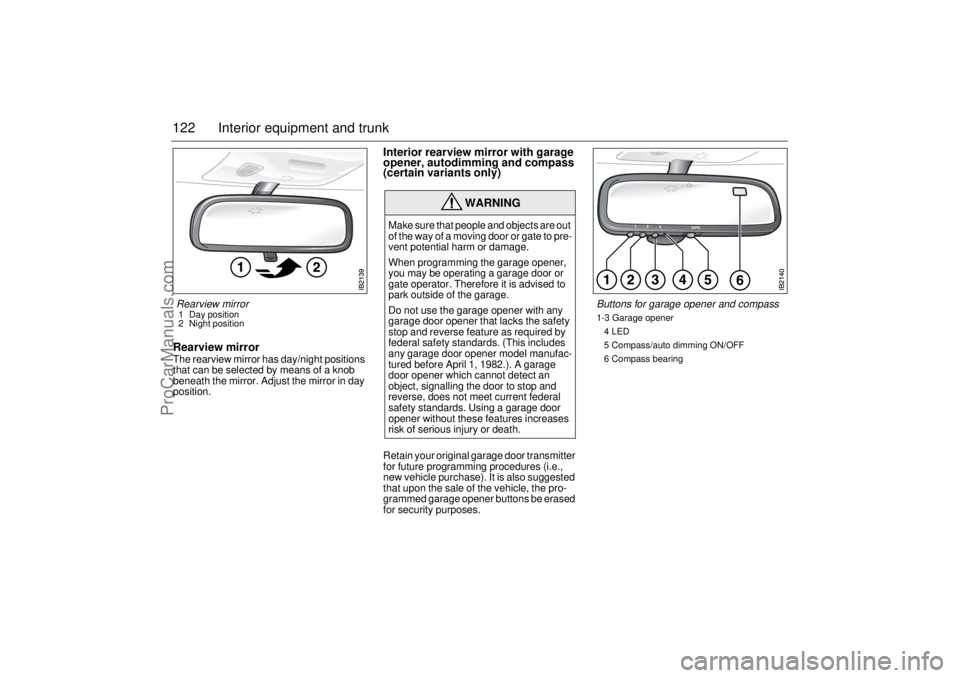
122 Interior equipment and trunkRearview mirrorThe rearview mirror has day/night positions
that can be selected by means of a knob
beneath the mirror. Adjust the mirror in day
position.
Interior rearview mirror with garage
opener, autodimming and compass
(certain variants only)Retain your original garage door transmitter
for future programming procedures (i.e.,
new vehicle purchase). It is also suggested
that upon the sale of the vehicle, the pro-
grammed garage opener buttons be erased
for security purposes.
WARNING
Make sure that people and objects are out
of the way of a moving door or gate to pre-
vent potential harm or damage.
When programming the garage opener,
you may be operating a garage door or
gate operator. Therefore it is advised to
park outside of the garage.
Do not use the garage opener with any
garage door opener that lacks the safety
stop and reverse feature as required by
federal safety standards. (This includes
any garage door opener model manufac-
tured before April 1, 1982.). A garage
door opener which cannot detect an
object, signalling the door to stop and
reverse, does not meet current federal
safety standards. Using a garage door
opener without these features increases
risk of serious injury or death.
Rearview mirror 1 Day position
2 Night position
Buttons for garage opener and compass1-3 Garage opener
4 LED
5 Compass/auto dimming ON/OFF
6 Compass bearing
ProCarManuals.com
Page 125 of 288
125 Interior equipment and trunk
Opening a garage door
To operate, simply press and release the
programmed button. Activation will now
occur for the trained device (i.e. garage door
opener, gate operator, security system,
entry door lock, home/office lighting, etc.).
For convenience, the hand-held transmitter
of the device may also be used at any time.
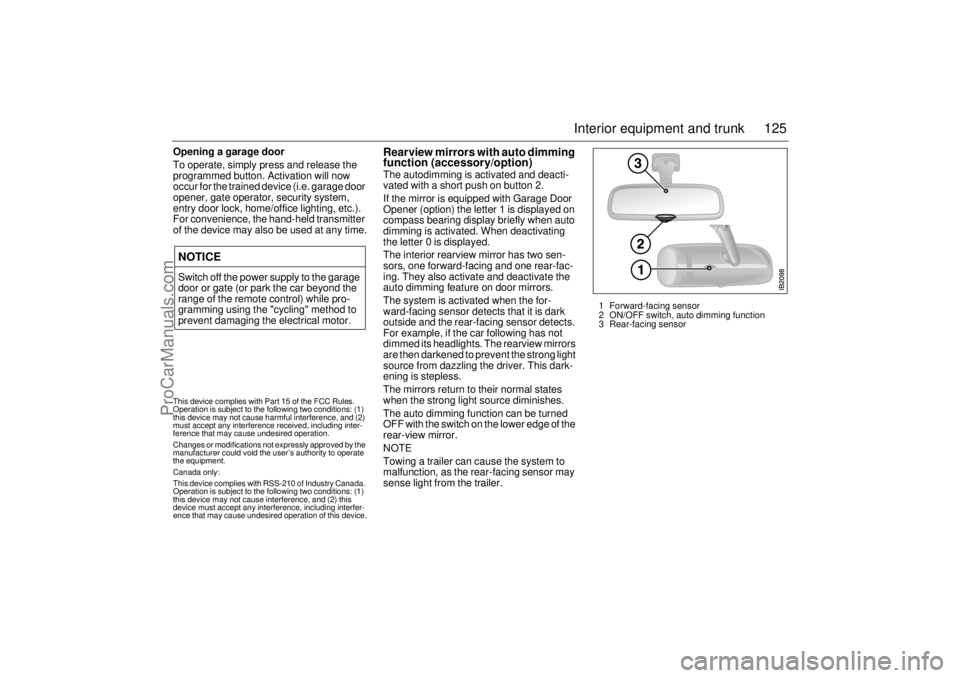
Rearview mirrors with auto dimming
function (accessory/option)The autodimming is activated and deacti-
vated with a short push on button 2.
If the mirror is equipped with Garage Door
Opener (option) the letter 1 is displayed on
compass bearing display briefly when auto
dimming is activated. When deactivating
the letter 0 is displayed.
The interior rearview mirror has two sen-
sors, one forward-facing and one rear-fac-
ing. They also activate and deactivate the
auto dimming feature on door mirrors.
The system is activated when the for-
ward-facing sensor detects that it is dark
outside and the rear-facing sensor detects.
For example, if the car following has not
dimmed its headlights. The rearview mirrors
are then darkened to prevent the strong light
source from dazzling the driver. This dark-
ening is stepless.
The mirrors return to their normal states
when the strong light source diminishes.
The auto dimming function can be turned
OFF with the switch on the lower edge of the
rear-view mirror.
NOTE
Towing a trailer can cause the system to
malfunction, as the rear-facing sensor may
sense light from the trailer.
NOTICESwitch off the power supply to the garage
door or gate (or park the car beyond the
range of the remote control) while pro-
gramming using the "cycling" method to
prevent damaging the electrical motor.
1 Forward-facing sensor
2 ON/OFF switch, auto dimming function
3 Rear-facing sensor
This device complies with Part 15 of the FCC Rules.
Operation is subject to the following two conditions: (1)
this device may not cause harmful interference, and (2)
must accept any interference received, including inter-
ference that may cause undesired operation.
Changes or modifications not expressly approved by the
manufacturer could void the user’s authority to operate
the equipment.
Canada only:
This device complies with RSS-210 of Industry Canada.
Operation is subject to the following two conditions: (1)
this device may not cause interference, and (2) this
device must accept any interference, including interfer-
ence that may cause undesired operation of this device.
ProCarManuals.com
Page 136 of 288
136 Interior equipment and trunk
WARNING
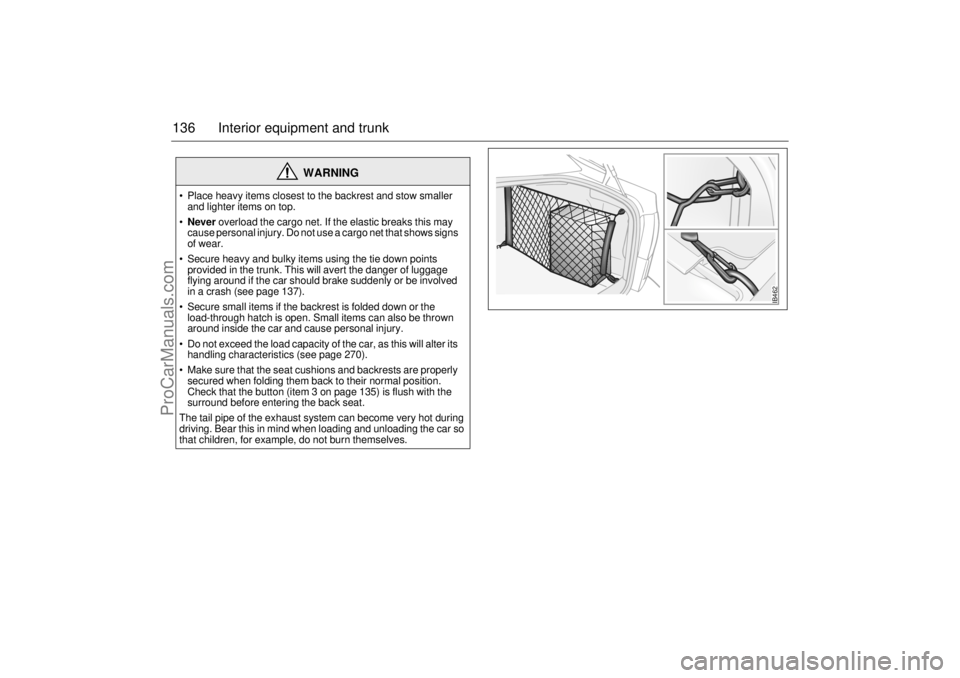
Place heavy items closest to the backrest and stow smaller
and lighter items on top.
Never overload the cargo net. If the elastic breaks this may
cause personal injury. Do not use a cargo net that shows signs
of wear.
Secure heavy and bulky items using the tie down points
provided in the trunk. This will avert the danger of luggage
flying around if the car should brake suddenly or be involved
in a crash (see page 137).
Secure small items if the backrest is folded down or the
load-through hatch is open. Small items can also be thrown
around inside the car and cause personal injury.
Do not exceed the load capacity of the car, as this will alter its
handling characteristics (see page 270).
Make sure that the seat cushions and backrests are properly
secured when folding them back to their normal position.
Check that the button (item 3 on page 135) is flush with the
surround before entering the back seat.
The tail pipe of the exhaust system can become very hot during
driving. Bear this in mind when loading and unloading the car so
that children, for example, do not burn themselves.
IB462
ProCarManuals.com
Page 137 of 288
137 Interior equipment and trunk
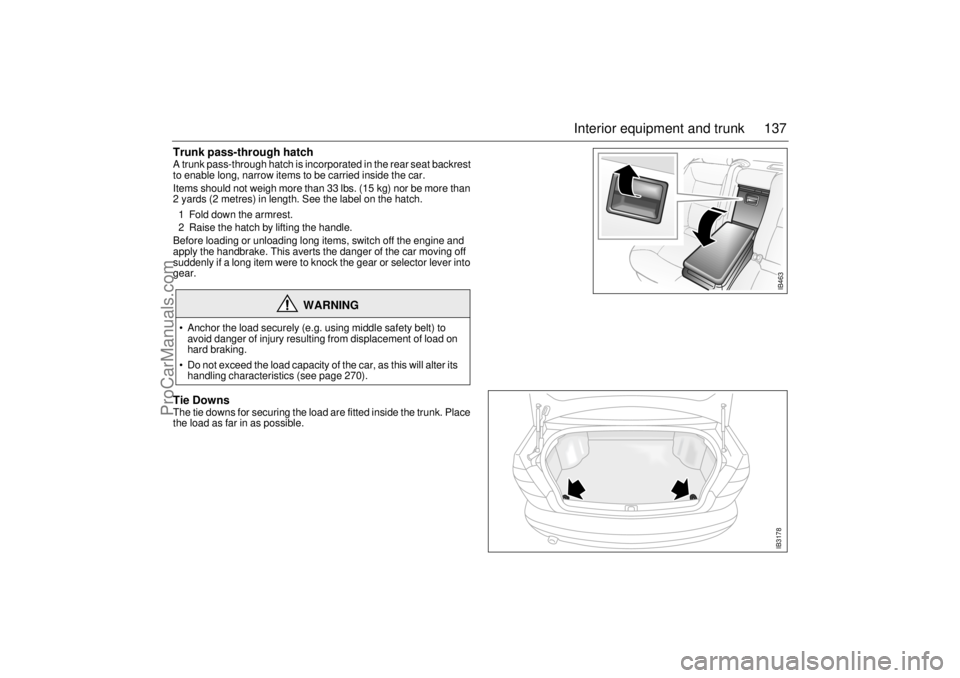
Trunk pass-through hatch A trunk pass-through hatch is incorporated in the rear seat backrest
to enable long, narrow items to be carried inside the car.
Items should not weigh more than 33 lbs. (15 kg) nor be more than
2 yards (2 metres) in length. See the label on the hatch.
1 Fold down the armrest.
2 Raise the hatch by lifting the handle.
Before loading or unloading long items, switch off the engine and
apply the handbrake. This averts the danger of the car moving off
suddenly if a long item were to knock the gear or selector lever into
gear. Tie DownsThe tie downs for securing the load are fitted inside the trunk. Place
the load as far in as possible.
WARNING
Anchor the load securely (e.g. using middle safety belt) to
avoid danger of injury resulting from displacement of load on
hard braking.
Do not exceed the load capacity of the car, as this will alter its
handling characteristics (see page 270).
IB463IB3178
ProCarManuals.com
Page 140 of 288
140 Interior equipment and trunkLoad anchoring
Driving with the trunk lid/tailgate open, see
page 188.
WARNING
Put heavy loads as low down and as
far forward as possible in the luggage
compartment, i.e. against the back of
the rear seat.
Never overload the cargo net. If the
elastic breaks this may cause personal
injury. Do not use a cargo net that
shows signs of wear.
Never stack cargo so high that any part
of the cargo lies above the edge of the
backrest, if a cargo guard (accessory)
is not being used.
Always tie down the cargo so that it
cannot be thrown forward during
heavy braking or in the event of a
crash.
Unsecured and heavy cargo can
increase the risk of injury during hard
braking, sudden avoidance maneu-
vers and in the event of a crash.
For the best load anchoring, use the
special cargo bolts and load straps
(accessory).
Load the cargo bolts evenly. Never
attach more than one strap to each tie
down eye.
Provide protection on sharp edges to
prevent damage to the load straps.
Never use the elastic floor net and
elastic side net when the rear seat is
folded down. These nets are only
intended to keep light objects tidy, not
for the anchoring of loads.
If possible, avoid having the rear seat
folded down when driving with a heavy
load because the anchoring possibili-
ties are restricted when the rear seat is
in this position. That the rear seat is
in the upright position is a basic
requirement for protection against
cargo displacement in the event of
a crash.
Cargo can intrude into the passenger
compartment during a sudden stop or
front crash if the outer safety belts are
not fastened. Check that the two red
warning-indication flags are fully
down. This shows that the backrests
are locked.
WARNING
Match the speed and driving style
according to how the car is loaded.
The driving characteristics of the car
can be affected because the center of
gravity is altered when there is a cargo
in the luggage compartment.
An object weighing 55 lbs. (25 kg) cor-
responds to a weight of 2200 lbs.
(1000 kg) in a head on crash at
32 mph (50 km/h).
Adjust the car’s load (passengers and
luggage) so that the gross vehicle
weight or the axle weight is not
exceeded, see page 270.
ProCarManuals.com
Page 143 of 288
143 Interior equipment and trunk
Sliding floor (accessory)
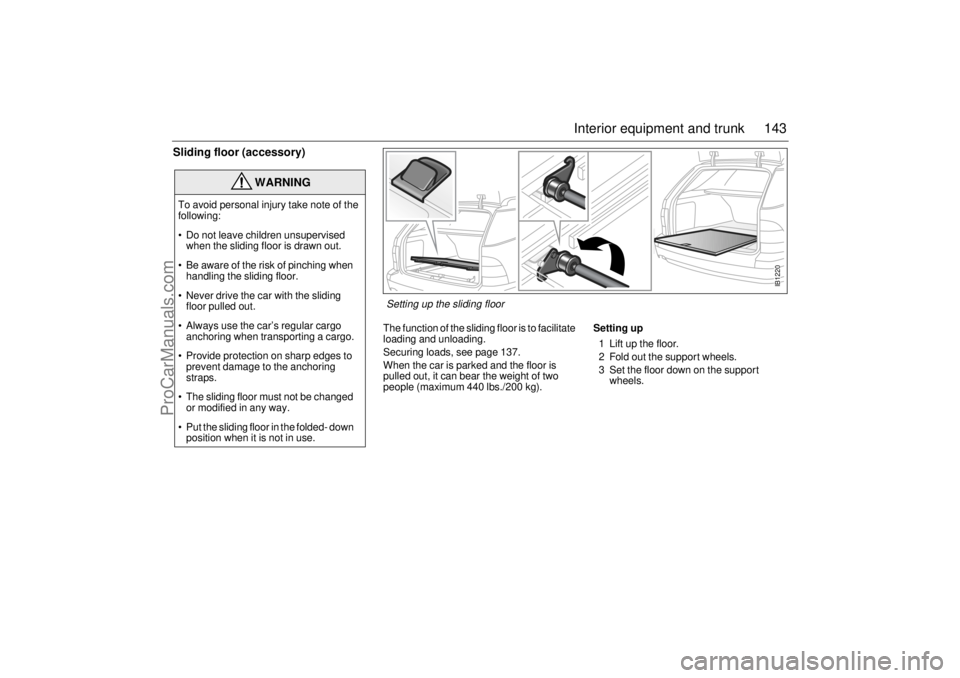
The function of the sliding floor is to facilitate
loading and unloading.
Securing loads, see page 137.
When the car is parked and the floor is
pulled out, it can bear the weight of two
people (maximum 440 lbs./200 kg).Setting up
1 Lift up the floor.
2 Fold out the support wheels.
3 Set the floor down on the support
wheels.
WARNING
To avoid personal injury take note of the
following:
Do not leave children unsupervised
when the sliding floor is drawn out.
Be aware of the risk of pinching when
handling the sliding floor.
Never drive the car with the sliding
floor pulled out.
Always use the car’s regular cargo
anchoring when transporting a cargo.
Provide protection on sharp edges to
prevent damage to the anchoring
straps.
The sliding floor must not be changed
or modified in any way.
Put the sliding floor in the folded- down
position when it is not in use.
IB1220
Setting up the sliding floor
ProCarManuals.com
Page 144 of 288
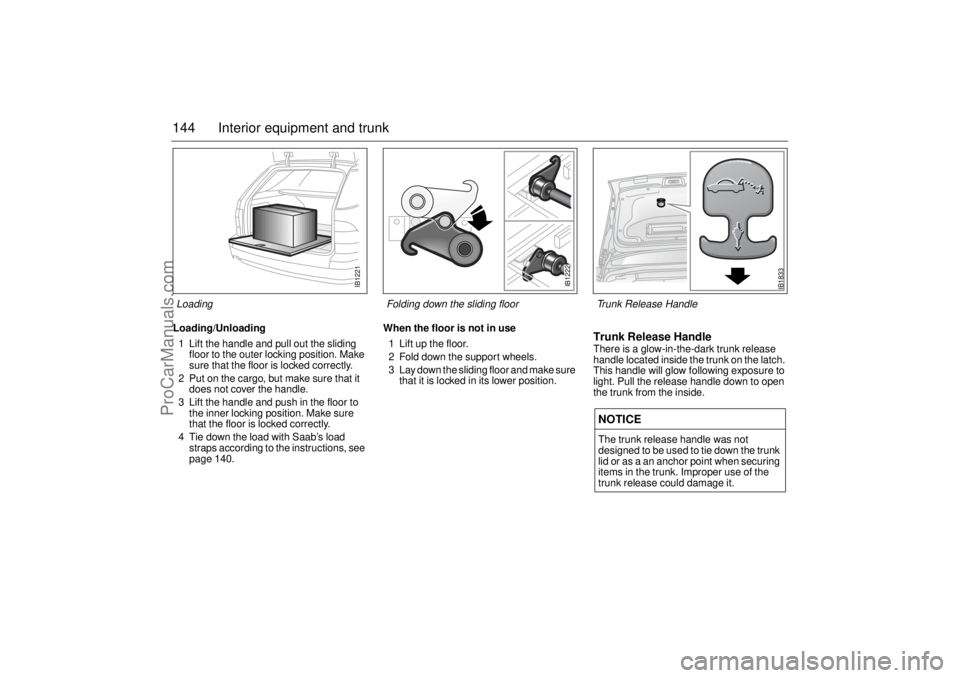
144 Interior equipment and trunkLoading/Unloading
1 Lift the handle and pull out the sliding
floor to the outer locking position. Make
sure that the floor is locked correctly.
2 Put on the cargo, but make sure that it
does not cover the handle.
3 Lift the handle and push in the floor to
the inner locking position. Make sure
that the floor is locked correctly.
4 Tie down the load with Saab’s load
straps according to the instructions, see
page 140.When the floor is not in use
1 Lift up the floor.
2 Fold down the support wheels.
3 Lay down the sliding floor and make sure
that it is locked in its lower position.
Trunk Release HandleThere is a glow-in-the-dark trunk release
handle located inside the trunk on the latch.
This handle will glow following exposure to
light. Pull the release handle down to open
the trunk from the inside.NOTICEThe trunk release handle was not
designed to be used to tie down the trunk
lid or as a an anchor point when securing
items in the trunk. Improper use of the
trunk release could damage it.
IB1221
Loading
IB1222
Folding down the sliding floor
IB1833
Trunk Release Handle
ProCarManuals.com
Page 161 of 288
161 Starting and driving
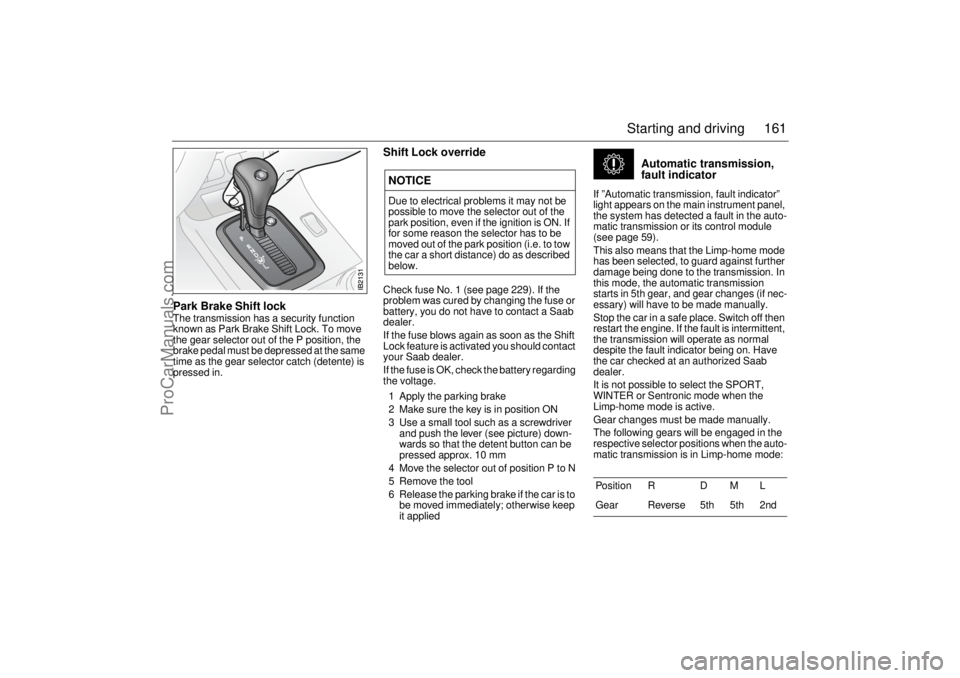
Park Brake Shift lockThe transmission has a security function
known as Park Brake Shift Lock. To move
the gear selector out of the P position, the
brake pedal must be depressed at the same
time as the gear selector catch (detente) is
pressed in.
Shift Lock overrideCheck fuse No. 1 (see page 229). If the
problem was cured by changing the fuse or
battery, you do not have to contact a Saab
dealer.
If the fuse blows again as soon as the Shift
Lock feature is activated you should contact
your Saab dealer.
If the fuse is OK, check the battery regarding
the voltage.
1 Apply the parking brake
2 Make sure the key is in position ON
3 Use a small tool such as a screwdriver
and push the lever (see picture) down-
wards so that the detent button can be
pressed approx. 10 mm
4 Move the selector out of position P to N
5 Remove the tool
6 Release the parking brake if the car is to
be moved immediately; otherwise keep
it applied
Automatic transmission,
fault indicator
If ”Automatic transmission, fault indicator”
light appears on the main instrument panel,
the system has detected a fault in the auto-
matic transmission or its control module
(see page 59).
This also means that the Limp-home mode
has been selected, to guard against further
damage being done to the transmission. In
this mode, the automatic transmission
starts in 5th gear, and gear changes (if nec-
essary) will have to be made manually.
Stop the car in a safe place. Switch off then
restart the engine. If the fault is intermittent,
the transmission will operate as normal
despite the fault indicator being on. Have
the car checked at an authorized Saab
dealer.
It is not possible to select the SPORT,
WINTER or Sentronic mode when the
Limp-home mode is active.
Gear changes must be made manually.
The following gears will be engaged in the
respective selector positions when the auto-
matic transmission is in Limp-home mode:
NOTICEDue to electrical problems it may not be
possible to move the selector out of the
park position, even if the ignition is ON. If
for some reason the selector has to be
moved out of the park position (i.e. to tow
the car a short distance) do as described
below.
Position R D M L
Gear Reverse 5th 5th 2nd
ProCarManuals.com
Page 178 of 288
178 Starting and driving2 Wait until the needle has dropped back
to indicate normal temperature (roughly
midway, in the white zone) before stop-
ping the engine. If the coolant needs top-
ping up, unscrew the cap on expansion
tank carefully.
Top up, as necessary, ideally with a
50/50 mixture of Saab-approved coolant
and water. If only water is available, use
that, but remember to have the coolant
mixture checked as soon as possible. 3 As soon as possible, have the cooling
system checked by an authorized Saab
dealer.
Towing a trailer
Trailer hitch attachmentTrailer hitch attachments are available as
accessories. These are designed for a max-
imum trailer weight of 3500 lbs. (1588 kg),
see also page 271.
Use only the electrical trailer hitch socket
provided in the trailer hitch kit.
Saab recommends:
Use a Saab original hitch kit attachment
which is designed and tested by Saab.
Consult your Saab dealer regarding the
appropriate hitch kit for your car.
WARNING
Exercise care when opening the hood
if the engine is overheated. Never
remove the expansion tank cap com-
pletely when the engine is hot.
The cooling system is pressurized -
hot coolant and vapor can escape.
These can cause injury to your eyes
and burns. Open the cap slowly to
release the pressure before
removing it.
WARNING
When towing a trailer, do not attempt
to negotiate a hill having a gradient in
excess of 15 %. The weight distribu-
tion over the front wheels of the car will
be insufficient to prevent wheelspin,
making further progress impossible.
In addition, the parking brake may not
always be able to hold the car and
trailer securely, with the result that the
wheels can start to slide downhill.
Always apply the trailer’s handbrake
when unhitching it. There is otherwise
a risk of personal injury or damage to
the bumper should the trailer start to
roll.
NOTICEUse only a genuine Saab trailer hitch and
wiring, since other wiring methods can
cause expensive damage to the car’s
body and electrical system.
Consult an authorized Saab dealer for
guidance on how to connect the trailer
hitch electrical system.
ProCarManuals.com