mirror SAAB 9-5 2005 User Guide
[x] Cancel search | Manufacturer: SAAB, Model Year: 2005, Model line: 9-5, Model: SAAB 9-5 2005Pages: 276, PDF Size: 16.72 MB
Page 111 of 276

109 Interior equipment and trunk
Preparations for first-time programmingBefore programming the garage opener for
the first time, you must delete any factory
codes.
Press and hold the two outer buttons until
the indicator light begins to flash-after
20 seconds. Release both buttons. Do not
hold for longer that 30 seconds. The garage
opener is now in the train (or learning) mode
and can be programmed at any time begin-
ning with "Programming" - step 2.ProgrammingThe garage opener can record and store the
frequencies of three different remote con-
trols.
The battery in the remote control should be
fairly new for programming to work well.Do not repeat "Programming" - step two
to train additional devices to a second or
third button. Begin with "Programming" -
step three.
1 Turn the ignition ON.
2 Press and hold the two outer buttons
(buttons one and three) - releasing only
when the indicator light begins to flash
(after 20 seconds).
Do not
hold the but-
tons for longer than 30 seconds and
do
not repeat step two
to program a
second and/or third hand-held transmit-
ter to the remaining two buttons.
3 Position the end of your hand-held trans-
mitter 1-3 inches (5-14 cm) away from
the button you wish to program while
keeping the indicator light in view. The transmitter should face the mirror from
below or left side of the mirror.
4 Simultaneously press and hold both the
chosen and hand-held transmitter but-
tons.
Do not release the buttons until
step 5 has been completed.
Note:
Some gate operators and garage
door openers may require you to replace
this Programming Step 4 with procedures
noted in the "Gate Operator / Canadian Pro-
gramming" section.
5 After the indicator light changes from a
slow to a rapidly blinking light, release
both the mirror and hand-held transmit-
ter buttons.
6 Press and hold the just-trained button
and observe the indicator light.
If the indicator light
stays on con-
stantly, programming is complete
and your device should activate when
the button is pressed and released.
Note:
To program the remaining two but-
tons, begin with "Programming" -
step
three. Do not repeat step two.
If the indicator light blinks
rapidly for two
seconds and then turns to a constant
light continue with "Programming"
steps 7-9
to complete the programming of
a rolling code equipped device (most com-
monly a garage door opener).
7 At the garage door opener receiver
(motor-head unit) in the garage, locate
the "learn" or "smart" button. This can
usually
be found where the hanging antenna wire is attached to the
motor-head unit.
8 Firmly press and release the "learn" or
"smart" button. (The name and color of
the button may vary by manufacturer.)
Note:
There are 30 seconds in which to ini-
tiate step nine.
9 Return to the vehicle and firmly
press,
hold for two seconds and release
the
programmed button. Repeat the
"press/hold/release"
sequence a
second time, and, depending on the
brand of the garage door opener (or
other rolling code equipped device),
repeat this sequence a third time to com-
plete the programming process.
The garage opener should now activate
your rolling code equipped device.
Note:
To program the remaining two but-
tons, begin with "Programming" -
step
three
. Do not repeat step two.
ProCarManuals.com
Page 113 of 276

111 Interior equipment and trunk
Opening a garage doorTo operate, simply press and release the
programmed button. Activation will now
occur for the trained device (i.e. garage door
opener, gate operator, security system,
entry door lock, home/office lighting, etc.).
For convenience, the hand-held transmitter
of the device may also be used at any time.
Rearview auto-dimming mirrors(accessory)The autodimming is activated and deacti-
vated with a short push on button 2.
If the mirror is equipped with Garage Door
Opener (option) the letter 1 is displayed on
compass bearing display briefly when auto
dimming is activated. When deactivating
the letter 0 is displayed.
The interior rearview mirror has two sen-
sors, one forward-facing and one
rear-facing. They also activate and deacti-
vate the auto dimming feature on door mir-
rors.
The system is activated when the for-
ward-facing sensor detects that it is dark
outside and the rear-facing sensor detects.
For example, if the car following has not
dimmed its headlights. The rearview mirrors
are then darkened to prevent the strong light
source from dazzling the driver. This dar-
kening is stepless.
The mirrors return to their normal states
when the strong light source diminishes.
The auto dimming function can be turned
OFF with the switch on the lower edge of the
rear-view mirror.
NOTE
Towing a trailer can cause the system to
malfunction, as the rear-facing sensor may
sense light from the trailer.
NOTICESwitch off the power supply to the garage
door or gate (or park the car beyond the
range of the remote control) while pro-
gramming using the "cycling" method to
prevent damaging the electrical motor.
1 Forward-facing sensor
2 ON/OFF switch, auto dimming function
3 Rear-facing sensor
This device complies with Part 15 of the FCC Rules.
Operation is subject to the following two conditions: (1)
this device may not cause harmful interference, and (2)
must accept any interference received, including interfe-
rence that may cause undesired operation.
Changes or modifications not expressly approved by the
manufacturer could void the user’s authority to operate
the equipment.
Canada only:
This device complies with RSS-210 of Industry Canada.
Operation is subject to the following two conditions: (1)
this device may not cause interference, and (2) this
device must accept any interference, including interfe-
rence that may cause undesired operation of this device.
ProCarManuals.com
Page 114 of 276
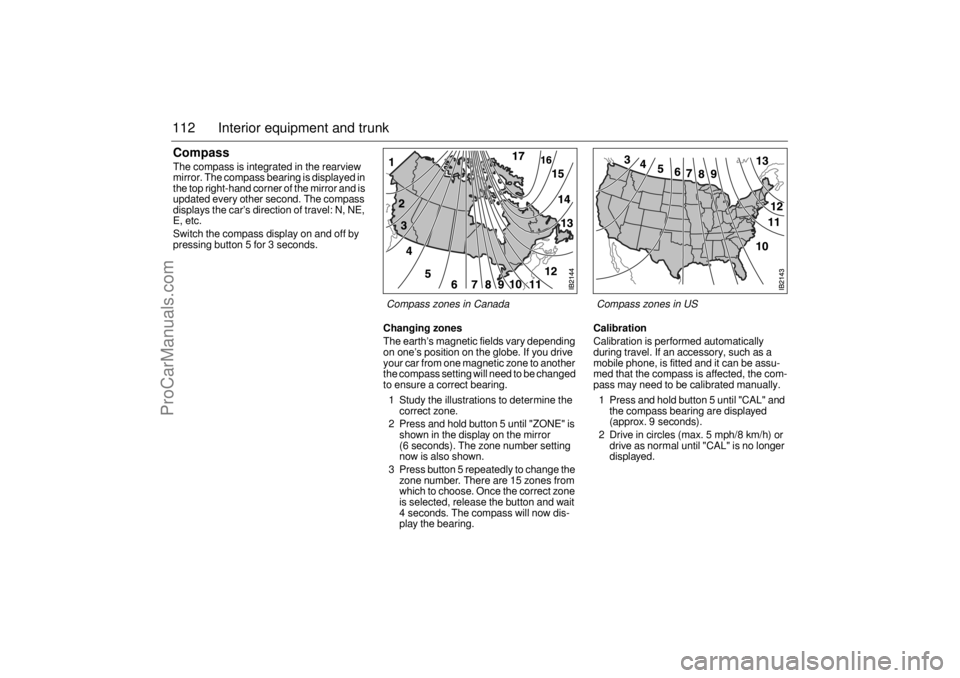
112 Interior equipment and trunkCompass The compass is integrated in the rearview
mirror. The compass bearing is displayed in
the top right-hand corner of the mirror and is
updated every other second. The compass
displays the car’s direction of travel: N, NE,
E, etc.
Switch the compass display on and off by
pressing button 5 for 3 seconds.
Changing zonesThe earth’s magnetic fields vary depending
on one’s position on the globe. If you drive
your car from one magnetic zone to another
the compass setting will need to be changed
to ensure a correct bearing.
1 Study the illustrations to determine the
correct zone.
2 Press and hold button 5 until "ZONE" is
shown in the display on the mirror
(6 seconds). The zone number setting
now is also shown.
3 Press button 5 repeatedly to change the
zone number. There are 15 zones from
which to choose. Once the correct zone
is selected, release the button and wait
4 seconds. The compass will now dis-
play the bearing.
CalibrationCalibration is performed automatically
during travel. If an accessory, such as a
mobile phone, is fitted and it can be assu-
med that the compass is affected, the com-
pass may need to be calibrated manually.
1 Press and hold button 5 until "CAL" and
the compass bearing are displayed
(approx. 9 seconds).
2 Drive in circles (max. 5 mph/8 km/h) or
drive as normal until "CAL" is no longer
displayed.Compass zones in US Compass zones in Canada
ProCarManuals.com
Page 116 of 276
114 Interior equipment and trunk
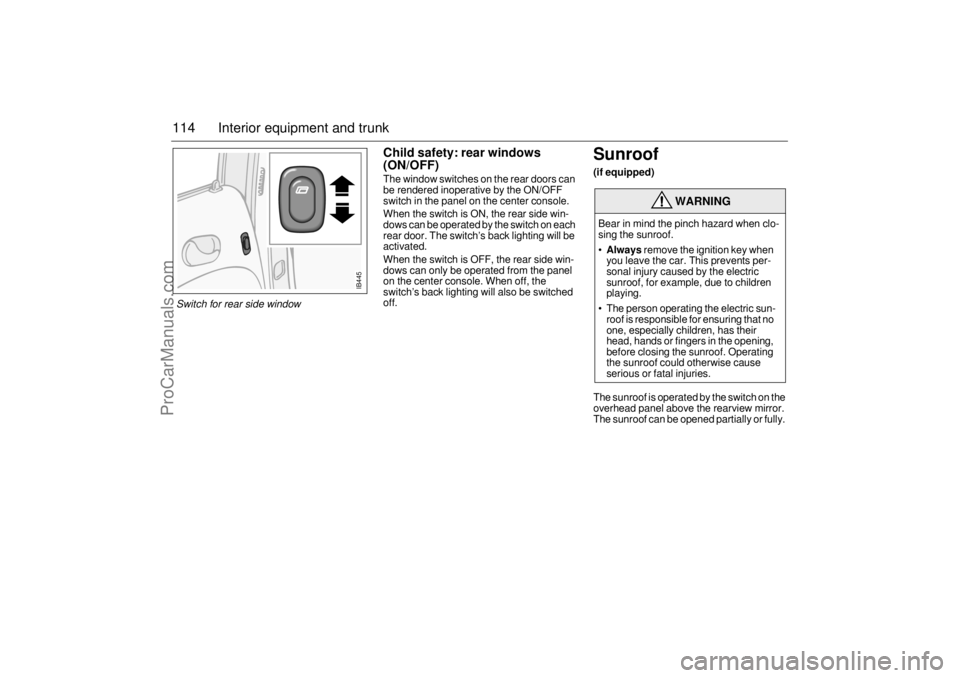
Child safety: rear windows
(ON/OFF)The window switches on the rear doors can
be rendered inoperative by the ON/OFF
switch in the panel on the center console.
When the switch is ON, the rear side win-
dows can be operated by the switch on each
rear door. The switch’s back lighting will be
activated.
When the switch is OFF, the rear side win-
dows can only be operated from the panel
on the center console. When off, the
switch’s back lighting will also be switched
off.
Sunroof (if equipped)The sunroof is operated by the switch on the
overhead panel above the rearview mirror.
The sunroof can be opened partially or fully.
WARNING
Bear in mind the pinch hazard when clo-
sing the sunroof.
Always
remove the ignition key when
you leave the car. This prevents per-
sonal injury caused by the electric
sunroof, for example, due to children
playing.
The person operating the electric sun-
roof is responsible for ensuring that no
one, especially children, has their
head, hands or fingers in the opening,
before closing the sunroof. Operating
the sunroof could otherwise cause
serious or fatal injuries.
IB445
Switch for rear side window
ProCarManuals.com
Page 118 of 276
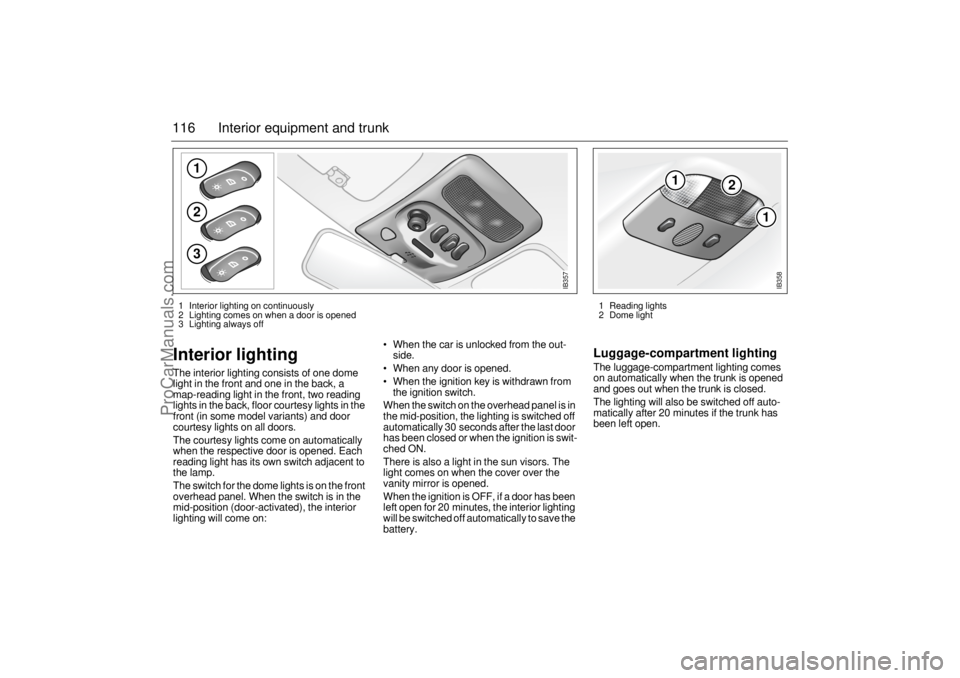
116 Interior equipment and trunkInterior lighting The interior lighting consists of one dome
light in the front and one in the back, a
map-reading light in the front, two reading
lights in the back, floor courtesy lights in the
front (in some model variants) and door
courtesy lights on all doors.
The courtesy lights come on automatically
when the respective door is opened. Each
reading light has its own switch adjacent to
the lamp.
The switch for the dome lights is on the front
overhead panel. When the switch is in the
mid-position (door-activated), the interior
lighting will come on: When the car is unlocked from the out-
side.
When any door is opened.
When the ignition key is withdrawn from
the ignition switch.
When the switch on the overhead panel is in
the mid-position, the lighting is switched off
automatically 30 seconds after the last door
has been closed or when the ignition is swit-
ched ON.
There is also a light in the sun visors. The
light comes on when the cover over the
vanity mirror is opened.
When the ignition is OFF, if a door has been
left open for 20 minutes, the interior lighting
will be switched off automatically to save the
battery.
Luggage-compartment lightingThe luggage-compartment lighting comes
on automatically when the trunk is opened
and goes out when the trunk is closed.
The lighting will also be switched off auto-
matically after 20 minutes if the trunk has
been left open.
123
IB357
1
2
1
IB358
1 Reading lights
2 Dome light 1 Interior lighting on continuously
2 Lighting comes on when a door is opened
3 Lighting always off
ProCarManuals.com
Page 119 of 276
117 Interior equipment and trunk
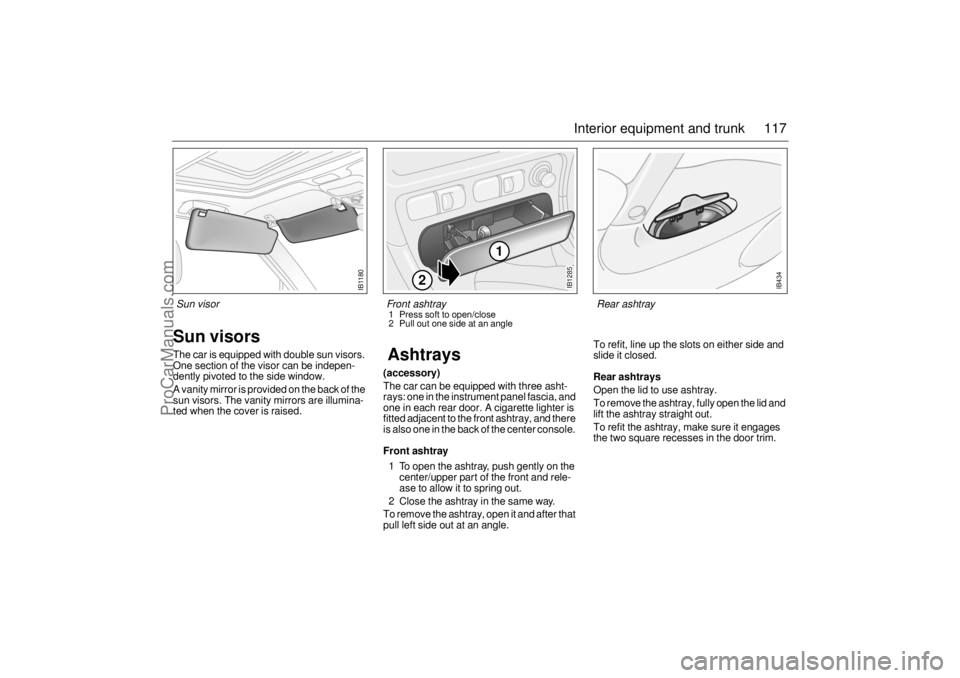
Sun visorsThe car is equipped with double sun visors.
One section of the visor can be indepen-
dently pivoted to the side window.
A vanity mirror is provided on the back of the
sun visors. The vanity mirrors are illumina-
ted when the cover is raised.
Ashtrays(accessory)The car can be equipped with three asht-
rays: one in the instrument panel fascia, and
one in each rear door. A cigarette lighter is
fitted adjacent to the front ashtray, and there
is also one in the back of the center console. Front ashtray1 To open the ashtray, push gently on the
center/upper part of the front and rele-
ase to allow it to spring out.
2 Close the ashtray in the same way.
To remove the ashtray, open it and after that
pull left side out at an angle. To refit, line up the slots on either side and
slide it closed.
Rear ashtraysOpen the lid to use ashtray.
To remove the ashtray, fully open the lid and
lift the ashtray straight out.
To refit the ashtray, make sure it engages
the two square recesses in the door trim.
IB1180
Sun visor
IB1285
1
2
Front ashtray 1 Press soft to open/close
2 Pull out one side at an angle
IB434
Rear ashtray
ProCarManuals.com
Page 166 of 276
164 Starting and drivingRecommendations for cars with manual
gearboxRises in coolant temperature are indicated
by the temperature gauge in the main instru-
ment panel.
The following steps are taken in order as the
temperature of the engine increases:
A/C compressor is switched off.
engine torque is reduced.
When continuing your journey, select a gear
in which the engine speed is about
3,000 rpm until the incline eases.
Driving considerations Always take extra care when towing a
trailer, as the car’s handling will be different
and its braking effect reduced. The trailer’s
braking system and suspension also have a
considerable effect on these characteris-
tics, see also ”Driving with a load” page 168.
If the car has automatic transmission, select
position D when ascending steep hills. This
ensures that the adaptive gear change pat-
terns are operational, see page 150. Use
position D or L for steep descents.
Checks before drivingMake sure that the car and camper or trailer
are in good working order. This is essential
since towing a camper or trailer increases
the strain on the car.
Check and if necessary adjust the tire
pressure of the car and camper or trailer.
Make sure all wheel bolts are properly
tightened.
Make sure that the equipment joining the
car and camper or trailer is properly secu-
red and adjusted.
Make sure the camper or trailer’s electri-
cal cable is properly connected and is not
so long that it drags along the ground.
Also, make sure the cable is not too short
and risks breaking when turning a corner.
Check all bulbs.
Check the car and camper or trailer bra-
kes.
Make sure that all items on or in the cara-
van or trailer are properly secured.
Make sure that the camper or trailer’s
jockey wheel is raised and locked.
Check the distribution of the load so that
the car and camper or trailer are well
balanced.
Check that the rearview mirrors provide
the best possible rearward vision.
Make sure the camper or trailer’s safety
cable is correctly attached.
WARNING
Utilize the braking effect of the engine
(1st, 2nd or 3rd gear) when you are
descending long or steep hills to spare
the brakes.
Brake failure can result from overheated
brakes!
NOTICEIf the ”Automatic transmission, fault indi-
cator” indicator comes on, cease
towing until the problem has been recti-
fied.
ProCarManuals.com
Page 170 of 276
168 Starting and driving
Driving at nightBear in mind the following points when
driving at night:
Nighttime driving requires your full con-
centration.
Do not rush. Count on your journey taking
slightly longer.
The number of drivers under the influence
of drugs is likely to be greater at night than
during the day.
Do not stare at the headlights of onco-
ming vehicles.
Avoid driving at night if you have poor eye-
sight. Night vision deteriorates with age.
Keep your car's headlights, windows and
mirrors clean. Also, if you wear glasses,
make sure they are clean.
Make sure you are well rested before star-
ting a long journey. Take a break every
other hour.
Only eat light meals. Heavy meals have a
tendency to induce tiredness.
Driving with a loadThe driving characteristics of the car are
affected by the way it is loaded.
Place heavy loads as far forward and as
low as possible in the trunk.
Secure the load to the tie downs, see
page 123.
The load should be such that the car´s
total weight or axle weight are not
exceeded, see page 252.
Heavy loads mean that the car’s center of
gravity is further back. As a result, the car
will sway more during evasive steering.
Never exceed the permissible load in the
roof box, even if there is room for more.
Ensure that the tire pressure is correct –
slight overinflation is preferable to under-
inflation.
The braking distance of a loaded car is
always greater. Keep your distance from
the vehicle in front.
Roof loads can negatively affect tele-
communication.Tire pressure, see page 262 and back
cover.
IB1295
ProCarManuals.com
Page 214 of 276

212 Car care and technical informationMaxi fusesThe Maxi fuses are housed in the fuse box
under the hood. These fuses can be
checked in the same way as the other fuses.
The Maxi fuses are designed to protect the
car’s electrical system from being dama-
ged. Each Maxi fuse protects a number of
electrical circuits and functions and there-
fore has a higher rating (amperage) than the
standard fuses. No spare Maxi fuses are
supplied with the car.
DICE / TWICEDICE = Dashboard Integrated Central Elec-
tronics
TWICE = Theft-Warning Central Electronics
DICE and TWICE are electronic control
modules that monitor and control a variety
of functions, including:
DICE controls (among other things):
Front lights and interior lighting
Instrument illumination
Intermittent wiper operation
Electric heating of rear window and door
mirrors
Cooling fans
TWICE controls (among other things):
Central locking.
Car alarm (Anti-theft system)
Engine immobilizer
Autochecking of lights.
Electric heating of rear seat
Safety belt reminder
Electrically adjustable passenger seatThe DICE and TWICE control modules are
linked to a data bus, which is basically an
information carrier that allows information to
be exchanged between all the control
modules and components connected to the
bus.
If a fault occurs in any of these components,
diagnostic faults codes are set in the rele-
vant control module, which facilitates fault
diagnosis at the Saab dealer.
The scan tool connector for fault diagnosis
is located under the instrument panel on the
drivers side.
NOTICEIf a Maxi fuse blows, it means that there is
a major fault in the electrical system.
Have the car checked without delay by an
authorized Saab dealer.
IB1795
Maxi fuses under the hood
ProCarManuals.com
Page 215 of 276
213 Car care and technical information
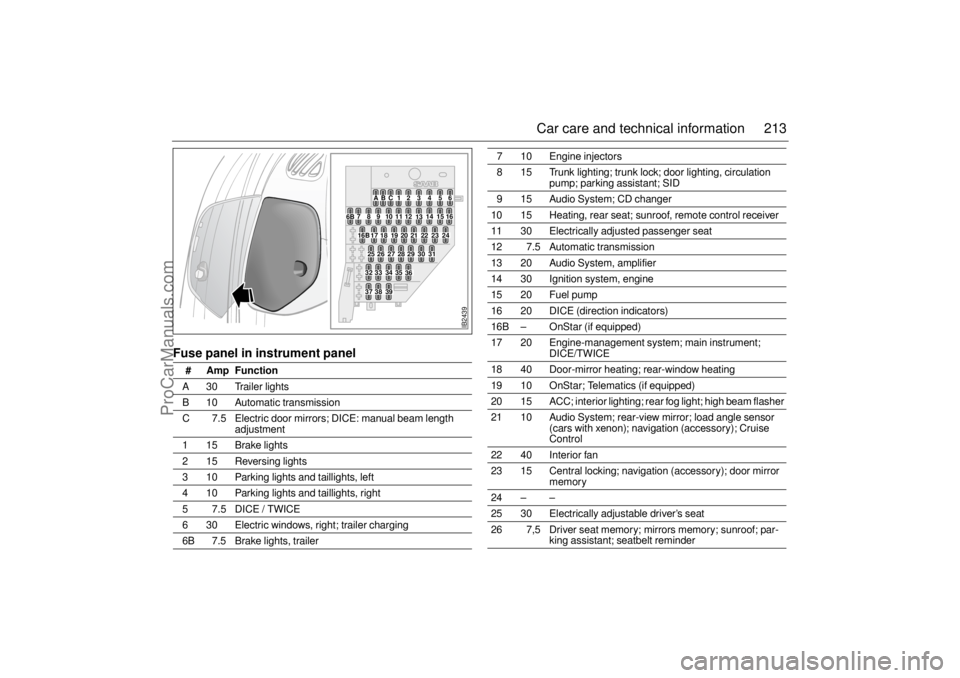
Fuse panel in instrument panel
# Amp Function A 30 Trailer lights
B 10 Automatic transmission
C 7.5 Electric door mirrors; DICE: manual beam length
adjustment
115Brake lights
2 15 Reversing lights
3 10 Parking lights and taillights, left
4 10 Parking lights and taillights, right
5 7.5 DICE / TWICE
6 30 Electric windows, right; trailer charging
6B 7.5 Brake lights, trailer
7 10 Engine injectors
8 15 Trunk lighting; trunk lock; door lighting, circulation
pump; parking assistant; SID
9 15 Audio System; CD changer
10 15 Heating, rear seat; sunroof, remote control receiver
11 30 Electrically adjusted passenger seat
12 7.5 Automatic transmission
13 20 Audio System, amplifier
14 30 Ignition system, engine
15 20 Fuel pump
16 20 DICE (direction indicators)
16B – OnStar (if equipped)
17 20 Engine-management system; main instrument;
DICE/TWICE
18 40 Door-mirror heating; rear-window heating
19 10 OnStar; Telematics (if equipped)
20 15 ACC; interior lighting; rear fog light; high beam flasher
21 10 Audio System; rear-view mirror; load angle sensor
(cars with xenon); navigation (accessory); Cruise
Control
22 40 Interior fan
23 15 Central locking; navigation (accessory); door mirror
memory
24 – –
25 30 Electrically adjustable driver’s seat
26 7,5 Driver seat memory; mirrors memory; sunroof; par-
king assistant; seatbelt reminder
IB2439
BC123456 A
14
121110987
13
6B
1516
2324
222120191817
16B25262728293031
3635343332
393837
ProCarManuals.com