trunk SAAB 9-5 2005 User Guide
[x] Cancel search | Manufacturer: SAAB, Model Year: 2005, Model line: 9-5, Model: SAAB 9-5 2005Pages: 276, PDF Size: 16.72 MB
Page 49 of 276

47 Security
Overview of functions
Alarm signals may differ between model variants for different
countries.
Some of the car-alarm functions can be reprogrammed – con-
sult your Saab dealer for further details (see page 264). Locking/
activation Hazard warning lights flash once.
The LED will come on for 10 seconds.
Unlocking/
deactivation Hazard warning lights flash twice.
The LED will come on for two seconds.
Unlocking/
deactivation of
trunk lid/tailgate
alarm Hazard warning lights flash three times.
The LED will flash three times per second for
10 seconds.
Alarm triggered Hazard warning lights flash for 5 min.
Horn wails for 30 seconds.
To switch off the alarm, deactivate the system in
the normal way (unlocking).
Key The range of the key is normally 5–10 yds. (5–
10 metres), although it can be substantially more
than this in ideal conditions (range can vary gre-
atly depending on the position of the car and its
surroundings).
If the key is not working, it may be because the
code signal has not been synchronized with that
in the control module for the car alarm. To rectify
this, press the unlock button on the key at least
four times in quick succession. When it is recog-
nized, the door locks will cycle.
If a key is lost, the new one will have to be pro-
grammed (all keys must be present) to match the
car’s unique security code. Contact an author-
ized Saab dealer.Battery for key The battery for the key will normally have a life of
4 years. When the battery needs changing,
”Remote control battery
low. Replace battery.”
will appear on the Saab Information Display
(SID).
Contact an authorized Saab dealer.
Car-battery
voltage If the battery is disconnected while the alarm is
active (car is locked), for example during an
attempt to steal the car, the alarm will be
triggered.
ProCarManuals.com
Page 50 of 276

48 SecurityOverview of LED signals and SID messagesSome signals may differ between model variants for different
countries. Status LED signal
Activation (during 10-second delay). Comes on for 10 seconds.
Alarm activated (after delay). Flashes once every other
second.
Deactivation. Comes on for 2 seconds.
Alarm not activated. Off.
Door, trunk lid/tailgate or hood open
or opened during delay period.Flashes three times per
second for 10 seconds.
Unlocking the trunk lid/tailgate. Flashes three times per
second for 10 seconds.
Closing of door, trunk lid/tailgate or
hood after delay period.Comes on for 10 seconds.
Car immobilized but not locked.
Car alarm not activated.Flashes twice at three
seconds intervals.
Fault in a switch serving doors, hood
or trunk lid.Flashing (instead of being
on continuously) during
delay period.
SID message Reason/action
Theft protection failure.
Contact service.Probably a fault in one of the sensors
or the horn.
Have the car checked by an authori-
zed Saab dealer.
Key not accepted.
Contact service.Fault in key transmitter or in igni-
tion-switch receiver.
Turn ignition switch to ON and press
the unlock button on the key. Start
the engine.
Have the car checked by an authori-
zed Saab dealer.
Remote control battery
low. Replace battery.Fit a new battery in the key, see
page 41.
REMOTE KEY
TRANSPONDRTurn the ignition key to position ON
and then press the button for ope-
ning the trunk lid. Saab Information
Display (SID) displays the number of
keys and transmitters (transponders)
coded to the car.
ProCarManuals.com
Page 107 of 276
105 Interior equipment and trunk
Steering wheel
adjustment ___________ 106
Rearview mirrors_______ 107
Electric windows _______ 113
Sunroof ______________ 114
Interior lighting ________ 116
Sun visors ____________ 117
Ashtrays______________ 117
Glove compartment ____ 118
Cup holders ___________ 120
Trunk ________________ 121
IB394
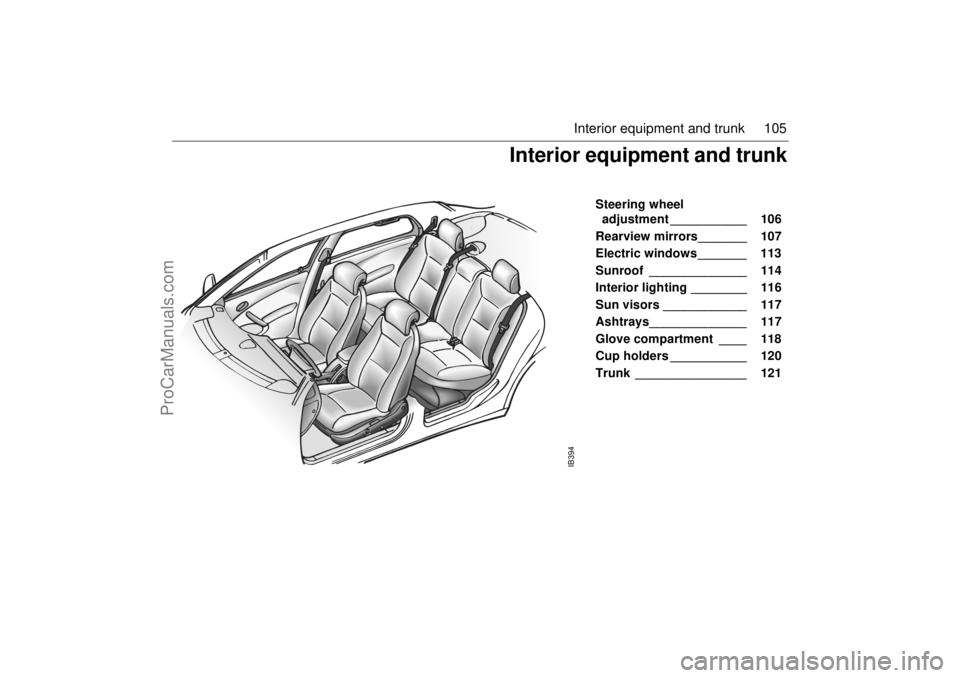
Interior equipment and trunk
ProCarManuals.com
Page 108 of 276
106 Interior equipment and trunkSteering wheel
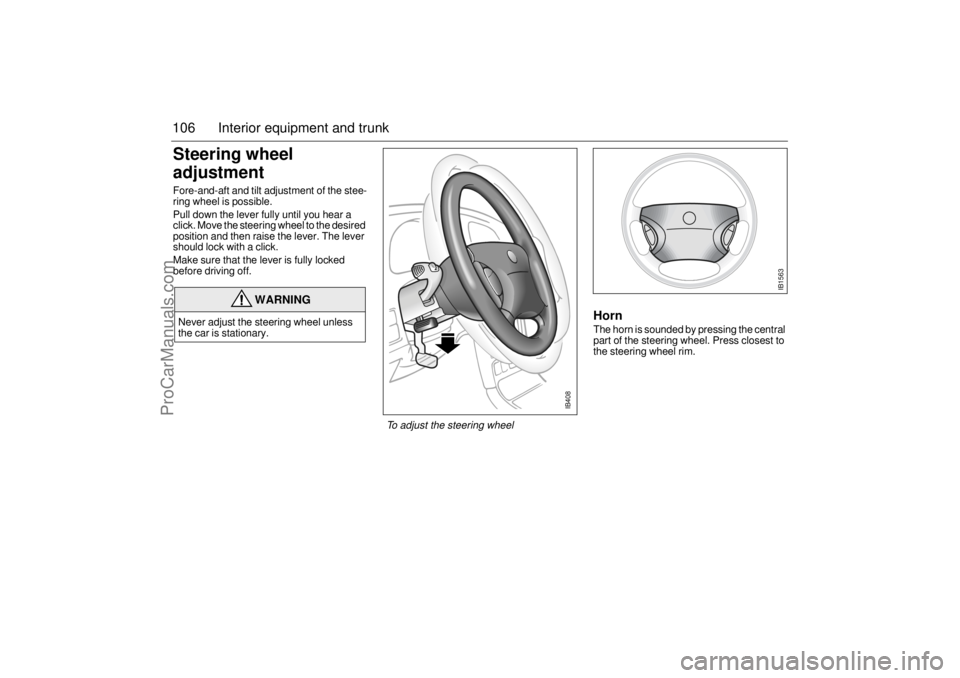
adjustment Fore-and-aft and tilt adjustment of the stee-
ring wheel is possible.
Pull down the lever fully until you hear a
click. Move the steering wheel to the desired
position and then raise the lever. The lever
should lock with a click.
Make sure that the lever is fully locked
before driving off.
HornThe horn is sounded by pressing the central
part of the steering wheel. Press closest to
the steering wheel rim.
WARNING
Never adjust the steering wheel unless
the car is stationary.
IB408
To adjust the steering wheel
IB1563
ProCarManuals.com
Page 109 of 276

107 Interior equipment and trunk
Rearview mirrorsDoor mirrorsThe door mirrors may have an auto dimming
function (option) and the passenger side
door mirror is of the wide-angle ‘‘aspheric”
type.
The door mirrors are designed to fold back
if knocked. They can also be fully retracted
for parking in tight spaces, such as on the
car deck of a ferry. Remember to fold them
out again before driving off.The adjusting switch is on the driver’s door.
If the car is equipped with a programmable
driver’s seat, the settings of the door mirrors
can also be stored in the preset buttons for
the seat (see page 14).
Cars equipped with a programmable dri-
ver’s seat also have the ability to angle the
passenger’s mirror down when reversing,
e.g. for a better view of the curb.
1 Select reverse.
2 Press the tiny button adjacent to the
doormirror switch to tilt the mirror. The mirror will be reset automatically when
reverse gear is deselected.
The mirror glass can also be adjusted
manually by gently pressing the glass in the
desired direction.
The mirrors are heated, and the heating
comes on and goes off with the rear-window
heater.
NOTICEThe door mirrors should be fully retracted
before the car enters an automatic car
wash.
Adjusting the door mirrors 1 Select mirror
2 Use touch pad to adjust mirror
Door mirror folded in
IB568
Button for angling passenger’s mirror
down when reversing
ProCarManuals.com
Page 110 of 276

108 Interior equipment and trunkRearview mirrorThe rearview mirror has day/night positions
that can be selected by means of a knob
beneath the mirror. Adjust the mirror in day
position.
Interior rearview auto-dimming
mirror with garage door opener,
and digital compass(if equipped)Retain your original garage door transmitter
for future programming procedures (i.e.,
new vehicle purchase). It is also suggested
that upon the sale of the vehicle, the pro-
grammed garage opener buttons be erased
for security purposes.
WARNING
Make sure that people and objects are out
of the way of a moving door or gate to pre-
vent potential harm or damage.
When programming the garage opener,
you may be operating a garage door or
gate operator. Therefore it is advised to
park outside of the garage.
Do not use the garage opener with any
garage door opener that lacks the safety
stop and reverse feature as required by
federal safety standards. (This includes
any garage door opener model manufac-
tured before April 1, 1982.). A garage
door opener which cannot detect an
object, signalling the door to stop and
reverse, does not meet current federal
safety standards. Using a garage door
opener without these features increases
risk of serious injury or death.
Rearview mirror 1 Day position
2 Night position
Buttons for garage opener and compass1-3 Garage opener
4 LED
5 Compass/auto dimming ON/OFF
6 Compass bearing
ProCarManuals.com
Page 111 of 276

109 Interior equipment and trunk
Preparations for first-time programmingBefore programming the garage opener for
the first time, you must delete any factory
codes.
Press and hold the two outer buttons until
the indicator light begins to flash-after
20 seconds. Release both buttons. Do not
hold for longer that 30 seconds. The garage
opener is now in the train (or learning) mode
and can be programmed at any time begin-
ning with "Programming" - step 2.ProgrammingThe garage opener can record and store the
frequencies of three different remote con-
trols.
The battery in the remote control should be
fairly new for programming to work well.Do not repeat "Programming" - step two
to train additional devices to a second or
third button. Begin with "Programming" -
step three.
1 Turn the ignition ON.
2 Press and hold the two outer buttons
(buttons one and three) - releasing only
when the indicator light begins to flash
(after 20 seconds).
Do not
hold the but-
tons for longer than 30 seconds and
do
not repeat step two
to program a
second and/or third hand-held transmit-
ter to the remaining two buttons.
3 Position the end of your hand-held trans-
mitter 1-3 inches (5-14 cm) away from
the button you wish to program while
keeping the indicator light in view. The transmitter should face the mirror from
below or left side of the mirror.
4 Simultaneously press and hold both the
chosen and hand-held transmitter but-
tons.
Do not release the buttons until
step 5 has been completed.
Note:
Some gate operators and garage
door openers may require you to replace
this Programming Step 4 with procedures
noted in the "Gate Operator / Canadian Pro-
gramming" section.
5 After the indicator light changes from a
slow to a rapidly blinking light, release
both the mirror and hand-held transmit-
ter buttons.
6 Press and hold the just-trained button
and observe the indicator light.
If the indicator light
stays on con-
stantly, programming is complete
and your device should activate when
the button is pressed and released.
Note:
To program the remaining two but-
tons, begin with "Programming" -
step
three. Do not repeat step two.
If the indicator light blinks
rapidly for two
seconds and then turns to a constant
light continue with "Programming"
steps 7-9
to complete the programming of
a rolling code equipped device (most com-
monly a garage door opener).
7 At the garage door opener receiver
(motor-head unit) in the garage, locate
the "learn" or "smart" button. This can
usually
be found where the hanging antenna wire is attached to the
motor-head unit.
8 Firmly press and release the "learn" or
"smart" button. (The name and color of
the button may vary by manufacturer.)
Note:
There are 30 seconds in which to ini-
tiate step nine.
9 Return to the vehicle and firmly
press,
hold for two seconds and release
the
programmed button. Repeat the
"press/hold/release"
sequence a
second time, and, depending on the
brand of the garage door opener (or
other rolling code equipped device),
repeat this sequence a third time to com-
plete the programming process.
The garage opener should now activate
your rolling code equipped device.
Note:
To program the remaining two but-
tons, begin with "Programming" -
step
three
. Do not repeat step two.
ProCarManuals.com
Page 112 of 276

110 Interior equipment and trunkGate Operator / Canadian ProgrammingCanadian radio-frequency laws require
transmitter signals to "time-out" (or quit)
after several seconds of transmission -
which may not be long enough for the
garage opener to pick up the signal during
programming. Similar to this Canadian law,
some U.S. gate operators are designed to
"time-out" in the same manner.
If you live in Canada or you are having diffi-
culties programming a gate operator by
using the "Programming" procedures
(regardless of where you live),
replace
"Programming " step 4
with the following:
Note:
If programming a garage door opener
or gate operator, it is advised to unplug the
device during the "cycling" process to pre-
vent possible overheating.
10 Continue to press and hold the button
while you
press and release - every
two seconds
("cycle") your hand-held
transmitter until the frequency signal
has successfully been accepted by the
garage opener. (The indicator light will
flash slowly and then rapidly.)
Proceed with "Programming" step five to
complete.
Reprogramming a single buttonTo program a device to the garage opener
using a button previously trained, follow
these steps:
1 Press and hold the desired button.
DO
NOT
release the button.
2 The indicator light will begin to flash after
20 seconds. Without releasing the but-
ton, proceed with "Programming" - step
3.
Erasing the three buttonsTo erase programming from the three but-
tons (individual buttons cannot be erased
but can be "reprogrammed" as outlined
below), follow the step noted:
Press and hold the two outer buttons until
the indicator light
begins to flash-after
20 seconds. Release both buttons. Do
not hold for longer that 30 seconds. The
garage opener is now in the train (or lear-
ning) mode
and can be programmed at
any time beginning with "Programming" -
step 3.
NOTICESwitch off the power supply to the garage
door or gate (or park the car beyond the
range of the remote control) while pro-
gramming using the "cycling" method to
prevent damaging the electrical motor.
ProCarManuals.com
Page 113 of 276

111 Interior equipment and trunk
Opening a garage doorTo operate, simply press and release the
programmed button. Activation will now
occur for the trained device (i.e. garage door
opener, gate operator, security system,
entry door lock, home/office lighting, etc.).
For convenience, the hand-held transmitter
of the device may also be used at any time.
Rearview auto-dimming mirrors(accessory)The autodimming is activated and deacti-
vated with a short push on button 2.
If the mirror is equipped with Garage Door
Opener (option) the letter 1 is displayed on
compass bearing display briefly when auto
dimming is activated. When deactivating
the letter 0 is displayed.
The interior rearview mirror has two sen-
sors, one forward-facing and one
rear-facing. They also activate and deacti-
vate the auto dimming feature on door mir-
rors.
The system is activated when the for-
ward-facing sensor detects that it is dark
outside and the rear-facing sensor detects.
For example, if the car following has not
dimmed its headlights. The rearview mirrors
are then darkened to prevent the strong light
source from dazzling the driver. This dar-
kening is stepless.
The mirrors return to their normal states
when the strong light source diminishes.
The auto dimming function can be turned
OFF with the switch on the lower edge of the
rear-view mirror.
NOTE
Towing a trailer can cause the system to
malfunction, as the rear-facing sensor may
sense light from the trailer.
NOTICESwitch off the power supply to the garage
door or gate (or park the car beyond the
range of the remote control) while pro-
gramming using the "cycling" method to
prevent damaging the electrical motor.
1 Forward-facing sensor
2 ON/OFF switch, auto dimming function
3 Rear-facing sensor
This device complies with Part 15 of the FCC Rules.
Operation is subject to the following two conditions: (1)
this device may not cause harmful interference, and (2)
must accept any interference received, including interfe-
rence that may cause undesired operation.
Changes or modifications not expressly approved by the
manufacturer could void the user’s authority to operate
the equipment.
Canada only:
This device complies with RSS-210 of Industry Canada.
Operation is subject to the following two conditions: (1)
this device may not cause interference, and (2) this
device must accept any interference, including interfe-
rence that may cause undesired operation of this device.
ProCarManuals.com
Page 114 of 276

112 Interior equipment and trunkCompass The compass is integrated in the rearview
mirror. The compass bearing is displayed in
the top right-hand corner of the mirror and is
updated every other second. The compass
displays the car’s direction of travel: N, NE,
E, etc.
Switch the compass display on and off by
pressing button 5 for 3 seconds.
Changing zonesThe earth’s magnetic fields vary depending
on one’s position on the globe. If you drive
your car from one magnetic zone to another
the compass setting will need to be changed
to ensure a correct bearing.
1 Study the illustrations to determine the
correct zone.
2 Press and hold button 5 until "ZONE" is
shown in the display on the mirror
(6 seconds). The zone number setting
now is also shown.
3 Press button 5 repeatedly to change the
zone number. There are 15 zones from
which to choose. Once the correct zone
is selected, release the button and wait
4 seconds. The compass will now dis-
play the bearing.
CalibrationCalibration is performed automatically
during travel. If an accessory, such as a
mobile phone, is fitted and it can be assu-
med that the compass is affected, the com-
pass may need to be calibrated manually.
1 Press and hold button 5 until "CAL" and
the compass bearing are displayed
(approx. 9 seconds).
2 Drive in circles (max. 5 mph/8 km/h) or
drive as normal until "CAL" is no longer
displayed.Compass zones in US Compass zones in Canada
ProCarManuals.com