remote control SAAB 9-5 2005 Owners Manual
[x] Cancel search | Manufacturer: SAAB, Model Year: 2005, Model line: 9-5, Model: SAAB 9-5 2005Pages: 276, PDF Size: 16.72 MB
Page 40 of 276

38 SecurityDoorsDoor handlesPull the handle to open the door.
If the door is stuck (e.g. if frozen), hold the
handle from above to secure a better grip.Central locking
Key / Remote control The key unit consists of a mechanical key
with integrated remote control.
The mechanical key is used for manual
locking and unlocking.
The remote control is used for remote lock-
ing and unlocking.
The key fits all the car’s locks.
The key supplied with the car has a code
number on a black plastic tag that needs to
be quoted for ordering additional keys. You
should therefore make a careful note of the
number.
The key contains a unique electronic code
for your car. When the key is inserted in the
ignition, the code is checked. If it matches,
the car can be started.
Your car is supplied with two keys. It is pos-
sible to have up to four keys for a car at one
time. If you loose one key you should have
this replaced as soon as possible by contac-
ting your Saab dealer. When the new key is
programmed into the system, the missing
key is automatically erased.
NOTE: For this reason, we strongly advise
you to take two keys with you on long jour-
neys and to keep them separate. If all keys
are lost, it will be necessary to replace costly
electronic components as well as the keys.
This loss and replacement cost is not cove-
red by the new car warranty.
If an additional key is to be added, all of the
original keys must be brought to the dealer
so that the control module can ”learn” to
recognize the new components.
WARNING
Leaving children or pets unattended in a
locked car is dangerous. It is also
dangerous to leave children in a vehicle
with the ignition key. A child or others
could be badly injured or even killed.
Key / Remote control1To lock
2 To unlock
3 Opening the trunk (9-5 Sedan)
Unlocking the tailgate (9-5 SportWagon)
IB3153
3
2 1
ProCarManuals.com
Page 41 of 276
39 Security
To check the number of keys that are pro-
grammed for the car; see page 48.
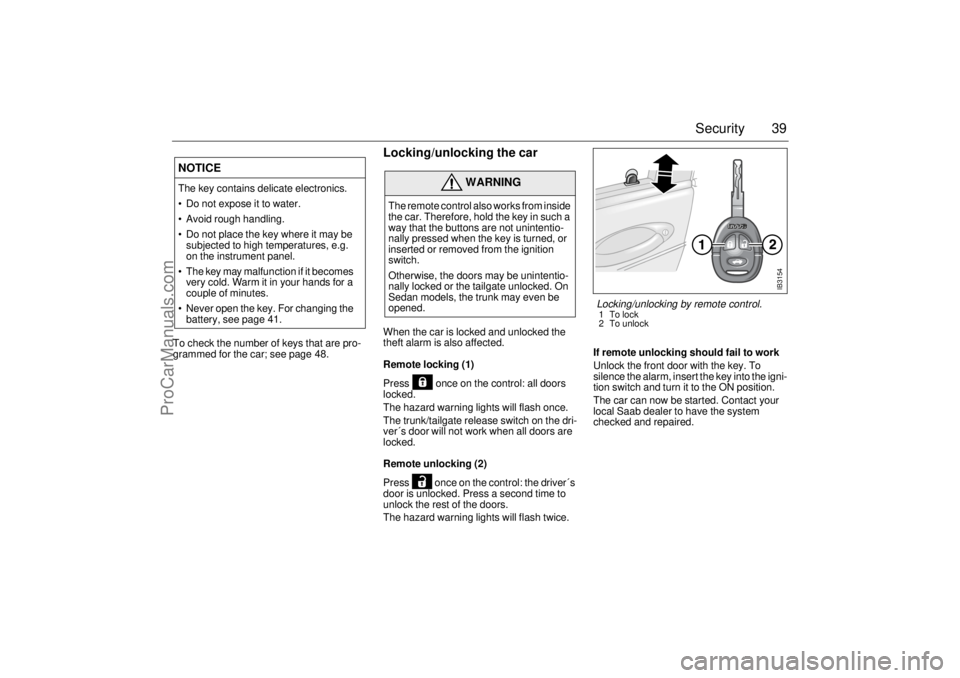
Locking/unlocking the carWhen the car is locked and unlocked the
theft alarm is also affected.
Remote locking (1)
Press once on the control: all doors
locked.
The hazard warning lights will flash once.
The trunk/tailgate release switch on the dri-
ver´s door will not work when all doors are
locked.
Remote unlocking (2)
Press once on the control: the driver´s
door is unlocked. Press a second time to
unlock the rest of the doors.
The hazard warning lights will flash twice.If remote unlocking should fail to work
Unlock the front door with the key. To
silence the alarm, insert the key into the igni-
tion switch and turn it to the ON position.
The car can now be started. Contact your
local Saab dealer to have the system
checked and repaired.
NOTICEThe key contains delicate electronics.
Do not expose it to water.
Avoid rough handling.
Do not place the key where it may be
subjected to high temperatures, e.g.
on the instrument panel.
The key may malfunction if it becomes
very cold. Warm it in your hands for a
couple of minutes.
Never open the key. For changing the
battery, see page 41.
WARNING
The remote control also works from inside
the car. Therefore, hold the key in such a
way that the buttons are not unintentio-
nally pressed when the key is turned, or
inserted or removed from the ignition
switch.
Otherwise, the doors may be unintentio-
nally locked or the tailgate unlocked. On
Sedan models, the trunk may even be
opened.
IB3154
Locking/unlocking by remote control.1To lock
2 To unlock
ProCarManuals.com
Page 42 of 276
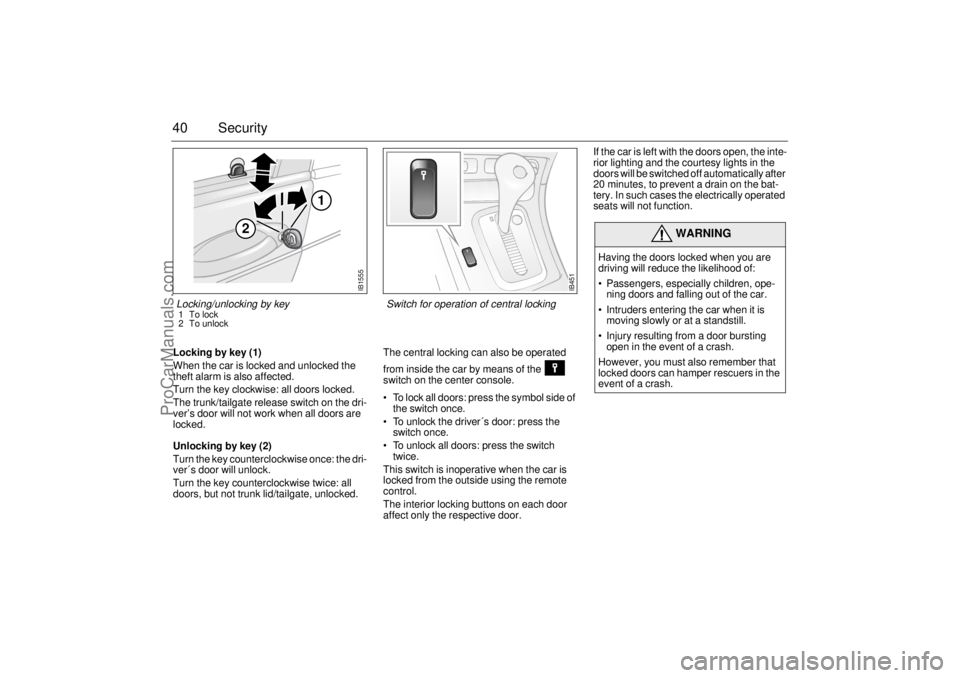
40 SecurityLocking by key (1)
When the car is locked and unlocked the
theft alarm is also affected.
Turn the key clockwise: all doors locked.
The trunk/tailgate release switch on the dri-
ver’s door will not work when all doors are
locked.
Unlocking by key (2)
Turn the key counterclockwise once: the dri-
ver´s door will unlock.
Turn the key counterclockwise twice: all
doors, but not trunk lid/tailgate, unlocked. The central locking can also be operated
from inside the car by means of the
switch on the center console.
To lock all doors: press the symbol side of
the switch once.
To unlock the driver´s door: press the
switch once.
To unlock all doors: press the switch
twice.
This switch is inoperative when the car is
locked from the outside using the remote
control.
The interior locking buttons on each door
affect only the respective door.If the car is left with the doors open, the inte-
rior lighting and the courtesy lights in the
doors will be switched off automatically after
20 minutes, to prevent a drain on the bat-
tery. In such cases the electrically operated
seats will not function.
WARNING
Having the doors locked when you are
driving will reduce the likelihood of:
Passengers, especially children, ope-
ning doors and falling out of the car.
Intruders entering the car when it is
moving slowly or at a standstill.
Injury resulting from a door bursting
open in the event of a crash.
However, you must also remember that
locked doors can hamper rescuers in the
event of a crash.
IB451
Switch for operation of central locking
IB1555
2
1
Locking/unlocking by key1To lock
2 To unlock
ProCarManuals.com
Page 43 of 276
41 Security
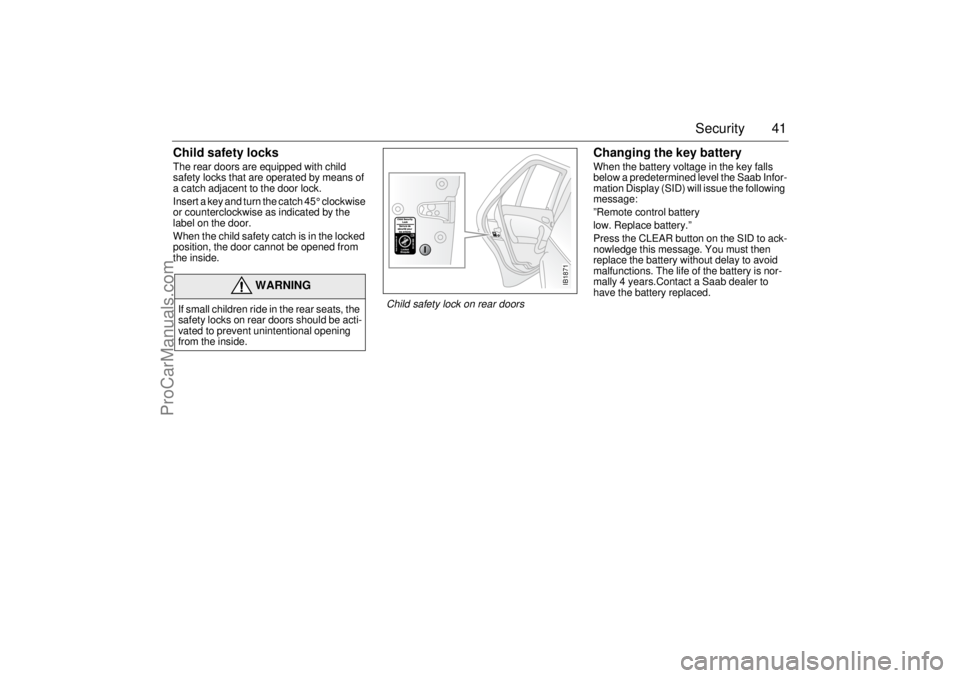
Child safety locksThe rear doors are equipped with child
safety locks that are operated by means of
a catch adjacent to the door lock.
Insert a key and turn the catch 45° clockwise
or counterclockwise as indicated by the
label on the door.
When the child safety catch is in the locked
position, the door cannot be opened from
the inside.
Changing the key batteryWhen the battery voltage in the key falls
below a predetermined level the Saab Infor-
mation Display (SID) will issue the following
message:
”Remote control battery
low. Replace battery.”
Press the CLEAR button on the SID to ack-
nowledge this message. You must then
replace the battery without delay to avoid
malfunctions. The life of the battery is nor-
mally 4 years.Contact a Saab dealer to
have the battery replaced.
WARNING
If small children ride in the rear seats, the
safety locks on rear doors should be acti-
vated to prevent unintentional opening
from the inside.
IB1871
Child safety lock on rear doors
ProCarManuals.com
Page 46 of 276
44 SecurityCar alarm The car alarm (anti-theft system) is acti-
vated/deactivated when the car is
locked/unlocked by the remote control or by
the key, see page 39.
The antenna for the alarm system is located
in the center console.
All the doors plus trunk lid/tailgate and hood
are monitored by microswitches.
Your Saab 9-5 is equipped with an Electro-
nic starting interlock (immobilizer), see
page 45 for details.
The car alarm is armed 10 seconds after the
car has been locked by the remote control.
During this ten-second delay period, the
doors, trunk lid/tailgate and hood may still
be opened without the alarm being trigge-
red.
The LED indicator on the instrument panel
fascia will be on continuously during this
period, at the end of which it will start to flash
(once every other second). If a door or the trunk lid/tailgate or hood has
been left open when the car is locked, the
LED on the fascia will flash (three times per
second) for ten seconds to indicate this.
WARNING
Leaving children or pets unattended in a
locked car is dangerous. It is also
dangerous to leave children in a vehicle
with the ignition key. A child or others
could be badly injured or even killed.
IB3153
3
2 1
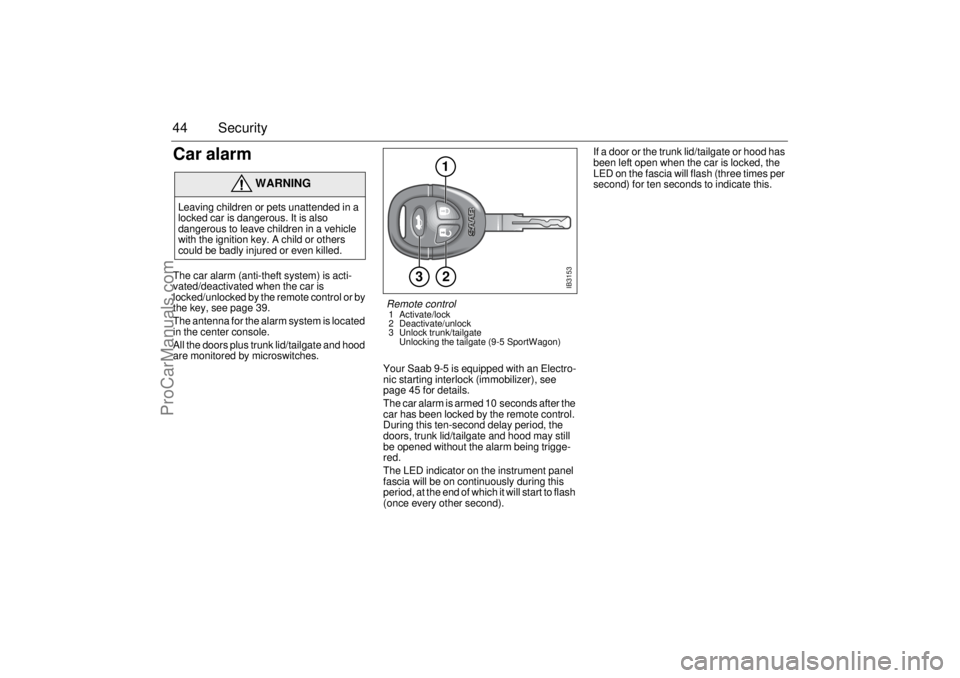
Remote control 1 Activate/lock
2 Deactivate/unlock
3 Unlock trunk/tailgate
Unlocking the tailgate (9-5 SportWagon)
ProCarManuals.com
Page 47 of 276

45 Security
Check to ensure that all the doors, plus
trunk lid/tailgate and hood, are closed pro-
perly.
If the fault persists (LED flashing when
another attempt is made to activate the car
alarm by remote control), lock the car using
the key instead. The car alarm will not have
been activated and you should contact an
authorized Saab dealer.
To avoid inconvenience caused by the
alarm being triggered inadvertently, make
sure that anyone else using the car is fami-
liar with how both the car alarm and the lock-
ing system work.
If the alarm is tripped (the direction indica-
tors are flashing and the horn is on) it can be
turned off by unlocking the car using the
button.
Activating the car alarm The car alarm cannot be activated if the dri-
ver’s door is open or if the ignition switch is
in ON position.
If one of the other doors or the trunk or hood
is open or opened and not closed again
during the 10-second delay period, it will be
excluded from the alarm function.
If it is then closed, a new delay period of ten
seconds will start, and the door (or trunk or
hood) will once again be secured by the
alarm system.
As usual, the LED will be on continuously
during the new delay period and will start to
flash once every other second after the
10-second period has elapsed.
Electronic starting interlock
(immobilizer) When the key is inserted in the ignition, a
signal is sent to the receiver. If the signal is
verified, the engine can be started.
Each time the key is removed from the igni-
tion, the electronic immobilizer is activated.
This means that the car cannot be started
without the correct key inserted in the igni-
tion and the immobilizer thus deactivated.
If a fault is detected (e.g. in the transmitter)
”Key not accepted.
Contact service.”
will appear on the Saab Information Display
(SID).
In this case, you can still start the car if you
turn the ignition key to ON and press one of
the buttons on the key (providing that the
receiver gets the right signal from the key).
Take the car to an authorized Saab dealer
to have the system checked.
The LED double-flashes when the car is
immobilized.
ProCarManuals.com
Page 49 of 276

47 Security
Overview of functions
Alarm signals may differ between model variants for different
countries.
Some of the car-alarm functions can be reprogrammed – con-
sult your Saab dealer for further details (see page 264). Locking/
activation Hazard warning lights flash once.
The LED will come on for 10 seconds.
Unlocking/
deactivation Hazard warning lights flash twice.
The LED will come on for two seconds.
Unlocking/
deactivation of
trunk lid/tailgate
alarm Hazard warning lights flash three times.
The LED will flash three times per second for
10 seconds.
Alarm triggered Hazard warning lights flash for 5 min.
Horn wails for 30 seconds.
To switch off the alarm, deactivate the system in
the normal way (unlocking).
Key The range of the key is normally 5–10 yds. (5–
10 metres), although it can be substantially more
than this in ideal conditions (range can vary gre-
atly depending on the position of the car and its
surroundings).
If the key is not working, it may be because the
code signal has not been synchronized with that
in the control module for the car alarm. To rectify
this, press the unlock button on the key at least
four times in quick succession. When it is recog-
nized, the door locks will cycle.
If a key is lost, the new one will have to be pro-
grammed (all keys must be present) to match the
car’s unique security code. Contact an author-
ized Saab dealer.Battery for key The battery for the key will normally have a life of
4 years. When the battery needs changing,
”Remote control battery
low. Replace battery.”
will appear on the Saab Information Display
(SID).
Contact an authorized Saab dealer.
Car-battery
voltage If the battery is disconnected while the alarm is
active (car is locked), for example during an
attempt to steal the car, the alarm will be
triggered.
ProCarManuals.com
Page 50 of 276

48 SecurityOverview of LED signals and SID messagesSome signals may differ between model variants for different
countries. Status LED signal
Activation (during 10-second delay). Comes on for 10 seconds.
Alarm activated (after delay). Flashes once every other
second.
Deactivation. Comes on for 2 seconds.
Alarm not activated. Off.
Door, trunk lid/tailgate or hood open
or opened during delay period.Flashes three times per
second for 10 seconds.
Unlocking the trunk lid/tailgate. Flashes three times per
second for 10 seconds.
Closing of door, trunk lid/tailgate or
hood after delay period.Comes on for 10 seconds.
Car immobilized but not locked.
Car alarm not activated.Flashes twice at three
seconds intervals.
Fault in a switch serving doors, hood
or trunk lid.Flashing (instead of being
on continuously) during
delay period.
SID message Reason/action
Theft protection failure.
Contact service.Probably a fault in one of the sensors
or the horn.
Have the car checked by an authori-
zed Saab dealer.
Key not accepted.
Contact service.Fault in key transmitter or in igni-
tion-switch receiver.
Turn ignition switch to ON and press
the unlock button on the key. Start
the engine.
Have the car checked by an authori-
zed Saab dealer.
Remote control battery
low. Replace battery.Fit a new battery in the key, see
page 41.
REMOTE KEY
TRANSPONDRTurn the ignition key to position ON
and then press the button for ope-
ning the trunk lid. Saab Information
Display (SID) displays the number of
keys and transmitters (transponders)
coded to the car.
ProCarManuals.com
Page 67 of 276

65 Instruments and controls
The following messages may be displayed: 1) This message will be displayed approximately
600 miles (1,000 km) before the next scheduled
service is due, or when 365 days have elapsed
since the last service. The message should be
cleared at the time of that service (see the Saab
Warranties & Service Record Booklet).
This message can also be deleted by first briefly
pressing the CLEAR button, then depressing it a
second time for at least eight seconds until
”SERVICE” appears on the display and a chime
sounds. The message can only be deleted when
it is shown on the SID.
Night panelTo improve night-driving conditions inside
the car, the Night Panel mode can be selec-
ted. In this mode, the amount of information
displayed is reduced, and only the most
important instruments and displays will be
illuminated.
When the Night Panel button is pressed,
only the speedometer will be illuminated (up
to the 87-mph or 140-km/h graduation), all
the other instruments illumination being ext-
inguished and their needles moved to zero.
Both the SID and the ACC displays will be
extinguished and the backlighting for swit-
ches and other controls will be dimmed.
Note: All indicator and warning lights,
together with the display of CHECK messa-
ges, will operate as normal, except ”Out-
door temperature”, see page 62.The following conditions will wake up the
respective displays in the Night-Panel
mode:
Setting of the Audio system, SID or ACC
(display comes on for ten seconds).
CHECK message generated in the SID.
High engine revs cause the rev counter to
be illuminated until the engine speed has
fallen again.
If the quantity of fuel remaining falls below
4 gallons (15 liters), the fuel gauge will be
illuminated.
If the engine temperature rises above nor-
mal, the temperature gauge will be illumi-
nated.
If the speed of the car exceeds 84 mph
(135 km/h), the entire speedometer will
be illuminated.
In cars with automatic transmission, if the
selector lever is moved from D to position
M or L, the selector indication on the main
instrument panel will be illuminated.
To restore the displays and lighting to the
normal mode, press the Night-Panel button. Message See
page
Fog light failure. 198
Rear light failure. 203
Brake light failure. 203
Washer fluid level low.
Refill. 196
Coolant level low.
Refill. 188
Remote control battery
low. Replace battery. 41
Key not accepted.
Contact service. 48
Theft protection failure.
Contact service. 48
Gearbox too hot.
Make a safe stop. 146
Time for ser vice.
1)
246
ProCarManuals.com
Page 102 of 276
100 Saab 9-5 Audio SystemLoudness ON/OFF To change the default setting:
The default setting for this function is ON.
– Press and hold the BAND button at the
same time as you switch on the Audio
System.
– After START VOL appears, release the
BAND button.
– Select LOUDNESS using
– Select ON or OFF using the VOL control.
– Wait 10 seconds or press one of the but-
tons on the bottom row of the Audio Sys-
tem, e.g. RADIO/BAND, to save the new
default setting.
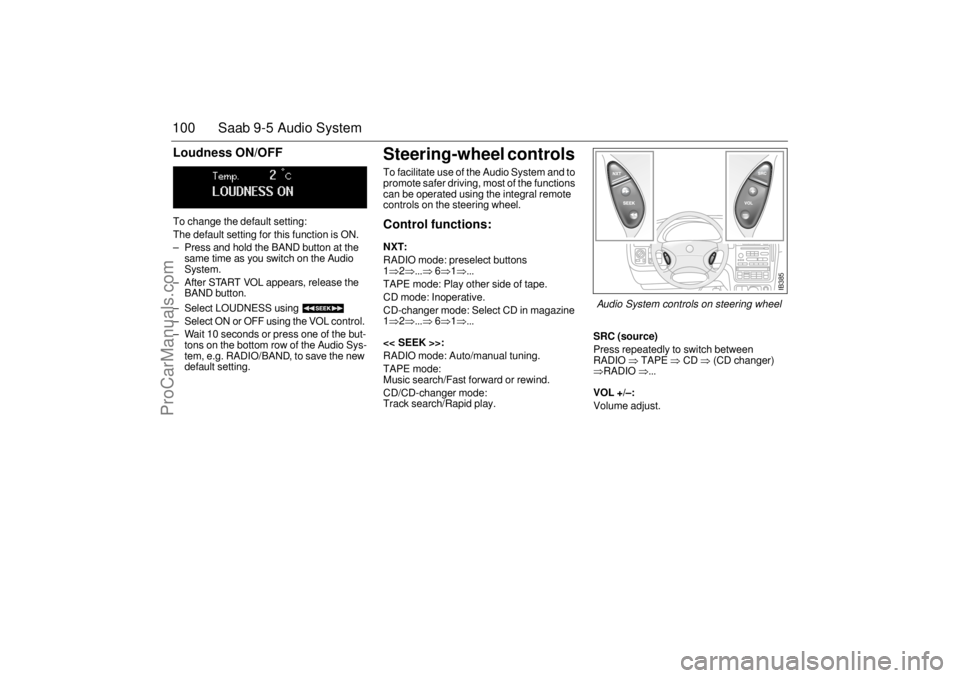
Steering-wheel controls To facilitate use of the Audio System and to
promote safer driving, most of the functions
can be operated using the integral remote
controls on the steering wheel. Control functions: NXT: RADIO mode: preselect buttons
1⇒2⇒...⇒
6⇒1⇒...
TAPE mode: Play other side of tape.
CD mode: Inoperative.
CD-changer mode: Select CD in magazine
1⇒2⇒...⇒
6⇒1⇒...
<< SEEK >>:
RADIO mode: Auto/manual tuning.
TAPE mode:
Music search/Fast forward or rewind.
CD/CD-changer mode:
Track search/Rapid play.
SRC (source)Press repeatedly to switch between
RADIO
⇒ TAPE
⇒ CD
⇒ (CD changer)
⇒RADIO
⇒...
VOL +/–: Volume adjust.
IB385
Audio System controls on steering wheel
ProCarManuals.com