ECO mode SAAB 9-5 2008 User Guide
[x] Cancel search | Manufacturer: SAAB, Model Year: 2008, Model line: 9-5, Model: SAAB 9-5 2008Pages: 288, PDF Size: 27.54 MB
Page 78 of 288
78 Instruments and controlsWhen the engine has been switched off,
the control stalk must be moved to posi-
tion 0 and back to position 1 to reactivate
the sensor.
Set the sensitivity using the control on the
wiper stalk (the same control as used for
wiper delay on cars not fitted with a rain sen-
sor). The sensor has three sensitivity set-
tings. It is most sensitive when in the upper-
most position (1). When a higher degree of
sensitivity is selected, the wipers make one
sweep of the windshield for reference.
The rain sensor has a daylight and a night
time mode. The sensor measures the
amount of available light and automatically
selects the appropriate mode. The sensor is
more sensitive at night. The function of the
rain sensor is impaired by dry snow.
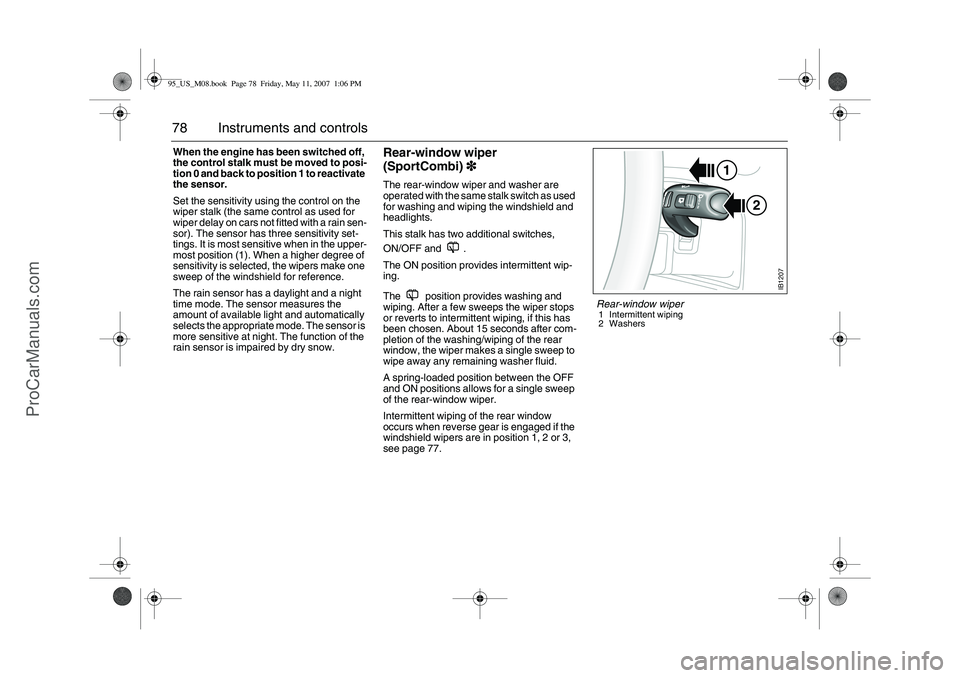
Rear-window wiper
(SportCombi)3
33 3The rear-window wiper and washer are
operated with the same stalk switch as used
for washing and wiping the windshield and
headlights.
This stalk has two additional switches,
ON/OFF and .
The ON position provides intermittent wip-
ing.
The position provides washing and
wiping. After a few sweeps the wiper stops
or reverts to intermittent wiping, if this has
been chosen. About 15 seconds after com-
pletion of the washing/wiping of the rear
window, the wiper makes a single sweep to
wipe away any remaining washer fluid.
A spring-loaded position between the OFF
and ON positions allows for a single sweep
of the rear-window wiper.
Intermittent wiping of the rear window
occurs when reverse gear is engaged if the
windshield wipers are in position 1, 2 or 3,
see page 77.
2 1
IB1207
Rear-window wiper1 Intermittent wiping
2 Washers
95_US_M08.book Page 78 Friday, May 11, 2007 1:06 PM
ProCarManuals.com
Page 85 of 288
85 Instruments and controls
Adaptation of ACCIt is also possible to customize the ACC system, e.g. to adapt to
driving and weather conditions.
Adaptation and restoration of factory settings is done by holding
the respective button depressed approx. 2 seconds until a chime
sounds.
Make sure the ignition is ON.
Example: If you want the ACC system to handle activation and deac-
tivation of rear window/door mirror heating, hold the button
depressed approx. 2 seconds until a chime sounds.
The display shows:
ACC:AUTO
RDEFR CTRL
When “Adaptation of ACC“ is done, it will apply until factory settings
are restored. Function Operation in AUTO mode
after adaptationFactory setting
The rear window heating will
come on after the engine has
started if the outside temper-
ature is below +5 °C.
– This function helps to pre-
vent ice or mist forming on
the rear window in cold,
damp weather. Fuel con-
sumption may increase
slightly.Heating is selected
manually.
Seat heating comes on if the
system determines that
heating is necessary based
on the temperature in the
seat and the outside temper-
ature. There are two settings
for heating. Repeat-
edly pressing the but-
ton switches between
low output, high output
and off. Function Display text in SID
during adaptationDisplay text in SID when
factory settings are
restored
ACC:AUTO
RDEFR CTRLACC:MANUAL
RDEFR CTRL
ACC:AUTO
S E AT H E AT I N GACC:MANUAL
SEAT HEATING
95_US_M08.book Page 85 Friday, May 11, 2007 1:06 PM
ProCarManuals.com
Page 93 of 288
93 Saab 9-5 Audio System
RadioPress the RADIO BAND button to return to
radio mode if another audio source is in use.Selecting a radio stationSelecting a frequency band
Press the RADIO BAND button to change
frequency band. The selected frequency
band appears on the display.
Selecting a preset station
Scroll to the desired preset page by press-
ing the FAV button and then pressing the
pushbutton (1-6) under the desired preset
station.
You can also press or on the steering
wheel to select another preset station.
Tuning a stationFine tuning
Turn the tone control one increment or
press the REV or FWD button to fine-tune
the frequency in increments of 0.2 MHz.
Automatic tuning
Press one of the SEEK buttons or the
button on the steering wheel for automatic
seek tuning. The radio then searches
upward in the frequency band for the near-
est strong station and stops at that fre-
quency.
Manual tuning
Turn the tone control or hold the REV or
FWD button depressed to seek a frequency
manually. Release the control/button to
stop at the desired frequency.
Scanning radio stations
Hold one of the SEEK buttons or the
button on the steering wheel depressed
until a chime sounds for a 5 second sam-
pling of each station accessible on the fre-
quency band.
Scanning...
appears on the
display.
Press one of the SEEK buttons or the
button on the steering wheel again to cancel
the scan and select the radio station being
played at that instant.
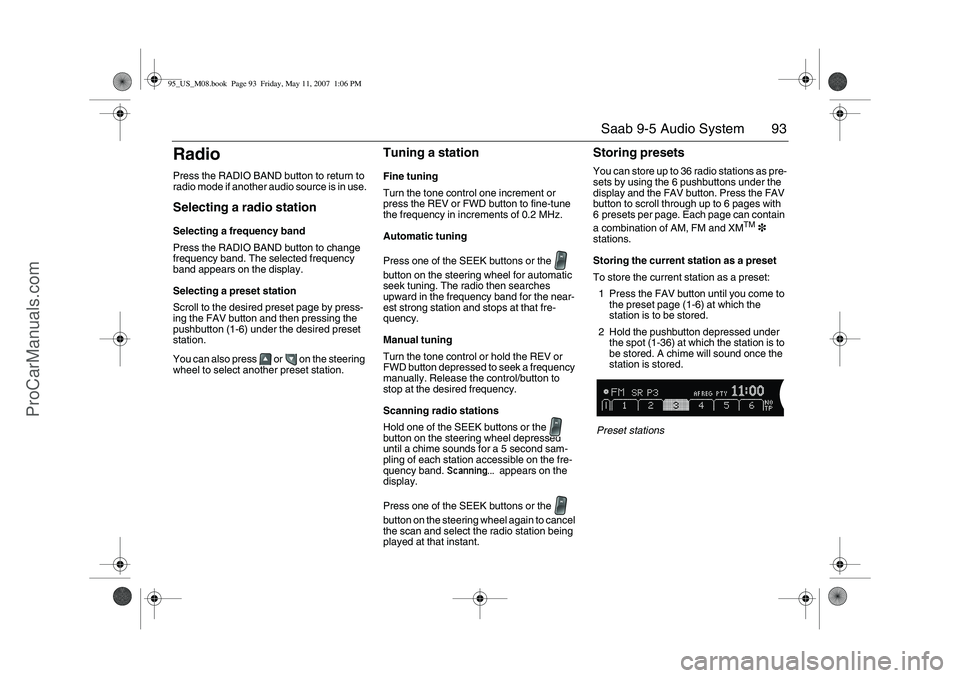
Storing presetsYou can store up to 36 radio stations as pre-
sets by using the 6 pushbuttons under the
display and the FAV button. Press the FAV
button to scroll through up to 6 pages with
6 presets per page. Each page can contain
a combination of AM, FM and XM
TM
3
stations.
Storing the current station as a preset
To store the current station as a preset:
1 Press the FAV button until you come to
the preset page (1-6) at which the
station is to be stored.
2 Hold the pushbutton depressed under
the spot (1-36) at which the station is to
be stored. A chime will sound once the
station is stored.
Preset stations
95_US_M08.book Page 93 Friday, May 11, 2007 1:06 PM
ProCarManuals.com
Page 119 of 288

119 Interior equipment and trunk
Preparations for first-time programming
Before programming the garage opener for
the first time, you must delete any factory
codes.
Press and hold the two outer buttons until
the indicator light begins to flash-after
20 seconds. Release both buttons. Do not
hold for longer that 30 seconds. The garage
opener is now in the train (or learning) mode
and can be programmed at any time begin-
ning with "Programming" - step 2.
Programming
The garage opener can record and store the
frequencies of three different remote con-
trols.
The battery in the remote control should be
fairly new for programming to work well.
Do not repeat "Programming" - step two
to train additional devices to a second or
third button. Begin with "Programming" -
step three.
1 Turn the ignition ON.
2 Press and hold the two outer buttons
(buttons one and three) - releasing only
when the indicator light begins to flash
(after 20 seconds). Do not hold the
buttons for longer than 30 seconds and
do not repeat step two to program a
second and/or third hand-held transmit-
ter to the remaining two buttons.
3 Position the end of your hand-held trans-
mitter 1-3 inches (5-14 cm) away from the button you wish to program while
keeping the indicator light in view. The
transmitter should face the mirror from
below or left side of the mirror.
4 Simultaneously press and hold both the
chosen and hand-held transmitter
buttons. Do not release the buttons
until step 5 has been completed.
Note: Some gate operators and garage
door openers may require you to replace
this Programming Step 4 with procedures
noted in the "Gate Operator / Canadian Pro-
gramming" section.
5 After the indicator light changes from a
slow to a rapidly blinking light, release
both the mirror and hand-held transmit-
ter buttons.
6 Press and hold the just-trained button
and observe the indicator light.
If the indicator light stays on
constantly, programming is complete
and your device should activate when
the button is pressed and released.
Note: To program the remaining two but-
tons, begin with "Programming" - step
three. Do not repeat step two.
If the indicator light blinks rapidly for two
seconds and then turns to a constant
light continue with "Programming"
steps 7-9 to complete the programming of
a rolling code equipped device (most com-
monly a garage door opener).7 At the garage door opener receiver
(motor-head unit) in the garage, locate
the "learn" or "smart" button. This can
usually be found where the hanging
antenna wire is attached to the
motor-head unit.
8 Firmly press and release the "learn" or
"smart" button. (The name and color of
the button may vary by manufacturer.)
Note: There are 30 seconds in which to ini-
tiate step nine.
9 Return to the vehicle and firmly press,
hold for two seconds and release the
programmed button. Repeat the
"press/hold/release" sequence a
second time, and, depending on the
brand of the garage door opener (or
other rolling code equipped device),
repeat this sequence a third time to
complete the programming process.
The garage opener should now activate
your rolling code equipped device.
Note: To program the remaining two but-
tons, begin with "Programming" - step
three. Do not repeat step two. 95_US_M08.book Page 119 Friday, May 11, 2007 1:06 PM
ProCarManuals.com
Page 120 of 288
120 Interior equipment and trunkGate Operator / Canadian Programming
Canadian radio-frequency laws require
transmitter signals to "time-out" (or quit)
after several seconds of transmission -
which may not be long enough for the
garage opener to pick up the signal during
programming. Similar to this Canadian law,
some U.S. gate operators are designed to
"time-out" in the same manner.
If you live in Canada or you are having diffi-
culties programming a gate operator by
using the "Programming" procedures
(regardless of where you live), replace
"Programming " step 4 with the following:
Note: If programming a garage door opener
or gate operator, it is advised to unplug the
device during the "cycling" process to pre-
vent possible overheating.
Continue to press and hold the button while
you press and release - every two sec-
onds ("cycle") your hand-held transmitter
until the frequency signal has successfully
been accepted by the garage opener. (The
indicator light will flash slowly and then rap-
idly.)
Proceed with "Programming" step five to
complete.Reprogramming a single button
To program a device to the garage opener
using a button previously trained, follow
these steps:
1 Press and hold the desired button. DO
NOT release the button.
2 The indicator light will begin to flash after
20 seconds. Without releasing the
button, proceed with "Programming" -
step 3.Erasing the three buttons
To erase programming from the three but-
tons (individual buttons cannot be erased
but can be "reprogrammed" as outlined
below), follow the step noted:
Press and hold the two outer buttons until
the indicator light begins to flash-after
20 seconds. Release both buttons. Do
not hold for longer that 30 seconds. The
garage opener is now in the train (or
learning) mode and can be programmed
at any time beginning with "Programming"
- step 3.
NOTESwitch off the power supply to the garage
door or gate (or park the car beyond the
range of the remote control) while pro-
gramming using the "cycling" method to
prevent damaging the electrical motor.
95_US_M08.book Page 120 Friday, May 11, 2007 1:06 PM
ProCarManuals.com
Page 124 of 288
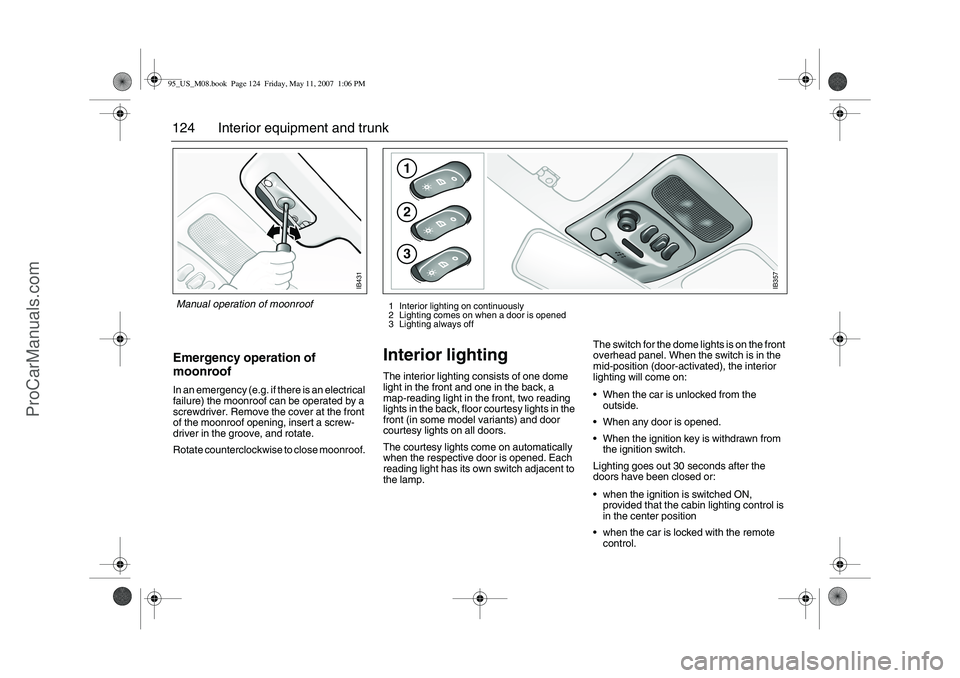
124 Interior equipment and trunkEmergency operation of
moonroofIn an emergency (e.g. if there is an electrical
failure) the moonroof can be operated by a
screwdriver. Remove the cover at the front
of the moonroof opening, insert a screw-
driver in the groove, and rotate.
Rotate counterclockwise to close moonroof.
Interior lighting The interior lighting consists of one dome
light in the front and one in the back, a
map-reading light in the front, two reading
lights in the back, floor courtesy lights in the
front (in some model variants) and door
courtesy lights on all doors.
The courtesy lights come on automatically
when the respective door is opened. Each
reading light has its own switch adjacent to
the lamp.The switch for the dome lights is on the front
overhead panel. When the switch is in the
mid-position (door-activated), the interior
lighting will come on:
When the car is unlocked from the
outside.
When any door is opened.
When the ignition key is withdrawn from
the ignition switch.
Lighting goes out 30 seconds after the
doors have been closed or:
when the ignition is switched ON,
provided that the cabin lighting control is
in the center position
when the car is locked with the remote
control.
IB431
Manual operation of moonroof
123
IB357
1 Interior lighting on continuously
2 Lighting comes on when a door is opened
3 Lighting always off
95_US_M08.book Page 124 Friday, May 11, 2007 1:06 PM
ProCarManuals.com
Page 139 of 288
139 Starting and driving
IB3878
Starting and driving
Ignition switch ________ 140
Starting the engine ____ 141
Important considerations
for driving___________ 144
Refueling ____________ 146
Engine Break-In Period_ 150
Gear changing ________ 150
Cruise control ________ 159
Braking ______________ 160
Electronic Stability
Program (ESP
®) ______ 163
Economical motoring __ 170
Driving in cold weather_ 172
Driving in hot weather _ 173
Towing a trailer3
33 3_____ 174 Driving with a roof rack
load________________ 179
Driving at night _______ 181
Driving with a load ____ 181
Driving with a spare
wheel fitted _________ 183
Driving with the trunk
lid/tailgate open______ 183
Driving in deep water __ 183
Towing the car________ 183
Jump starting ________ 186
Saab Parking
Assistance3
33 3________ 168
Parking brake ________ 165
Parking ______________ 165
3 Asterisk means: equipment not fitted in all cars
(can depend on model variant, engine variant,
market specification, options or accessories).95_US_M08.book Page 139 Friday, May 11, 2007 1:06 PM
ProCarManuals.com
Page 143 of 288
143 Starting and driving
Useful tips on cold climate
startingIf the engine has failed to start after several
attempts in very cold weather, press and
hold the accelerator down to the floor and
run the starter for 5–10 seconds. This will
prevent the engine being flooded (exces-
sively rich fuel-air mixture).
Now start the engine in the normal way – do
not touch the accelerator.
If the engine stalls immediately after starting
(e.g. if the clutch was released too quickly),
do not touch the accelerator when restarting
the engine.
Limp-home modeThe engine management system has a
diagnostic feature that continually checks a
number of internal functions.
If, for example, a fault is detected in the
throttle valve, the engine management
system will go into Limp-home mode.This
limits:
idling control,
disables the cruise-control system and
limits the capacity of the A/C compressor.
If the limp-home mode is in operation
(”Engine malfunction (CHECK ENGINE)”
light on, see below) and the outside temper-
ature is close to or below freezing, you may
need to use some throttle on starting (some
pressure on the accelerator).
If the diagnostic system has detected a fault
in the engine-management system, the
”Engine malfunction (CHECK ENGINE)”
light on the main instrument panel will
come on (see page 58), indicating that you
should have the car checked as soon as
possible by a workshop. We recommend
that you contact an authorized Saab dealer.
NOTEIf the CHECK ENGINE warning light
starts to flash, ease off the accelerator
slightly. If the light does not cease to flash
within 5 seconds, stop the car in a suit-
able place as soon as possible and turn
off the engine. The car must be towed to
a workshop. We recommend that you
contact an authorized Saab dealer.
If the CHECK ENGINE warning light
flashes, it indicates that the engine is mis-
firing which can result in damage to the
catalytic converter.
95_US_M08.book Page 143 Friday, May 11, 2007 1:06 PM
ProCarManuals.com
Page 152 of 288
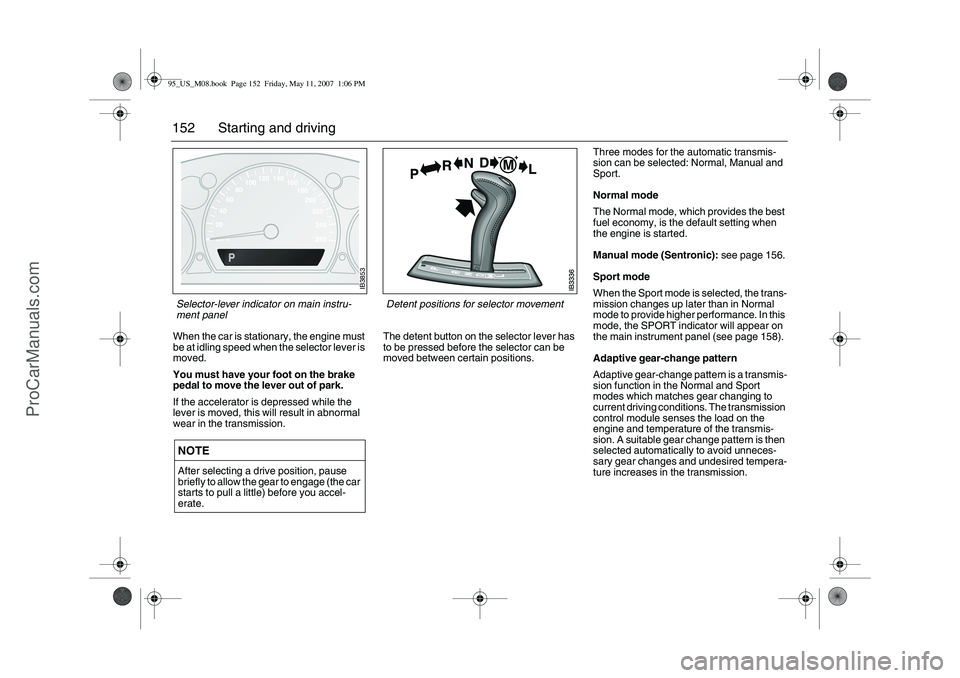
152 Starting and drivingWhen the car is stationary, the engine must
be at idling speed when the selector lever is
moved.
You must have your foot on the brake
pedal to move the lever out of park.
If the accelerator is depressed while the
lever is moved, this will result in abnormal
wear in the transmission.
The detent button on the selector lever has
to be pressed before the selector can be
moved between certain positions. Three modes for the automatic transmis-
sion can be selected: Normal, Manual and
Sport.
Normal mode
The Normal mode, which provides the best
fuel economy, is the default setting when
the engine is started.
Manual mode (Sentronic): see page 156.
Sport mode
When the Sport mode is selected, the trans-
mission changes up later than in Normal
mode to provide higher performance. In this
mode, the SPORT indicator will appear on
the main instrument panel (see page 158).
Adaptive gear-change pattern
Adaptive gear-change pattern is a transmis-
sion function in the Normal and Sport
modes which matches gear changing to
current driving conditions. The transmission
control module senses the load on the
engine and temperature of the transmis-
sion. A suitable gear change pattern is then
selected automatically to avoid unneces-
sary gear changes and undesired tempera-
ture increases in the transmission.
NOTEAfter selecting a drive position, pause
briefly to allow the gear to engage (the car
starts to pull a little) before you accel-
erate.
Detent positions for selector movement
IB3853
Selector-lever indicator on main instru-
ment panel 95_US_M08.book Page 152 Friday, May 11, 2007 1:06 PM
ProCarManuals.com
Page 154 of 288
154 Starting and drivingIf ”Automatic transmission3, fault indicator”
light appears on the main instrument panel,
the system has detected a fault in the auto-
matic transmission or its control module
(see page 62).
This also means that the Limp-home mode
has been selected, to guard against further
damage being done to the transmission. In
this mode, the automatic transmission
starts in 5th gear, and gear changes (if nec-
essary) will have to be made manually.
Stop the car in a safe place. Switch off then
restart the engine. If the fault is intermittent,
the transmission will operate as normal
despite the fault indicator being on. Have
the car checked at a workshop. We recom-
mend that you contact an authorized Saab
dealer.
It is not possible to select the SPORT or
Sentronic mode when the Limp-home mode
is active.
Gear changes must be made manually.
The following gears will be engaged in the
respective selector positions when the auto-
matic transmission is in Limp-home mode:
Overheated transmission fluid If the automatic-transmission fluid should
overheat, the following message will appear
on the SID:
”Gearbox too hot.
Make a safe stop.”
In this event, stop the car in a suitable place,
switch off the engine and open the hood.
Wait for several minutes then turn on the
ignition to check that the message has gone
out. When driving subsequent to the trans-
mission fluid overheating, select a gear in
which the engine speed is about 3,000 rpm.
Overheating of the automatic-transmission
fluid can occur when the car is towing a
heavy load, such as a camping trailer in hilly
country. High ambient temperatures can
also increase the temperature of the trans-
mission fluid or the oil cooler may be faulty.
Contact a workshop. We recommend that
you contact an authorized Saab dealer (see
also page 174).
Automatic transmission3
33 3,
fault indicator
Position R D M L
Gear Reverse 5th 5th 2nd
NOTEIf the control module has actuated the
Limp-home function for the automatic
transmission, the car will remain in 5th
gear when D is selected, making it very
sluggish.
Select position L to prevent unnecessary
wear on the transmission. The transmis-
sion then starts in 2nd gear. Once the car
is moving you can select position D.
When the indicator light is on, the car
must not be driven with a caravan or
trailer attached.
95_US_M08.book Page 154 Friday, May 11, 2007 1:06 PM
ProCarManuals.com