trunk release SAAB 9-5 2008 User Guide
[x] Cancel search | Manufacturer: SAAB, Model Year: 2008, Model line: 9-5, Model: SAAB 9-5 2008Pages: 288, PDF Size: 27.54 MB
Page 122 of 288
122 Interior equipment and trunkCompass The compass is integrated in the rearview
mirror. The compass bearing is displayed in
the top right-hand corner of the mirror and is
updated every other second. The compass
displays the car’s direction of travel: N, NE,
E, etc.
Switch the compass display on and off by
pressing button 5 for 3 seconds.
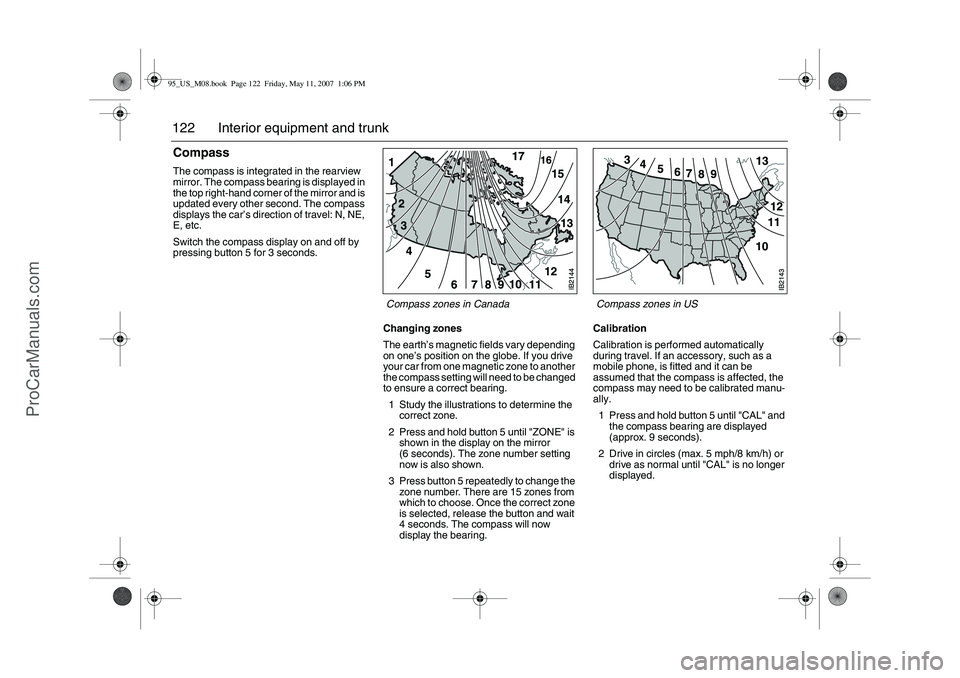
Changing zones
The earth’s magnetic fields vary depending
on one’s position on the globe. If you drive
your car from one magnetic zone to another
the compass setting will need to be changed
to ensure a correct bearing.
1 Study the illustrations to determine the
correct zone.
2 Press and hold button 5 until "ZONE" is
shown in the display on the mirror
(6 seconds). The zone number setting
now is also shown.
3 Press button 5 repeatedly to change the
zone number. There are 15 zones from
which to choose. Once the correct zone
is selected, release the button and wait
4 seconds. The compass will now
display the bearing.Calibration
Calibration is performed automatically
during travel. If an accessory, such as a
mobile phone, is fitted and it can be
assumed that the compass is affected, the
compass may need to be calibrated manu-
ally.
1 Press and hold button 5 until "CAL" and
the compass bearing are displayed
(approx. 9 seconds).
2 Drive in circles (max. 5 mph/8 km/h) or
drive as normal until "CAL" is no longer
displayed.
Compass zones in US Compass zones in Canada
95_US_M08.book Page 122 Friday, May 11, 2007 1:06 PM
ProCarManuals.com
Page 128 of 288
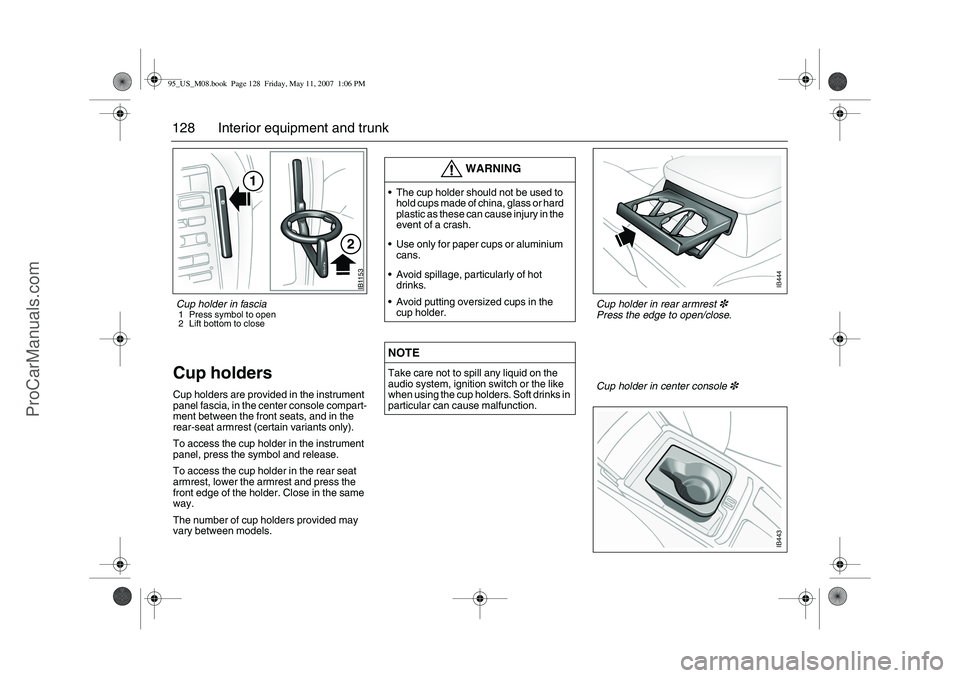
128 Interior equipment and trunkCup holders Cup holders are provided in the instrument
panel fascia, in the center console compart-
ment between the front seats, and in the
rear-seat armrest (certain variants only).
To access the cup holder in the instrument
panel, press the symbol and release.
To access the cup holder in the rear seat
armrest, lower the armrest and press the
front edge of the holder. Close in the same
way.
The number of cup holders provided may
vary between models.
WARNING
The cup holder should not be used to
hold cups made of china, glass or hard
plastic as these can cause injury in the
event of a crash.
Use only for paper cups or aluminium
cans.
Avoid spillage, particularly of hot
drinks.
Avoid putting oversized cups in the
cup holder.NOTETake care not to spill any liquid on the
audio system, ignition switch or the like
when using the cup holders. Soft drinks in
particular can cause malfunction.
IB1153
1
2
Cup holder in center console
3
IB443
Cup holder in rear armrest
3
Press the edge to open/close.
IB444
Cup holder in fascia 1 Press symbol to open
2 Lift bottom to close 95_US_M08.book Page 128 Friday, May 11, 2007 1:06 PM
ProCarManuals.com
Page 129 of 288
129 Interior equipment and trunkTrunkFolding the rear seat, 9-5 SedanThe rear seat is split and the two sections can be folded indepen-
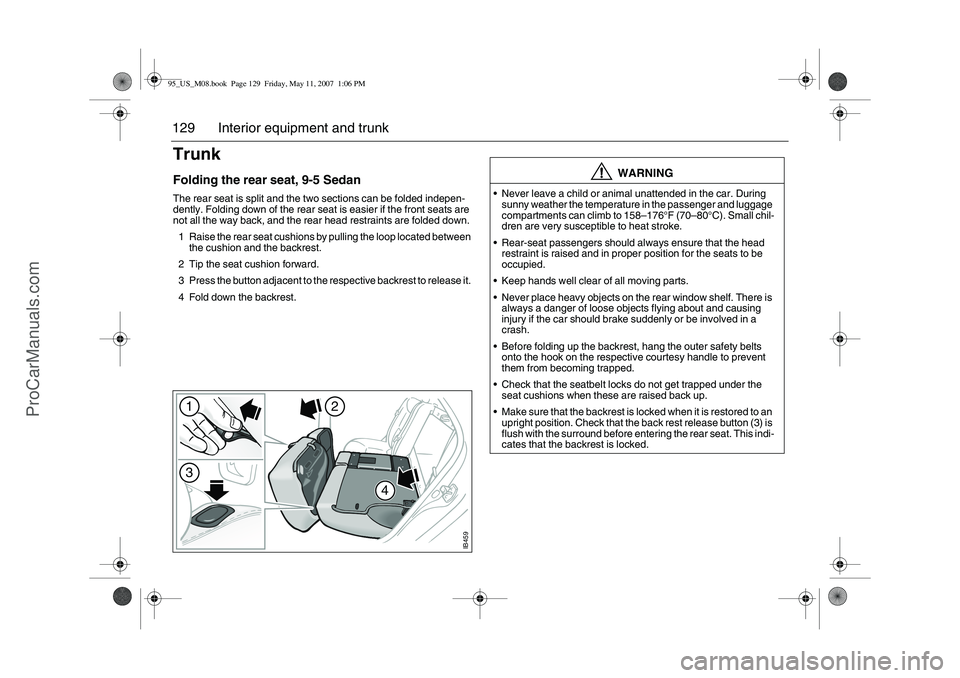
dently. Folding down of the rear seat is easier if the front seats are
not all the way back, and the rear head restraints are folded down.
1 Raise the rear seat cushions by pulling the loop located between
the cushion and the backrest.
2 Tip the seat cushion forward.
3 Press the button adjacent to the respective backrest to release it.
4 Fold down the backrest.
WARNING
Never leave a child or animal unattended in the car. During
sunny weather the temperature in the passenger and luggage
compartments can climb to 158–176°F (70–80°C). Small chil-
dren are very susceptible to heat stroke.
Rear-seat passengers should always ensure that the head
restraint is raised and in proper position for the seats to be
occupied.
Keep hands well clear of all moving parts.
Never place heavy objects on the rear window shelf. There is
always a danger of loose objects flying about and causing
injury if the car should brake suddenly or be involved in a
crash.
Before folding up the backrest, hang the outer safety belts
onto the hook on the respective courtesy handle to prevent
them from becoming trapped.
Check that the seatbelt locks do not get trapped under the
seat cushions when these are raised back up.
Make sure that the backrest is locked when it is restored to an
upright position. Check that the back rest release button (3) is
flush with the surround before entering the rear seat. This indi-
cates that the backrest is locked.
IB459
1
2
4
3
95_US_M08.book Page 129 Friday, May 11, 2007 1:06 PM
ProCarManuals.com
Page 136 of 288
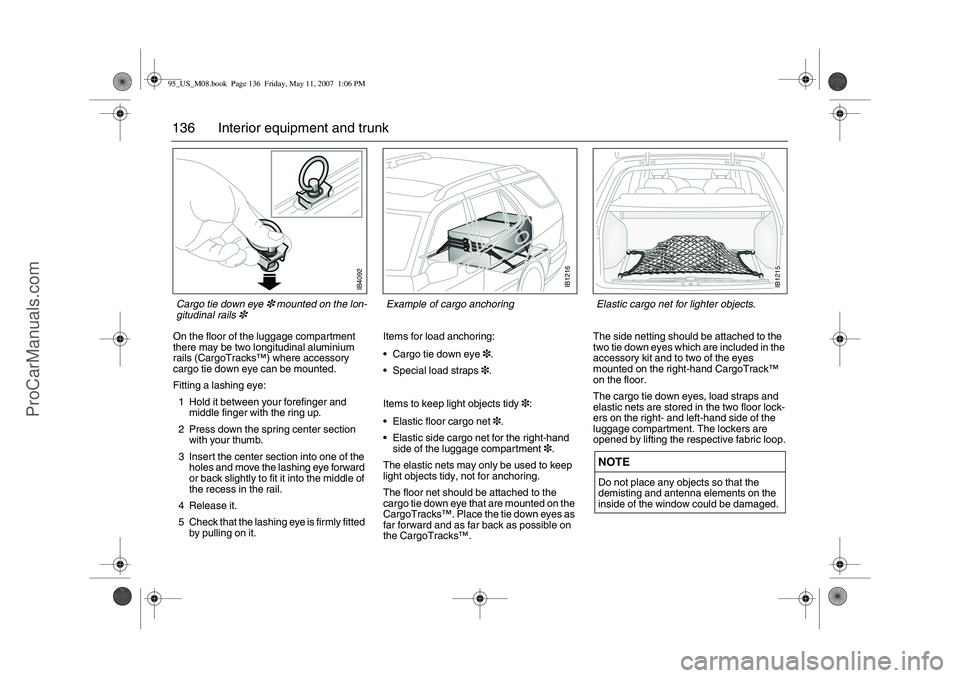
136 Interior equipment and trunkOn the floor of the luggage compartment
there may be two longitudinal aluminium
rails (CargoTracks™) where accessory
cargo tie down eye can be mounted.
Fitting a lashing eye:
1 Hold it between your forefinger and
middle finger with the ring up.
2 Press down the spring center section
with your thumb.
3 Insert the center section into one of the
holes and move the lashing eye forward
or back slightly to fit it into the middle of
the recess in the rail.
4 Release it.
5 Check that the lashing eye is firmly fitted
by pulling on it.Items for load anchoring:
Cargo tie down eye3.
Special load straps3.
Items to keep light objects tidy3:
Elastic floor cargo net3.
Elastic side cargo net for the right-hand
side of the luggage compartment3.
The elastic nets may only be used to keep
light objects tidy, not for anchoring.
The floor net should be attached to the
cargo tie down eye that are mounted on the
CargoTracks™. Place the tie down eyes as
far forward and as far back as possible on
the CargoTracks™.The side netting should be attached to the
two tie down eyes which are included in the
accessory kit and to two of the eyes
mounted on the right-hand CargoTrack™
on the floor.
The cargo tie down eyes, load straps and
elastic nets are stored in the two floor lock-
ers on the right- and left-hand side of the
luggage compartment. The lockers are
opened by lifting the respective fabric loop.
NOTEDo not place any objects so that the
demisting and antenna elements on the
inside of the window could be damaged.
IB4092
Cargo tie down eye
3 mounted on the lon-
gitudinal rails
3
IB1216
Example of cargo anchoring
IB1215
Elastic cargo net for lighter objects.
95_US_M08.book Page 136 Friday, May 11, 2007 1:06 PM
ProCarManuals.com
Page 138 of 288
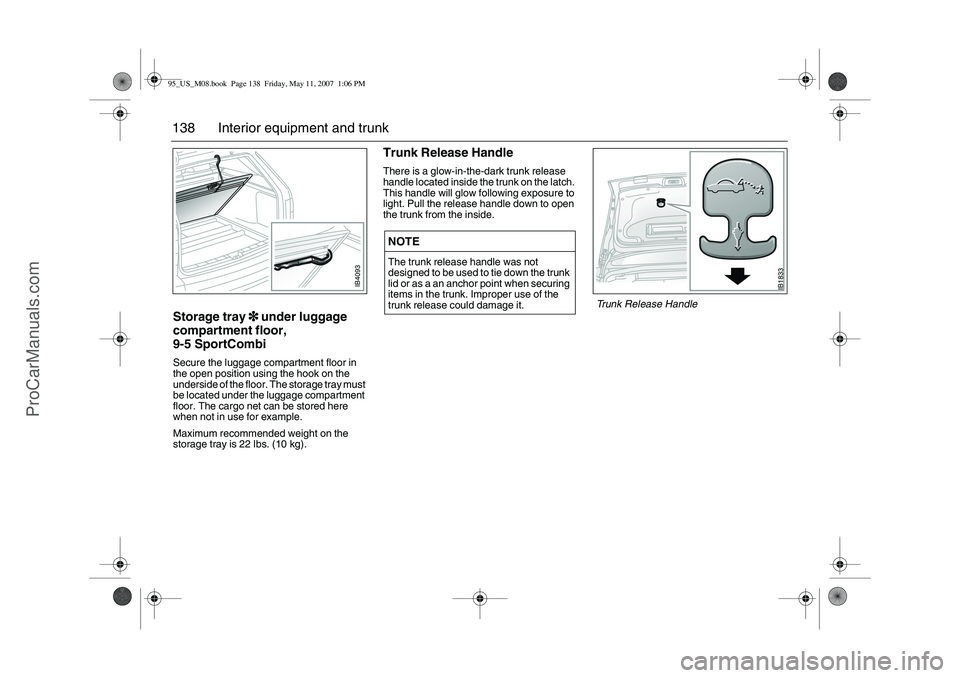
138 Interior equipment and trunkStorage tray 3
33 3 under luggage
compartment floor,
9-5 SportCombiSecure the luggage compartment floor in
the open position using the hook on the
underside of the floor. The storage tray must
be located under the luggage compartment
floor. The cargo net can be stored here
when not in use for example.
Maximum recommended weight on the
storage tray is 22 lbs. (10 kg).
Trunk Release HandleThere is a glow-in-the-dark trunk release
handle located inside the trunk on the latch.
This handle will glow following exposure to
light. Pull the release handle down to open
the trunk from the inside.NOTEThe trunk release handle was not
designed to be used to tie down the trunk
lid or as a an anchor point when securing
items in the trunk. Improper use of the
trunk release could damage it.
IB1833
Trunk Release Handle
IB4093
95_US_M08.book Page 138 Friday, May 11, 2007 1:06 PM
ProCarManuals.com
Page 209 of 288
209 Car care and technical information
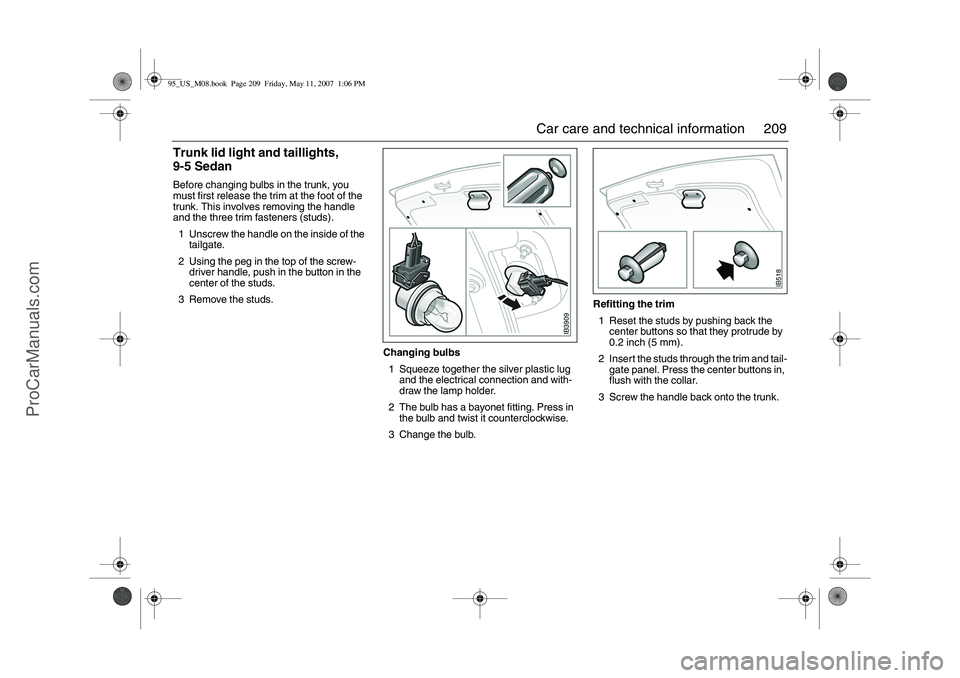
Trunk lid light and taillights,
9-5 SedanBefore changing bulbs in the trunk, you
must first release the trim at the foot of the
trunk. This involves removing the handle
and the three trim fasteners (studs).
1 Unscrew the handle on the inside of the
tailgate.
2 Using the peg in the top of the screw-
driver handle, push in the button in the
center of the studs.
3 Remove the studs.
Changing bulbs
1 Squeeze together the silver plastic lug
and the electrical connection and with-
draw the lamp holder.
2 The bulb has a bayonet fitting. Press in
the bulb and twist it counterclockwise.
3 Change the bulb.Refitting the trim
1 Reset the studs by pushing back the
center buttons so that they protrude by
0.2 inch (5 mm).
2 Insert the studs through the trim and tail-
gate panel. Press the center buttons in,
flush with the collar.
3 Screw the handle back onto the trunk.
IB3909
IB518
95_US_M08.book Page 209 Friday, May 11, 2007 1:06 PM
ProCarManuals.com